






Running a business across Square and Shopify can be rewarding — but managing both separately can turn into a logistical nightmare. Inventory mismatches, manual data entry, and scattered order data slow down your workflow and increase costly errors.
That’s where Square Shopify integration changes everything. It connects your online store and physical store, keeping your inventory, products, and orders perfectly in sync.
In this guide, we’ll walk you through everything you need to know — from what Square and Shopify integration actually means to how you can set it up effortlessly using the right tools. Read on.
What Is Shopify and Square Integration?
Shopify and Square integration allows your Shopify eCommerce store to work seamlessly with your Square POS system. Instead of maintaining two separate product lists or manually adjusting stock, integration creates a two-way data sync between Shopify and Square.
It ensures:
- Product details like titles, prices, and images stay accurate and consistent.
- Inventory levels update automatically when sales occur online or in-store.
- Orders, customer data, and fulfillment data sync in real time.
Simply put — it’s a digital bridge that connects your in-person and online sales channels for smoother, automated operations.
What Can Be Synced Between Shopify and Square?
With the right tool (we’ll get to that in a moment), you can sync:
- Inventory counts — Know exactly how much you have and where, with Shopify and Square inventory sync that updates stock levels in real time.
- Product details — Titles, descriptions, pricing, images, and SKUs, with product syncing to keep Shopify inventory and Square unified.
- Orders Sync — Combine online and in-person orders into a single dashboard, with Shopify orders synced automatically between platforms.
When your systems talk to each other, you get clearer insights and smoother operations. Syncing helps keep inventories accurate across both Shopify and Square, reducing errors and overselling.
Why Square Shopify Integration is Crucial for Multi-Channel Sellers
Today’s shoppers buy across platforms — in person, on websites, through mobile, and even via social media. Sellers who don’t unify their systems risk errors and missed opportunities.
Here’s why Square and Shopify integration is crucial for multi-channel sellers:
- Centralized Inventory Control: No more duplicate stock counts. Updates happen automatically across all channels.
- Faster Fulfillment: Real-time order sync keeps your logistics smooth and efficient.
- Consistent Customer Experience: Unified data ensures accurate prices and stock information everywhere.
- Saving Time & Energy: Say goodbye to repetitive exports, imports, and spreadsheet updates.
- Data-Driven Growth: View total sales performance from both platforms in one dashboard.
Example: a boutique retail store owner selling online via Shopify and offline using Square POS can rely on integration to keep inventory accurate without manual input.
What Are the Methods to Integrate Square and Shopify?
Depending on your business scale and technical comfort, there are several ways to connect Square with Shopify.
1. Manual Data Migration
In this method, sellers can export product and manage inventory data from the Shopify app store and import it into Square (or vice versa). While this method works for very small catalogs, it’s time-consuming and prone to human errors.
2. CSV File Import/Export
Another method is CSV file import. Both ecommerce platforms let you transfer data using CSV files. However, there’s no real-time sync — any update on one platform won’t reflect automatically on the other.
3. Third-Party App Integration (Recommended)
The most effective solution is using a third-party integration platform that automatically syncs Square and Shopify. This method offers real-time updates, automatic order sync, and SKU mapping — all without coding.
Meet QuickSync: The Easy Way to Connect Square and Shopify
When comparing tools, most integrations cover partial syncing, like product or price updates. But they miss critical areas such as order flow or SKU accuracy. QuickSync solves all of that. It’s an all-in-one automation hub designed to keep your Multichannel E-commerce stores fully synchronized in real time.
Key Features of QuickSync include:
- No tech skills needed — Just a few clicks and you’re good to go.
- Real-time syncing — Keeps all your inventory and orders updated automatically.
- Easy-to-use dashboard — See everything in one place.
- Reliable support — A helpful team is always available if you get stuck.
If you’ve been searching for a simple and easy way to unify your online and in-person sales, QuickSync is it.
Things to Have Handy for a Smooth Shopify and Square Integration
Before you begin the setup, make sure you have the following things handy for an effortless integration process:
- Active Shopify account with admin access.
- Square POS account with access to product and inventory data.
- Matching SKUs for all products across both platforms.
- Product images, titles, and pricing are properly organized.
- A QuickSync account — you can create one at QuickSync.pro.
Having these things ready ensures your seamless integration completes quickly and without errors.
Steps to Integrate Shopify and Square Using QuickSync
Connecting your stores through QuickSync is quick, secure, and fully automated. You do not need to be a tech expert or coding wizard, just a few clicks here and there. Let’s look at the steps of the integration process using QuickSync
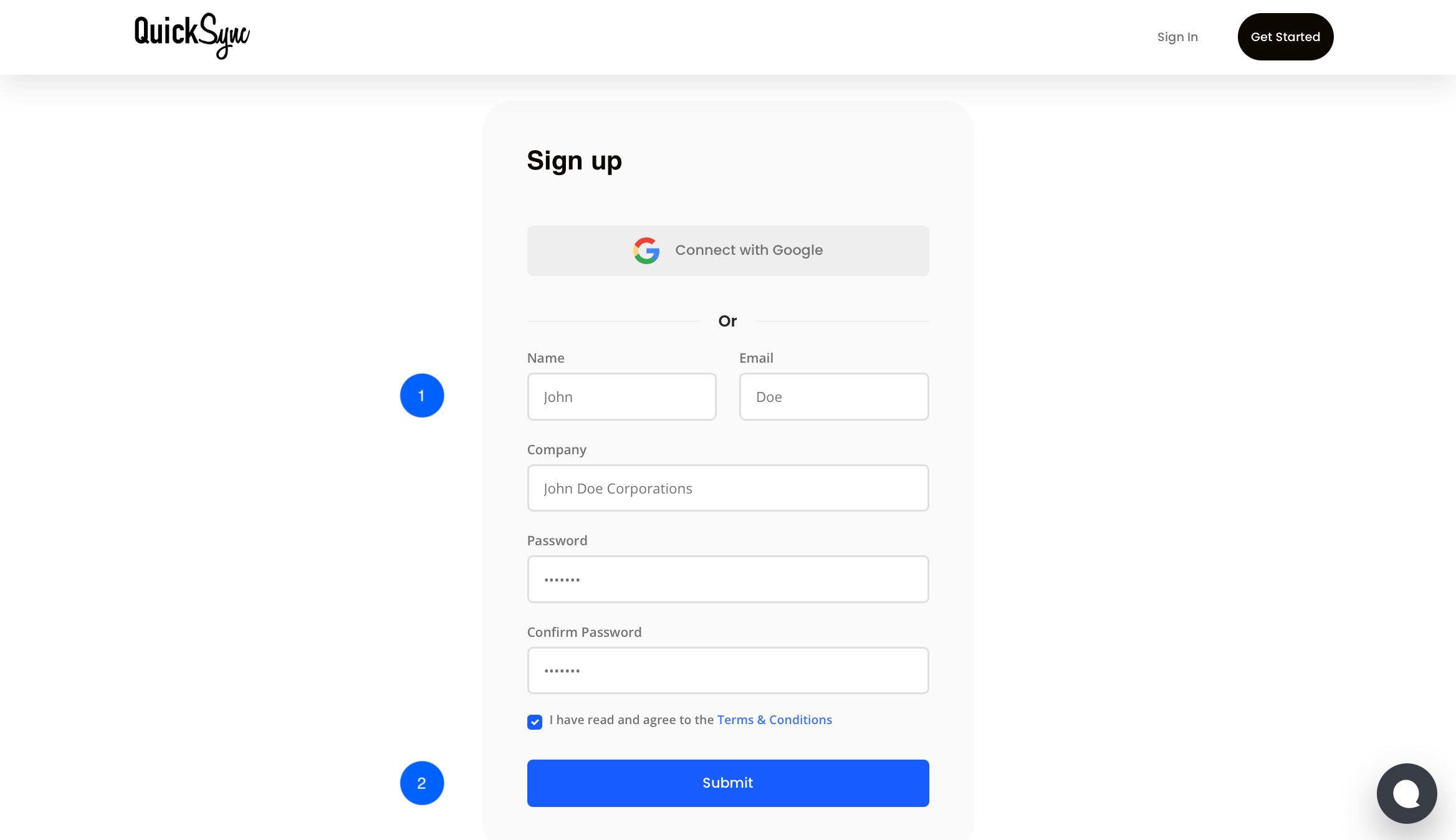
Step 1: Sign Up on QuickSync
- Go to QuickSync.pro and create your account using your email, name, and password.
- Log in if you already have an account on QuickSync.
Step 2: Connect Shopify Store
- Go to QuickSync Dashboard and click “+ Connect Store”
- Then select Shopify from the dropdown menu.
- Put your Shopify store’s URL
- After that, click on “+ Connect a Store” and authorize QuickSync to access Shopify data (products, inventory, and orders).

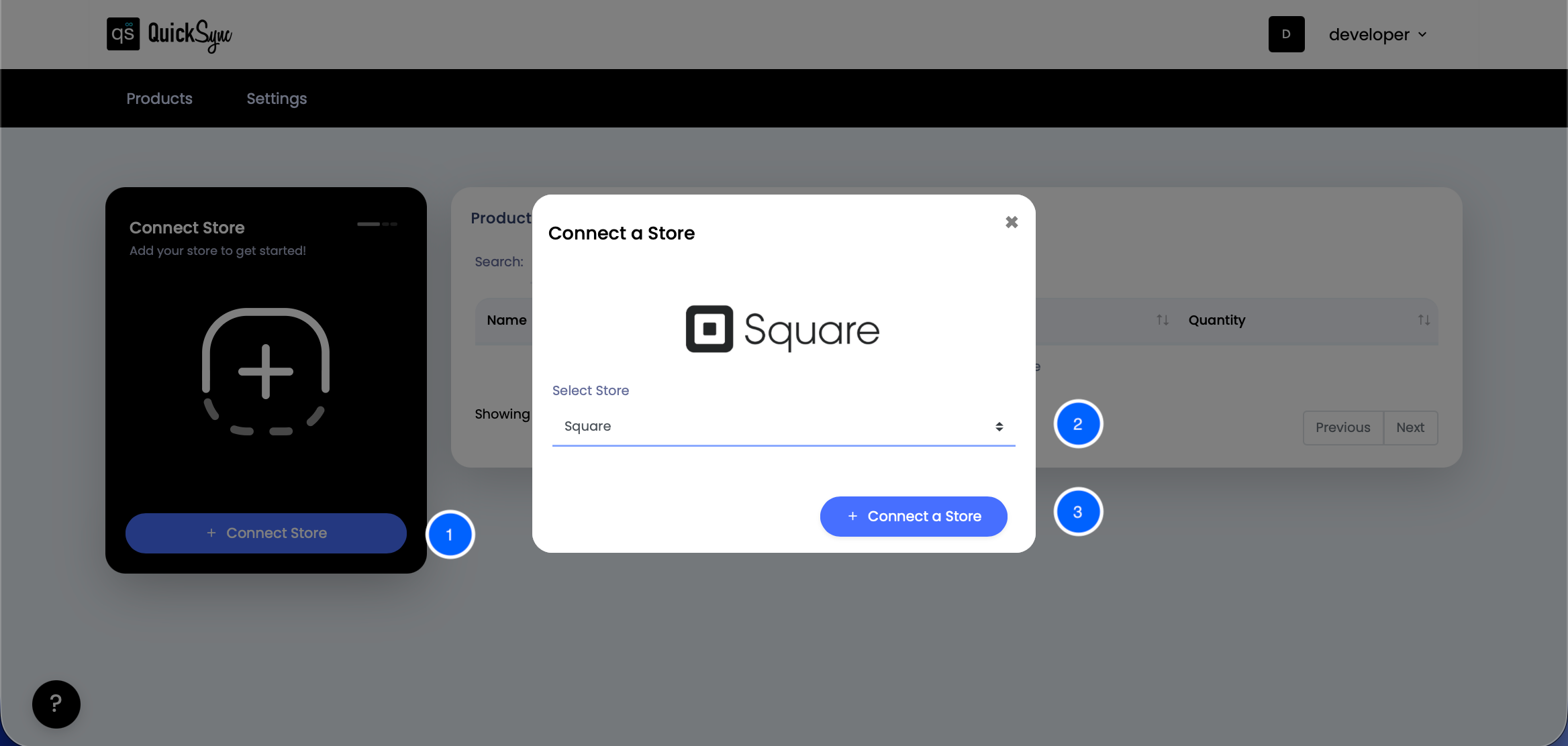
Step 3: Connect Square Platform
- Come back to the QuickSync Dashboard and click “+ Connect Store”
- Then select Square from the dropdown menu.
- Click “+ Connect Store” and approve access to QuickSync.
Step 4: Select What to Sync & Start Syncing
Select what you want to sync, like Inventory, product, or order sync. You can also go for selective syncing in case you want to sync some specific products only:
- Inventory Sync: Keeps stock accurate across platforms.
- Product Sync: Updates titles, images, and prices automatically.
- Order Sync: Reflects orders in both Shopify and Square near real-time.

That’s it — your Shopify Square integration is successful and running within minutes.
Common Square Shopify Integration Issues (and How to Fix Them)
No matter how experienced you are as a seller or how reliable your syncing tool is, even the most advanced Square Shopify integration can occasionally hit a snag. These issues are usually minor but can cause inventory management mismatches, missing data, or delays if not handled properly.
Let’s go through some of the most common integration challenges and how to fix them quickly.
- SKU Conflicts: When SKUs don’t match between Shopify and Square, products fail to sync or duplicate. Always use identical SKUs across both platforms. Avoid symbols or spacing differences and detect mismatched SKUs before syncing.
- Duplicate Products: Manually adding products on both Shopify and Square often creates duplicates. This leads to split stock counts and confusion. Let QuickSync handle product syncing automatically and avoid manual uploads to keep your catalog clean.
- Delayed Updates: If changes take too long to show up, real-time syncing may be off. Turn on live sync instead of periodic updates. QuickSync updates inventory and orders instantly after every sale, keeping both systems aligned.
- Untracked Refunds: Refunds processed on one platform may not always update inventory on the other. This creates stock mismatches. QuickSync automatically adjusts inventory after refunds so your counts stay accurate everywhere.
- Incorrect Mapping: Wrong product mapping links the wrong items between Shopify and Square. Check product names, variants, and categories before syncing. QuickSync lets you review mappings in advance to avoid errors..
Tips for a Smooth Square and Shopify Syncing
Follow these best practices for flawless integration:
- Maintain consistent product naming and SKUs.
- Audit your catalog regularly for mismatched prices or missing images.
- Leverage automation instead of manual edits.
- Enable real-time inventory sync for accuracy.
- Use centralized analytics to monitor performance across channels.
These small habits will help your Square app and Shopify store sync stay error-free and efficient.
Frequently Asked Questions:
1. Can I use Square and Shopify together?
Yes. You can connect a Square account with your Shopify store to sync inventory, products, and orders.
2. Will my inventory update in real time?
Yes. Inventory changes on one platform can update on the other in real time if both are synced.
3. Can I sync multiple locations with one Shopify store?
Absolutely. QuickSync also offers multi-location support, letting you track and sync stock across various locations.
4. What happens if I update product details on one platform?
QuickSync automatically sends updates between two platforms, ensuring product titles, pricing, and stock remain consistent.
5. Is this integration suitable for small businesses?
You can still use Square Payment Gateway for processing payments externally via external redirect checkout, especially if you prefer Square’s payment processor and want to save money on processing fees.
Wrap-Up: Sell Everywhere, Manage in One Place
Managing Square POS and Shopify separately adds complexity and inefficiency. A smooth Square Shopify integration streamlines seamless inventory management, keeping your products, orders, and stock perfectly synced across both platforms.
With QuickSync, everything updates automatically in real time — giving you seamless control from one dashboard.
Get started with QuickSync today and enjoy a 14-day free trial.
Leave a Reply