
Managing inventory across multiple sales channels like Shopify and eBay can feel like a full-time job. One minute you’re updating product quantities on your website, the next you’re scrambling to remove an out-of-stock item. Sound familiar?
If you’re selling on both Shopify and eBay, a good inventory sync app isn’t just a nice-to-have—it’s essential. The right Shopify eBay integration for inventory sync will save you time, prevent costly errors, and make your business easier to manage.
In this blog, we’ll break down the top features to look for in a Shopify and eBay inventory sync app—and introduce a powerful solution that makes syncing smooth and stress-free.
Does Shopify have an Inventory System for eBay?
While Shopify and eBay do offer some built-in integration options, their inventory management options are quite limited. Shopify offers just basic syncing features, which might update product details or prices occasionally, but it often fails to manage real-time stock updates, order adjustments, or complex rules like bundles, variants, or multi-location inventory.
For example, if a product sells out on eBay, it can take hours before the change reflects in Shopify — leading to overselling and unhappy customers. Similarly, when you restock or change product details, these updates may not sync instantly or correctly.
That’s why a dedicated Shopify eBay inventory sync app is needed. It closes these gaps by automating updates in real time and keeping your stock perfectly accurate across both platforms.
Chosen a tool already? Connect Shopify to eBay has the step-by-step setup.
Top Features to Consider While Choosing a Shopify eBay Inventory Sync App
Before installing any inventory syncing app for Shopify and eBay, it’s important to check out the key features the app is offering. Your inventory sync app should provide complete inventory management support along with other essential features that make multi-channel selling easier.
Check out the key Shopify eBay inventory sync features below.
1. Real-Time Inventory Sync
The Shopify and eBay inventory sync app should push updates out the moment it learns of a purchase, not on a daily or weekly schedule. Keep in mind that eBay doesn’t announce a sale, so a good app goes and looks every couple of minutes.
Imagine someone buys your last unit of a product on eBay. Without real-time syncing, your Shopify store might still show it as available, leading to an awkward “sorry, it’s out of stock” email.
A good eBay and Shopify inventory sync app will write updates across platforms within seconds of spotting a sale, so your stocks are always accurate and up to date. No more double-selling. No more disappointed customers, improving customer satisfaction.
2. Multi-Warehouse or Multi-Location Inventory Sync
If your products are stored in more than one location, like a warehouse, retail store, or fulfillment center, the inventory sync app should be smart enough to track stock for each location separately. This means when a product sells on eBay, the app will automatically adjust inventory in the correct warehouse on Shopify (and vice versa).
It helps prevent mix-ups and ensures customers always see the right stock availability, no matter where the item ships from.
3. Two-Way Sync Between Shopify and eBay Store
A two-way sync means your inventory and product details move both ways from Shopify to eBay and from eBay to Shopify automatically.
For example:
- When you update stock or price on Shopify, those changes are instantly reflected on your eBay listings.
- If a product sells or the quantity changes on eBay, the update flows back into Shopify right away.
This eliminates the need for manual updates and helps ensure consistency across your storefronts.
4. Automate Product Listing from Shopify to eBay
Creating eBay listings one by one every time you add a new product to Shopify can take hours, especially as your store grows.
A good Shopify eBay inventory sync app should let you automatically publish your Shopify products to eBay with just a few clicks. This means product details like product titles, descriptions, prices, images, and variants are synced over instantly, without any manual work.
This automation saves a huge amount of time and ensures your product listings stay consistent across both platforms.
5. Centralized Dashboard for Orders and Inventory
With a centralized dashboard, you can easily manage inventory and orders across platforms, streamlining your online store management and automating key processes. Instead of hopping between multiple tabs and tools, a good Shopify and eBay inventory sync app lets you monitor everything in one place and efficiently manage products from a single dashboard.
From this single dashboard screen, you can:
- View real-time stock levels across both platforms.
- Spot low-stock items before they run out.
- Make faster, smarter decisions about restocking, pricing, and promotions, all without juggling multiple tabs or spreadsheets.
6. Provides Inventory Error Alerts and Reporting
Sometimes, syncing inventory between Shopify and eBay doesn’t go perfectly. Internet interruptions, API limits, or store configuration issues can cause delays or failed updates.
That’s why it’s important to choose an app that provides real-time error alerts and detailed reports. These alerts notify you right away if something goes wrong, such as:
- Sync failures
- Listing or upload errors
- SKU mismatches
With timely notifications and clear error reports, you can quickly identify and fix issues before they affect your stock accuracy or customer experience. A good Shopify eBay inventory sync app helps you stay informed instead of finding out about problems after a sale goes wrong.
7. Reliable Customer Support When Needed
Even the most reliable Shopify eBay inventory syncing tools can run into small glitches or syncing delays from time to time. When that happens, quick and responsive customer support can save you hours of frustration.
Choose an inventory sync app that offers:
- Live chat or email support for instant help
- A detailed help center or knowledge base for self-guided fixes
- Onboarding assistance if you’re new to multi-channel syncing
Good support means you won’t be left stuck when you need help the most. It ensures your inventory sync runs smoothly across all the stores.
8. Easy Setup and User-Friendly Interface
Setting up an inventory sync tool shouldn’t feel complicated or technical. The best inventory syncing tools are designed to be simple, even for beginners.
Look for a Shopify eBay inventory sync app that includes:
- Step-by-step setup instructions to get started quickly
- A clean, organized dashboard for managing your inventory and orders
- Easy-to-use controls that don’t require technical knowledge
9. Inventory Syncing Across Multiple Platforms
As your business grows, you might not want to limit yourself to selling just on Shopify and eBay. A good Shopify eBay inventory syncing tool should also support syncing between multiple marketplaces like Amazon, Walmart, Etsy, or TikTok Shop etc.
With multi-channel support, you can easily expand your business without needing to install separate tools for inventory syncing.
10. Selective Syncing Option
You might not want to sell all the Shopify products on eBay or vice versa; that’s where selective syncing comes in. With the selective syncing feature, you can sync only the products and inventories that you wish to.
This feature gives you full flexibility and control. You can:
- Exclude certain products or categories from syncing.
- List only high-demand or best-selling products on eBay.
- Manage seasonal or limited-stock items separately.
Choose an inventory sync tool for Shopify and eBay stores that supports selective syncing.
Why QuickSync is the Best Shopify eBay Inventory Sync App
If you’re looking for an inventory syncing app that checks all the boxes above, QuickSync is one of the best options on the market.
Apart from all of the above-listed inventory syncing features for Shopify and eBay stores, QuickSync also offers these key features, which make multi-channel selling easier:
- Source Store Setup: QuickSync lets you choose a source store, which is the main store where your inventory data starts. This helps keep all connected stores perfectly aligned with the same stock levels.
- Auto-Generate SKUs: If some of your products don’t have SKUs, QuickSync automatically creates them during export. This ensures every item has a unique SKU for accurate syncing and tracking.
- Create Products as Drafts: When you export products, you can choose to create them as drafts. This way, the selected products won’t appear live on your store until you’re ready to publish, giving you full control over when listings go live.
- Smart Inventory Adjustments: When orders are cancelled, returned, or only partially fulfilled, QuickSync automatically updates your stock levels and always stays accurate.
- Error-Free Quantity Handling: Different platforms allow different stock ranges (for example, eBay might not allow decimals). QuickSync automatically adjusts quantities to valid numbers and logs every change to prevent errors.
- Accurate Multi-Channel Updates: If multiple sales or changes happen at the same time across your stores, QuickSync processes them in the correct order to make sure your final stock count is always right, no double-selling or mismatched numbers.
How to Sync Inventory Between Shopify and eBay with QuickSync
Follow these simple steps to integrate Shopify with eBay using QuickSync for smooth inventory syncing.
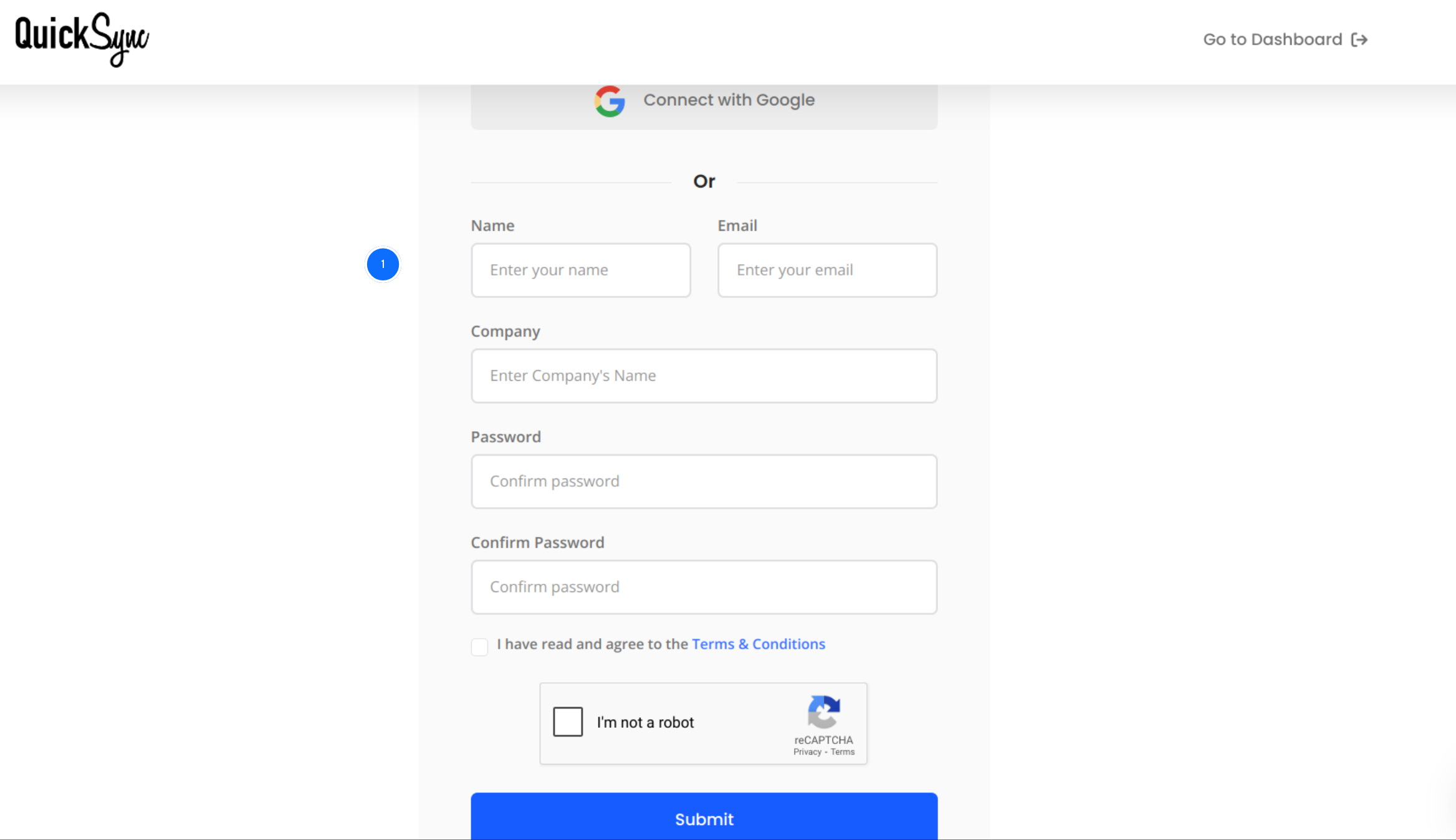
Step 1: Sign Up for QuickSync
- Visit the QuickSync.pro website, click on sign in.
- Now sign in with your name, company name, and email address.
Step 2: Connect Shopify Store
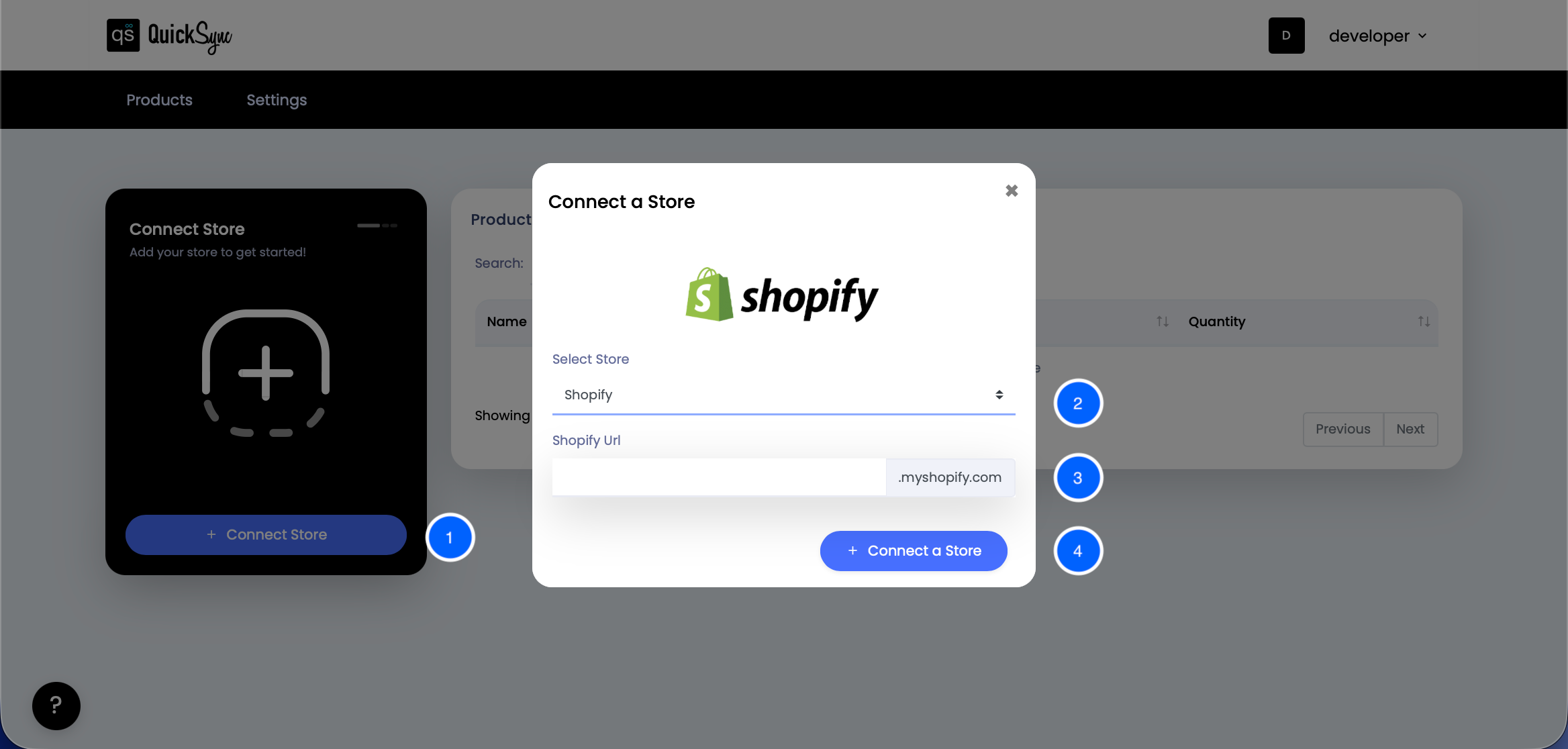
- Once signed, connect the Shopify store. Go to Dashboard, click on Connect Store.
- Under the select store, click on Shopify.
- Enter the Shopify URL.
- Click Connect a store and log in to the Shopify account.
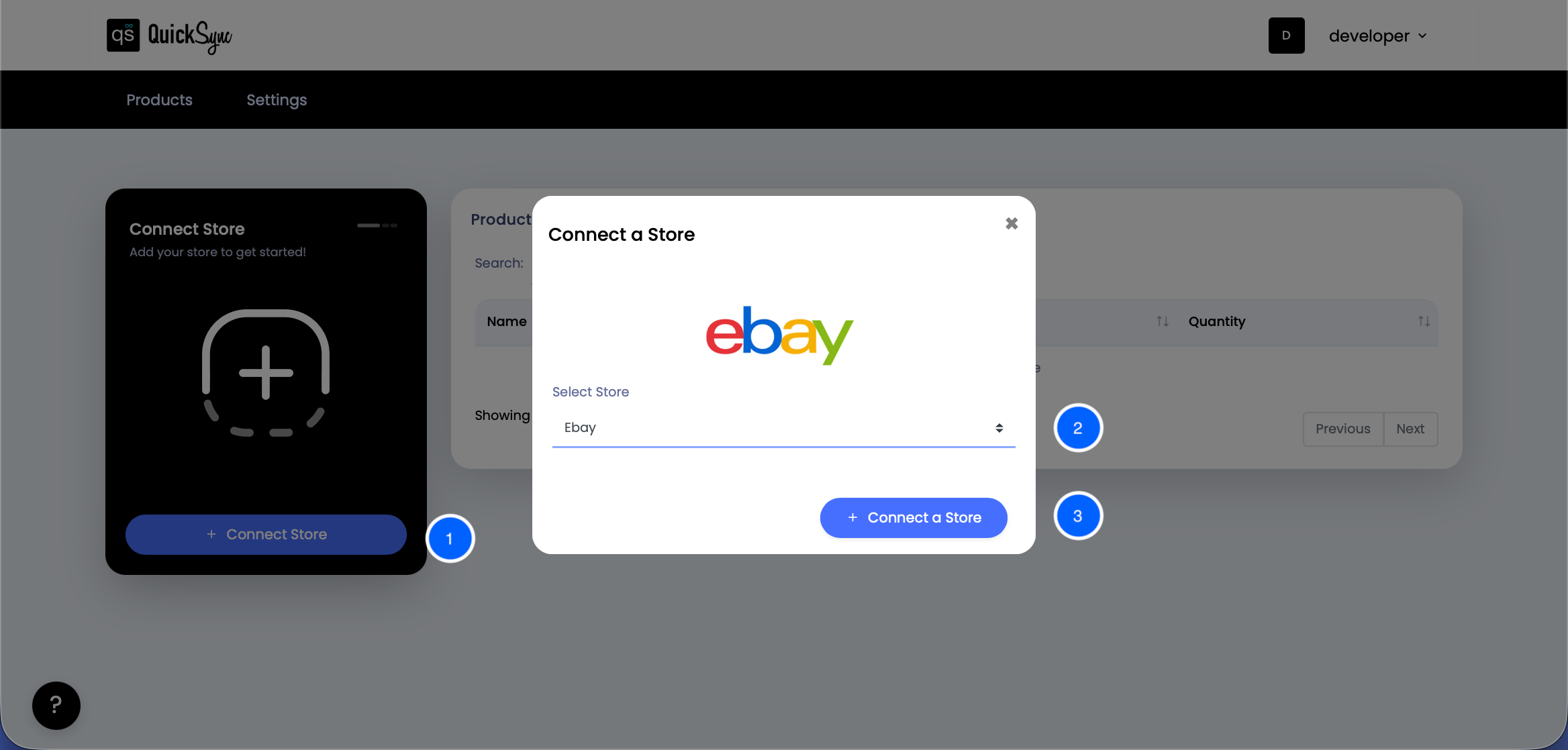
Step 3: Connect eBay Store
- Similarly, connect the eBay store. For that, go to QuickSync Dashboard and click on “Connect Store”.
- Choose eBay and click Connect a Store.
- Log in to your eBay account and approve access for the required things.
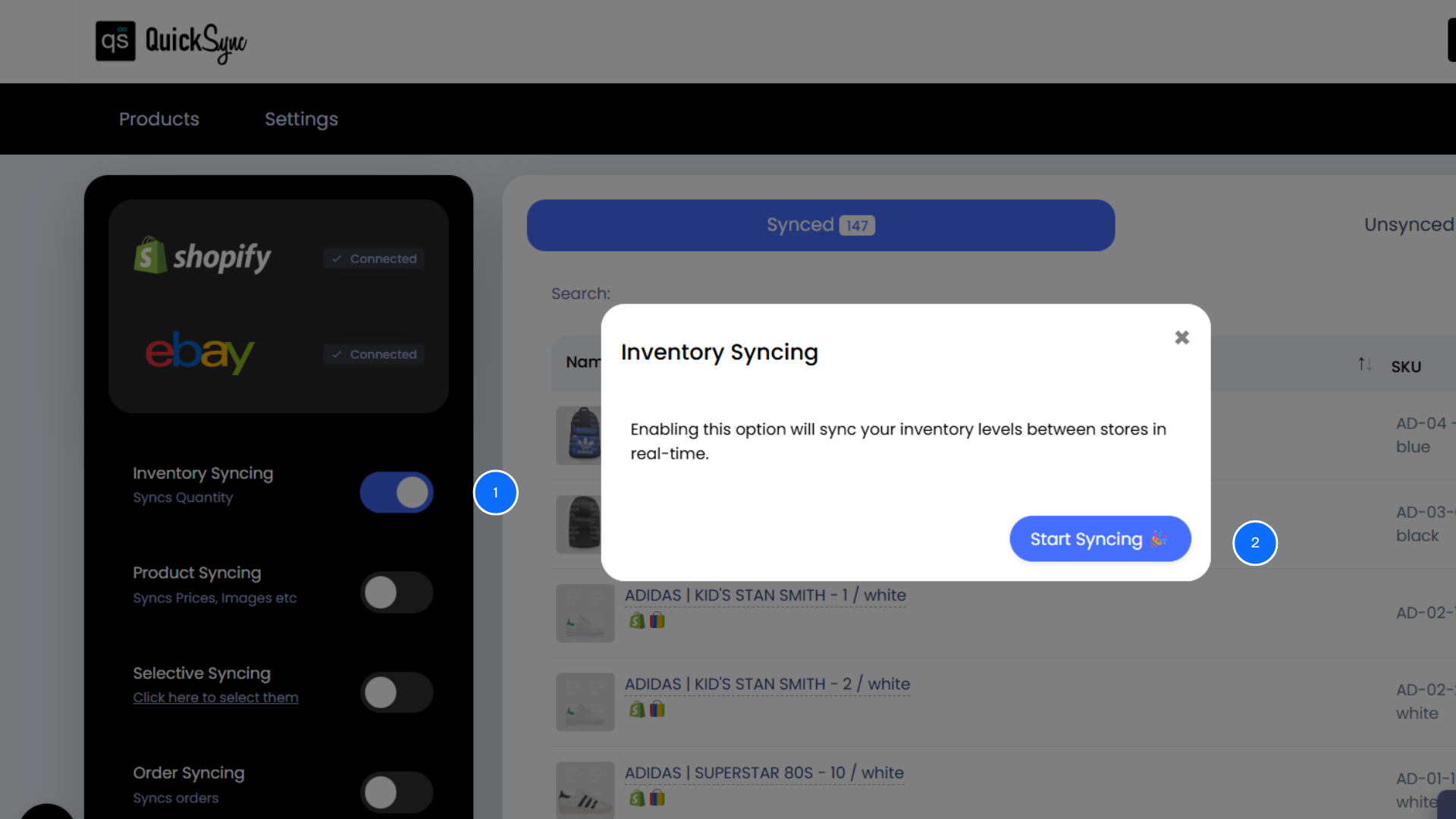
Step 4: Select Inventory Syncing
- On the left-hand side of the QuickSync dashboard, you will see an inventory syncing option. Click on it.
- Select start syncing, and your Shopify and eBay inventory will be synced.
Try eBay to Shopify Inventory Synchronization Today
Syncing your Shopify and eBay stores doesn’t have to be complicated or stressful. With the right Shopify eBay inventory sync app like QuickSync, you can grow your business with confidence.
If you want a tool that delivers on all fronts, from inventory syncing to product and order syncing, QuickSync is a solid, trusted choice.
Ready to simplify your eCommerce operations? Try QuickSync today and make inventory syncing between Shopify and eBay seamless.