



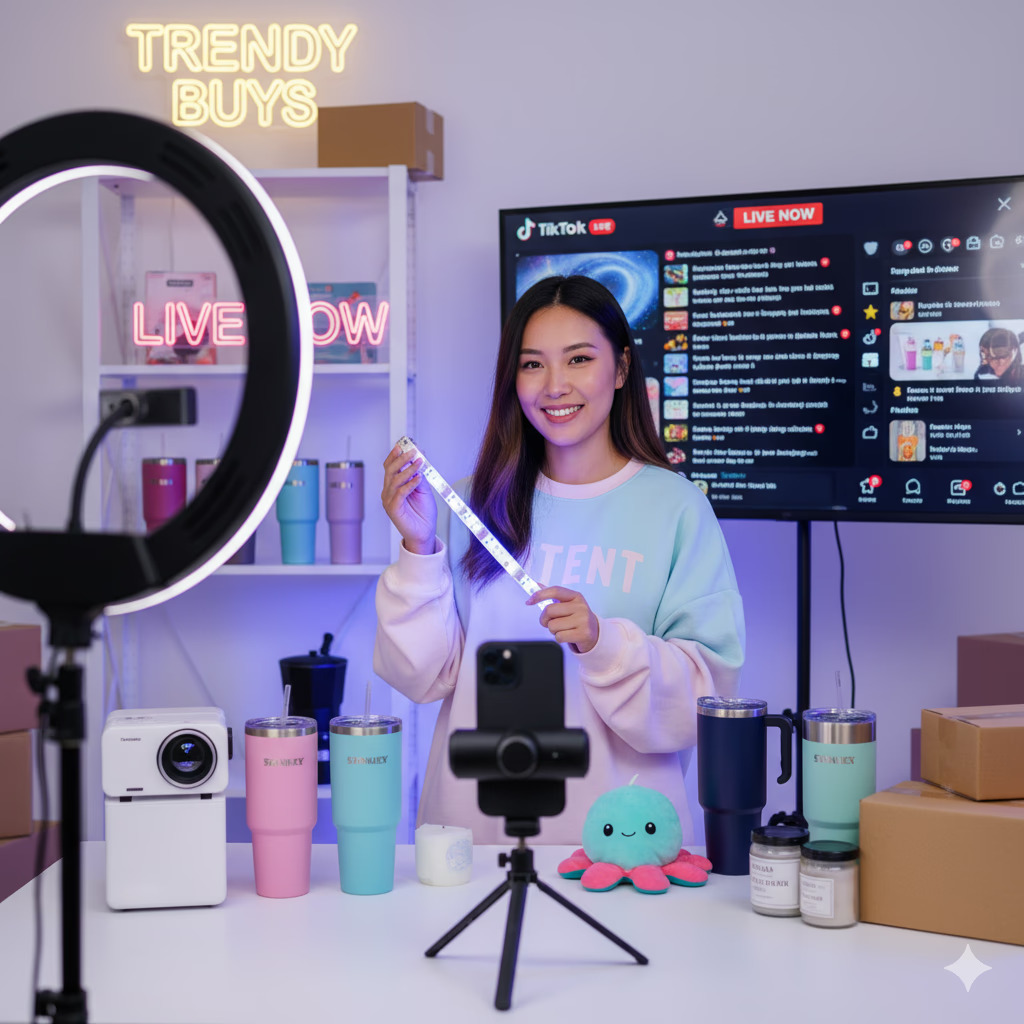

The connection between Shopify and TikTok Shop has opened a new world of opportunities for online sellers. With TikTok’s explosive growth as a social commerce platform, brands can now reach massive audiences and sell directly through videos and live streams.
But to make this connection seamless, one crucial step is to sync Shopify products to TikTok Shop. This ensures the product listings, inventory, and orders stay updated in real time. So Sellers never have to worry about mismatched stock or duplicate updates.
What Does Syncing Shopify Products to TikTok Shop Mean
Syncing Shopify products to TikTok Shop means connecting both platforms so that the product data flows automatically between them. When you update a product’s price, stock, or description on Shopify, the same changes are instantly reflected on your TikTok app store account listings.
This helps sellers maintain accuracy, save time, and provide a consistent shopping experience across both platforms.
Why Integration Comes First Before Product Syncing
Before syncing can begin, sellers need to integrate Shopify and TikTok Shop. Integration creates a secure link between both platforms, allowing data to pass automatically. Without integration, syncing products or inventory updates won’t be possible. It’s like trying to transfer water without connecting the pipes first.
Once integration is established, sellers can start syncing product details, stock levels, and even order updates between the two platforms.
Key Benefits of Syncing Shopify Products to TikTok Shop
Syncing your Shopify store with a TikTok Shop account offers more than just convenience. It’s a foundation for efficiency and growth. The key benefits include:
1. Save Time and Reduce Errors:
Automated syncing eliminates repetitive manual updates and reduces human mistakes.
2. Maintain Accurate Inventory:
Every sale, refund, or restock on one platform instantly reflects on the other, preventing overselling.
3. Consistent Product Data:
Product names, descriptions, and images stay uniform across both stores, ensuring brand consistency.
4. Faster Product Updates:
New products added to Shopify can be auto-pushed to TikTok Shop instantly.
5. Improve Customer Experience:
Accurate stock levels and consistent pricing help build customer trust and minimize cancellations.
Available Methods to Sync Shopify Products to TikTok Shop
There are multiple methods for connecting a Shopify store with TikTok Shop, but not all offer the same level of automation or accuracy. Choosing the best integration tool your catalog size, order volume, and how much time you want to spend managing updates. Below are the three most common methods sellers use.
1. Manual Upload via TikTok Seller Center
This is the simplest method to start selling on TikTok Shop by manually adding and updating products through the TikTok Seller Center.
- Pros: Free, no technical setup required.
- Cons: Extremely time-consuming, error-prone, and not suitable for large catalogs.
2. Shopify’s TikTok Sales Channel
Shopify provides a built-in TikTok integration that allows merchants to run TikTok ads and sync selected products.
- Pros: Official integration, easy connection from the Shopify app store dashboard.
- Cons: Limited functionality for full product and inventory syncing, lacks advanced automation and order management tools.
3. Third-Party Integration Tools (e.g., QuickSync)
Third-party tools like QuickSync are built specifically for automation. They sync your Shopify products, inventory, pricing, and orders with TikTok Shop directly in real time.
- Pros: Fully automated, real-time updates, ideal for multi-channel sellers managing large inventories.
- Cons: Requires a subscription but delivers significant time and accuracy benefits.
To make the comparison clearer, here is the comparison of all three methods in tabular form:
Method | Best For | Pros | Cons |
Manual Upload (TikTok Seller Center) | Beginners or very small catalogs | Free and easy to start | Time-consuming, error-prone, and no automation |
Shopify’s TikTok Sales Channel | Small businesses or ad-focused sellers | Official and easy setup | Limited syncing capabilities, lacks real-time inventory updates |
Integration Tools (e.g., QuickSync) | E-commerce sellers, retailers, and marketplace merchants | Real-time automation, inventory + order sync, scalable | Requires a small monthly plan |
Step-by-Step: How to Sync Shopify Products to TikTok Shop Using QuickSync
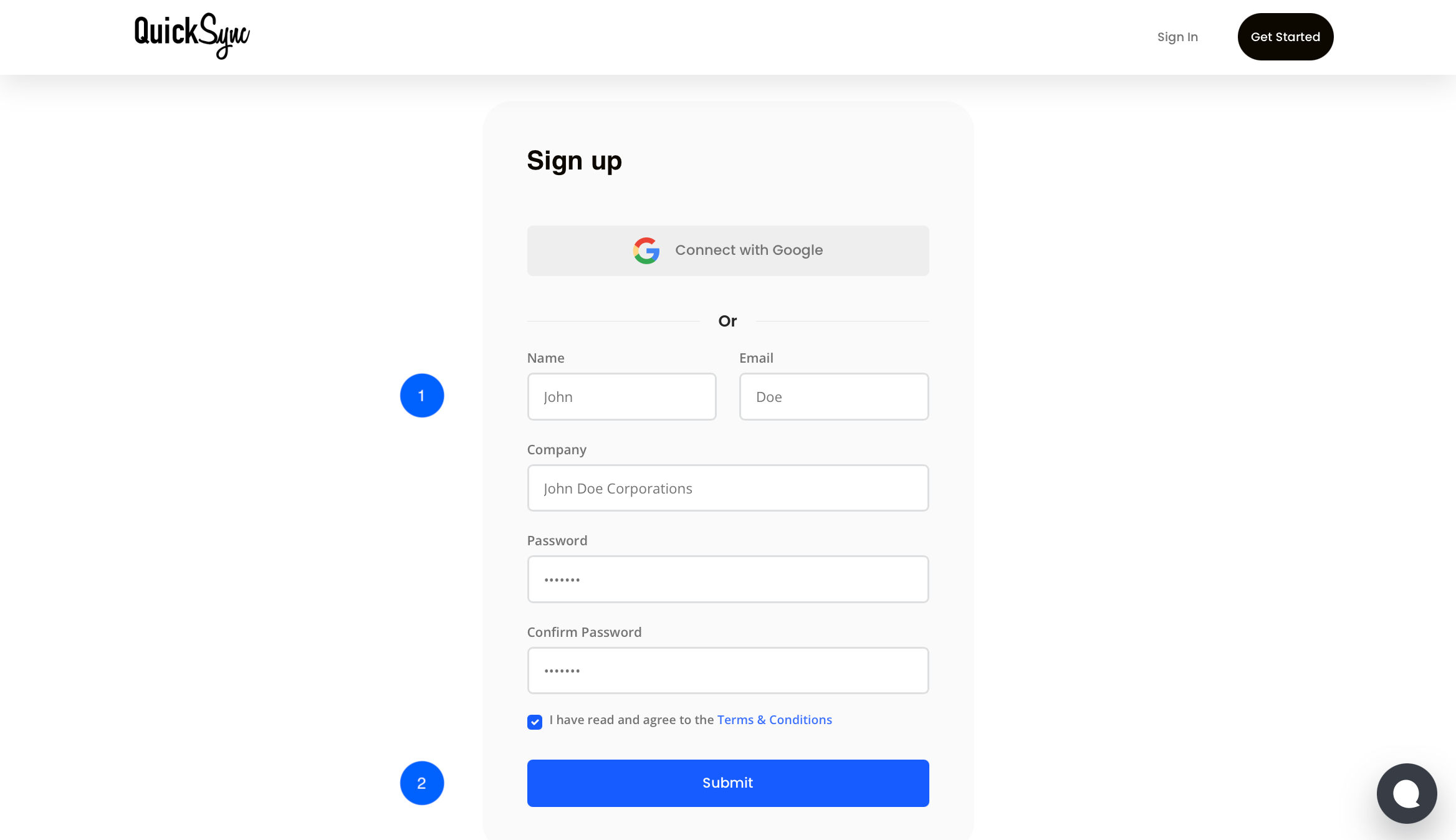
Step 1: Sign Up for QuickSync
- Visit QuickSync.pro and create an account with your name, email, and store details.
- Log in if you already have an account
Step 2: Connect Shopify Store
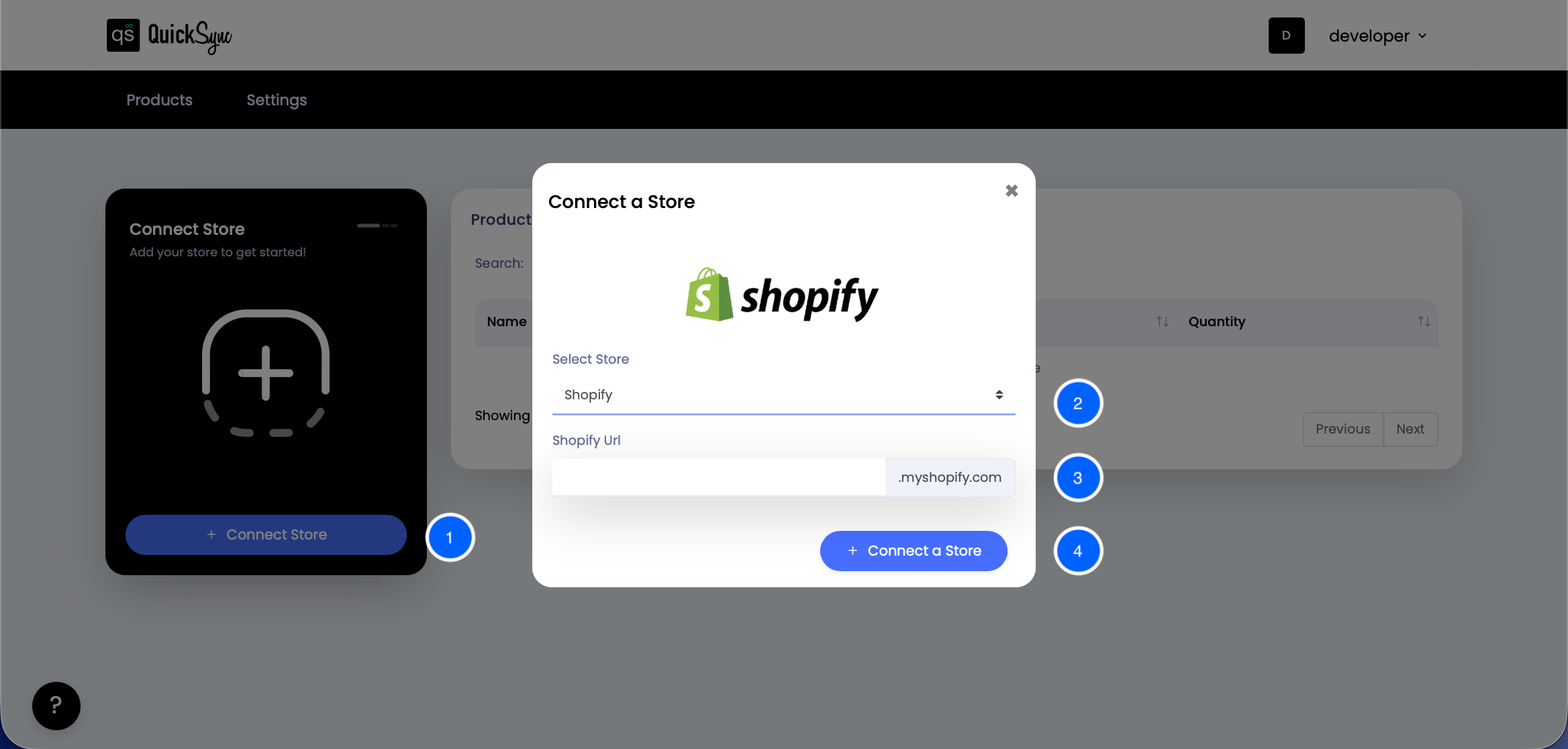
- Go to the QuickSync dashboard, click on “+Connect Store” and choose Shopify.
- Sign in to your Shopify admin account using the Shopify URL and click on “Connect a Store”.
- Allow access to sync your products, inventory, and orders.
- QuickSync will automatically fetch data from the Shopify store.
Step 3: Connect TikTok Shop
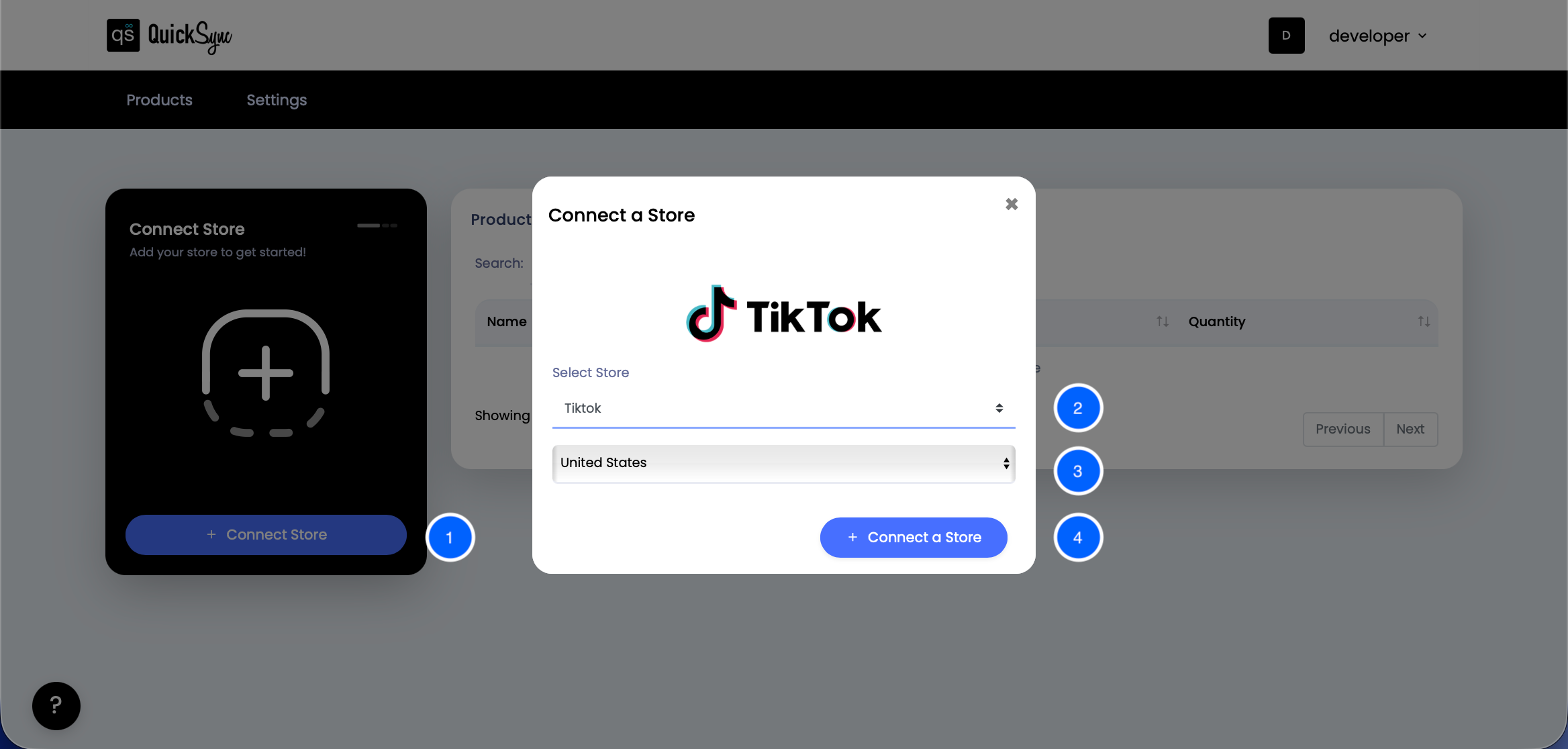
- Go to your QuickSync Dashboard and click “Connect Store.”
- Select TikTok from the available platform options.
- Choose the United States or the Rest of the World based on your TikTok Shop region.
- Click “Connect a Store” and log in to your TikTok Seller Center account. Approve all permission requests for products, orders, and inventory.
Once authorized, QuickSync will automatically begin importing your store data, locations, and products. You’ll see a progress bar in the dashboard as the sync runs.
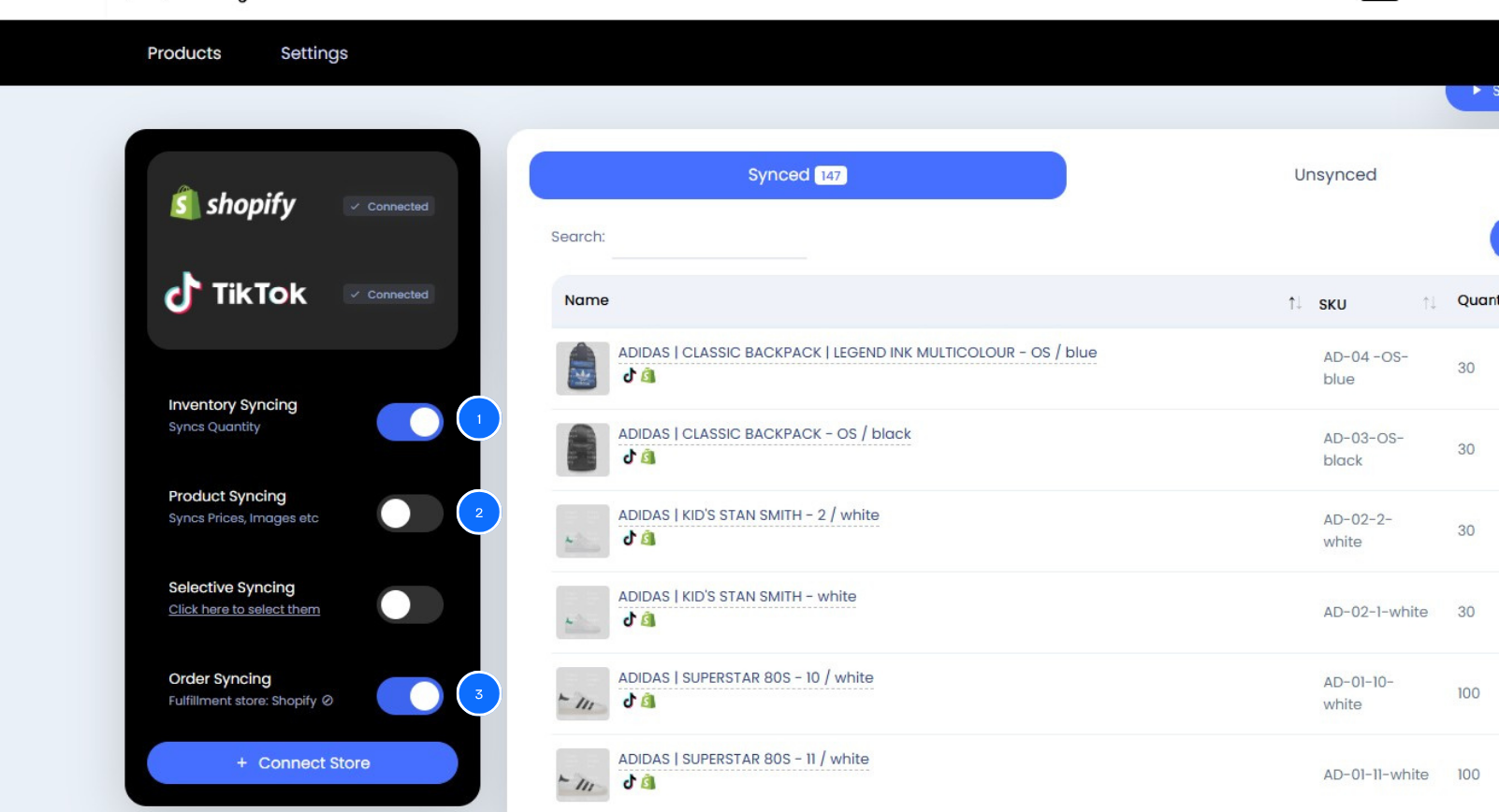
Step 4: Choose What to Sync
Select the data you want QuickSync to sync:
- Products (images, titles, prices)
- Inventory levels
- Orders and tracking details
Step 5: Start Syncing
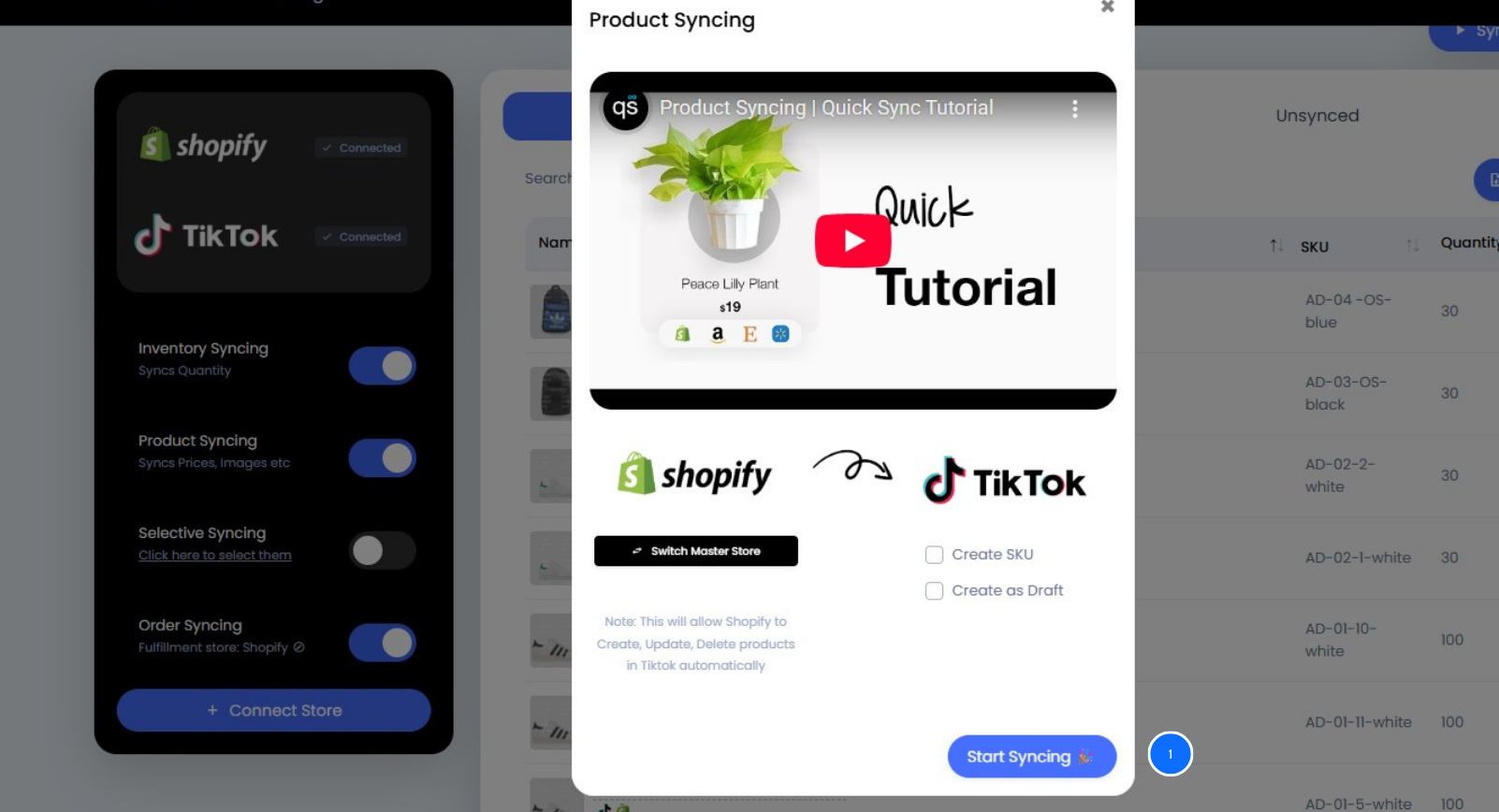
- Click “Start Sync” and QuickSync will begin automatically syncing your Shopify products to TikTok Shop.
- You can monitor everything from the unified dashboard.
Common Mistakes to Avoid When Syncing Shopify With TikTok Shop
Syncing a Shopify account with TikTok Shop can boost sales fast, but small setup errors often cause big headaches. Avoid these common Shopify and TikTok integration mistakes to keep your product catalog synced smoothly:
- Inconsistent SKUs: Use identical SKUs on both platforms to prevent mapping and listing errors.
- Ignoring Product Requirements: Review TikTok’s listing rules for titles, images, and descriptions before syncing.
- Overwriting Product Data: Always preview sync settings to avoid replacing correct product info by mistake.
- Missing Permissions: Ensure proper account access to enable seamless data transfer between Shopify and TikTok Shop.
- Skipping Sync Checks: Even with automation, review your catalog occasionally to catch and fix sync issues early.
Best Practices for Smooth Shopify and TikTok Shop Sync
- Keep product names and SKUs consistent across both platforms.
- Regularly update product images and descriptions in Shopify first.
- Review sync logs weekly to catch any mismatches early.
- Use automation to handle high-volume updates and reduce manual work.
- Ensure all active products are properly categorized in the TikTok Shop for better visibility.
Frequently Asked Questions —
1. Can I Sync Only Selected Products?
Yes, QuickSync allows you to choose which Shopify products to sync with TikTok Shop.
2. Does QuickSync Sync Orders Automatically?
Yes, orders placed on TikTok Shop are automatically imported into Shopify.
3. How Often Does Sync Occur?
Syncing happens in near real time — every update, or stock change, gets reflected instantly.
4. Do I Need Technical Knowledge to Set It Up?
No. QuickSync is built for simplicity and requires no coding or setup expertise.
5. Will Syncing Affect My TikTok Ads or Campaigns?
No, syncing only updates product and inventory data. Your ad campaigns remain unaffected.
The Bottom Line
Syncing Shopify products to TikTok Shop isn’t just about convenience. It’s a must for efficient, error-free selling across multiple channels. Automation tools like QuickSync make this process effortless, keeping your product listings, inventory, and orders perfectly aligned.
Get started with QuickSync today and sync Shopify products to TikTok Shop effortlessly.
Leave a Reply