I talked to an $8M supplement brand last month. They update inventory with a spreadsheet. Every morning. Manually. For an eight-million-dollar business. Their setup: Shopify for DTC. WooCommerce for wholesale. A Google Sheet in between.
When I asked what happens if two people buy the same last unit simultaneously, they laughed. Then they stopped laughing. This isn’t rare. It’s normal. And multichannel sellers collectively lose over $1 trillion each year due to inventory mismatches like this. It’s about to become completely unacceptable.
Shopify WooCommerce inventory management isn’t about fancy Shopify WooCommerce integration software. It’s about stopping platforms that don’t talk from silently destroying your customer trust. Here’s exactly how these systems clash, where the gaps hide, and how to fix them before your next viral moment.
What Is Shopify WooCommerce Inventory Management?
Shopify WooCommerce inventory management is the practice of tracking, controlling, and synchronizing inventory levels acrossboth e-commerce platforms simultaneously.
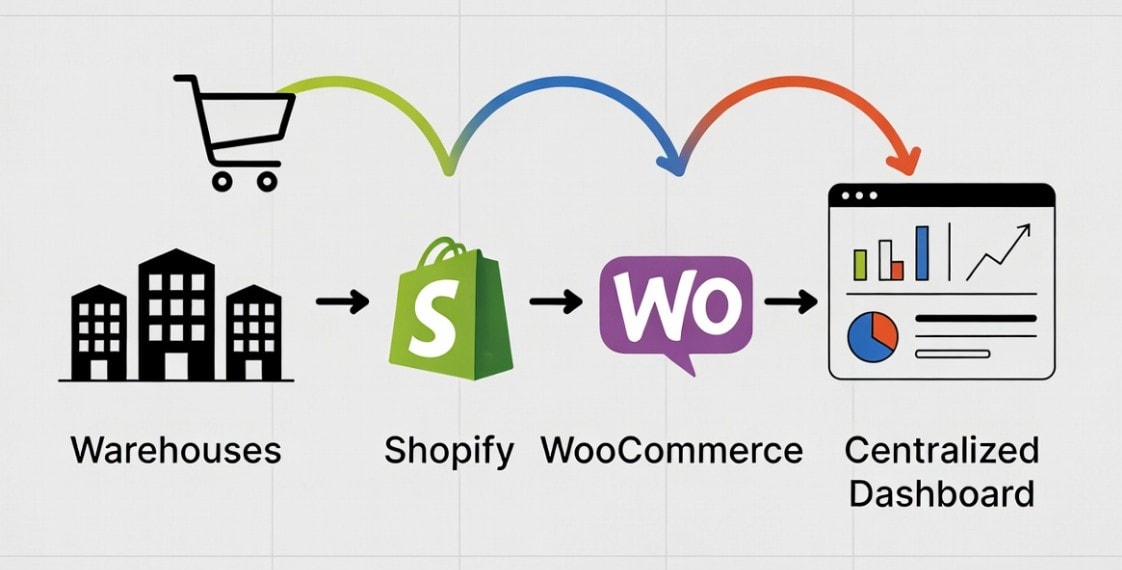
Instead of treating Shopify and WooCommerce as separate platforms, effective inventory management creates a unified view of:
- Available stock across all warehouses and locations
- Incoming purchase orders and transfer quantities
- Reserved inventory from pending orders
- Returns and damaged goods adjustments
When it’s done right, you connect Shopify to WooCommerce and sell on both platforms with confidence. When done wrong (or not at all), you play inventory roulette with every order.
So inventory management is extremely crucial for multi-channel sellers. Otherwise, sinking would take place if you don’t sync your ecommerce platforms.
The Hidden Challenges of Shopify WooCommerce Inventory Management
Let me reveal an uncomfortable truth: Shopify and WooCommerce weren’t designed to work together. They’re competitors with different architectures, different data structures, and zero native integration.
So there are countless challenges in the way for Shopify or woocommerce stores owners. Let’s look at the key challenges below:
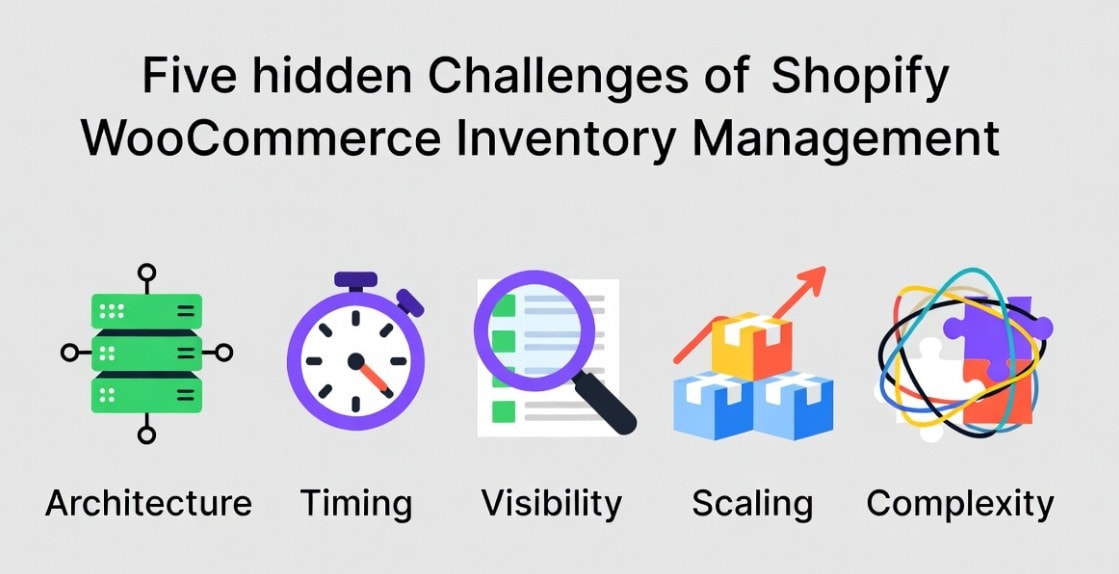
The Architecture Problem:
Shopify runs on a closed, hosted system. WooCommerce is an open-source WordPress. They speak different languages literally. Shopify uses REST API with rate limits. WooCommerce uses WordPress database hooks.
Making them communicate requires translation layers that most sellers don’t have. The result?Fragile integrations, inconsistent sync behavior, and frequent data mismatches.
The Timing Problem:
Even if you manually update your product or inventory on both platforms, you still face delays. For example, you run a limited-time discount on Shopify. Inventory drops quickly as customers rush to buy. WooCommerce, however, still shows the old stock level, so customers continue placing orders for items that are already sold out.
Result? You oversell during your own promotion and are forced to cancel discounted orders.
Manual syncing simply can’t keep up with real-time multi-store sales. Even short delays compound quickly as order volume increases. Now you’ve oversold inventory you don’t actually have.
The Visibility Problem:
Multi-channel sellers often struggle with fragmented inventory visibility. Shopify shows one stock view. WooCommerce shows another. Warehouse spreadsheets show something else entirely.
Without a centralized dashboard, you’re making decisions based on partial information. This leads to:
- Inaccurate forecasting
- Overstocking slow-moving products
- Stockouts on high-demand items
Instead of seeing one reliable inventory picture, you’re piecing together clues from multiple systems.
The Scaling Barrier:
Early-stage inventory workflows aren’t built for momentum. Processes that feel manageable at low order volume begin to fracture as sales increase. Manual syncing and basic plugins may work initially, but they weren’t designed to support sustained, multi-channel growth.
More platforms mean more SKUs, more edge cases, and more chances for human error. Scaling a Shopify + WooCommerce operation without an inventory automation system often results in increased cancellation rates, customer service overload, and operational burnout
At that point, inventory management stops being a background task and becomes a daily firefighting exercise.
The Complexity Multiplier:
Each platform handles inventory differently. Shopify Tracks by location, supports POS syncing, and reserves stock at checkout. But WooCommerce Plugin-dependent tracking, complex product variations, and customizable workflows.
How Shopify and WooCommerce Handle Inventory Separately
To understand why Shopify WooCommerce inventory sync doesn’t happen automatically, you first have to look at how each platform manages inventory on its own.
Both systems are powerful. But they were built with different priorities, and that difference is exactly what creates friction for multi-store sellers.
Shopify’s Inventory Approach:
Shopify uses a location-based inventory system. Instead of treating stock as one big number, it organizes products into separate pools across locations, such as:
- Main warehouse: 500 units
- Retail store: 50 units
- Third-party logistics (3PL): 200 units
This structure is great for businesses managing multiple fulfillment points.
Another key feature is how Shopify reserves inventory. It locks stock at checkout, not at payment. That means when a customer starts the checkout process, Shopify temporarily holds the item to prevent overselling, but only within the Shopify ecosystem.
It has no visibility into what’s happening on WooCommerce. Shopify also includes several built-in inventory tools:
- Multi-currency and multi-channel pricing
- POS integration for physical retail
- Automated low-stock alerts
These features work seamlessly across Shopify’s own channels, but they stop at the Shopify boundary.
WooCommerce’s Inventory Approach:
WooCommerce handles inventory very differently. Because it runs on WordPress, its inventory system is database-driven and highly customizable.
At its core, WooCommerce provides basic stock tracking:
- In-stock / out-of-stock status
- Quantity management per product or variation
From there, functionality expands through plugins and custom development:
- Extensions for warehouse and order management
- Custom code tailored to specific business needs
This flexibility is powerful, but it can also create fragmentation. Every store’s WooCommerce setup can look different depending on its plugin stack.
Another important distinction: WooCommerce does not reserve stock at checkout by default. It checks availability when items are added to the cart and again at payment. When selling simultaneously on Shopify, this delay increases the risk of race conditions — situations where two platforms sell the same unit before either system updates.
The Sync Gap
Without proper multi-store inventory management, Shopify and WooCommerce operate in parallel universes.
Shopify thinks you have 100 units. WooCommerce thinks you have 100 units.
In reality, you only have 100 units total, not 200. But both platforms will happily sell their assumed share unless something actively synchronizes them.
This gap is where overselling, stock discrepancies, and operational stress begin. And the more the order volume increases, the faster those small mismatches turn into costly problems.
Common Inventory Problems When Using Shopify and WooCommerce Together
When sellers run Shopify and WooCommerce side by side without proper synchronization, the problems aren’t theoretical. They show up in day-to-day operations. And they tend to follow predictable patterns.
Here are the patterns we see daily:
The Overselling Spiral:
A product suddenly takes off. Maybe a TikTok video goes viral or a promotion performs better than expected. Shopify processes 80 orders in a single hour. You plan to update WooCommerce manually, but by the time you do, hours have passed.
During that gap, WooCommerce has already sold units you don’t have.
Now you’re canceling dozens of orders, issuing refunds, and sending apology emails to frustrated customers. What started as a growth moment quickly turns into a reputation problem.
Overselling doesn’t just hurt revenue in the short term, it chips away at long-term customer trust.
Phantom Inventory:
Inventory adjustments rarely happen in just one place. You mark 20 units as damaged or unsellable in WooCommerce, but forget to reflect that change in Shopify.
Shopify continues selling those units as if nothing changed.
Customers receive defective products, return requests increase, and your operational workload doubles. Over time, repeated incidents like this affect store ratings, platform trust signals, and overall brand perception.
The Reconciliation Time Sink:
Many multi-channel sellers end up dedicating a fixed block of time each week to reconciling inventory and orders.
Every Sunday, you spend 4 hours matching Shopify payouts to WooCommerce orders, adjusting stock counts, and hunting discrepancies. That’s 208 hours annually. Equivalent to five full work weeks spent on spreadsheet detective work.
That’s time pulled away from marketing, customer experience, and growth initiatives.
Channel Blindness:
Without a centralized inventory view, sellers operate with fragmented information.
To understand the true available stock, you have to log into Shopify, check WooCommerce, compare numbers, and manually calculate what’s actually sellable. And even then, the data may already be outdated if new orders come in mid-check.
This lack of real-time inventory visibility forces guesswork. Sellers either oversell by accident or under-sell by playing it safe and holding back inventory. Both scenarios quietly reduce profitability.
The Growth Ceiling:
Manual inventory management might feel manageable at low order volumes. But as sales increase, the system starts to break down.
At 50 orders per week, it’s inconvenient.
At 500 orders, it becomes stressful.
At 2,000 orders, it’s unsustainable.
Without systems designed to prevent overselling and synchronize stock automatically, growth turns into operational chaos. Instead of scaling confidently, sellers end up limiting expansion just to keep inventory under control.
Key Components of Effective Shopify WooCommerce Inventory Management
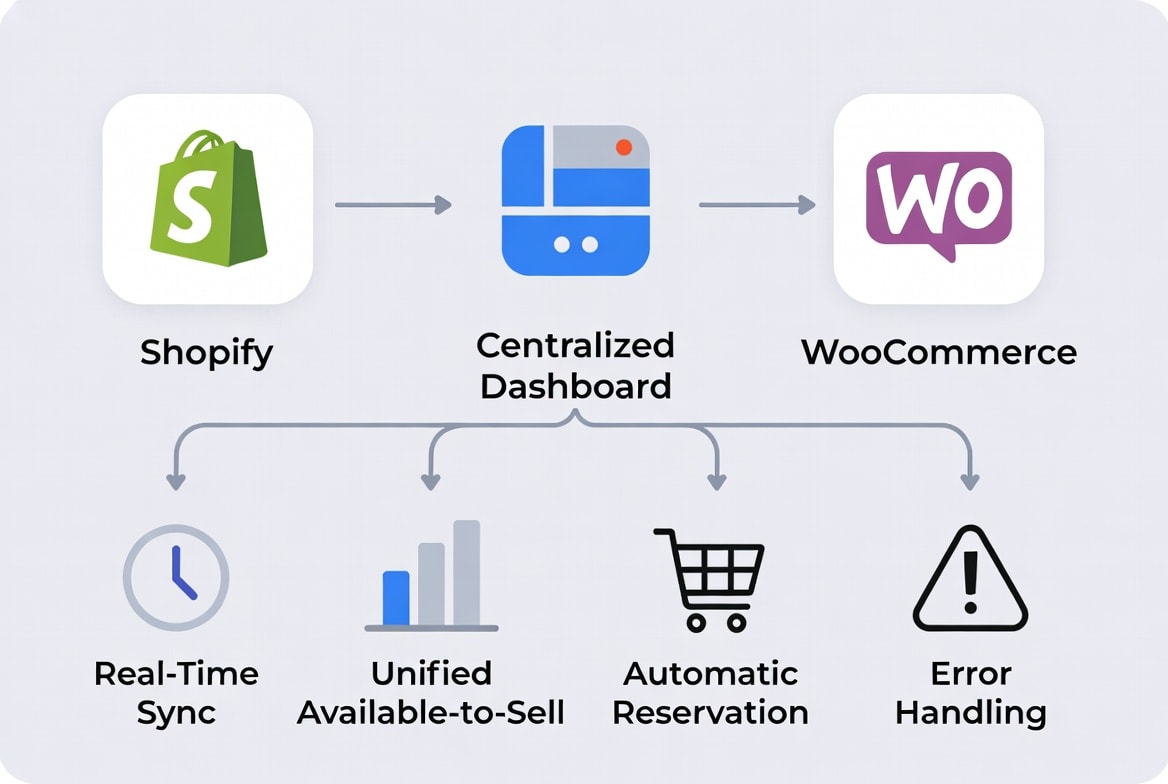
After analyzing workflows from hundreds of multi-store sellers, one thing becomes clear: successful Shopify + WooCommerce operations don’t rely on guesswork. They rely on systems built around a few core capabilities.
If an inventory setup is missing any of these, problems tend to show up quickly as order volume grows.
Real-Time (or Near Real-Time) Sync:
In multi-channel selling, timing isn’t a minor detail, it’s the difference between smooth operations and constant overselling.
Effective Shopify WooCommerce inventory sync should happen in near real time, ideally within 1–5 minutes of any stock change. Hourly or daily updates simply can’t keep pace with modern sales velocity.
The goal is to shrink the window where mismatches can occur.
Unified Available-to-Sell Calculation:
A reliable system should calculate inventory based on business-wide reality, not platform-specific numbers. That means working from a shared formula:
Total physical stock – reserved orders – safety buffer = available to sell
Both Shopify and WooCommerce should pull from the same availability logic. Without this unified calculation, each platform ends up operating on partial truths.
Automatic Reservation Across Channels:
When an order is placed on either platform, inventory should be reserved instantly across both ecosystems.
This prevents race conditions where two customers unknowingly purchase the same last unit. Automatic cross-channel reservation is one of the most effective ways to eliminate overselling windows.
Centralized Visibility Dashboard
Multi-store inventory can’t be managed efficiently from scattered screens. An effective system provides a single dashboard showing:
- Stock levels by SKU across all locations
- Pending and fulfilled orders by platform
- Recent sync activity and any errors
- Low-stock alerts with estimated replenishment timelines
This centralized view turns inventory from reactive troubleshooting into proactive planning.
Error Handling and Recovery Mechanisms:
Even the best integrations encounter occasional disruptions, such as API downtime, network interruptions, or temporary sync failures.
A resilient system should:
- Queue updates automatically for retry
- Send immediate alerts when issues occur
- Protect against overselling during sync gaps
Without built-in recovery safeguards, small technical hiccups can cascade into operational problems.
Note: Many sellers eventually reach a point where manual syncing and lightweight plugins no longer scale. At that stage, dedicated inventory sync tools such as systems designed specifically for Shopify and WooCommerce integration, like QuickSync, can provide the automation and centralized control described above.
The goal isn’t to add more software for its own sake. It’s to build an infrastructure that supports growth without increasing operational stress.
How Automation Solves Shopify WooCommerce Inventory Challenges
Manual Shopify WooCommerce inventory management might work on a very small scale. But it breaks down quickly as order volume increases. This is where dedicated syncing solutions like QuickSync become essential, removing the exact friction points that manual workflows create for growing multi-channel sellers.
Centralized Inventory Control:
Instead of managing stock in two separate dashboards, sync tools create a single source of truth for your inventory. All stock movements, like sales, returns, and adjustments, feed into one centralized system.
This eliminates duplicate data entry and prevents situations where Shopify and WooCommerce are operating on different numbers.
For multi-channel sellers, centralized control turns inventory management from a reactive task into a structured workflow.
Real-Time Stock Updates:
Speed is critical in multi-store selling. Inventory sync tools push updates across platforms in near real-time, minimizing the window where mismatches can occur.
When a product sells on Shopify, WooCommerce reflects that change almost instantly (and vice versa). Advanced tools, including platforms, are built specifically to maintain fast, reliable sync intervals even as order volume grows.
This real-time behavior is one of the strongest defenses against overselling.
Platform-Specific Logic Handled Automatically:
Shopify and WooCommerce follow different inventory rules. One uses location-based tracking and checkout reservations. The other relies on WordPress-driven stock management and plugin extensions.
Sync tools act as an intelligent translation layer. They automatically handle:
- API communication and rate limits
- Data format differences
- Stock reservation timing
- Allocation rules during simultaneous sales
Sellers no longer have to understand or manually reconcile these technical differences. The system manages them in the background. It even makes it easier to import WooCommerce products to Shopify.
Reduced Operational Workload:
Without automation, multi-channel inventory requires constant monitoring, reconciliation, and manual corrections. Sync tools remove much of this repetitive work by automating updates, logging every stock change, and providing audit trails.
When discrepancies appear, sellers can trace them quickly instead of spending hours investigating spreadsheets. The result is fewer administrative hours spent on maintenance and more time available for growth-focused activities.
Better Customer Experience:
Accurate inventory directly affects customer trust. When stock levels sync reliably, sellers avoid overselling, delayed shipments, and unexpected cancellations. Customers receive what they ordered, when they expect it.
Fewer errors mean fewer refunds, fewer support tickets, and stronger long-term loyalty. In this sense, inventory sync isn’t just an operational improvement, but also a customer experience strategy.
Best Practices for Managing Inventory Across Shopify and WooCommerce
Whether you use a tool or manual processes (temporarily), these practices reduce risk:
Designate a Master Inventory System:
One of the biggest causes of inventory errors is adjusting stock in multiple places at once. Choose a single platform to act as your source of truth for inventory changes. All manual adjustments should originate there and flow outward to the other platform.
For example:
- WooCommerce often works well as the master system if you manage complex product variants or custom workflows.
- Shopify may be a better choice if you operate multiple retail locations or rely heavily on POS integration.
A clearly defined master system reduces conflicting updates and keeps inventory logic consistent.
Implement Safety Stock Buffers:
Never expose your full physical inventory to online sales. A safety buffer, typically 5–10% of total stock, protects against damaged goods, returns, and short sync delays.
If you physically hold 100 units, you might display only 90 as available.
When physical inventory approaches the buffer threshold, listings automatically show out of stock. This cushion dramatically lowers the risk of accidental overselling.
Audit Your Actual Sync Speed:
Assumptions about sync speed often don’t match reality. Run a simple test: place a controlled order on one platform and measure how long it takes for the other to reflect the stock change.
If the delay exceeds a few minutes, you’re operating in a risk window. Understanding your real sync performance helps you adjust buffers and workflows accordingly.
Perform Daily Reconciliation (Until Fully Automated)
If you’re still using manual processes, consistency is critical. Set aside time each day to compare order counts and stock levels across platforms. Catching discrepancies early prevents small mismatches from compounding into larger operational issues.
As automation improves, reconciliation shifts from daily firefighting to occasional verification.
Use Channel-Specific SKUs for Complex Cases:
When fulfillment rules differ between platforms, SKU clarity becomes essential. For complex or edge-case products, using channel-specific SKUs can simplify tracking. For example:
- TSHIRT-RED-L-SHP for Shopify
- TSHIRT-RED-L-WOO for WooCommerce
This approach reduces confusion when mapping variants and makes troubleshooting faster when discrepancies occur.
Signs Your Business Needs Shopify WooCommerce Inventory Management
Not every seller needs sophisticated sync. You need it when:
Scenario | Why It Matters |
Centralized inventory control needed | Avoids mismatched stock levels across Shopify and WooCommerce |
Real-time order activity | Prevents overselling when orders come in simultaneously |
Different platform inventory logic | Each system handles stock differently and needs translation |
Operational workload growing | Manual updates slow teams down and increase human error |
Need for accurate reporting | Inconsistent data leads to poor forecasting and decisions |
Business scaling up | Manual inventory processes don’t scale with higher order volume |
Customer experience at risk | Incorrect stock availability leads to cancellations and delays |
If you’re processing 20 monthly orders with 30-day stock levels, manual management works. If you’re here reading this guide, you’ve likely already crossed that threshold.
The Bottom Lines
Shopify WooCommerce inventory management isn’t about finding perfect software. It’s about eliminating the gaps that cost you sales, customers, and sanity. You now understand why these platforms create inventory issues. You’ve seen what effective management includes and how sync tools bridge the gap.
The next step? Audit your current reality. Calculate hours spent on manual updates. Count the overselling incidents last quarter. Measure the lag between platform updates.