Stop me if any of these situations does not sound familiar.
You are selling on Shopify and Etsy and constantly trying to keep everything in sync. Or you are doing well on one platform and unsure if expanding to the other will create more problems than growth. Or maybe you already tried managing both, and it quickly became overwhelming.
It is not just your story. I hear this from 2 out of 4 Shopify and Etsy sellers all the time. What most do not realize is this. It is easy to connect Etsy to Shopify, as there are hundreds of integration tools in the market. Basic apps may work at low volume. However, as your Shopify and Etsy stores grow, delays, mismatches, and errors start to show. At that point, you do not need another tool. You need a system that works reliably without constant checking.
Hence, here I am with this guide to walk you through everything, from the basics to advanced tools, their comparison, and show you the best way to sync Shopify and Etsy without the usual friction, and beyond that.
What Does Connecting Shopify to an Etsy Store Really Mean?
Many multichannel sellers think that connecting Shopify to Etsy just means listing the same products on both Shopify & Etsy platforms. That is not enough. True integration goes much deeper.
It means your systems talk to each other automatically. When you update inventory in Shopify, it immediately updates on Etsy. Orders from Etsy appear directly in your Shopify dashboard. Price changes sync without you touching a second screen.
Basically, your business runs as one operation, not as two separate stores. Without this kind of connection, you are not running a multichannel business. You are running a stressful operation. I have seen sellers updating stock twice a day, copying product descriptions manually, and reconciling orders across two dashboards every night.
That might work if you only have ten products. When you hit fifty, it becomes frustrating. At a hundred, it is unmanageable.
Problems Sellers Face Without Proper Shopify Etsy Sync
Now that you know what true integration looks like, let’s look at what happens when both stores are not synced. These problems do not show up on day one. They hide quietly until your stores grow, and then they explode.
Here are the key problems that happen when your Shopify is not integrated and synced with your Etsy shop.
Running Out of Stock:
Your Shopify shows 40 units, Etsy shows 40 units, but your warehouse only has 28. A TikTok creator features your product, and both platforms start taking orders. By the time your “sync” updates, you have sold 52 units you cannot fulfill. Now you are cancelling orders, issuing refunds, and watching negative reviews pile up. This is the number one reason multichannel sellers lose their Etsy account privileges.
Updating Product Info Repeatedly:
Every price change, product photo, or description tweak has to be done in the Shopify store and then again in the Etsy shop. If you miss a detail, your product listings will look unprofessional. If you skip an update, your prices do not match. This double work steals hours you could spend on marketing or creating new products.
SKU Mismatch and Wrong Shipments:
For example, Shopify might label a variant as TSHIRT-BLUE-M, while Etsy reads it as TSHIRT_BLUE_M. As a result, your warehouse can pick the wrong item, which means your customer ends up receiving the wrong order. Over time, return rates increase, your ratings take a hit, and all of this adds unnecessary stress and extra work for you and your team.
Pricing Difference Mistakes:
You might run a flash sale on Shopify, but forget to update Etsy. As a result, customers notice the price difference and demand refunds. Or even worse, you could accidentally sell at a loss for several days. Either way, your margins take a hit, and it becomes a drain on both time and revenue.
Order Management Confusion:
At the same time, you might be checking Shopify for some orders and Etsy for others while trying to track shipping in a separate spreadsheet. In the middle of all this, urgent orders can slip through, shipping delays trigger penalties, and follow-ups fail simply because your data lives in multiple places.
Research shows that shipping errors alone cost US businesses over $17 billion every year, and most of these problems start with fragmented systems just like this.
Key Features to Look for in a Shopify Etsy Integration Solution
So far, you’ve seen what happens when Shopify and Etsy are not properly connected. These problems are not random. Almost all of them come down to one cause: using the wrong tool.
Not every app that claims to integrate Shopify to Etsy is built to handle real business volume. Some move data with delays. Others break under pressure. A few simply stop working once your catalog grows.
So before you decide how to link Shopify to Etsy, here are the features that truly matter and why they make a difference.
| Feature | Why It Matters | What Happens Without It |
| Real-time inventory sync | Keeps stock accurate across both platforms | Overselling, cancelled orders, account penalties |
| Unified order management | Brings all orders into a single dashboard | Missed shipments, confused fulfillment, delays |
| Automatic product sync | Updates titles, images, and variants instantly | Manual work, inconsistent listings, errors |
| Smart SKU mapping | Makes sure products match correctly across systems | Wrong items shipped, tracking chaos, returns |
| Pricing sync rules | Protects margins and keeps offers aligned | Revenue loss, customer complaints, refund requests |
| Error detection and recovery | Catches and fixes sync failures automatically | Silent errors, operational breakdowns, lost sales |
| Multi-channel scalability | Supports growth beyond two platforms | Rebuilding systems again when you expand |
If your integration solution cannot handle these basics, you are only setting yourself up to repeat the same problems we just covered.
Ways to Connect Etsy to Shopify (Only One Actually Works)
When it comes to connecting Shopify to Etsy, most sellers pick one of three approaches. At first, all of them seem workable. But as your stores grow, the differences become painfully obvious.
Hence, go through all of these ways thoroughly so you can decide which one will definitely suit your business.
Method 1: Manual Setup
Many sellers start this way. They create products separately on both platforms, update inventory by hand, and manage orders across two dashboards. At first, it seems manageable because there is no extra cost, and you feel in control.
However, this approach quickly reaches its limits as the work multiplies while your business grows.
- Inventory is never truly synced
- Every product update has to be done twice
- Orders scatter across platforms
- Human errors become inevitable
Manual setup is not integration. It is a duplication. It may work for twenty products and a few orders per week, but it will surely collapse once real volume hits.
Method 2: Basic Connector Apps:
These apps promise automation for fifteen to fifty dollars a month. They can reduce some of the manual work, but they do not eliminate the biggest risks.
- Sync delays of 15 minutes to an hour
- Weak error handling lets problems go unnoticed
- Limited support for complex variants
- No scalability for multi-channel growth
These tools often create a false sense of security. They let you connect Shopify to Etsy at a surface level, but your first overselling incident or inventory mistake will quickly reveal their limitations.
Method 3: QuickSync – Unified Syncing Engine
This is the right integration solution that actually works for growing multichannel sellers. QuickSync is built for reliability, accuracy, and speed, not constant manual fixes.
- Real-time inventory visibility across both platforms
- Centralized order management inside Shopify
- Automatic product syncing, including variants and images
- Smart SKU mapping to prevent mismatches
- Built for growth beyond just Shopify and Etsy
With QuickSync, you are no longer managing two separate systems. Instead, you run one unified operation, which is the real difference between simply connecting platforms and truly syncing them.
What You’ll Need Before You Start Syncing Etsy and Shopify
Before you integrate Shopify and Etsy stores, make sure you have a few basics in place. This will save you headaches and make the setup much smoother.
- A Shopify store with your products already added and organized.
- An Etsy seller account. Signing up is free and straightforward if you don’t have one yet.
- Products that follow Etsy’s rules. Etsy allows handmade items, vintage pieces, or craft supplies. Make sure your listings fit these categories to avoid issues down the line.
Having these things ready means you can focus on syncing your stores instead of fixing setup problems later.
How to Connect Etsy to Shopify Using QuickSync: 4 Easy Steps
Setting up a reliable Shopify Etsy integration does not need an engineering degree. With QuickSync, it’s easy and straightforward. Here’s exactly how to get your stores talking to each other properly.
Step 1: Create Your QuickSync Account
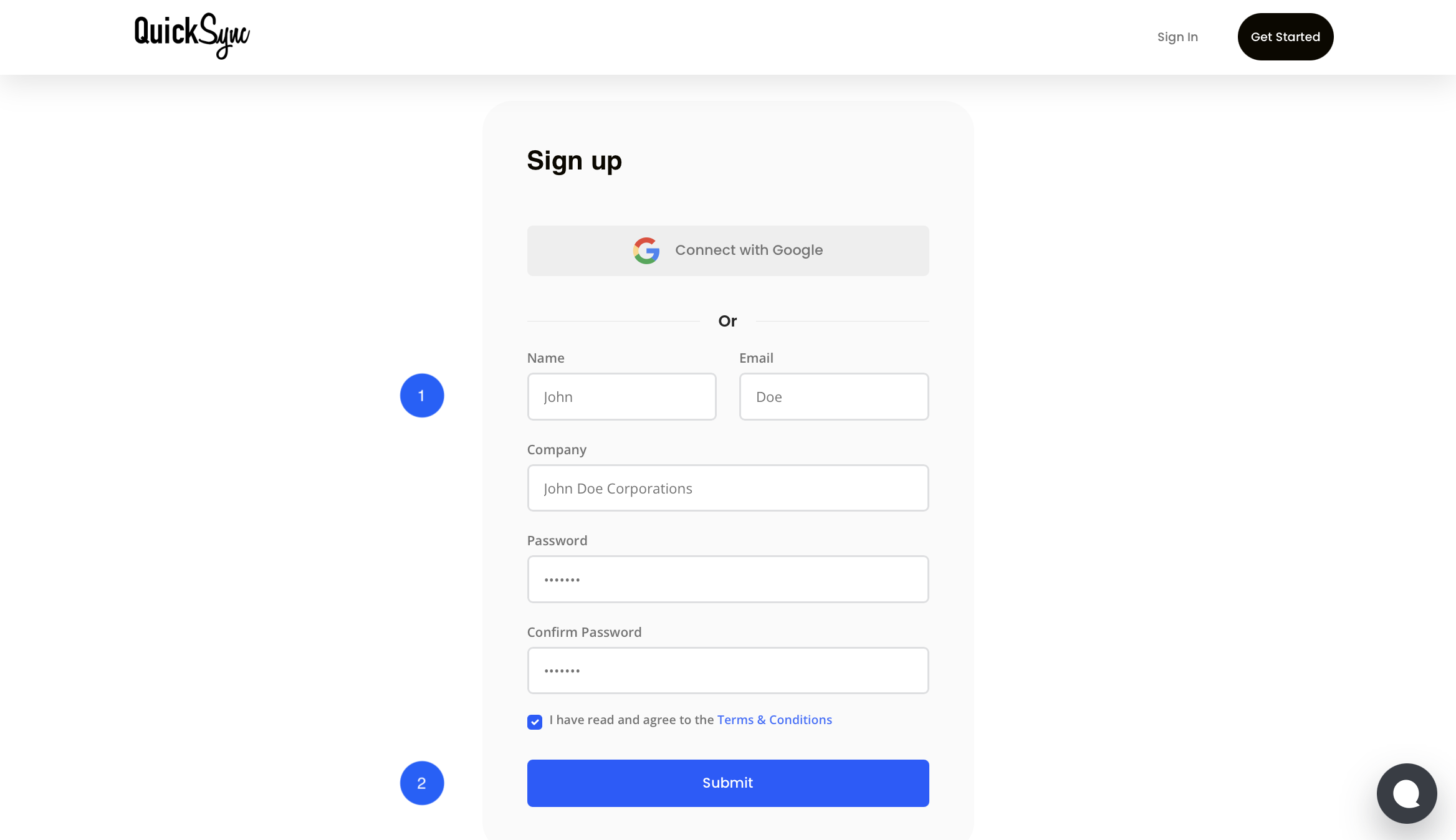
- If you are new, sign up for QuickSync.
- If you already have an account, just log in using your credentials and open your dashboard.
Step 2: Connect Your Shopify Store
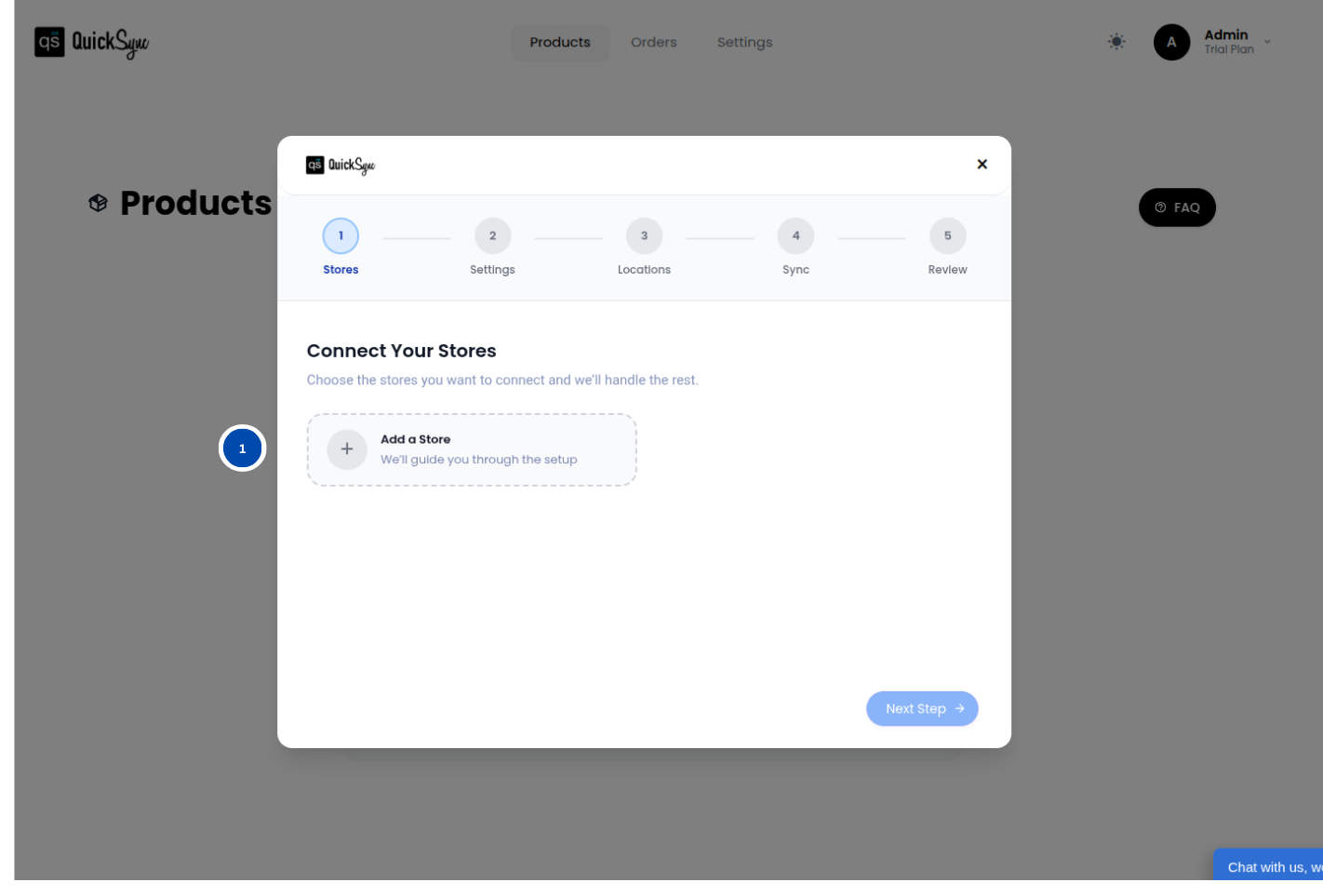
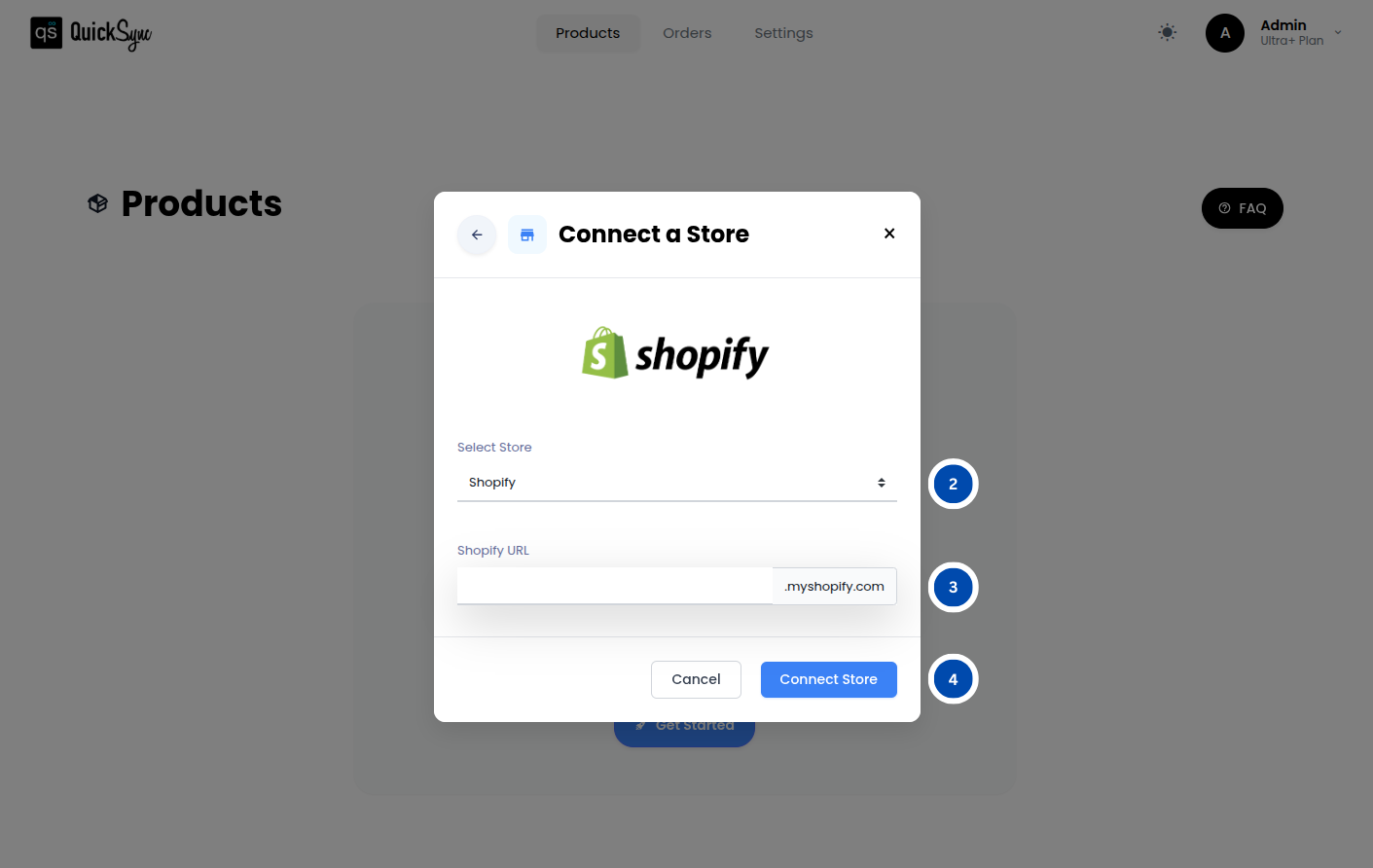
- Go to Dashboard → Add a Store → Select Shopify
- Enter your Shopify store URL and click Connect
- Log in to your Shopify account, approve access, and wait for QuickSync to import your products, inventory, and store data
Step 3: Connect Your Etsy Shop
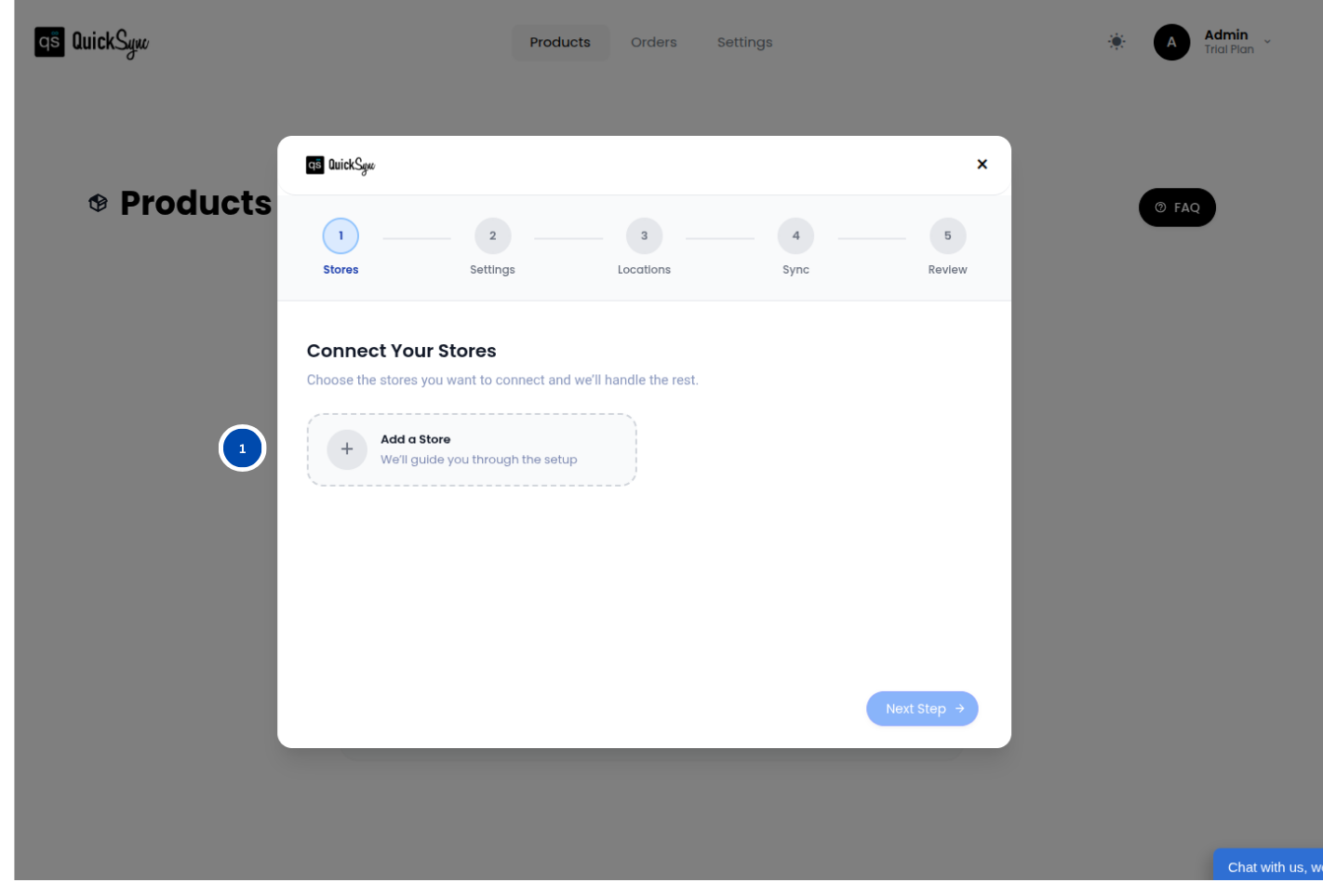
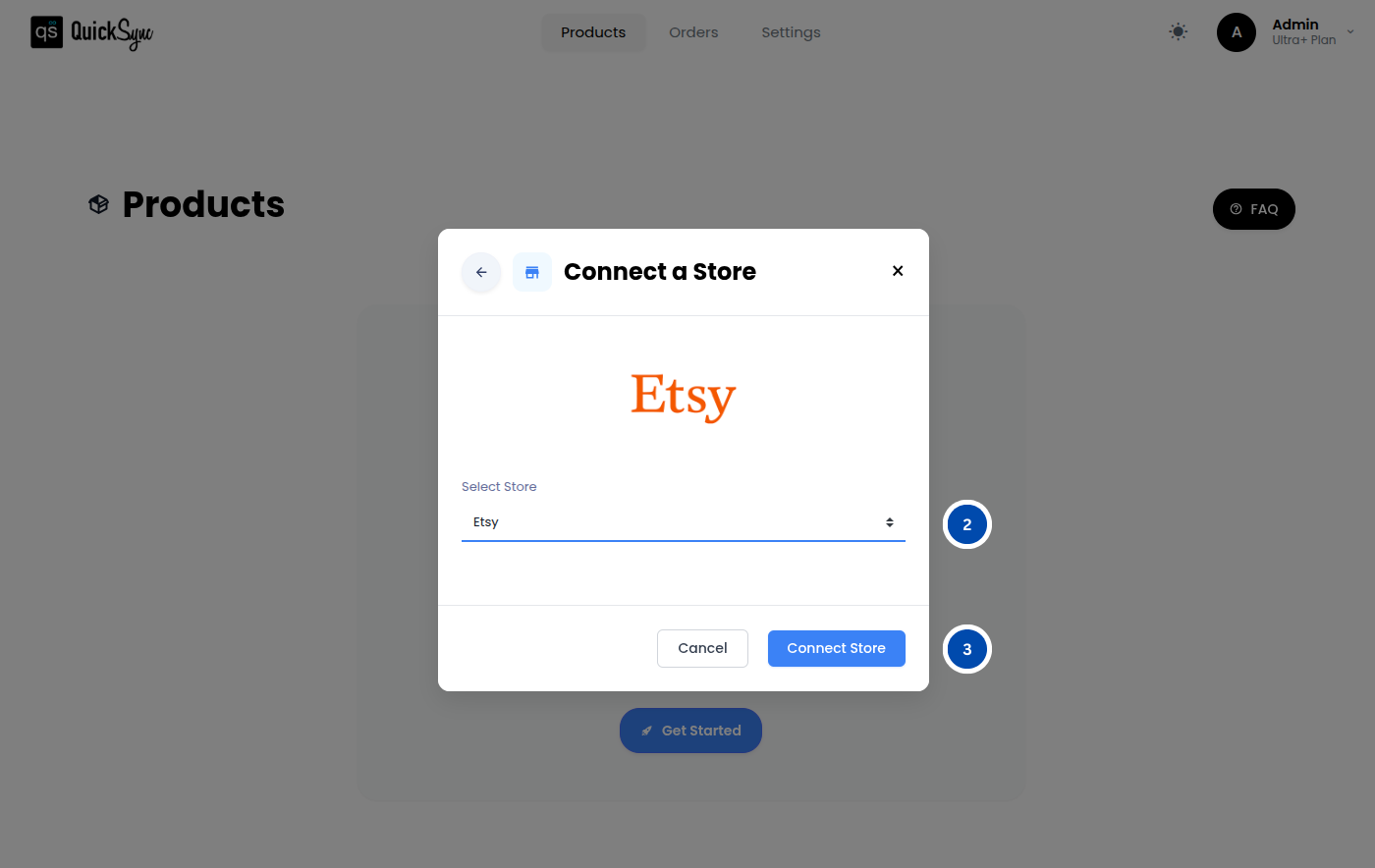
- Go to Dashboard → Add a Store → Select Etsy
- Click Connect a Store and log in to your Etsy account
- Approve access and wait for QuickSync to import your listings, inventory, and shop data
Once approved, QuickSync will automatically import your Etsy listings, product variants, and current inventory.
Step 4: Choose Your Syncing Preferences
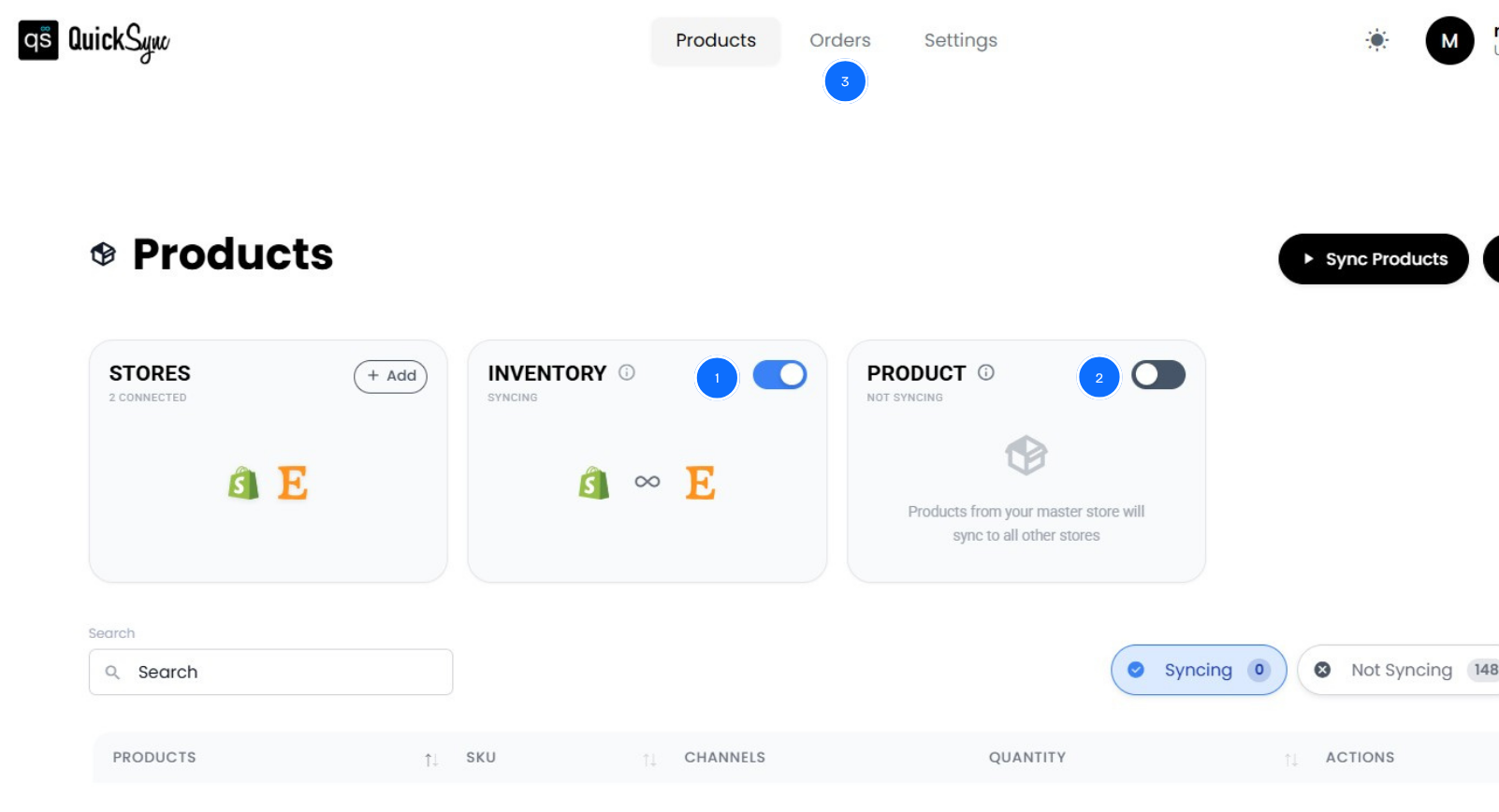
Decide what you want QuickSync to manage automatically:
- Inventory syncing: keep stock levels accurate in real time
- Product syncing: automatically update titles, images, and variants
- Order syncing: funnel Etsy orders directly into your Shopify dashboard
Once configured, your Shopify–Etsy integration runs in the background continuously. No more manual updates, no more switching between tabs, and no more guessing which dashboard is accurate.
Best Practices for a Smooth Shopify Etsy Sync
Connecting your online stores is just the first step. What really keeps your Shopify and Etsy integration stable is how you manage it daily. I have seen sellers set everything up perfectly, only to run into problems because they ignore simple habits.
Here is what actually works.
Use Shopify as Your Source of Truth:
Always make product updates, inventory changes, and pricing adjustments in Shopify first. Then let QuickSync push those changes to Etsy automatically. Avoid editing directly in Etsy because even small changes there can create data conflicts, duplicate entries, and inventory mismatches.
By keeping the Shopify marketplace as your Source of Truth, your workflow remains simple, and your team always knows where to focus.
Keep Syncing in Real Time:
Some tools use delayed syncing to save costs, but that delay is exactly where problems begin. Even a fifteen-minute lag during a traffic spike can result in dozens of oversold orders.
Real-time syncing eliminates that risk because inventory, orders, and product listings flow instantly between both Shopify & Etsy platforms, keeping your business accurate and reliable.
Maintain Clean and Consistent SKUs:
Before connecting your stores, take some time to audit your SKU structure. Make sure you use a consistent naming format, ensure every product has a unique code, and remove any duplicates or outdated entries.
Even one small mismatch can disrupt syncing, which may lead to wrong shipments and tracking headaches.
Monitor and Reconcile Weekly:
Automation does the heavy lifting, but weekly checks catch issues early. Spend 10–15 minutes reviewing inventory levels on both Shopify and Etsy platforms, checking order flows, and looking for sync alerts. This habit prevents small gaps from turning into customer complaints.
Keep Product Data Standardized:
Titles, descriptions, variants, and images should follow a consistent structure across Shopify and Etsy. Inconsistent data causes mapping errors, missing variants, and broken updates. Standardized product listings data keeps syncing smoothly and ensures a professional experience for your customers.
By following these best practices, your Shopify and Etsy setup will remain reliable, accurate, and stress-free, allowing you to focus on growing your business instead of constantly fixing preventable mistakes.
The Bottom Line: What’s Next?
You have seen what goes wrong when Shopify and Etsy run separately. You have seen why most integration tools fail under real business pressure. And you have seen how to connect Shopify to Etsy properly and keep it running smoothly.
Now the choice is yours.
You can keep juggling dashboards and hoping overselling does not strike. Or you can run one unified business by using the right system to connect Etsy to Shopify with real-time inventory, centralized orders, and automation that works.
The sellers who grow are not the ones with the most time. They are the ones with the right systems. QuickSync delivers real-time syncing, reliable performance, and support when you need it.
Start your free 14-day trial today. No credit card required.