
Running a Shopify store and selling on Amazon at the same time can significantly increase your sales reach. But managing inventory across both platforms is not as simple as it seems.
Shopify and Amazon do not automatically sync stock levels. When a product sells on one platform, the inventory on the other platform does not update automatically. Over time, this gap can lead to overselling, cancelled orders, and poor customer experience.
According to Onramp Funds, around 14% of Amazon seller accounts were suspended in Q1 2025, and inventory errors are among the most common reasons for account health issues.
To avoid these problems, many sellers try different solutions. Some rely on manual inventory updates, others use CSV uploads, while some attempt custom API integrations.
While these methods can technically connect Shopify and Amazon inventory, they often become inefficient as order volume and product catalogs grow. Understanding how Shopify Amazon inventory sync works, and choosing the right syncing method becomes essential for maintaining accurate stock across both platforms.
In this guide, you will learn how Shopify Amazon inventory sync works and the most reliable ways to keep inventory accurate as your business scales.
What Does Shopify-Amazon Inventory Sync Mean and How Does it Work?
I’m going to be honest with you from the start.
I’ve seen this same situation play out more times than I care to count. A seller adds Amazon to their Shopify business. Sales pick up. Everything feels manageable. Then, they’re cancelling the order and dealing with a performance warning in their Account Health dashboard.
Shopify Amazon inventory sync is the process of automatically keeping stock levels, product details, and orders aligned between your Shopify store and your Amazon seller account in real time. When a sale happens on either channel, both platforms update instantly. No manual input required from your side.
For retailers selling on multiple platforms, this means you don’t have to adjust stock every time an order comes in manually. The same inventory is reflected across both Shopify and Amazon. It reduces the risk of overselling, stock mismatches, and order cancellations.
Both platforms stay aligned because a sync tool sits in the middle, monitoring both channels and updating them simultaneously. Without that tool, the two platforms operate in complete isolation.
This isn’t just about connecting platforms technically. It’s about running one unified ecommerce operation instead of two separate stores that happen to sell the same products.
Advantages of Syncing Inventory Between Shopify and Amazon

Syncing your Shopify store and Amazon listings does more than prevent overselling. It changes how your entire multichannel selling operation runs, from the moment a product sells to the moment it ships.
Here are five benefits that matter most for sellers managing inventory across both sales channels.
Real-Time Stock Accuracy Across Both Channels
When a product sells on Amazon, your Shopify stock updates instantly. When a Shopify order comes through, your Amazon listings reflect the change immediately. Real-time inventory sync means your stock levels are always accurate across both platforms, with zero manual input required from you.
Fewer Cancelled Orders and Negative Reviews
With real-time inventory sync between Shopify and Amazon, you avoid order cancellations. When inventory syncs instantly, you’re not selling products that are already out of stock on the other channel. Fewer cancellations also protect your Amazon seller reputation. It helps you maintain customer trust. It keeps your Amazon account metrics stable.
Better Inventory Planning and Restocking Decisions
When your Shopify and Amazon inventory are synced, you get a clear view of how products are actually selling across both channels. That visibility makes inventory planning much easier. You can identify fast-moving products sooner. You can restock popular items before they run out, and avoid overordering slow sellers.
Protection for Your Amazon Account Health
Amazon monitors your Order Defect Rate, Cancellation Rate, and Late Shipment Rate constantly. Exceeding the 1% ODR threshold puts your account at risk of suspension. Accurate inventory sync keeps your stock counts correct, which keeps your cancellation rate low and your account health metrics in safe territory.
Less Manual Work for Your Team
Without inventory sync, every sale means adjusting stock manually. That might seem manageable with a few orders. Once sales pick up, those small updates turn into hours of repetitive work. With inventory sync, your team spends less time fixing inventory numbers. They have time for focusing on orders, marketing, and growth.
Common Inventory Issues Without Shopify Amazon Sync
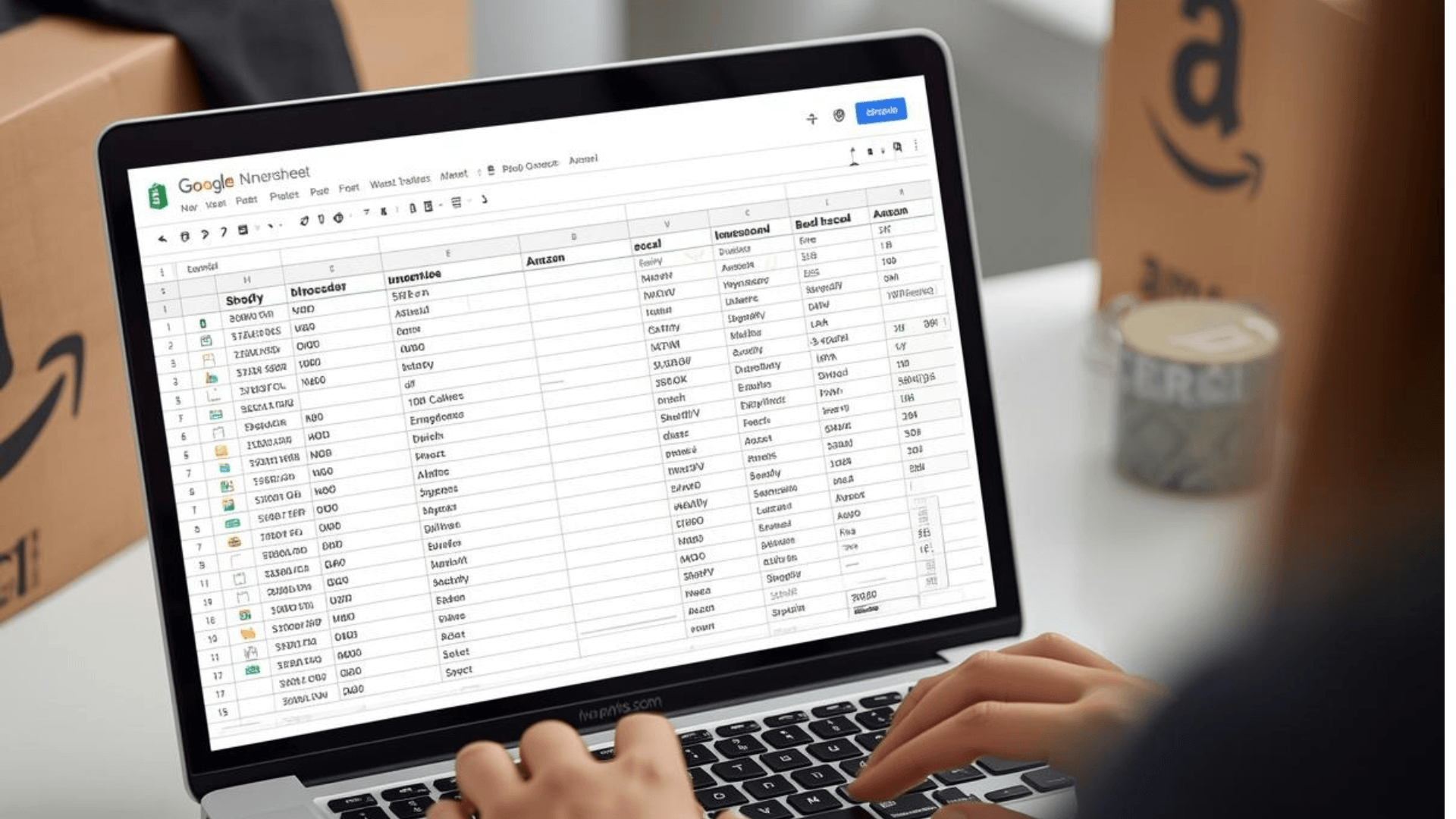
From my experience, most inventory problems don’t show up on day one. Everything feels manageable at the start. But as your product catalog grows and order volume increases. The gaps between unsynced platforms turn into real operational breakdowns. I’ve seen these patterns repeat across different businesses, and the impact is almost always the same.
Let me break down exactly what happens.
Overselling When Orders Hit Both Channels at Once
A product appears available on both Shopify and Amazon at the same time. Orders start coming in from both platforms. But in reality, you don’t have enough stock. This is how overselling begins. Now you’re forced to cancel some orders. You need to deal with the impact on your Amazon cancellation rate. All of this happens because your inventory isn’t synced.
Manual Updates That Fall Behind Order Volume
Without inventory sync, you’re constantly switching between platforms to adjust stock levels manually. What seems manageable at first quickly becomes difficult as your product catalog and sales activity grow. During busy periods, these manual updates start falling behind. Once inventory numbers are no longer updated on time, stock mismatches appear.
Variant Errors Across Listings and SKUs
When you manage product variants manually across two platforms, SKU mismatches are inevitable. A size or color that sells out on Shopify stays available on Amazon. A variant named “Blue-L” in Shopify becomes “Blue_L” in Amazon listings. Those small inconsistencies send the wrong items, trigger customer order returns, and create unhappy customers who leave negative reviews.
Amazon Account Health Warnings from Inaccurate Inventory
Nearly 70% of shoppers say their perception of a business is damaged when an item shows as available online but isn’t actually in stock. On Amazon, that perception damage becomes measurable. Inaccurate inventory drives up your Order Defect Rate. It reduces your Buy Box eligibility and puts your entire seller account at risk.
What a Proper Shopify Amazon Inventory Sync Should Include
Not all inventory sync tools are built the same. Some only move data occasionally. Others handle stock levels but ignore product details. A few break entirely once your catalog grows past a few hundred SKUs.
Before choosing how to sync Shopify to Amazon. You need to know what a complete inventory sync tool should include.
Real-Time Inventory Snc
Delayed syncing is where overselling starts. When a sale happens on either channel, both platforms must update immediately. Not in 15 minutes. Not in an hour. Instantly. The moment there’s a lag, your stock counts become unreliable.
Multi-Location Inventory Support
It is essential if you hold stock in more than one place. Whether you’re working with multiple warehouses, a third-party fulfillment center, or FBA inventory alongside your own stock. Your sync tool needs to map and manage inventory across every location accurately.
SKU Mapping and Variant Management
It ensures that products and their variants are correctly matched across both platforms. Without clean SKU mapping, even a small naming inconsistency between your Shopify catalog and Amazon listings can trigger wrong shipments, missing variants, and tracking issues.
Centralized Inventory Visibility
A proper sync tool should give you a unified dashboard view of your inventory. Instead of checking Shopify and Amazon separately to check your stock levels. You can monitor inventory from one system. This unified inventory visibility makes it easier to track product availability and plan restocking.
Different Ways to Sync Shopify and Amazon Inventory
There are several ways sellers try to keep Shopify and Amazon inventory in sync. Some methods work for small catalogs or very low order volumes. But as your business grows, those approaches quickly start breaking down.
Below are the most common inventory management methods for Shopify and Amazon.
Method 1: Manual Inventory Updates
The most basic approach is manually updating stock levels on both platforms. Sellers log into Shopify and Amazon separately and adjust inventory whenever stock changes.
This might work if you sell a few products and only receive occasional orders. But once your catalog grows or sales increase, manual updates become difficult to maintain. Inventory changes can easily fall behind, leading to stock mismatches and overselling.
Method 2: CSV File Uploads
Some sellers use CSV files to update inventory in bulk. They export product data from one platform. Then they edit stock quantities in a spreadsheet. Lastly, they uploaded the updated file to the other platform.
While this method saves some manual work. It still relies on periodic updates rather than real-time syncing. If multiple orders happen between uploads, the inventory numbers can quickly become inaccurate.
Method 3: Middleware or Custom API Integrations
Larger businesses sometimes build custom integrations using middleware tools or direct APIs between Shopify and Amazon. These setups can automate parts of the process and provide more flexibility.
However, they often require developer support, ongoing maintenance, and technical knowledge. For many sellers, managing and troubleshooting a custom integration becomes expensive and time-consuming.
Method 4: Using a Dedicated Inventory Sync Tool (QuickSync)
The most reliable method is using a dedicated inventory sync tool built specifically for Shopify and Amazon integration.
Tools like QuickSync automatically keep products, inventory, and orders in sync across both platforms in real time. Instead of relying on manual updates or delayed uploads, the sync happens instantly whenever inventory changes.
For growing multichannel sellers, this approach removes operational complexity and keeps inventory accurate without constant monitoring.
Can Shopify and Amazon Sync Inventory Using Built-In Features?
Many sellers, why should I invest in some tools? Why should I try different methods for syncing inventory? They assume there might be some built-in feature to sync Shopify inventory with Amazon.
Firstly, let me clear your doubts. There are no properly built-in features that support Shopify and Amazon inventory sync in real time.
Shopify previously offered an Amazon sales channel integration, but it was discontinued. Today, Shopify does not provide a native way to keep inventory synced with Amazon
Amazon Seller Central also does not provide a built-in tool that automatically syncs inventory with Shopify stores. Sellers can upload inventory files or manage listings manually, but those methods do not provide real-time syncing.
That is why most multichannel sellers rely on a dedicated integration tool like QuickSync. A third-party tool connects Shopify with Amazon without any hassle. It ensures inventory updates are in real-time and stay consistent across your entire sales operation.
How to Sync Shopify to Amazon Using QuickSync
Now that we have analyzed all the methods of syncing Shopify and Amazon inventory. It’s clear that the QuickSync inventory sync tool is a smart choice. In fact, QuickSync is affordable. It offers a 14-day free trial for first-time users.
Setting up your Shopify Amazon inventory sync with QuickSync doesn’t require a developer, custom APIs, or technical knowledge. Most sellers are fully set up in under 30 minutes.
Here’s how to get started with QuickSync for Shopify Amazon integration.
Step 1: Create Your QuickSync Account
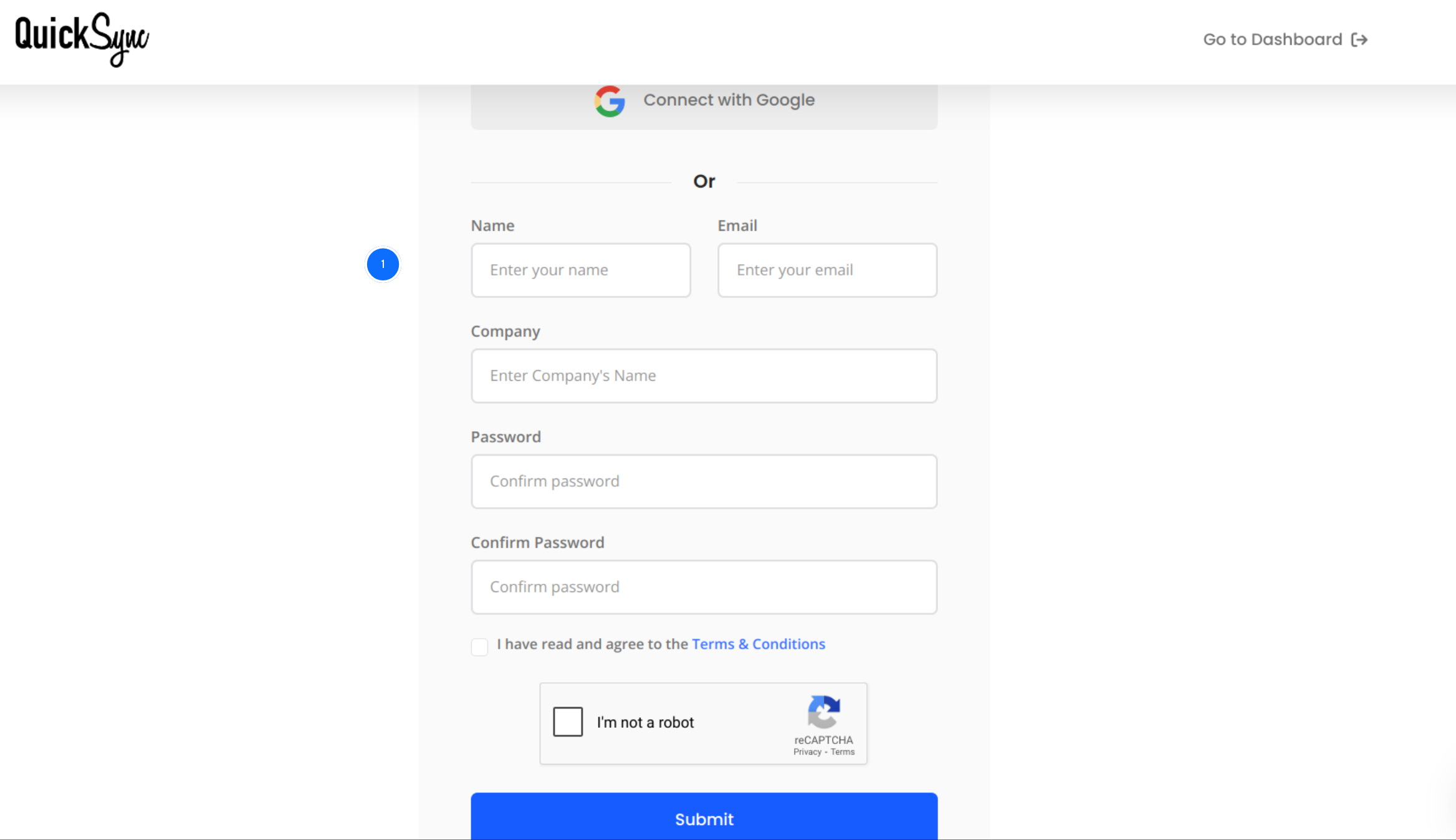
- If you’re new to QuickSync, start by signing up at quicksync.pro.
- Enter your details and log in to the QuickSync dashboard with your credentials.
Step 2: Connect Your Shopify Store
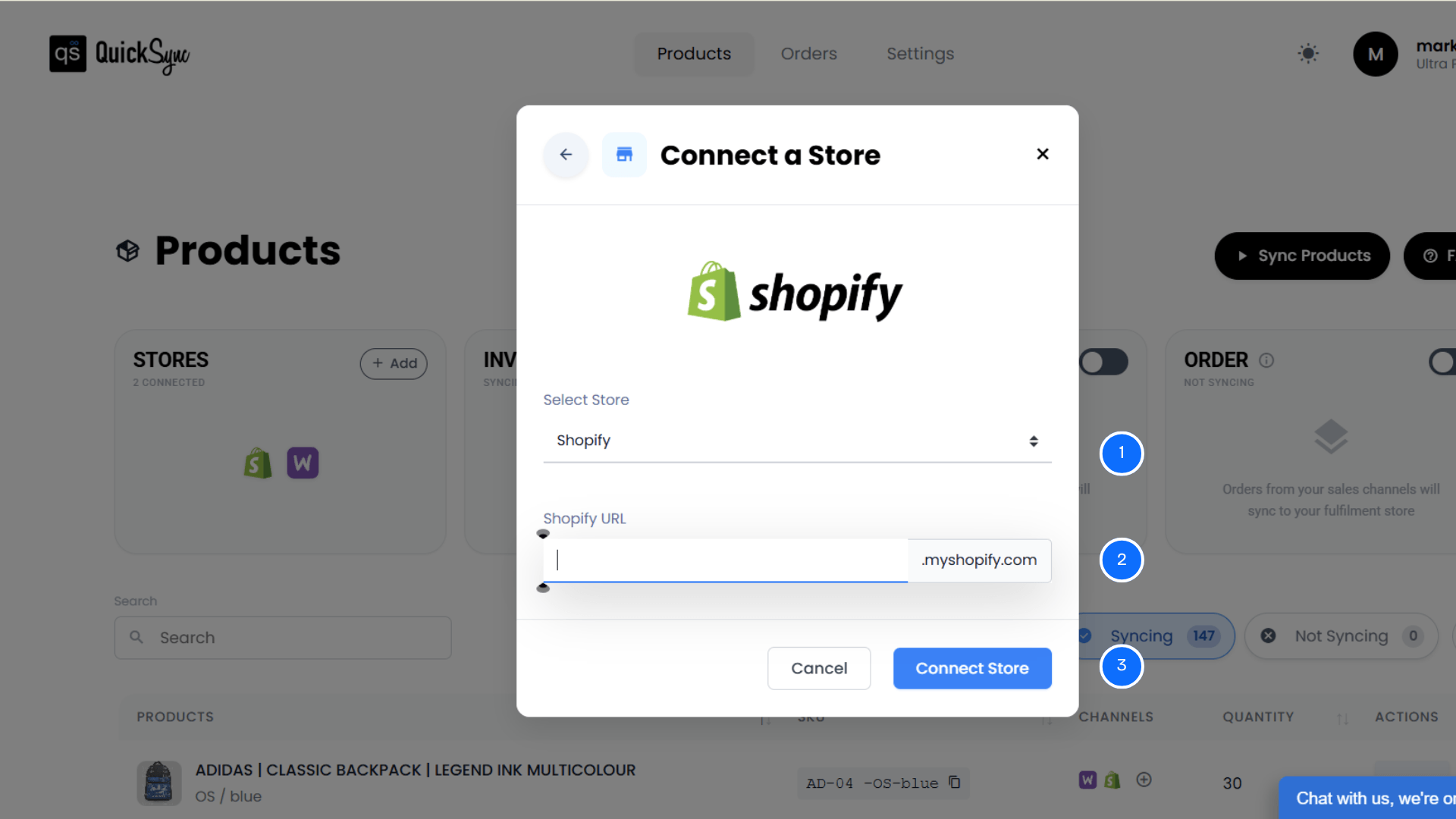
- Once you have logged in to the QuickSync dashboard. You will see a Sync product option. Click on it.
- Click Add a Store again.
- Select Shopify from the list.
- Enter your Shopify store URL in the format yourstore.myshopify.com.
- Approve permissions for products, images, inventory, and orders.
Once authorised, QuickSync runs an initial import of your store details, locations, and product catalog. You’ll see a progress bar in the dashboard while this runs. Larger catalogs take a few minutes. Keep the tab open.
Step 3: Connect Your Amazon Store
- Now, similarly, connect the Amazon store.
- Click on Add a store again.
- Select Amazon in your QuickSync dashboard.
- Authenticate via Amazon Seller Central and approve the integration permissions.
QuickSync imports your existing Amazon listings and maps them against your Shopify products.
Step 4: Set Your Source Store and Choose Inventory Sync
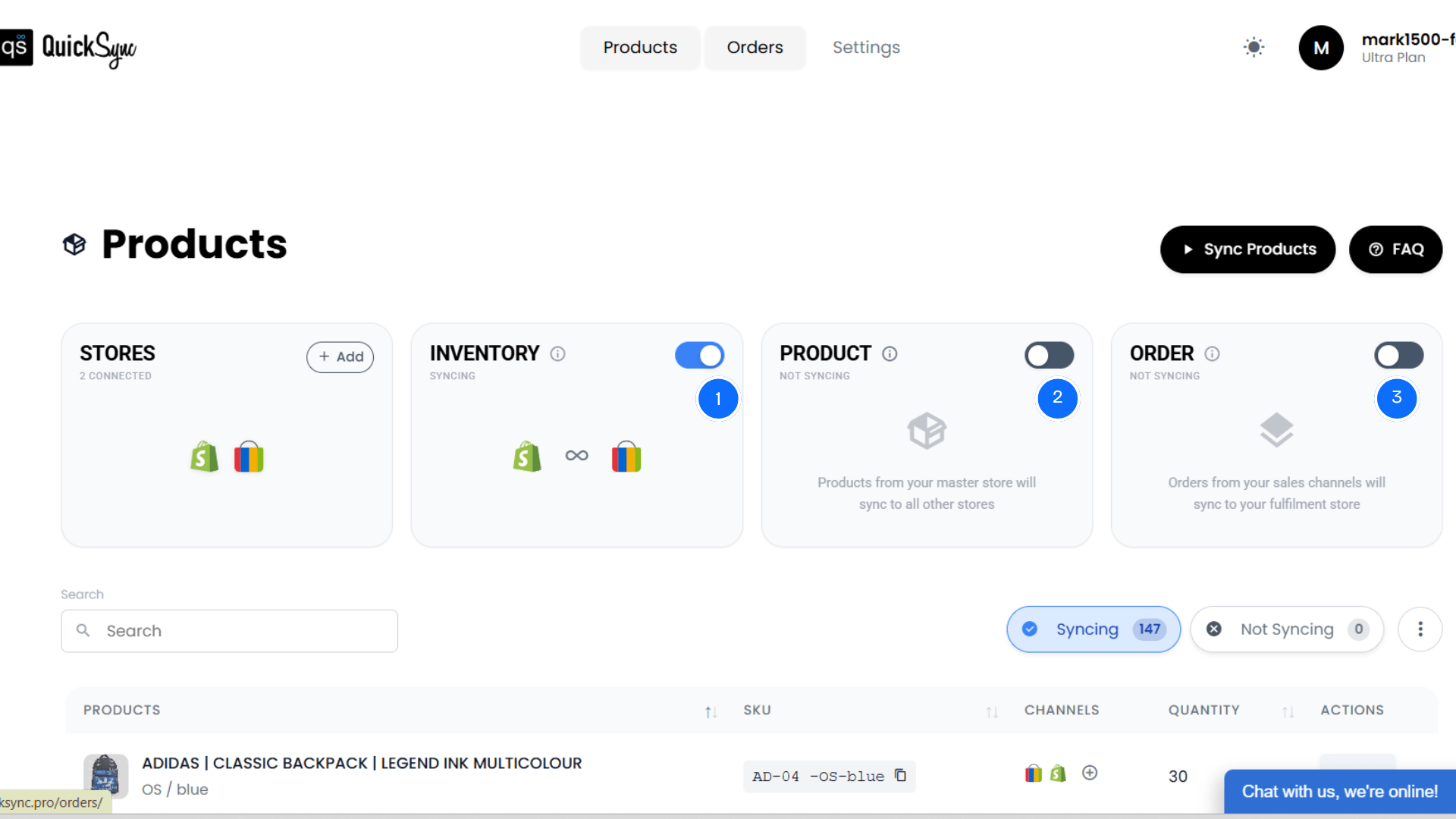
Your Source Store is the platform that holds your primary inventory count. QuickSync uses it as the baseline when deciding how much stock to show on the connected channel.
If you fulfill from your own warehouse and manage everything from Shopify, set Shopify as your Source Store. If Amazon FBA holds the physical stock, set Amazon as your Source Store.
- Inside your QuickSync dashboard, enable the inventory sync option.
- You can also enable product sync and order sync for a full Amazon Shopify integration.
Once you have configured these settings, QuickSync will begin the inventory sync process. Once everything is set up, QuickSync will automatically handle Shopify and Amazon inventory.
A Note on the Shopify Variant Limit
If your Shopify store already has more than 50,000 product variants, Shopify limits new variant creation to roughly 1,000 per day. QuickSync detects this automatically and queues remaining variants to create the following day.
You don’t need to manage this manually. Just know that very large catalogs may take some time to complete the initial sync.
Best Practices for Shopify Amazon Inventory Sync
Connecting your platforms is only the beginning. What actually determines success is how you manage the sync after setup.
I’ve seen merchants configure everything correctly and still run into problems three weeks later because they skipped a few fundamentals. Here’s what keeps your Shopify Amazon inventory sync stable and accurate over the long term.
Use Shopify as your Source of Truth
Make all product updates, inventory changes, and pricing adjustments inside Shopify first. Let the integration push those changes to Amazon automatically. Avoid making direct edits inside Seller Central on products that are already synced. Even small changes can create data inventory mismatches.
Clean your SKUs before you connect.
Before connecting your platforms, fix your SKU structure. Use a consistent naming format across your entire product catalog. Make sure every product has a unique SKU. And that no duplicates or outdated SKUs exist. A single SKU mismatch between Shopify and Amazon can cause broken inventory updates.
Regularly Monitor Sync Logs and Alerts
Even with automated syncing in place, it’s important to occasionally check your integration dashboard. Most sync tools provide activity logs or alerts that show if a product failed to sync. Reviewing these logs helps you catch small issues early before they turn into larger inventory problems.
Avoid Creating Duplicate Listings
Duplicate products across platforms can confuse the sync process. If the same product exists with different identifiers or listings. The system may not know which item to match correctly. Always ensure each product is mapped to a single listing. So inventory updates stay accurate across both platforms.
Plan Inventory Buffers for High-Demand Products
Fast-moving products can sell out quickly during promotions or seasonal spikes. Maintaining a small inventory buffer for high-demand items helps prevent sudden stockouts. This buffer gives your system enough room to process inventory smoothly. It reduces the risk of overselling,
Conclusion
Managing Shopify and Amazon inventory separately might seem manageable at the beginning. But it quickly becomes difficult as your catalog and sales grow. Manual updates, delayed stock changes, and SKU mismatches create constant risk for overselling.
That’s exactly where QuickSync makes the difference.
QuickSync gives you real-time inventory sync, product sync, image and video sync, and order +routing between Shopify and Amazon, all in one tool, with a setup that takes less than 30 minutes.
Instead of constantly fixing inventory errors. QuickSync handles the synchronization in the background while your team focuses on sales and growth.