

Last year, I worked with a fashion brand that went viral overnight on TikTok. One creator posted a 12-second styling video. Within 30 minutes, they had 700 orders. By the next morning, they had oversold 214 units. Not because demand was the problem.
Because their Shopify and TikTok Shop weren’t properly synced. This is what most merchants don’t realize: TikTok Shop isn’t just another sales channel. It’s a velocity engine. When the algorithm decides to push your product, it doesn’t send traffic gradually. It floods you. And if your inventory, pricing, or product data isn’t syncing correctly between Shopify and TikTok Shop, things break fast.
The issue isn’t demand.
The issue is proper synchronization.
If you’re trying to figure out how to sync Shopify products to TikTok Shop the right way, you’re not just looking for a basic connection tutorial. You need a system that protects your store when a single video suddenly sends hundreds of buyers at once.
In this guide, I’ll walk you through exactly how to sync Shopify with TikTok Shop, from basic setup to scalable automation. I’ll show you where most integrations fail, how to connect Shopify to TikTok Shop properly, and much more. Read on.
What Does It Mean to Sync Shopify Products to TikTok Shop?
Let me simplify this, because “sync” is often used as if it’s automatic magic. When I talk about Shopify TikTok product sync, I’m not talking about clicking “connect” and hoping for the best.
I’m talking about your product data moving automatically between Shopify and TikTok Shop without spreadsheets, manual uploads, or inventory guesswork. If you’re still copying product details from one platform to another, that’s not syncing. That’s duplicating risk.
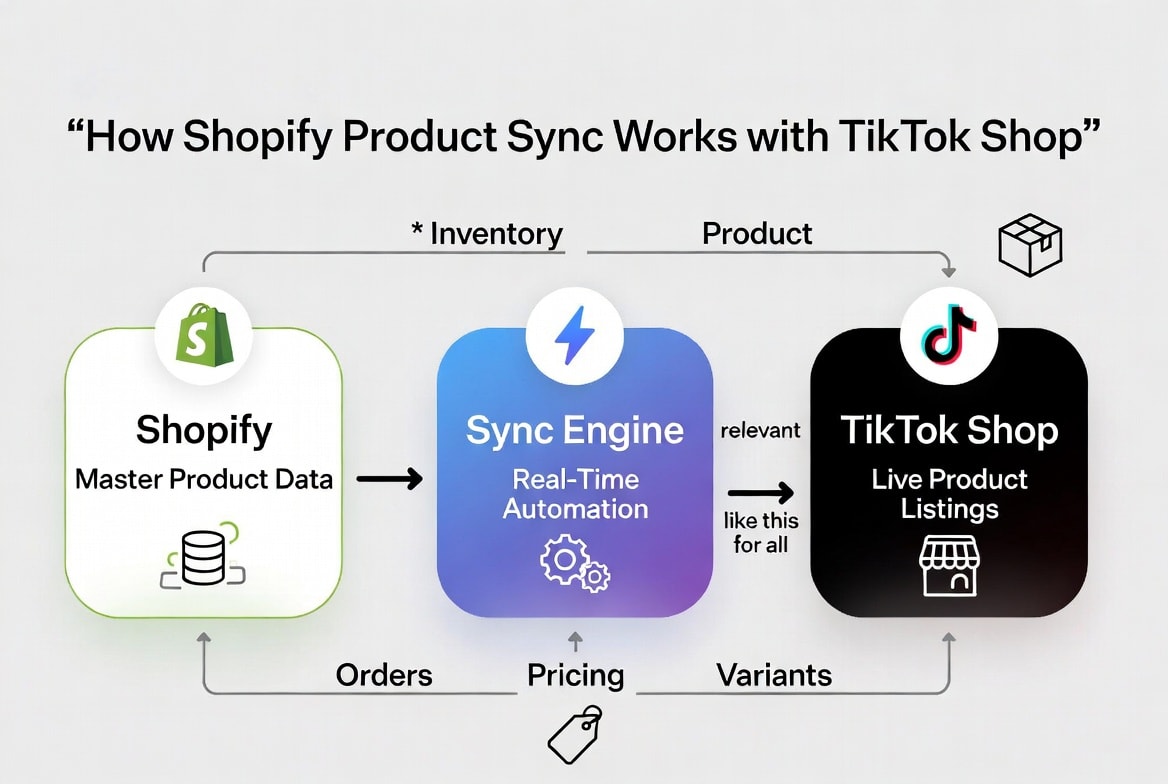
Real product sync means your systems talk to each other continuously. When something changes in Shopify, TikTok Shop reflects it immediately.
When we say “sync,” we’re talking about six critical data points:
Data Point | What Syncs | Why It Matters |
Products | Titles, descriptions, categories | Listing accuracy, search visibility |
Variants | Size, color, material options | Customer gets exactly what they ordered |
Pricing | Base price, sale price, currency | Margin protection, promotional consistency |
Inventory | Stock levels, locations, buffers | Overselling prevention |
Images | Main photo, variants, lifestyle shots | Conversion optimization |
Metadata | SEO tags, compliance attributes | Platform approval, search ranking |
If even one of these layers fails to sync properly, you don’t just get a small error; you get operational friction, rejected listings, margin leaks, or oversold products.
Sync isn’t just about getting products onto TikTok Shop. It’s about keeping every moving part aligned when demand spikes.
What Problems Ecom Sellers Face While Syncing Shopify Products to TikTok?
Here’s what most merchants don’t understand: There’s a massive difference between being connected and being properly synced. I audit stores every month that say, “Yes, we connected Shopify to TikTok Shop.”
Then I look under the hood, and I immediately see where money is leaking. Here are the six key problems I see repeatedly.
1. Inventory Mismatches Between Platforms
I’ll ask the founder a simple question:
“Shopify shows 47 units. TikTok Shop shows 47 units. Your warehouse shows 31. Which number is real?”
The answer that I get is pin-drop silence.
Because without true real-time sync, you’re operating on delayed data. And delayed inventory data is expensive.
You either:
- Oversell → refunds, penalties, health score damage
- Or undersell → lost revenue and stagnant stock
The root problem? Native integrations don’t always update instantly. A 5-15 minutes delay doesn’t sound dangerous until a TikTok video drives 200 orders in 10 minutes. In viral commerce, 10 minutes is an eternity.
2. Overselling During Viral TikTok Campaigns
TikTok demand is not linear. It spikes. I’ve seen a product sit quietly for weeks in the inventory, then a creator posts at 2:07 PM. By 2:20, traffic explodes. By 2:35, the inventory is gone on both platforms.
One brand I worked with sold 89 units of a product in under 30 minutes across Shopify and TikTok Shop.
They had 34 in stock.
The sync lag meant TikTok Shop continued accepting orders even after Shopify was sold out. The result wasn’t just refunds. It was:
- Customer complaints
- Account health warnings
- Weeks of performance recovery
This isn’t rare. It’s predictable if sync isn’t airtight.
3. Manual Product Uploads and Constant Updates
See, we are living in a world where automation has taken over many things and made them effortless. But still, a lot of sellers rely on partial automation.
They upload products manually.
They map categories one by one.
They adjust variants individually.
Now multiply that by 200 SKUs. That’s not a growth strategy. That’s administrative quicksand.
And every manual touchpoint introduces risk:
- Wrong category → listing rejection
- Incorrect variant mapping → wrong item shipped
- Missed update → inventory mismatch
Multi-channel sellers must realize that the manual processes don’t break immediately. They break under scale.
4. SKU and Variant Inconsistencies
This one is more technical and more dangerous than it looks. Shopify might label an SKU:
TSHIRT-RED-L
TikTok Shop might interpret it differently. Even a small formatting mismatch means the platforms stop recognizing that they’re talking about the same product.
Now you have two systems tracking what they think is one item. But it’s not one item anymore. It’s two separate inventory pools drifting apart. Without automated SKU mapping and structured variant alignment, you end up translating between platforms instead of scaling.
5. Price Differences Across Channels
Pricing on TikTok Shop isn’t always a mirror of Shopify. There are formatting requirements. Category-based rules and promotion validation checks.
If you manage pricing separately on both platforms, you’re constantly updating two systems, risking non-compliant listings and accidentally shrinking your margins
I’ve seen brands run discounts on Shopify and forget to update TikTok. Or worse, update TikTok and forget Shopify. When pricing isn’t synchronized, your profitability becomes unstable.
6. Order and Stock Update Delays
Most native syncing setups are event-triggered, not continuously synchronized. An order is placed, a webhook is triggered, the task gets queued, and after some time, the inventory is updated. This delay is usually fine if you only have around 10 orders a day.
But when orders increase to 100, the system starts to struggle. At 1,000 orders, it can completely break down. During that delay window, both Shopify and TikTok Shop show available inventory. Both accept orders. Both charge customers. And the irony is that now you’re fulfilling products you don’t physically have.
If there’s one pattern behind all six issues, it’s not TikTok, it’s false confidence. Sellers believe their systems are fully synced, so they assume everything is running smoothly. But in fast-moving, high-volume commerce, “mostly synced” isn’t good enough.
Even small delays or gaps can quickly turn into major problems. In this environment, being partially synced is practically the same as not being synced at all.
Methods to Sync Shopify Products to TikTok Shop (Manual vs Automated)
When brands ask me how to sync Shopify products to TikTok Shop, I tell them this: You have two paths. One helps you test, and the second one helps you scale. Choosing the wrong one isn’t catastrophic at first. But it becomes catastrophic when demand spikes
Let’s look at the pros and cons of both methods below:
Manual Method: Native TikTok Shopify Integration
If you’re just getting started, TikTok’s official Shopify app is functional. I’ve used it with early-stage brands to validate product-market fit on TikTok Shop. It connects. It publishes, and it works, but within limits.
Here’s how it typically works:
- Install the TikTok app from the Shopify App Store
- Connect your TikTok For Business account
- Select products to publish
- Manually map each product to TikTok categories
- Set inventory sync frequency (usually 5–15 minutes)
- Manage TikTok orders inside Shopify
For testing, this method is fine. But here’s where sellers misunderstand it: “Connected” doesn’t mean optimized.
It’s best for new sellers with fewer than 50 SKUs and under 20 orders per day, or for those simply testing whether TikTok Shop is viable. If you’re in validation mode, it’s acceptable. But if you’re in growth mode, it’s too fragile to rely on.
Critical Limitations I See Repeatedly:
- No true real-time inventory (minimum 5–15 minute delay)
- Manual category mapping for every product
- One-way order sync (TikTok → Shopify only)
- No advanced bulk editing
- No safety stock buffers
- No multi-location inventory logic
At low volume, these gaps are manageable. At high velocity, they become operational liabilities.
Automated Method: Using Advanced Product Sync Tools
Once a brand decides TikTok is more than an experiment, I recommend automation. Third-party syncing tools are built specifically to eliminate the lag and manual friction that native integrations leave behind.
Here’s how a proper automated setup works:
- Shopify is established as the master source of truth
- TikTok Shop is authorized inside a centralized dashboard
- Categories are mapped automatically (often with AI assistance)
- Real-time or near-real-time sync activates
- Orders, inventory, and pricing update continuously
- Automated rules handle exceptions and edge cases
Instead of managing two dashboards, you manage one system. This approach is best for growing sellers with 50+ SKUs, 20+ orders per day, or brands scaling TikTok as a primary acquisition channel.
If TikTok is generating significant revenue, manual workflows will eventually fail, so a more streamlined system becomes essential.
Key Advantages of Automation Sync:
- Real-time inventory reservation
- Intelligent bulk category mapping
- Bidirectional order sync
- Safety stock buffers to prevent overselling
- Automated error detection and recovery
The difference isn’t just speed. It’s protection. Manual sync reacts after something happens. Automated sync prevents the problem from happening in the first place. When sellers ask me which method they should choose, my answer is simple:
If TikTok Shop is an experiment, go manual. But if TikTok Shop is a growth channel, automate before it forces you to.
Which Method Is Best to Sync Shopify Products to TikTok Shop?
I get asked this all the time “Should we go with the native TikTok Shopify app or an automated sync tool?“
Here’s the truth: It depends on where you are in your multichannel selling journey.
To make it simple, below is the tabular comparison of both approaches side by side, based on what actually matters when running a real business:
Feature | Manual Sync (Native App) | Automated Sync (QuickSync) |
Setup Time | 2–3 hours | 15 minutes |
Real-time Inventory | 5-15 min delay | Under 2 minutes |
Category Mapping | Manual per product | AI bulk mapping |
Price & Variant Sync | Limited, error-prone | Full automation |
Overselling Protection | Delay-based risk | Instant reservation |
Bulk Operations | 50 products max | Unlimited |
Order Sync Direction | TikTok → Shopify only | Bidirectional |
Safety Stock Buffers | Not available | Configurable |
Error Handling | Basic alerts | Auto-recovery + alerts |
Scalability | Low (breaks at volume) | High (handles viral spikes) |
Manual Effort | 10–15 hrs/week | <1 hr/week |
Best For | Beginners, testing | Growing brands, scaling |
Looking at this, if you’re still testing TikTok Shop, the native manual sync is fine. It gets you started quickly and helps validate whether your products perform on TikTok.
But here’s the reality I’ve seen again and again:
You should switch to automated sync before your first viral moment.
Because once demand spikes, the manual method doesn’t just become inconvenient, it becomes dangerous. You’ll oversell. You’ll lose money, and you’ll damage your account health.
So if your goal is growth and stability, automation isn’t an option. It’s essential, and there is QuickSync (a reliable unified multi-channel syncing engine).
Steps on How to Sync Shopify Products to TikTok Shop Using QuickSync
Syncing Shopify products to TikTok Shop with QuickSync is simple and fast. You don’t need technical skills or manual configurations. Once set up, QuickSync automatically keeps both platforms aligned.
Step 1: Create Your QuickSync Account
Start by creating your QuickSync account.
- Sign up on QuickSync
- Access the central dashboard
- Prepare your account for store and channel connections
Step 2: Connect Your Shopify Store
Next, connect your Shopify store to QuickSync.
- Authorize your Shopify store connection
- Allow QuickSync to access product, variant, and inventory data
- Set Shopify as the primary source for product information
Once connected, QuickSync reads your Shopify catalog and prepares it for syncing.
Step 3: Connect Your TikTok Shop Account
After Shopify is connected, link your TikTok Shop account.
- Sign in to your TikTok Shop account through QuickSync
- Grant permissions for product and inventory syncing
To learn more about correctly setting up your warehouse address in TikTok, read our detailed guide.
This allows QuickSync to send updates from Shopify directly to TikTok Shop automatically.
Step 4: Choose Sync Preferences for Inventory and Product Syncing
This is where you define how syncing should work.
You can choose:
- Whether to sync products, inventory, or both
- How inventory updates should behave
- Which products should be included in the sync
Once everything is set up, Shopify and TikTok Shop stay in sync automatically. Product updates in Shopify instantly reflect on TikTok, inventory stays accurate across both platforms, and manual uploads or edits are no longer needed.
This dramatically lowers the risk of overselling, so your Shopify-TikTok product sync runs quietly in the background while you focus on selling and scaling your business.
This is the most reliable way to sync Shopify products to TikTok Shop without operational headaches.
Best Practices to Keep Shopify and TikTok Shop Products Consistent
If you want TikTok Shop to be a reliable revenue channel, consistency is everything. In my experience, the difference between brands that scale smoothly and brands that crash during a viral moment is simply whether they follow these best practices.
1. Use Shopify as the Single Source of Truth
Everything should begin in Shopify, such as titles, descriptions, pricing, inventory, variants, and images. Editing TikTok Shop directly almost always leads to trouble, creating version conflicts and split realities.
If Shopify is the master, QuickSync acts as the messenger: update it once, and QuickSync automatically propagates the changes everywhere.
You change it once, and QuickSync propagates it everywhere.
2. Enable Real-Time Syncing (Not Scheduled)
Scheduled syncing is a fragile setup, and hourly or daily updates create gaps where inventory and product info can fall out of sync. In TikTok commerce, those risk windows can quickly damage your brand. Real-time syncing (under 2 minutes) closes that gap.
The cost difference is minimal, but the protection is huge. If your inventory updates aren’t instant, you’re basically gambling with oversells.
3. Sync Only TikTok-Approved Products
TikTok Shop has strict category rules and compliance requirements. The fastest way to damage your account health is to sync products that are not eligible or restricted.
QuickSync’s filters let you:
- Exclude non-approved categories
- Only publish compliant products
- Prevent listing rejections before they happen
This alone saves you hours of troubleshooting and protects your account reputation.
4. Test Sync Before Launching TikTok Ads
This is non-negotiable. If you’re going to spend ad dollars, you must verify the sync works.
Here’s what I do before scaling:
- Place test orders
- Confirm inventory updates in real time
- Verify order flow from TikTok → Shopify
- Confirm fulfillment workflows
Only then do I scale ad spend.
Because the cost of overselling during a $10,000 ad day is catastrophic.
6. Use Automation Before Scaling Campaigns
Manual sync is fine for organic testing and small volume. But if you plan to scale, especially with paid campaigns, automation is mandatory. The cost of overselling during a viral day is far greater than any tool subscription.
Automation isn’t a luxury. It’s a risk-management strategy.
The Bottom Line
For Shopify merchants, TikTok Shop is the biggest opportunity we’ve seen in years. But without dependable syncing, that opportunity becomes a liability. If you’re trying to figure out how to sync Shopify products to TikTok Shop in a way that won’t crack under pressure, you need more than the basic native app.
QuickSync delivers a real-time, scalable sync system that keeps inventory accurate, orders flowing, and viral demand profitable instead of problematic. If you’re serious about TikTok Shop, you need real-time protection. Because in TikTok commerce, 5 minutes is enough time to oversell and damage your brand reputation.
Ready to Sync Shopify with TikTok Shop?
Leave a Reply