Selling on WooCommerce and Amazon separately costs you sales, customers, bad reviews, and much more. Three things are meant to happen without proper WooCommerce Amazon sync.
The first is that you lose sales due to stockouts on one channel while holding inventory in another. The second is that you waste hours manually reconciling numbers that should match automatically. And the third is that you get an inch closer to an Amazon suspension that 34% of sellers never recover from.
The gap between connection and synchronization is where most multichannel businesses die. Basic WooCommerce Amazon integration plugins connect, but they do not protect. They do not save you when demand explodes without warning. Real synchronization means inventory updates within 5 minutes. It means your Amazon order defect rate stays bulletproof even during viral traffic spikes.
Therefore, we are here with this guide to provide the prevention you need. You will discover exactly how to connect WooCommerce to Amazon with true real-time syncing. Read on…
What Does WooCommerce Amazon Sync Really Mean?
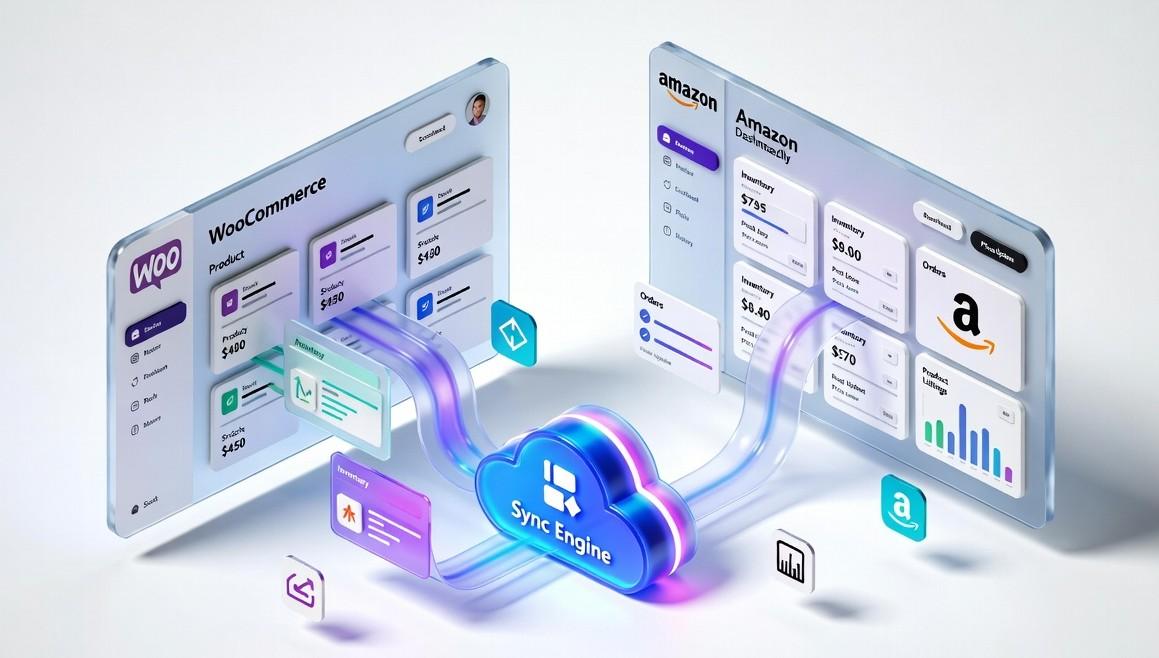
Before we talk about solutions, it’s important to clearly understand what WooCommerce Amazon sync actually means. Many sellers believe they are syncing their stores when they are not.
For example, some people import Amazon orders into WooCommerce once a day, update stock using spreadsheets, or manually copy product information between the two platforms. While this might feel like syncing, it’s not true synchronization.
Real WooCommerce–Amazon sync means that both platforms automatically stay updated with the same information all the time, and that too without any manual work.
For instance:
- When a product sells on Amazon, the stock level in WooCommerce automatically updates within minutes.
- If you change a product description in WooCommerce, the change appears on Amazon as well.
- If prices need to adjust based on Amazon fees or promotions, the system updates them automatically.
With real-time sycing everything stays connected and updated in real time.
Signs You Don’t Have Proper WooCommerce and Amazon Sync Yet
If you are currently doing the following things, then you do not have the right sync solution at all. These things are as follows:
- Exporting CSV files from Amazon and importing them into WooCommerce
- Manually updating stock levels after a group of sales
- Copy-pasting product descriptions between platforms
- Fixing inventory differences at the end of the month
- Trying to figure out which platform has the correct stock number
Then your systems are not truly synced. Instead, you’re managing separate systems, which often leads to mistakes, confusion, and extra work.
The Critical Features of an Effective Amazon WooCommerce Integration
A proper Amazon and WooCommerce integration solution keeps several important types of data automatically updated between WooCommerce and Amazon. Let’s have a look at those key data points below.
| Sync Category | What Gets Synced | Purpose |
| Product Information | Product titles, descriptions, images, categories, and attributes | Keeps listings consistent across WooCommerce and Amazon and improves product visibility. |
| Inventory Levels | Stock quantities update automatically after each sale | Prevents overselling and avoids errors caused by incorrect stock counts. |
| Orders | Sales, returns, refunds, and customer details | Allows you to manage everything from one place and keeps records accurate. |
| Pricing | Product prices adjust automatically based on rules, fees, or promotions | Helps to maintain pricing and profit margins. |
| Fulfillment Updates | Shipping status, tracking numbers, and fulfillment details | Keeps both platforms updated and ensures potential customers stay informed about their orders. |
When all of these elements stay synchronized, your business runs much more smoothly. Most importantly, you can manage everything without relying on spreadsheets or manual updates, giving you clearer operations and more time to focus on growing your business.
Why Ecommerce Sellers Need WooCommerce–Amazon Sync
Now that you understand what WooCommerce–Amazon sync actually means, the next question is simple: why is it so important?
For many e-commerce sellers, syncing WooCommerce with Amazon is not just a helpful feature. As the business grows, it becomes a necessity. Most successful multichannel stores rely on proper synchronization for three main reasons.
1. Reach Amazon’s Huge Customer Base:
Amazon is one of the largest e-commerce marketplaces in the world. Millions of people visit it every day with the intention of buying something. Unlike many visitors on regular websites, Amazon shoppers usually search for products because they are ready to purchase.
For WooCommerce store owners, this means access to a massive group of customers who may never discover their independent store through ads, SEO, or social media.
However, selling on Amazon also comes with strict standards. Without proper WooCommerce–Amazon sync, keeping up with these standards manually becomes very difficult, especially when order volume increases.
2. Expand Sales Channels Without Increasing Work:
Many ecommerce experts recommend selling on multiple platforms instead of relying on only one channel. This helps businesses reach more customers and reduce risk.
But without real-time syncing, managing multiple platforms often means much more work:
- Updating inventory in several places
- Managing different pricing systems
- Tracking orders across multiple dashboards
When everything is synced properly, WooCommerce functions as your main product catalogue while product information automatically updates on Amazon. Orders and inventory remain consistent across both platforms, ensuring accurate stock levels and centralized order management.
3. Stay Competitive in Modern Ecommerce:
Competition in ecommerce is stronger than ever. Many sellers are already doing their product listings on Amazon. But the real difference between successful sellers and struggling ones usually comes down to how well their operations are managed.
When systems are not synced properly, sellers often face problems such as:
- Selling products that are already out of stock
- Different prices appearing on different platforms
- Delayed order processing
- Inventory mismatches between systems
These issues can harm customer trust and seller performance. However, when operations run smoothly, it becomes easier to build customer trust, maintain good seller metrics, and grow sales steadily.
The Challenges of Managing WooCommerce and Amazon Without Proper Sync
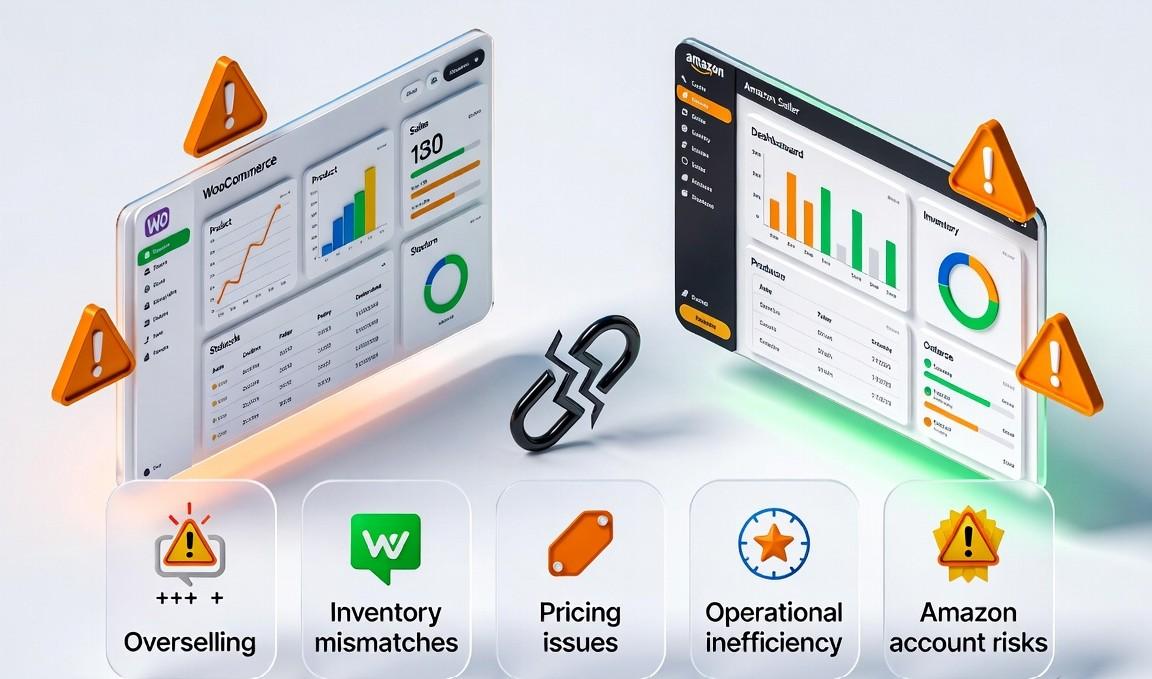
Even after understanding the importance of WooCommerce–Amazon sync, many sellers still try to manage both platforms manually. They rely on spreadsheets, delayed updates, or partial tools that do not keep all the data fully synchronized.
At first, this may seem manageable. But as orders increase, these methods create serious problems that affect sales, operations, and account health.
Below are some of the most common challenges multi-channel sellers face when proper synchronization is missing.
Overselling Products:
Overselling is one of the most costly problems in multichannel ecommerce.
For example, imagine your WooCommerce store shows 15 items in stock. Amazon also shows the same 15 units. If 8 units sell on WooCommerce and Amazon is not updated immediately, both platforms may continue accepting orders for stock that no longer exists.
This leads to several problems:
- Order cancellations and refunds
- Negative customer reviews
- Lower seller ratings
Overselling does not just affect the order management process. Repeated incidents can damage your seller reputation and reduce product visibility on the platform.
Inventory Mismatches:
Without real-time WooCommerce–Amazon sync, inventory records slowly become inaccurate. This happens for many reasons:
- Returns processed on one platform but not the other
- Pending orders reserving stock that is not visible everywhere
- Damaged or unavailable products not reflected in the inventory data
Over time, these issues create inventory confusion. Sellers may think products are available when they are not, or assume they are out of stock when units still exist. This leads to missed sales opportunities and unnecessary cancellations.
Pricing Problems:
Pricing can also become difficult when WooCommerce and Amazon are managed separately. Amazon includes several costs that WooCommerce stores usually do not deal with directly, such as referral fees, WooCommerce Amazon fulfillment, storage fees, and advertising costs.
If pricing is not updated correctly across platforms, sellers may accidentally set prices too low and reduce their profit margins. On the other hand, prices that are too high can make listings less competitive.
Manual pricing updates also cause delays, which means sellers may miss important market changes or promotional opportunities.
Operational Inefficiency:
Manual processes also create a large amount of unnecessary work. Teams often spend hours doing tasks like:
- Updating stock levels across platforms
- Fixing listing errors
- Reconciling orders and inventory data
- Checking which platform has the correct information
Instead of focusing on business growth, marketing, or product development, time is spent managing repetitive administrative work.
Risks to Amazon Seller Account Health:
Amazon Marketplace has strict performance standards for sellers. Metrics such as shipping speed, order defect rate, and cancellation rate must remain within specific limits.
If performance metrics fall below Amazon’s required standards, sellers may face:
- Account reviews
- Temporary selling restrictions
- Removal from certain product categories
- Account suspension
Maintaining accurate and synchronized operations is essential for protecting the long-term stability of an Amazon seller account.
Methods to Connect and Sync WooCommerce with Amazon
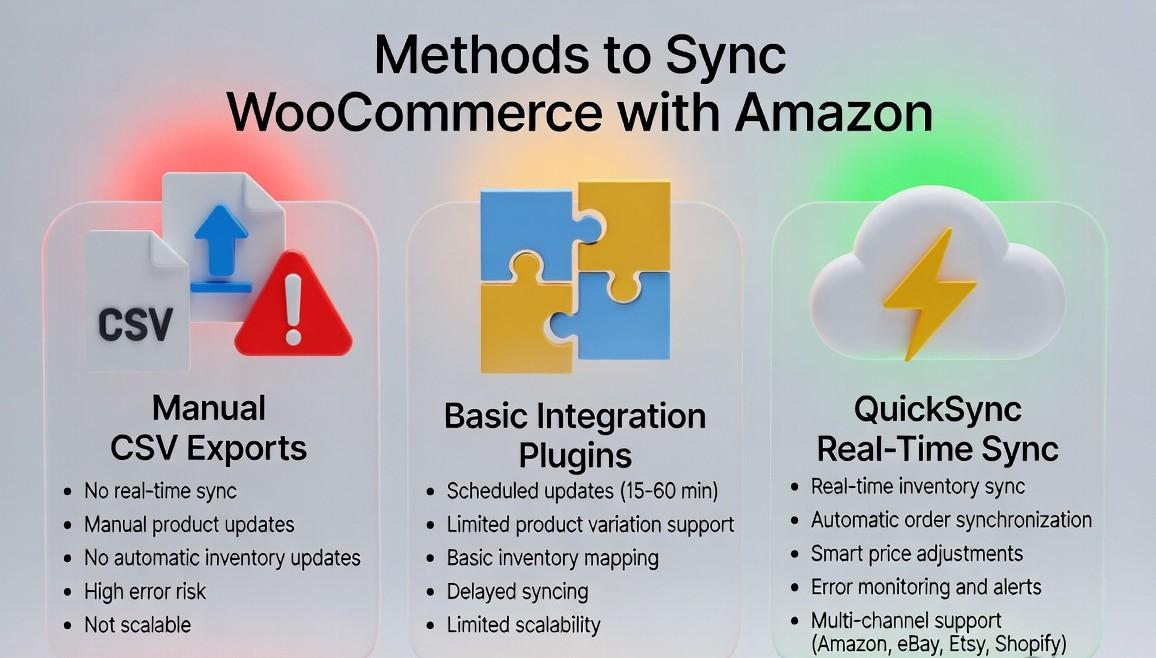
After explaining why synchronization matters, the next step is understanding how to actually connect WooCommerce with Amazon. There are three main approaches. Two may work temporarily, but only one can scale with serious business growth.
1. Manual CSV Exports and Imports:
This is the most basic method. You:
- Export product data from WooCommerce
- Format it for Amazon’s templates
- Upload it through Amazon Seller Central
- Check and adjust inventory manually, usually once a week
However, this method comes with several challenges, like stock updates taking days, leading to overselling, and any product change requires re-uploading everything.
There’s no built-in error checking, and managing more than 50 orders per month quickly becomes overwhelming. In short, while it might work for a small hobby store, serious sellers will face constant stock and order management issues.
2. Basic Amazon WooCommerce integration Plugins:
The next method is using basic integration plugins. These basic plugins connect WooCommerce to the Amazon marketplace and update data every 15–60 minutes. They can import orders and handle simple product mapping.
But Problems with this method are:
- Updates are delayed, so inventory mistakes still happen
- Doesn’t handle complex product variations well
- Minimal error reporting
- No smart pricing adjustments
- Works mainly for one platform and is hard to scale
- Can break during high traffic or Amazon API changes
So it is better than doing everything manually, but still risky. Even a small delay can cause overselling and unhappy customers.
3. QuickSync – True Real-Time Sync:
QuickSync is designed for serious multi-channel sellers. It does more than just connect WooCommerce and Amazon. It keeps everything in sync automatically.
QuickSync does:
- Updates inventory across all channels in minutes.
- Reserves stock per channel to prevent overselling.
- Adjusts Amazon prices automatically for fees and competition.
- Syncs all Amazon orders with WooCommerce in real time.
- Handles errors and sends instant alerts.
- Supports adding eBay, Etsy, or Shopify with no extra setup
QuickSync turns WooCommerce and the Amazon marketplace into a single, reliable system. You can grow your business from hundreds to millions in sales without worrying about mistakes or extra work.
QuickSync: The Reliable Sync Solution for Multichannel Sellers
After seeing three major ways to connect WooCommerce and Amazon, QuickSync stands out as the choice for sellers who want smooth, error-free operations. Here’s why it works differently from other solutions:
True Real-Time Architecture:
Unlike plugins that poll for updates periodically, QuickSync uses a webhook-based architecture and continuous API monitoring. When a sale occurs on Amazon, your WooCommerce inventory adjusts immediately. When you receive new stock in your warehouse, both platforms update simultaneously.
Intelligent Inventory Management:
QuickSync doesn’t just move numbers. It applies business logic. Set safety stock buffers for each channel, reserve inventory for specific marketplaces, and manage FBA versus FBM stock separately. The system prevents overselling while maximizing your available-to-sell quantities.
Amazon-Specific Optimization:
Amazon’s requirements are unique: specific category templates, strict image standards, complex variant relationships, and rigorous performance metrics. QuickSync understands these nuances, ensuring your listings remain compliant and competitive.
Bidirectional Order Flow:
Amazon orders appear in your WooCommerce dashboard instantly. Process them alongside your direct sales, update tracking information, and manage returns all from one interface. Shipping confirmations flow back to the Amazon marketplace automatically, protecting your seller metrics.
Scalable Infrastructure:
Whether you’re processing 10 orders daily or 10,000, QuickSync’s infrastructure scales seamlessly. No slowdowns during peak seasons, no API throttling issues, no downtime during critical selling periods.
How to Connect & Sync WooCommerce with Amazon Using QuickSync
Connecting WooCommerce to Amazon with QuickSync is simple and does not require technical expertise. Within just a few clicks, you can set up real-time synchronization so that inventory, product, and orders sync automatically.
Here’s how to do it step by step:
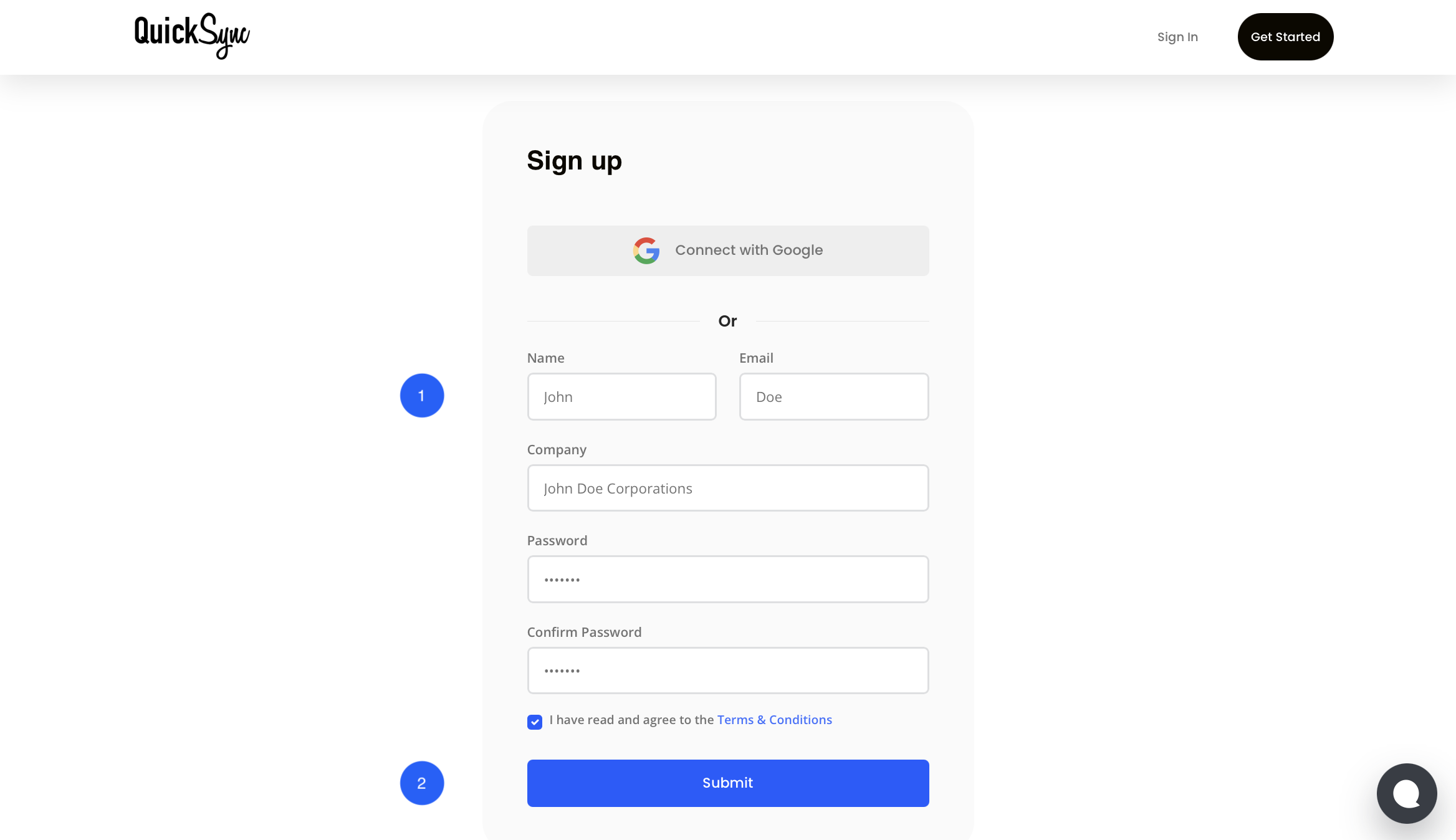
Step 1: Create Your QuickSync Account
- If you’re new to QuickSync, start by signing up and selecting WooCommerce as your main platform.
- If you already have an account, simply log in.
Step 2: Connect Your WooCommerce Store
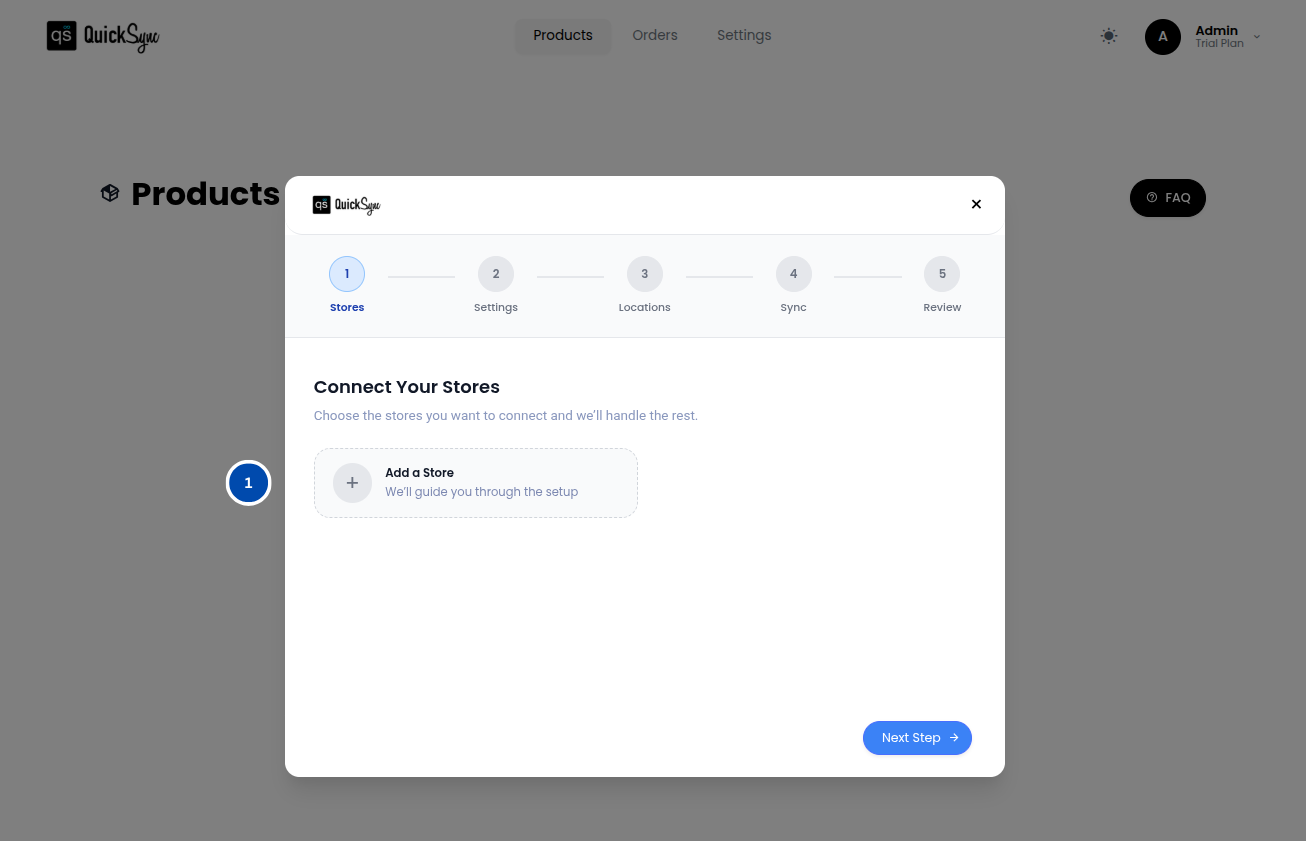
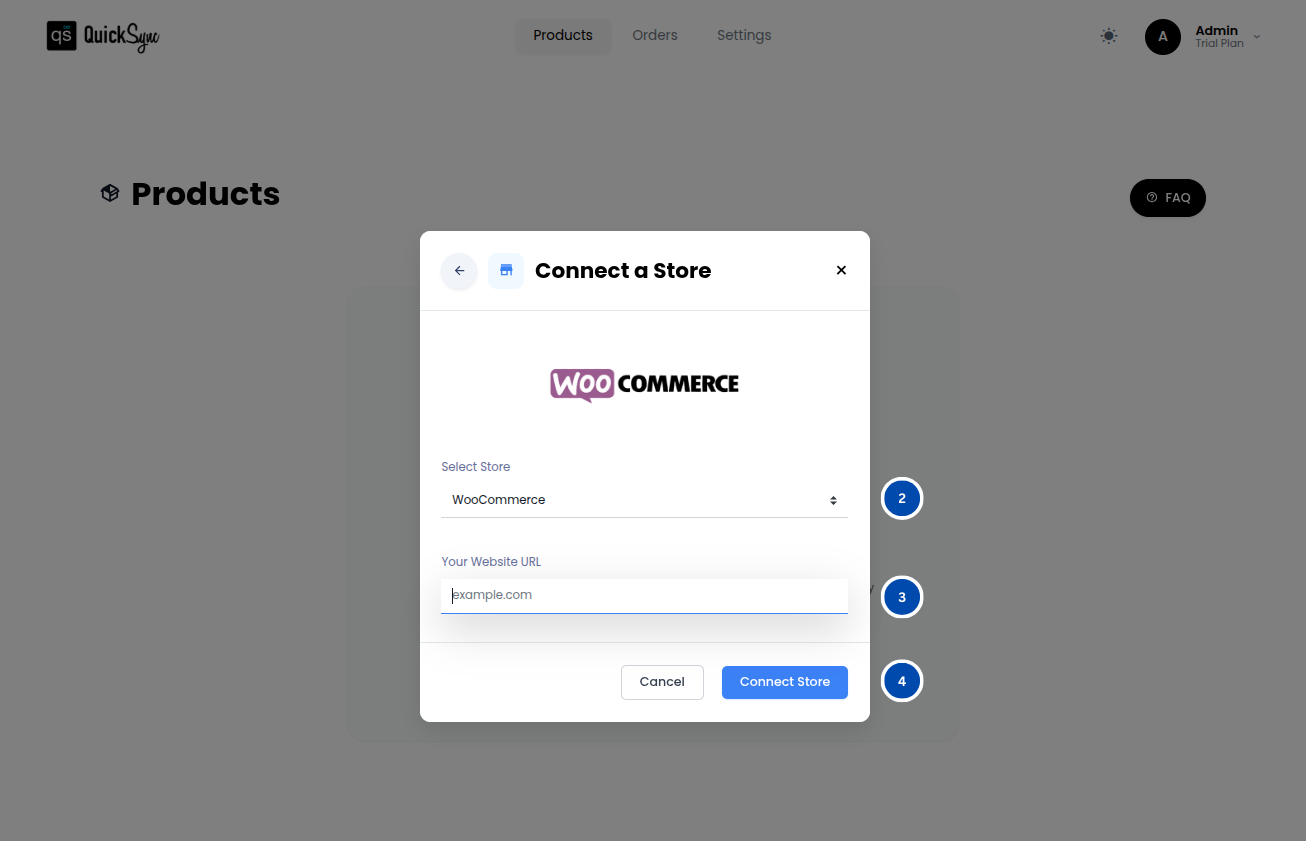
- Go to the QuickSync Dashboard, click Add a Store, and select WooCommerce.
- Enter your WooCommerce store URL.
- Click Connect a Store and approve the access request to allow QuickSync to manage your products, inventory, and orders.
Once approved, QuickSync will automatically import your store data, including categories, attributes, settings, and products.
Step 3: Connect Your Amazon Account
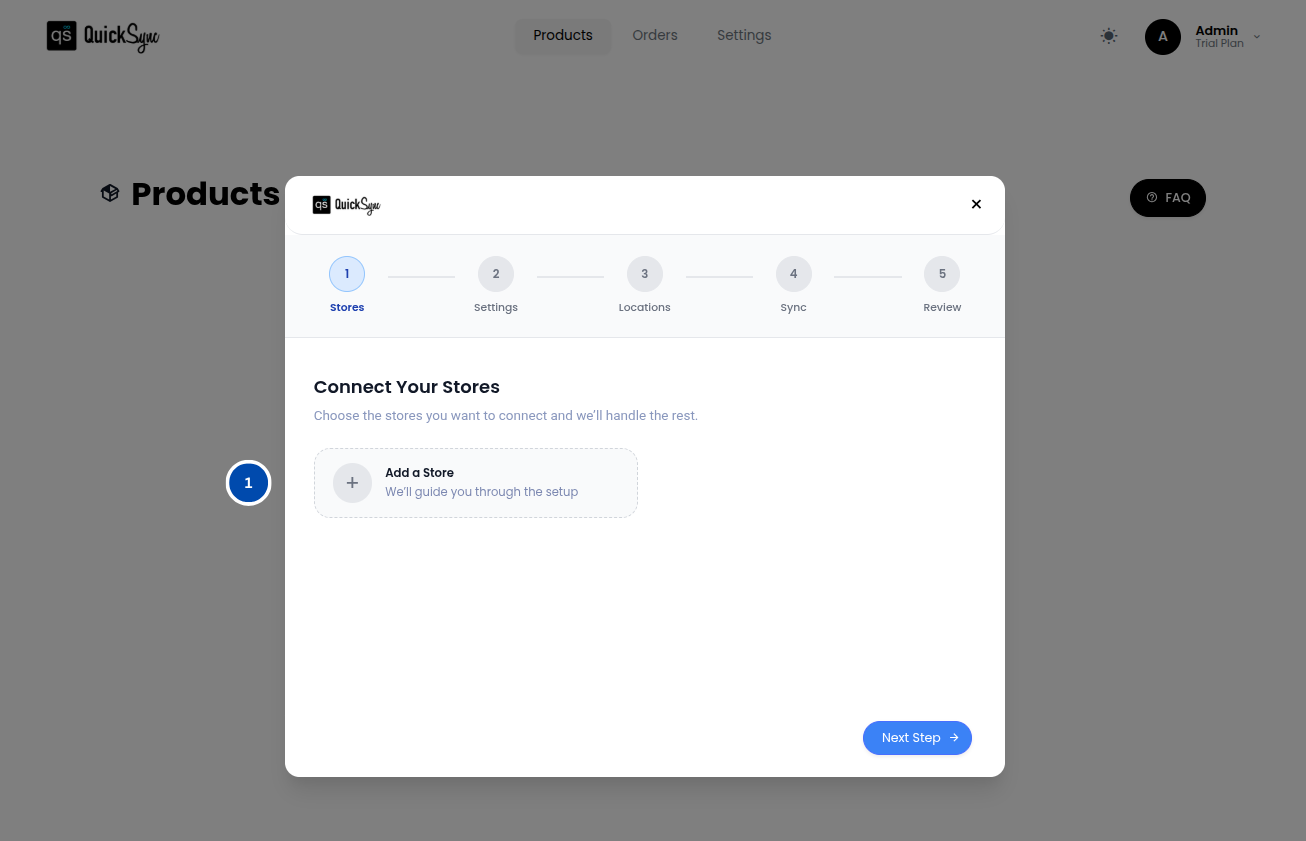
- Now connect your second store (Amazon) using the same steps. Click on “Add a store“.
- Select the Amazon marketplace from the drop-down list of e-commerce channels.
- Click Connect a Store and approve the access
Step 4: Set Sync Preferences
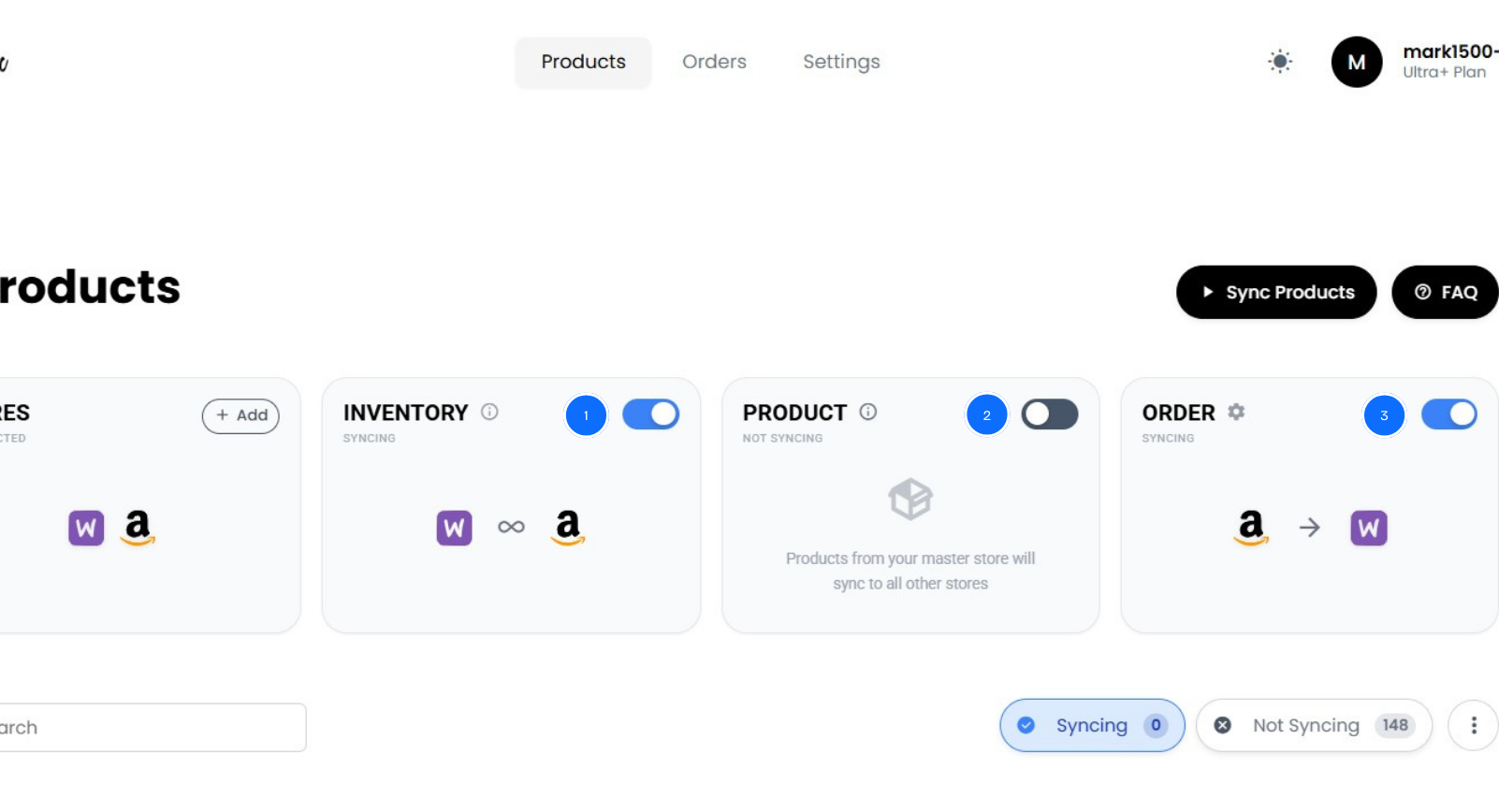
Now choose what you want QuickSync to sync automatically between WooCommerce and Amazon. You can choose whether to sync products, inventory, orders and which products or categories should be included in the sync
Once everything is set up, WooCommerce and Amazon stay in sync automatically. This ensures your multichannel business runs smoothly without errors, overselling, or extra work.
Best Practices for WooCommerce and Amazon Success
Now that your WooCommerce and Amazon stores are connected and syncing automatically through QuickSync, the next step is running your multichannel business efficiently. Simply connecting the platforms is not enough. Consistent operations and smart management separate thriving stores from those constantly dealing with problems.
Maintain WooCommerce as Your Single Source of Truth:
All product information, including titles, descriptions, pricing, and inventory sync, should originate in WooCommerce. QuickSync acts as the distribution tool, not the editing interface. This keeps product attributes consistent across platforms and prevents version conflicts.
Enable Continuous Real-Time Syncing:
Avoid scheduled or batch updates. Even short delays can create overselling risks in fast-moving multiple channels. Continuous synchronization ensures your inventory, orders, and product details remain accurate at all times.
Implement Conservative Safety Stock Buffers:
Reserve slightly more inventory than you think you need, especially when starting. A 10 to 15 percent buffer helps prevent overselling during sudden demand spikes while you learn your sales patterns.
Monitor Amazon Seller Metrics Religiously:
Check your Amazon Account Health dashboard daily. Track metrics such as:
- Late shipment rate
- Order defect rate
- Cancellation rate
Address any trends toward Amazon’s limits immediately to protect your performance and account health.
Test Before Scaling:
Before running major promotions or increasing advertising spend, verify that your sync works correctly. Place test orders, confirm inventory updates, and validate tracking synchronization under controlled conditions.
Regular Reconciliation:
Even with automated sync, weekly checks help catch edge cases like returns, partial shipments, or API interruptions. Spending just 15 minutes per week can prevent month-end surprises.
Following these best practices together with real-time WooCommerce and Amazon sync creates a strong foundation for smooth operations, accurate inventory, and reliable order fulfillment. This allows you to focus on growing your business instead of fixing avoidable problems.
The Bottom Lines: What Next!
In short, WooCommerce Amazon sync is not just convenient. It is essential. Manual updates and basic plugins create gaps that cause overselling, lost time, and operational headaches. True synchronization like QuickSync keeps inventory, orders, and pricing accurate in real time, letting you scale confidently across Amazon and other marketplaces.
The sellers who succeed are not the ones managing spreadsheets. They are the ones who automate reliably. Reach millions of Amazon customers without stress, mistakes, or chaos.