Updating prices across dozens of products and multiple marketplaces is time-consuming and error-prone. One small mistake can hurt your profit margins or confuse customers. Price Rounding solves this problem by keeping your prices neat, consistent, and easy to manage.
In this blog, we’ll define what price rounding means, why it matters for online sellers, and how to automate it efficiently.
What Is Price Rounding?
Price rounding is the process of adjusting prices to the nearest whole number or a specific decimal digit. For example, rounding $9.97 to $10.00 or $4.23 to $4.25.
It helps online businesses maintain uniform pricing, simplify calculations, and make it easier for users to understand value at a glance. Whether it’s a t-shirt or a high-end product, rounding the price ensures clarity and consistency in your store.
Key Benefits of Rounding Price For Online Sellers
Price Adjustment plays a crucial role in enhancing customer experience, maintaining pricing consistency, and simplifying store management. Rounding keeps prices clean and intentional across discounts, currencies, or psychological pricing.
Key benefits include:
-
Simplifies pricing: Creates uniform pricing across your store and POS system.
-
Reduces manual effort: Saves time by eliminating repetitive price edits.
-
Improves consistency: Keeps pricing the same on all channels.
-
Enhances customer trust: Buyers prefer neat, predictable prices.
-
Supports automation: Works seamlessly with pricing and inventory sync tools.
Common Price Rounding Methods Used in Online Stores
There are some common rounding methods that help online sellers keep pricing consistent and professional across sales channels. These methods are as follows:
1. Round to the nearest whole number:
This is one of the simplest and most popular rounding methods. It eliminates decimals to make prices cleaner and easier to read. This type of price round is ideal for retail stores and faster checkout clarity.
-
Example: $19.45 → $19.00, $19.50 → $20.00.
2. Round to fixed decimals:
Instead of rounding to a whole number, you can set prices to always end with specific decimals, such as .25, .50, or .99. This helps businesses maintain a consistent line across all platforms.
-
Example: $14.23 → $14.25.
3. Rule-based rounding (up or down):
In this method, you set specific rules — such as always rounding up to the nearest $1 or down to the nearest 0.50. It helps maintain predictable pricing and avoid odd numbers.
-
Example: $17.10 → $18.00 (round up) or $17.90 → $17.50 (round down).
4. Percentage-based rounding:
Adjust prices by a set percentage (e.g., +5%) and then round to .99 or .00 for a cleaner look. It is ideal for handling taxes, discounts, or exchange rate differences.
-
Example: Increase all prices by 5%, then round them to the nearest .99 or .00 for clearer display.
If you sell across currencies or multiple sales channels like Etsy, eBay, and WooCommerce, rounding prices ensures equal and accurate pricing.
The Role of Price Rounding in Managing Inventory For Multichannel Stores
Rounded prices aren’t just neat — they also make inventory control easier. When pricing amounts are standardized, you can group items, check bulk prices, and manage listings more effectively. For sellers managing thousands of SKUs on Shopify or Square, small pricing errors can cause big issues.
Inconsistent prices create confusion in reports and mismatched product listings. Regular price updates keep data accurate and also help maintain better control of inventory levels.
Smart Ways to Automate Price Rounding for Multi-Store Sellers
1. Built-In Platform Settings
Most platforms, such as Shopify, WooCommerce, and BigCommerce, offer basic rounding options in their settings. You can enable automatic rounding for product prices, discounts, or taxes—simple and effective if you manage a single store.
2. Custom Scripts or APIs
For custom websites or advanced setups, automation scripts or APIs can round prices dynamically based on your own rules (e.g., always end in .99 or round up to the nearest dollar). This method offers flexibility but requires technical setup and maintenance.
3. Third-Party Apps Like QuickSync
For multichannel sellers, QuickSync simplifies price automation. Its Modify Prices feature automatically adjusts and rounds prices across platforms like eBay, Amazon, and Etsy, maintaining consistency while offsetting marketplace fees. It also supports live currency conversion, rounding prices to .49 or .99 for seamless cross-border selling.
Steps to Modify Automate Price Modification Via QuickSync
Manually adjusting prices across multiple platforms takes time and invites errors. Tools like QuickSync automate price rounding, keeping prices accurate and consistent across all channels.
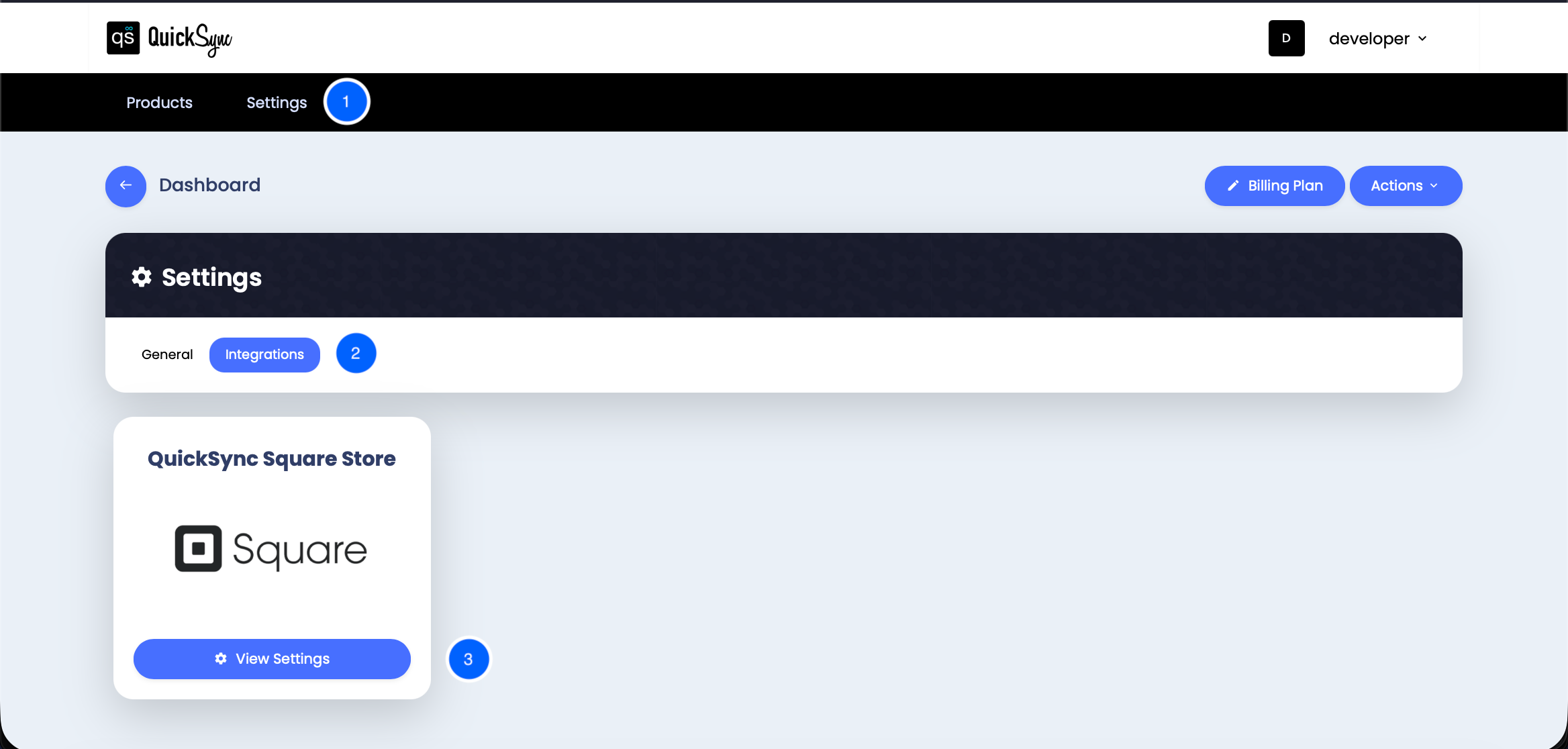
Step 1: Open Integration Settings
In your QuickSync dashboard, go to Settings → Integrations → View Settings to access your pricing automation controls.
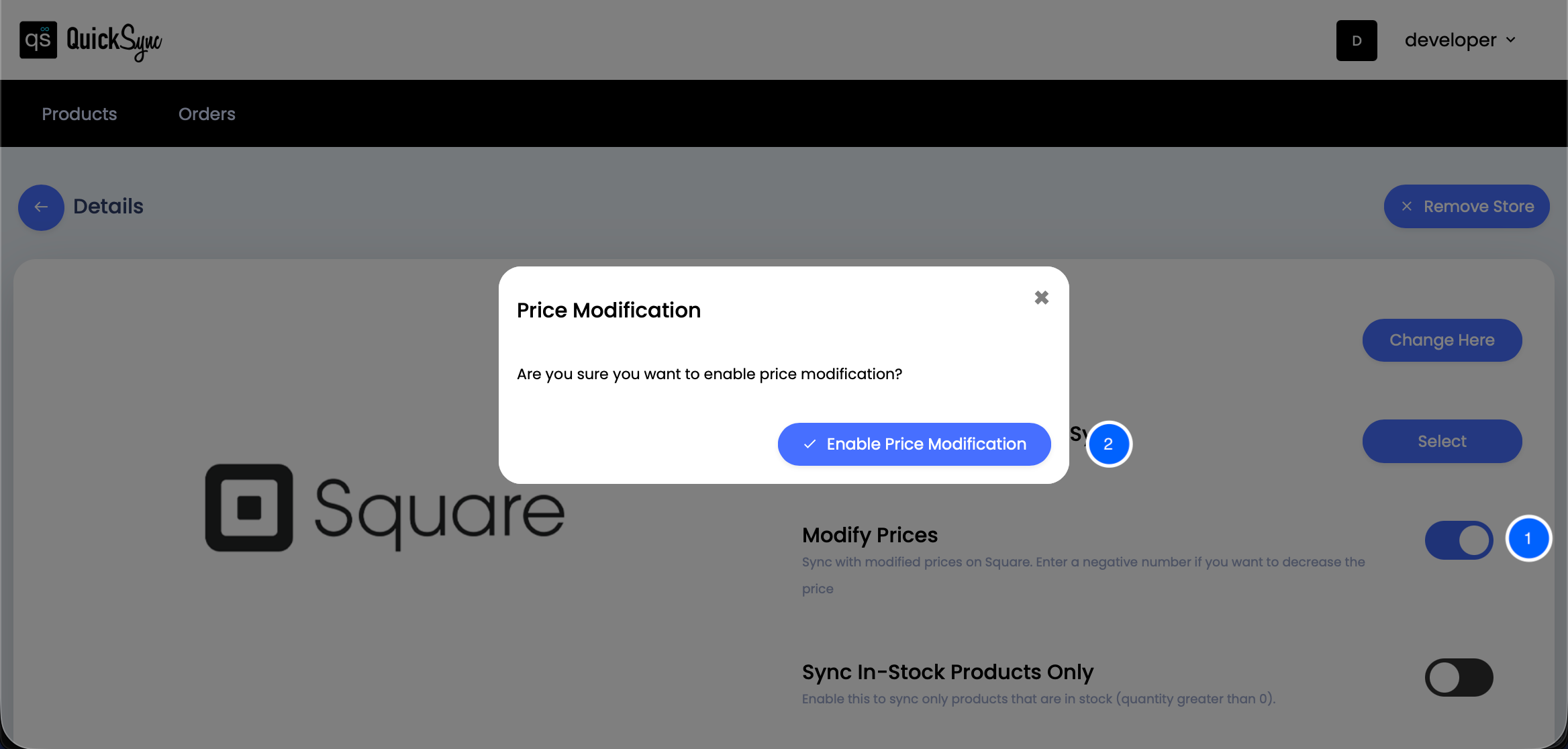
Step 2: Enable Modify Price
Toggle Enable Modify Price to activate automated price adjustments for your synced products.
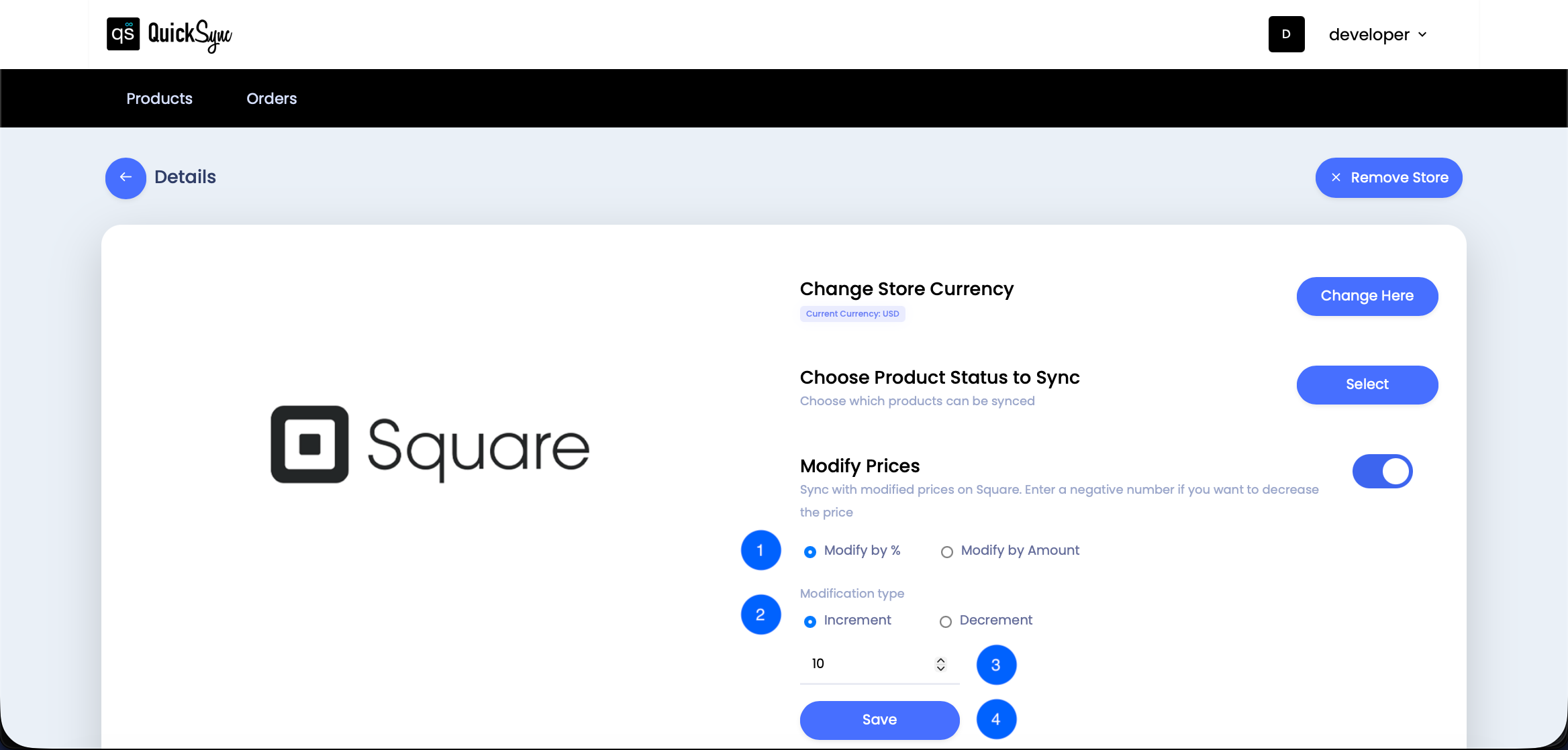
Step 3: Set Your Price Adjustment Rules
Choose how you want to modify prices — either by percentage or fixed amount.
Then, select the Modification Type:
-
Increment to raise prices (e.g., to cover marketplace fees), or
-
Decrement to lower prices (e.g., for discounts).
-
Enter your desired value, such as 10% or $2.00, and click Save to apply the rule.

Step 4: Sync and Review Changes
Run a sync to apply your new pricing rules automatically across all connected platforms. Review activity logs to confirm updated prices and ensure consistency across every channel.
Best Practices for Setting Up Price Rounding Rules
To make the most of your rounding strategy, keep these tips in mind:
-
Pick one rounding method (like nearest 0.99 or 1.00) and apply it store-wide.
-
Regularly check for rounding accuracy after syncing.
-
Avoid extreme rounding that can make prices look too high or low.
-
Review currency conversions, taxes, and discounts carefully.
-
If unsure, contact support or use test runs before applying changes globally.
Wrapping it up
Even small changes like rounding a t-shirt price from $19.97 to $20.00 can impact how buyers perceive your deal. This approach connects closely with psychological pricing strategies. Automated Price Rounding also keeps your pricing accurate, attractive, and consistent. With tools like QuickSync, you can round the prices once and sync them across multiple sales channels.
Get started with QuickSync to automate & sync prices across multiple stores perfectly!