Running an online store on Shopify but using Square POS in your physical store? You might be thinking, Can I use Square with Shopify?
Let me tell you, yes, Shopify and Square can work together.
But Shopify and Square do not offer a native integration, because they are separate systems. Merchants often try to manage them using spreadsheets or CSV imports and exports. While this may work temporarily, it becomes difficult to manage as product catalogs grow and sales increase.
Without proper Square Shopify integration, businesses often face inventory mismatches, manual data entry, and disconnected order records. Retailers lose over $1.2 trillion every year due to stockouts and inventory visibility problems caused by disconnected systems and inaccurate stock data.
That’s why when it comes to integrating two big ecommerce platforms where you are getting revenue, you need the right integration tool. That’s what this blog covers.
In this guide, you will learn how to connect Square with Shopify and manage both systems efficiently.
Does Square Work with Shopify?
Yes, you can use Square with Shopify, but not directly. Square and Shopify don’t have built-in features that you can toggle and connect them. Square is a POS software, while Shopify is an ecommerce platform designed for online selling.
You need a third-party, reliable integration tool to connect Square with Shopify seamlessly and sync products, inventory, and orders in real-time.
When people ask, “Does Shopify integrate with Square?”, they’re usually asking one of three things. Let me answer each directly:
Can I accept Square payments on my Shopify store? No. Shopify has its own payment gateways. Square’s payment processing isn’t compatible with Shopify’s checkout.
Can I sync inventory between them? Only with a third-party integration tool. Manual syncing or basic automation platforms create gaps that cause overselling and stock mismatches.
Can I manage both from one dashboard? Only if you use an integration platform. Without one, you’re managing two separate systems.
To connect Square with Shopify effectively, you need an integration sync tool that bridges the two platforms and keeps your product data, inventory, and orders synchronized across both systems.
Why Square and Shopify Don’t Integrate Natively
The main reason why Shopify and Square don’t integrate natively is that both platforms are built for different purposes.
Shopify promotes its own payment processor (Shopify Payments) and POS system. Square provides its own payment processor, POS hardware, and business tools.
Because of this, they do not offer a direct native integration.
Think about what Shopify handles natively: product catalogs, online inventory, digital orders, and customer accounts.
Now think about what Square owns: register payments, location-specific stock, receipt printing, and card readers.
These aren’t just different features; they’re fundamentally different business operations.
This means each platform prefers merchants to operate fully within its ecosystem instead of combining two systems.
Running two systems without integration creates operational friction. Both platforms work independently, but they must be connected through an automation platform to operate as a single, unified commerce workflow.
What Happens When Shopify and Square Aren’t Connected
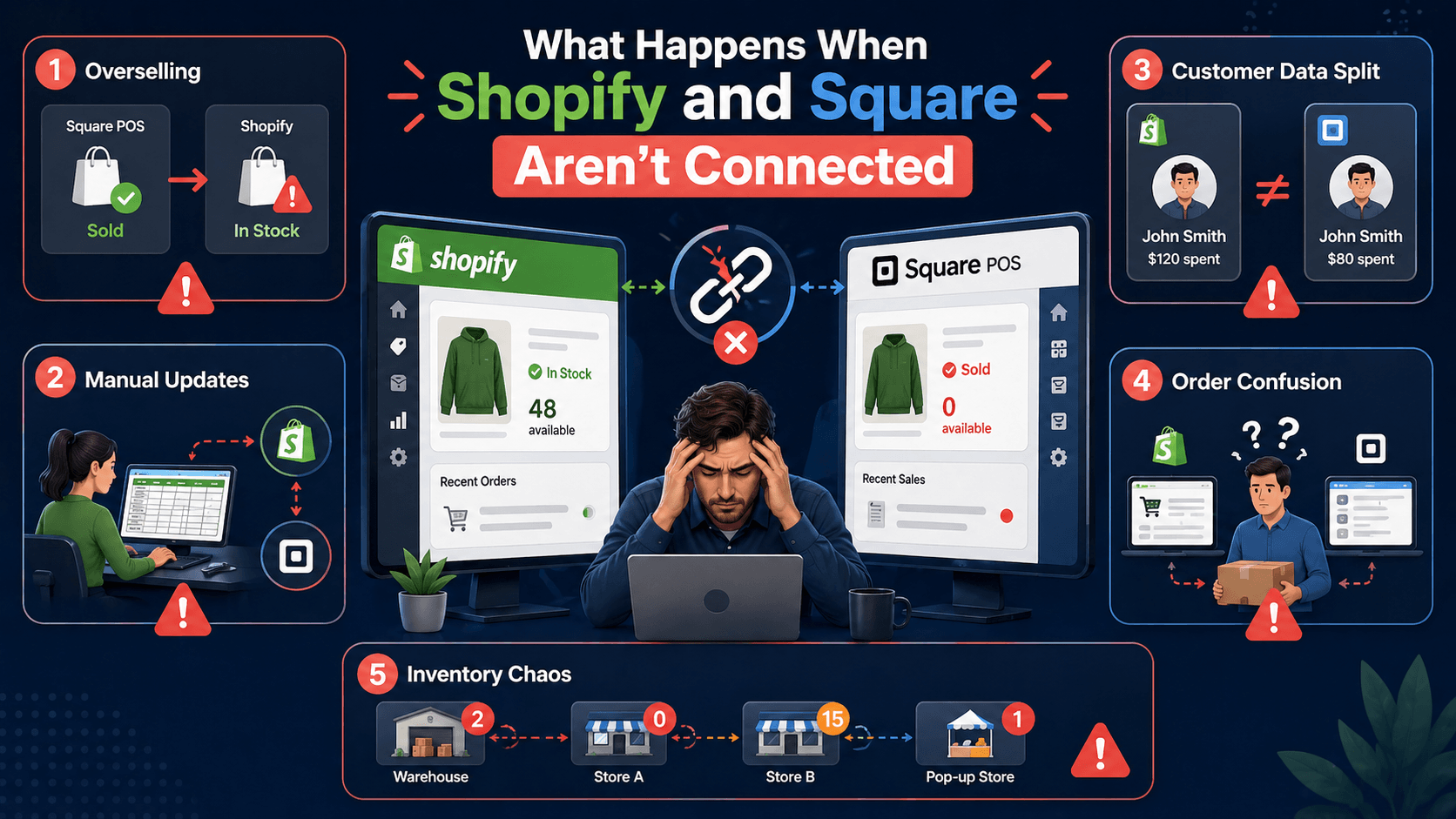
Many retailers operate Shopify and Square separately at first. It seems manageable in the beginning. But once sales increase, problems appear quickly. Inventory mismatches, manual updates, and reporting issues become common.
Here are the biggest operational problems merchants face.
Overselling Is Your Biggest Problem
When Shopify and Square are not connected, overselling becomes a serious risk. Your inventory levels are never accurate without real-time sync. A product sold in your Square POS does not update the Shopify inventory automatically. That means customers can still purchase the same item online even when the stock is already gone.
This creates order cancellations, refund requests, and unhappy customers. Studies show overselling costs retailers up to 15% of lost sales annually.
Manual Inventory Updates Become a Daily Nightmare
Without sync, someone on your team has to manually update inventory every single day. They check what sold in Square. They log into Shopify and adjust stock. They check Shopify orders. They manually note them in Square for fulfillment.
For a store with 500 SKUs, this is hours of work. For 5,000 SKUs? It becomes impossible. Mistakes happen. Stock levels drift. You lose track of what’s actually available.
Your Customer Data Becomes Worthless
A customer buys from you online. Shopify knows they spent $50. A month later, the same customer walks into your store. Square processes its purchase. But it’s a different record. You have no idea they’re a repeat customer.
You can’t target them with personalized offers. You can’t see their full purchase history. You’re treating them like a stranger every time.
Your Fulfillment Team Runs in Circles
Orders come in from Shopify. Your fulfillment team needs to pick and pack them. But they’re not in Square. They’re manually writing orders down or managing a separate spreadsheet for Shopify Square orders.
Meanwhile, in-store purchases are in Square. These orders go a different route. Your fulfillment operation is split. Productivity drops. Errors multiply.
Multi-Location Inventory Becomes Impossible to Manage
Retailers with warehouses, pop-ups, or multiple physical stores cannot maintain accurate inventory levels across both systems. A stock change in the Square location does not reflect everywhere.
This leads to confusion about available products. Without proper syncing, merchants struggle to maintain reliable inventory management across brick and mortar stores and online sales channels.
How Shopify Square Integration Improves Your Business

Now that you understand the problems, let’s look at the advantages of integration. Connecting Square with Shopify creates a unified retail business. Your online store and physical store start working together instead of operating separately.
Here are the major benefits of syncing Square and Shopify.
Real-Time Inventory Accuracy
With real-time Shopify and Square, your inventory stays accurate at all times without any manual input from your team. Someone buys online. Your Shopify inventory drops instantly. That same stock count updates at all your Square locations immediately.
This prevents overselling. Retailers with real-time inventory sync report 30% fewer stockouts. Your conversion rates go up. Your customer satisfaction goes up. Your refund rate drops.
Unified Order Management
Another major benefit of Square Shopify integration is that your order management becomes way easier. Every order, from every channel, lands in one dashboard. A customer orders on Shopify. That order goes straight to your fulfillment team with complete details.
You can manage Shopify and Square orders from one dashboard. Your fulfillment team picks orders from one queue. Order processing becomes faster. Shipping accuracy improves.
Consistent Product Catalog Across Platforms
With integration, managing product details and uploading products becomes more convenient. Products created in Shopify can automatically appear in Square POS and Square Online with all variants, images, and pricing intact.
This keeps product information accurate everywhere your customers shop. Variant details like color, size, material, and SKU stay aligned. This makes every item scannable at the register and correctly listed online.
Customer Data Consolidation
When Shopify and Square are connected, customer information from both systems stays unified. Online and in-store purchases link to the same customer profile, creating a complete purchase history. This helps businesses understand customer preferences and buying behavior.
With consolidated customer data, merchants can create targeted promotions. They improve loyalty programs and deliver more personalized shopping experiences.
Better Sales Reporting and Analytics
You want to know: What’s my best-selling product? What’s my revenue by location? How are my online sales vs. in-store sales? Without integration, you’re piecing together data from two different dashboards, manually combining reports. It’s incomplete. It’s slow.
With proper integration, all your sales data flows into one analytics view. You see patterns you couldn’t see before. You make better business decisions.
Now that you understand the importance of integration, let’s discuss what a proper Shopify Square integration workflow should include. Many connectors only sync basic data. But a true integration tool should handle multiple retail operations automatically.
Here are the core features merchants should expect.
What a Proper Shopify-Square Integration Should Include
A reliable integration tool should prioritize real-time inventory syncing. Inventory must update instantly across Shopify and Square locations whenever a sale happens. This prevents stock mismatches. It ensures accurate inventory levels for both online and in-store sales.
Real-Time Inventory Sync Across All Locations
A reliable integration tool should prioritize real-time inventory syncing. Inventory must update instantly across Shopify and Square locations whenever a sale happens. This prevents stock mismatches. It ensures accurate inventory levels for both online and in-store sales.
Product Sync with Full Variant Support
Another important feature to look for in an integration tool is product sync support at the variant level. Every product from your Shopify store should sync to Square with all its details intact. Product name, description, images, and pricing should stay in sync.
Bi-Directional Order Sync with Payment Details
Bi-directional order syncing is another feature in a reliable integration tool. Orders created in Square POS should appear automatically in Shopify. While Shopify online orders remain visible across both systems. Payment details must also sync correctly.
Easy-to-Use Integration Setup
A reliable integration tool should be easy to set up and manage, even for non-technical store owners. The tool should have a user-friendly interface so merchants can connect Shopify and Square quickly. Clear dashboards and straightforward controls make it easier to manage syncing preferences.
Support for Large Product Catalogs
A reliable integration tool should be able to handle large product catalogs without performance issues. Many retailers manage hundreds or even thousands of products with multiple variants. Strong catalog support prevents sync failures and allows businesses to scale.
Support for Processing Payments and Processing Fees
The integration must sync payment methods and processing fees data from Square to Shopify orders, ensuring financial records reflect actual transactions. This helps maintain accurate accounting and simplifies reconciliation across multiple platforms.
3 Different Ways to Connect Square to Shopify
Connecting Square to Shopify can be done in several ways, but not every method works well for long-term retail operations. Some approaches require manual work, while others rely on basic automation tools.
Let me explain the three most common ways merchants connect Shopify and Square.
Method 1: Manual Data Entry (Not Recommended for Growth)
Here’s how most people start: spreadsheets and manual updates.
You check what sold in Square each morning. You log into Shopify and adjust inventory. You check Shopify orders and manually create them in Square for fulfillment. You update product prices if they change. You export data, import data, and copy and paste information.
Why this breaks:
This method is incredibly time-consuming (5-15 hours per week for medium-sized stores)
It has a high error rate (typos, missed updates, wrong numbers)
It doesn’t scale (the bigger you grow, the more hours you need)
You can’t run a growth strategy when someone’s doing data entry all day
For a store with 50+ SKUs or more than one location, this approach costs you money every single day through overselling, inefficiency, and lost sales.
Method 2: CSV Import and Export (Temporary Workaround)
Another method some merchants try is using CSV imports and exports to move data between Shopify and Square. This involves exporting product or inventory data from one platform and uploading it into the other. At first, it may look like a simple way to connect the two systems and keep product data aligned.
Why this method fails long-term:
It requires constant manual CSV downloads and uploads
It doesn’t offer real-time inventory syncing between platforms
In this, variant mapping can break for large product catalogs
Images and product metadata often fail to transfer correctly
Multi-location inventory updates become extremely difficult
Time-consuming process for stores with frequent sales
CSV syncing may work temporarily for very small catalogs. Managing Shopify and Square through spreadsheet uploads quickly becomes inefficient and risky.
Method 3: Integration Tool like QuickSync (The Right Solution)
A dedicated integration tool like QuickSync connects Shopify and Square through a direct, structured sync. Instead of relying on manual workarounds or basic automations, it keeps products, inventory, and orders in sync across both platforms automatically.
Here’s what QuickSync offers:
Real-Time Inventory Sync: Stock levels sync between Shopify and Square locations after every sale, return, or manual adjustment.
Product Sync with Variants: Product titles, descriptions, images, pricing, and variants stay in sync across both platforms automatically.
Order Sync: Online and in-store orders sync into a unified dashboard so fulfillment teams work from one complete order view.
SKU and Barcode Sync: Every product variant includes proper SKU and barcode support. It allows Square POS hardware to scan items instantly at the register.
Payment Method from Tenders: Card or cash payments made in-store sync to Shopify, so order records reflect the exact payment method used.
Service Charges as Native Objects: Service charges appear as actual Square service charges rather than product line items, keeping financial reports accurate.
Cancel with Refund Flow: Cancelling an order in Shopify automatically triggers the correct refund and order closure in Square.
Webhook Idempotency Protection: Duplicate webhook events from Square are automatically filtered. It prevents duplicate orders or incorrect inventory deductions.
A QuickSync integration tool scales with you. Whether you have 100 SKUs or 10,000, QuickSyn can handle operations.
How to Connect Square to Shopify Using QuickSync
Connecting Square to Shopify using QuickSync is straightforward and can typically be completed in under an hour. The setup process is designed for merchants. So no technical expertise or developer support is required.
Follow the steps below to integrate Square with Shopify using QuickSync.
Step 1: Create Your QuickSync Account
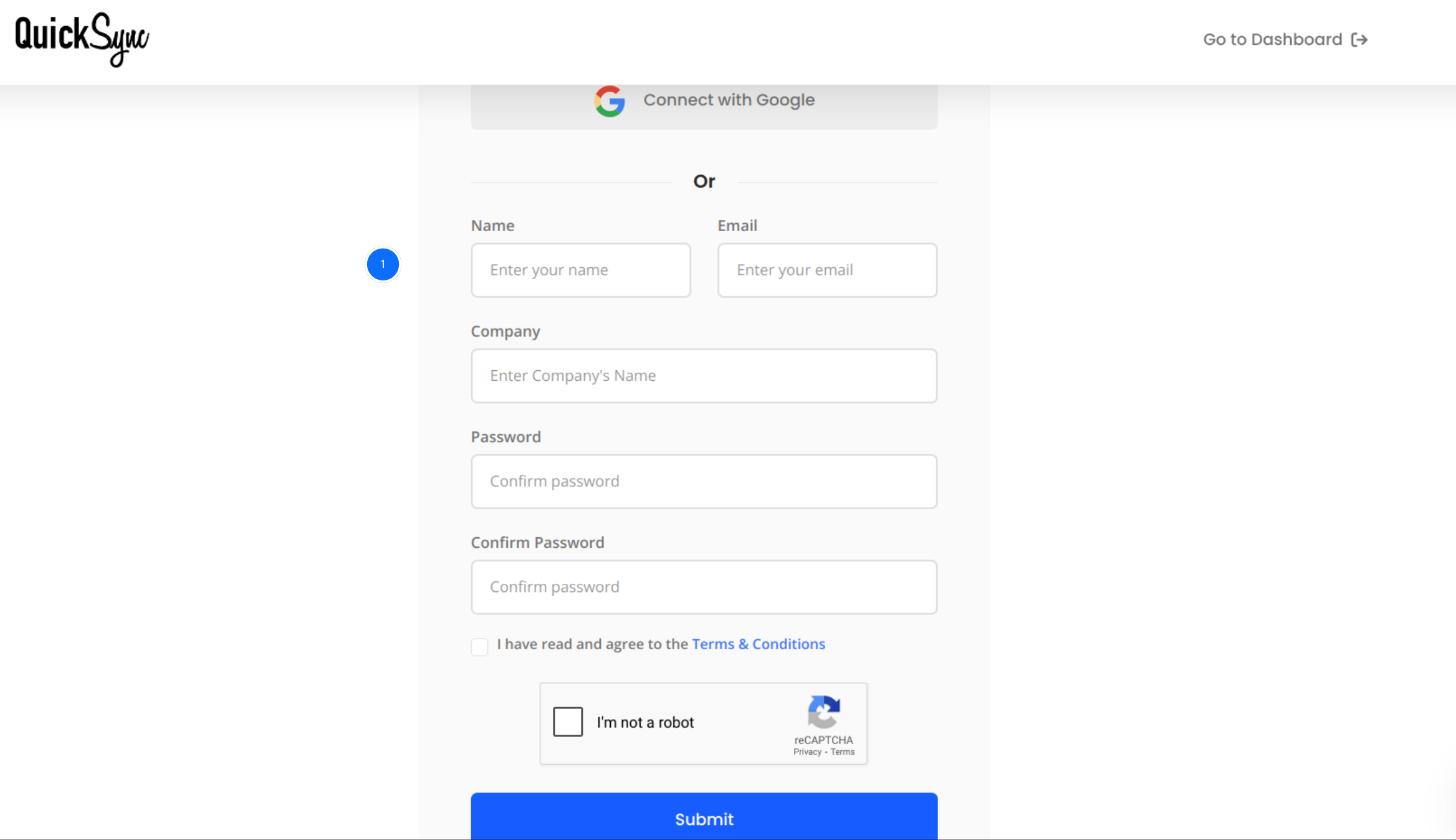
Visit quicksync.pro and click Sign Up to create your account.
After registration, you will be redirected to the QuickSync dashboard.
This dashboard lets you manage integrations, configure inventory sync, and monitor connected stores from one place.
Step 2: Connect Your Square Account
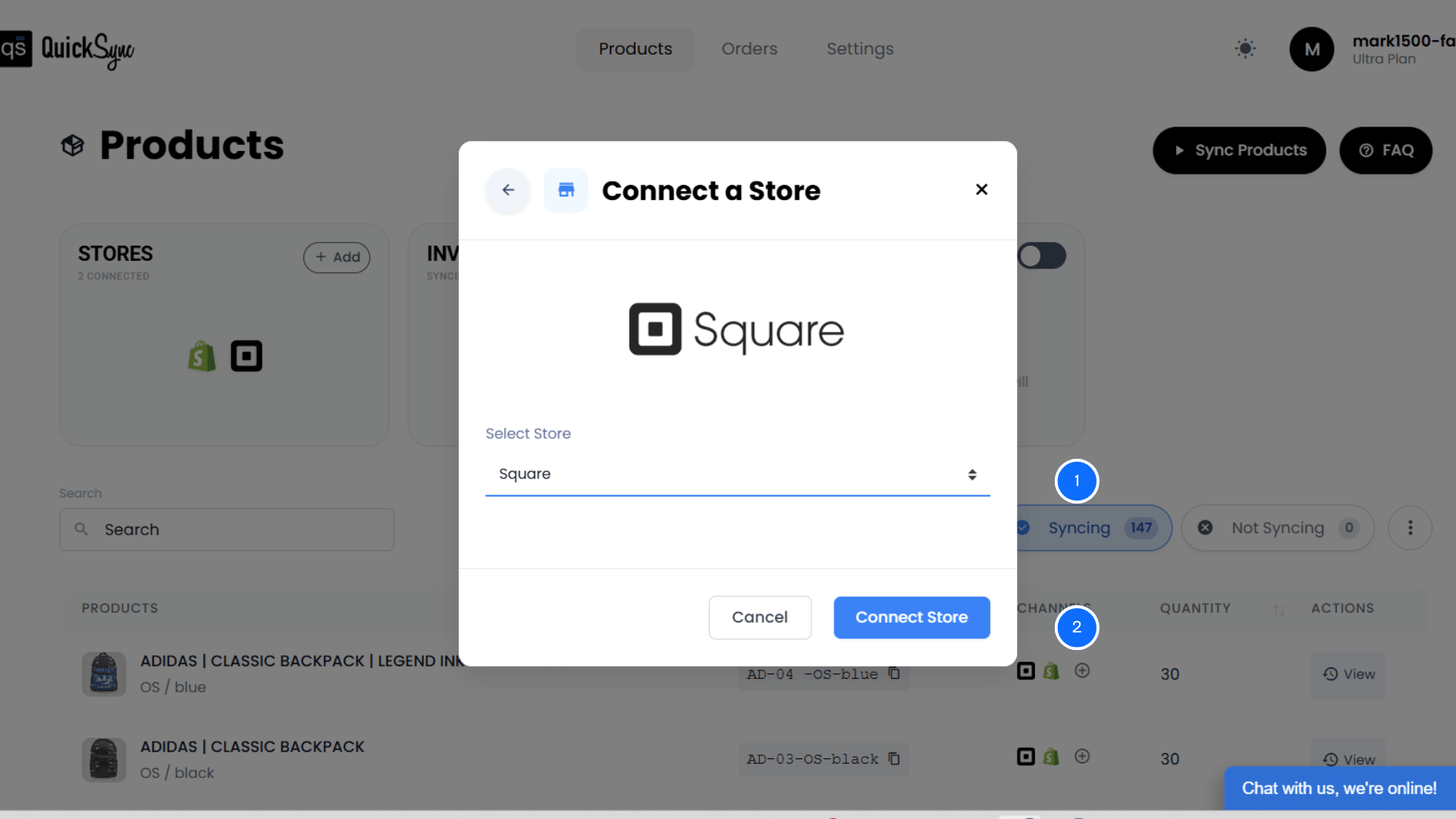
Go back to the dashboard and click Add a Store again.
Select Square from the list of platforms.
Click Connect a Store and log in to your Square account.
Approve permissions for products, inventory, customers, and orders.
QuickSync will automatically import your Square locations and product catalog.
Step 3: Connect Your Shopify Store
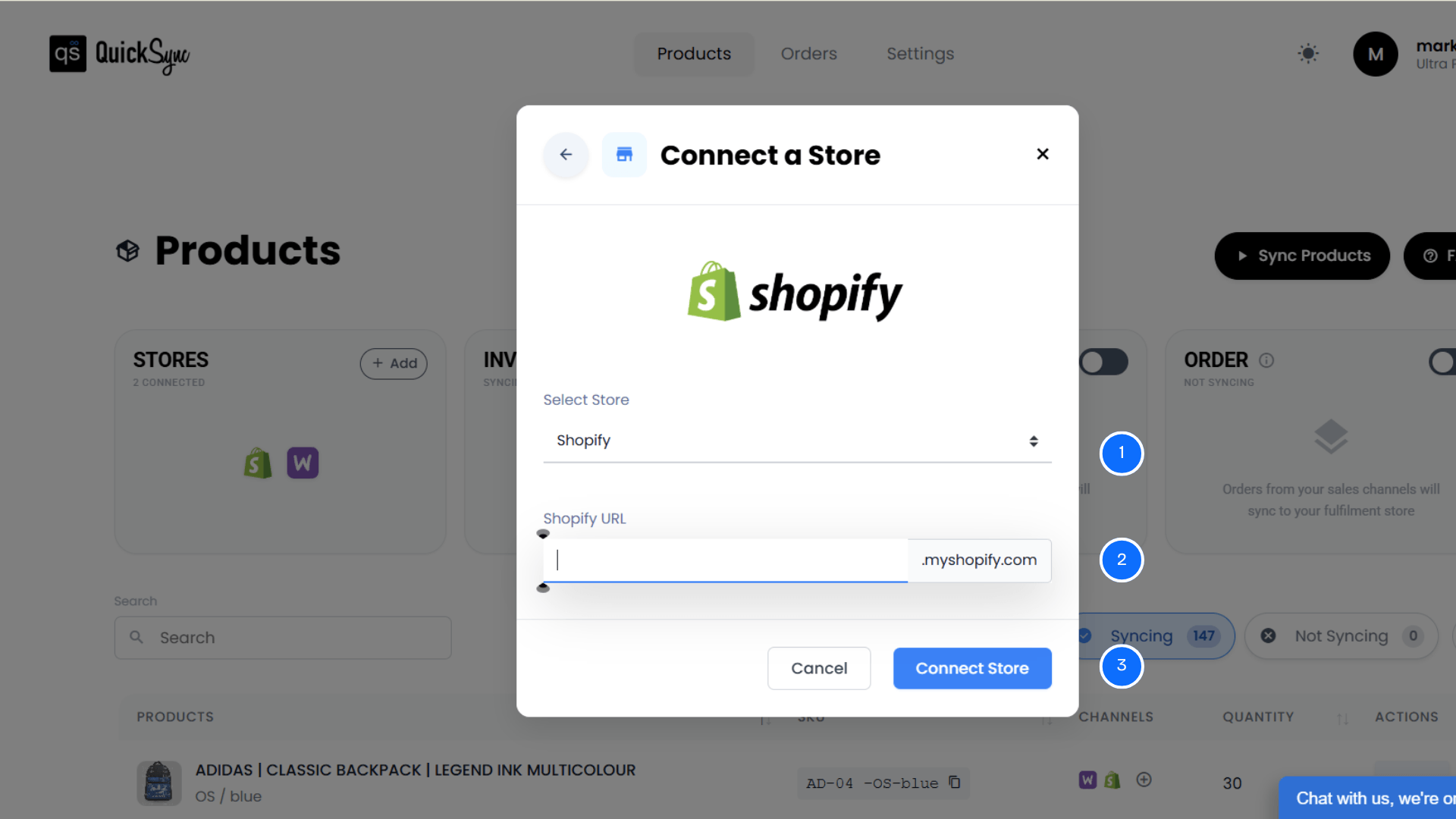
From the QuickSync dashboard, click Sync Products.
Click Connect Store, then select Add a Store.
Choose Shopify from the platform list.
Enter your Shopify store URL (example: storename.myshopify.com).
Approve permissions for products, images, inventory, and orders.
QuickSync will automatically import your Shopify store details, product catalog, and locations.
Step 4: Enable Sync Options
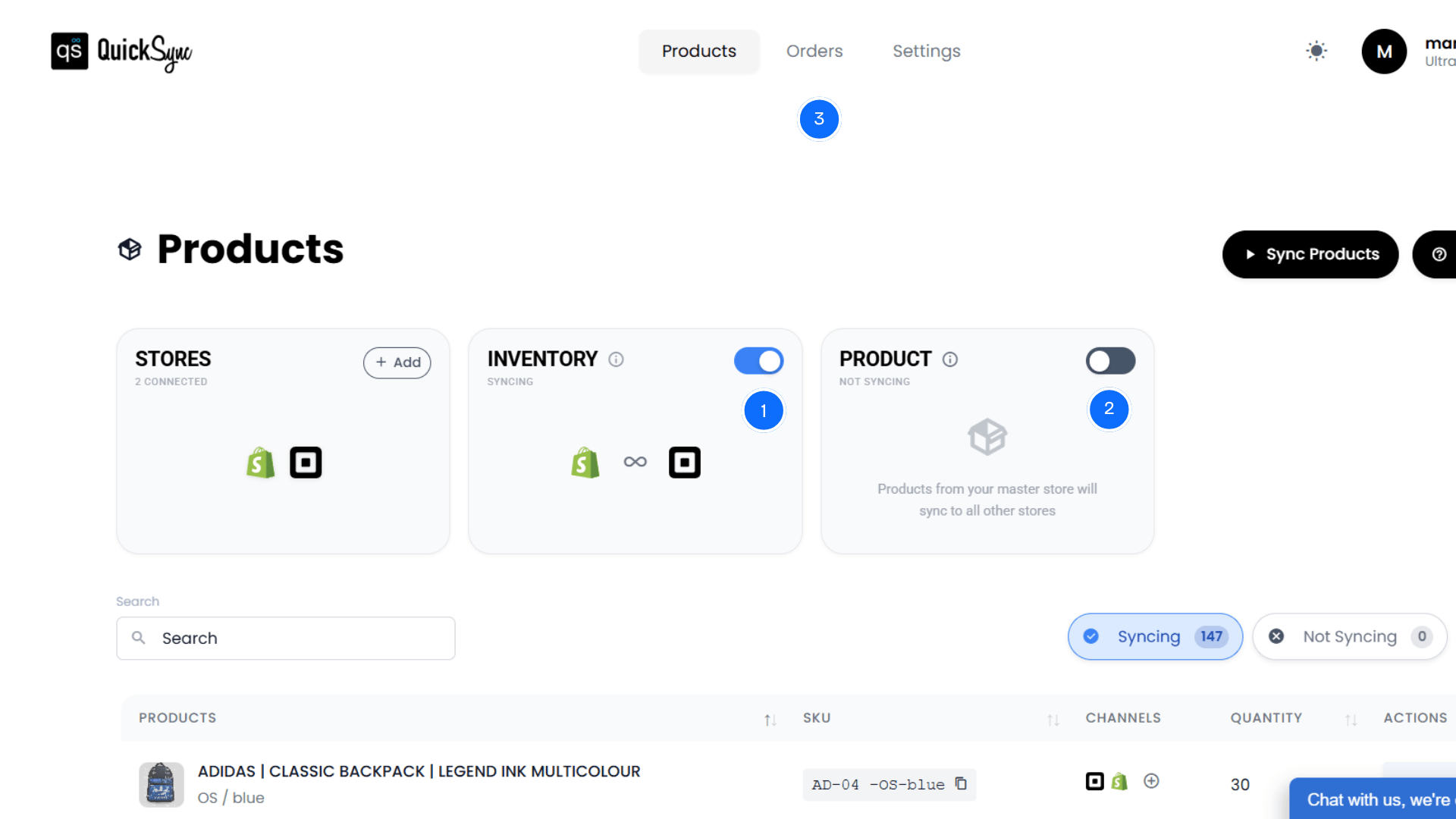
Once you have connected Shopify and Square with QuickSync, the integration is ready to run.
Visit the QuickSync dashboard to review your sync preferences.
You will see multiple syncing options. Simply toggle the features you want to activate.
Here’s how each QuickSync feature works for Shopify Square integration:
Inventory Sync: Inventory syncing activates automatically once both platforms are connected. Stock levels update across your Shopify store and all connected Square locations in real time after every sale, return, or manual stock adjustment.
Product Sync: Choose your Master Store. Product updates made in the Master Store automatically sync to the other platform. Product titles, variants, images, pricing, and SKUs stay aligned without manual duplication.
Order Sync: Enable order syncing so Square POS orders appear in Shopify, and online Shopify orders stay visible for reporting. Your team can manage fulfillment and track order activity from a complete view across online and in-store sales.
Once configured, QuickSync automatically manages inventory, products, and orders across Shopify and Square, allowing your online store and physical POS operations to function as one connected system.
Best Ways to Keep Shopify and Square Perfectly Synced & Working
After the Shopify Square sync, it’s important to follow a few simple practices to keep everything running smoothly. These small steps help maintain accurate inventory, product data, and order records across both platforms.
You’ve set up the integration. Here’s how to make sure it works flawlessly.
Audit Your Data Before Integrating
Before you sync, review your Shopify products. Do your variant names match? Are all SKUs filled in? Are your variant prices consistent? On the Square side, check for duplicate products or stale items. Syncing is only as good as the data you start with. Give yourself a few hours to clean up both systems.
Start With One Location (If Multi-Location)
If you have multiple Square locations, don’t sync all of them at once. Pick your main location. Get the integration working perfectly with one location first. Troubleshoot any issues. Once it’s running smoothly, add your second location. This approach makes debugging easier if something goes wrong.
Test With a Subset of Products
Don’t sync your entire catalog on day one. Pick 20-30 products that represent your variety (different sizes, colors, price ranges, variants). Let them sync and check Shopify and Square. Check inventory counts. Make sure images sync correctly. Once you’re confident, expand to your full catalog.
Keep Your Customer Records Clean
Customer data sync only works if your customer information is consistent. Don’t have variations in customer names (“John Smith” vs “John S”). When you link a repeat customer in Square, use the same email and phone you used in Shopify. Clean customer records mean complete purchase history and better personalization.
Avoid Creating Duplicate Products
Duplicate products can create serious syncing problems between Shopify and Square. Always check whether a product already exists before creating a new one on either platform. Duplicate listings can lead to incorrect inventory counts. Maintaining a single product record for each item helps ensure the integration syncs data accurately,
Conclusion
So, can you use Square with Shopify? Yes. But not without the right tool.
Shopify and Square were built for different purposes. They don’t integrate natively. Without a purpose-built integration platform, you’re either doing manual data entry (expensive and error-prone). Or you are using basic automation that doesn’t handle the complexity (which breaks when you grow).
That’s why QuickSync exists. We built integration specifically for retailers like you, merchants with online and offline operations who can’t afford to keep systems disconnected.
Real-time inventory sync. Product updates that work both ways. Orders that consolidate across channels. Payment data that stays complete.