Selling on Shopify, Amazon, and eBay sounds nice; you think you will make more revenue as you have a larger audience now. But once you start getting a bulk of orders, your store operations start breaking.
You sell products on Shopify, but Amazon and eBay stock didn’t update. Now you have oversold and have to cancel orders. That’s when the real challenge begins.
How do you keep inventory accurate across all three?
How do you make sure orders don’t get missed?
And more importantly, how do you sync all the stores?
Most sellers try quick fixes. Manual updates, CSV imports, basic apps. These methods work in the beginning. But once orders increase, they start failing.
83% of e-commerce businesses report major challenges keeping inventory and systems synchronized as per businesswire. This is where the difference between just connecting platforms and a proper Shopify Amazon eBay integration becomes clear.
Read this blog to know the best way to sync Shopify, Amazon, and eBay, what fails, and what works.
Why Syncing Shopify, Amazon and eBay Matters More Than You Think
Here is the thing: most sellers do not realise when selling on multiple channels until it is too late. The problem is never the sales. The problem is what happens behind the scenes when those sales come in from three different places at once.
Your Shopify inventory does not know what Amazon just sold. Amazon does not know what eBay just sold. And by the time you catch up manually, you have already oversold and frustrated customers who may not come back.
Inventory drifts apart. Orders pile up across separate dashboards. Product details go out of sync. These are not small inconveniences. They eat into your revenue, damage your seller ratings, and slow down your entire operation.
Syncing Shopify, Amazon, and eBay is not just a setup task you do once and forget. It is what keeps your business running as one connected system instead of three separate ones fighting each other.
When your integration process is working properly:
- A sale on any platform instantly updates stock everywhere else
- Your product listings show the same accurate information across all three stores
- Every order lands in one place so nothing gets missed or delayed
Without that, every new sale is a risk. And the more you grow, the bigger that risk gets.
Common Problems Without Integration

In the beginning, selling on Shopify, Amazon, and eBay feels manageable. A few orders here and there, and you can still keep things under control.
But once orders start coming in regularly from all three platforms, things begin to slip. That’s when you realise the problem is not selling. The problem is managing everything together.
Here’s what usually starts going wrong:
Inventory Doesn’t Match Across Platforms
You update stock on one platform but miss the others, so numbers start showing differently everywhere. One store shows 20 units while another is already out of stock, creating confusion during fulfilment. Even a small mismatch can lead to lost sales, especially when managing multiple stores
Pricing Goes Out of Control Across Platforms
When stores are not connected, pricing starts drifting across. A product may be listed at one price on the Shopify store and a different price on Amazon or eBay, sometimes with a $5–$15 gap. This either hurts your margins. Over time, inconsistent pricing leads to lower profits and confusion in your overall pricing strategy.
Product Listings Stop Matching
Over time, your product details go out of sync across platforms without you noticing. Product title, descriptions, and images may not update, and variations can break between listings. This creates confusion for customers and increases the chances of incorrect orders or abandoned carts.
Orders Get Delayed or Missed
Orders come from different dashboards like Shopify admin, Amazon, and your eBay seller dashboard. Switching between platforms increases the chances of delays, especially during busy hours. Even a 1–2-hour delay in processing can affect delivery timelines and increase customer complaints.
Manual Work Starts Taking Over
Every small change needs to be repeated across all platforms, from updating stock to editing listings. Sellers often spend 10 to 15 hours every week just managing basic operations instead of growing the business. This slows down scaling and increases the risk of human errors over time.
Benefits of Connecting Shopify, Amazon & eBay

Once your ecommerce stores are properly connected, things start working the way they should. You stop dealing with everyday problems and start running a more stable business. You can trust the automation process and focus on growing your stores.
Here’s what actually changes when you connect Shopify to Amazon and eBay the right way.
Inventory Syncs in Real Time
When Amazon, Shopify, and eBay are connected correctly, inventory syncs automatically across all platforms. If one unit sells on Amazon, Shopify, and eBay, it reflects it instantly without delay. This reduces overselling risk by up to 90% and keeps your inventory management accurate across multiple marketplaces.
Orders Are Managed in One Flow
All your orders come into a single sales channel instead of being scattered across different dashboards. This really reduces the time spent switching platforms and improves processing fulfilment speed with centralised order syncing across sales channels. Many sellers cut order handling time by 30–50%, especially during peak sales periods across multiple channels.
Fewer Refunds and Chargebacks
When your systems are properly connected, mistakes that lead to refunds are reduced significantly. You avoid situations like accepting orders for unavailable products or sending incorrect items due to mismatched data. This lowers cancellation rates and chargebacks, helping you protect revenue and maintain a better customer experience.
Listings Stay Consistent Everywhere
Another major benefit of integration is that your Amazon, Shopify and eBay listings stay consistent across all platforms. Pricing, images, and variations automatically stay in sync, so customers see the same information everywhere. The product sync also saves you from doing the same update two or three times manually.
Better Control Over Multi-Channel Growth
When all platforms are connected, you stop guessing and start seeing clear data. You know which products are performing on Amazon, which ones are moving faster on eBay, and what needs restocking on the Shopify store. This level of visibility helps you plan better and improve efficiency by 15–25% across all your sales channels.
What a Proper Shopify Amazon eBay Integration Should Include
By now, it’s clear the problem is not selling on multiple platforms; it’s managing them together without things breaking.
A proper Shopify Amazon eBay integration is not just about connecting accounts. It’s about building a system where products, inventory, and orders move together without constant manual fixes.
Here are some important features to look for when you are choosing an integration method for your stores.
Smart Product Mapping with SKU Logic
The system should automatically match products using SKUs and also handle missing SKUs by creating them where needed. Without a proper SKU, products don’t map correctly, leading to duplicate listings, broken sync, and incorrect inventory updates across platforms.
Real-Time Sync Across Products, Inventory, and Orders
Everything should update instantly across Shopify, Amazon, and eBay, not after delays or manual refreshes. This includes product details, inventory, and incoming orders, so you don’t deal with overselling, missed orders, or outdated listings during peak sales hours.
Variant-Level Sync (Not Just Basic Products)
A good integration doesn’t just sync products; it syncs every variant, like size, color, or style, separately. This ensures each variation has accurate stock and pricing, which is important when you are managing large catalogues across multiple marketplaces.
Complete Media Sync (Images and Videos)
Your product images and videos should stay consistent across all platforms without manual uploads. This ensures your listings look the same everywhere, improves customer trust, and removes the need to update media files separately on each marketplace.
Multi-Marketplace and Multi-Account Support
The system should support selling across multiple platforms and even allow you to connect multiple eBay accounts from one place. This becomes important when you are expanding into different regions or handling multiple storefronts under one operation.
Centralized Control Without Complexity
You should be able to manage everything from a centralized dashboard without switching between platforms. At the same time, the setup should be simple enough to configure without technical help; you end up spending more time fixing the system than using it.
Different Ways to Connect Shopify With Amazon and eBay
There are a few ways merchants try to connect Shopify with Amazon and eBay. However, some of these integration methods come with their limitations. There is a method that offers a seamless Shopify eBay Amazon integration.
Let’s break down what actually happens with each method.
Method 1: CSV Uploads and Manual Updates
This is the most basic way to manage syncing multiple platforms like Shopify, Amazon, and eBay. You export product data, upload it to another marketplace, and manually update stock when sales happen.
But this is where the CSV upload breaks:
- No real-time sync inventory across Shopify Amazon and eBay
- High chances of outdated stock and pricing errors
- Every change needs to be repeated across platforms
- Becomes unmanageable beyond 20–30 orders per day
This method only works for very small sellers testing one or two products. The moment order volume increases, it starts creating more problems than it solves.
Method 2: Basic Marketplace Apps and Connectors
Many sellers move to integration apps from the Shopify App Store or third-party app tools to automate some parts of the process.
But these tools still have limitations:
- Sync delays of 10–30 minutes can still cause stock issues
- Often syncs only products, not the full order flow
- Limited control over variants, pricing, or errors
- Not built for the Shopify marketplace connect.
- Not designed to handle multiple marketplaces together
These apps are slightly better than manual work, but they still require constant monitoring and fixes as your business grows.
Method 3: QuickSync – One System for All Channels
QuickSync is built for Shopify to connect Shopify, Amazon, and eBay into one working system instead of managing them separately. It’s designed to keep products, orders, and stock aligned in real time.
Here’s what makes QuickSync different from other integration methods:
- Real-time sync inventory across Shopify Amazon and eBay
- Sync product details and keep catalogues consistent without double work
- Syncs all orders into a single dashboard for a unified view
- Handles variants, SKUs, images, and listings without manual effort
- Supports multiple top marketplaces and, sales channels integrations from one dashboard
QuickSync is engineered for sellers who require a smart integration system that maintains data integrity and operational accuracy as order volumes increase. It eliminates the need for manual corrections and ensures seamless scalability.
How to Sync Shopify, eBay and Amazon with QuickSync
Now that you have analysed all the methods of integrating Shopify, eBay and Amazon. It’s clear that QuickSync stands out. QuickSync syncs everything from inventory, products, orders, SKUs, images, videos, and barcodes for multiple sales channels.
Getting started with QuickSync for Shopify, Amazon eBay integration is simple. You don’t need any technical skills or need to hire any developer. Just keep your email and store details ready.
Here’s how you can get started with Shopify eBay and Amazon integration with QuickSync.
Step 1: Create Your QuickSync Account
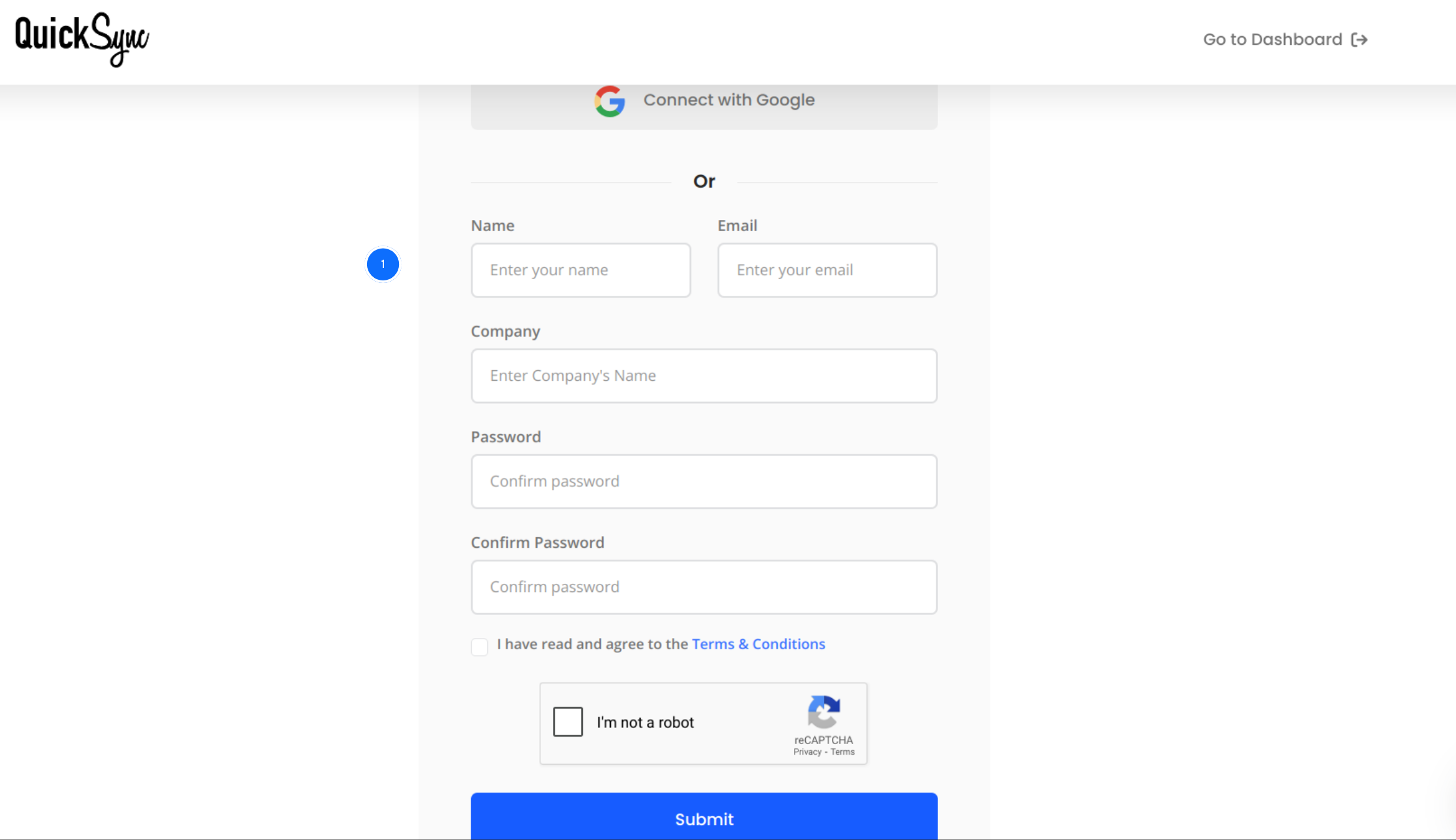
- Visit QuickSync.pro and click on sign up.
- Sign up with your details.
- Once sign up, log in with your credentials and access the QuickSync dashboard.
Step 2: Connect Your Shopify Store
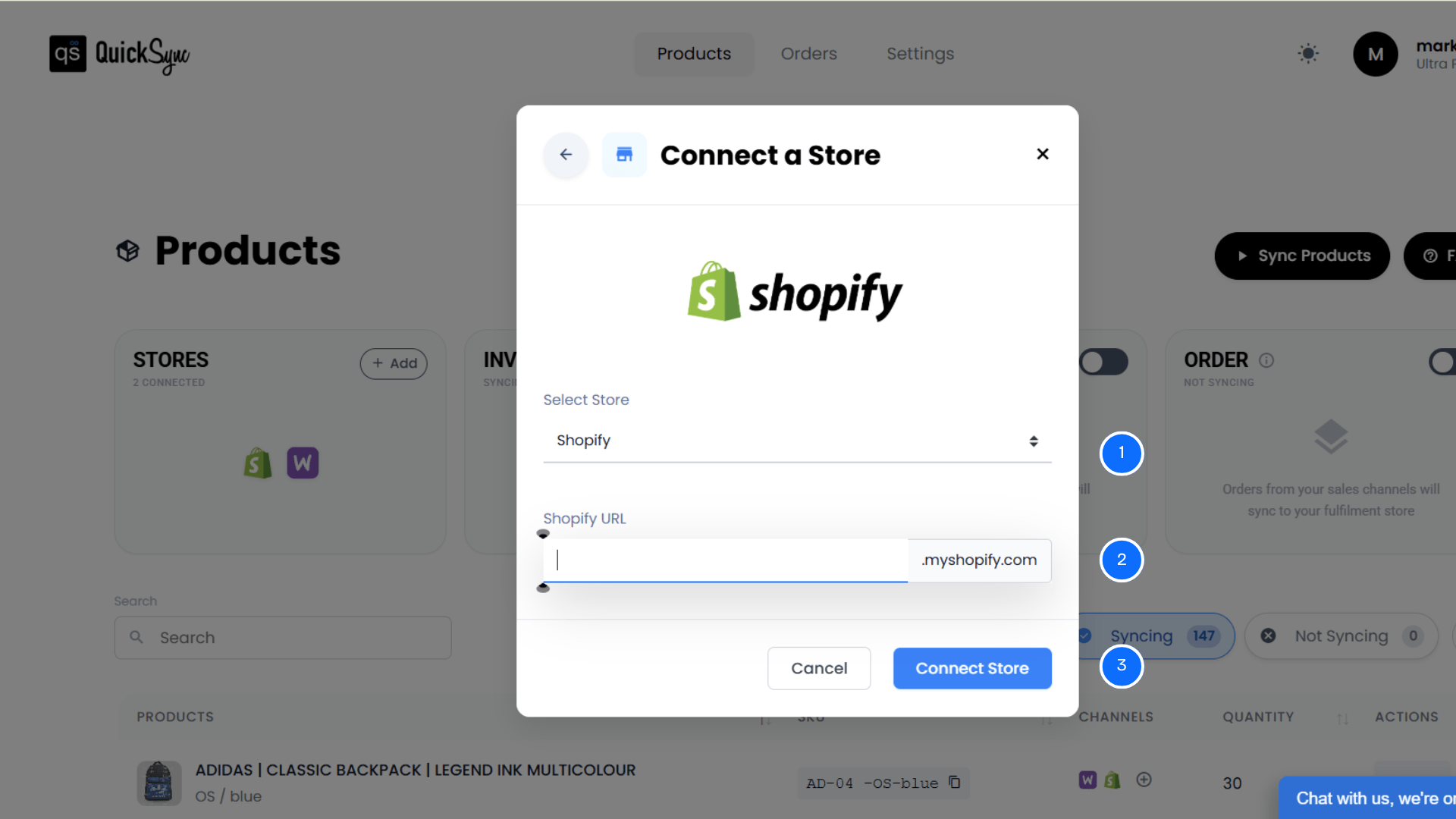
- In the QuickSync dashboard, you will see the Sync Products option. Click on it.
- Then, click Connect Store, then Add a Store.
- A new window will appear. From the options, select Shopify.
- Enter Shopify URL.
- Approve access for products, images, inventory, and orders.
- QuickSync imports your shop details, locations, and products.
Step 3: Connect Your eBay Account
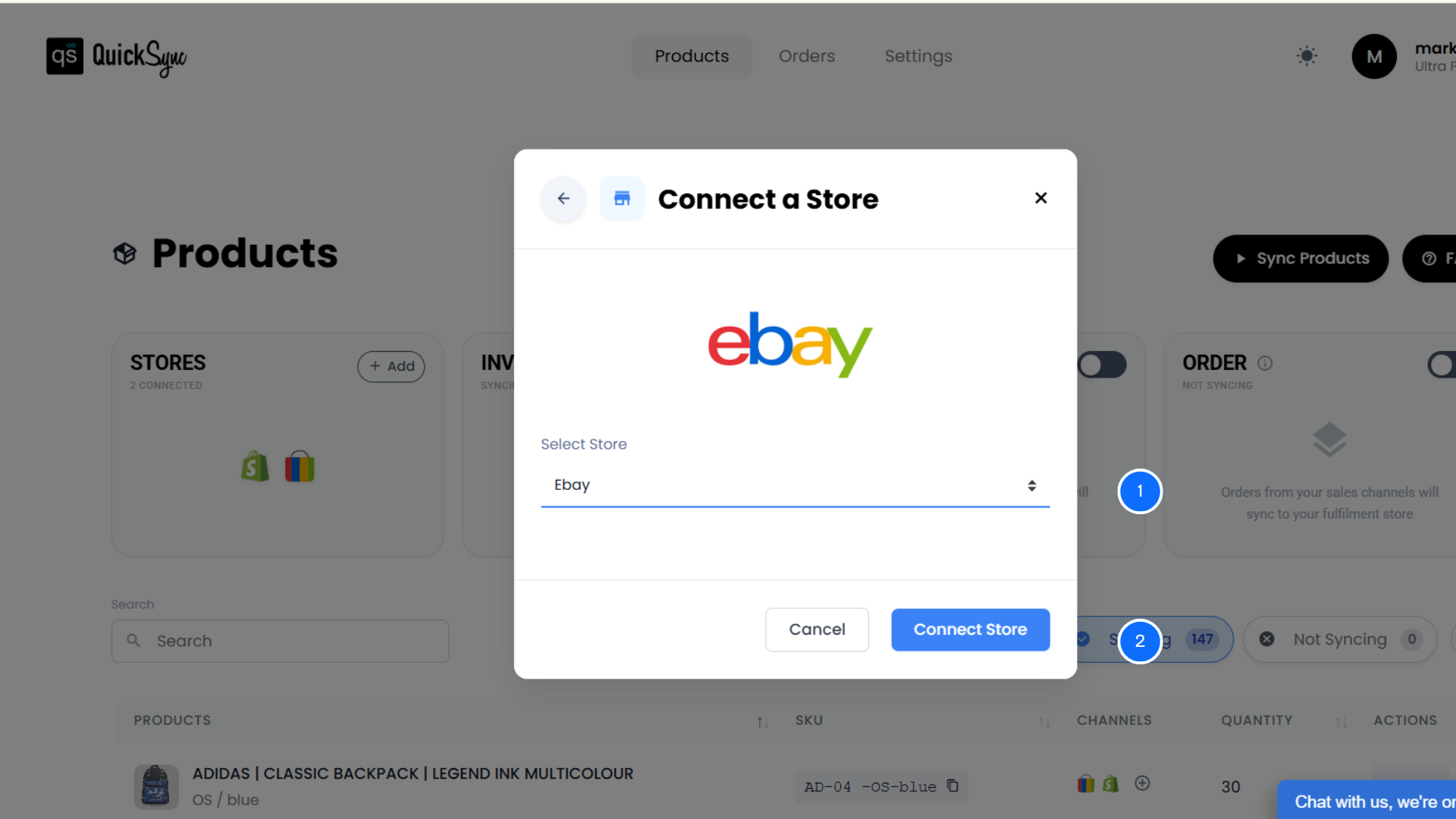
- From the same dashboard, click Add a Store again and select an eBay seller account.
- Approve access for listings, inventory, and orders.
- QuickSync imports your eBay listings, categories, and policies.
Step 4: Connect Your Amazon
- Similarly, click Add a Store again and select Amazon.
- Log in to your Amazon seller account and authorise access.
- QuickSync imports your product listings, inventory, and order data.
Step 5: Configure Sync Settings
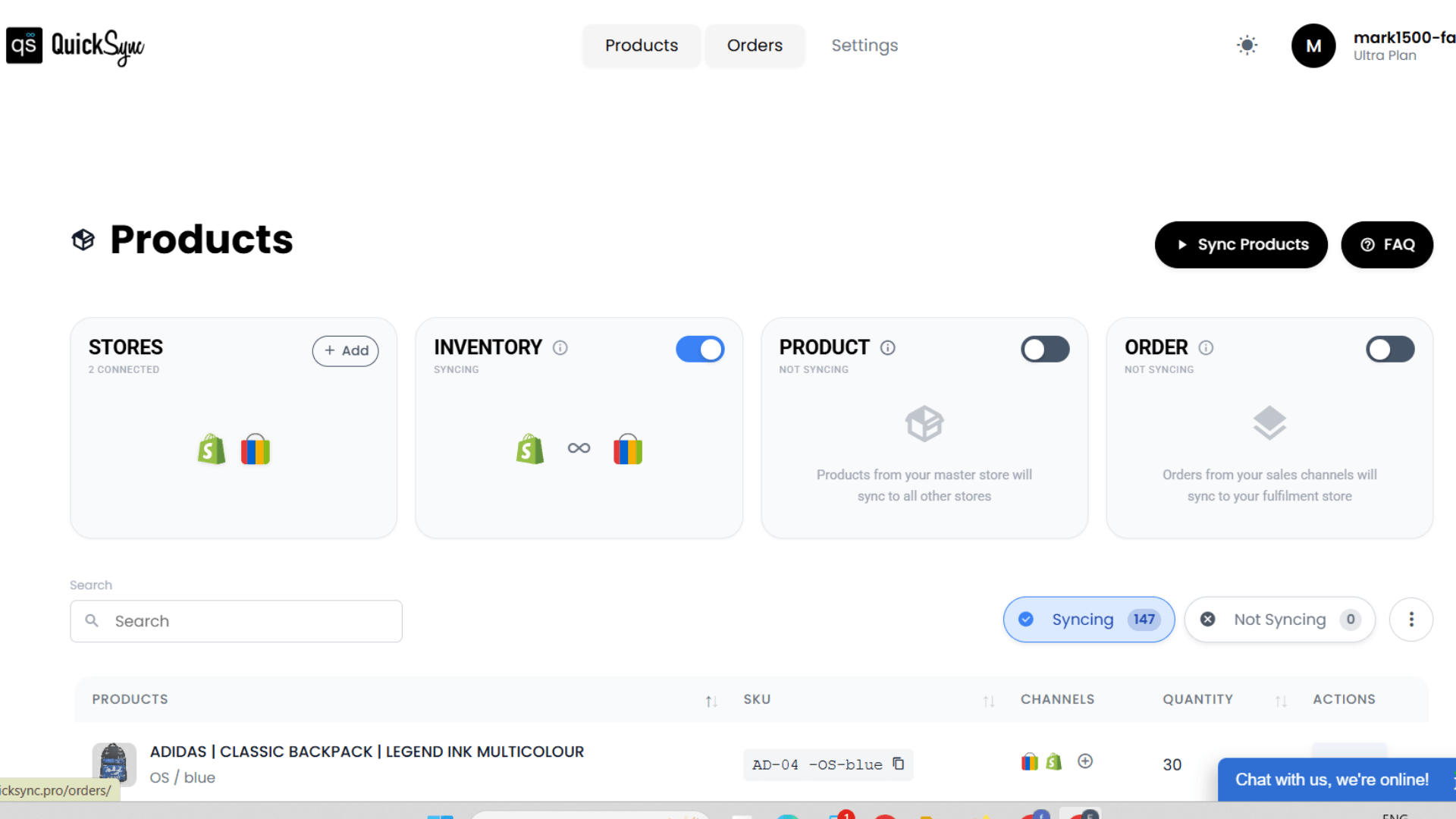
- Once you have connected stores, in the QuickSync dashboard, you will see syncing options.
- Choose what to sync between products, inventory, and orders, and start syncing.
- Your stores will now stay connected automatically in real time.
Best Practices for Managing Shopify, Amazon and eBay Together
Connecting Shopify with Amazon and eBay is just the setup part. What really matters is how you manage everything after that. The way you handle daily operations decides whether your system runs smoothly or creates more problems.
Here are some practical tips that will make sure your integration setup runs smoothly.
Keep SKUs Structured and Clean
Your SKU system is what keeps everything connected behind the scenes, so it needs to stay clean and consistent. Even small SKU issues can break syncing and create inventory mismatches, especially when you sync inventory between eBay and Shopify. A clear SKU structure also makes it easier to track, update, and manage products as your catalogue grows.
Use One Source of Truth
You need one platform to act as the main control point, and for most sellers, that’s the Shopify store. This avoids conflicting updates when changes are made on different channels at the same time, particularly when coordinating with marketplaces. When everything flows from one source, your data stays consistent and easier to manage.
Monitor Sync Activity
Don’t just set up the system and forget it; keep an eye on what’s happening in the background. Checking sync logs regularly helps you catch small issues before they turn into bigger operational problems. It also gives you better control over how your integration is performing daily.
Optimize Listings for Each Marketplace
Every platform has its own way of displaying and ranking products, so one format doesn’t fit all. Instead of copying the same listing everywhere, adjust product titles, images, and details based on each marketplace. This helps improve visibility and increases your chances of getting more sales.
Plan Inventory for High Sales Periods
Peak sales periods can put pressure on your entire system, especially when orders come in fast from multiple channels. Even small delays during this time can lead to overselling or stock issues. Keeping buffer stock, planning ahead, and leveraging help you stay in control when demand increases.
Conclusion
Managing Shopify, Amazon, and eBay separately might work in the beginning. But as your business grows, it quickly turns into a system full of gaps, delays, and constant fixes.
This is exactly what a proper QuickSync Shopify Amazon eBay integration is meant to solve.
Instead of relying on manual updates, partial syncing, or tools that break under pressure, QuickSync connects all three platforms into one reliable system. Your products, stock, and orders stay in sync without delays, automatically.
No constant checking. No repeated work. No operational chaos as you scale.