Managing inventory between your Square POS system and Shopify store can be a real challenge if both your online store and physical locations aren’t connected. You end up with double work updating inventory levels manually in Square POS and the Shopify dashboard. This not only takes up your time but can also lead to inaccurate stock counts, which can negatively affect sales opportunities.
That’s why smooth Shopify and Square inventory management is essential for efficient business operations. Read this blog to learn how to do effective Shopify and Square inventory management, what tools to use for syncing Square POS and Shopify inventory, and more about Shopify Square integration.
Challenges Retailers Face When Shopify and Square Inventory Isn’t Synced
When your Shopify and Square inventory isn’t synced, you face various issues. You might not notice it right away, but every time you manually update stock, you lose valuable time. Over weeks or months, that time adds up—not to mention the risk of:
- Accidentally overselling items that are out of stock
- Delaying orders due to missing inventory
- Confusing your team or customers with inaccurate product availability
It’s a silent productivity killer that grows as your business scales. Without automated syncing between Square POS and Shopify stores, manual updates are prone to mistakes and inefficiencies.
Benefits of Syncing Shopify and Square Inventory
When you sync inventory between Shopify and Square POS, your retail operations and online business become more efficient. Here’s what you gain from syncing Square and Shopify inventory:
1. Know Accurate Inventory Levels
You can see your online and in person sales stock in one centralized system. No more switching between platforms to check inventory levels. With Shopify and Square inventory sync, you get a complete overview of what’s available, what’s selling, and what needs restocking.
2. Faster Order Processing and Order Tracking
Inventory syncing ensures your Shopify and Square POS orders flow smoothly, reducing the risk of delays or backorders. With real-time inventory updates, your fulfillment process becomes faster and more accurate.
3. Improved Cash Flow and Forecasting
Accurate inventory data helps you make better purchasing decisions. You can identify fast-moving products, avoid overstocking, and plan reorders based on real-time insights.
4. Consistent Customer Experience and Customer Satisfaction
Whether your customer shops in-store or online, they’ll always see up-to-date stock availability. This consistency builds trust and reduces the chances of cancellations due to out-of-stock items.
5. Less Admin Work, More Automation
Manual updates take time and often cause errors. With Shopify and Square inventory sync, updates happen automatically, so your team can focus on sales, marketing, and customer service.
Does Shopify Have an Inventory Management System for Square POS?
Shopify and Square POS are both powerful tools for retail and eCommerce, but they don’t natively connect with each other. In other words, Shopify doesn’t have a built-in inventory management system for Square POS. This means when you sell a product in your Square store using your Square reader or POS system, Shopify won’t automatically update its stock levels, and vice versa.
Without integration, inventory updates must be done manually. To automatically sync Shopify and Square inventory, retailers need an excellent third-party app. That’s where Shopify Square integration tools act as a bridge between two stores, ensuring that product quantities, pricing, and details stay consistent across both platforms—whether you’re selling online or at your physical store.
In short, every time you make a sale, adjust inventory, or restock an item, the changes are instantly reflected on both platforms.
Best Shopify and Square Inventory Management Tool: QuickSync
QuickSync is an app designed for Shopify Square integration, helping retailers connect their Shopify and Square accounts for seamless inventory updates. Unlike other Shopify Square sync apps that require patchwork setups or multiple add-ons, QuickSync is easy to use and made to handle product syncing from end to end.
With QuickSync, you get:
- Real-time syncing – inventory gets updated in all the connected stores in real time, ensuring you get accurate inventory levels always.
- Multi-location support – keep stock counts accurate across physical locations, pop-ups, and online stores.
- A clean dashboard – track sync status, view logs, and troubleshoot with ease from a single dashboard.
- Order syncing – Sync orders between Shopify and Square stores. Orders from Shopify can be sent to Square POS for fulfillment.
- Product syncing – Sync product listings and update product titles, descriptions, images, and SKUs in one click in all the connected stores.
- Selective syncing – Choose which products, categories, or stock locations to sync between Shopify and Square, giving you full flexibility and control over how your inventory is managed.
- Supports multiple sales channels – including your Shopify and Square stores and other online and in-person sales platforms such as Amazon, WooCommerce, Etsy, etc.
- Affordable Plan – get a 14-day free version trial as a first-time user. Our monthly plan starts at just 19 dollars.
- Customer support – have any doubts? Raise it with our responsive customer care team and get assistance.
How to Sync Between Square POS and Shopify Using QuickSync
Follow the step-by-step guide given below to sync Shopify and Square inventory using the QuickSync third party app.
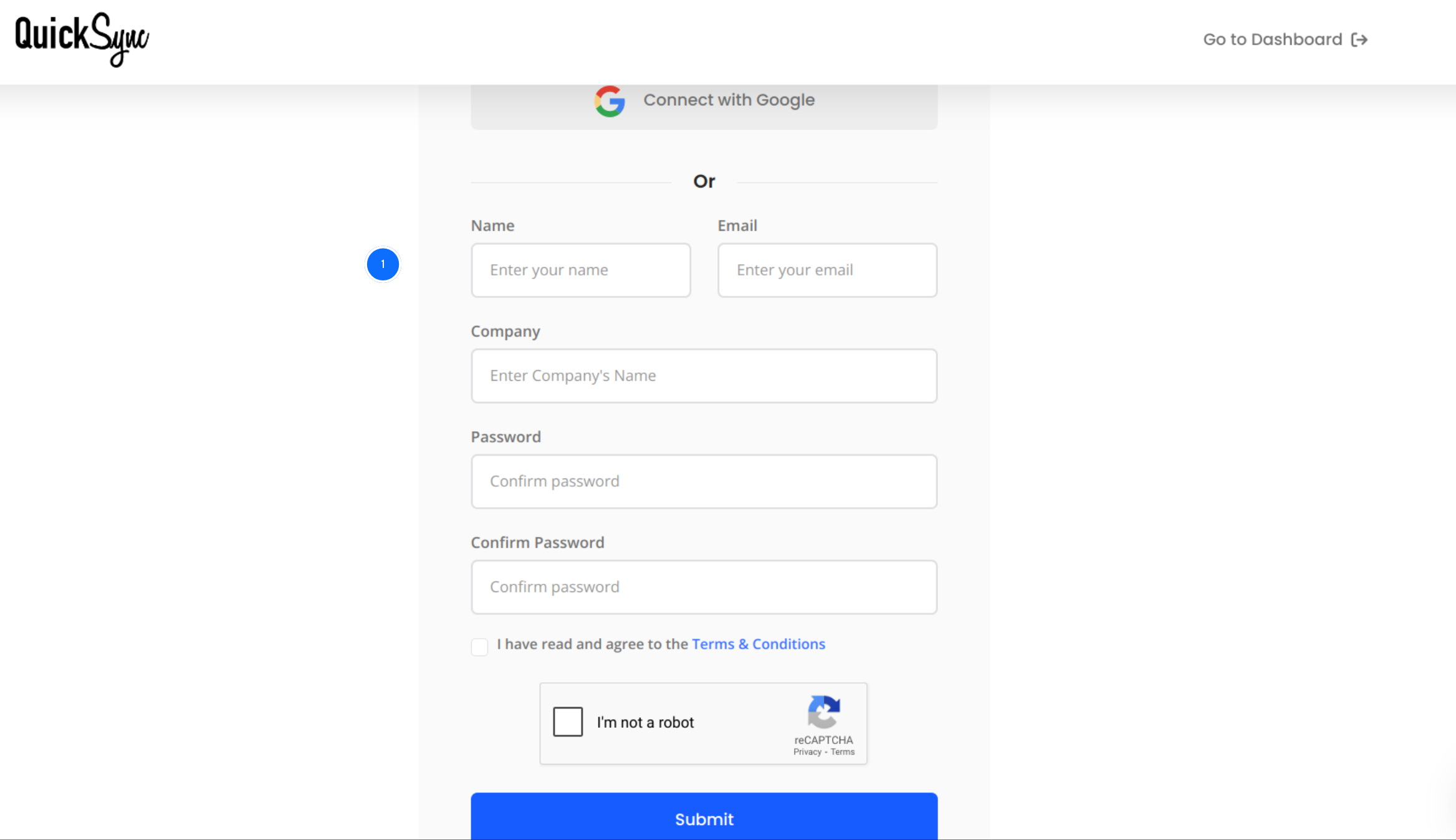
Step 1: Sign Up for QuickSync
- Visit the QuickSync.pro website and click on sign in.
- Sign in with your name, company name, and email address.
Step 2: Connect Shopify Store
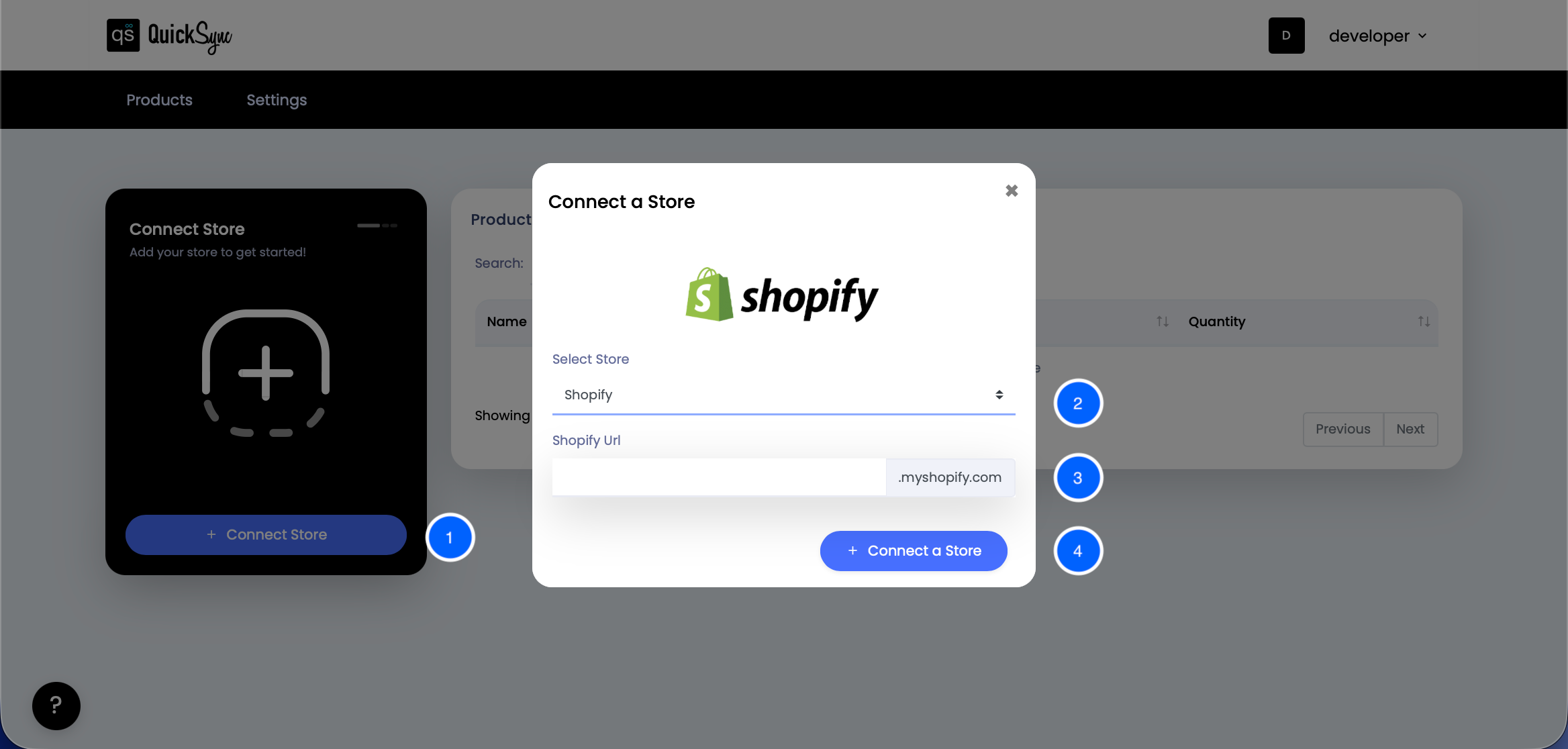
- Go to Dashboard, click on Connect Store.
- Under the select store, choose the Shopify store option.
- Type the Shopify URL.
- Click on Connect a store and log in to your Shopify account.
Step 3: Connect Square Stores
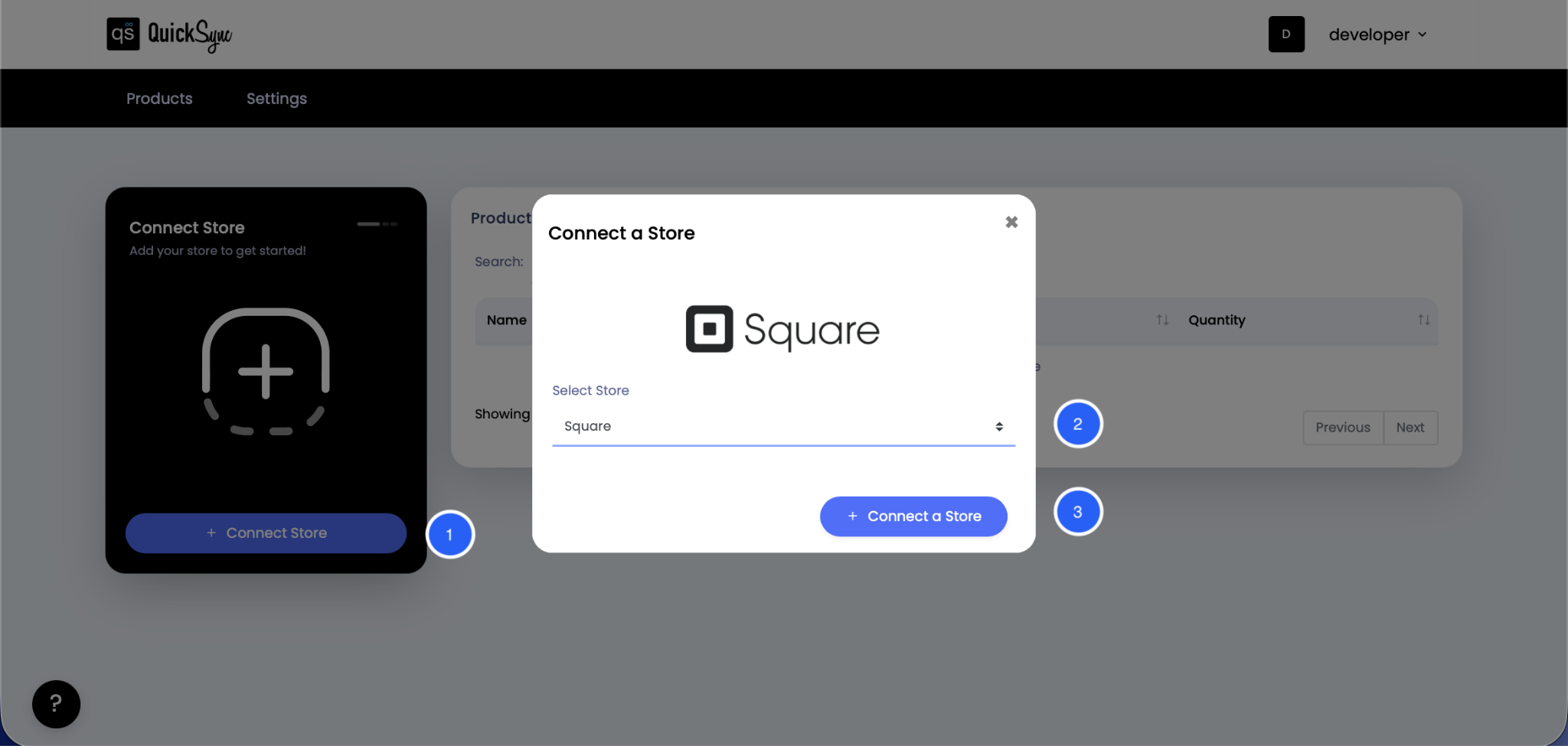
- Now, follow the same steps and connect Square stores. Click on Connect Store on the dashboard.
- Under the select store, choose Square.
- Then, click on Connect the Square store by following the instructions and approve access to the required permissions.
Step 4: Choose What to Sync
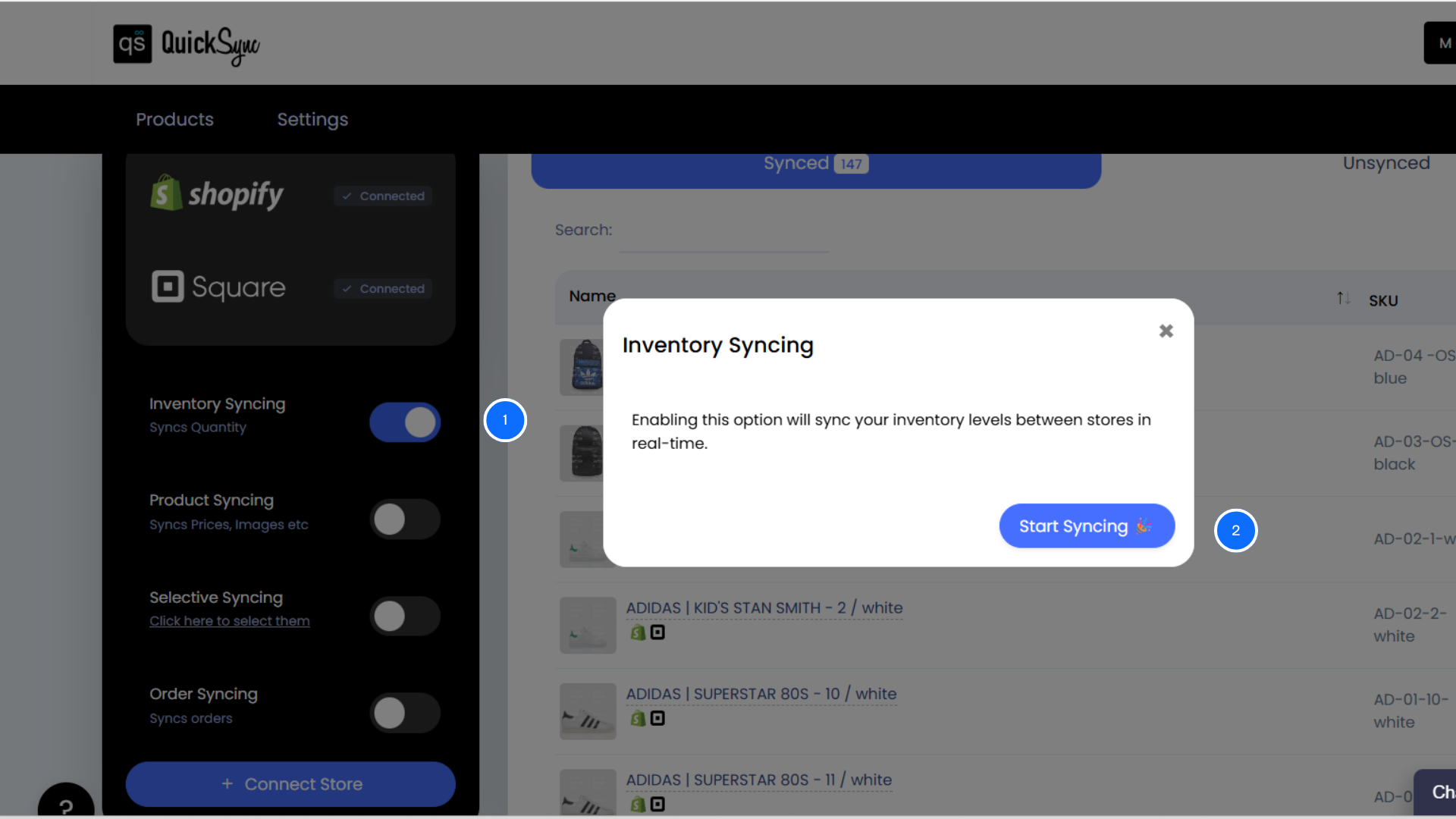
- On the left-hand side of the dashboard, you will see inventory syncing, product syncing, and order syncing options.
- Decide what matters most to your multi-channel business—just Shopify and Square inventory stock levels, or also pricing and product descriptions? You stay in control of which data syncs between the two platforms.
- To sync Shopify and Square inventory, choose inventory syncing and click on select syncing. After that, the inventory between Shopify and Square will be synced.
Top Common Inventory Syncing Mistakes to Avoid for Smooth Integration
To get the best results from syncing inventory between Shopify and Square, follow these best practices:
- Standardize your SKUs and make sure you are using matching SKUs across both platforms. This is essential for accurate syncing and to keep inventory levels consistent.
- Run an initial sync on a test group of products before going full scale.
- Keep both stores updated with clear product titles and categories.
- Use the activity logs in QuickSync to quickly spot sync issues.
- Reach out to QuickSync support early—they can help you resolve any hiccups before they become big problems.
Final Thoughts: Make Inventory One Less Thing to Worry About
You started your business to serve customers and grow—not to spend your days matching spreadsheets and updating inventory. With a reliable inventory syncing tool like QuickSync, you can finally stop juggling stock across platforms and start focusing on what really moves the needle for your business.
Get started with QuickSync today — an app that provides seamless Shopify and Square integration and lets you manage inventory from one platform.