
Before I spill the beans on how to connect Shopify to Amazon, let me admit something most integration experts rarely say out loud.
I used to believe in keeping things simple. Not just for Shopify and Amazon, but across platforms like TikTok Shop, Etsy, and eBay. Basic connections felt quick, easy, and good enough for a while. But later on, I started seeing a pattern repeatedly in basic connectors (oversold inventory, broken listings, missed orders, and merchants stuck fixing problems they never expected).
What looked simple in the beginning slowly turned into a mess behind the scenes. That is when I realized something most guides never tell you. Easy or low-cost setups often come with hidden risks. These risks quietly lead to lost sales, revenue leaks, and operational issues.
This guide is my attempt to fix that. If you are looking to sync Shopify with Amazon the right way, not just the easy way, you are in the right place. Let’s get into what truly works and what silently breaks your multichannel business.
What Does Connecting Shopify to Amazon Really Mean?

Many sellers think integration just means listing products on both Shopify and Amazon. It is not.
Real connection is full synchronization. Every sale, return, and inventory change updates automatically between platforms. Shopify knows what sells on Amazon. Amazon reflects Shopify price changes. All orders appear in one dashboard for easy fulfillment.
Without this, you are managing two separate stores. You copy product info twice, update stock in two places, and handle orders separately. That is not multichannel selling. It is multichannel stress.
The best sellers use Shopify as their command center and Amazon as a fully synced extension. One unified business, two customer touchpoints.
Problems Multichannel Sellers Face Without Proper Shopify-Amazon Integration
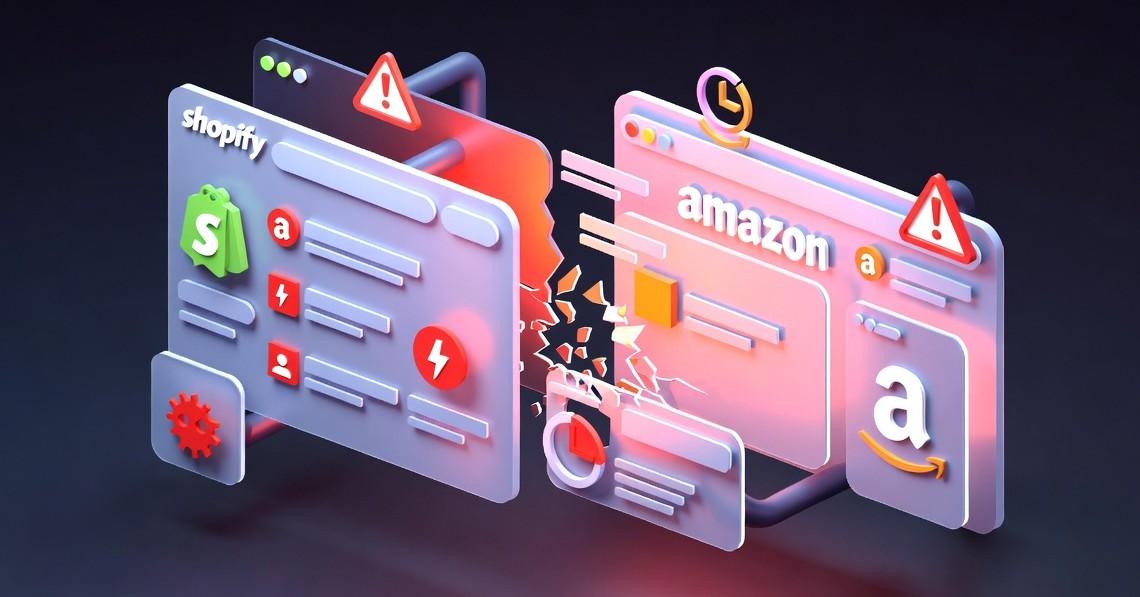
Now, let’s talk about what actually goes wrong when you connect Shopify to Amazon the wrong way. Because the problems do not show up immediately. At first, everything seems fine. Orders come in, products are listed, and you feel like your system is working very smoothly.
Then the cracks start to appear. Without a proper Shopify and Amazon integration working behind the scenes, below are the problems most merchants run into:
The Overselling Problem:
Overselling is one of the critical issues that multichannel sellers face while managing more than two e-commerce stores. For those who do not know what overselling is, here is an example.
Imagine your store shows 50 items in stock. But in reality, 35 of those have already been sold on another platform. Since your inventory is not updating in real time, both Shopify and Amazon keep accepting orders.
You end up selling products you do not even have. The result? Cancelled orders, frustrated customers, bad reviews, and even penalties from Amazon.
Inventory Mismatches Across Both Platforms:
This is one of the most common and frustrating issues.
Your Shopify store shows one number, Amazon Seller Central shows another, and neither reflects the actual stock you have. You are left guessing which one is correct.
This confusion leads to poor decisions, missed opportunities, and constant stress.
SKU and Item-Specific Inconsistencies:
Small mismatches create big problems. If your product details, variations, or SKUs do not match perfectly across platforms, things start breaking.
Orders may not sync properly, inventory may not update correctly, and tracking becomes messy.
These issues are hard to spot but costly to ignore.
Pricing Inconsistencies Across Platforms:
Pricing can quietly go out of sync. A product might be listed at one price on Shopify and a completely different one on Amazon. With different fees involved, this can either hurt your margins or make your products less competitive.
Either way, it impacts your sales and profits.
Order and Stock Update Delays:
Timing matters more than most merchants realize. If your orders and inventory are not updated instantly, even small delays can create big issues. A product sells on one platform, but the other platform still shows it as available.
That gap is where mistakes happen. This is why choosing the right integration is not just about convenience. It is about protecting your business from problems you may not even see coming.
Selling the same stock on Amazon and somewhere else? Amazon tells us the moment a merchant-fulfilled order is placed, and your Shopify, eBay, Etsy or till count is corrected straight after. Stock Amazon holds and ships keeps its own count, which is Amazon’s to own. See how it handles Amazon, or Start 14-day trial
Key Features of an Effective Shopify Amazon Integration Solution
By now, you know the price of choosing the wrong integration solution. Most of these problems are not random. They all come down to one thing: using the wrong kind of setup.
It is not just about connecting Shopify to Amazon. It is about how you connect them. Because the right integration solution quietly keeps everything in sync and under control.
The wrong one leaves you dealing with constant errors, confusion, and lost revenue. So the real question is not whether you should integrate, but what kind of integration features you should look for first in an integration solution.
Below are the key features you should look for in a syncing solution that truly reduces your issues:
| Feature | Why It Matters | What Happens Without It |
| Real-time inventory data sync | Keeps stock accurate across platforms | Overselling, cancellations, unhappy customers |
| Seamless order management | Brings all orders into one place | Missed Amazon orders, shipping delays, and confusion |
| Intelligent inventory buffers | Protects you during demand spikes | Running out of stock, lost sales |
| Variant and bundle support | Handles complex products correctly | Listing errors, wrong orders, and customer confusion |
| Dynamic pricing rules | Protects your profit margins | Selling at a loss, constant manual updates |
| Error handling and recovery | Catches and fixes issues automatically | Silent errors, broken data, operational chaos |
| Multi-channel readiness | Supports future growth | Rebuilding your system again and again |
Looking at the feature table, it is clear what makes an integration reliable and what causes constant problems. You need real-time sync, smart inventory sync, error handling, and multi-channel readiness.
So how do you actually connect Shopify to Amazon in a way that protects your business and scales with growth?
Also Read: eBay vs Amazon: Compare Fees, Profit, Traffic & Selling Experience
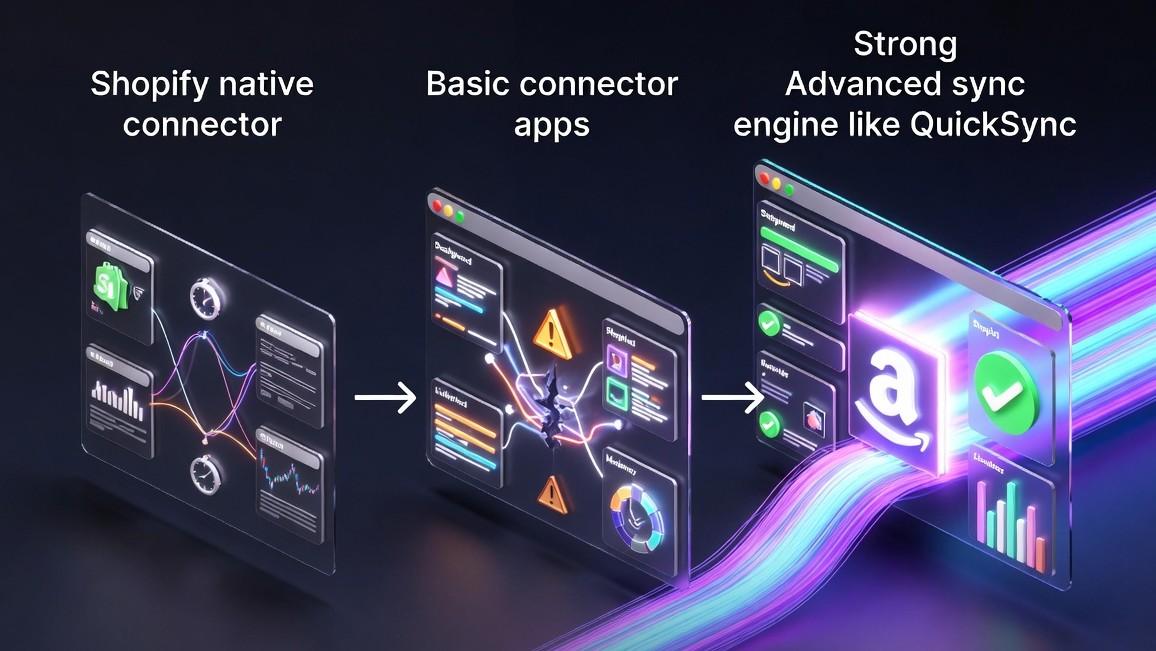
The 3 Ways to Connect Shopify to Amazon And Their Pros & Cons
There are three main approaches to integrating Amazon with Shopify. Two work for a little while, but only one can handle real expansion without leaving you scrambling to fix mistakes. Let’s break them down.
Method 1: Shopify Marketplace Connector:
Shopify’s native Amazon app, formerly Codisto, promises a simple, official connection. It is free for your first 50 orders each month, and then charges one percent of Amazon sales up to ninety-nine dollars per month.
But the reasons why it fails are as follows:
- Inventory updates only every 15 to 60 minutes instead of real-time
- Limited features for complex product catalogs
- No intelligent buffers to prevent overselling
Many multichannel sellers outgrow this setup quickly, often after experiencing their first overselling disaster. It can only be a good choice for absolute beginners testing the Amazon catalog with fewer than 50 monthly orders.
Method 2: Basic Connectors Apps:
These basic apps offer more automation than native tools for a monthly fee between fifteen and eighty-nine dollars.
But the reasons why it fails are as follows:
- Sync speeds can be unreliable, creating inventory gaps
- Limited error handling leaves silent mistakes unchecked
- Single-channel focus means rebuilding the system if you expand
- Customer support is inconsistent
It can be an option for small sellers with very few Shopify products and moderate order volume who do not plan multi-channel expansion.
Method 3: QuickSync, One Unified Syncing Engine:
QuickSync is not just an integration solution. It is a complete syncing engine built for high-volume, multi-channel sellers.
And the reasons why it wins are:
- Connect to multiple marketplaces with a single setup
- Supported inventory changes sync automatically; timing varies by platform
- All orders flow straight into your Shopify dashboard
- Set pricing per channel while staying in full control
- Review supported fields and destination requirements before exporting products
QuickSync is specially built for sellers who are serious about growth, handling complex catalogs, or expanding beyond Amazon without risk.
Meet QuickSync: The Smartest Way to Connect Shopify and Amazon
QuickSync is built to make selling across Shopify and Amazon effortless, without any technical headaches.
Here’s what makes it the go-to solution for multichannel sellers:
- Easy Setup: Connect Shopify and Amazon in minutes, no tech skills required
- Live Data Sync: Inventory, products, and orders stay updated automatically
- Reliable Performance: Stable, secure, and built to handle growing businesses
- Dedicated Support: Expert help is ready whenever you need it
With QuickSync, syncing Shopify and Amazon is no longer a juggling act. Your stores work together seamlessly, letting you focus on growing your business instead of fixing errors.
How to Connect Shopify to Amazon Using QuickSync
Connecting Shopify to Amazon with QuickSync is simple, fast, and requires no technical expertise. In just a few steps, you can have your stores fully synced, with inventory, orders, and product updating automatically.
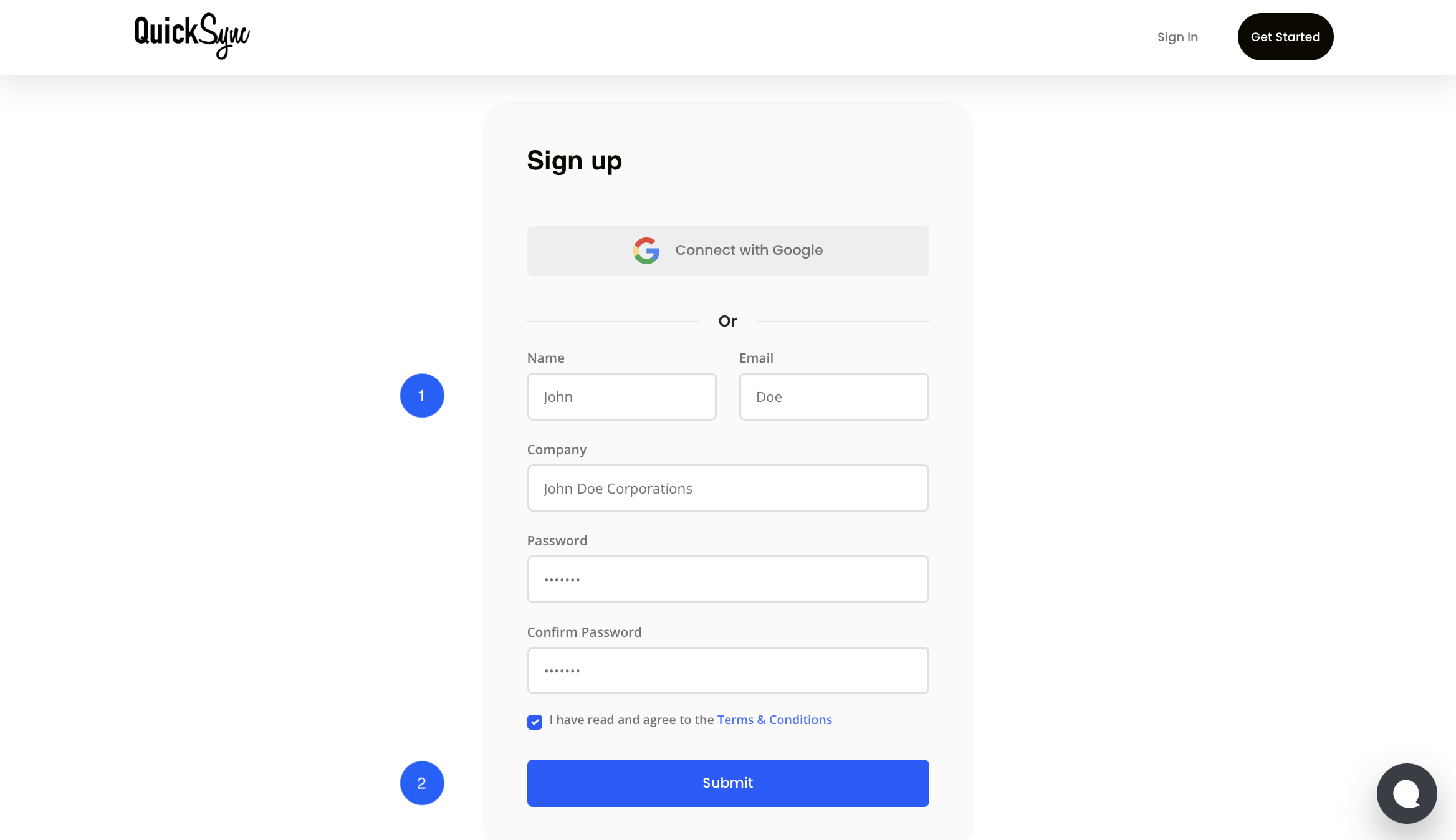
Step 1: Create Your QuickSync Account:
- Sign up for QuickSync if you’re a new user, or log in if you already have an account.
- Select Shopify as your primary platform during setup.
Step 2: Connect Your Shopify Store:
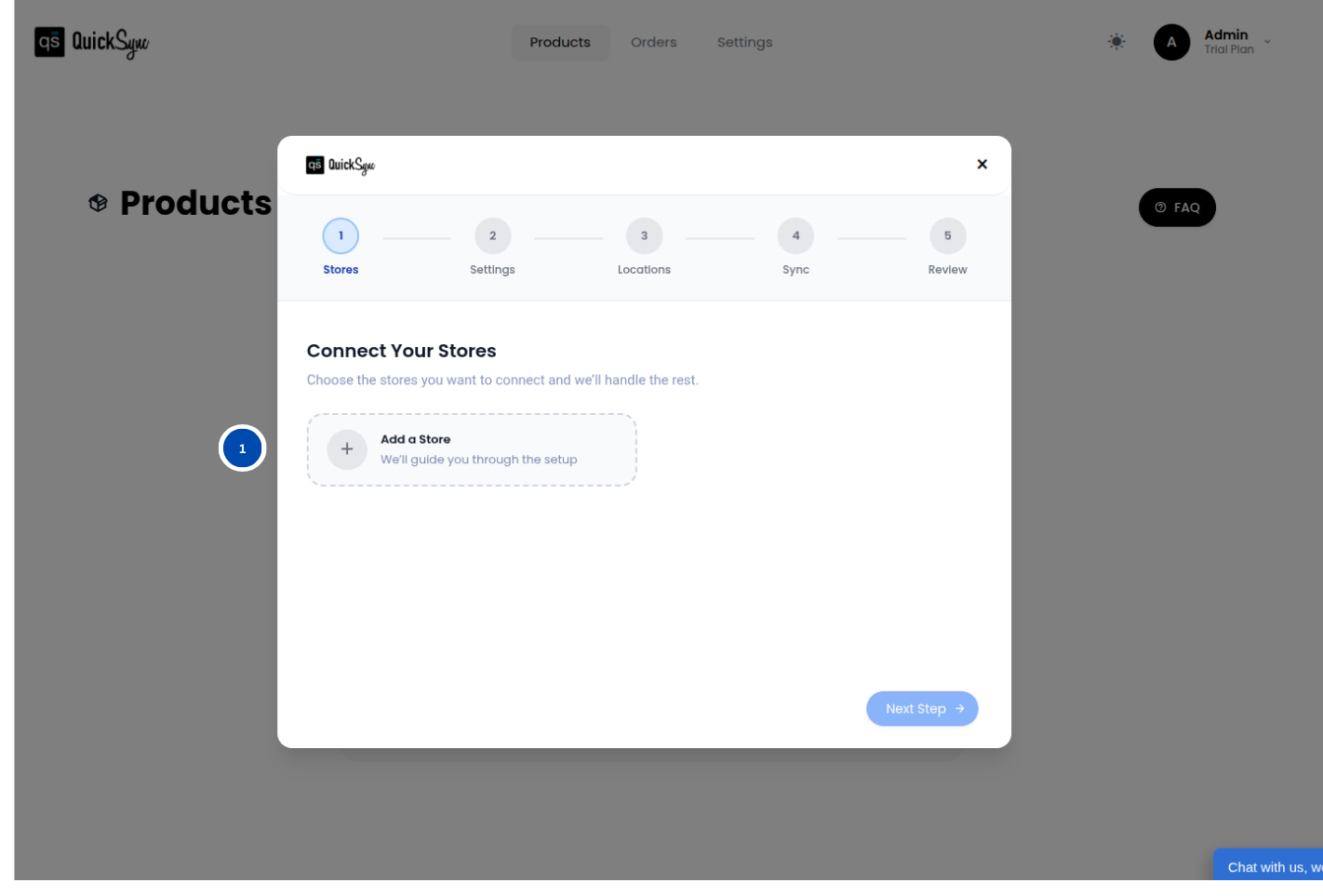
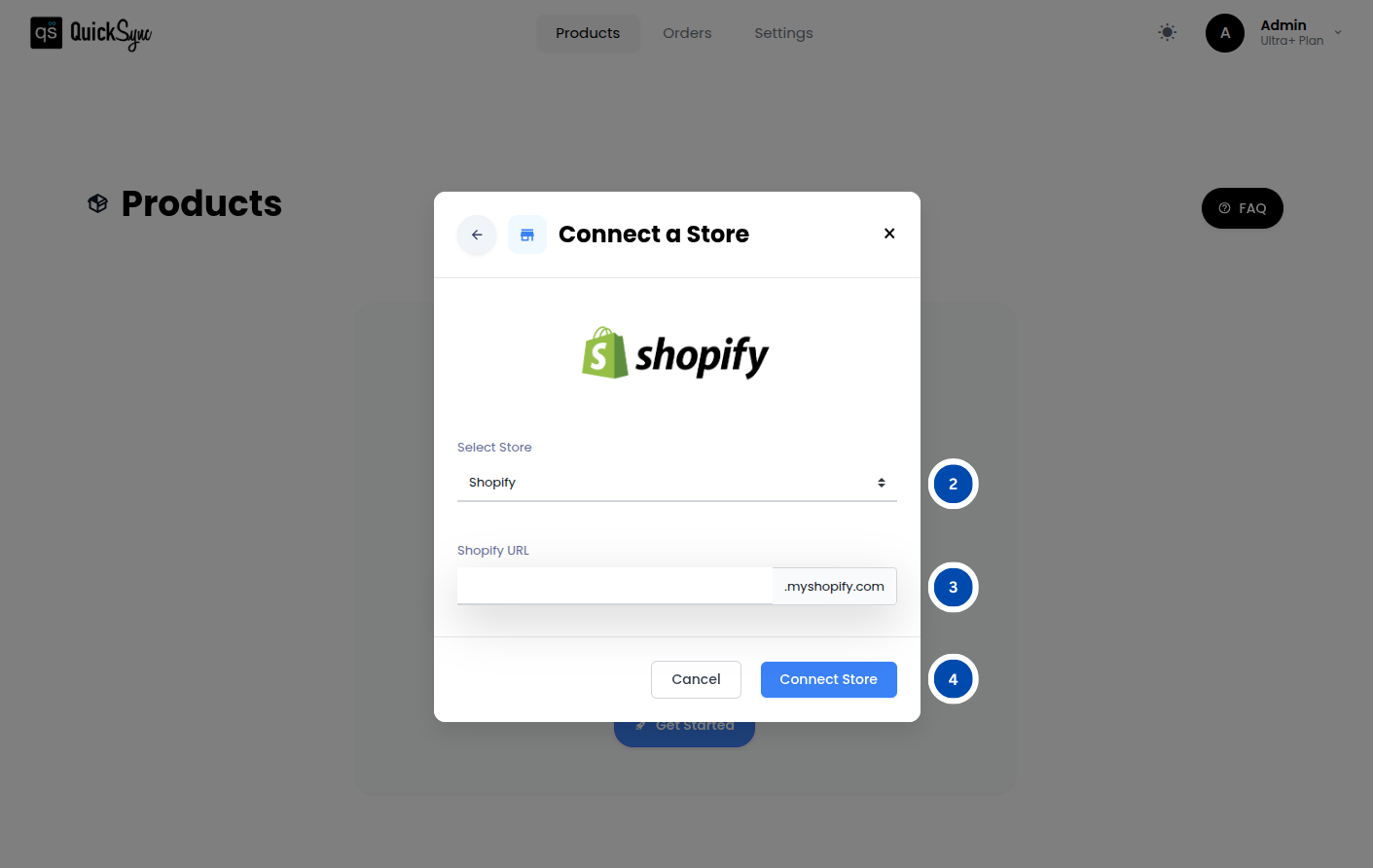
- Go to Dashboard → Add a Store → Select Shopify
- Enter your Shopify store URL and click Connect
- Approve QuickSync’s access request so it can manage your products, inventory, and orders
QuickSync will automatically import your Shopify store data, including categories, attributes, and product listings.
Step 3: Connect Your Amazon Account:
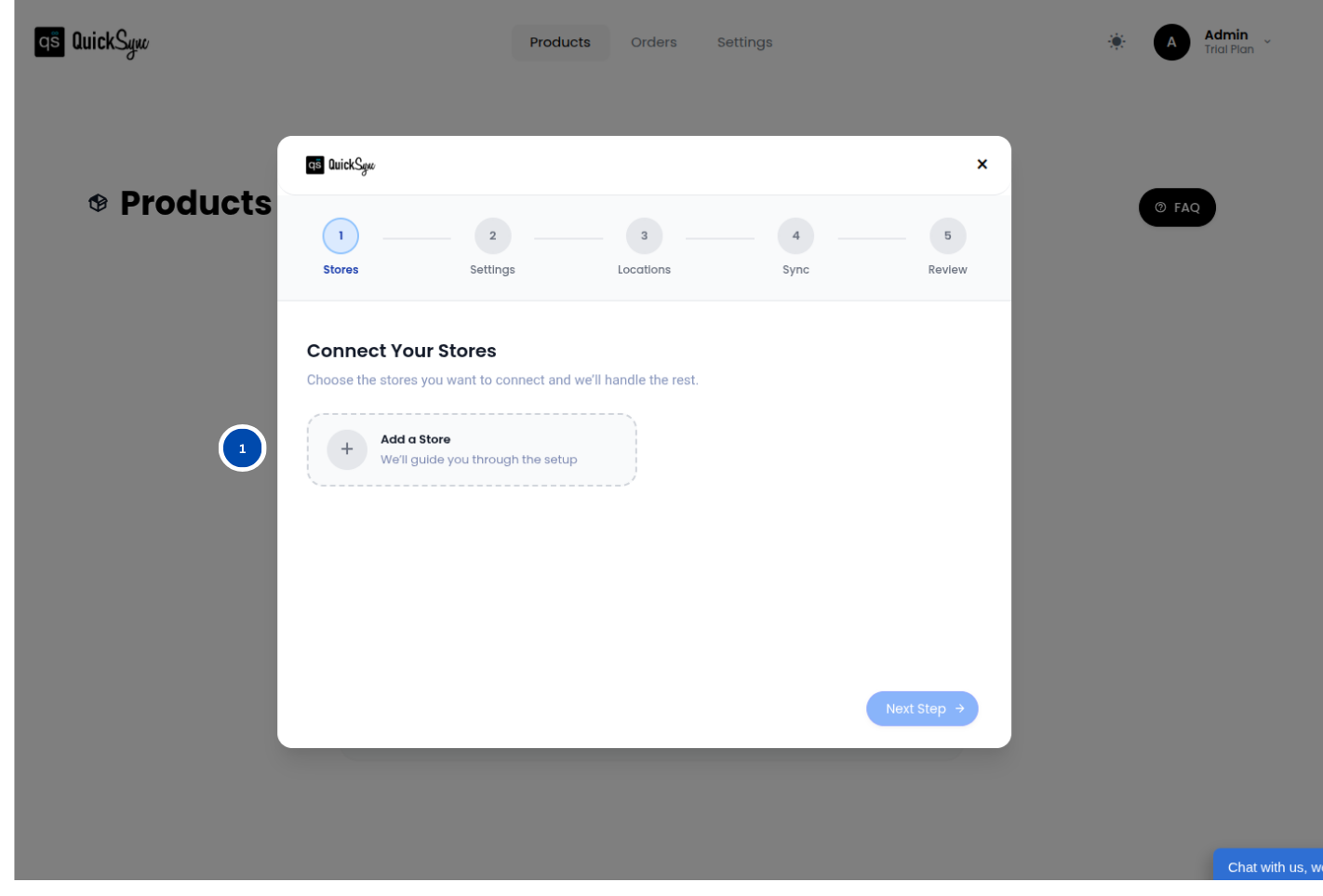
- Go to Dashboard → Add a Store → Select Amazon
- Enter your Amazon Seller credentials and approve the access request
- QuickSync will import your Amazon account details, including listings, inventory, and orders
The progress bar will indicate when the import is complete, ensuring your Shopify and Amazon accounts are fully linked.
Step 4: Configure Sync Preferences:
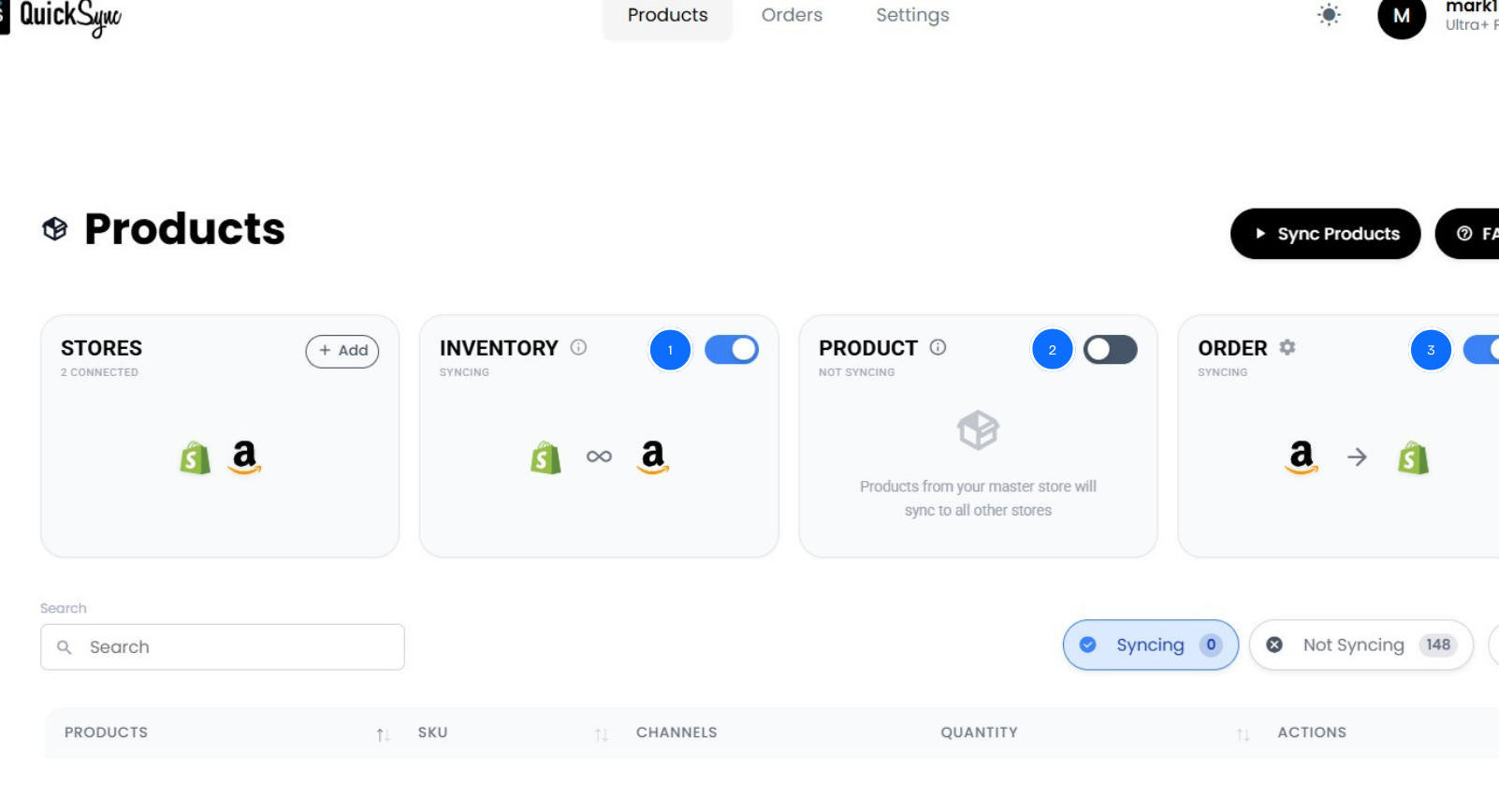
Now choose what QuickSync should sync automatically: Inventory, sync, order sync, and product sync.
Once configured, QuickSync syncs supported changes. Amazon orders are checked every two minutes. Quantity updates target merchant-fulfilled listings; Amazon manages FBA stock. Processing and platform responses can add time.
Also Read: How to Integrate Shopify and Clover: Best Tools, Methods & Tips
Best Practices for a Smooth Shopify and Amazon Sync
Connecting Shopify and Amazon with QuickSync is only the first step. How you manage the integration and daily workflows determines whether it actually saves time and prevents costly mistakes. Follow these key practices to keep your stores running smoothly:
Use Shopify as Your Main Source of Truth:
All product updates, price changes, inventory adjustments, and refunds should start in Shopify (Source of Truth). Avoid making edits directly in Amazon, as this can create conflicts. QuickSync automatically updates Amazon, ensuring your data stays accurate and consistent across both platforms.
Keep Syncing in Real Time:
Relying on daily or weekly updates leaves gaps that can affect inventory management, orders, and cash flow. Automatic syncing reduces manual stock updates. Amazon orders are checked every two minutes. Quantity updates target merchant-fulfilled listings; Amazon manages FBA stock. Processing and platform responses can add time. Use stock buffers for fast-selling items.
Monitor Inventory and Product Accuracy:
Even with automation, it’s important to double-check that stock levels, product variants, and listing details match across Shopify and Amazon. Catching discrepancies early prevents overselling, pricing errors, and account issues.
Reconcile Weekly:
Spend 10 to 15 minutes each week reviewing orders, refunds, and inventory adjustments. Small weekly checks help catch problems before they grow and keep your reporting accurate.
Plan for Multi-Channel Expansion:
Even if Amazon is your only focus now, choose infrastructure that can grow with your business. QuickSync makes it easy to add eBay, Etsy, TikTok shop, or other sales channels later without disrupting your workflow.
Following these best practices ensures your Shopify and Amazon integration stays reliable, accurate, and ready to support growth as your business scales.
The Bottom Line: What Next?
In short, we have seen the problems, different methods to link Shopify and Amazon, and the integration process, along with best practices so far. But here is what really matters.
Many sellers celebrate their first Amazon sale, then panic when inventory goes out of sync. Emergency shipping piles up, reviews drop, and Sunday nights turn into apology marathons.
That’s the cost of basic integration. Learning how to connect Shopify to Amazon properly lets you run one business across two platforms: accurate stock, unified orders, and pricing that automatically protects your margins.
QuickSync is how you get there. Start your free 14-day trial today. No credit card. No technical headaches. Just proper Shopify Amazon integration that scales with your ambition.