
Choosing the wrong e-commerce platform costs you more than money. It costs time, leads to lost sales, and misses growth opportunities. That is why the Shopify vs WooCommerce decision matters more than most business owners realize.
At first glance, both platforms look like strong options. WooCommerce powers around 33.4% of all online stores worldwide, while Shopify runs millions of businesses and processes massive global sales every year. On paper, either one can work.
Shopify is a hosted platform where everything is managed for you. WooCommerce runs on WordPress and gives you full control over your store, but also makes you responsible for hosting, security, and updates.
We have tested both platforms hands-on, gathered feedback from real merchants, and applied the same evaluation criteria to each. By the end, you will know exactly which platform fits your situation, what it will actually cost you, and what to do if you need both running simultaneously. Read on.
How We Evaluated Shopify vs WooCommerce Comparison
Before we jump into every feature deeply, let’s look at the factors that we considered in this comparison, which were evaluated consistently across both platforms. Here is what we covered and why each one matters.
- Ease of use and setup: How quickly you can go from zero to a live store, and how much technical knowledge you need.
- Total cost of ownership: The real monthly and annual cost of running each platform, including hidden costs.
- Features and functionality: What each platform can do natively versus what requires plugins or apps.
- Design and customization: How much control you have over the look and behavior of your store.
- Inventory management: How each platform handles stock tracking, variants, and multi-location inventory.
- Payment processing: Supported payment methods, transaction fees, and processor flexibility.
- SEO capabilities: How well each platform supports search engine optimization.
- Scalability and performance: How each platform handles growth in traffic, products, and order volume.
- Security and reliability: Who is responsible for keeping the store secure?
- Support and community: What help is available when something goes wrong.
- Integration capabilities: How well each platform connects with external tools and services.
Shopify vs eBay: A Brief Overview of Each Platform
A fair Shopify vs WooCommerce comparison starts with one fact. They are not the same type of platform. Shopify handles everything for you, while WooCommerce gives you full control but requires you to manage it. Here is a quick overview of both.
What Is Shopify?

Shopify is a fully hosted eCommerce platform founded in 2006. It started as a solution for a snowboard equipment store whose founders could not find an eCommerce platform that was easy enough to use. Today, it powers businesses from solo entrepreneurs to enterprise brands.
Shopify’s core proposition is simplicity without sacrifice. You get a professional eCommerce store with built-in payment processing, inventory management, shipping integrations, and multi-channel selling, all managed through a single dashboard, without needing to configure a single server or install a single plugin just to get started.
Shopify POS extends the platform to physical retail. Shopify Plus serves high-volume enterprise merchants. And Shopify’s app store with over 8,000 integrations covers virtually any functionality a growing business needs.
Shopify: Our Assessment
- Ease of use: Shopify is the most beginner-friendly eCommerce platform available. Most merchants can have a live store within a few hours without any technical knowledge.
- Managed infrastructure: Hosting, SSL, security, and updates are all handled automatically. You never touch a server.
- Built-in payment processing: Shopify Payments eliminates the need to configure a separate gateway and removes extra transaction fees.
- Multi-channel selling: Sell on TikTok Shop, Instagram, Facebook, Amazon, eBay, and in-store from one Shopify backend.
- Reliable performance: Shopify’s infrastructure handles traffic spikes automatically. No server upgrades needed as you grow.
- 24/7 support: Official support via phone, email, and live chat for all plan levels.
What Is WooCommerce?
WooCommerce is a free, open-source eCommerce plugin for WordPress. It was developed by WooThemes in 2011 and acquired by Automattic, the company behind WordPress.com, in 2015. It currently powers an estimated 33% of all successful online stores globally, making it the most widely deployed eCommerce platform by sheer volume.
WooCommerce’s appeal is its combination of zero platform cost and unlimited flexibility. Because it runs on WordPress, it inherits the entire WordPress ecosystem, including over 59,000 plugins, thousands of themes, and a global community of developers. There is virtually nothing you cannot build with WooCommerce, given enough time and technical resources.
However, every decision about hosting, security, performance, and maintenance falls on you. WooCommerce itself provides no hosting, no official support, and no guarantee of uptime. Your store is as reliable as the decisions you make about the infrastructure surrounding it.
WooCommerce: Our Assessment
- Cost: The WooCommerce plugin is free. For technically capable teams, the total cost of ownership can be lower than Shopify at scale.
- Customization: Complete code access and the full WordPress ecosystem mean there is no design or functionality limitation you cannot work around.
- SEO: WordPress combined with plugins like Yoast SEO or RankMath gives WooCommerce a genuine SEO advantage over Shopify.
- Payment flexibility: No platform surcharge for using any payment processor. Full freedom to choose and negotiate rates.
- Ownership: You own your store completely. Your data, your code, your hosting. No platform can change your pricing or shut you down.
- Plugin ecosystem: 59,000+ WordPress plugins cover every conceivable functionality need.
Shopify vs WooCommerce: A Detailed Comparison Based on 11 Important Factors
1. Ease of Use and Setup
For many online business owners, the time and expertise required to set up and run a store are just as important as the features it offers. A platform you cannot manage without constant developer help is not a platform that works for your business.
Shopify:
Shopify is designed for people with no technical background. Creating an account, choosing a theme, adding products, connecting a payment method, and going live can all be done in a few hours without any coding knowledge.
The admin interface is clean, logical, and consistent, and staff can also be trained on Shopify quickly. And because Shopify manages all the technical infrastructure, there is no ongoing maintenance burden on the store owner.
WooCommerce:
WooCommerce requires more to get started. You need a domain name, a hosting account, a WordPress installation, the WooCommerce plugin, and a theme before you can begin adding products. Each of these steps is manageable individually, but combined, they represent a meaningful setup process that can take days rather than hours, especially for someone without prior WordPress experience.
Once set up, WooCommerce’s day-to-day management is straightforward for most tasks. But updates, plugin conflicts, security patches, and performance issues require ongoing technical attention that Shopify handles automatically.
Verdict: Shopify wins clearly on ease of use and setup. For non-technical business owners, the difference is significant. For developers or technical teams, WooCommerce’s setup overhead is manageable.
2. Pricing Structure and Plans
This is the most important factor in Shopify and WooCommerce, and the one where the most misleading information circulates. WooCommerce is described as free everywhere, and the plugin is free. But the cost of running a WooCommerce store is not.
Shopify Pricing:
Shopify’s pricing is transparent and predictable. You pay a monthly subscription that includes hosting, SSL, security, and Shopify’s core features. The Basic plan starts at $39 per month. The Shopify plan is $105 per month. Advanced is $399 per month. These prices include the infrastructure that WooCommerce requires you to purchase separately.
Additional costs on Shopify include premium app subscriptions if you need features beyond the core platform, transaction fees if you choose not to use Shopify Payments, and the POS Pro add-on at $89 per location per month for advanced retail features.
WooCommerce Pricing:
A realistic breakdown of what a serious WooCommerce store actually costs annually includes hosting at $10 to $100 or more per month depending on traffic, a domain at $10 to $20 per year, an SSL certificate which may be free through your host or cost up to $100 per year, essential plugins for SEO, security, backups, and performance optimization which can add $100 to $500 or more per year, a premium theme at $50 to $200 as a one-time cost, and payment gateway fees on every transaction.
For stores that require customization, developer costs are the biggest variable. WordPress developer rates range from $50 to $150 or more per hour. A single custom feature or a complex setup issue can consume more developer time than months of Shopify subscription fees.
At a small scale with a technical team, WooCommerce can be meaningfully cheaper than Shopify. At a mid-market scale without in-house development, the total cost of ownership is often comparable or higher.
Verdict: There is no universal winner here. Shopify wins on cost predictability and transparency. WooCommerce can win on total cost for technically capable teams at scale. For businesses without a developer, Shopify is almost always cheaper in practice once hidden WooCommerce costs are counted.
3. Features and Functionality
This factor defines what your store can actually do. Both Shopify and WooCommerce cover all core eCommerce needs, but they take different approaches. Shopify relies on built-in tools, while WooCommerce depends on plugins and customization.
Shopify Features:
Shopify includes a strong set of core features natively: inventory management, multi-channel selling, abandoned cart recovery, discount codes, gift cards, basic analytics, shipping integrations, and a full checkout system.
Features that go beyond the core are available through Shopify’s app store. For most retail businesses, Shopify’s native feature set covers 80 to 90 percent of what they need without a single app installation.
WooCommerce Features:
WooCommerce’s core plugin handles the fundamentals. For everything else, there is a plugin. This is both WooCommerce’s greatest strength and its greatest complexity.
There are plugins for subscriptions, memberships, bookings, multi-currency, advanced shipping, product bundles, and virtually anything else you can imagine. But each plugin adds cost, complexity, potential conflicts, and a maintenance obligation.
Verdict: In the Shopify vs WooCommerce features comparison, Shopify wins for simplicity and reliability of features. WooCommerce wins for breadth and depth of what is ultimately achievable. The right choice depends on whether you need advanced functionality and have the technical resources to manage it.
4. Design and Customization
Your store’s design plays a key role in conversions, brand perception, and customer trust. The level of control you have over that design can directly influence how your business is experienced by customers.
Shopify Design:
Shopify offers a range of free and paid themes through its official theme store. Premium themes run from $100 to $400 as a one-time purchase. Customization is done through Shopify’s visual editor and its Liquid templating language.
For most merchants, the available customization options are sufficient. For businesses that need a truly unique design or complex custom functionality, Shopify’s theme system can feel limiting compared to WooCommerce’s flexibility.
WooCommerce Design:
WooCommerce runs on WordPress, which gives it access to thousands of free themes from multiple marketplaces. More importantly, because you have complete code access, there is no design limitation that a developer cannot work around.
Any design that exists on the web can be replicated in WooCommerce. For businesses with specific design requirements or a development team, WooCommerce offers complete creative freedom.
Verdict: WooCommerce wins on design flexibility and customization depth. Shopify wins on ease of implementation for non-technical store owners. For businesses with a developer, WooCommerce provides capabilities that Shopify simply cannot match.
5. Inventory Management
Inventory management is essential for keeping your operations running smoothly. When stock levels are accurate, you can avoid overselling, stockouts, and order delays. However, if inventory is not managed properly, it can quickly lead to lost revenue, unhappy customers, and confusion.
Shopify Inventory:
Shopify’s inventory management is one of its strongest native features. Products with multiple variants each have their own stock count, barcode, SKU, and price. Multi-location inventory lets you track stock across warehouses, retail locations, and fulfillment centers from one dashboard.
Inventory transfers between locations, demand forecasting reports, and low stock alerts are all available without installing a single app. Every sale, whether online or in-store, updates inventory across all channels automatically.
WooCommerce Inventory:
WooCommerce’s inventory management works well within its core plugin. Product variants, SKUs, stock counts, and basic low stock alerts are all included. Multi-location inventory is supported and works well when connected through QuickSync for multichannel operations. Advanced inventory features like forecasting and complex multi-warehouse management typically require additional plugins.
Verdict: Shopify has a modest edge on built-in inventory depth, particularly for barcodes, unit pricing, digital products, and customer data access. WooCommerce covers all the essentials and supports multi-location inventory. For most businesses, both platforms handle inventory adequately.
6. Payment Processing
Payment processing affects every single transaction in your store. The fees, flexibility, and reliability of your payment setup directly impact your bottom line.
Shopify Payment Processing:
Shopify has its own built-in payment processor called Shopify Payments. Using it means no extra transaction fees on top of the processing rate. It supports major credit cards, debit cards, Apple Pay, Google Pay, Shop Pay, and buy now pay later options.
If you use a third-party processor instead, Shopify charges an additional 0.5% to 2% transaction fee per sale, depending on your chosen plan. This fee structure effectively encourages Shopify merchants to use Shopify Payments.
WooCommerce Payment Processing:
WooCommerce has no built-in payment processor and no platform transaction fee. You choose whichever payment gateway fits your business, whether that is Stripe, PayPal, Square, Authorize.net, or a regional processor.
There is no surcharge for using any of them. For high-volume merchants, this freedom to negotiate rates with processors and switch without penalty is a genuine financial advantage over Shopify’s locked fee structure.
Verdict: WooCommerce wins on payment flexibility. No platform surcharge and complete freedom to choose and switch processors is a real advantage, especially at high volume. Shopify wins on simplicity and the convenience of a built-in processor that requires no configuration.
7. SEO Capabilities
Organic search traffic is one of the most valuable and cost-effective customer acquisition channels for eCommerce. How well your platform supports SEO can determine whether customers find you or your competitors.
Shopify SEO:
Shopify has solid built-in SEO features. You can customize meta titles, meta descriptions, URL structures, alt text, and canonical tags. Shopify generates a sitemap automatically, and page speed is generally strong because Shopify manages its own infrastructure.
The limitations appear in deeper SEO control. Shopify’s URL structure forces certain formats, and the platform’s Liquid templating language can create constraints for developers who want complete technical SEO control.
WooCommerce SEO:
WooCommerce on WordPress has a genuine SEO advantage. Plugins like Yoast SEO and RankMath provide precise control over every SEO element, including schema markup, breadcrumbs, XML sitemaps, redirect management, and content analysis.
WordPress’s flexibility means developers can implement any technical SEO requirement. The blogging capabilities of WordPress also support content marketing strategies more naturally than Shopify’s built-in blog.
Verdict: WooCommerce edges Shopify on SEO flexibility and depth. For businesses where organic search is a primary acquisition channel, WordPress combined with a quality SEO plugin is a meaningful advantage.
8. Scalability and Performance
A platform that works well at low volume but creates problems as you grow is a business risk. Understanding how each platform scales prevents painful migrations at the worst possible time.
Shopify Scalability:
Shopify handles scaling automatically, so you do not have to worry about technical adjustments as your business grows. As your traffic increases or order volumes rise, everything is managed seamlessly by Shopify’s infrastructure. This means you never need to upgrade servers, configure caching, or optimize database queries on your own.
In addition, as your business reaches a larger scale, Shopify continues to support that growth without disruption. For high-volume businesses, Shopify Plus offers dedicated infrastructure along with custom checkout options and advanced automation tools. Because of this, the platform is designed to support you from your first sale all the way to millions of orders, without requiring you to switch systems.
WooCommerce Scalability:
WooCommerce can scale to support very large stores, and many established eCommerce businesses rely on it. However, this scalability is not automatic. As your traffic grows, you need to upgrade hosting, implement caching, and optimize performance to keep your store running smoothly.
Because of this, WooCommerce works best for businesses that have some level of technical support. Without proper preparation, sudden traffic increases can lead to slow loading times or even downtime during important sales periods.
Verdict: Shopify wins on scalability and simplicity. Growth on Shopify is automatic. Growth on WooCommerce requires active infrastructure management. For businesses without technical resources, this difference is significant.
9. Security Features and Reliability
A compromised store or an unexpected outage can cost more than just revenue. It damages customer trust and seller reputation in ways that take months to recover from.
Shopify Security:
Shopify takes care of security for you, so there is very little you need to manage on your own. SSL certificates are included and maintained automatically, and PCI compliance for payment processing is handled entirely by Shopify. In addition, security updates are applied in the background without requiring any action from you.
Because of this, your store stays protected without ongoing effort. Shopify also maintains strong uptime and uses a reliable infrastructure with built-in redundancy. As a result, you do not have to worry about security patches, plugin vulnerabilities, or server configurations at any stage.
WooCommerce Security:
With WooCommerce, security is your responsibility from the start. Since WordPress powers a large portion of the web, it is also a common target for security threats. In many cases, issues arise from outdated plugins, insecure hosting setups, or missed updates to the WordPress core.
To keep a WooCommerce store secure, you need to choose a reliable hosting plan provider, install a security plugin, manage regular updates, and maintain backups. On top of that, ongoing monitoring is essential to prevent vulnerabilities.
For businesses with technical expertise, this process is manageable. However, for non-technical store owners, maintaining security can become a continuous and sometimes challenging responsibility.
Verdict: Shopify clearly stands out when it comes to security simplicity. Because it follows a managed security model, it removes an entire layer of risk that WooCommerce store owners need to handle on their own. As a result, there is less ongoing effort and fewer chances for security gaps. This becomes especially important for businesses that deal with customer payment data and personal information, where strong and consistent protection is essential.
10. Support and Community
When something goes wrong with your store, how quickly and effectively you can get help directly affects how much revenue you lose during the disruption.
Shopify Support:
Shopify provides 24/7 official dedicated support across all plan levels through phone, email, and live chat. This ensures that help is always available whenever you run into an issue. In addition, the help center is well-structured and includes detailed guides, video tutorials, and webinars to assist with common tasks and troubleshooting.
Beyond direct support, Shopify also offers the Shopify Experts marketplace, where merchants can connect with verified developers and agencies for more advanced or custom work. In most cases, response times are quick, and many common issues are resolved on the first interaction.
WooCommerce Support:
WooCommerce does not offer a centralized official support system. Since it is an open-source plugin, support primarily comes from the community and the broader WordPress ecosystem. Free help is available through forums, documentation, and user discussions, which can be useful but often requires time to navigate.
For paid WooCommerce extensions, support is handled directly by the extension developers rather than a single platform team. When issues arise on a WooCommerce store, resolving them usually depends on your own technical skills, a hired developer, or time spent troubleshooting through community resources.
Verdict: Shopify clearly wins on structured, dedicated support. With 24/7 official assistance, issues are resolved faster and more consistently, which is especially valuable for non-technical users. WooCommerce relies on community and developer support, which can be helpful but is not guaranteed or immediate. This makes Shopify the more reliable option for ongoing business operations.
11. Integration Capabilities
No eCommerce platform operates in isolation. The tools you connect it to, from accounting to email marketing to fulfillment, determine how efficiently your entire operation runs.
Shopify Integrations:
Shopify offers an app store with over 8,000 integrations covering all major business tools. This includes accounting platforms like QuickBooks and Xero, email marketing tools like Klaviyo and Mailchimp, analytics tools like Google Analytics, and ad platforms such as Meta Ads.
In addition, the Shopify store provides native integrations for multichannel selling across TikTok Shop, Instagram, Facebook, Amazon, and eBay. The Shopify API is also well-documented, making it easy to connect custom tools and workflows.
WooCommerce Integrations:
WooCommerce has access to the broader WordPress ecosystem, which includes over 59,000 plugins. This gives it a larger number of potential integrations compared to Shopify, although quality and reliability can vary widely.
It supports key tools for accounting, marketing, shipping, and analytics, and can also connect to external platforms through third-party solutions like QuickSync for inventory and order syncing across channels.
Verdict: Both platforms offer strong integration options. Shopify focuses on curated, high-quality apps with strong native multichannel support, while WooCommerce provides greater volume and flexibility through the WordPress ecosystem. In most cases, both can connect to the tools a business needs without major limitations.
Shopify vs WooCommerce: Comparing Pricing Plans
This is where most WooCommerce comparisons fail the reader. The WooCommerce plugin is free. A production-ready WooCommerce store is not. Here is the honest breakdown.
| Pricing Area | Shopify | WooCommerce |
| Monthly / Platform Costs | Basic: $39/mo Shopify: $105/mo Advanced: $399/mo Plus: $2,300/moPOS Pro: +$89/location/mo All plans include hosting, SSL, and security | WooCommerce plugin: FreeWordPress: FreeHosting: $10 to $100+/mo depending on traffic Domain: $10 to $20/yr SSL certificate: Free to $100+/yr Essential plugins: $100 to $500+/yr (SEO, backup, security, forms) Premium theme: $50 to $200 one-time. Payment gateway: Varies (Stripe, PayPal fees apply) Developer costs if needed: $50 to $150+/hr |
| Transaction Fees | Hosting upgrade costs as traffic grows, Security plugin and monitoring costs, WooCommerce extensions (subscriptions, memberships, etc.)Developer time for updates and maintenance, Backup solution costs, Performance optimization costs (CDN, caching) | No platform transaction fee. Payment gateway fees apply (Stripe: 2.9% + $0.30). Full freedom to choose any processor. No surcharge for using third-party gateways. Can negotiate rates with high-volume processors |
| Hidden Costs to Watch | POS Pro add-on for retail features, Premium app subscriptions, Transaction fees if not using Shopify PaymentsShopify Email beyond the free tier | POS Pro add-on for retail features, Premium app subscriptions, Transaction fees if not using Shopify Payments, Shopify Email beyond the free tier |
Key Pricing Takeaways
- WooCommerce is not actually free at scale: Hosting, plugins, themes, security tools, and developer time make a serious WooCommerce store comparable in cost to Shopify for many businesses.
- Shopify pricing is predictable: You know exactly what you are paying each month. WooCommerce costs can fluctuate significantly, especially when developer time is involved.
- Payment processing is where WooCommerce wins financially: No platform transaction fee and complete processor freedom can generate meaningful savings at high volume.
- Developer costs are the biggest WooCommerce variable: Businesses without in-house technical capability often spend more on WooCommerce in developer fees than they would spend on Shopify subscriptions over the same period.
Hidden Costs and Pricing Differences to Know
At first glance, WooCommerce and Shopify may seem straightforward in pricing, but the real costs often appear over time in less obvious ways.
With WooCommerce, the highest hidden cost is developer time. Because it is self-hosted, issues like plugin conflicts, performance tuning, security fixes, and custom changes often require technical help. Even small ongoing tasks can turn into a meaningful cost in both time and money, especially if you rely on a developer.
With Shopify, the platform handles most technical work for you, but costs can shift toward paid apps. As your store grows, you may need multiple apps for marketing, reporting, or advanced features. Individually, they are small, but together they can add anywhere from $50 to $500 per month on top of your base plan.
If you use both Shopify and WooCommerce together, another hidden cost appears in the form of manual work. Managing inventory, products, and orders across two systems can quickly become time-consuming and error-prone.
This is where tools like QuickSync.pro help by automatically syncing both platforms, reducing manual effort and keeping everything aligned.
Shopify vs WooCommerce Comparison Overview: Who Actually Wins?
After comparing both platforms across eleven factors, here is the complete woocommerce vs shopify comparison in one place.
| Factor | Shopify | WooCommerce | Winner |
| Platform Cost | $39 to $399/mo all-in | Free plugin, $50 to $500+/mo total | Tie (depends on needs) |
| Transaction Fees | 0% with Shopify Payments | 0% platform fee, gateway fees apply | WooCommerce |
| Hosting | Fully managed, included | Self-managed, extra cost | Shopify |
| Ease of Setup | Hours, no technical skill needed | Days, technical knowledge required | Shopify |
| Customization | Limited, theme-based | Unlimited, full code access | WooCommerce |
| SEO | Solid but limited flexibility | Superior with WordPress plugins | WooCommerce |
| Security | Fully managed by Shopify | Your responsibility | Shopify |
| Payment Flexibility | Shopify Payments preferred | Any gateway, no surcharge | WooCommerce |
| Inventory Management | Multi-location, built-in | Multi-location, plugin-dependent | Shopify |
| Scalability | Automatic, no server management | Requires hosting upgrades | Shopify |
| Multi-Channel Selling | Built-in across channels | Plugin-dependent | Shopify |
| Official Support | 24/7 structured support | Community only, no official support | Shopify |
| Plugin Ecosystem | 8,000+ apps | 59,000+ WordPress plugins | WooCommerce |
| Ownership and Control | Platform-dependent | You own everything | WooCommerce |
| Using Both Together | Possible via QuickSync | Possible via QuickSync | Both + QuickSync |
Shopify wins on ease of use, managed infrastructure, security, scalability, and official support. These are decisive advantages for non-technical business owners and growing businesses that cannot afford to manage their own infrastructure.
WooCommerce wins on customization, SEO, payment flexibility, plugin breadth, and complete platform ownership. These advantages matter most for technical teams, developers, and businesses with specific requirements that go beyond what any managed platform can offer.
Which Platform Should You Use? Shopify vs WooCommerce by Business Type
Choose Shopify if:
- You are not technical and do not have a developer on your team.
- You want to launch quickly without dealing with hosting, security, or technical setup.
- You need predictable monthly costs and do not want surprise infrastructure bills.
- You want built-in multichannel selling across social media and marketplaces.
- You are scaling fast and need a platform that handles growth automatically.
- Official support and guaranteed uptime are priorities for your business.
Choose WooCommerce if:
- You or your team have WordPress and development experience.
- You need deep customization that Shopify’s theme system cannot accommodate.
- SEO is a primary acquisition channel, and you need granular technical SEO control.
- You want complete platform ownership and do not want dependency on a vendor’s pricing.
- Payment processor flexibility and avoiding Shopify’s transaction fee surcharge matter to your margins.
- You are building a complex store with subscription products, memberships, or highly customized checkout flows.
What if You Use Shopify and WooCommerce Together!
So far, you now have a clear idea of every essential aspect of Shopify and WooCommerce, and which platform would better fit your business. But what if you could use both together rather than choosing one?
This is where things get interesting. Shopify gives you speed, social selling, and a checkout that converts. WooCommerce gives you SEO power, total customization, and full ownership. Using both means you sell online everywhere your customers actually shop, with each platform handling what it does best.
The only catch is keeping them aligned. Two stores mean two catalogs, two inventory counts, and two order systems. Without sync, you are stuck copying data, fixing mismatches, and risking oversells.
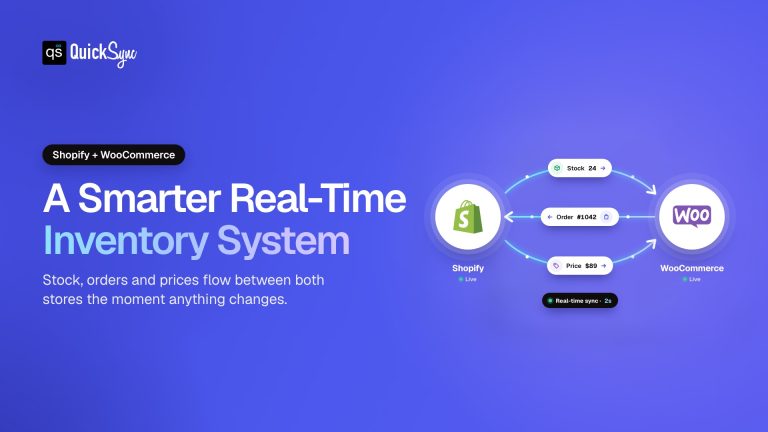
QuickSync fixes this by connecting both platforms into one system with Shopify WooCommerce integration. It syncs products, inventory, orders, and customer data between Shopify and WooCommerce in real time. Update once, see it everywhere.
Sell on Shopify and WooCommerce as One Store with QuickSync
Selling on both Shopify and WooCommerce gives you reach and flexibility, but managing them separately creates constant syncing issues, manual updates, and hidden errors. QuickSync removes that complexity by keeping both stores perfectly aligned in real time, so they operate like one unified system. The following are some of the key features that you get when your Shopify and WooCommerce are synced through QuickSync.
- Products stay identical on both stores – Product data, including images, titles, descriptions, tags, categories, pricing, and variants, stays fully synced. Any update in one store is reflected everywhere instantly, without manual edits.
- Orders sync instantly in both directions – A purchase on Shopify appears in WooCommerce immediately and vice versa. Customer details, shipping information, and payment status stay fully consistent across both platforms.
- Inventory updates in real time – Every sale updates stock across both stores instantly. Each product variant is tracked correctly, preventing overselling, stock mismatches, and fulfillment errors.
- Fulfillment works from either platform – Ship from Shopify and tracking pushes to WooCommerce. Ship from WooCommerce and tracking pushes to Shopify. You choose your dashboard.
- Digital products sync correctly – Virtual and downloadable flags carry over, so WooCommerce never charges shipping for items that do not ship.
- Errors fix themselves – Duplicate SKUs auto correct. Security plugin blocks are handled without manual work. Auth failures notify you immediately instead of breaking silently.
With QuickSync, you do not treat Shopify and WooCommerce like two separate systems. But you manage both of them as one store and sell using them together seamlessly.
Bottom Lines: What To Choose?
In short, Shopify vs WooCommerce is not about finding a winner. It is about finding your fit. Shopify fits if you want speed, simplicity, and zero technical headaches. WooCommerce lets you have control, customization, and full ownership.
But the smartest sellers use both, but the catch is keeping them aligned. Without sync, you are juggling two stores, copying data, and risking oversells. QuickSync fixes this. It connects both platforms into one system so products, inventory, and orders flow automatically.