Are you looking for a way to sync inventory between Shopify and eBay without constantly updating stock levels manually? Managing inventory across multiple sales channels can quickly become complicated.
When a product sells on Shopify, but your eBay store doesn’t update stock immediately. This delayed inventory sync can lead to overselling, order cancellations, and frustrated customers.
Many merchants try manual updates, CSV uploads, or basic integrations to keep their inventory aligned. While these methods may work for small stores, they often become unreliable as order volumes increase.
According to McKinsey & Company, businesses with poor inventory visibility can lose 2–5% of sales due to stockouts. That’s exactly where a proper Shopify eBay inventory sync workflow becomes essential.
In this guide, you’ll learn how to sync Shopify and eBay inventory properly, what causes inventory mismatches, and how businesses maintain accurate stock levels across both platforms.
What It Means to Sync Shopify and eBay Inventory and Why It Matters
Syncing Shopify and eBay inventory means connecting both platforms so your products, stock levels, and orders stay updated automatically across stores. When the stores are properly synced, your Shopify inventory, product listings, and order updates reflect instantly on your eBay store. This ensures that both platforms always show the same stock availability.
Without proper syncing, Shopify and eBay operate as two separate systems. Any change made on one platform does not automatically update the other.
For example, imagine your Shopify store shows 20 units of a product, and your eBay store also shows 20 units. If five items sell on Shopify but the update does not reflect on eBay, your listing will still show outdated stock levels.
If another order comes from eBay during that time, the product may get oversold.
Even small inventory gaps like this can create operational issues when you sell across multiple platforms. When Shopify and eBay inventory syncing works properly:
- Product inventory updates automatically across both platforms
- Shopify product listings stay aligned with eBay listings
- Orders from Shopify or eBay adjust stock levels instantly
- Merchants can monitor inventory from one centralized system
For businesses selling across multiple marketplaces, inventory syncing plays a critical role in maintaining accurate stock and supporting efficient multi-channel ecommerce operations.
Why Inventory Mismatch Happens Between Shopify and eBay
Keeping inventory in sync across two platforms sounds simple, until it isn’t. When you are selling on both Shopify and eBay, even the smallest delay or gap in communication between the two can throw your stock levels off without you even realizing it.
And here’s the thing, most of the time, it’s not actually your inventory that’s the problem. It’s how the platforms talk to each other. Without a proper syncing system connecting them, updates don’t always transfer instantly.
So what’s actually causing your inventory to fall out of sync? Here are the most common reasons.
Manual updates across platforms
Many small sellers update stock manually inside the Shopify dashboard and on eBay. This manual approach works for a few products. But it quickly becomes unreliable when listings grow.
SKU mismatches between listings
If Shopify products and eBay listings do not share the same unique SKU, syncing inventory becomes difficult. The system cannot map the products correctly. This causes incorrect stock updates.
Delayed inventory syncing
Some basic Shopify eBay inventory sync app updates stock 15–30 minutes instead of real time updates. This delayed inventory sync can cause inaccurate stock. During sales periods, this delay leads to overselling issues.
Separate inventory systems
Running Shopify and eBay as independent platforms means inventory data lives in different places. Without a proper Shopify eBay integration, inventory updates must be repeated manually.
What are the Risks of Not Syncing Inventory Across Shopify and eBay

When Shopify and eBay inventory are not synced properly, the problems go beyond stock errors. It starts with a stock error. Then comes a cancellation. Then a refund. Then, a frustrated customer who doesn’t come back.
Here are some risks merchants face without a proper Shopify eBay inventory sync system.
Overselling of Products
Without real time updates, the same product can sell on both platforms even if only one unit remains. Overselling leads to cancelled orders and poor seller ratings on eBay.
According to ecommerce fulfillment studies, nearly 34% of sellers experience overselling issues when inventory across sales channels is not synced properly.
When cancellations increase, it directly affects marketplace performance and customer trust.
Lost Revenue from Stockouts
Incorrect stock levels can also hide available inventory. If your eBay listings show “out of stock” while Shopify still has stock available. You lose potential sales opportunities.
Retail research shows businesses lose nearly 4% of annual sales due to stockouts caused by poor inventory visibility.
This means your products might be available in your warehouse but invisible to customers online.
Poor Customer Experience
Customers expect accurate listings and smooth order fulfillment. If they place an order that later gets cancelled because of inventory issues, it damages trust in your store.
Studies show 69% of shoppers will not return after a poor fulfilment experience, especially when cancellations happen after payment.
Consistent inventory syncing helps prevent these situations and improves customer satisfaction.
Time Lost in Manual Corrections
Many merchants spend hours fixing inventory discrepancies manually between Shopify and eBay dashboards. Checking stock numbers, adjusting listings, and correcting orders becomes a daily operational burden.
Research suggests ecommerce teams spend up to 12 hours per week correcting inventory errors across sales channels.
This time could be used for marketing, product sourcing, or business growth.
Negative Marketplace Performance
Frequent order cancellations or incorrect listings can impact your eBay seller performance metrics. It reduces product visibility in search results.
Marketplace policies prioritize sellers with accurate listings and reliable fulfillment.
Even a small increase in cancellation rate can reduce your listing exposure. It affects long-term marketplace sales performance.
Benefits of Syncing Inventory Between Shopify and eBay Accurately

When inventory syncing works correctly, your operations start running much more smoothly and efficiently. Instead of constantly fixing stock errors, merchants gain a stable workflow that supports multi-channel growth.
Here are some real benefits merchants see after implementing a proper Shopify eBay inventory sync workflow.
Real-Time Stock Accuracy
Every sale instantly syncs inventory levels across Shopify and eBa. So your customers always see exactly what’s available. No guesswork, no delays, just accurate inventory working in the background 24/7.
Businesses using automated inventory syncing improve stock accuracy by up to 95%. And when your stock is accurate, your orders go out faster, too. It’s a win that keeps giving.
Faster Multi-Channel Selling
With reliable inventory sync, you sell everywhere, stress about nothing. Automated inventory syncing means your listings stay perfectly updated across every platform. So you can focus on growing your sales, not managing them.
Multi-channel sellers using automation tools process orders 28% faster, handling more volume without adding to their workload. More sales, same effort. That’s the dream.
Better Inventory Management
Centralized inventory gives you a clear view of your stock, what’s selling, what’s sitting, and what needs reordering. You’re always one step ahead.
Companies using automated inventory systems reduce stock discrepancies by up to 40%. It helps them make smarter restocking decisions and keep shelves (virtual or physical) perfectly balanced.
Improved Customer Satisfaction
When customers receive exactly what they ordered, right on time, they come back. Accurate inventory means smoother deliveries, fewer surprises, and a brand experience people genuinely trust.
Accurate inventory management can improve customer retention by nearly 30%. Happy customers don’t just return, they bring others with them.
Operational Efficiency
Your team gets their time back. Instead of manually updating stock across platforms, automation handles it. It frees everyone up to focus on marketing, sourcing, and scaling the business.
Businesses using automated inventory systems see 20–30% efficiency improvements in their fulfillment workflows. Less admin, more growth.
What an Ideal Shopify–eBay Inventory Sync Workflow Looks Like
An ideal Shopify inventory sync workflow makes merchants’ lives easier. A well-built inventory sync workflow connects both platforms into a single unified system. Shopify acts as the central inventory source. Every product update, stock movement, and listing change on Shopify is automatically reflected on eBay in real time.
A reliable setup typically includes:
- SKU-level product mapping so every product is tracked with precision across both platforms.
- Real-time inventory syncing ensures stock levels are always accurate and up to date.
- Variant-level updates covering size, color, style, and other product attributes.
- Automatic listing updates so any changes in Shopify instantly reflect on eBay.
- Centralized monitoring through a single dashboard for complete operational visibility.
With this system in place, merchants manage their Shopify store, eBay store, and inventory from one unified workflow.
Different Ways to Sync Shopify and eBay Inventory
There are several ways merchants attempt to sync inventory between Shopify and eBay. Some methods work temporarily, but many struggle once order volumes increase.
Let’s look at the most common methods for syncing inventory between Shopify and eBay.
Method 1: CSV Imports and Exports
Some merchants export product data from Shopify and upload it to eBay using CSV files. This is one of the earliest methods used for syncing product listings across platforms.
While this method works for small sellers, it comes with serious limitations once inventory and sales volume start growing.
CSV imports do not provide real time updates. Every stock change requires another export and upload process.
Challenges with CSV syncing
- Inventory updates may be delayed by hours or days.
- Manual file handling increases the risk of errors.
- Large product catalogs become difficult to manage.
- Sales data may not reflect real-time stock changes.
Industry reports suggest nearly 41% of small sellers abandon CSV syncing once they scale beyond a few hundred listings.
Method 2: Manual Inventory Updates
Another approach is updating stock levels manually on both platforms. Merchants log into Shopify and eBay dashboards separately. Then they adjust inventory numbers for each product whenever sales occur.
This approach may work for very small stores with limited product catalogues. However, once sales start increasing, manual updates become slow and unreliable.
Common issues with manual syncing
- Inventory updates depend on constant monitoring.
- Small delays can cause overselling.
- Large product catalogs become difficult to maintain.
- Human errors increase during busy sales periods.
Research indicates that over 30% of inventory discrepancies come from manual data entry errors in e-commerce systems.
Method 3: Inventory Sync Software (QuickSync)
Modern merchants rely on inventory sync software to maintain accurate stock levels across platforms.
Instead of manually updating inventory, tools like QuickSync connect Shopify and eBay into one automated system that updates stock levels in real time.
This approach removes the operational complexity of managing multiple sales channels. It comes with no limitations compared to other inventory sync methods.
Tools like QuickSync provide a complete Shopify eBay inventory sync system with:
- Real-time inventory syncing across platforms
- Variant-level inventory updates
- Multi-location inventory support
- Centralized dashboard for all sales channels
- Automatic product mapping using SKUs
- No manual updates required
How to Sync Inventory Between Shopify and eBay Using QuickSync
Now that you understand why inventory mismatches happen and what they cost your business, the next step is fixing them. And that’s exactly where QuickSync comes in.
QuickSync is a complete sync solution built for merchants. Beyond keeping your stock levels accurate in real time, QuickSync also handles product syncing, order syncing, and even images and video sync. So every detail of your listings stays consistent across both platforms, not just the numbers.
And the best part? You don’t need to be tech-savvy to get it running. together. The setup process is simple and takes only a few steps.
Here’s how to get it set up:
Step 1: Create Your QuickSync Account
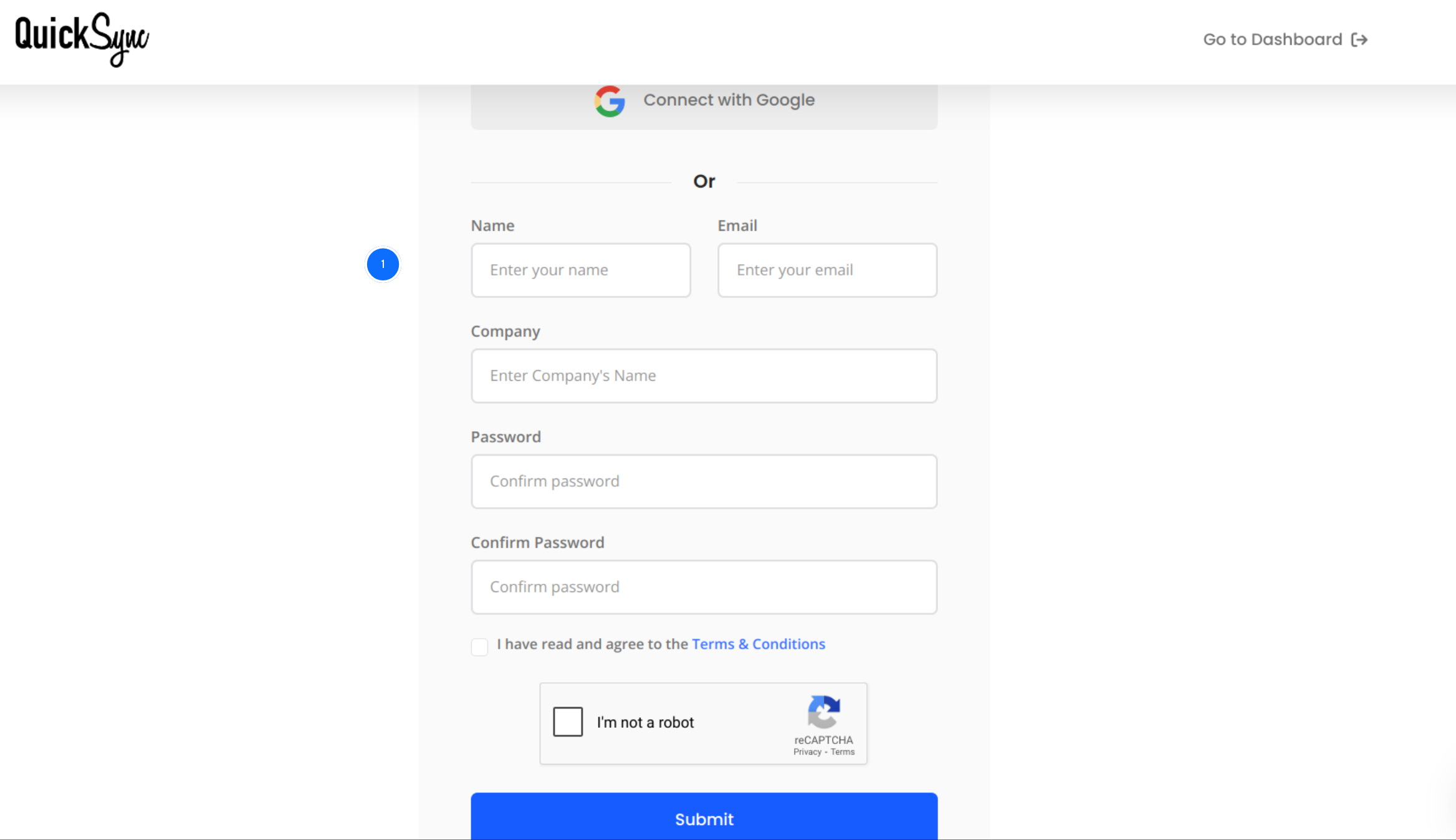
- Visit quicksync.pro and click on sign up.
- Start by creating a QuickSync account.
- After signing up, you’ll access the QuickSync dashboard. In this dashboard, you can manage integrations, inventory syncing, and marketplace connections.
Step 2: Connect Your Shopify Store
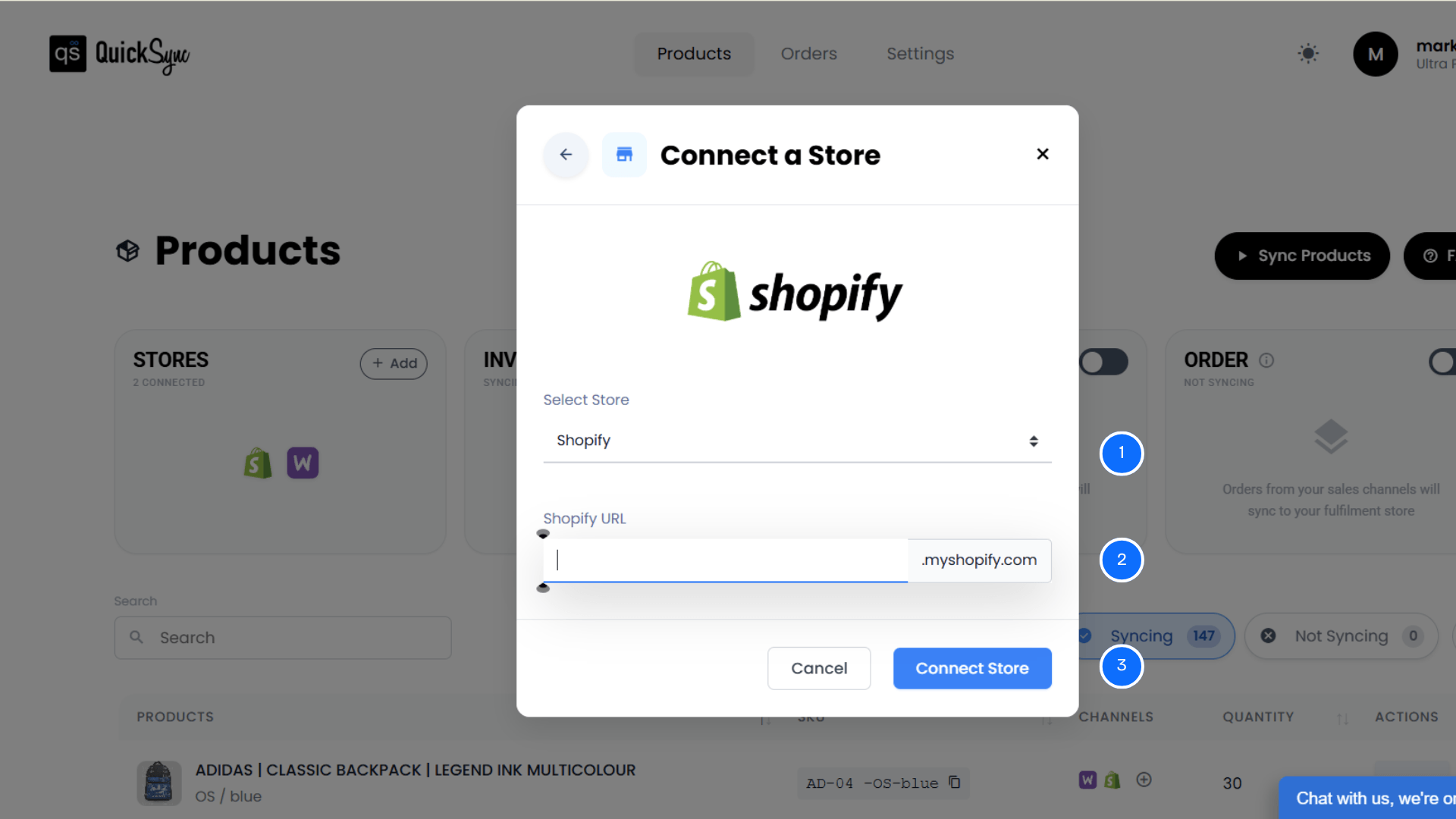
- In the QuickSync dashboard, click on the sync products option.
- Then, click Connect Store, then Add a Store.
- A new window will appear. From the options, select Shopify.
- Enter your Shopify account URL (example: mark1500.myshopify.com).
- Approve permissions for products, images, inventory and orders
Once authorized, QuickSync imports your shop details, products, and locations automatically.
Step 3: Connect Your eBay Store
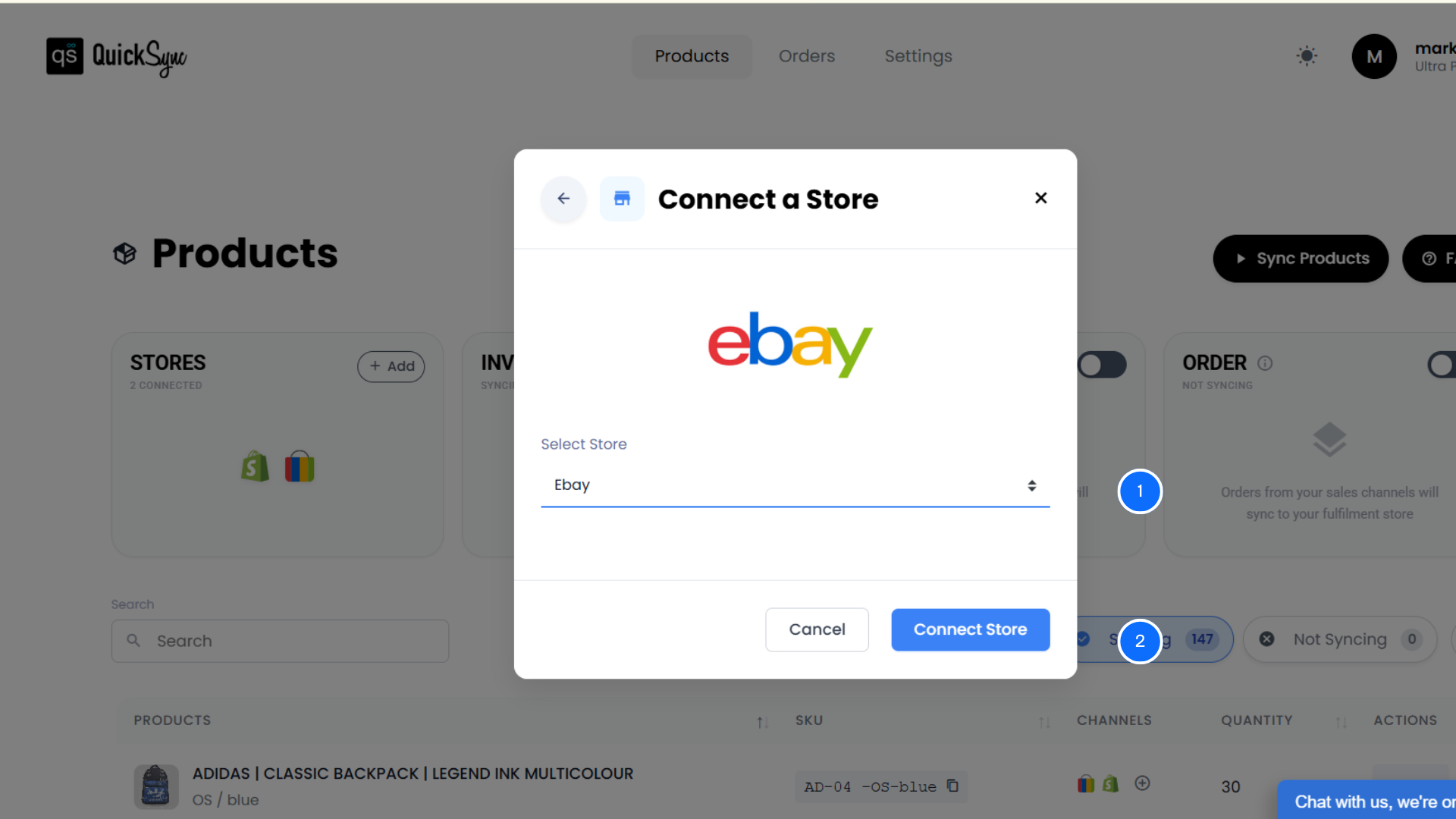
- Now, similarly, connect the eBay store. Click on Add a Store and select eBay seller account.
- Approve access for listings, inventory, and orders.
- QuickSync automatically imports your eBay products, categories, policies, and catalog data, including existing listings.
Step 4: Enable Inventory Sync
- After connecting both stores with QuickSync,
- From the QuickSync dashboard, toggle Inventory Sync.
- Once enabled, QuickSync begins syncing stock levels across Shopify and eBay automatically.
From this point forward, every sale, return, or stock update reflects instantly across both platforms.
Best Practices to Maintain Real-Time Inventory Visibility
Setting up inventory sync is a big step. But keeping it running well takes a little more intention. Automation does the heavy lifting. The merchants who get the most out of it are the ones who back it up with a few smart habits.
Think of these as the foundation that keeps everything reliable. Small, consistent actions on your end mean fewer surprises, cleaner data, and a workflow that holds up when things get busy.
Use Consistent SKU Structures
Your SKU system connects Shopify products to eBay listings behind the scenes. Keep it clean. And keep it consistent. A solid SKU structure ensures every product maps correctly, and syncs run without errors. Without it, even the best tool can struggle to match products across platforms.
Use Shopify as Your Source of Truth
Managing updates from two platforms at once creates confusion. Pick one platform. You can use Shopify as your primary inventory system. Once Shopify is set as the primary store, stock data flows in one direction.
Monitor Sync Logs Regularly
A well-configured sync tool still benefits from a quick weekly check. Look at your integration logs. Spot small issues before they turn into stock errors or missed orders. It takes a few minutes. It saves a lot of trouble.
Maintain Clean Product Data
Syncing works best when your data is consistent. Keep titles, SKUs, and variants standardized across both platforms. Messy product data slows things down and creates duplicate listings. Clean data keeps everything moving the way it should.
Plan Inventory for High Sales Periods
Real-time inventory syncing keeps stock accurate. But it cannot create inventory that isn’t there. Before peak sales events, build in a buffer. Sudden demand spikes can drain stock fast. A little planning ahead keeps you from overselling entirely.
Conclusion
Selling on Shopify and eBay together opens many growth opportunities. But without proper inventory syncing, those opportunities quickly turn into operational problems.
Manual updates, delayed syncing, and mismatched listings all create risk.
A proper Shopify eBay inventory sync system connects both platforms so inventory updates automatically across sales channels.
For modern multi-channel sellers, an automated syncing tool like QuickSync is no longer optional. It’s the foundation of scalable ecommerce operations.