If you are selling on Shopify along with other sales channels, managing inventory is one of the biggest challenges.
The thing with Shopify is that it just tracks Shopify inventory. But if you are selling on other platforms like Etsy, eBay, Amazon, or POS, you need to manage inventory manually. Shopify does not automatically sync inventory across various sales channels through any built-in feature.
And if your inventory numbers aren’t matching, it directly impacts your revenue. You end up cancelling orders due to insufficient stock. You hire extra staff to maintain inventory reports. You may restock products despite already having them in your warehouse.
Those gaps turn into real losses. According to IHL Group, retailers lose over $1.77 trillion globally due to inventory problems like stockouts and overstock. This shows how important accurate inventory management is for ecommerce businesses.
That’s exactly why Shopify inventory sync becomes critical. Shopify inventory sync basically keeps your stock levels accurate across every online store and location you sell on. However, for syncing Shopify inventory with other sales channels or Shopify stores, you need an automated inventory sync approach.
That’s exactly what this blog covers. Read here to know how Shopify inventory sync works, why you need it, and how to set it up so your inventory management becomes automatic.
What Is Shopify Inventory Sync? And What It Actually Means
Shopify inventory sync means connecting your Shopify store with other sales channels or systems so that inventory levels update automatically across all platforms in real time.
Instead of manually updating inventory in each store separately, sync keeps everything aligned automatically. It is not just about tracking stock inside Shopify. It is about making sure your stock stays consistent everywhere you sell.
When inventory syncing is done correctly, every sale, return, or stock adjustment updates instantly across all connected platforms. That means your Shopify store, marketplaces, and POS systems always reflect the same inventory data.
Here’s what Shopify inventory sync actually includes:
Stock levels update automatically across all connected stores and channels
Multi-location inventory tracking keeps warehouse and retail locations perfectly aligned
You reduce manual data entry by hours every single week
Stock accuracy improves dramatically, reducing overselling incidents
You spend less time managing products and more time growing your business
Each of these points saves you operational headaches. But the biggest benefit? You never have to worry about inventory discrepancies destroying your customer relationships or costing you sales.
Why Shopify Doesn’t Sync Inventory With Built-in Features
This surprises most merchants, but Shopify has limitations when it comes to multi-store and multi-channel inventory syncing. Shopify has built-in inventory tracking. But it is designed mainly for single-store operations. The moment you expand to multiple platforms, limitations start showing.
Shopify does not automatically sync inventory with external marketplaces or POS systems. Each platform still manages its own inventory separately.
This creates operational gaps that merchants often underestimate. Here’s where Shopify’s built-in inventory features fall short:
Only tracks inventory within your Shopify admin, not across external channels
No automatic product syncing to platforms like Amazon, Etsy, or WooCommerce
Manual stock adjustments required for each separate sales channel
No centralized dashboard for multi-channel inventory control
Variants don’t automatically map across different platform structures
CSV imports exist but require manual work and cause errors
POS integration is limited to Shopify’s own POS system
Bulk importing creates duplicate work and data inconsistencies
Each of these limitations means you’re doing manual work. You’re copying data. You’re fixing errors. You’re managing inventory in multiple systems. That’s expensive. That’s why merchants turn to dedicated inventory sync tools.
Why Do You Need Inventory Sync? The Hidden Costs of Manual Management
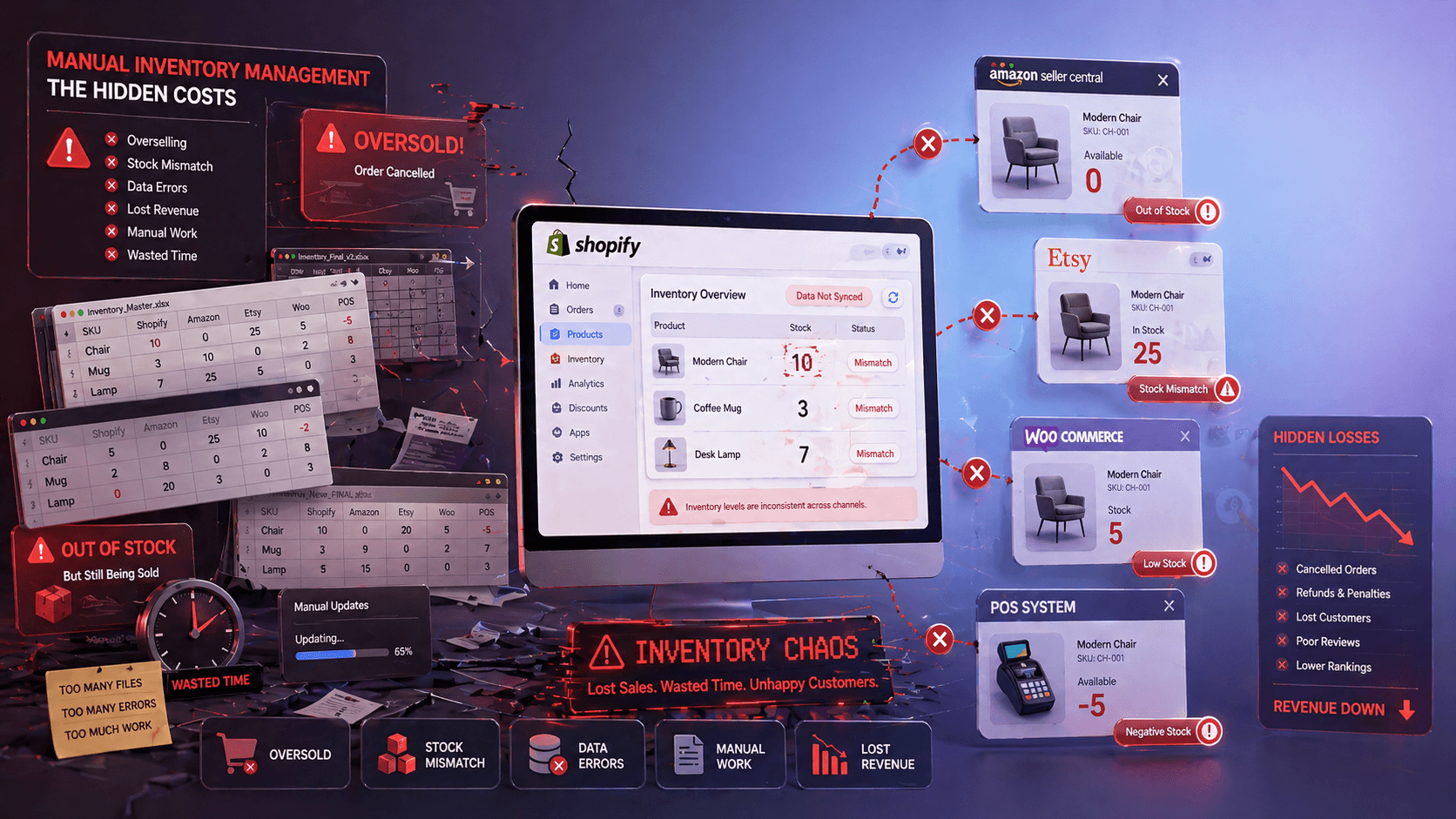
Most store owners don’t realize how much manual inventory management costs them. Not just in time, but in lost revenue, customer frustration, and operational chaos. Let me walk you through the real pain points.
Overselling Across Channels
When inventory isn’t synced, overselling happens constantly. Studies show nearly 30% of multichannel sellers face overselling issues. This results in cancellations, refunds, and damaged customer trust. Over time, this starts affecting your store’s reputation and marketplace performance.
For many businesses, even a small percentage of oversold orders can lead to thousands of dollars lost every month in refunds, penalties, and missed repeat purchases.
Stock Mismatch and Data Errors
Without an automated Shopify inventory sync, merchants have to manually update stock after every sale. When merchants rely on manual input, even small inconsistencies can quickly grow into larger issues if not addressed in time.
Sometimes the team misses updating the stock after a sale or enters the wrong number. This leads to inaccurate stock levels and affects inventory management. This directly impacts purchasing decisions and long-term inventory control.
Lost Revenue from Stockouts
Incorrect inventory visibility means your systems are not showing the correct stock levels. Sometimes your Shopify store or marketplace shows “out of stock” even when inventory is actually available in another system or location.
Because of this, customers are unable to place orders even though you have stock. That directly results in lost sales. These missed sales opportunities add up faster than most merchants expect
Time Lost in Manual Work
Merchants spend hours updating inventory manually across platforms. On average, businesses lose 10 to 15 hours per week on manual stock updates. That time could be used for marketing, sourcing, or scaling operations.
This ongoing manual work slows down your overall business growth. It also increases dependency on repetitive tasks instead of automation.
Poor Customer Experience
Inventory issues directly impact customer satisfaction. Delayed shipments, cancellations, and incorrect availability reduce trust. Nearly 69% of customers do not return after a poor order experience caused by stock errors.
Once trust is lost, it becomes difficult to recover customer loyalty. Consistent inventory accuracy plays a major role in maintaining long-term customer relationships.
How Syncing Shopify Inventory With Other Connected Channels Benefits Merchants
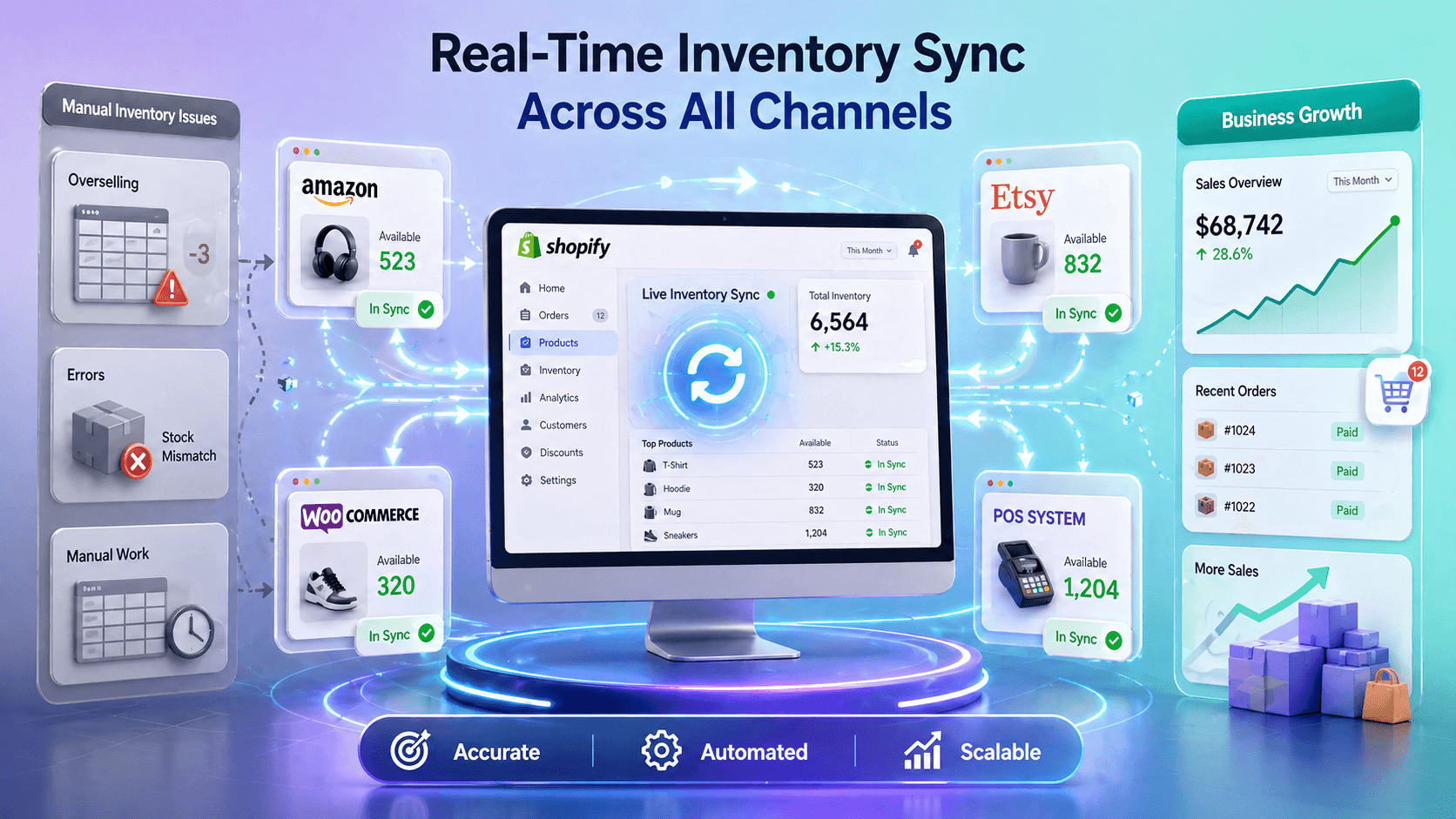
Once you implement real-time inventory sync, everything changes. Let me show you exactly what improves when you sync Shopify inventory in real-time.
Real-Time Accuracy Across Every Sales Channel
Inventory sync keeps stock levels perfectly accurate across all your channels simultaneously. When a customer buys on your main Shopify store. That sale updates your Amazon, WooCommerce, and POS inventory within seconds; Etsy is corrected as soon as we see the change on its next check.
This prevents overselling because every channel sees the same current stock level. Your customers never see inaccurate inventory. You never process refunds for products you actually had available.
Eliminated Manual Data Entry and Human Error
When you automate inventory sync, you remove the human element that creates mistakes. No one is manually updating stock numbers. No one is copy-pasting data between systems.
Your sync tool handles all the data work. Merchants using real-time inventory sync report 95%+ reductions in inventory discrepancies. Your team’s focus shifts from data management to actually growing your business.
Increased Sales and Order Completion Rates
Accurate inventory directly increases sales. Customers are more confident purchasing from stores with accurate stock information. When your inventory is synced, conversion rates improve. Cart abandonment decreases across channels.
Customers complete more purchases because they trust that the products you show will actually ship. Merchants implementing inventory sync typically see 8-12% increases in order completion within the first month alone.
Improved Customer Satisfaction and Reduced Refunds
Overselling destroys customer relationships. When you refund someone’s order because you oversold, they don’t come back. They leave negative reviews. They tell their friends about the bad experience.
Inventory sync eliminates these incidents. Your customers get the products they ordered. They receive orders on time. They return to buy again. Your refund rate drops. Your repeat customer rate increases. Your reputation strengthens.
Better Business Intelligence and Reporting
When all your inventory data flows through one system, you gain visibility you never had before. You see which products sell best across all channels. You identify trends across locations. You understand which sales channels drive the most revenue.
You make data-driven decisions about what to stock and what to reorder. And where to focus marketing efforts. This directly improves your profitability and inventory planning.
Different Methods to Sync Shopify Inventory With Other Ecommerce Channels
Now let’s talk about how to actually sync your Shopify inventory. You have several options, but not all of them work equally well. Let me walk you through different inventory management techniques for Shopify so you can choose the best solution for your business.
Method 1: Manual Inventory Updates
Manual sync means you log into each platform, check your stock levels, and update inventory across all your stores one by one. You’re managing inventory in your Shopify admin. Then logging into Amazon, then Etsy, then your POS system, then WooCommerce, updating numbers in each place separately.
This is how many single-location merchants start, but it quickly becomes unsustainable.
Here’s why manual inventory management doesn’t work:
It takes 5-10 hours per week of your team’s time
Manual logs create constant human errors and inventory discrepancies
This leads to overselling because updates aren’t simultaneous
Manual inventory updates require someone to remember to update every single channel
Merchants don’t get any real-time inventory tracking across channels
Retailers have to hire additional staff to maintain spreadsheets.
Prevents your team from focusing on strategic work
Costs thousands annually in wasted labor
Most merchants using manual updates eventually realize they’re spending more on labor costs than they would on a proper sync solution.
Method 2: CSV Import/Export
CSV import and export is another method for Shopify inventory sync. You export your inventory as a CSV file from Shopify. You then import that file into Amazon, Etsy, WooCommerce, and other channels. This eliminates some of the manual data entry, but it’s still error-prone.
Here’s what’s wrong with CSV import/export:
This method still requires manual work multiple times daily or weekly
You get no real-time syncing. You get batched updates with hours of lag
It requires technical knowledge to format CSVs correctly
This method doesn’t sync product metadata like images, descriptions, or pricing
With CSV files, variants don’t map correctly across different platform structures
Becomes a nightmare managing multiple CSV files for multiple channels
CSV import/export is better than completely manual, but still causes the inventory problems you’re trying to avoid. CSV imports don’t give merchants real-time inventory visibility. This leads to wrong inventory purchase decisions.
Method 3: Shopify’s Built-in Features (Limited)
Shopify’s admin includes some basic inventory management capabilities. You can create locations, transfer inventory between them, and set inventory levels within your Shopify dashboard. However, Shopify’s built-in features don’t connect to external sales channels or automate inventory sync across multiple sales platforms.
Here’s what Shopify’s native tools lack:
No integration with Amazon, Etsy, WooCommerce, or other sales channels
No automatic product syncing to external platforms
Manual adjustments required for each separate location or channel
Variants don’t map to different platform formats automatically
Product images don’t sync to external channels
Descriptions require manual updates on each platform
Tags don’t automatically adjust for platform-specific requirements
No real-time order syncing from external channels back to Shopify
Limited POS integration compared to dedicated sync solutions
No bulk product creation across multiple channels
Shopify’s built-in features work fine if you only sell on Shopify. But the moment you add a second Shopify store or second sales channel or location, you struggle with inventory management.
Method 4: QuickSync – Automated Real-Time Inventory Sync
Now let me show you the solution that actually solves this problem. QuickSync is purpose-built for merchants managing inventory across multiple Shopify stores, sales channels, and POS. QuickSync is a dedicated inventory sync tool for merchants selling on multiple platforms.
QuickSync automatically syncs inventory in real-time in all channels without any manual input required. It is designed to meet various inventory management requirements for ecommerce businesses, like variant sync, SKU mapping, and multi-location support.
Here’s what makes QuickSync the best choice:
Real-time inventory sync across all connected channels and locations
Automatic SKU assignment for products missing SKUs. This ensures every product and variant has proper identification across all platforms
One unified dashboard view for complete inventory visibility. You can see stock levels across all your stores, channels, and locations from a single control center
Multi-location inventory support for managing inventory across warehouses, retail locations, and fulfillment centers
Supports thousands of products seamlessly, scaling from 100 SKUs to 50,000+ without performance issues or manual intervention
Advanced variant management that automatically maps your Shopify options to platform-specific dimensions. For example, your 3 Shopify options (Color, Size, Material) automatically fold into Etsy’s compatible structure, supporting up to 70 variant combinations
Per-variant pricing and SKU mapping so every variant keeps its own price and SKU without flattening or losing data
If you are selling across two Shopify stores, you can even sync inventory between two Shopify stores with the QuickSync tool.
QuickSync handles all the complexity that other methods simply don’t address. Your product data stays consistent across platforms. Your inventory never oversells. Your team spends time on business growth, not data management.
Important Features to Look For in Shopify Inventory Sync App
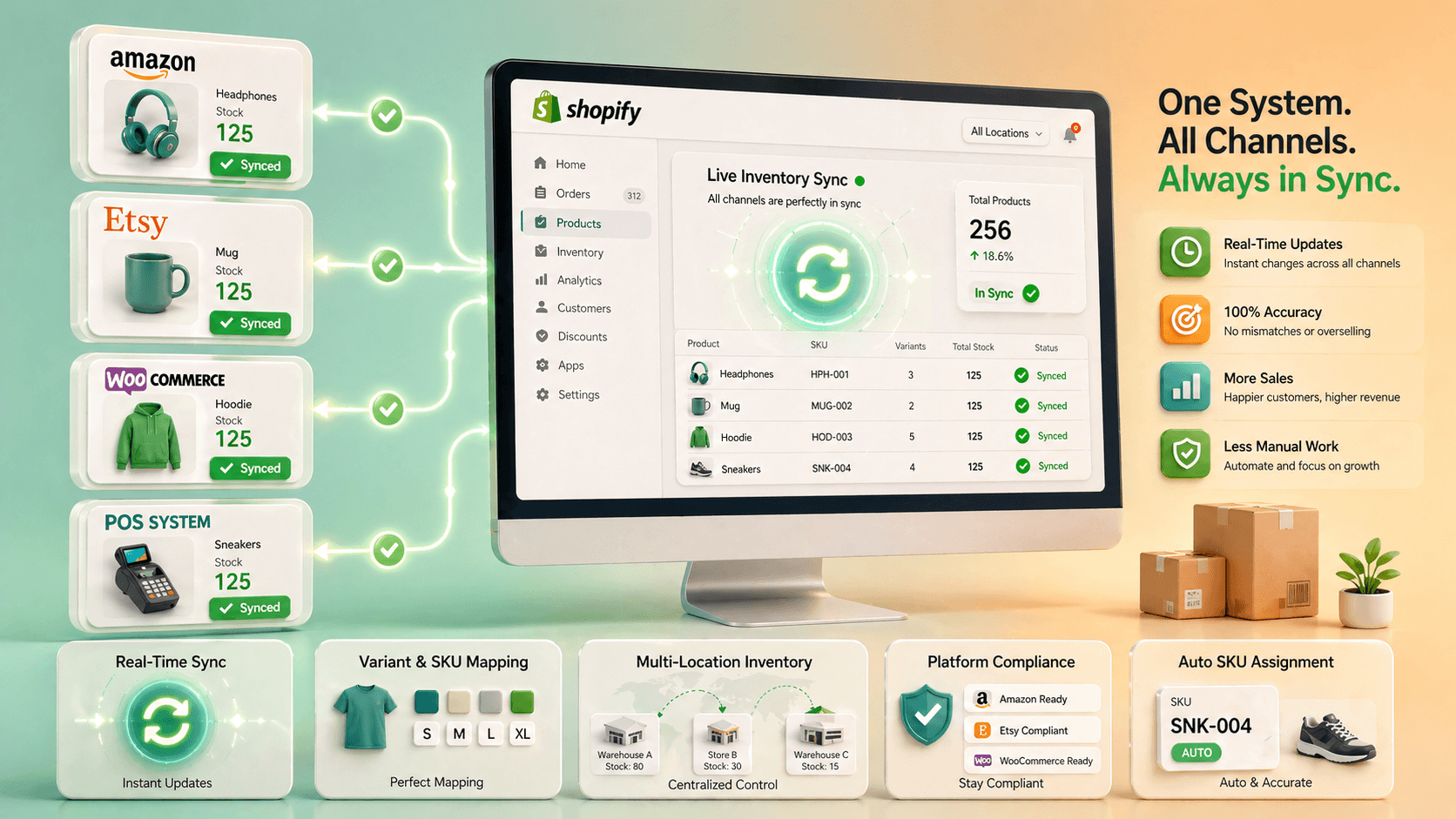
Not every inventory sync app is created equal. Before you choose a tool, make sure it includes these critical features. Your success depends on selecting a platform with the right capabilities.
Consider these factors before choosing an inventory sync tool for Shopify.
Real-Time Inventory Sync Across All Sales Channels
Your sync app absolutely must sync inventory in real-time, not in batches. Batch syncing happens every 4 hours or once daily, whereas real-time syncing happens the moment a sale is made. Real-time Shopify inventory sync prevents overselling. It keeps your stock level accurate in all sales channels you sell on.
Variant Management and SKU Mapping Support
If you sell products with variants (size, color, style, etc.), your sync tool must handle variants intelligently. It should automatically map your Shopify options to each platform’s specific structure. It should keep per-variant pricing and SKUs aligned. It should support dozens of variant combinations.
Multi-Location Inventory Tracking
If you have multiple warehouses, retail locations, or fulfillment centers, your sync tool must track inventory per location. You need to know which products are available at which location. You need to route orders to the correct fulfillment location. You need to see stock levels across all locations simultaneously.
Built-in Compliance and Platform-Specific Rules
Different platforms have different requirements. Etsy has specific tag limits and taxonomy requirements. Amazon has ASIN and FBA inventory rules. WooCommerce has its own structure. Your sync tool should know these rules and automatically apply them. It should validate data before syncing to prevent rejected listings.
Automatic SKU Assignment and Product Matching
Your sync tool should not depend entirely on manually created SKUs. It should automatically generate missing SKUs and map products correctly across platforms. Proper SKU assignment ensures accurate inventory tracking. It prevents duplicate listings and keeps your product data consistent across all connected systems.
How to Sync Inventory Across Channels From Shopify Using QuickSync
QuickSync is an advanced inventory sync tool built for handling stocks across various ecommerce channels. Compared to manual methods or basic connectors, QuickSync provides a far more reliable and scalable solution. It allows merchants to maintain accurate inventory control across all sales channels.
QuickSync combines real-time inventory syncing, product syncing, and order syncing into one centralized platform. This ensures your stock levels, product data, and orders remain in sync across all platforms without manual effort.
QuickSync also handles advanced requirements that most tools fail to manage effectively. This includes variant-level syncing, multi-location inventory tracking, automatic SKU generation, and
Here’s how you get started connecting your Shopify store and syncing inventory with QuickSync:
Step 1: Create Your QuickSync Account
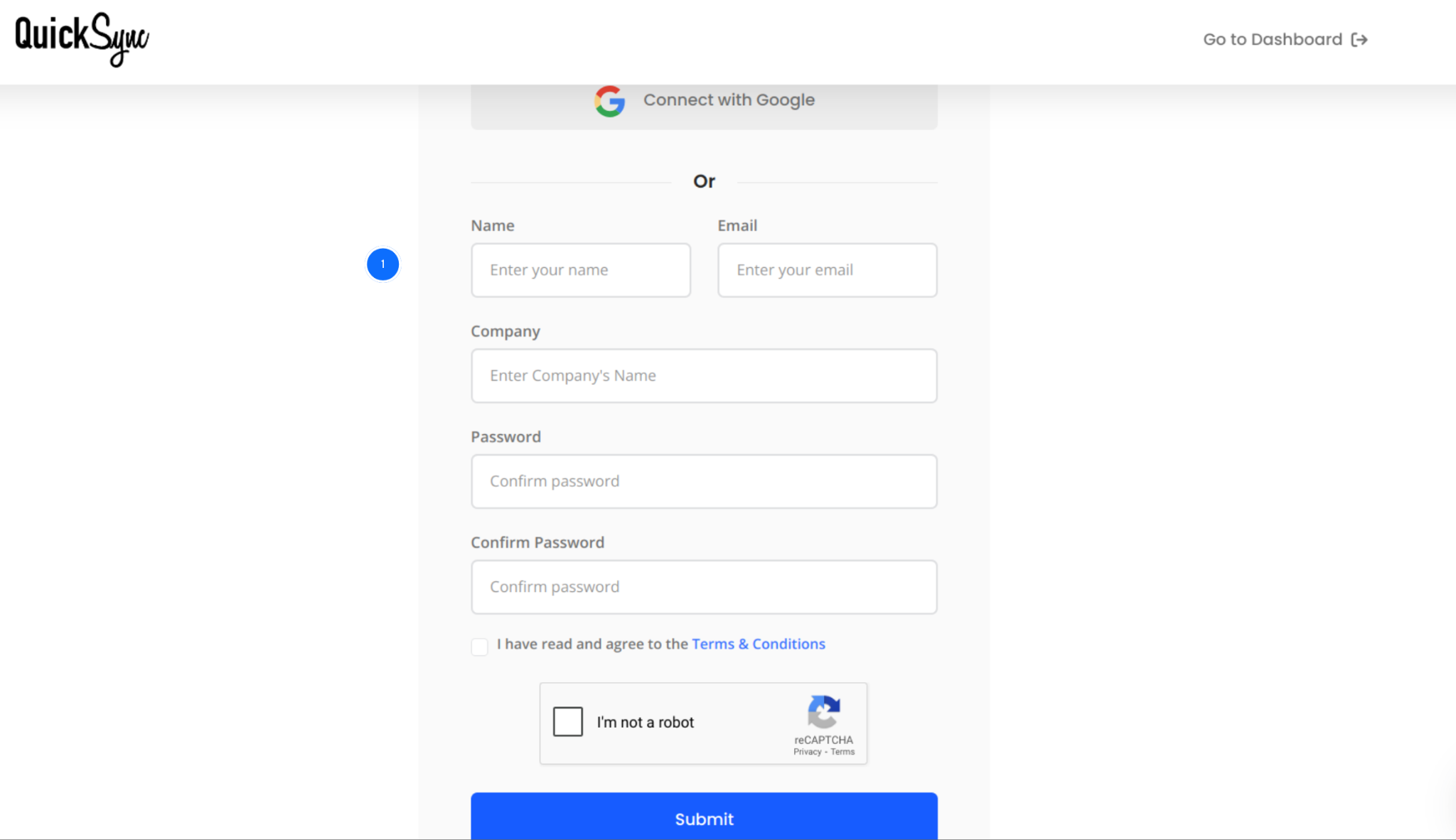
Visit quicksync.pro and click on Sign Up to create your account.
After registration, you will be redirected to your QuickSync dashboard.
This is where you will manage all your integrations, configure inventory sync settings, and monitor your connected stores from one central location.
Step 2: Connect Your Shopify Store
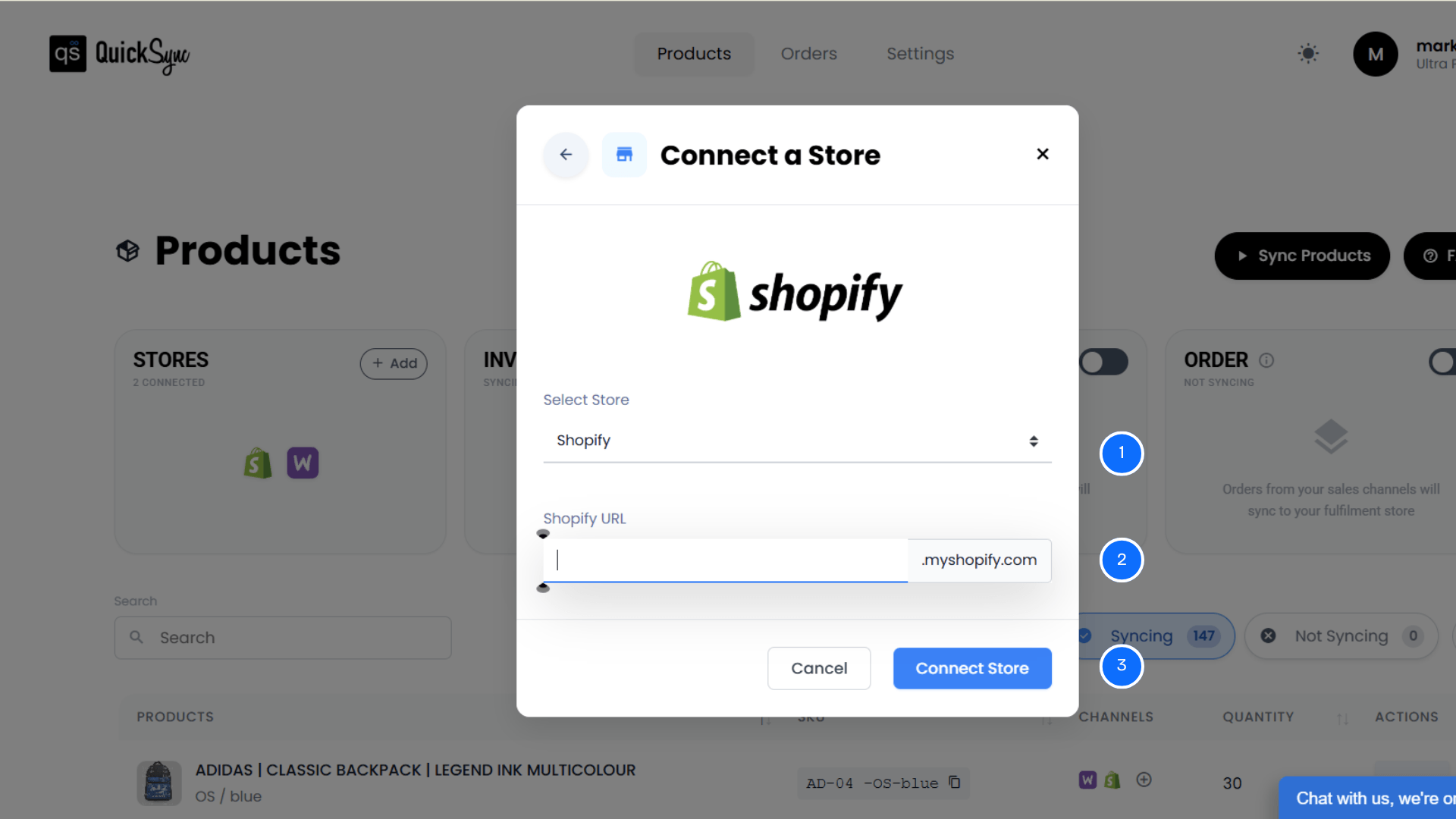
From the QuickSync dashboard, click Sync Products.
Select Add a Store and choose Shopify. Enter your Shopify store URL (example: yourstore.myshopify.com).
Approve permissions for products, images, inventory, and orders.
QuickSync automatically imports your Shopify store details, product catalog, and all your locations.
Step 3: Connect Your Sales Channels
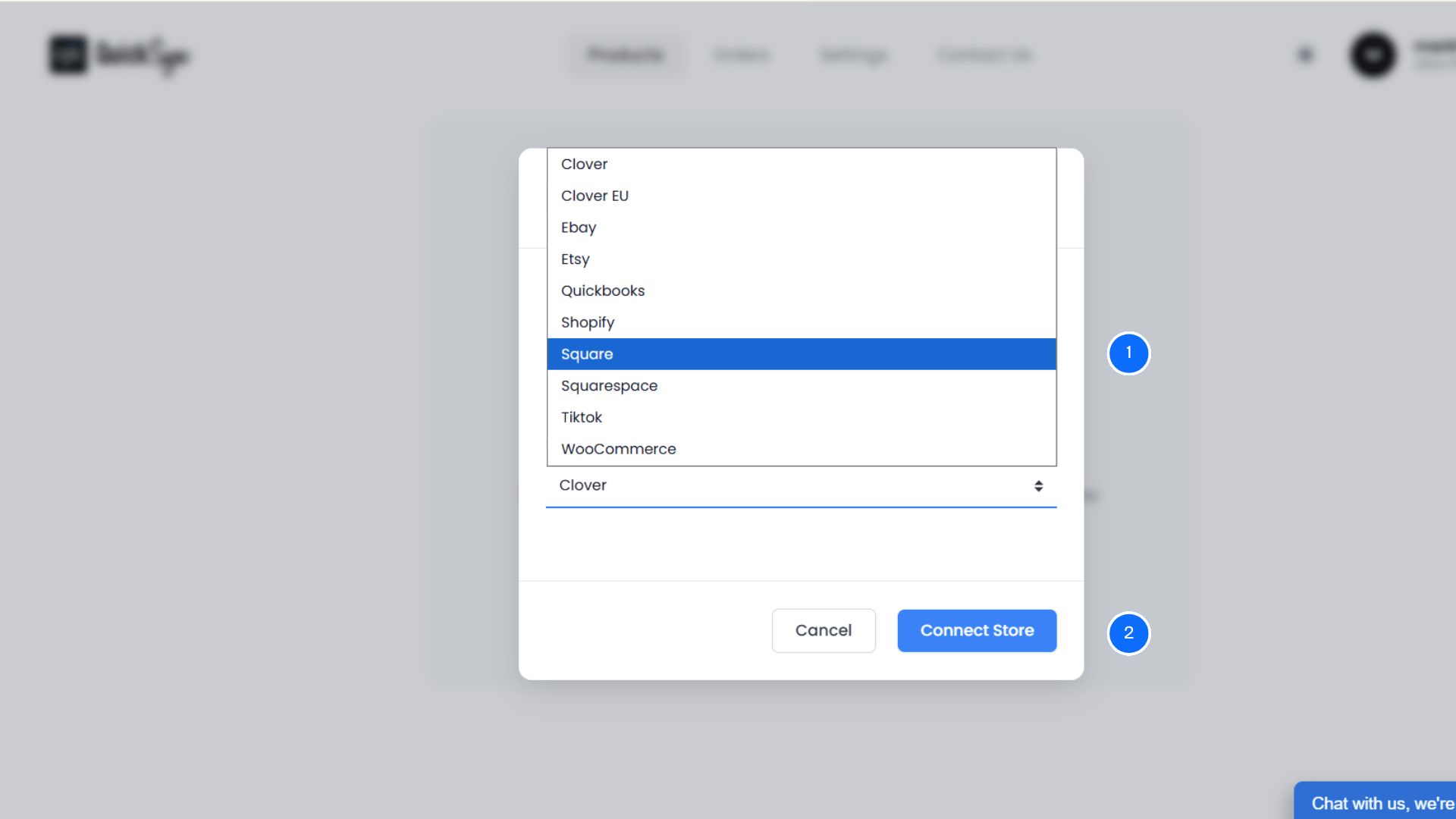
From the QuickSync dashboard, click on Sync Products.
Choose Add a Store. Select the first platform you want to connect (Shopify, Etsy, Amazon, WooCommerce, or your POS system).
Click Connect and log in to that account.
Approve the permissions for QuickSync requests. We need access to your products, inventory, customers, and orders to sync them properly.
QuickSync will automatically import your catalog and locations.
Step 4: Enable Sync Options and Configure Your Settings
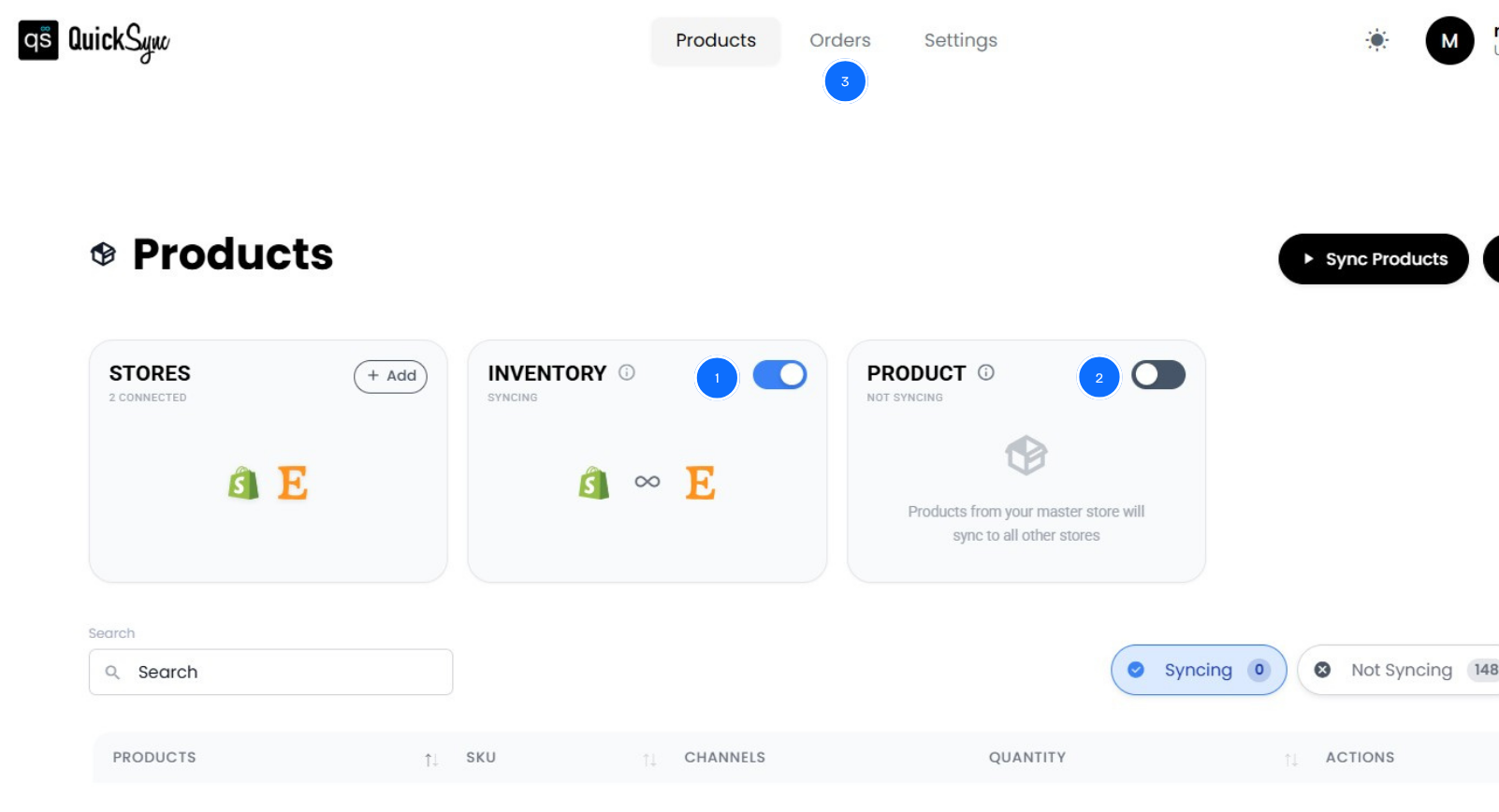
Once you’ve connected Shopify and your other sales channels, the integration is ready.
Visit the QuickSync dashboard to review your sync preferences. You’ll see multiple syncing options.
Simply toggle the features you want to activate.
Here’s what each feature does:
Inventory Sync: Activates automatically once both platforms connect. Stock levels update across your Shopify store and all connected channels in real time after every sale, return, or manual adjustment.
Product Sync: Choose your Master Store (usually Shopify). Product updates like titles, variants, images, pricing, SKUs, automatically sync to all other connected platforms. Your product data stays aligned without manual duplication.
Order Sync: Enable order syncing so orders from all channels appear in Shopify. Your team manages fulfillment from one dashboard. Track order activity across all sales channels.
Once configured, QuickSync automatically manages inventory, products, and orders across all your connected platforms. Your online store and sales channels function as one connected system.
Tips for Smooth Shopify Inventory Management and Best Practices
Once you’ve set up real-time inventory sync, follow these best practices to maximize the benefits and keep your Shopify operations running smoothly.
Monitor Inventory Levels Across Locations Regularly
Real-time sync is powerful, but you still need visibility into your stock levels. Check your QuickSync dashboard weekly to see inventory levels across all channels. Look for unusual patterns. Use the inventory data to inform reordering decisions. QuickSync’s reporting gives you visibility that manual management never could.
Set up Low Stock Notifications
Set up notifications for low stock alerts, sync errors, or unusual inventory movements. QuickSync can alert you when specific products hit minimum thresholds. It can notify you of any sync failures so you catch problems immediately. These notifications keep your team informed without requiring them to manually check inventory.
Avoid Manual Inventory Adjustments During Active Sync
Once inventory sync is active, avoid updating stock manually on different platforms. When you change stock in multiple places, it creates conflicting data. The system may not know which update is correct. Instead, make all stock changes in your main store. The Shopify inventory sync tool will automatically update every connected platform.
Track Reserved Inventory Properly
Shopify sometimes reserves stock for pending or unfulfilled orders. This means your available inventory may look lower than your actual stock. If you don’t track this, it can create confusion in stock levels. Keep an eye on the reserved inventory inside Shopify. This helps you understand what is truly available for sale.
Use Inventory Reports for Better Stock Planning
Shopify provides inventory reports that show which products are selling fast and which are not. Use these reports to understand stock movement and demand patterns. This helps you reorder the right products at the right time. It prevents overstocking of slow items. It tells you when you are running out of high-demand products.
Conclusion
You now understand Shopify inventory sync and why it’s important for multi-channel merchants. Manual inventory management is expensive, error-prone, and prevents your business from scaling.
Shopify’s built-in features don’t connect external sales channels. CSV imports are outdated. Real-time automated inventory sync is the only solution that actually works.
QuickSync is built to solve this exact problem. We sync your inventory across Shopify, Amazon, Etsy, WooCommerce, your POS system, and anywhere else you sell. Most channels update within a second; Etsy and eBay are checked every few minutes.
We handle product data intelligently. We automatically adapt your Shopify products for each platform’s requirements. We manage variants, images, and SKUs without manual work. We keep your inventory perfectly accurate so you never oversell again.
Most importantly, we free up your team’s time. No more manual updates. No more hours spent managing inventory in multiple systems.