As your online business grows, relying on a single marketplace can start to feel limiting. If you’re searching for How to Import Etsy to WooCommerce, chances are you’re ready to go beyond Etsy and build a more independent ecommerce presence. With WooCommerce, you can customize your store, strengthen your brand, and create a better shopping experience for your customers.
However, migrating your store can seem complicated when you already have dozens or even hundreds of active products. Losing images, descriptions, inventory data, or product variations during the process can create unnecessary setbacks. That’s why choosing the right migration approach is so important.
This guide answers that question completely. It covers why sellers make this move, what data can be transferred, the different ways to do it, a full step-by-step walkthrough, and how to make the entire process as fast and clean as possible. Read on.
Why Sellers Move From Etsy Shop to WooCommerce Store
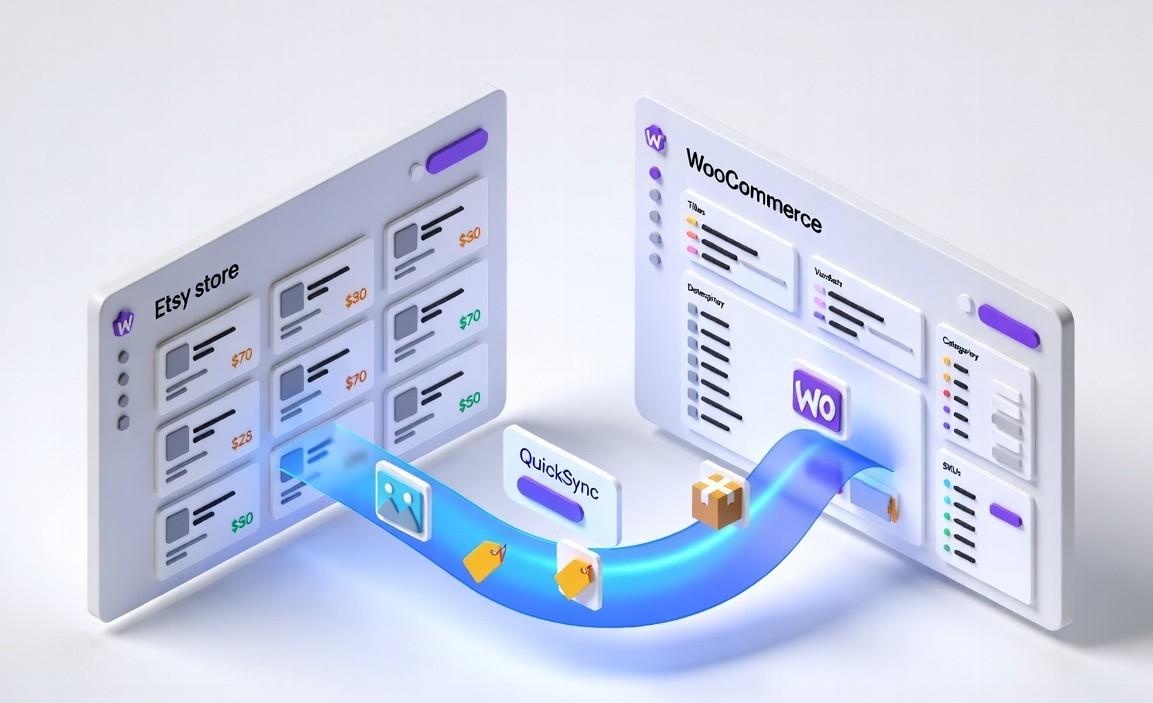
Before we move to the migration process, it is better to understand why so many sellers make the move in the first place. Most businesses do not leave Etsy because the platform failed them. They move because their business has grown beyond the limitations of selling only on a marketplace.
The following are the key reasons why Etsy sellers want to move to WooCommerce.
Rising Fees Start Cutting Into Profits:
Etsy charges a $0.20 listing fee per item, a 6.5% transaction fee on every sale, and additional payment processing fees on top of that. For a seller doing low volume, these fees are manageable. But for a seller processing hundreds of orders a month, they represent a high and growing cost that WooCommerce does not have.
Less Control Over Their Brand:
One of the biggest limitations of Etsy is branding. Most Etsy stores follow a similar layout, which makes it difficult to create a unique shopping experience. Sellers have limited control over design, customer experience, and how their brand is presented. With WooCommerce, store owners can fully customize their website, use their own domain, and build a store that feels completely independent and professional.
Customer data belongs to Etsy, not the seller:
On Etsy, most customer interactions happen within the platform itself. That limits how sellers connect with buyers outside of Etsy. As businesses grow, many sellers want to build email lists, create marketing campaigns, and develop long-term customer relationships that encourage repeat purchases. WooCommerce gives sellers complete ownership over their customer data and marketing strategy.
Scaling requires independence:
Growing stores often need features that marketplaces cannot easily provide. Things like advanced inventory management, custom integrations, flexible shipping setups, and automation become more important over time. WooCommerce offers far more flexibility, allowing sellers to expand their operations without being restricted by marketplace limitations.
Many Sellers want to Use Both Platforms Together:
Moving to WooCommerce does not always mean leaving Etsy completely. In fact, many successful sellers continue using Etsy to attract new customers while using WooCommerce as their main branded storefront. This approach combines Etsy’s marketplace visibility with the flexibility and ownership of an independent online store.
What Product Data Can You Import From Etsy to WooCommerce
Once sellers decide to move beyond Etsy, the next big question is usually how to migrate. Most store owners want to know exactly what information can be transferred and whether important product details will remain intact after the move.
The good news is that modern inventory sync tools like QuickSync.pro can transfer most essential store data automatically from Etsy to WooCommerce. Instead of manually rebuilding every listing, sellers can migrate large portions of their store while keeping products organized and inventory accurate.
Data That Can Be Imported Successfully
When using a proper integration tool to transfer Etsy products to the WooCommerce platform, the following data transfers correctly:
- Product names and titles
- Product descriptions
- Product categories and tags
- Product variants including size, color, and material combinations
- Variant images and product images
- Videos attached to product listings
- SKUs for inventory tracking
- Retail pricing and tax settings
- Digital product listings
While most data transfers smoothly, a few Etsy-specific settings still need attention after migration. A Few Things Still Need Review After Import.
For example, Etsy requires fields like “who made it” and “when made” for each listing. These don’t exist in WooCommerce, but tools like QuickSync can apply defaults when syncing back to Etsy, keeping listings compliant without manual edits. Shipping settings and return policies also need to be configured separately, since both platforms handle them differently.
Challenges Merchants Face During the Etsy to WooCommerce Migration
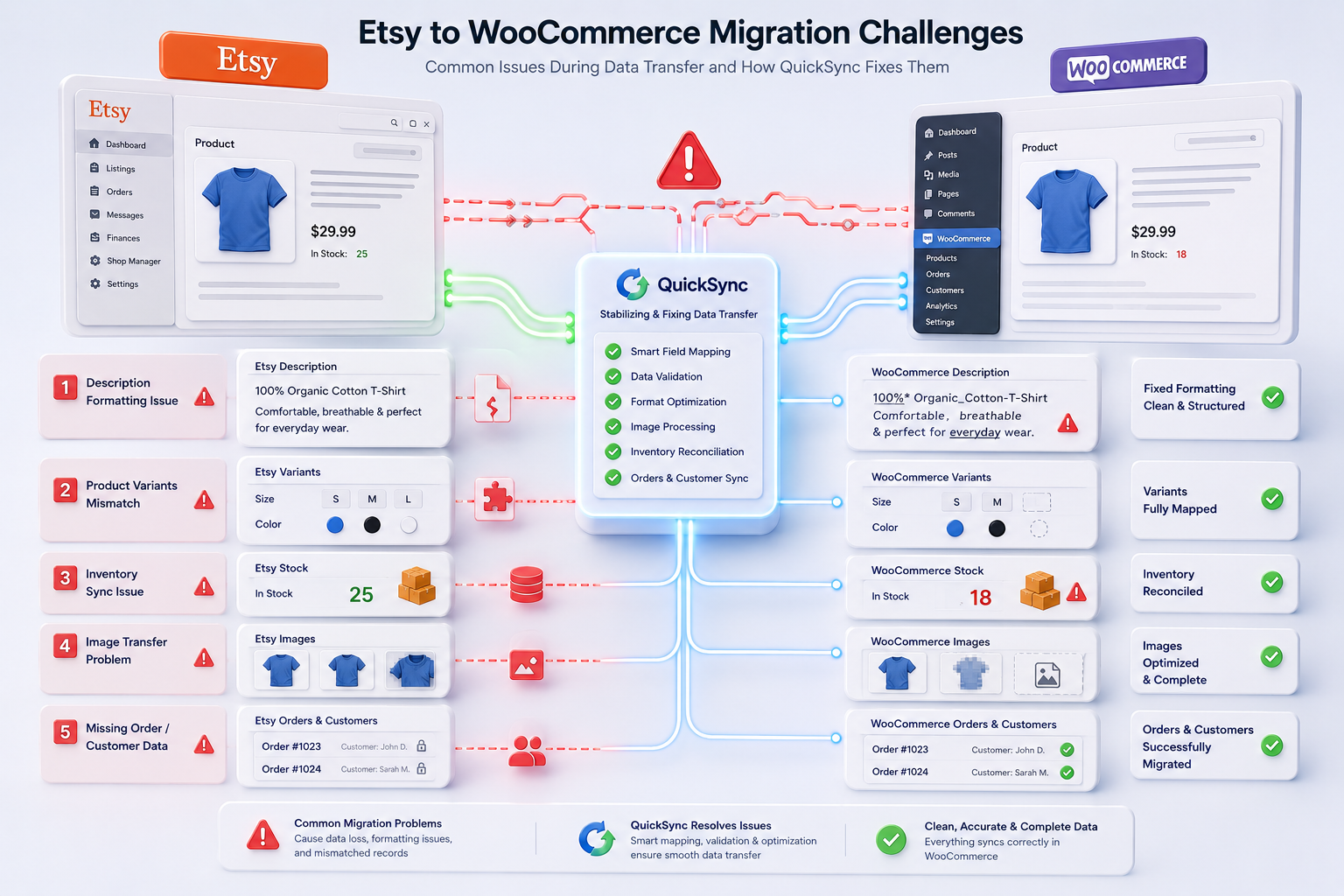
Moving from Etsy to WooCommerce offers more control, but it comes with technical challenges like data and sync issues. According to a study, 40% of ecommerce businesses identify data migration as one of their biggest operational hurdles, showing why careful planning is critical. Let’s go through the key challenges comes during the Etsy to WooCommerce migration.
Description Formatting Issues:
One common challenge is how product descriptions are handled. Etsy uses simple plain text, while WooCommerce supports rich formatting like bold text, bullet points, links, and images. Without the right tool, descriptions can lose formatting or appear messy after transfer. Solutions like QuickSync help by converting content properly in both directions so listings stay clean and readable on both platforms.
Product Variants Don’t Always Match:
Etsy limits listings to just a couple of variant types, such as size or color. WooCommerce, on the other hand, allows much more flexibility with multiple option groups. This difference can create mismatches during migration if not handled correctly. A proper sync tool helps expand Etsy’s simple structure into WooCommerce’s more advanced variant system while still keeping everything compatible.
Inventory Sync Problems:
Inventory sync is another major pain point. After a manual migration, stock levels often become disconnected between platforms. This can lead to overselling if a product sells in one store but doesn’t update in the other. This issue can only be solved with real-time inventory sync. This feature keeps inventory aligned across both Etsy and WooCommerce automatically.
Product Image Transfer Inconsistencies:
Image format compatibility is another common issue. Etsy listings sometimes use image formats that do not transfer cleanly into WooCommerce without conversion. QuickSync handles image format conversion automatically, so product photos appear correctly on both platforms without manual intervention.
Missing Order and Customer History:
Finally, one limitation to be aware of is that past orders and customer data from Etsy usually do not transfer directly into WooCommerce. This means sellers may need to manually plan how they handle customer communication or marketing based on previous purchase history.
Different Ways to Import Products From Etsy to WooCommerce
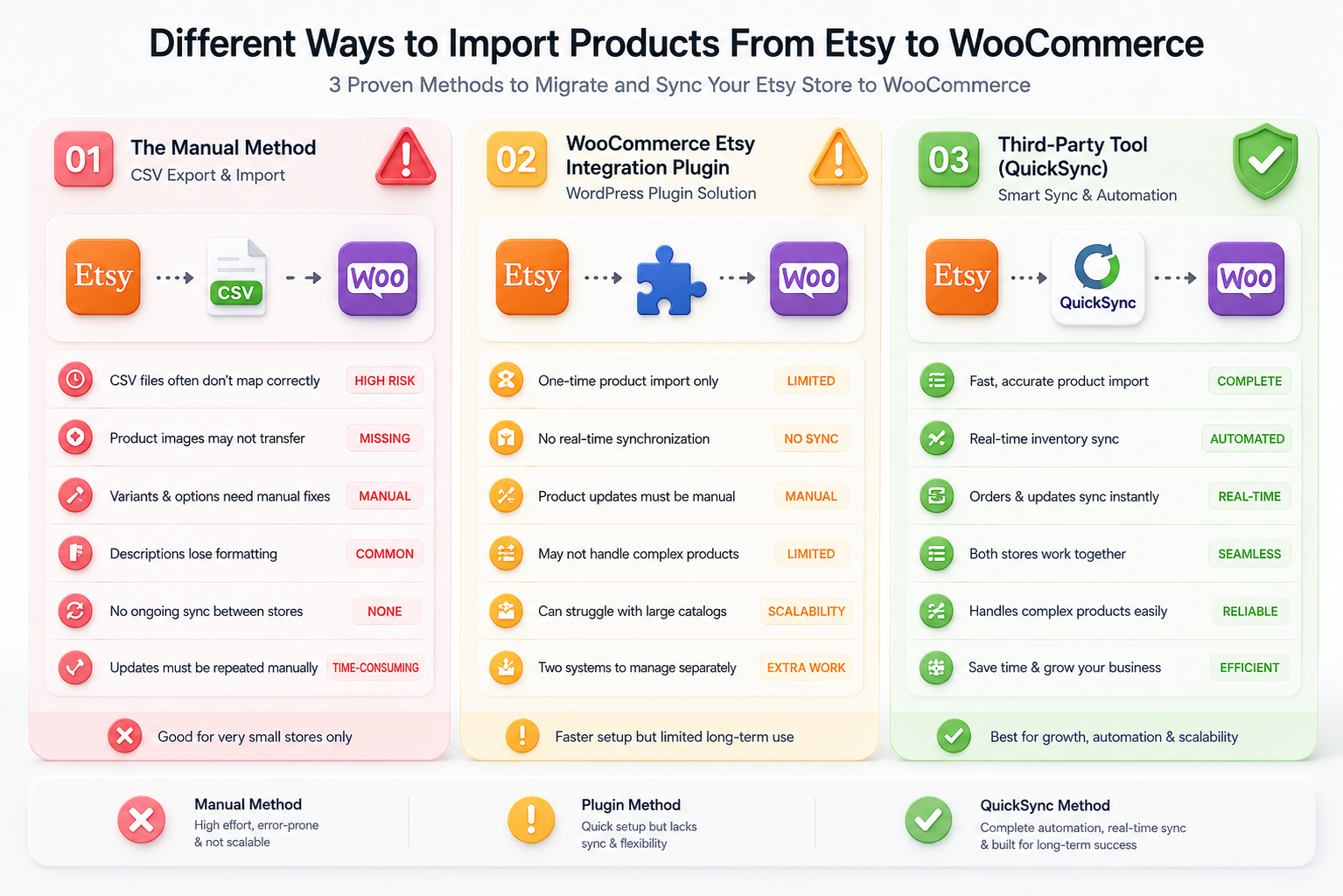
Now comes the most interesting and important part of this blog, which is knowing the methods to import Etsy data to WooCommerce. For that, there are three main approaches to migrating Etsy store products to WooCommerce. Each has different trade-offs depending on catalog size, technical comfort, and how much ongoing sync is needed after the initial import.
1. The Manual Method
The manual method is the most basic way to transfer products. It usually involves exporting product data from Etsy using a CSV file and then importing it into WooCommerce using its built-in importer tool. While this may seem simple, it is generally only practical for very small stores with basic product listings.
Limitations of this approach include:
- CSV files often do not map correctly between platforms.
- Product images may fail to transfer properly.
- Variants and options usually require manual fixes.
- Product descriptions often lose formatting.
- No ongoing sync between Etsy and WooCommerce.
Because of these challenges, any updates made after the import must be manually repeated across both platforms, which can quickly become time-consuming as the store grows.
2. WooCommerce Etsy integration plugin
Another common option is using third-party WordPress plugins designed to help with Etsy migrations. These plugins typically automate the initial import process, making it faster and easier than doing everything manually. They are often used by sellers who want a quick setup without dealing with CSV files.
However, this approach comes with some limitations:
- Most plugins only support one-time imports.
- Limited or no real-time synchronization after migration.
- Product updates must be manually duplicated across platforms.
- May not handle complex product structures reliably.
- Can struggle with larger or growing catalogs.
While plugins can speed up the initial setup, they still leave sellers managing two separate systems after the import is complete.
3. Third-Party Tools (QuickSync)
The most advanced and reliable way to migrate and manage products between platforms is through a dedicated sync solution. Tools like QuickSync create a direct connection between Etsy and WooCommerce, allowing both stores to work together seamlessly from day one.
With this approach:
- Products are imported quickly and accurately.
- Inventory stays automatically updated across both platforms.
- Orders and product changes sync in real time.
- Both stores can run together without manual effort.
- Store management becomes significantly more efficient.
This makes it a strong, beneficial Etsy WooCommerce syncing solution for sellers who want to continue growing on Etsy while building a powerful, fully controlled WooCommerce store at the same time.
Which Methods Should You Choose for Importing Etsy to WooCommerce
With three different ways to import products from Etsy to WooCommerce, choosing the right method can feel overwhelming at first. Each option comes with its own strengths, but also clear limitations depending on how your business operates.
Some sellers only need a one-time migration, while others need continuous syncing and automation to avoid manual work. To make things simple, here’s a quick comparison of all three approaches side by side.
| Feature / Method | Manual Method | WooCommerce Plugins | QuickSync (Third-Party Tool) |
|---|---|---|---|
| Setup Process | Export CSV from Etsy and import manually into WooCommerce | Install the plugin and run the import setup | Connect the Etsy and WooCommerce accounts and sync |
| Ease of Use | Low – requires manual handling and technical cleanup | Moderate – easier than manual but still requires setup | High – simple connection and automated process |
| Best For | Very small stores with simple products | Small to medium stores needing one-time import | All store sizes, especially growing or scaling businesses |
| Product Import Accuracy | Often inconsistent (formatting and mapping issues) | Generally good but depends on plugin quality | High accuracy with structured sync |
| Product Images Handling | May require manual fixes | Usually supported but not always reliable | Automatically synced and maintained |
| Variants Support | Manual corrections required | Limited or partially supported | Fully supported and properly mapped |
| Ongoing Sync (Inventory & Updates) | Not available | Usually not available | Real-time automatic sync |
| Inventory Management | Manual updates on both platforms | Manual updates after import | Automatically synced across both platforms |
| Order Sync | Not supported | Limited or not available | Fully synced in real time |
| Scalability | Poor for growing stores | Moderate but limited long-term | Excellent for scaling businesses |
| Maintenance Effort | High | Medium | Low |
If you are running a very small store with minimal products, manual import or plugins can work for a basic setup. However, for growing sellers who want accuracy, automation, and long-term efficiency, a dedicated sync solution like QuickSync is the most reliable and scalable choice.
How to Import & Sync Etsy to WooCommerce Using QuickSync
QuickSync’s Etsy WooCommerce integration is the fastest and most complete way to import Etsy to WooCommerce while keeping both platforms connected and in sync after the initial transfer. You do not even need to have technical knowledge to sync your e-commerce stores. Just a few clicks here and there, and it’s done. Yes, it is that simple and quick.
Below is the full step-by-step process.
Step 1: Create Your QuickSync Account
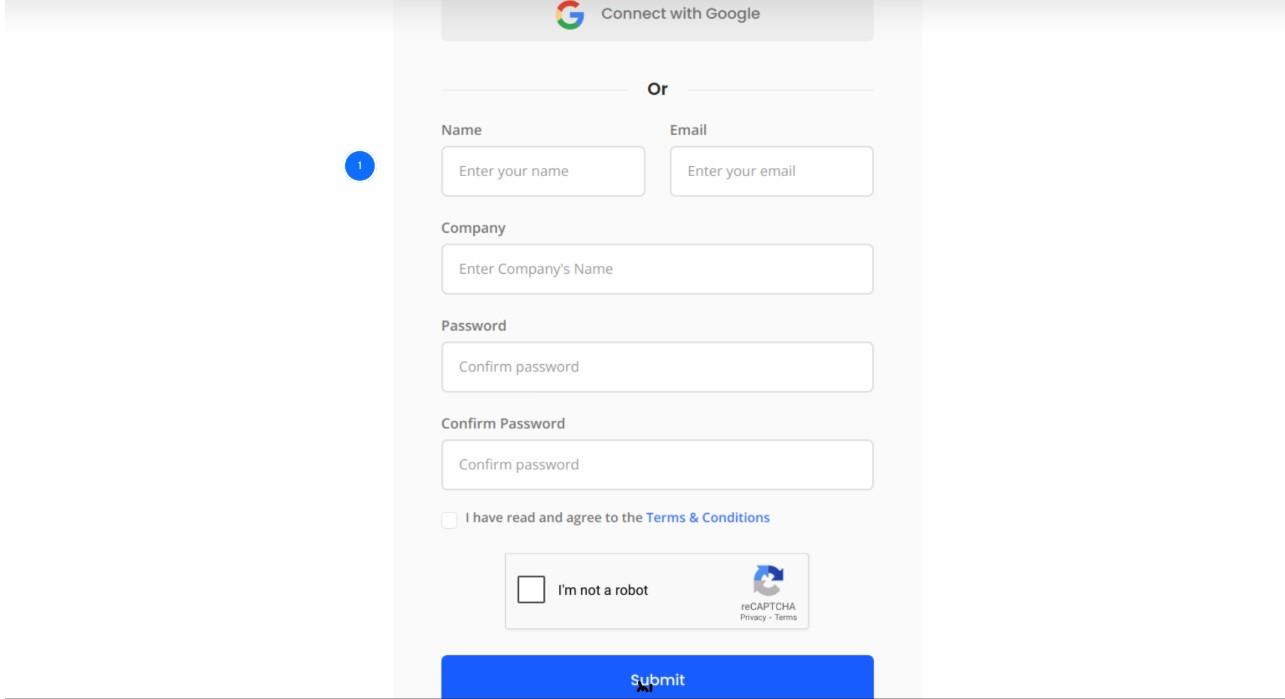
Start by creating your QuickSync account to begin the migration process.
- Go to QuickSync.pro
- Sign up using your email and business details
- Choose a plan based on your product count
- Start with the 14-day free trial (no credit card required)
Once inside, you’ll land on the dashboard where you can manage all connected stores and sync settings.
Step 2: Connect Your Etsy Store
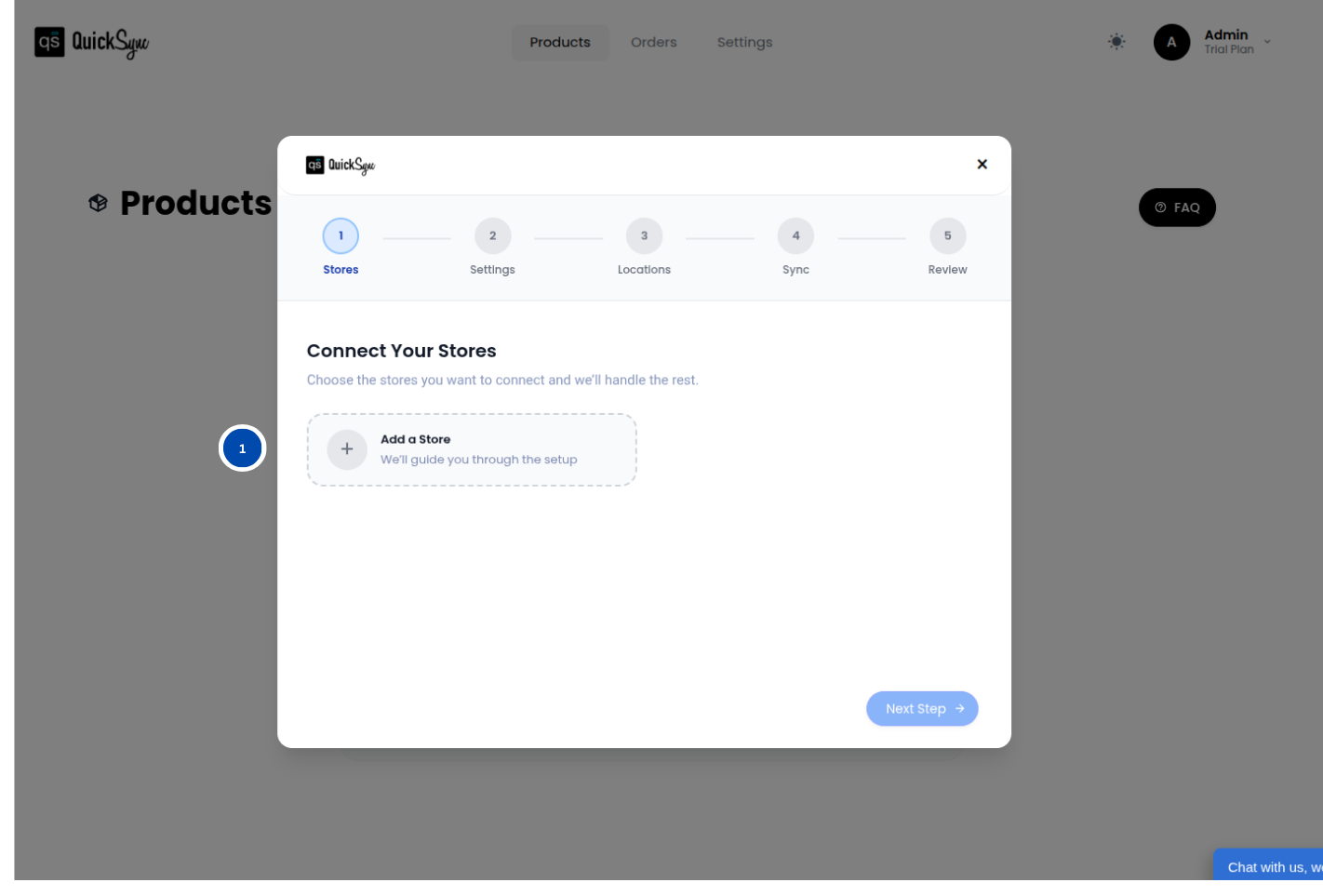
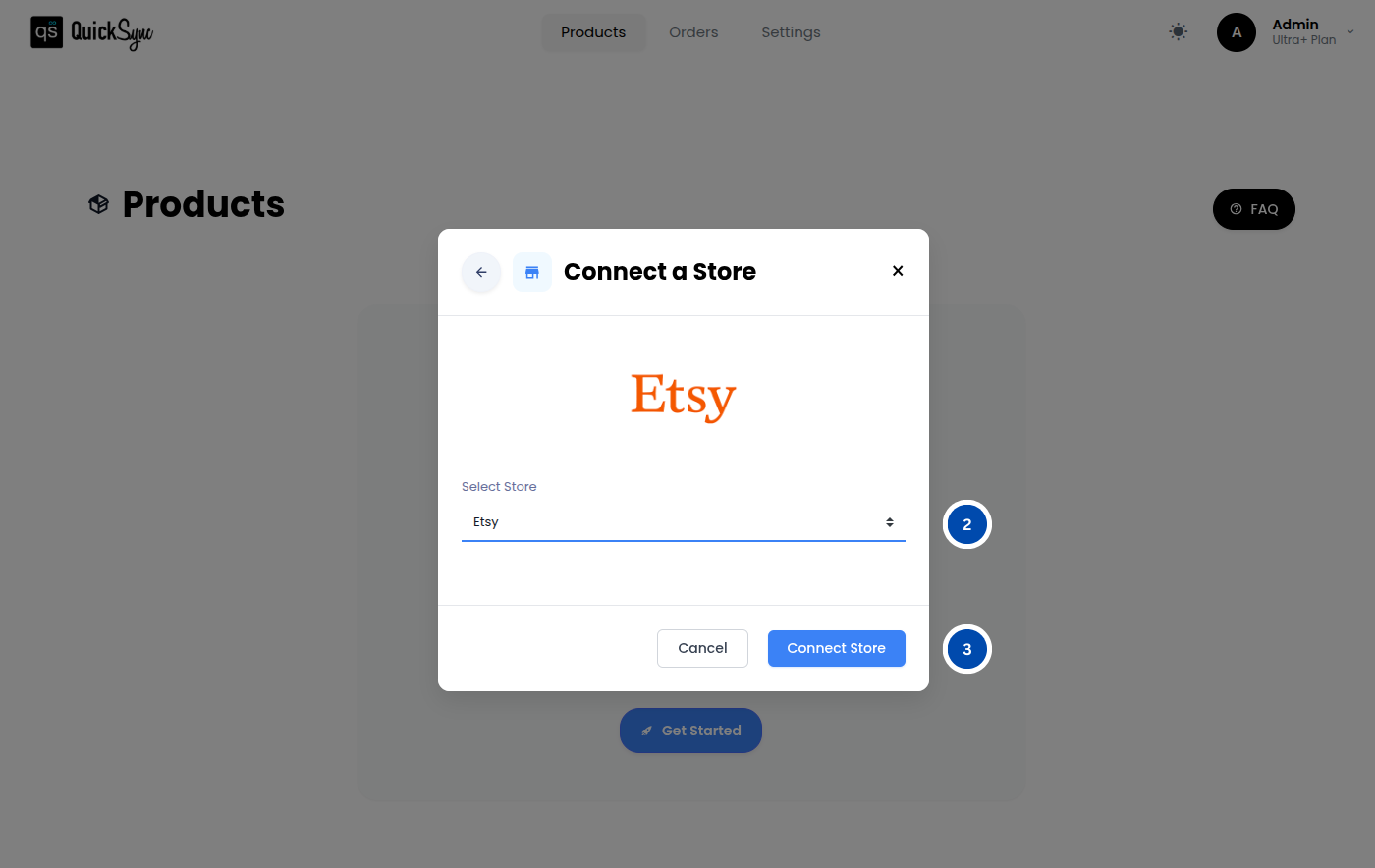
Next, connect your Etsy shop so QuickSync can access your product data.
- Open your QuickSync dashboar.
- Go to Dashboard > Sync Products > Add Store.
- Select Etsy from the list.
- Log in with your Etsy account.
- Approve permissions for listings, inventory, and orders sync.
This allows QuickSync to read your product catalog and prepare it for import.
Step 3: Connect Your WooCommerce Store
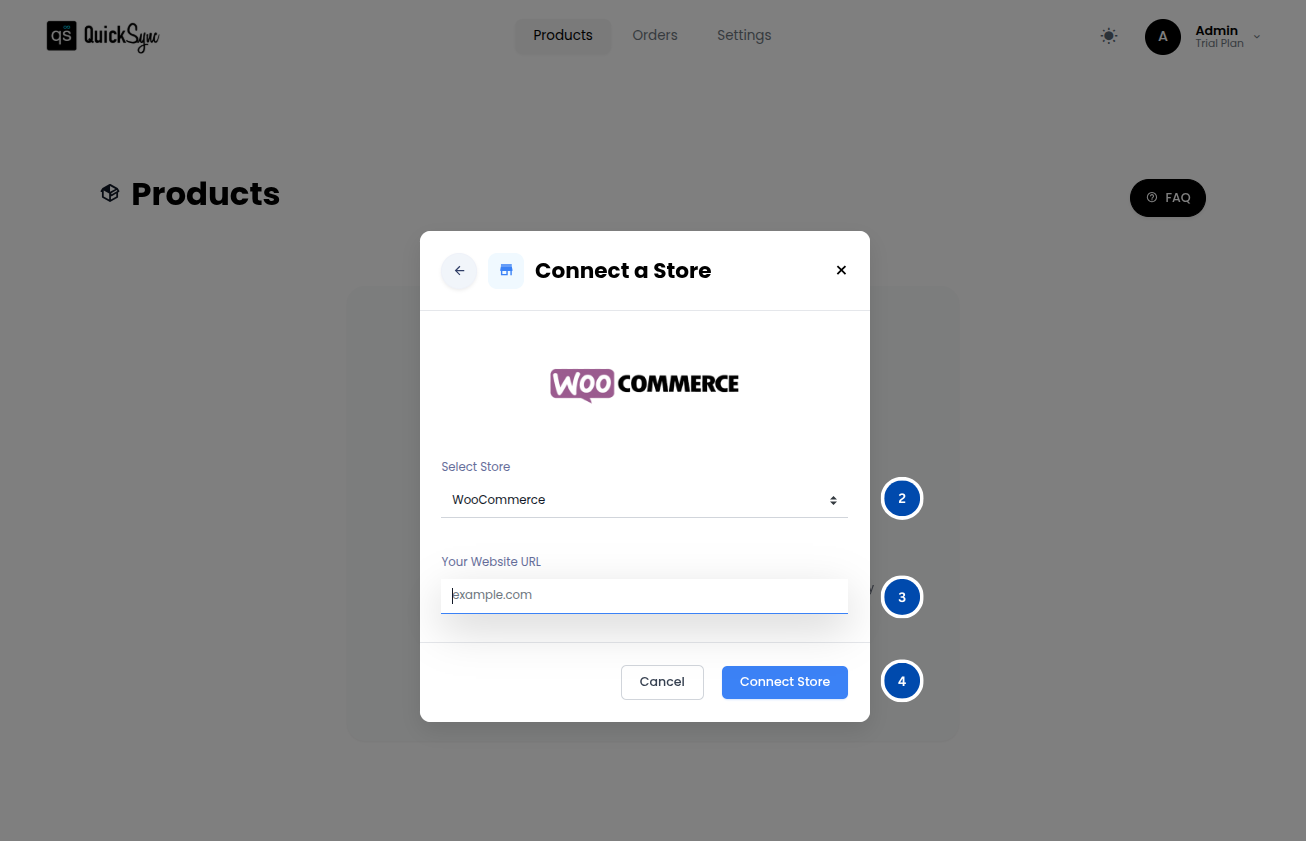
Now connect your WooCommerce store so products can be imported directly.
- Go to Dashboard > Sync Products > Add Store again.
- Select WooCommerce.
- Enter your store URL (e.g., yourstore.com).
- Follow the authentication steps.
QuickSync will verify the connection and link your store securely.
Step 4: Configure Your Sync Settings
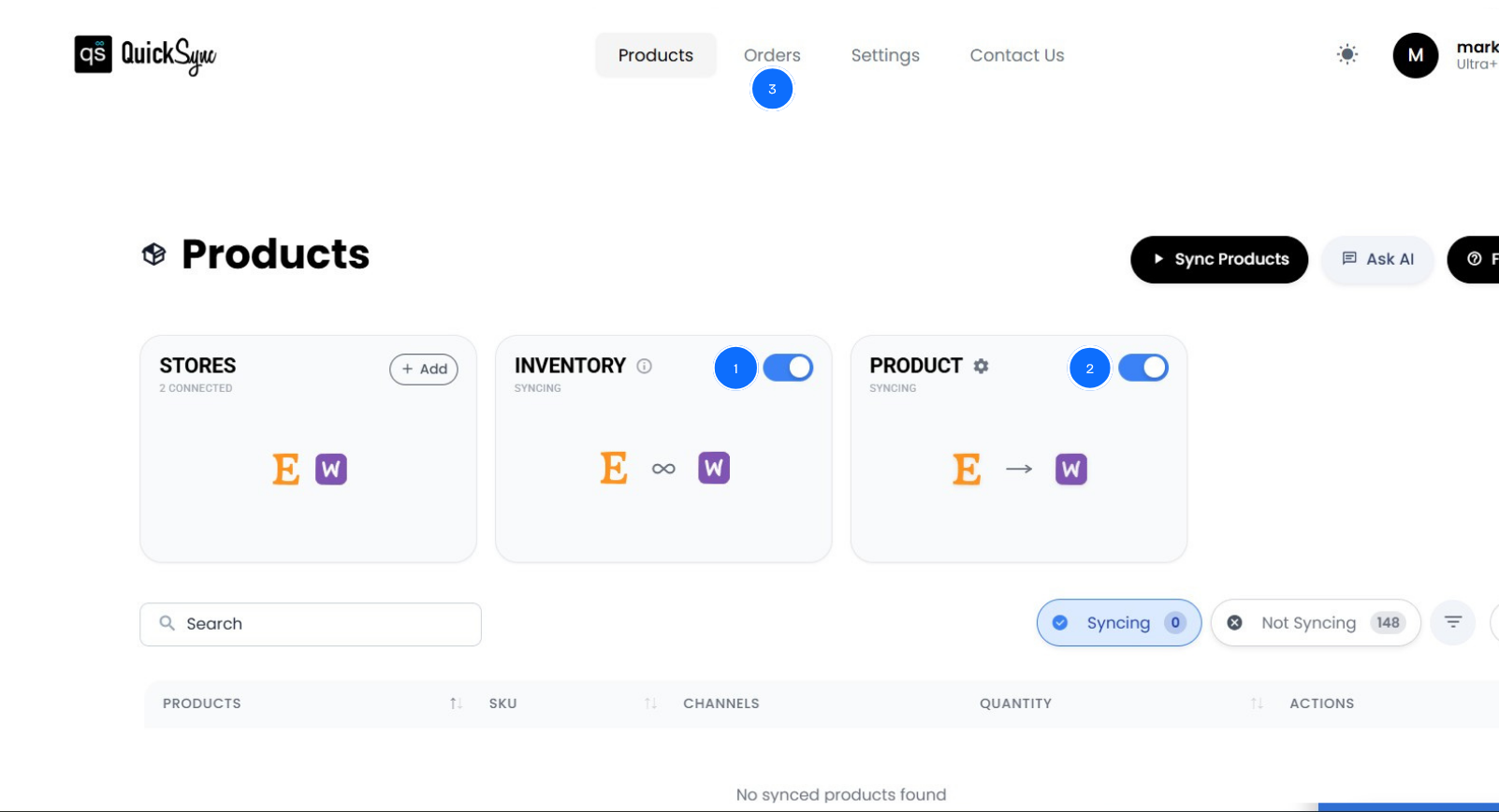
Before importing, choose how you want your data to sync between platforms.
- Select what to sync: products, inventory, orders.
- Set default categories for imported products.
- Adjust pricing or inventory preferences if needed.
- Choose whether WooCommerce or Etsy acts as the primary store.
This step ensures your data behaves exactly the way your business needs.
Step 5: Start the Product Import
Now you can run your first import from Etsy to WooCommerce.
- Click Start Product Sync.
- QuickSync begins importing your full product catalog.
- Products, images, SKUs, variants, and tags are automatically mapped.
During import:
- Descriptions are converted into a WooCommerce-friendly format.
- Variants are adjusted to fit WooCommerce’s flexible structure.
- Product data is organized for a clean store setup.
This step fully builds your WooCommerce store from your Etsy listings.
Step 6: Review Your Imported Products
After the import is complete, do a quick quality check before going live.
- Open a few products in WooCommerce.
- Check matching titles, images, and descriptions.
- Verify variants and pricing accuracy.
- Confirm inventory is correct.
Once everything looks good, your WooCommerce store is ready to launch and fully synced with Etsy.
Why QuickSync Is the Best Solution for Etsy to WooCommerce Product Sync
There are several ways to migrate an Etsy store to WooCommerce, but most of them solve only part of the problem. A one-time CSV import gets products into WooCommerce but leaves the seller managing two disconnected platforms from that point on. A basic plugin handles the initial transfer but offers no ongoing synchronization.
QuickSync is built to solve the complete problem, not just the first step.
It treats WooCommerce as a first-class platform:
Most multi-channel tools are built around Shopify. WooCommerce sellers are treated as secondary. QuickSync is built specifically for WordPress-native sellers, with deep WooCommerce integration that handles the platform’s full product structure, including all variant types, custom fields, tags, categories, and pricing options correctly.
It keeps both platforms running together:
For sellers who want to maintain their Etsy presence while building their WooCommerce store, QuickSync creates a permanent live connection between both platforms. Products sync automatically. Inventory updates in real time across both channels. A sale on Etsy updates WooCommerce stock instantly and a sale on WooCommerce updates Etsy the same way. Sold-out Etsy listings deactivate automatically when WooCommerce stock hits zero and reactivate when stock returns.
It handles the technical differences automatically:
The eBay Etsy listing requirements differences that break manual migrations are handled invisibly by QuickSync. HTML descriptions convert to plain text for Etsy. Plain text converts to properly formatted WooCommerce descriptions. WooCommerce’s ten option types merge down to Etsy’s two-property limit automatically. Handmade metadata is applied to every Etsy listing from store-level defaults, so compliance is maintained without touching each product individually.
It preserves every detail that matters:
When Etsy orders come into WooCommerce through QuickSync, nothing is lost. Personalization requests, gift wrap details, buyer messages, VAT, and coupon data all map correctly into WooCommerce’s order format. Tracking numbers entered in WooCommerce push back to Etsy automatically through dual tracking sync, so customers get consistent shipping updates regardless of where they placed their order.
It scales with the business:
Whether the catalog has 50 products or 5,000, QuickSync handles the sync load without manual intervention. As the business grows and order volumes increase, the integration scales with it. There is no need to rebuild the workflow or switch tools as the store expands.
The Bottom Lines
In short, understanding how to import Etsy to WooCommerce gives you a clear path to move from marketplace dependence to full store ownership. While Etsy helps you start selling, WooCommerce gives you the freedom to scale with complete control over your brand and data.
With the right migration approach, you can move products, preserve store data, and avoid downtime or manual rebuilding. Tools like QuickSync make the process smoother by handling syncing automatically across both platforms.
In the end, it’s about building a setup that is faster to manage, easier to scale, and fully under your control.