Inventory gets messed up fast if you are selling through multiple warehouses. Each location has its own stock levels, incoming shipments, outgoing orders, and replenishment schedules. Without a clear system, it’s easy to lose track of where products are stored or how much inventory is actually available.
One warehouse may have excess inventory while another runs out of the same product. Orders can be delayed because the wrong warehouse is selected for fulfillment. Inventory records may also become outdated if stock movements, transfers, and returns are not updated across every location.
It gives businesses a centralized view of inventory across every warehouse, helping them track stock levels, manage transfers between locations, fulfill orders from the right warehouse, and reduce costly inventory errors.
In this guide, you’ll learn how multi warehouse inventory management works, the common challenges businesses face, the benefits of managing inventory across multiple locations, and the best practices for keeping inventory accurate as your business grows.
What it means
Across QuickSync sellers we move 2M+ inventory updates a month — the mismatch usually shows up the first week a second warehouse or channel goes live, not after you “get organised”.
Multi warehouse inventory management is the process of tracking, organizing, and controlling inventory across two or more storage locations from a single system. These locations can include company-owned warehouses, distribution centers, retail stores, or third-party logistics facilities.
Instead of managing inventory separately at each location, businesses get a centralized view of stock availability, inventory movements, and warehouse operations.
The goal is simple. Every location should show the right stock at the right time. When something sells, ships, or gets returned, the inventory count updates everywhere instantly.
Instead of each warehouse keeping its own private list, they all read from the same source of truth. That is the main purpose of multi warehouse inventory management.
- It helps you see how much stock you have, where that stock is stored, and which location should handle each order.
- When a product sells, gets returned, or moves from one warehouse to another, the inventory count should update across all connected locations.
- Without this, your team may keep checking spreadsheets, calling warehouse staff, or manually updating stock on every channel. That creates delays, wrong stock numbers, and overselling.
A good warehouse inventory management system gives your business one clear view of inventory across multiple locations. So instead of guessing, your team can manage stock, orders, and fulfillment with better control.
Why it breaks
Most businesses do not start with multiple warehouses. They grow into them.
More orders, more locations, and faster delivery expectations make stock harder to control. That is why growing merchants need multi warehouse inventory management software.
Here are the biggest benefits it gives your business.
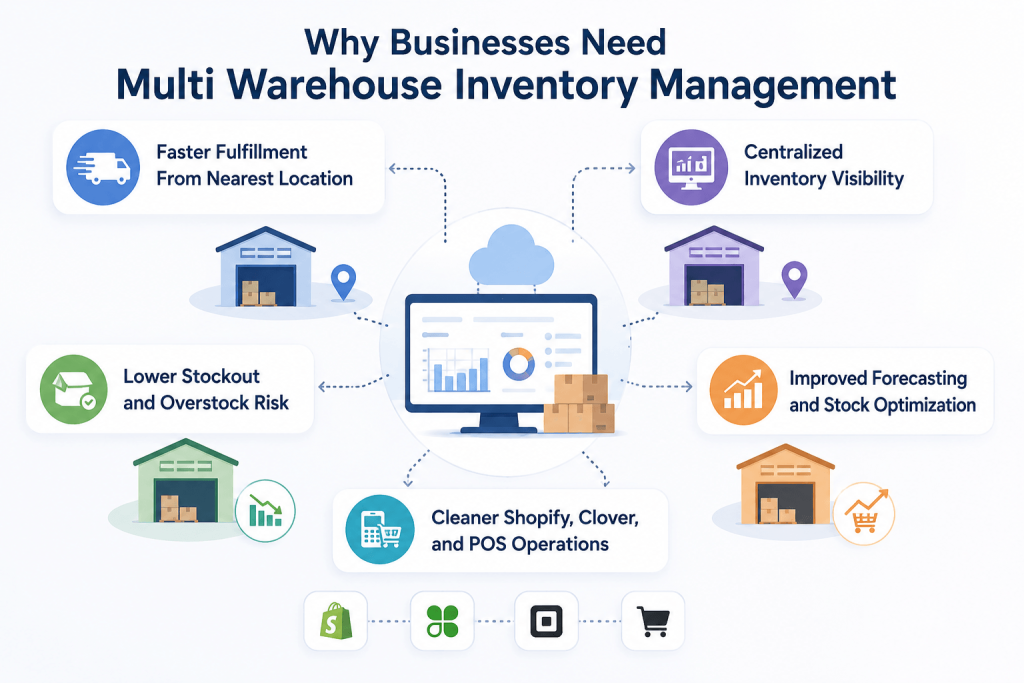
Faster Fulfillment From Nearest Location
Customers do not want slow delivery anymore. Around 69% of online shoppers abandon a purchase and go to a competitor the moment an item shows out of stock. They want faster shipping and better updates. When inventory is visible per warehouse, your team can fulfill from the best location.
This means fewer delays, fewer split shipments, and a better customer experience. It also helps Shopify and POS merchants compete with larger sellers without building one huge warehouse.
Centralized Inventory Visibility
Managing inventory across multiple warehouses becomes much easier when all your stock data is available in one place. Instead of checking each warehouse separately, you get a centralized view of inventory levels, stock movements, and product availability across every location.
This inventory visibility helps teams quickly identify where inventory is available, avoid unnecessary replenishment, transfer stock between warehouses when needed, and make faster, more informed inventory decisions.
Lower Stockout and Overstock Risk
Stockouts hurt sales. Overstock hurts cash flow. Both become common when inventory sits across disconnected warehouses. Good multi warehouse inventory management helps balance stock better. You can see which location is short and which location has extra stock.
This helps your team transfer products before problems grow. It also helps reduce panic buying, last-minute supplier orders, and dead stock sitting in the wrong warehouse.
Improved Forecasting and Stock Optimization
A centralized view of inventory across multiple warehouses makes it easier to identify demand patterns and optimize stock levels at each location. Instead of relying on guesswork, businesses can use inventory data to determine when to replenish stock, where to allocate products, and how much inventory each warehouse needs.
Better forecasting helps reduce excess inventory, prevent stockouts, improve inventory turnover, and ensure products are available where customer demand is highest.
Cleaner Shopify, Clover, and POS Operations
Many retailers sell online and in-store at the same time. Shopify may handle ecommerce. Clover or Square may handle in-store sales. Marketplaces may bring extra orders. That setup can work well. But only when inventory updates flow between every system.
A sale in Clover should update Shopify. A Shopify sale should reduce stock from the right location. Multi warehouse inventory management keeps POS, ecommerce, and warehouse teams working from cleaner stock data.
Where counts drift
Managing stock across multiple warehouses without a proper system gets messy fast. The real problem starts when every location, store, and sales channel shows different stock numbers.
Stock Counts Drift Quickly
Stock counts start drifting when sales, returns, exchanges, and manual edits do not update everywhere. One warehouse may show available stock, while the actual shelf is empty. This creates overselling, cancelled orders, and unhappy customers.
It also creates internal confusion. Your team wastes time checking physical stock instead of fulfilling orders. The more locations you add, the faster this problem grows. Manual updates cannot keep up with real-time selling pressure.
Manual Transfers Create Confusion
Stock transfers should be simple. But manual transfer tracking often creates confusion. A transfer leaves one warehouse and nobody updates the system, so for a while every location shows the wrong number.
Shopify may still show stock in one location. Clover may show another number. This makes purchasing, fulfillment, and reporting unreliable. A proper system should show what moved, where it moved, and when it became available again.
SKU Mistakes Break Inventory Accuracy
SKUs are the backbone of clean inventory. When SKUs are missing, duplicated, or written differently, inventory sync becomes messy.
The same product can exist across Shopify, Clover, WooCommerce, and marketplaces with slightly different names. But the SKU must stay clean. Without SKU consistency, products may not link correctly. That leads to wrong counts, duplicate products, and stock updates going to the wrong listing.
Orders Route to the Wrong Location
Order routing becomes harder when stock is spread across multiple warehouses. Your team needs to know which location has stock, which location is closest, and which location can fulfill fastest.
Without accurate inventory, orders may be assigned to a warehouse that cannot ship them. That causes delays and manual fixes. It also increases support tickets. Customers only see one thing. Their order did not arrive on time.
Reporting Becomes Too Slow
Manual reports are usually outdated before anyone uses them. By the time your team exports warehouse stock, checks POS sales, updates Shopify orders, and compares spreadsheets, the numbers have changed again.
This makes forecasting weaker. It also affects purchasing decisions. You may buy more stock for one warehouse while another warehouse already has enough. Real-time inventory reporting gives better control because decisions are based on current stock.
Also Read: How to Handle Customer Returns: Process, Tips & Best Practices
What has to work
So what actually fixes all this? Software. But not just any software. The wrong tool adds more problems. The right one helps you manage multiple warehouse inventory easily.
Here are some features you should consider to choose the best inventory sync and management software for your warehouses.
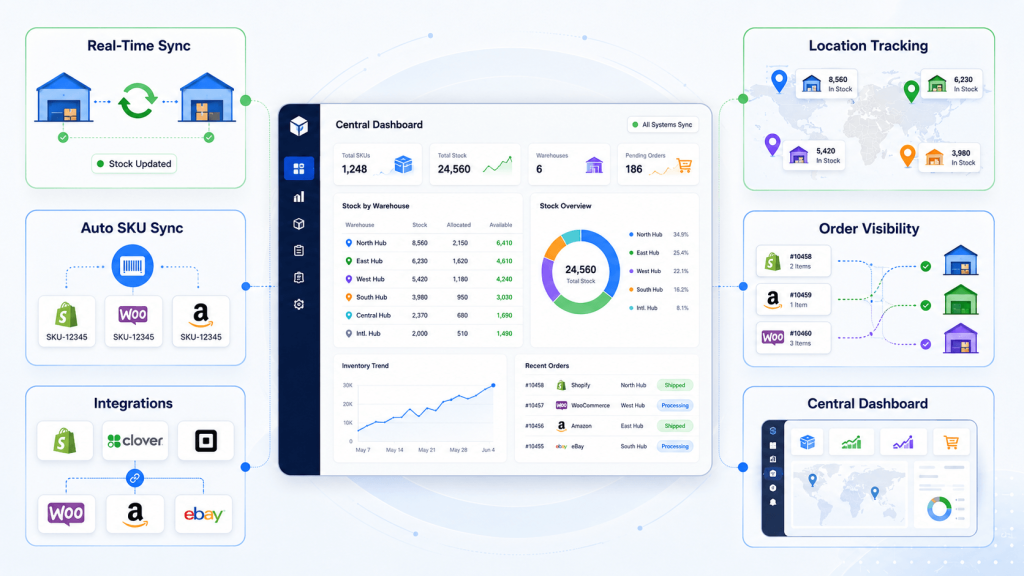
Real-Time Inventory Sync
This is non-negotiable. The moment a sale, return, or restock happens anywhere, every location and channel should update instantly. No batch delays, no overnight jobs. Real-time inventory sync is what kills overselling for good.
Multi-Location Inventory Tracking
A good multi warehouse inventory system tracks stock at every location separately while providing a centralized view of inventory. This helps you identify where products are available, fulfill orders from the right warehouse, and maintain accurate inventory across all locations.
Automatic SKU Assignment and Syncing
Products without a SKU are a tracking nightmare. The right system auto-generates clean SKUs for them, then keeps those SKUs synced everywhere. Consistent SKUs mean accurate counts. They also let the system match the same product across two stores automatically.
Multi-Warehouse Management
Choose an inventory system that supports managing multiple warehouse locations from a single platform. Whether you operate several Shopify warehouse locations or multiple distribution centers, the tool should provide accurate stock visibility across every location.
Order and Fulfillment Visibility
Inventory management should connect with order flow. Your team should see which orders came in, where stock is available, and which location can fulfill. This helps reduce delays, missed orders, split shipments, and manual order checks.
Centralized Inventory Dashboard
A centralized dashboard gives your team one place to check inventory. This reduces platform switching. It also helps teams compare stock across Shopify, Clover, Square, WooCommerce, Etsy, eBay, Amazon, TikTok Shop, and warehouse locations faster.
Practices that hold
Here are five practices that keep inventory management across multiple locations accurate as you grow. None of them are complicated. All of them pay off.
Use One Source of Truth
Your team needs one trusted inventory source. This source should tell every connected platform what stock is available. Without this, every warehouse and sales channel becomes its own version of the truth.
Choose one main store or system to control stock. Then use inventory sync to update other connected platforms automatically.
Standardize SKUs Before Scaling
Before you add another warehouse or channel, clean your SKUs. Use one SKU format across products, variants, sizes, colors, and bundles.
This helps Shopify, Clover, Square, WooCommerce, and marketplaces recognize the same product. It also makes reporting cleaner. Strong SKU hygiene prevents many inventory problems before they happen.
Set Reorder Points by Location
Each warehouse should have its own reorder point. Demand is not always equal across locations. One location may sell faster than another. One may serve online orders. Another may support retail sales.
Location-based reorder points help you avoid local stockouts. They also stop you from sending too much stock to slower locations.
Keep Safety Stock for Each Location
Every warehouse should have a small safety stock level for important products. This protects you when demand suddenly increases, suppliers delay stock, or one location sells faster than expected.
Do not use the same safety stock rule everywhere. Set it based on local demand, delivery time, and sales speed for each warehouse.
Review Warehouse Performance Regularly
Do not only track total inventory. Review how each warehouse is performing. Check which locations sell faster, which products sit too long, and which warehouses often run short.
This helps you move stock smarter, reduce storage waste, and improve buying decisions. Regular reviews make multi location inventory management easier to control.
What sync changes
Now, the important part. Inventory sync really helps in multi warehouse inventory management. A good inventory sync software puts your work on automation.
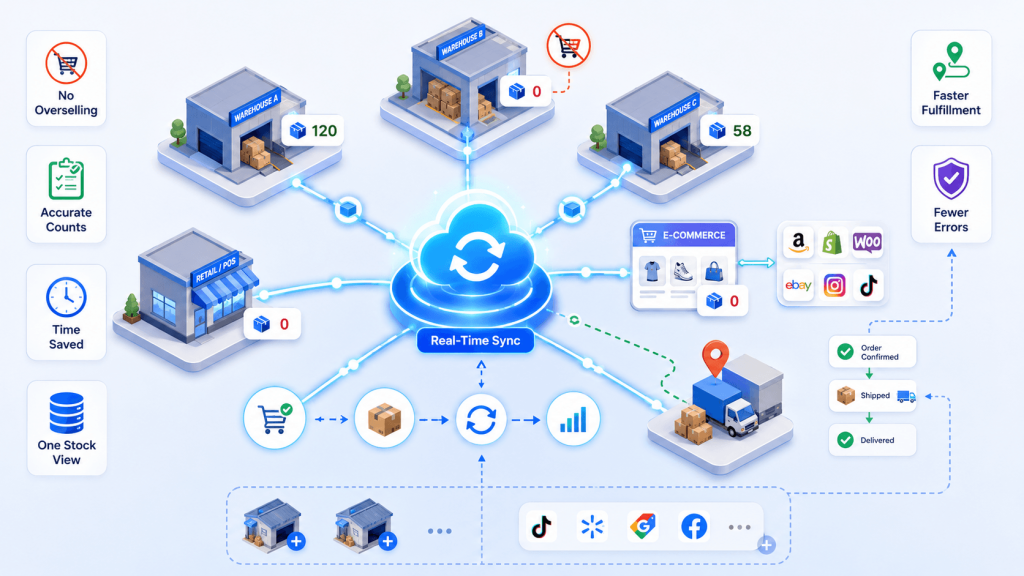
Inventory sync means every stock change reflects everywhere, automatically and in real time. Here is how inventory sync improves multi warehouse operations.
- It prevents overselling. When stock hits zero in one place, it’s marked unavailable everywhere at once. No more selling what you don’t have.
- It keeps counts accurate. Live updates beat manual counts every time. Real-time tracking improves stock accuracy by around 35% over periodic methods.
- It saves hours every week. No logging into five platforms to update one number. The system does it for you, instantly.
- It unifies your locations. Warehouses, stores, and channels all read from one count. One source of truth, finally.
- It speeds up fulfillment. Accurate per-location data lets you ship from the nearest stock without second-guessing.
- It protects your seller metrics. Fewer cancellations and refunds mean healthier marketplace standing and better reviews.
- It scales with you. Add a warehouse or a channel and sync just extends to cover it. Your process doesn’t change.
- It cuts costly errors. Automated order syncing pushes tracking back to every channel, so nothing slips through.
Inventory sync helps your team move faster without losing control.
Manual vs sync
Here’s the clear difference between a manual vs automated inventory management system.
| Area | Manual Inventory Updates | Synced Inventory Updates |
| Stock changes | Updated by staff | Updated automatically |
| Speed | Slow and delayed | Real time or near real time |
| Error risk | High | Lower |
| SKU matching | Often inconsistent | Cleaner and more reliable |
| Shopify and POS sync | Requires manual checks | Updates across connected platforms |
| Reporting | Often outdated | More current |
| Fulfillment | More manual decisions | Better location visibility |
| Growth readiness | Hard to scale | Easier to scale |
How QuickSync fits
Managing inventory across multiple warehouses becomes much easier when your inventory stays synchronized across every sales channel and fulfillment location. QuickSync helps businesses keep inventory accurate by automatically syncing stock updates between connected platforms, reducing manual work and minimizing inventory discrepancies.
QuickSync is a real-time multichannel inventory sync platform trusted by 27,000+ sellers, with a 4.9 rating. It keeps your products, orders, and stock aligned across every location and channel.
Key features include:
- Multi-location inventory sync support for warehouses, retail stores, and fulfillment centers, giving you a centralized view of inventory across all locations.
- Real-time inventory sync to automatically update stock levels whenever products are sold, returned, or restocked.
- Automatic SKU generation for products without existing SKUs, making inventory tracking and product matching more reliable.
- Existing product linking using matching SKUs, so you can connect products across platforms without creating duplicate listings.
- Draft product creation so new products can be reviewed before they are published to your online store.
- Support for major ecommerce platforms, including Shopify, WooCommerce, Square, Clover, Amazon, Etsy, eBay, and TikTok Shop, allowing you to manage inventory from a connected workflow.
- Selective syncing options that let you choose which products, locations, or inventory data should be synchronized.
When to switch
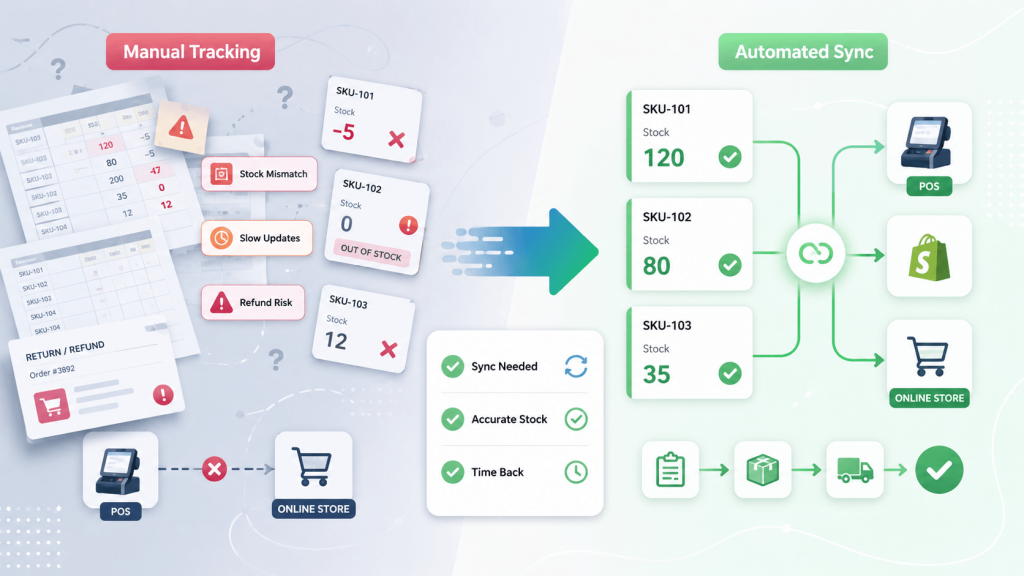
You don’t need every box ticked. Even two or three is a clear sign that manual tracking is holding you back. Read these honestly.
- You’ve sold an item that was already out of stock, more than once.
- You keep a spreadsheet just to do inventory reconciliation between your POS and online store.
- Updating one product across channels takes you longer than five minutes.
- You’re not fully sure which stock number is the “right” one.
- You’ve delayed adding a sales channel because syncing sounds painful.
- Your team spends more time chasing numbers than selling.
- Returns and restocks don’t update everywhere automatically.
If you nodded at a few of those, the problem isn’t your effort. It’s the method. Manual tracking simply can’t keep up once you move into multiple locations and channels.
The cost of manual inventory is not only staff time. It is also lost sales, refunds, wrong orders, customer support tickets, and poor decision-making. A better system gives your team time back.
Bottom line
Multi warehouse inventory management is not difficult because you have more stock. It becomes difficult because your stock is spread across too many places, and every system tells a different story.
That is where QuickSync gives growing merchants real control.
It connects your stores, warehouses, POS systems, and sales channels so inventory updates happen automatically. No more checking Shopify, Clover, Square, WooCommerce, and spreadsheets one by one.
No more guessing which location has stock. No more overselling because one channel did not update on time. With QuickSync, every location stays aligned, your team works faster, and your stock finally matches reality.