Warehouse inventory management is the process of tracking, controlling, and optimizing inventory throughout every stage of warehouse operations. It begins when products arrive at the warehouse and continues through storage, picking, packing, shipping, and returns.
This has always been important for businesses, but without accurate warehouse inventory management, sellers face inventory discrepancies, delayed shipments, stock shortages, and unnecessary carrying costs. A well-managed inventory system supports better forecasting and helps maintain a consistent customer experience.
This blog covers what warehouse inventory management is, its core functions, how it differs from general inventory management, the common challenges businesses face, the best practices and techniques for 2026, and how warehousing and inventory management integration with ecommerce channels works in practice.
TL;DR: Warehouse Inventory Management at a Glance
| → Warehouse inventory management keeps stock accurate from receiving to shipping. → Real-time inventory tracking reduces errors, stockouts, and overselling. → A Warehouse Management System (WMS) automates inventory, orders, and warehouse operations. → Best practices like cycle counting, ABC analysis, FIFO, and demand forecasting improve efficiency. → Connecting your warehouse with ecommerce, marketplaces, POS, and accounting keeps inventory synchronized across every sales channel. → QuickSync helps automate inventory, product, and order sync from one centralized dashboard. |
What Is Warehouse Inventory Management?
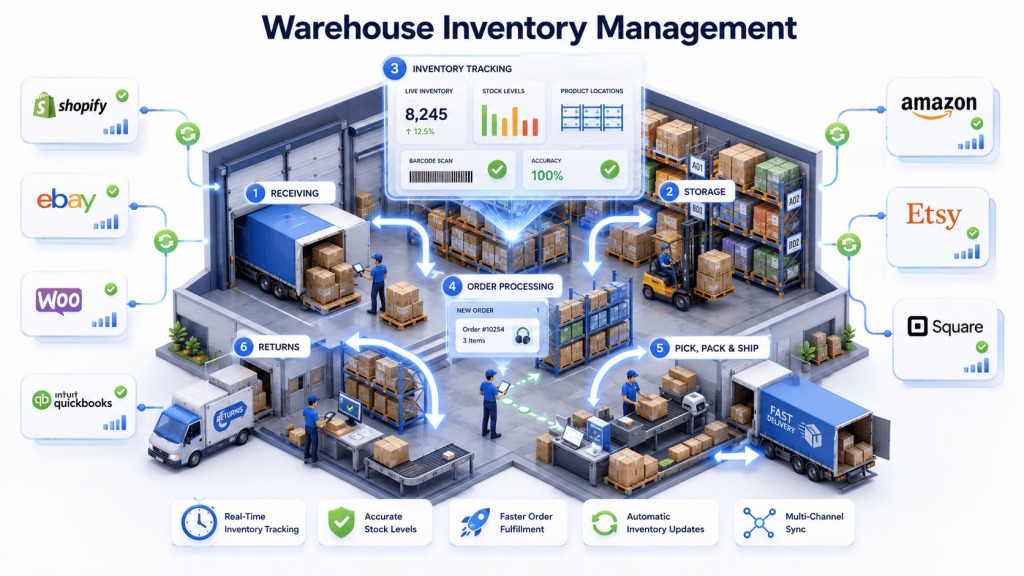
Warehouse inventory management is the process of organizing, tracking, and controlling inventory inside a warehouse. It helps businesses know exactly what products they have, where those products are located, and when it’s time to restock.
The process includes receiving inventory, storing products, tracking stock levels, picking and packing customer orders, shipping products, and handling returns.
Modern warehouse inventory management systems also record every inventory movement automatically, so stock levels stay updated across warehouses, ecommerce stores, and other sales channels. This improves inventory accuracy, speeds up order fulfillment, and reduces costly inventory errors.
The Importance of Proper Warehouse Inventory Management
Proper warehouse inventory management helps online sellers run more smoothly every day. It keeps inventory organized, reduces mistakes, and makes sure products are available when customers want to buy them.
Some of the biggest benefits include:
- Better inventory accuracy.
- Faster order processing.
- Fewer stockouts.
- Lower storage costs.
- Happier customers.
- Better control over inventory across different warehouses and sales channels.
When inventory information stays updated in real time, businesses can avoid overselling and fulfill customer orders with confidence.
Functions of Inventory Management and Warehousing
The functions of inventory management and warehousing cover every phase a product goes through from the moment it arrives at the facility to the moment it reaches the customer.
Inventory management assists with demand forecasting and purchasing strategies alongside these core operational functions. Understanding each function makes it clear why accuracy at every phase depends directly on accuracy at the previous one.
1. Receiving
Receiving is the first step in warehouse inventory management. When new products arrive at the warehouse, the team checks that the correct items have been delivered and that the quantity matches the purchase order. They also inspect the products to make sure nothing is damaged.
Getting this step right is important because every inventory record starts here. If the wrong quantity is entered or damaged products are not identified, it can lead to inventory errors, delayed orders, and stock issues later on.
2. Put-Away and Storage
After new inventory is received, it is placed on shelves or in storage areas inside the warehouse. Warehouse teams choose the best storage location based on:
- How often the product is picked for orders.
- The size of the product.
- Its weight.
- Any special storage requirements.
Popular products are usually stored closer to the shipping area because they are picked more often. This helps employees find items faster and reduces the time needed to prepare customer orders.
3. Inventory Tracking
Inventory tracking is an essential part of warehouse inventory management because it helps multichannel sellers maintain accurate stock information at all times. Instead of only knowing how many products are available, businesses can also track where each item is located inside the warehouse.
Effective and accurate inventory tracking helps:
- Improve inventory accuracy.
- Reduce time spent searching for products.
- Speed up order picking and fulfillment.
- Prevent stock discrepancies.
- Provide real-time visibility into warehouse operations.
Modern technologies such as RFID, barcode scanning, and inventory sync management software make it easier to track products automatically and keep warehouse data updated.
4. Order Processing
When a customer places an order, order processing verifies the order details, checks stock availability, and prepares the fulfillment workflow. Accurate order processing depends entirely on the accuracy of the inventory records at that moment.
If records are wrong, the wrong product gets picked, or the system shows stock that does not physically exist.
5. Picking
Once an order comes in, someone needs to find those products inside the warehouse and prepare them for shipping. This step is known as picking. Without a proper picking system, employees may spend too much time searching for products or accidentally select the wrong items.
A well-organized warehouse makes it easier to find products quickly and complete orders correctly. Using tools like barcode scanners, voice instructions, and automated picking systems helps warehouse teams work faster while reducing mistakes.
6. Packing and Shipping
Packing and shipping means preparing products for delivery after an order is received. Workers check the items, pack them safely, add delivery information, and send the package to the customer.
A good packing process makes sure the following:
- The right product is shipped.
- The package reaches the customer safely.
- Delivery information is accurate.
- Orders are completed on time.
Using barcode scanners and digital tools helps warehouses avoid mistakes and improve the overall customer experience.
7. Inventory Replenishment
Inventory replenishment means restocking products when the available quantity starts getting low. Instead of waiting until a product is completely out of stock, businesses can reorder items at the right time to keep products available for customers.
Warehouse management systems make this process easier by notifying businesses when inventory needs to be replaced. This helps avoid missed sales, keeps operations running smoothly, and prevents businesses from storing more products than necessary.
8. Returns Management
Customer returns management helps businesses handle products that come back from customers. After a product is returned, it is checked to see if it can be sold again.
Products that are still usable are added back to available stock, while damaged products are repaired or removed from inventory. Keeping track of returned items properly helps businesses maintain accurate stock information and avoid inventory mistakes.
“Warehouse inventory management is a chain where every step relies on the previous one. A small mistake during receiving can lead to incorrect storage, picking errors, shipping problems, and customer returns. That’s why accuracy at every stage is essential.”
Difference Between Warehouse Management vs Inventory Management
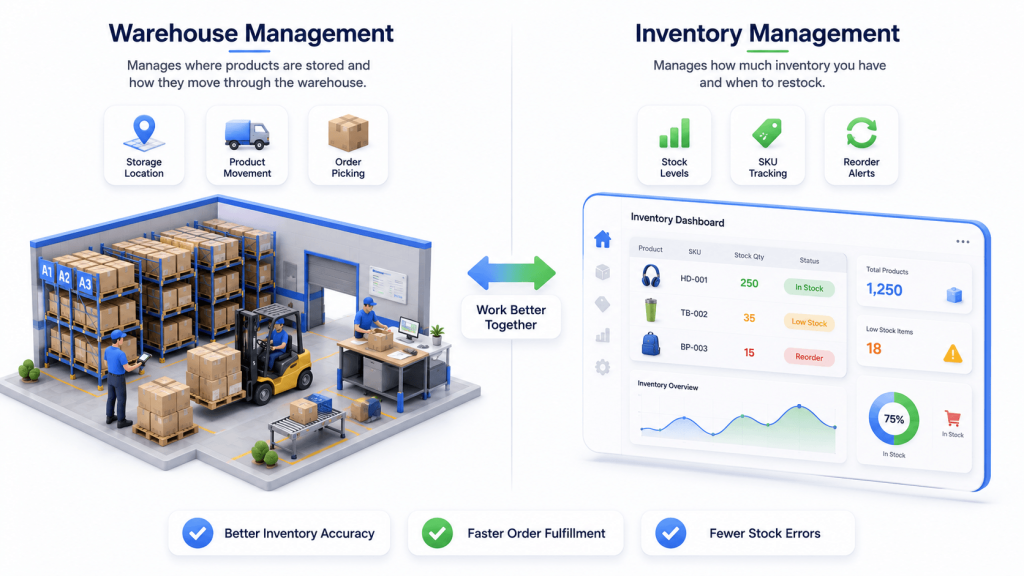
Warehouse management and inventory management are closely related but they are not the same thing. Understanding the difference helps businesses identify which system or combination of systems they actually need.
Warehouse management focuses on how inventory is stored and processed. It deals with the physical handling of goods, including where they are located in the facility, how staff moves through the warehouse, how orders are picked and packed, and how labor is managed across shifts. Warehouse management is utilized by larger businesses with more complex operations that require detailed control over physical space and labor efficiency.
Inventory management focuses on stock levels and availability. It deals with what is in stock, how many units remain, when to reorder, and how to forecast future demand. Inventory management can be used by smaller businesses that need to know what they have without necessarily managing a complex physical facility.
| Factor | Warehouse Management | Inventory Management |
| Primary focus | How and where goods are stored and moved | What is in stock and how much |
| Key question it answers | Where is this product in the warehouse? | How many units do we have available? |
| Data it tracks | Storage locations, pick paths, labor efficiency | Stock levels, SKUs, reorder points, turnover |
| Tools used | WMS, barcode scanners, RFID, pick-to-light | IMS, ERP, demand forecasting software |
| Business size | Larger businesses with complex operations | Any size business including smaller operations |
| Can it work without the other | Difficult, needs inventory data to function well | Yes, but loses physical location context |
| Combined benefit | Full operational visibility from shelf to shipment | Full operational visibility from shelf to shipment |
Inventory management helps businesses track how much stock they have. Warehouse management helps them organize where that stock is stored and how it moves through the warehouse. When both work together, businesses can manage inventory more efficiently, reduce mistakes, and deliver products to customers faster.
Also Read: How to Handle Customer Returns: Process, Tips & Best Practices
Common Challenges in Warehouse Inventory Management
Managing inventory in a warehouse is not always easy. Businesses often face challenges like keeping accurate stock records, preventing shortages, reducing mistakes, and ensuring products are available when customers need them.
Understanding these warehouse and multichannel inventory challenges helps businesses choose the right processes and tools to improve warehouse efficiency and manage inventory more effectively.
Inaccurate Inventory Records
Data inaccuracy can lead to stockouts or overselling, both of which directly damage business performance. Inaccurate inventory records create a chain reaction of problems downstream. Therefore, automated data collection enhances inventory accuracy and labor efficiency by removing the manual entry step where errors most commonly occur.
Poor Warehouse Layout
An unoptimized warehouse layout forces staff to travel longer distances during picking, increases handling time, and creates bottlenecks in high-traffic areas. Optimized warehouse layouts improve efficiency and reduce labor costs by placing fast-moving items closest to shipping areas and ensuring clear, unobstructed pick paths throughout the facility.
Manual Processes and Paper-Based Systems
Using paper records and manual updates can make warehouse management more difficult. Employees may enter incorrect information, lose records, or make mistakes while transferring data from one person to another. Digital warehouse systems make the process easier by automatically recording inventory changes.
Overstocking and Dead Stock
Overstocking happens when a business keeps more inventory than it needs. This increases storage costs and ties up money in products that are not selling. Products that remain unsold for a long time are called dead stock. They occupy valuable warehouse space without generating revenue.
Using demand-based inventory planning and modern inventory management systems helps businesses maintain the right stock levels while reducing excess inventory and avoiding unnecessary costs.
Multichannel Inventory Challenges
Many businesses sell their products on more than one platform, such as Amazon, Shopify, and eBay. This makes inventory management more challenging because stock levels need to stay the same everywhere.
If one system doesn’t update after a sale, customers may order products that are no longer available. Using real-time inventory synchronization helps keep inventory accurate across all sales channels.
Staff Management
People play an important role in warehouse inventory management. They receive products, organize inventory, pick orders, and prepare shipments for customers. When there are staffing shortages, frequent employee turnover, or limited training, inventory mistakes become more likely. A well-trained team and safe working environment help businesses improve accuracy and keep warehouse operations running smoothly.
Warehouse Inventory Management Best Practices for 2026
Following the right warehouse inventory management practices can help businesses improve inventory accuracy, reduce costs, and fulfill customer orders more efficiently. Here are some of the most effective warehouse inventory management best practices for 2026 that can help businesses improve daily operations and stay competitive.
Implement Cycle Counting Instead of Annual Physical Counts
Cycle counting evaluates inventory inconsistencies regularly by counting a small section of inventory at a time rather than shutting down the entire warehouse for an annual count. Cycle counting improves inventory accuracy by evaluating sections regularly so discrepancies are caught and corrected throughout the year rather than discovered all at once.
Use ABC classification to set counting frequency. Count category A items monthly. Count category B items quarterly. Count category C items every six months. Compare each count against your records, investigate any discrepancy, and update records immediately. The discipline of regular cycle counting is one of the highest-leverage activities in warehouse inventory management.
Apply ABC Analysis to Prioritize Inventory Attention
ABC analysis helps businesses organize inventory based on its value and how often it sells. This allows teams to focus more on the products that have the biggest impact on sales and profits instead of treating every product the same.
By giving extra attention to high-value products, businesses can manage inventory more efficiently and make better use of their time and resources.
- Category A: These are your most important products. They sell quickly and generate the most revenue, so they should be checked often and stored where they are easy to access.
- Category B: These products are moderately important. They do not sell as fast as Category A items, so regular monitoring and standard storage practices are usually enough.
- Category C: These products have the lowest value or sell less frequently. They require less attention and can be checked on a regular schedule instead of every day.
Minimize Manual Tasks With Automation and Technology
Automation plays an important role in warehouse inventory management by reducing manual work and improving inventory accuracy. Instead of entering inventory data by hand, businesses can use barcode scanners and warehouse management systems to record updates automatically.
RFID technology provides real-time inventory tracking by automatically reading tags as products move through the facility without requiring line-of-sight scanning. Combined with a warehouse management system, automated data collection creates a continuously accurate picture of inventory status across the entire facility.
Optimize Your Warehouse Layout
A well-organized warehouse helps staff find, pick, and pack products more quickly. Keeping popular products close to the packing and shipping area reduces the time spent walking around the warehouse.
Businesses can also make better use of available space by adding taller storage racks and using clear labels and signs to mark different sections. A good warehouse layout improves efficiency, saves time, and makes daily operations run more smoothly.
Implement Real-Time Inventory Tracking
Real-time inventory visibility reduces shipping errors and enhances customer satisfaction by ensuring that every order is picked from accurate, current inventory data.
A warehouse management system automates inventory tracking and provides real-time stock level visibility across every location in the facility. Without real-time tracking, employees may see outdated inventory information by the time they reach the product.
Maintain Safety Stock for Supply Chain Disruptions
Safety stock is extra inventory that businesses keep as a backup in case of unexpected delays or a sudden increase in customer demand. It helps ensure products remain available even when new stock arrives later than expected.
Businesses should reorder inventory before this backup stock is used up. This helps prevent stockouts, keeps customer orders moving, and reduces the impact of supply chain disruptions.
Use Demand Forecasting to Stay Ahead of Demand
Demand forecasting is an important part of warehouse inventory management because it helps businesses plan inventory based on expected customer demand. It uses historical sales data, seasonal patterns, and market trends to predict future inventory needs.
With better forecasting, businesses can maintain the right stock levels, reduce inventory costs, and improve order fulfillment.
Apply FIFO for Short Shelf Life and Time-sensitive Stock.
FIFO (First In, First Out) ensures older inventory is sold before newer stock arrives, keeping product quality high and reducing waste from expired or outdated items. This is particularly critical in food and beverage, pharmaceutical, and cosmetics industries where product age directly affects quality and regulatory compliance.
LIFO can be useful in some situations, especially for accounting purposes, but FIFO is the preferred method for most warehouse operations because it helps maintain better inventory flow. To understand FIFO and LIFO better. Here is the table comparing both terms in the easiest way.
| Factor | FIFO (First In First Out) | LIFO (Last In First Out) |
| What it means | Sell oldest inventory first | Sell newest inventory first |
| Best for | Perishable goods, food, pharmaceuticals, cosmetics | Non-perishable goods where tax benefits matter |
| Inventory freshness | Keeps stock fresh and reduces waste | Risk of older stock becoming outdated |
| Tax implication | Higher taxable income in rising price environments | Reduces taxable income by increasing COGS |
| Industry use | Food, beverage, healthcare, fashion | Manufacturing, oil, commodities |
| Regulatory note | Accepted globally including IFRS | Not permitted under IFRS, US-only under GAAP |
Conduct Regular Quality Control Checks
Regular quality checks help businesses find problems before they become bigger issues. When new products arrive, warehouse teams should check that the quantity is correct, items are in good condition, and everything matches the order details.
The same checks should be performed before products are shipped to customers. This helps reduce mistakes, prevent damaged items from being sent out, and maintain accurate inventory records.
Train Staff on Inventory Systems and Processes
Implementing a Warehouse Management System boosts productivity and accuracy only when staff know how to use it correctly. Develop detailed training modules covering the use of barcode scanners, RFID technology, WMS navigation, and standard operating procedures for every inventory process.
Invite staff feedback to continually refine processes because the people doing the work every day are the first to identify what is not working efficiently.
Build Strong Supplier Relationships
Strong supplier relationships are an important part of effective warehouse inventory management. Regular communication helps businesses stay informed about supply delays, inventory availability, and market changes.
By working closely with suppliers and planning ahead, businesses can maintain better stock levels, reduce disruptions, and improve overall inventory control.
Set Clear Reorder Points and Automate Replenishment
A reorder point tells businesses when it is time to order more stock before inventory runs out. It helps maintain the right amount of inventory and prevents products from becoming unavailable.
Instead of manually checking stock levels, businesses can use automation tools to send alerts or place orders when inventory reaches a certain level. This helps avoid stockouts, saves time, and keeps inventory levels under control.
What Warehouse Inventory Management Systems Do and Features to Look For
Following warehouse inventory management best practices is much easier when you have the right technology supporting your operations. While processes like cycle counting, demand forecasting, and automated replenishment improve inventory accuracy, managing them manually becomes increasingly difficult as your business grows.
This is where a warehouse management system (WMS) becomes essential. A WMS automates inventory tracking, streamlines warehouse workflows, and provides real-time visibility into stock movements, helping businesses improve accuracy, reduce manual work, and scale operations more efficiently.
What Does a Warehouse Management System Do?
A warehouse management system works by providing features that help warehouse managers address the core challenges of running a warehouse inventory operation.
Warehouse management systems improve timely order fulfillment accuracy by guiding staff through picking and packing with system-verified instructions rather than paper-based pick lists.
Effective warehouse management systems optimize storage allocation by tracking the exact location of every SKU and directing put-away to the most appropriate storage zone based on market demand, size, and turnover.
Key Features Every Warehouse Management System Should Have
- Real-time inventory tracking: Monitor live inventory levels and product locations across your warehouse to maintain real-time inventory visibility at all times.
- Barcode and RFID integration: Automate inventory updates during receiving, storage, picking, packing, and shipping to reduce manual data entry and improve accuracy.
- Order management: Manage the complete order lifecycle from order receipt and picking to shipping, returns, and fulfillment tracking.
- Reporting and analytics: Gain insights into inventory turnover, warehouse productivity, fulfillment speed, order accuracy, and labor performance.
- Multi-location inventory management: Track inventory across multiple warehouses, fulfillment centers, or storage locations from a centralized dashboard.
- Integration with commerce platforms and POS: Keep inventory synchronized in real time across ecommerce stores, marketplaces, POS systems, and accounting.
- Automated restocking alerts: Get notified when inventory runs low so you can reorder products before they go out of stock.
Cloud-Based vs. On-Premise Warehouse Management Systems
When choosing a warehouse management system, you’ll typically come across two deployment options: cloud-based and on-premise. The right choice depends on your business size, budget, and operational needs.
Cloud-Based WMS
A cloud-based WMS is hosted online, allowing you to manage your warehouse from anywhere with an internet connection. It is easy to set up, automatically updates, and grows with your business, making it a great choice for most small and medium-sized businesses.
On-Premise WMS
An on-premise WMS is installed on your company’s own servers, giving you full control over your data and system. Although it requires a higher upfront investment and ongoing maintenance, it is a good option for businesses that need advanced customization or have strict security and compliance requirements.
Warehousing and Inventory Management Integration for Multichannel Operations
Managing warehouse inventory is only one part of running a successful ecommerce business. If you sell on multiple platforms, your warehouse also needs to stay connected with every place where your products are listed. This is where warehousing and inventory management integration becomes essential.
It connects your warehouse operations with your ecommerce stores, online marketplaces, point-of-sale (POS) systems, and other business tools. Whenever inventory changes in one system, the update is automatically reflected across all connected sales channels, helping you keep stock levels accurate everywhere.
Why Is Warehouse Integration Important?
Imagine you have one product left in stock. A customer purchases it from your physical store or warehouse, and your warehouse inventory is updated immediately. However, if your warehouse management system is not connected to your Shopify store, Amazon listing, eBay account, or Etsy shop, those platforms may still show the item as available.
Another customer places an order for the same product on a different sales channel. Now you have two orders but only one item in stock.
It leads to overselling, order cancellations, unhappy customers, and lower seller ratings. This is where warehouse integration is important. By integrating your warehouse with every sales channel, inventory updates happen automatically in real time, helping you avoid stock discrepancies and keep your business running smoothly.
What Does Warehousing and Inventory Management Integration Connect?
A warehouse inventory management integration connects your warehouse with the systems you use to sell, manage, and track your business. This ensures inventory stays accurate across every platform without manual updates.
- Ecommerce platforms: Connect platforms like Shopify, WooCommerce, and Squarespace so inventory updates automatically whenever a product is sold or restocked.
- Online marketplaces: Keep inventory synchronized across Amazon, eBay, Etsy, and TikTok Shop, helping prevent overselling and ensuring customers always see accurate stock levels.
- Point of Sale (POS) systems: Integrate Square, Clover, and Lightspeed to keep stock aligned with your warehouse. Clover stock sold in a sale is read 30 minutes after the order; its stock edits arrive by webhook.
- Accounting software: Connect with QuickBooks to automatically record inventory-related transactions, helping keep your financial records accurate while reducing manual data entry.
How QuickSync Connects Your Warehouse to Every Selling Channel
Keeping inventory accurate across multiple sales channels can be difficult when your systems don’t communicate with each other. QuickSync solves this by connecting your warehouse with your ecommerce stores, online marketplaces, POS systems, and accounting software from one centralized dashboard.
Whenever inventory changes in your warehouse, QuickSync automatically updates every connected platform in real time. Whether a product is sold online, in-store, or restocked, your inventory stays synchronized across all your sales channels without manual updates or scheduled syncs.
With QuickSync, You Can:
- Sync inventory in real time so stock levels update automatically across all connected channels within seconds.
- Keep product information consistent by syncing product names, descriptions, images, variants, and pricing from a single source.
- Manage orders more efficiently by bringing orders from multiple sales channels into a single dashboard for fulfillment.
- Automate accounting updates by syncing sales and inventory data with QuickBooks to reduce manual bookkeeping.
The Bottom Line
Warehouse inventory management plays a key role in keeping products organized, inventory accurate, and customer orders moving efficiently. By combining proven inventory management practices with real-time warehouse integration, businesses can reduce stock discrepancies, improve order accuracy, and scale with confidence.
QuickSync helps businesses automate inventory, product, and order synchronization across leading ecommerce platforms, marketplaces, POS systems, and accounting software.