You think you have five items left. Your inventory system says eight. Then a customer buys the last one, and suddenly you are trying to figure out where the other seven went. This is the kind of problem good store inventory control is designed to prevent.
And the impact of getting inventory wrong can be bigger than you might think. According to a recent study, mismanaged inventory costs businesses nearly $2 trillion annually. Store inventory control gives you a clear picture of what is in stock, what is selling, what needs to be reordered, and which products are sitting too long.
And you do not need a complicated setup to get started. A suitable inventory method, accurate tracking, and consistent processes can go a long way. This guide breaks down everything you need to know, from inventory control methods and common mistakes to managing stock across physical and online sales channels.
What Is Store Inventory Control?
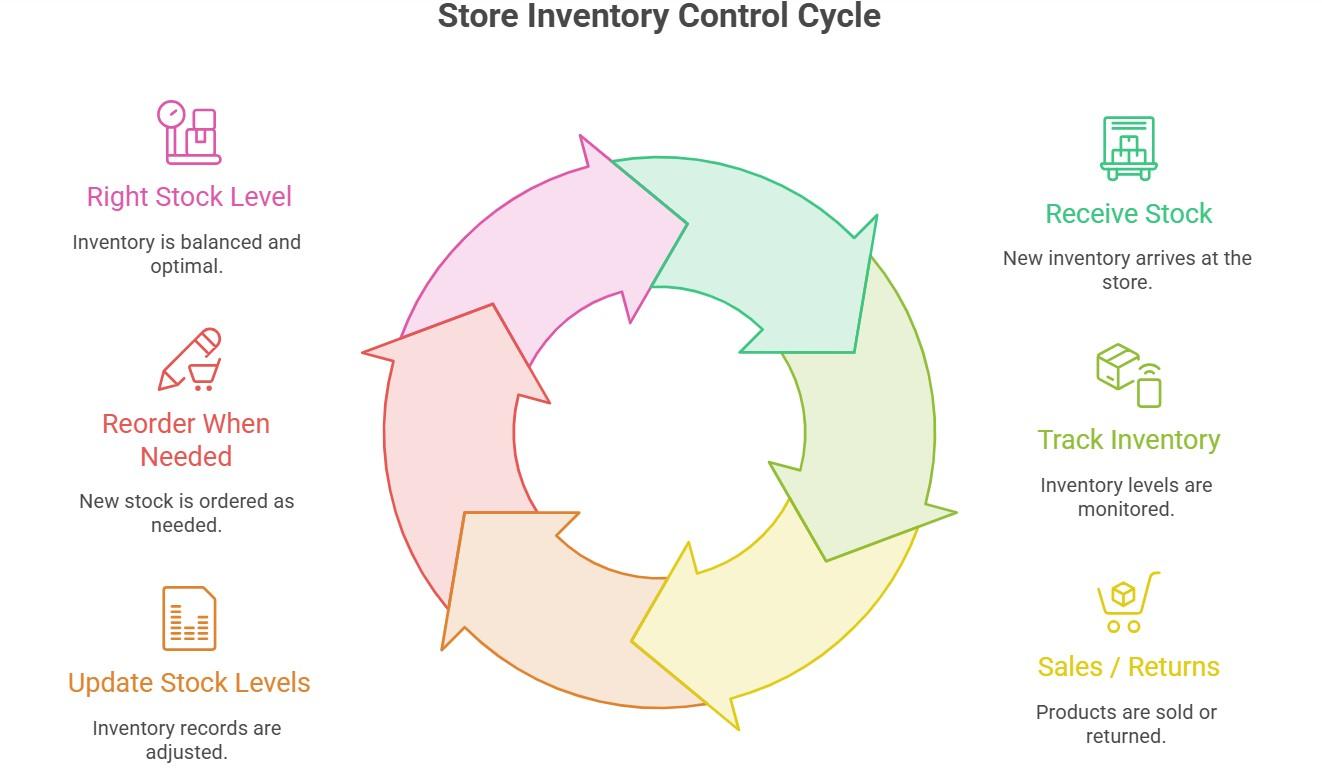
Store inventory control is the process of tracking, managing, and maintaining the right amount of stock in a store at any given time. It is about knowing exactly how many units of each product are available, deciding when to reorder and how much to order, and making sure stock levels stay accurate after every sale, delivery, return, and adjustment.
In practical terms, Inventory control is about having the right products in the right amounts. It helps you avoid running out of bestsellers while keeping slow-moving products from taking up valuable space and cash.
What features does Inventory Control offer?
Good stock control is not just about counting products. It covers the everyday tasks that help you know what you have, what is selling, and when you need to restock.
- Counting and recording current stock levels accurately.
- Tracking which products sell quickly and which ones move slowly.
- Setting reorder points so products get restocked before they run out.
- Recording incoming deliveries and confirming quantities received.
- Identifying and dealing with slow-moving, damaged, or obsolete inventory.
- Keeping stock counts accurate after every sale, whether in-store or online.
- Reconciling the recorded stock with the actual physical count regularly.
What is the Difference Between Inventory Control and Inventory Management?
These two terms are often used interchangeably, but they describe different scopes of activity.
- Inventory control focuses on what is already in the store. It is about accuracy, tracking, and maintaining the right stock levels at any given moment. It answers the question: how much do you have at the moment, and is that number correct?
- Inventory management is broader. It covers a much bigger picture. It includes deciding what to stock, ordering from suppliers, storing products, tracking inventory movement, and planning what to do as products sell.
Think of inventory control as one part of inventory management methods. For most store owners, getting the stock count right is the first step. Once that foundation is in place, it becomes easier to make better decisions about purchasing, suppliers, and future inventory needs.
Why Store Inventory Control Is Important in 2026
Inventory problems rarely appear as one big issue. They usually start with small mistakes. A product runs out sooner than expected, too much stock sits on the shelf, or a customer orders something that is not available in your store.
Each problem can cost your business money. Over time, those small losses can add up quickly. The following are the key challenges online commerce sellers face without inventory control.
Key problems sellers face without inventory control
- Stockouts cost you more than one sale – When a product runs out before your next order arrives, every customer who came looking for it is a lost sale. According to a recent study, Walmart alone estimated 3 billion dollars in missed sales in 2014 because poor inventory control left store shelves empty at the wrong time. For your store, a stockout of a bestselling product on a busy day is revenue you cannot recover.
- Excess stock ties up your cash – When you order too much of a slow-moving product, you lock working capital in stock that is not generating revenue. Carrying costs, which cover storage costs, handling, insurance, and the opportunity cost of capital tied up in stock, typically run between 20 and 30 percent of total inventory value annually. That is money your business is spending to hold products that are not selling.
- Dead stock becomes a direct loss – Some products simply stop selling. The longer they sit, the harder they can be to move. Keeping an eye on slow-moving items gives you a chance to offer discounts, change your sales strategy, or clear the stock before it becomes a bigger loss.
- Poor customer experience – Research from the Global State of Multichannel Customer Service Report found that 62 percent of customers have stopped buying from a brand after poor customer satisfaction, with out-of-stock items being a leading cause. A stockout is not just a missed sale. It is a customer who may not come back to your store.
- Shrinkage and inventory discrepancies – Products can disappear because of theft, damage, returns, or simple counting errors. Regular stock checks help you spot differences between your records and the products actually on hand.
Good inventory control helps you catch these problems earlier. Instead of reacting when something goes wrong, you have a clearer view of your stock and can make better decisions about what to order, sell, discount, or remove.
7 Proven Inventory Management Techniques For Sellers
Knowing why inventory control matters is one thing. The next step is choosing a method that works for your store. There is no single approach that works for every business. The right method depends on what you sell, how quickly products move, how often you restock, and whether you sell through one channel or multiple sales channels.
Here are the most common inventory control methods, explained in simple terms so you can find the right fit for your business.
FIFO: First In, First Out
FIFO means selling your oldest stock first. When new inventory arrives, you place it behind the older products so the older stock gets sold first. This method works especially well for products that can expire or go out of date, such as food, cosmetics, supplements, and seasonal products.
A simple example: when your next juice delivery arrives, you place new bottles behind the existing ones so customers reach for the older stock first. That small habit prevents waste without adding any complexity to your process.
ABC Analysis
ABC analysis helps you decide which products need the most attention.
- A items: High-value or fast-selling products that have the biggest impact on your revenue.
- B items: Products with moderate value and steady sales.
- C items: Lower-value or slow-moving products that need less frequent monitoring.
You do not need to spend the same amount of time checking every product. If you have hundreds of SKUs, focusing more closely on your A items can help you spend your time where it matters most.
For example, you might check A items weekly, B items monthly, and C items every few months.
Safety stock
Safety stock is extra inventory you keep on hand in case demand suddenly increases or a supplier takes longer than expected to deliver. The amount you need depends on your sales patterns and supplier reliability. Products with unpredictable demand or longer delivery times usually need a larger buffer.
Safety stock can also be useful when you are into multichannel selling. Keeping a small buffer can reduce the risk of overselling when inventory updates between platforms are not immediate.
Reorder Points
A reorder point tells you when it is time to order more stock. The goal is to place the order early enough that the new inventory arrives before you run out.
A simple formula is:
Reorder Point = Average Daily Sales × Supplier Lead Time + Safety Stock
For example, if you sell 10 units a day, your supplier takes 5 days to deliver, and you keep 20 units as safety stock, your reorder point is 70 units.
Without a reorder point, you may only notice that you need more stock when the shelf is almost empty. Setting one helps you restock before that happens.
Cycle Counting
Cycle counting means checking a small portion of your inventory regularly instead of counting everything at once.
You might check your most important A items every week, B items once a month, and C items every few months. This makes it easier to spot differences between your records and actual stock before small errors become bigger problems.
Cycle counting can work for both physical stores and ecommerce businesses with warehouse inventory or storage space. It also avoids the disruption of having to stop operations for a full inventory data count.
Just-in-Time (JIT)
Just-in-time inventory means ordering products close to when you expect to sell them instead of keeping large amounts of stock on hand.
The main benefit is that you spend less money storing inventory. But there is a trade-off. If demand suddenly increases or your supplier is delayed, you may run out of stock quickly.
JIT works best when demand is predictable and suppliers are reliable. For many small stores, a balanced approach works better: order smaller quantities more often while keeping some safety stock as a backup.
Min-Max Inventory Control
Min-max inventory control sets a minimum and maximum stock level for each product. When inventory reaches the minimum level, you reorder enough to bring it back toward the maximum. This gives you a simple range to work within without requiring complicated calculations.
It can be a good starting point for small businesses that want an easy system. The downside is that fixed minimum and maximum levels may not work well when demand changes significantly during busy seasons or unexpected sales spikes.
| “Owners of small and emerging businesses would be stunned to see how much help they can get and money they can save by wisely managing their inventory. Many small businesses are not rolling in cash, and much of their funding is tied up in their inventory. Good practices balance customer demand and effective inventory management in the smartest possible ways.” – Dr. David Pyke | Professor and Inventory Management Expert, University of San Diego |
Common Inventory Control Mistakes and How to Avoid Them
Most inventory problems follow predictable patterns. If you can recognize them, you can prevent them before they cost you money. Here are some of the most common inventory mistakes and what you can do to avoid them.
Relying on Memory Instead of a System:
If you reorder when the shelf looks empty or only count products when something goes missing, you are relying on guesswork. That might work when you have a small number of products, but it quickly becomes difficult as your inventory grows.
Even a simple spreadsheet with stock levels and reorder points is more reliable than trying to remember everything.
Counting Stock Too Infrequently:
Annual stock counts catch problems but catch them far too late. A discrepancy discovered in December may have started in March. Regular cycle counting throughout the year catches errors while they are still small and easy to fix rather than months after they began accumulating.
Not Updating Inventory After Every Sale:
Every sale changes your stock level. If that sale is not recorded, your inventory records can quickly become inaccurate. This becomes even more difficult when you sell through both a physical store and online channels.
Keeping your POS and inventory system connected can automatically update stock after each transaction and reduce the need for manual updates.
Buying Too Much of Slow-Moving Products:
A bulk order may give you a lower price per unit, but that does not make it a good deal if the products sit on your shelves for months. Slow-moving items tie up cash and can eventually become obsolete stock.
Reviewing sales data and using ABC analysis can help you identify which products deserve larger orders and which ones should be purchased in smaller quantities.
Treating Every Product the Same:
Not every product needs the same level of attention. Your best-selling or high-value products can have a much bigger impact on your business than products that rarely sell. Instead of checking every SKU with the same frequency, use ABC analysis to focus more time on the products that matter most.
Keeping Outdated Supplier Lead Times:
Your reorder points are only useful if your supplier delivery times are accurate. For example, if your supplier used to deliver in five days but now takes 10, using the old lead time could cause you to reorder too late. Review your supplier lead times regularly and update your reorder points when delivery conditions change.
How to Manage Inventory Across Multiple Sales Channels
Keeping accurate inventory counts is fairly straightforward when everything you sell goes through one system. Things get more complicated when you do multichannel selling with Shopify and across other online marketplaces. Without a connection between the two, those counts drift apart with every transaction.
How Real-Time Sync Solves Your Multichannel Problem
A real-time inventory sync tool connects your physical store POS and your online store to one shared inventory count. When a product sells in-store, your online listing updates within seconds. When it sells online, your POS inventory updates just as quickly. Both channels always show the same accurate count without any manual action from you after each sale.
AI inventory management systems reduce manual data-entry errors and improve accuracy by removing the human step from every stock update. If you operate across more than one selling channel, this is not an optional feature. It is what makes accurate inventory control genuinely achievable as your sales volume grows.
How QuickSync Helps Your Store
QuickSync connects your physical store POS systems, including Clover, Square, and Lightspeed, to your online selling channels, including Shopify, WooCommerce, Amazon, eBay, Etsy, and TikTok Shop, from one central dashboard.
When stock sells on any connected channel, every other channel updates automatically within seconds. For you as a store owner selling across both physical and online channels, this is store inventory control applied to the reality of modern retail.
One accurate stock count shared across every place you sell, maintained automatically without manual work after every sale.
Which Inventory Management Solution You Should Consider?
Once you know how to manage inventory across your sales channels, the next question is simple: what should you use to keep everything organized?
The right tool depends on the size of your store, how many products you carry, where you sell, and how much of the work you want to handle manually. You do not necessarily need the most advanced software. You need a tool that fits the way your store operates.
Here are the main options, from simple to more advanced.
Spreadsheets:
A spreadsheet can be enough when your inventory is small. You can use it to record stock levels, set reorder points, and keep track of incoming orders.
The downside is that you have to update it yourself. As your product range and sales volume grow, keeping every number current becomes harder and increases the chance of errors.
It may be a good option if you run a very small store with under 50 products selling through a single channel. Otherwise, you need to move to an automated inventory management solution.
POS System Inventory Features:
Most modern POS systems, including Clover, Square, and Lightspeed, include built-in inventory tracking that updates automatically after every in-store sale. This removes manual entry for your physical transactions.
The only gap appears when you add online sales because your POS inventory tools do not connect to your online store without a third-party sync tool. Hence, think twice before going with this one option for inventory management.
Third-party Multichannel Inventory Sync Tools
Real-time inventory sync solutions like QuickSync connect your physical store POS to your online selling channels and keep your inventory accurate across every channel automatically after every sale.
If you operate across more than one selling point, a sync solution is what makes your store inventory control genuinely achievable without doubling your operational workload.
Choosing a third-party inventory sync solution would be best if you sell across both your physical store and one or more online channels, and even if you need marketplace integration.
How to Get Started With Store Inventory Control Step-by-Step
Knowing what inventory control involves and choosing the right tools are important first steps. Now it is time to put them into practice. You do not need to change everything about how your store works overnight. Start with a few basics, get your stock accurate, and build a process you can maintain as your business grows.
1. Start With an Accurate Stock Count:
Before you set up anything else, find out how much inventory you actually have. Count every product and record the quantities. This gives you a reliable starting point for everything that follows. If your starting numbers are wrong, even the best inventory management software will give you inaccurate results.
2. Give Every Product a SKU:
A SKU is a unique code that tells your inventory system exactly which product is being tracked. Without SKUs, similar products get confused and your counts drift. Most POS systems and inventory software generate SKUs automatically. Assigning them before setting up anything else prevents the most common cause of discrepancies.
3. Choose a Tracking Method That Fits Your Store:
If you run a single-location store with a few products, a POS system with built-in tracking and a simple purchase order spreadsheet is a workable start. For larger catalogs or multiple locations, dedicated inventory management software adds the automation and reporting that manual tracking cannot provide. If you sell across physical and online channels, a multichannel sync tool is essential from day one, not something to add after the fact.
4. Set Reorder Points for Important Products:
You do not need to start with every product. Focus on your most important items first. Look at how quickly your key products sell and how long your suppliers take to deliver. Use that information to set reorder points so you know when it is time to order more. This helps you restock before a popular product runs out instead of reacting after the shelf is empty.
5. Use ABC Analysis to Prioritize Your Inventory:
Identify the top 20 percent of your products by revenue contribution. These are your A items. Count them more frequently, monitor their stock closely, and set tighter reorder points. Your B and C items can be managed with lighter intensity without affecting your overall inventory accuracy.
6. Create a Regular Cycle Counting Schedule:
Once your initial stock count is done, you still need to keep your records accurate. Set up a cycle counting schedule based on the importance of each product. You might check A items weekly, B items monthly, and C items every few months. If you find a difference between your records and physical stock, investigate it and correct it rather than simply changing the number.
7. Connect Your Online and In-Store Inventory:
If you sell through multiple sales channels, connect them before inventory discrepancies become a problem. Your POS and online store should work from the same stock information whenever possible. This helps prevent overselling and saves you from manually updating inventory after every sale.
Starting with connected inventory is much easier than trying to fix months of mismatched stock later.
Best Practices for Effortless Store Inventory Control
Setting up your inventory control system is a great start. But keeping it accurate as your store grows is what really matters. Sales change, suppliers change, products move between locations, and busy periods can put extra pressure on your process.
A few simple habits can help you keep your inventory accurate without turning it into a daily headache.
Count Your Stock Regularly, Not Just in a Crisis:
Most inventory problems are discovered too late because counts happen too infrequently. Cycle counting, where you count different sections of your store on a rotating schedule, catches errors early without the disruption of a complete stock take. Your goal is continuous accuracy, not annual discovery.
Use One Source of Truth:
If your inventory numbers are spread across a spreadsheet, POS, and online store, it can be difficult to know which number is correct. Choose one system as your main inventory record and connect your other sales channels to it whenever possible. This gives you one reliable stock count instead of several competing numbers.
Set Low-Stock Alerts on Your Fastest-Moving Products:
You do not have to manually check every product to know when it needs to be reordered. Set minimum stock levels for your best-selling products and use low-stock alerts to remind you when inventory is getting close to that point. This gives you time to reorder before the product runs out.
Keep Your Supplier Lead Times Current
Your reorder points depend on how quickly your suppliers can deliver. If a supplier used to take five days but now takes 10, your reorder point needs to reflect that change. Review supplier lead times whenever delivery conditions change so you are not ordering based on outdated information.
Reconcile Your Inventory After Every Peak Period
Your peak selling periods, including sales events, holidays, and promotions, are when sync delays or edge cases are most likely to surface. A manual reconciliation check after each high-volume period confirms that every channel reflects the correct count and catches anything that needs correcting before it carries into your next selling cycle.
In Closing
Summing up this guide, inventory problems are easier to prevent when you can trust your stock numbers. That is what store inventory control is really about. Keep your counts accurate, monitor what sells, reorder before products run out, and make sure your inventory stays updated wherever you sell.
You do not need to build a complicated system from day one. Start with the basics and add automation as your store grows. And if you sell both online and in-store, connecting your sales channels via quickSync can take a lot of the manual work off your plate. The simpler your inventory process is, the easier it is to keep it accurate.