Most retailers think that whenever a customer returns their product, they lost a sale. The truth is, that’s where the real work begins.
Every returned product tells you something about your business. It could reveal a misleading product description, poor packaging, a warehouse picking mistake, or even an inventory problem that caused the wrong item to ship. Here’s what many store owners overlook: returns aren’t just products coming back.
They’re business data. If you know how to use that data, you can improve your products, reduce future returns, and create a better customer experience.
However, financial impact is impossible to ignore. According to the National Retail Federation, customers returned £743 billion worth of merchandise in 2023, representing 14.5% of total retail sales. These numbers aren’t just industry statistics. They represent millions spent on return shipping, warehouse labour, inventory adjustments, refunds, and customer support.
But here’s the interesting part. A return doesn’t have to be a loss.
Research consistently shows that customers are far more likely to buy again after an easy return experience. That means your return process isn’t simply fixing a problem. It’s another opportunity to build trust, protect customer loyalty, and encourage repeat purchases.
If you’re wondering how to handle customer returns, I’ll walk you through the complete return process in this blog. I will show you how successful retailers reduce unnecessary returns.
📌 Key Takeaways
- Customer returns are more than a business expense, they provide valuable insights into product quality, fulfilment performance, and customer expectations.
- A clear and easy-to-understand return policy helps set customer expectations, builds trust, and encourages shoppers to complete their purchases.
- Every return should follow a structured workflow, from the initial return request to inspection, refund processing, inventory updates, and final resolution.
- Fast refunds, timely updates, and transparent communication create a better customer experience and increase the likelihood of repeat purchases.
- Returned products should be added back to inventory immediately to maintain accurate stock levels and reduce the risk of overselling.
- Monitoring return reasons helps identify recurring issues with products, packaging, shipping, or fulfilment before they affect more customers.
- Automating return management reduces manual work, minimizes human errors, and speeds up day-to-day ecommerce operations.
- Businesses selling across multiple marketplaces should keep inventory synchronized after every return to avoid stock discrepancies.
- Real-time inventory synchronization helps ensure products, stock levels, and orders remain accurate across all connected sales channels.
What Are Customer Returns?
Before discussing the process, let’s clear up one common misconception.
Many retailers use the words return, refund, exchange, and cancellation interchangeably. They aren’t the same thing. Understanding the difference helps you build a better return policy, train your support team properly, and set clear expectations for your customers.
- Customer return happens when a buyer sends a product back after receiving it
- A refund is simply the payment returned to the customer.
- An exchange allows the customer to replace the original item with another size, colour, or variation.
- An order cancellation happens before the product is delivered. Since the customer never receives the item, inventory and return handling follow a completely different workflow.
Understanding these differences helps you create a smoother return process and set the right expectations for your customers.
| Term | Meaning | When It Happens |
|---|---|---|
| Customer Return | The customer sends the purchased product back to the retailer. | After the product has been delivered. |
| Refund | The retailer returns the customer’s payment after approving the return or cancellation. | After a return is accepted or an order is cancelled. |
| Exchange | The customer replaces the purchased product with another size, colour, or item instead of receiving a refund. | After the returned product is approved. |
| Order Cancellation | The order is cancelled before it is shipped or delivered. | Before fulfilment begins. |
So why do customers return products in the first place? The answer isn’t always obvious.
Sometimes it’s a warehouse error. Sometimes it’s damaged packaging. Sometimes the customer simply ordered the wrong size. In other cases, the product description created expectations the product couldn’t meet. Every return has a reason behind it, and identifying those reasons is one of the fastest ways to improve your operations.
That’s why successful retailers don’t treat returns as the end of a sale. They treat them as feedback that helps them make better decisions.
Now that you understand the difference, let’s look at why customers return products in the first place.
Most Common Reasons Customers Return Products
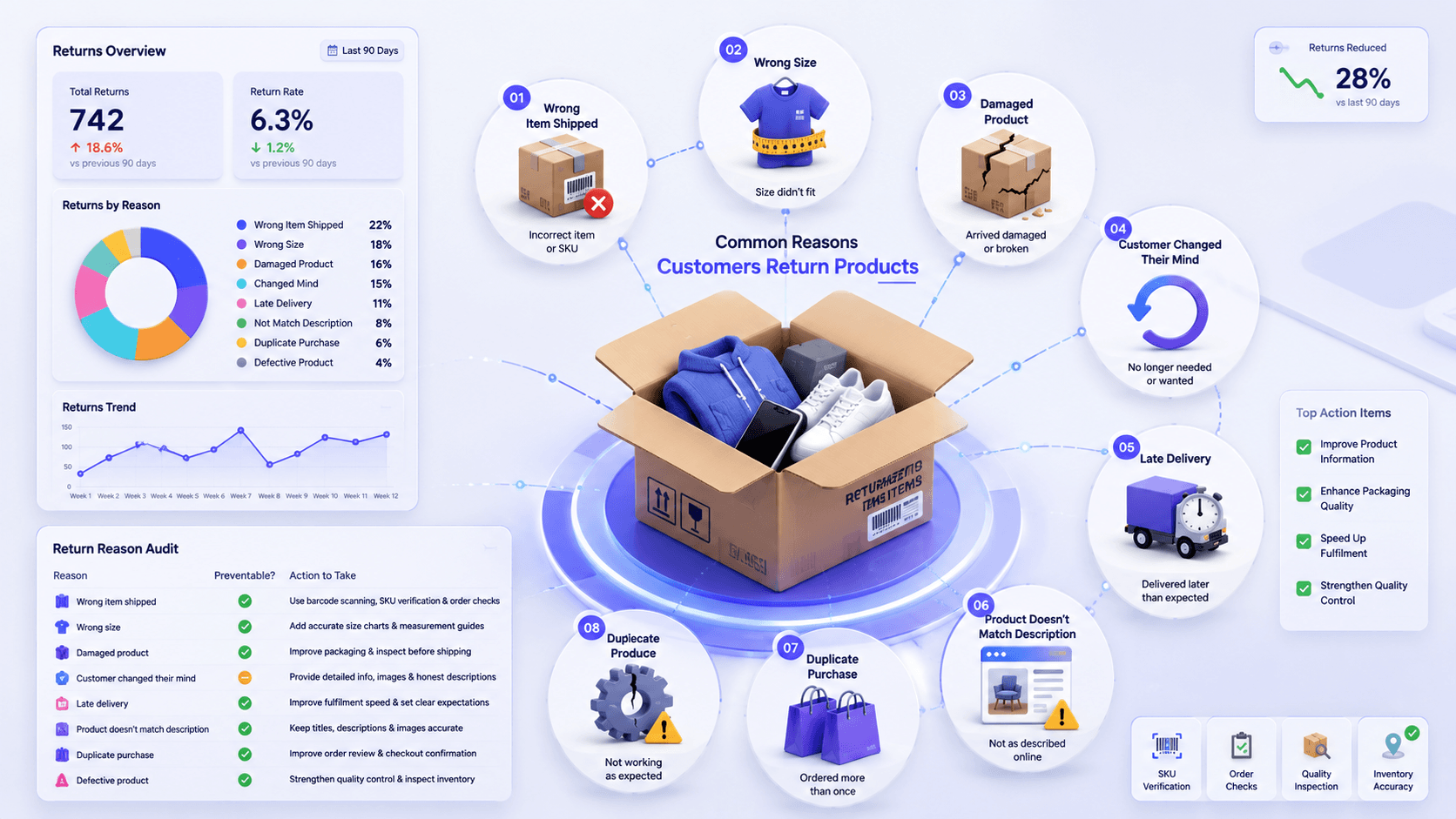
Before you fix order returns, you need to know what is driving them. Most retailers guess. Guessing is expensive.
I always start with a reason audit. Pull your last 300 returns and tag each one. Patterns appear fast, and they are rarely what the team assumed.
The table below breaks down the eight reasons why customers return products.
| Reason | Is It Preventable? | Best Solution |
|---|---|---|
| Wrong item shipped | Yes, in most cases | Use barcode scanning, SKU verification, and order checks before dispatch. |
| Wrong size | Yes | Add accurate size charts, measurement guides, and detailed sizing information on product pages. |
| Damaged product | Yes | Improve packaging quality, inspect products before shipping, and choose reliable delivery partners. |
| Customer changed their mind | Partially | Provide detailed product information, multiple images, and honest descriptions to reduce impulse purchases. |
| Late delivery | Yes | Improve fulfilment speed, provide shipment tracking, and set realistic delivery expectations. |
| Product doesn’t match description | Yes | Keep product titles, descriptions, specifications, and images accurate across every sales channel. |
| Duplicate purchase | Yes | Improve checkout confirmation and allow customers to review orders before payment. |
| Defective product | Yes | Strengthen quality control processes and inspect inventory before products reach customers. |
Understanding these return reasons is the first step. The next step is building a structured process that handles every return quickly, accurately, and consistently. That’s exactly what we’ll cover next
How to Handle Customer Returns Step by Step
This is the part most guides rush. Let me explain it easily.
A good customer return process isn’t just about getting products back into your warehouse. It’s about creating a smooth returns process that keeps customers happy while protecting your business.
Here’s what the most successful retailers do differently for customer return management.
Step 1: Make Your Return Policy Easy to Understand
Your return policy is usually the last thing customers read before placing an order. If it’s confusing, many won’t buy at all.
Keep the policy easy to understand and easy to find. Clearly explain who can return products, the time frame for returns, and acceptable reasons. List out the refund options, exchange rules, and whether you offer free returns or charge return shipping.
A transparent policy reduces disputes. It gives customers more confidence to complete their purchase.
Step 2: Accept the Return Request Without Creating Friction
Give customers a self-service portal. The order number and email should be enough to start a return. No support ticket required.
Ask for a reason from a fixed dropdown list. Collect only the information you actually need, such as the order number, reason for the return, product condition, and preferred resolution. These details become valuable customer data later, helping you identify return patterns.
Confirm the request instantly by email.
Step 3: Verify the Order
Before approving any return, verify that the order exists and qualifies under your return policy.
- Check the order date against your return window.
- Check that the item was actually purchased from you.
- Check whether the order was discounted or part of a bundle.
This step protects your business from fraudulent returns. Serial returners, items bought elsewhere, and orders outside the window all surface here.
Many businesses also use CRM systems to track customer interactions, previous purchases, and make order management easier.
Step 4: Approve or Reject the Request
Decide fast. Same day if possible.
- If you approve, issue a return label and a return authorisation number. That number ties the physical parcel to the digital record.
- If you reject, explain why in one clear sentence. Vague rejections turn into chargebacks and public reviews.
Step 5: Receive the Product & Record It
Once the returned product reaches your warehouse or in-store location, record it immediately.
Scan the authorisation number and match it to the open request. Unmatched parcels are a real problem. Without a label reference, you have a box and no idea whose refund it belongs to.
Keep received returns in a dedicated staging area. Never mix them with sellable stock before inspection.
Step 6: Inspect the Item
Check condition against your grading rules. Is packaging intact? Are tags attached? Are accessories included? Is there wear?
Classify each item into one of three categories: sellable as new, sellable at a discount, or not sellable. Photograph anything questionable. A consistent quality control process helps determine whether the product should be restocked, refurbished, or removed from inventory.
Careful inspections also reduce return fraud while ensuring sellable products quickly become available again.
Step 7: Decide the Next Action
Not every returned product follows the same path.
The product’s condition determines what happens next. Making the right decision helps minimize losses while improving operational efficiency.
- Restock: If the product passes inspection, return it to inventory immediately. Fast restocking improves product availability and supports better inventory management.
- Refurbish: Some returned products need minor repairs, cleaning, or repackaging before they can be sold again. Refurbishment helps recover product value while reducing waste. Establish clear quality standards before placing refurbished items back into your catalogue.
- Liquidate: Products that cannot be sold at full price may still recover part of their value through clearance sales, outlet channels, or wholesale liquidation. This approach frees warehouse space while helping reduce losses from unsellable inventory.
- Dispose: Certain products cannot legally or safely be resold. Damaged, expired, or heavily used items may need responsible disposal. Having clear disposal guidelines protects your business and ensures compliance with industry regulations.
The return isn’t finished until the customer receives a resolution.
Depending on the situation and the customer’s preference, this could mean a refund, replacement, exchange, or store credit.
Whenever possible, provide return options. Some customers prefer an exchange. Others would rather receive store credit for future purchases. While some simply want a refund. Giving customers flexibility improves customer satisfaction while helping your business retain revenue.
Step 9: Update Inventory Immediately
They process the refund but forget about the inventory. The unit is back on your shelf. Every sales channel needs to know.
Restocked items must go back to the correct location. If your channels update on a manual schedule, you have a window where you can oversell.
For businesses multichannel selling, real-time inventory management software isn’t a nice feature anymore. It’s a crucial part of running an efficient ecommerce operation.
Step 10: Analyse Why It Was Returned
Most businesses finish the process once the refund is issued. The best retailers are only getting started
Every return contains valuable customer feedback. By analysing return data, you can identify trends, discover human error, and improve product descriptions.
This approach turns customer returns into opportunities for making data-driven improvements instead of simply recording another refund.
Over time, those improvements help minimize returns and increase customer loyalty. Returns data is the cheapest product research you will ever get. Most retailers throw it away.
How to Avoid Losing Money While Handling Customer Refunds and Returns
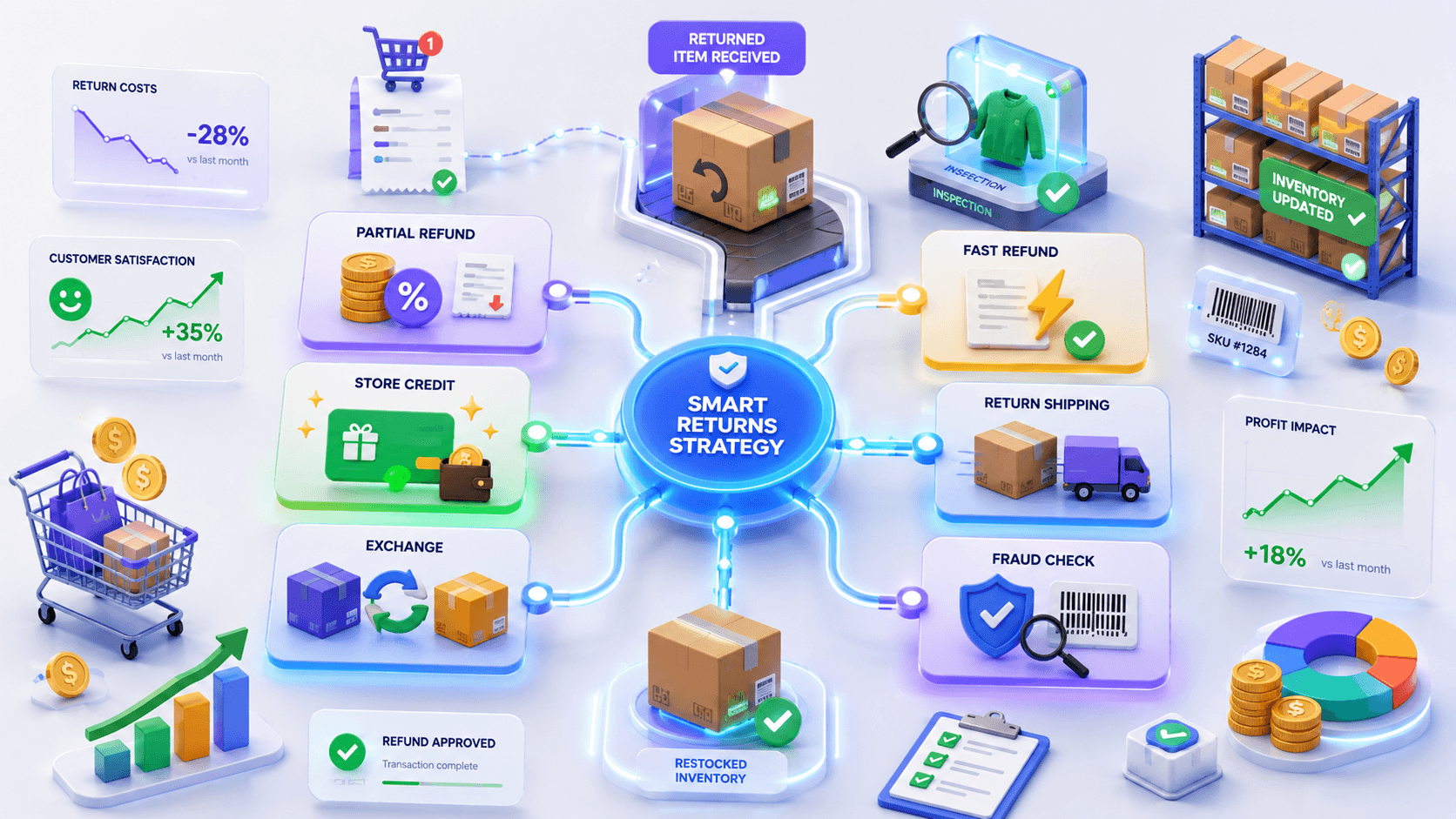
Did you know? Every return can cost retailers 20–30% of the product’s value after shipping, inspection, repackaging, and restocking costs. A well-planned refund strategy can help reduce those losses while maintaining customer trust.
Now that you understand how to process returns, let’s talk about the money. Handling returns well is not the same as handling refunds well.
The goal is to keep the customer happy while protecting your margins as much as possible. Those two things are not in conflict. Here is how to balance them.
Offer Partial Refunds When It Makes Sense
A full refund isn’t always the best solution. If a customer receives a product with a small cosmetic issue but is still happy to keep it, offering a partial refund can be a win for both sides. This approach reduces shipping costs and avoids unnecessary online returns. It helps your business reduce costs while still delivering an excellent customer resolution.
Encourage Store Credit Instead of Cash Refunds
Store credit is one of the smartest alternatives to cash refunds. It gives customers flexibility while keeping revenue inside your business. Many retailers even add a small bonus when customers choose store credit instead of a refund. This simple incentive encourages future purchases and strengthens customer loyalty.
Turn Refund Requests into Product Exchanges
When the wrong size, color, or variation arrives, an exchange usually makes more sense than a refund. The customer receives the product they originally wanted. And your business keeps the sale. Well-managed exchanges improve customer satisfaction. It creates a smoother overall customer experience than immediately issuing refunds.
Process Refunds Quickly to Build Customer Trust
Few things frustrate customers more than waiting weeks for their money. Once a returned item has been approved, process the refund as quickly as possible. Fast refunds improve trust. They reduce unnecessary customer interactions with your support team. Quick resolutions also increase the chances of future sales.
Be Clear About Return Shipping Costs
Your policy should clearly explain who pays for return shipping and under which circumstances. Unexpected deductions often lead to customer complaints and negative reviews. Whether you offer free returns or ask customers to cover return shipping. Transparency helps customers make informed purchase decisions.
Prevent Return Fraud Before It Hurts Your Business
Unfortunately, not every return request is genuine. Verify purchases and inspect products carefully. Monitor unusual buying behaviour to identify fraudulent returns early. A structured return verification process protects your business without creating issues for honest customers. The goal is to stop abuse while continuing to provide excellent service.
Identify and Reduce Return Abuse Early
Some shoppers repeatedly buy products with no intention of keeping them. Tracking return patterns helps identify this behaviour before it becomes a significant challenge. By reviewing repeat return activity alongside customer data, you can make informed decisions that reduce abuse. While ensuring genuine customers continue receiving fair and handled efficiently return experiences.
Return Rate Benchmarks by Product Category
Before you judge your own return rate, you need to know what normal looks like in your category. Averages across all of retail are close to useless. A 25% return rate is alarming for electronics and unremarkable for footwear. Context decides whether you have a problem.
Use the ranges below as a rough guide, then track your own trend line over time.
| Product category | Typical online return rate | Main return driver |
|---|---|---|
| Apparel and footwear | 20% to 40% | Fit and sizing uncertainty |
| Consumer electronics | 8% to 15% | Compatibility and performance expectations |
| Beauty and personal care | 4% to 12% | Shade, scent and skin reaction |
| Home and furniture | 5% to 15% | Scale, colour accuracy and transit damage |
| Jewellery and accessories | 10% to 20% | Perceived quality and size |
| Sporting goods | 8% to 15% | Specification mismatch and fit |
| Books and media | 3% to 8% | Condition and duplicate purchase |
Your own trend matters more than any benchmark. A rising rate in a low-return category is a bigger warning than a steady high rate in apparel.
What Happens When Returns Aren’t Managed Properly
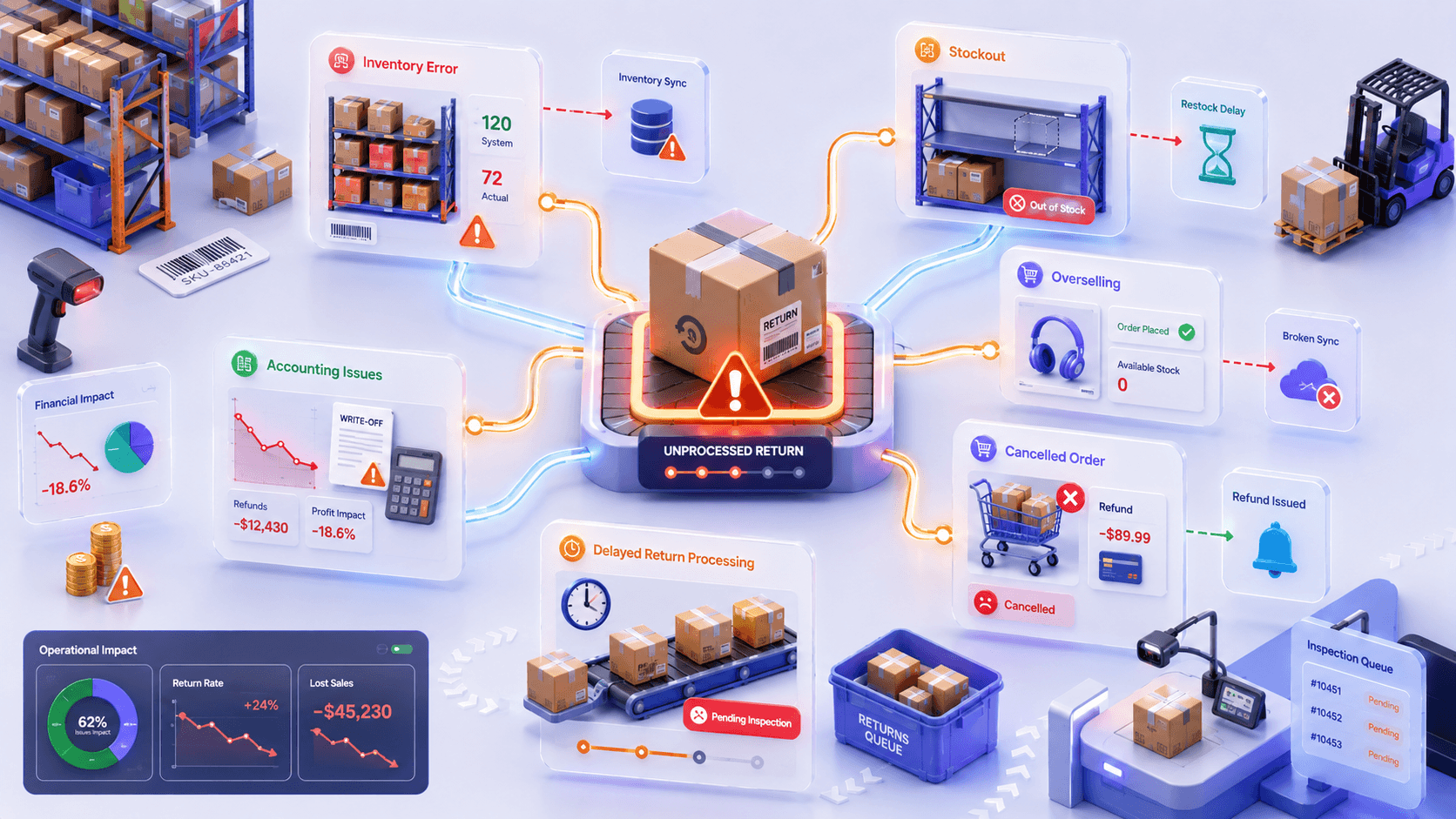
A return isn’t over when the refund is issued. In fact, that’s when many operational problems begin.
Poor returns management doesn’t just create extra work for your support team. It affects inventory, fulfilment, accounting, and even future sales. Small delays and manual processes may seem harmless at first, but as your business grows, they become expensive bottlenecks.
Here are some of the biggest problems retailers face when the returns management process isn’t handled efficiently.
Inventory Errors Can Cost Retailers Millions
Inventory mistakes aren’t just inconvenient; they’re expensive. Studies have found that inventory inaccuracies can reduce inventory accuracy by 20–30%. This leads to overselling and poor purchasing decisions. Every delayed return widens the gap between the inventory shown in your system and what’s actually in your warehouse inventory.
Stockouts Aren’t Always Caused by High Demand
Many stockouts happen because sellable returned products are still waiting to be inspected. Until they’re added back into inventory, your store can’t sell products you already own. This results in missed sales and unnecessary reorders. Processing returns faster helps put inventory back on the shelf sooner.
Out-of-Sync Inventory Can Cost You More Sales Than You Think
Did you know that nearly 70% of online shoppers may abandon a retailer after a poor shopping experience, such as a cancelled order? Inventory that’s out of sync increases the risk of overselling. This forces you to cancel orders when products aren’t actually available. These cancellations reduce customer trust. It can even impact your marketplace performance.
Returns Affect More Than Refunds
Every return impacts your financial records. Store credit, damaged inventory, restocking fees, and write-offs all need to be recorded correctly. If they’re not, financial reports become less reliable, making it harder to understand your true profitability and make informed business decisions.
How to Reduce Customer Returns Before They Happen
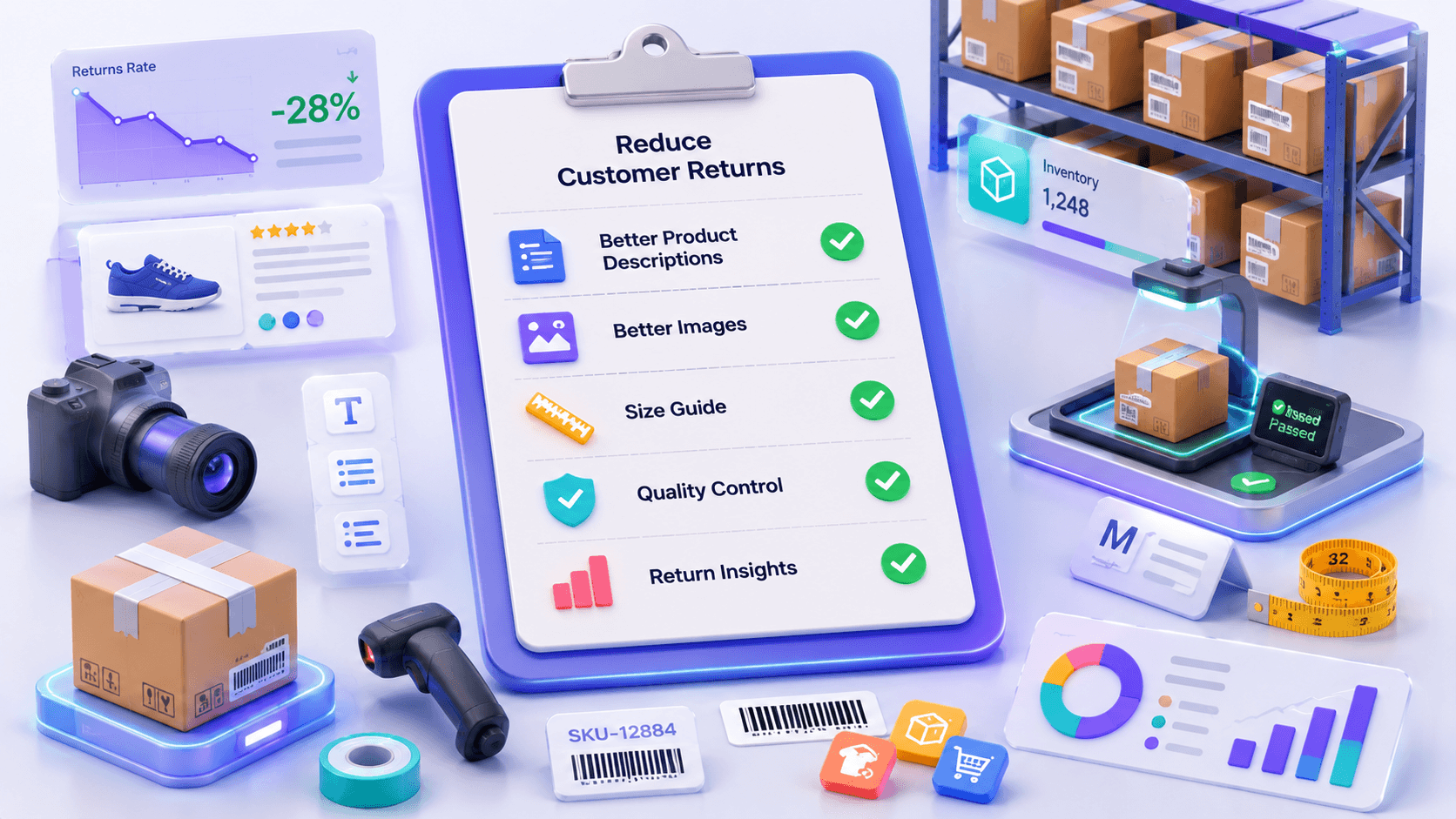
Every retailer wants to process returns faster. The best retailers focus on something else entirely.
You will be surprised to know that nearly 1 in 3 online purchases can be returned. Many of these returns happen because of preventable problems like unclear product details, sizing issues, damaged items, or products not matching expectations.
Here’s how you can reduce customer return requests.
Write Product Descriptions That Set the Right Expectations
Many returns start long before the customer clicks Buy Now. They begin with inaccurate or incomplete product descriptions. Customers should know exactly what they’re ordering before they complete a purchase.
Include dimensions, materials, compatibility, care instructions, colours, and any limitations that might influence buying decisions.
Use High-Quality Product Images
A product photo should answer questions before customers need to ask them. Show products from multiple angles, include close-up images, and, where appropriate. Add videos that demonstrate how the product looks or works in real life.
Better visuals reduce uncertainty. It helps shoppers make more confident purchase decisions.
Make Size and Specification Information Easy to Find
Size-related returns are one of the biggest challenges for fashion, footwear, and furniture retailers. Whether it’s clothing measurements, furniture dimensions, or technical specifications. Make the information impossible to miss.
Accurate sizing guides and specification tables help customers choose the right product the first time. It reduces unnecessary exchanges and refunds.
Strengthen Quality Control
No return policy can compensate for inconsistent product quality. Inspect products before they’re packed, and monitor supplier performance. Regularly review return reasons linked to defects or damage.
Even small improvements in quality control can significantly reduce returns. While improving customer satisfaction and protects your brand reputation.
Learn From Every Return
Every return tells you something. Instead of simply approving refunds, analyse your return data to understand why products are coming back. Are customers reporting sizing issues? Are certain products frequently damaged? Are shipping delays creating complaints?
Identifying these return patterns allows you to make data-driven improvements that reduce future returns.
Best Way to Build a Return Policy Customers Can Trust
A good return policy doesn’t just explain how returns work. It gives customers the confidence to place an order in the first place. In fact, many shoppers read a retailer’s return policy before they buy anything.
Here are the essentials every return policy should include.
A Clear Return Window
Tell customers exactly how long they have to return a product. Whether it’s 30, 60, or 90 days, make the time frame easy to understand and display it consistently across your website. Clear deadlines reduce confusion and prevent unnecessary disputes later.
Eligible and Non-Eligible Products
Not every product can be returned. Clearly explain which items qualify for returns and which don’t. Personalised products, digital downloads, or hygiene-related items often have different rules. Setting expectations early helps avoid unnecessary customer complaints.
Refund, Exchange, or Store Credit
Explain how customers will receive their resolution.
- Can they request a refund?
- Will they receive store credit?
- Are exchanges available?
Providing these details upfront creates a smoother customer return process and reduces questions for your support team.
Return Shipping Information
One of the biggest frustrations for online shoppers is discovering unexpected return shipping charges. Be transparent about who pays for return shipping. Whether you offer free returns, and how customers can obtain return labels.
Simple Instructions
Don’t make customers search multiple pages to understand how to start a return. Provide clear, step-by-step instructions that explain exactly what they need to do after a customer initiates a return request. Simplicity improves customer satisfaction while reducing unnecessary support enquiries
Best Practices That Improve Customer Return Experience
A return is one of the few moments when customers truly judge your business. Anyone can deliver a product on time. The real test is how you respond when something goes wrong.
The good news is that creating a better customer experience doesn’t always require more staff or bigger budgets. In most cases, it’s about removing unnecessary delays and improving customer communication.
Here are the best practices every retailer should follow.
- Fast approvals: Approve returns within hours, not days. Auto-approve anything inside your window that meets your rules. Save manual review for high-value or flagged orders only.
- Clear communication: Tell customers what happens next at every stage. Send messages like request received, label sent, parcel arrived, refund issued. Four messages cover the whole journey.
- Self-service portals: A return portal removes your team from the loop entirely. Customers start returns, pick a reason, and print a label without emailing anyone. This cuts your support ticket volume sharply and gives customers control.
- Instant tracking: Give customers a tracking link for the return conversation. When a refund is queried, the scan history shows exactly where the parcel is and when it reached you.
- Faster refunds: Refund the moment inspection clears. Where risk is low, refund on the first carrier scan instead of waiting for arrival. Early refunds feel generous and cost almost nothing on low-value items.
- Email updates: Automate return emails. Manual updates get forgotten on busy days. Keep each email to one message and one next step. Include the order number, the item, and the expected date. Nothing else.
Why Inventory Should Update Immediately After Every Return
Here is what most store owners miss. A return is not one inventory event. It is several. The unit leaves the customer. It enters your staging area. It gets categorized. Then it either rejoins sellable stock or leaves your inventory permanently.
Each of those moments changes what you can actually sell. If your systems only learn about it at the end of the day, you are selling blind for hours.
Multiply that across five sales channels and two locations. The gaps stop being small.
Returned stock
Returned stock is stock you hold but cannot yet sell. It must be visible in your system and excluded from availability. Give it its own status. Received, awaiting inspection. That way your team knows it exists without your storefronts offering it for sale.
Available stock
Available stock is what you can ship right now. Only categorized, sellable returns belong here. Move units into available stock at the moment of grading, not at the moment of receipt. Getting that order wrong is the most common cause of overselling after returns.
Multi-location inventory
Most retailers run more than one stock location. A return delivered to your warehouse cannot fulfil a store pickup order. Your system needs location-level accuracy, not just a company-wide total. Totals look fine and still leave you unable to fulfil specific orders.
Warehouse inventory
Warehouse counts drive online fulfilment. A return processed into the warehouse should raise online availability within minutes. Delays here directly cost sales. Products sit unsold in a bin while your storefront shows them as out of stock.
POS inventory
Your Clover or Square register is a live inventory system. In-store returns change stock instantly at the counter. If that change never reaches your online channels, your website oversells items already sold or already returned. POS and ecommerce need to share one truth.
Online inventory
Every channel keeps its own inventory record. Shopify, TikTok Shop, Amazon, eBay, and Etsy all hold separate numbers. A return only reaching one of them puts the others out of step. Marketplaces punish oversell cancellations hard. Keeping all channels aligned protects both revenue and account standing.
How QuickSync Simplifies Inventory After Customer Returns
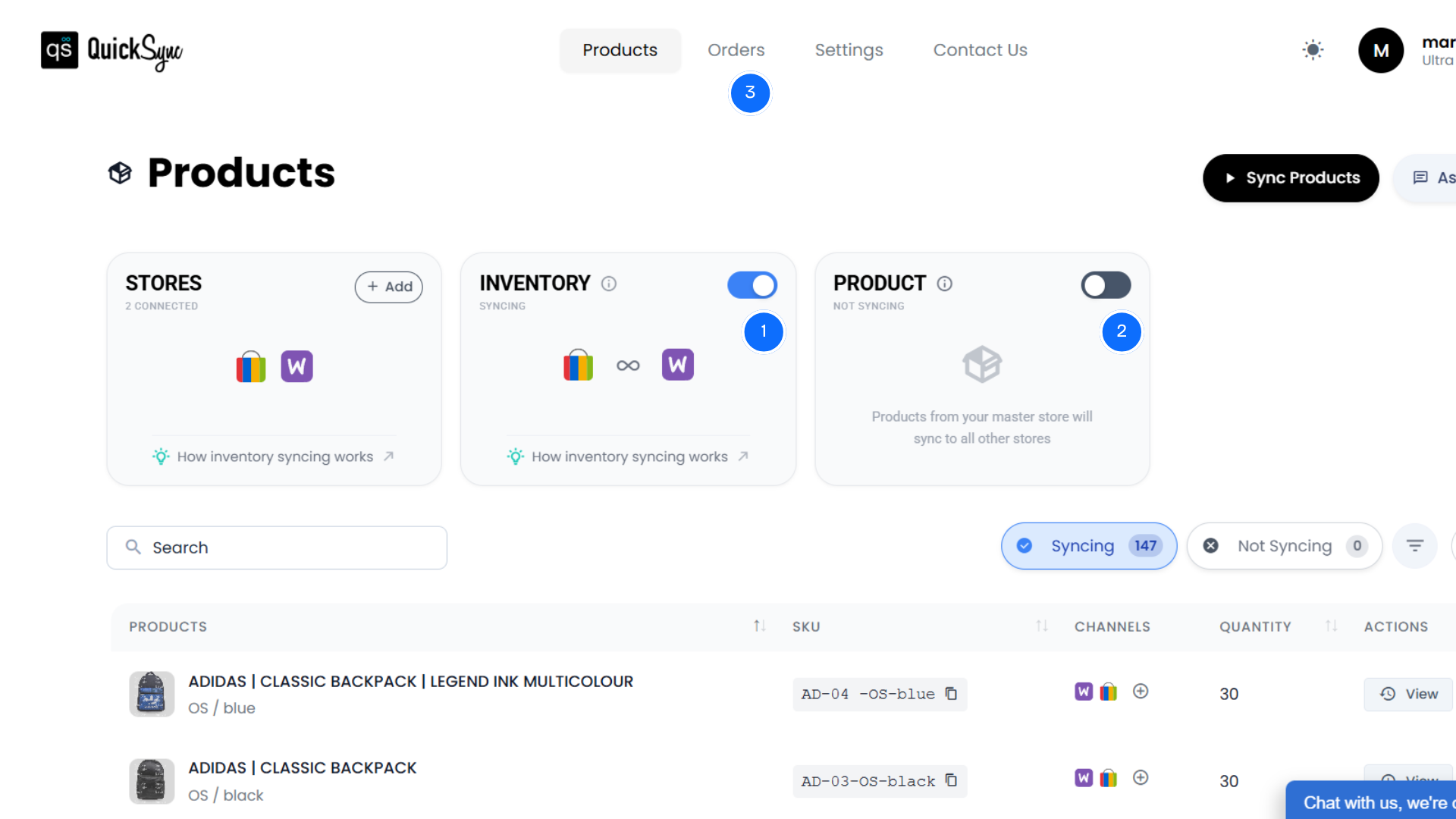
Handling customer returns is only half the job.
The bigger challenge is making sure every inventory change reaches every place you sell.
Many retailers process a return correctly inside their warehouse or POS system, but the updated stock never reaches Shopify, Amazon, Etsy, TikTok Shop, or other connected channels. That’s where overselling, stock discrepancies, and fulfilment problems begin.
QuickSync inventory sync software removes that manual work by automatically synchronising inventory whenever products are returned, restocked, exchanged, or sold. Instead of updating each platform separately, you manage inventory once while QuickSync keeps every connected channel aligned.
Here’s how it helps.
- Real-Time Inventory Sync: Once a returned product is approved and restocked, QuickSync automatically syncs inventory across Shopify, Clover, Square, Amazon, Etsy, TikTok Shop, and other connected channels, with Etsy and eBay catching up on their next check.
- Multi-Location Inventory: Returns are updated at the correct warehouse or retail location. This gives your team complete inventory visibility into where returned inventory is available.
- SKU Assigning & Matching: QuickSync automatically matches returned items to the correct SKU. This ensures inventory updates apply to the right product and reduces manual stock corrections.
- Product Sync: If product information changes before a returned item is restocked, such as the title, description, images, price, or variants, QuickSync keeps those updates synced across every connected sales channel.
- Order Sync: Every return stays linked to its original order. This makes it easier to verify purchases, process refunds or exchanges, and maintain a complete order history without switching between multiple systems.
Final Thoughts
Returns are not going away. Online return rates near 20% are now the baseline, and customer expectations keep rising. So the goal is not zero returns. The goal is returns that cost you as little as possible and leave customers willing to buy again.
That comes down to three things. A policy people understand. A workflow that runs the same way every time. Inventory numbers that update the moment stock moves.
Get the first two right and your support load drops. Get the third right, and you stop overselling, stop reordering stock you already hold, and stop guessing what you can actually ship.
Start with a reason audit on your last 300 returns. Then fix your two highest-volume causes. Then close the inventory gap. In that order, the work pays for itself quickly.