Last year, I worked with a handmade jewelry seller on Etsy. She had 2,400 sales, 840 products, and a five-star rating. It sounds so good. Right? But when tax season came, she had to spend 76 hours reconciling her books, and later she found that she had underreported revenue by $12,000 and overpaid estimated taxes by $3,400.
The problem? She did not know how to sync Etsy with QuickBooks properly. Exporting CSV files and entering numbers manually was slow, stressful, and full of errors. Similarly, many Etsy sellers do not realize that Etsy is more than a creative marketplace.
It is a fast-moving sales channel with complex fees, tax rules, and inventory demands. As your business grows, manual bookkeeping becomes a liability, and simple CSV exports are no longer sufficient.
Hence, in this guide, I will show you how to sync Etsy with QuickBooks the right way to eliminate manual work, prevent costly errors, and build a syncing system that scales with your business. Read on…
What does syncing Etsy with QuickBooks Online Means?
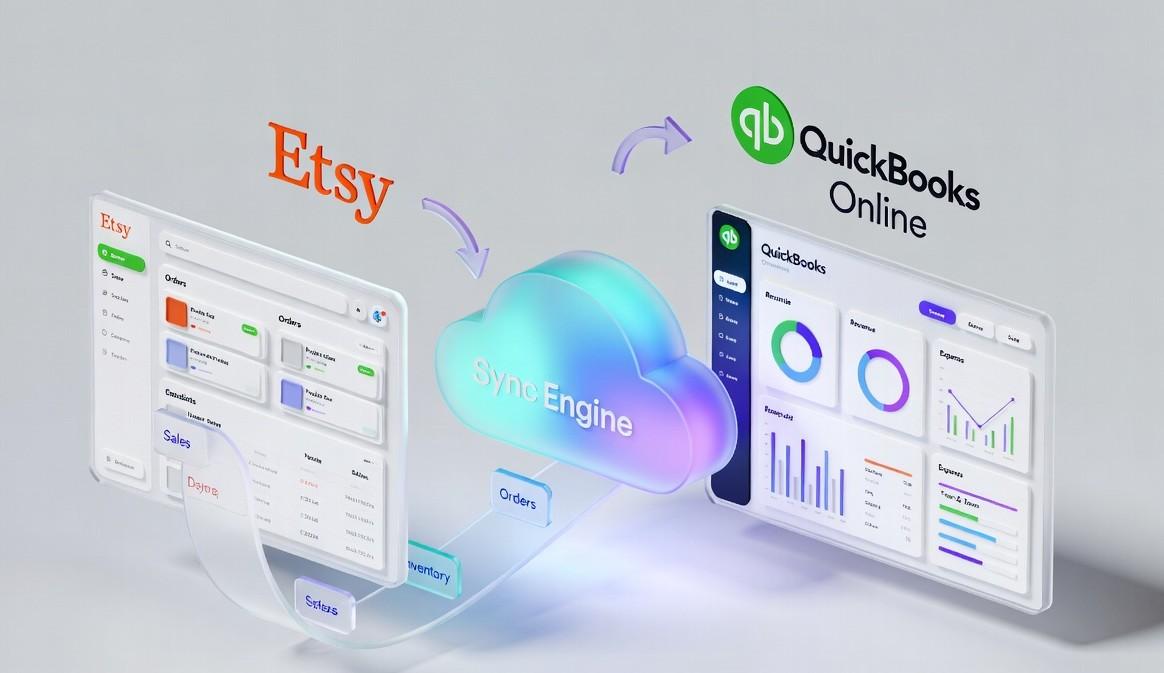
Before going deep into the topic, let’s clarify what it really means to sync Etsy sales with QuickBooks. Many Etsy sellers assume that syncing is simply downloading a CSV from Etsy and uploading it into QuickBooks once a month. That approach is not integration. It is slow, error-prone, and leaves your books constantly out of date.
Real Etsy and QuickBooks syncing is when your systems communicate automatically. Every sale, fee, refund, and material cost flows into your accounting system within minutes. Your inventory stays accurate, your cost of goods sold reflects reality, and your tax liabilities match your actual revenue.
If you are still exporting Etsy payment account CSVs manually, categorizing transactions one by one in QuickBooks, reconciling inventory between your studio and your books, or guessing your true profit margins, your systems are not integrated. They are disconnected, and you are making business decisions based on outdated data.
Features That an Ideal Etsy QuickBooks Syncing Solution Should Have
Many multichannel sellers think syncing is only about recording sales. But true integration touches multiple layers of your business. When done correctly, it ensures that your financial reports, inventory, and taxes all reflect reality.
Below are the key areas that a proper syncing solution should have:
| Data Layer | What Syncs Automatically | Why It Protects Your Business |
| Products | Titles, SKUs, variants, pricing | Ensures accurate inventory valuation and cost tracking |
| Inventory | Stock levels, materials, adjustments | Prevents overselling and cost of goods sold errors |
| Orders | Sales, fees, refunds, shipping | Keeps books clean and provides true revenue visibility |
| Expenses | Listing fees, transaction costs, and advertising spend | Allows precise profit margin calculation |
| Taxes | Sales tax collected, remittance status | Supports compliance and audit readiness |
When these layers sync automatically, your profit and loss statements reflect the true state of your business. Your inventory valuation matches what is on your studio shelves. And your tax preparer does not spend extra hours correcting discrepancies.
“A proper synchronization is the foundation of accurate accounting and stress-free financial management.”
Common Problems That Happen When Etsy and QuickBooks Are Not Synced
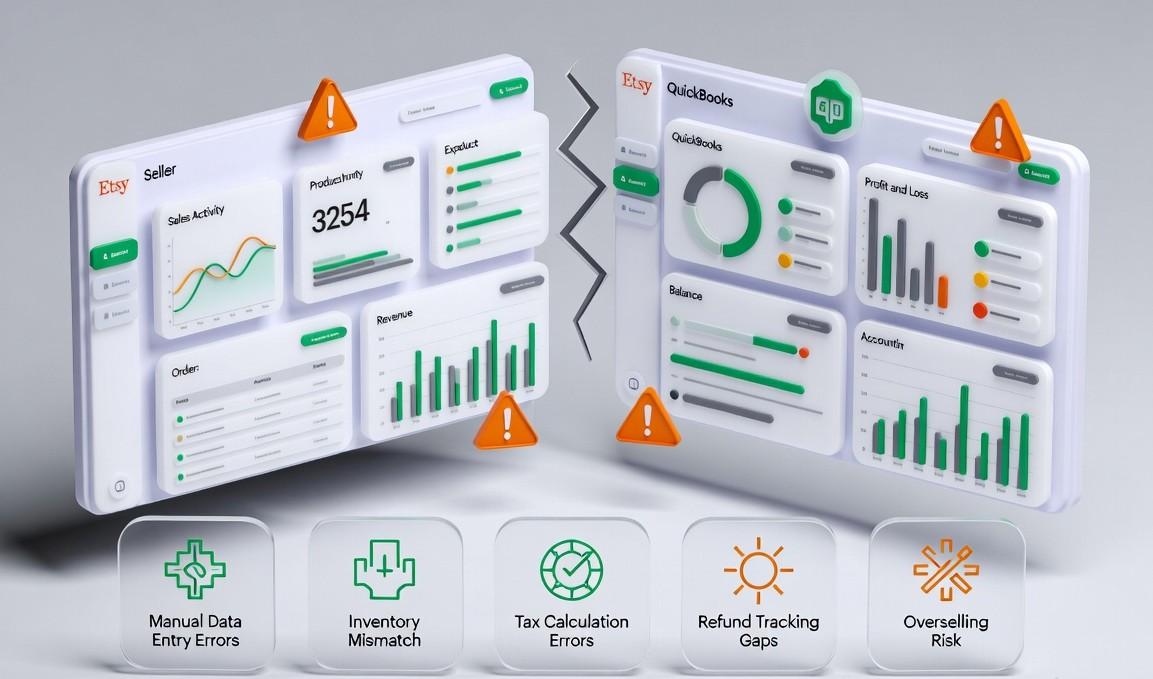
When your Etsy shop is not connected with QuickBooks, you face many problems. Even if your Etsy shop is growing, hidden bookkeeping issues can quietly drain profits and put your business at risk. After reviewing many Etsy seller workflows, several problems appear repeatedly when Etsy and QuickBooks are not synced correctly.
Manual Data Entry Mistakes:
Many Etsy sellers still enter transactions manually. Even a small error rate can add up quickly. One mistake in material costs or sales entries can damage your profit, leading to incorrect pricing and tax filings.
For example, one seller I worked with underreported material costs for eight months because of a simple copy-and-paste error. She overpaid taxes by nearly $2,800 before we properly synced her systems.
Manual entry is slow, stressful, and costly. Studies show manual bookkeeping errors cost businesses both time and money, and undetected mistakes can compound over months.
Inventory Mismatches and Overselling:
Without real-time syncing between Etsy and QuickBooks, your inventory numbers can get poor. Your Etsy store might show 12 items, your studio shelf shows 8, and QuickBooks shows 15. Which one is correct?
- In fact, the average inventory accuracy across businesses is only about 83 percent, meaning nearly one in five records contains an error.
- 58 percent of retailers operate below 80 percent inventory accuracy, causing overselling and stockouts.
Overselling directly affects revenue. Nearly 70 percent of online shoppers switch to competitors if an item is out of stock. Inventory mismatches also make cost of goods sold calculations unreliable and distort profitability, leaving you guessing your true margins.
Hidden Etsy Fees:
Etsy charges listing fees, transaction fees, payment processing fees, and optional advertising fees. When these fees do not automatically sync to QuickBooks, you see gross deposits rather than net revenue.
For example, a seller might see $10,000 in Etsy deposits and think that is their revenue. After fees, the actual revenue might be $8,200. Without accurate tracking, you could be $1,800 underwater before even paying suppliers or rent.
Tax Compliance Risks:
Sales tax rules vary by location, and Etsy may collect tax in some areas but not others. Without automated tracking in QuickBooks, you risk remitting tax you do not owe or failing to remit where required.
This can result in fines, penalties, or audits, and inaccurate tax records increase accountant fees and preparation time.
Delayed Financial Insights:
If you rely on monthly CSV exports, your financial data is always outdated. You cannot see margin erosion, rising material costs, or fee increases in real time.
Studies show that shipping errors cost U.S. businesses over $17 billion annually due to returns, corrections, and delays. Delays in financial visibility prevent timely action to correct problems, which is especially harmful for seasonal Etsy sellers.
Benefits of Connecting Etsy and QuickBooks for Multi-Channel Sellers
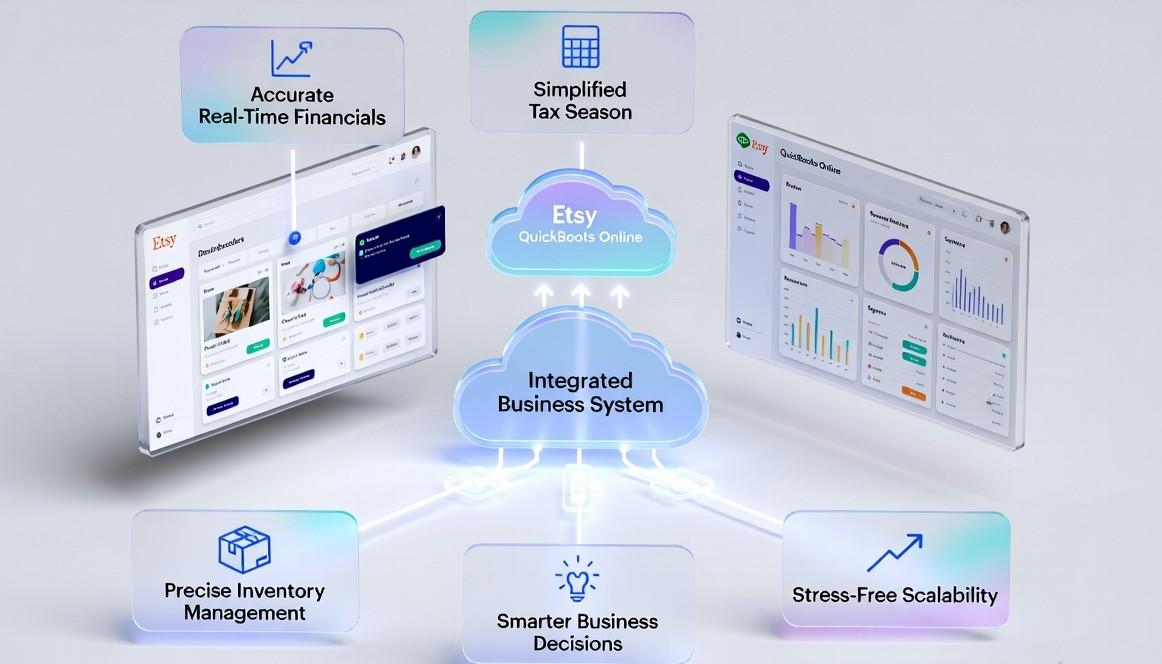
After seeing the costly problems caused by disconnected systems, it is clear that proper integration is not just a convenience. It is a game-changer for your multichannel business. When Etsy and QuickBooks are connected correctly, the impact is immediate, and the benefits continue to grow as your business scales.
Accurate Real-Time Financials:
Your books reflect reality within minutes instead of weeks. Every sale, fee, and refund is recorded automatically, giving you a clear picture of true profit margins. You can spot and fix issues early, before they turn into costly mistakes.
Simplified Tax Season:
No more spending dozens of hours reconciling spreadsheets. Clean, categorized transactions flow automatically into QuickBooks. Your tax preparer works faster, charges less, and can even find deductions you may have overlooked.
Precise Inventory Management:
With proper syncing, your Etsy listings, stock, and accounting records all match. You stop overselling, optimize reorder points, and maintain better cash flow. This prevents lost sales and improves customer satisfaction.
Smarter Business Decisions:
With up-to-date data, you can see which products are most profitable, adjust pricing to account for fees, and plan inventory purchases to maximize returns. Decisions are based on facts, not guesswork.
Stress-Free Scalability:
What works for 50 orders a month often breaks at 500. With accurate integration, your system scales effortlessly as your business grows. You can focus on creating products and delighting customers, not reconciling accounts.
Methods to Sync Etsy with QuickBooks for Multi-Channel Sellers
After understanding the problems caused by disconnected systems and seeing the benefits of proper integration, the next question most sellers ask is how to actually sync Etsy sales with QuickBooks.
There are three main approaches. Two can work temporarily, but only one scales with your growing business. Ultimately, the method you choose depends on where your shop is today and where you plan to grow tomorrow.
I am not going to encourage you to choose any specific method based on my preference. I will just mention the pros and cons of all three methods being unbiased, and the rest is up to you.
Manual CSV Export and Import
The first method is a manual way of exporting and importing CSVs. For new sellers, Etsy’s built-in CSV exports combined with QuickBooks’ import tools can function. Many use this method to test their product-market fit before investing in automation.
How it works:
- Download the Etsy payment account CSV weekly or monthly
- Format columns to match QuickBooks import requirements
- Manually categorize transactions, including sales, fees, refunds, and taxes
- Import and reconcile against bank deposits
- Adjust inventory counts by hand
This method seems like a good option for the new sellers, but it has some limitations. Let’s talk about its limitations below.
Limitations:
- Books are always 1 – 4 weeks behind, with no real-time visibility
- Manual categorization invites errors and inconsistencies
- Inventory does not sync automatically
- Fee breakdowns require manual calculation
- Becomes unmanageable above 100 transactions per month
Basic Connectors Apps
As your shop grows, basic connector apps can help automate some tasks. They move data faster than CSVs, but they don’t handle everything. Usually, they can import transactions daily or hourly, create simple sales receipts, categorize expenses, and track inventory in a basic way. They make work easier but aren’t built for complex operations.
Limitations:
- Sync delays create inventory risk
- Fee structures are often oversimplified
- Material costs are not linked for accurate COGS
- Limited support for variants or made-to-order workflows
- Usually Etsy-only, no multi-channel capabilities
QuickSync: Unified Multi-Channel Sync
For growing Etsy sellers and multi-channel businesses, QuickSync provides complete operational integration. It doesn’t just move data, but also aligns your entire business in real-time.
QuickSync Etsy-specific advantages:
- Auto Payment Recording – Invoices and receipts marked paid automatically.
- Product Visibility Mapping – Active/Draft products synced accurately.
- Continuous Sync – Real-time product and order updates.
- Accurate Order Syncing – Orders sync with full financial data.
- Marketplace Integration – Etsy, Shopify, and more sync directly to QuickBooks.
With QuickSync, syncing Etsy sales with QuickBooks is no longer a monthly chore. It becomes continuous business protection, giving you accurate data, real-time insights, and peace of mind as your shop scales.
Which Method Should You Choose to Sync Etsy and QuickBooks
The next step is choosing the approach that fits your business stage. Selecting the right method proactively can prevent overselling disasters, tax headaches, and wrong stock levels. Here’s the comparison of all three syncing methods in tabular form. This comparison will help you to compare all methods based on the essential factors:
| Feature | Manual CSV | Basic App | QuickSync |
| Setup time | 4–6 hours weekly | Approx 2–3 hours initially | Less than 15 minutes |
| Sync speed | Weekly or monthly | Daily/hourly | Real-time (under 5 minutes) |
| Inventory sync | Manual only | Limited | Full automation across multiple locations |
| Fee categorization | Manual calculation | Basic | Automatic, detailed breakdown |
| Multi-channel support | No | Rarely | Yes, 10+ platforms |
| Error handling | You catch it too late | Basic alerts | Automatic recovery with notifications |
In short, manual CSV and basic apps may work temporarily, but only QuickSync provides real-time accuracy, multi-channel support, and operational reliability to grow with your business.
How to Sync Etsy with QuickBooks Using QuickSync Step by Step
After comparing the different ways to connect Etsy with QuickBooks, it’s clear that QuickSync is the most reliable solution for growing businesses. But how do you actually connect Etsy with QuickBooks? Don’t worry. Below is a simple step-by-step guide to help you set up the integration easily. The best part is that you don’t need any technical knowledge to get started.
Step 1: Create Your QuickSync Account:
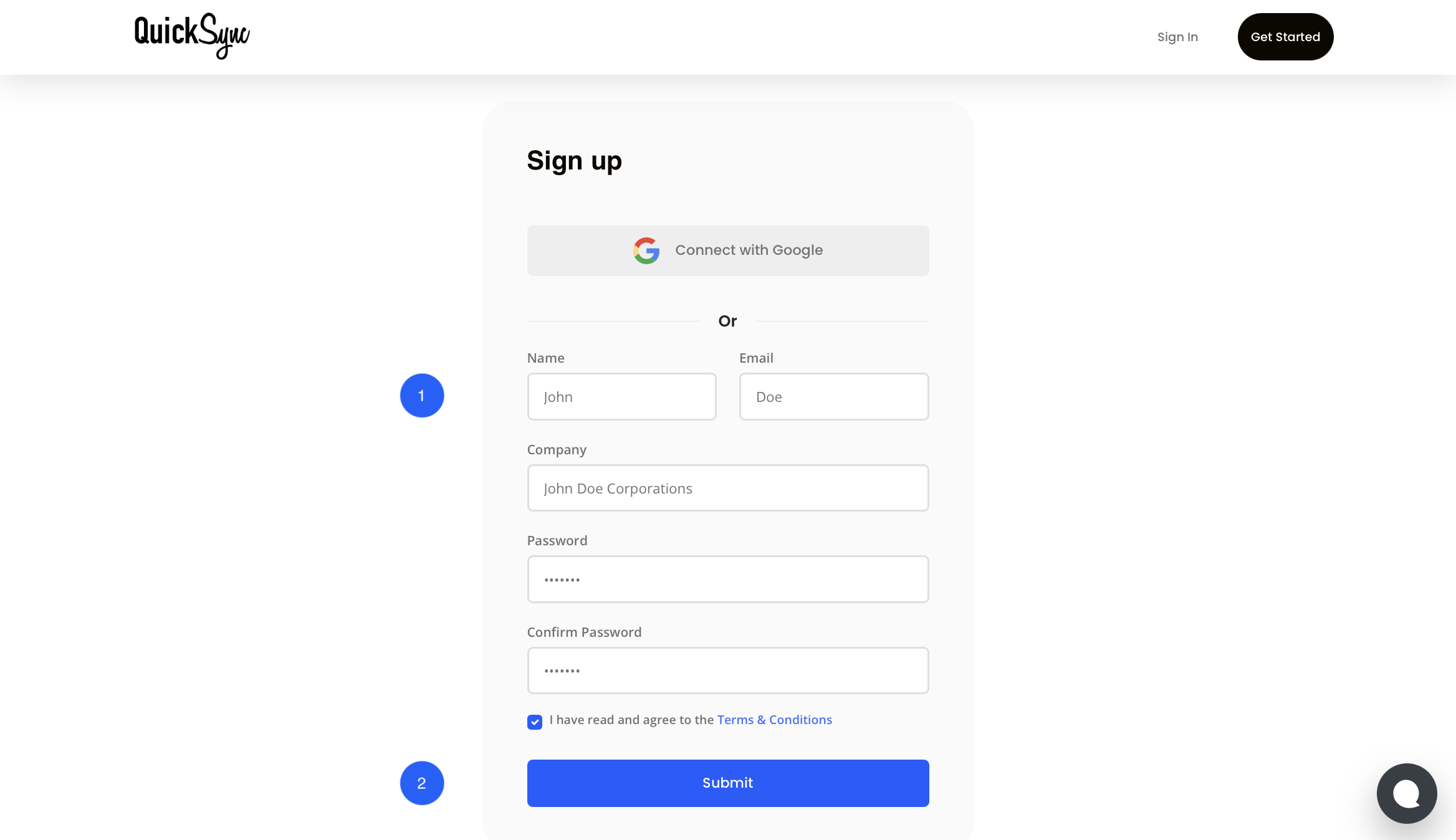
- If you are new to QuickSync, start by signing up and selecting Etsy as your main sales channel during onboarding.
- If you already have an account, simply log in and open your QuickSync dashboard.
Step 2: Connect Your Etsy Shop:
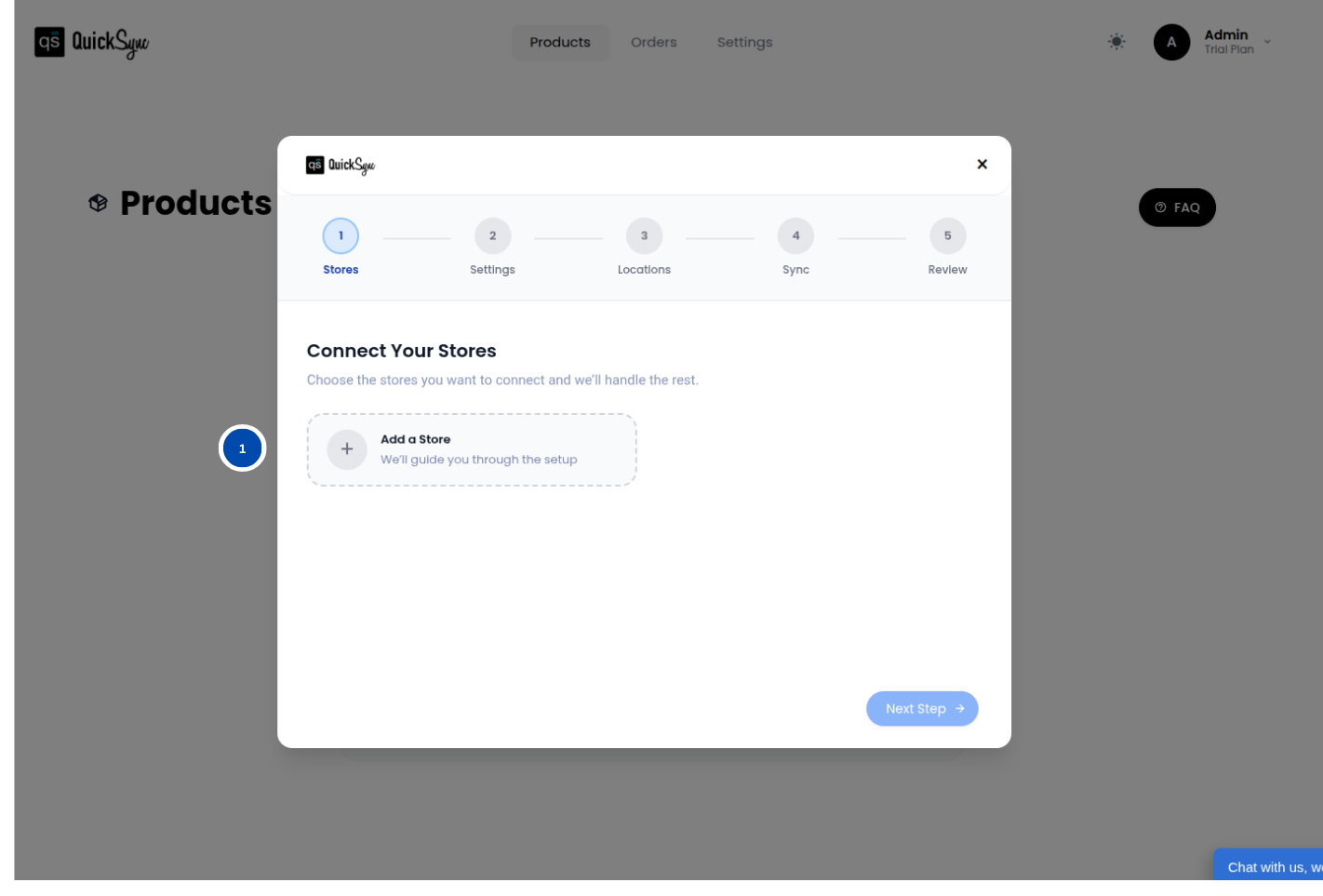
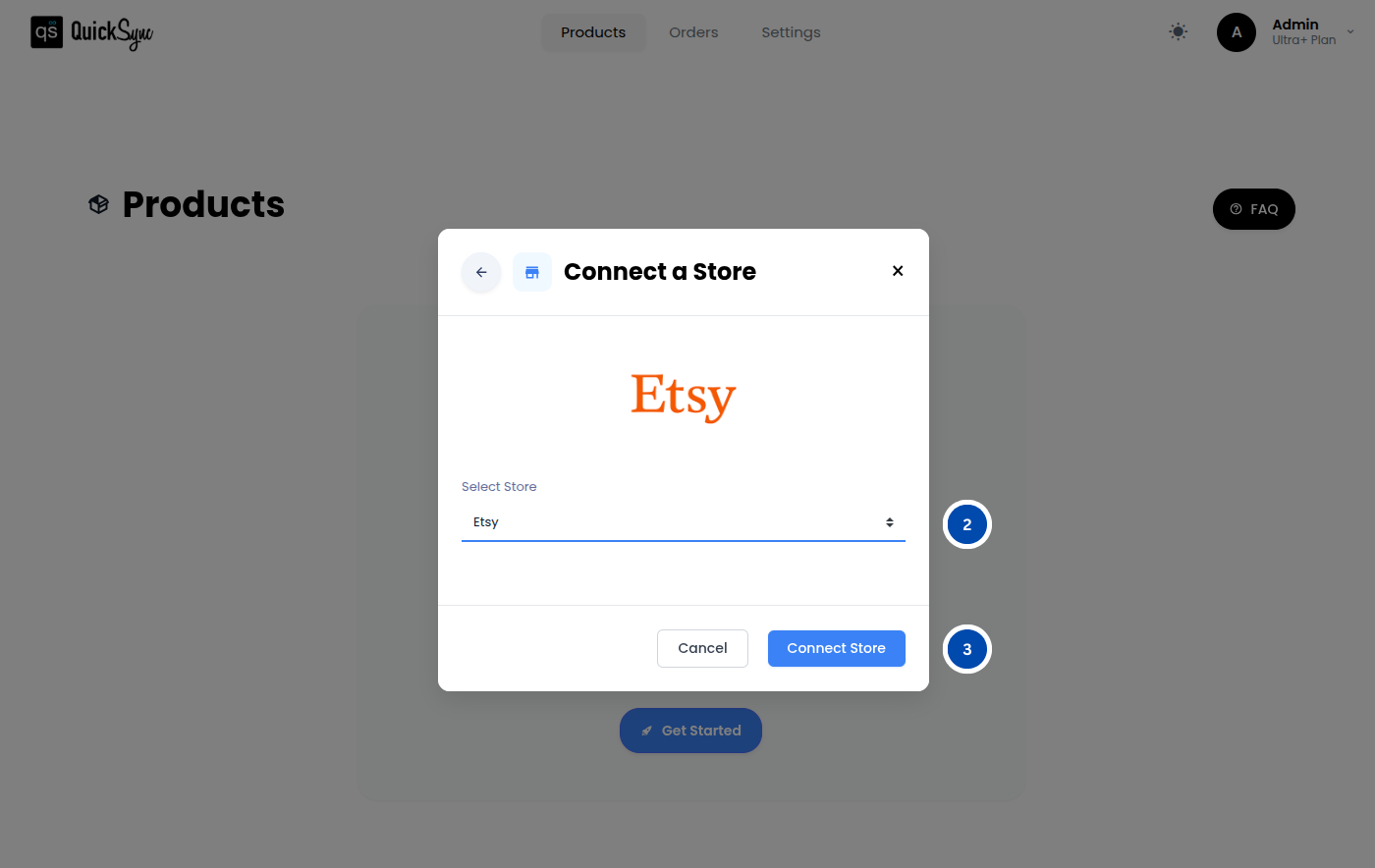
- Go to your QuickSync Dashboard and navigate to Sync Products.
- Go to Store → Add a Store, then select Etsy and click Connect a Store.
- Sign in to your Etsy account and approve the requested permissions for shops, listings, images, videos, inventory, and orders.
Once approved, QuickSync will automatically import your Etsy listings, product variants, and current inventory.
You will see a progress bar during this process. If your shop has many listings, the import may take a few minutes to complete.
Step 3: Connect QuickBooks Online:
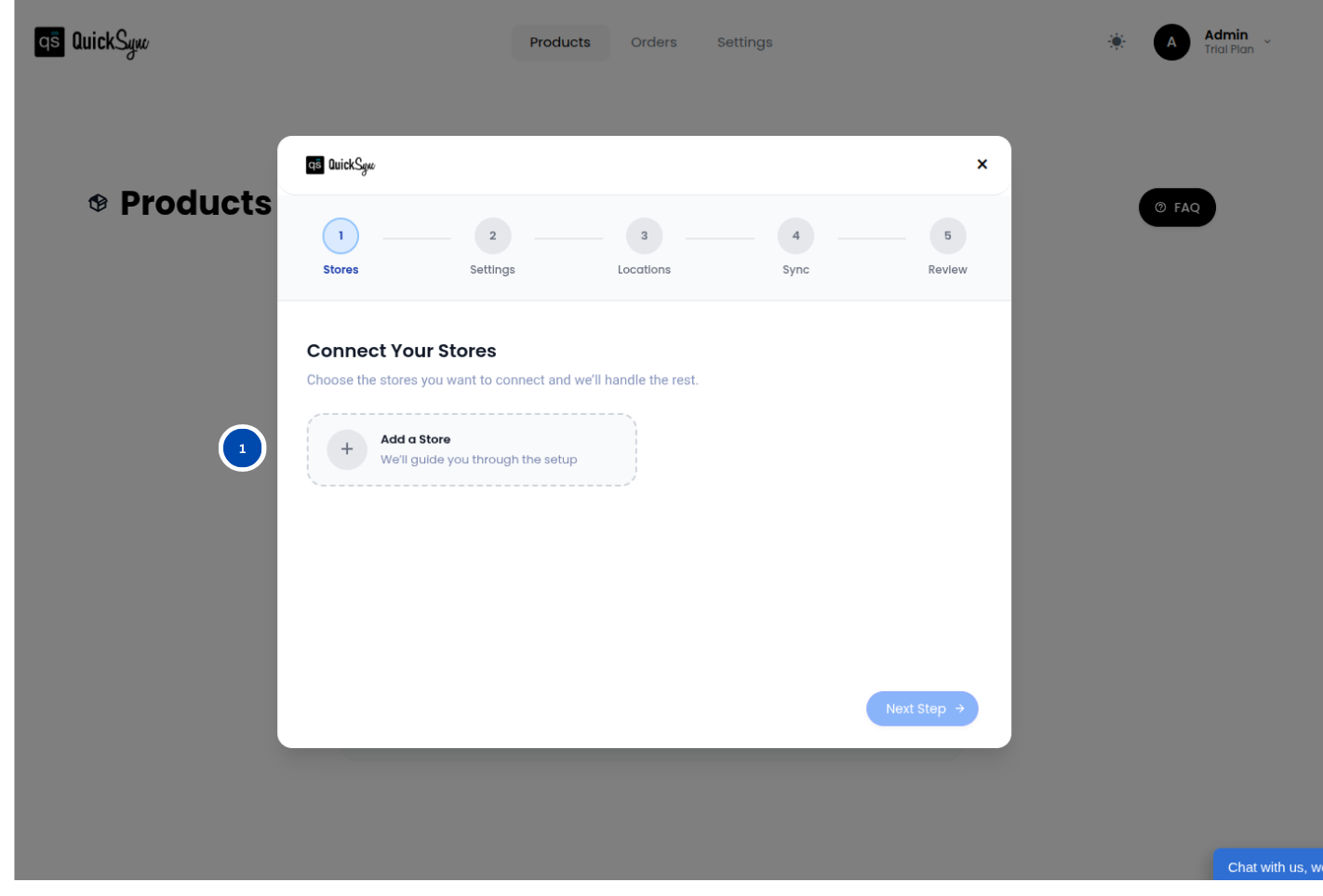
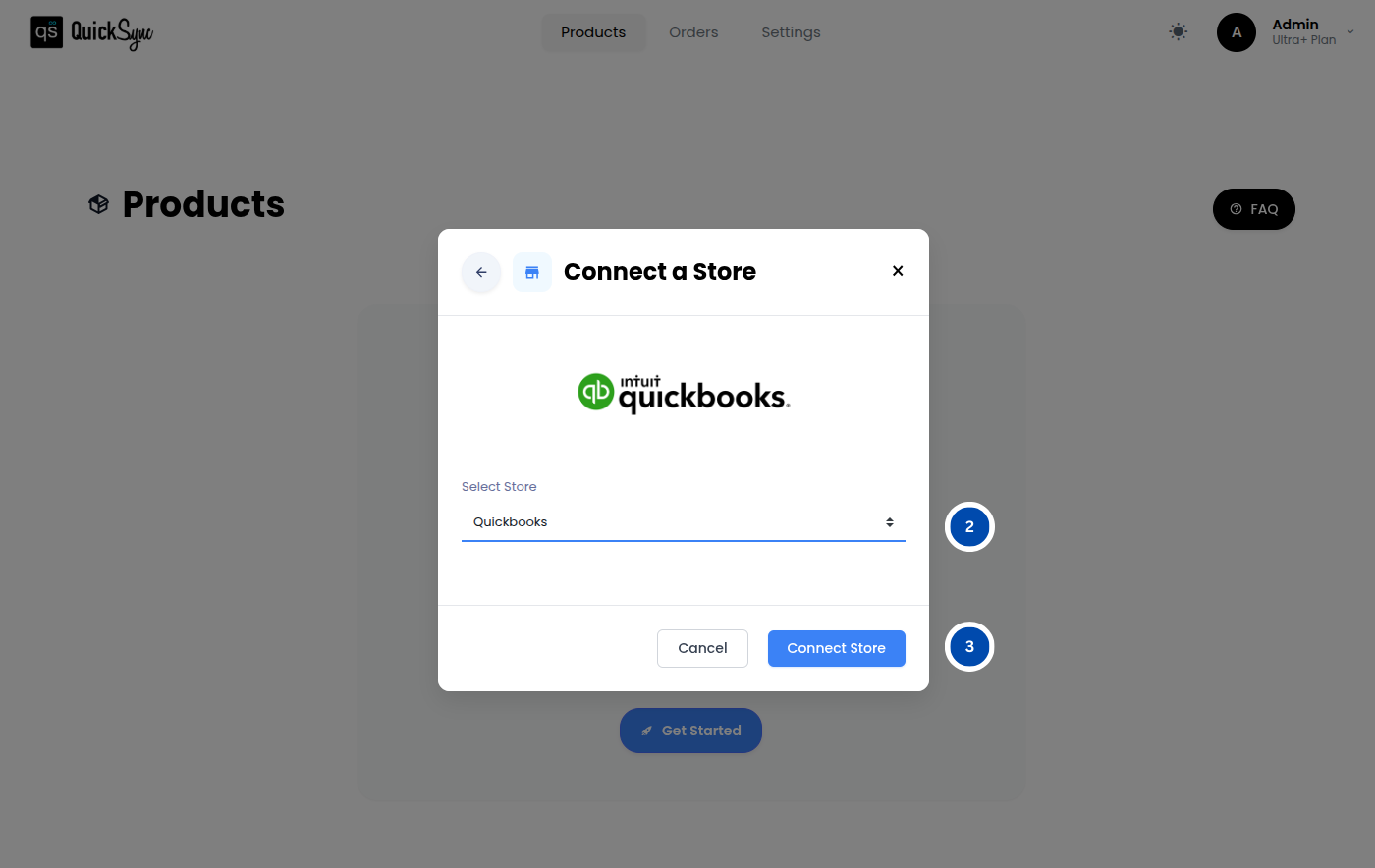
- Log in to your QuickSync Dashboard and go to Sync Products.
- Navigate to Store → Add Store, select QuickBooks, and click Connect a Store.
- Sign in to your QuickBooks account and approve access for Items, Payments, and Accounting.
After the connection is approved, you can map your Etsy income and expenses to the correct QuickBooks categories.
Step 4: Set Your Sync Preferences:
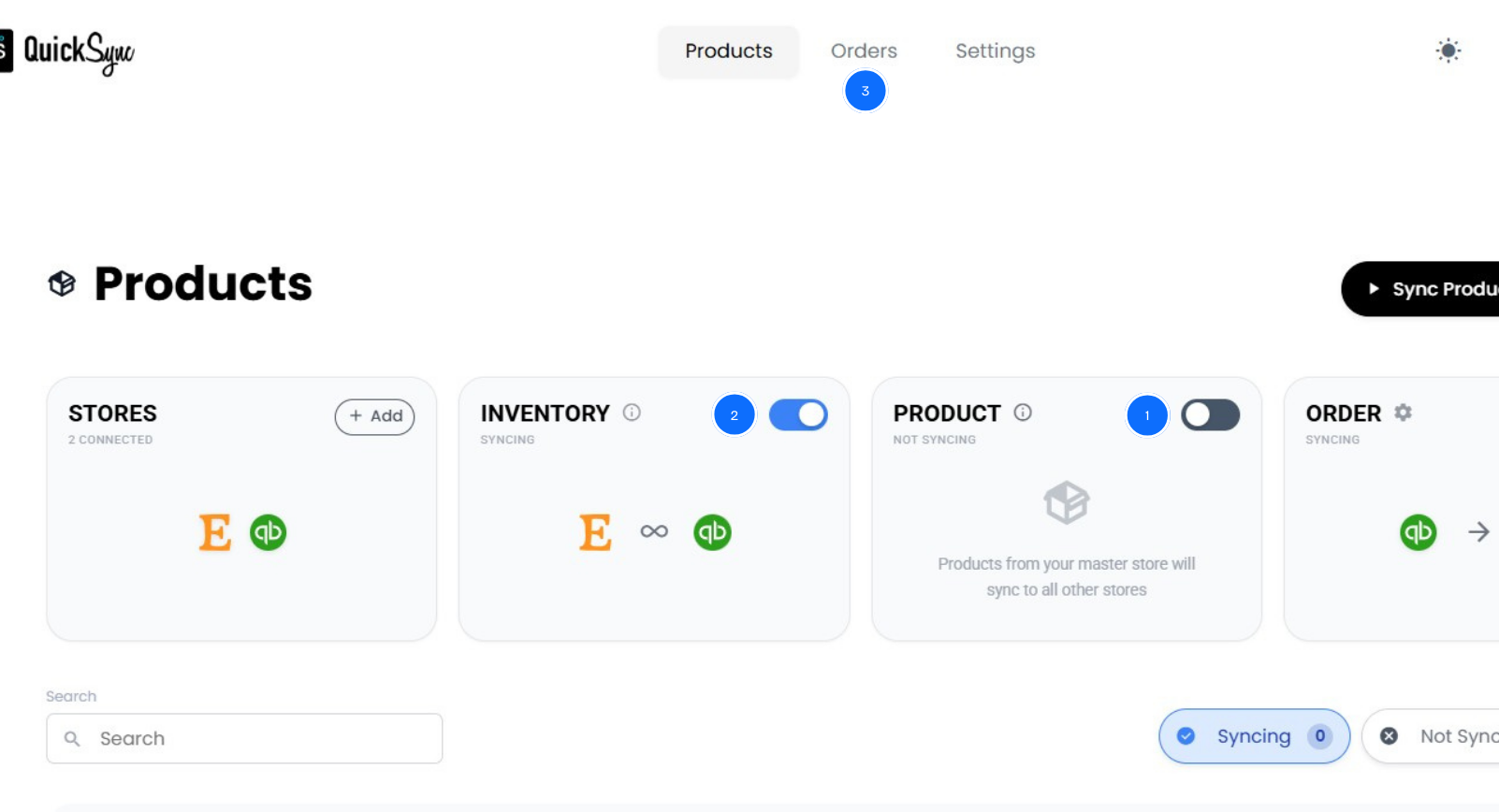
Now choose what QuickSync should sync automatically between Etsy and QuickBooks. You can also set inventory rules and choose how Etsy fees are categorized in QuickBooks.
Once configured, QuickSync keeps your orders, inventory, and accounting data updated automatically between both platforms.
Best Practices For Smooth Etsy and QuickBooks Sync
So you have started syncing both your platforms now, but that alone is not enough. The next step is maintaining a system that works reliably as your business grows. Connecting Etsy and QuickBooks is only the beginning. The real advantage comes from following consistent practices that keep your data accurate and your operations running smoothly.
Successful Etsy sellers treat integration as an ongoing process rather than a one-time setup. By following the right practices consistently, you can keep your accounting accurate, avoid operational problems, and scale your business with confidence.
Use QuickBooks as Your Financial Source of Truth:
Even though QuickSync can sync data both ways, it is best to treat QuickBooks as the main location for your financial structure. Set up your chart of accounts, expense categories, and cost structures in QuickBooks first. QuickSync will then bring Etsy data into those categories automatically.
This keeps your financial reports consistent and makes it easier for accountants to understand your books.
Keep Your Sync Running in Real Time:
Some sellers rely on daily or weekly syncing, but this can create gaps in your data. Etsy’s marketplace can generate sudden bursts of orders when a product trends or gets featured.
Real-time syncing ensures that sales, fees, and inventory updates appear in QuickBooks within minutes. This prevents overselling and keeps your financial records accurate at all times.
Track Etsy Fees in Detail:
Etsy has several different types of fees. Instead of grouping them, create separate categories in QuickBooks for better visibility.
For example, track:
- Etsy listing fees
- Etsy transaction fees
- Payment processing fees
- Etsy Ads spending
- Shipping label costs
This level of detail helps you understand the true profitability of each product. Many sellers discover that some “bestselling” products barely break even once all fees are considered.
Reconcile Your Data Weekly:
Even with automation, it is smart to review your data regularly. Set aside about fifteen minutes each week to check:
- Unsynced transactions
- Inventory differences between Etsy and QuickBooks
- Unexpected fee increases
- Orders that have not cleared yet
Weekly checks prevent small issues from turning into major accounting problems later.
Prepare for Multi-Channel Growth:
Many successful Etsy sellers eventually expand beyond the marketplace. They may sell through their own website, wholesale partners, or other platforms.
Using a system like QuickSync from the beginning ensures your accounting structure can support multiple sales channels without creating new complications. This makes future growth much easier.
The Bottom Lines: What Next?
Selling on Etsy should feel creative and exciting, not stressful and confusing. But when your accounting and inventory are disconnected, it becomes difficult to track profits, manage inventory, and stay ready for tax season.
QuickSync removes that chaos. It keeps your Etsy orders, inventory, and QuickBooks records perfectly aligned so your numbers always make sense.
If you have been wondering how to sync Etsy with QuickBooks in a simple way, QuickSync makes it effortless.