Can You Answer This in 10 Seconds? It Could Save Your Business.
How many units of your best-selling unit do you actually have right now? not in your dashboard, not in your head, but physically available across every store and channel you sell on?
If you hesitated, you’re already in trouble. And when orders start flying in from five directions, that hesitation becomes expensive very fast. But don’t worry, as this guide to omnichannel inventory management will take you through what actually works, what we’ve seen fail spectacularly, and how to implement systems that don’t require an engineering team.
We’ve spent 10+ years helping businesses grow from single stores to multi-channel operations. We’ve guided hundreds of implementations. We know the difference between a theory that sounds good and an execution that actually works.
What Is Omnichannel Inventory Management?
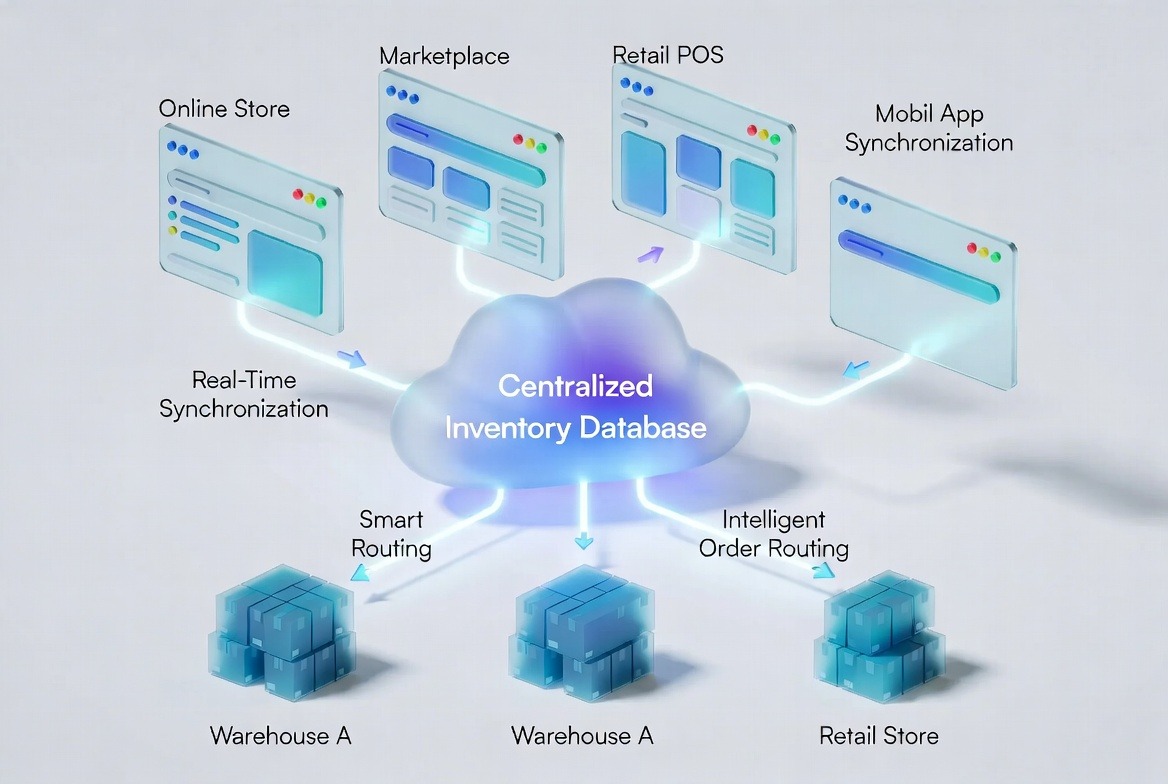
Omnichannel inventory management means maintaining a single real-time view of stock across all sales channels, websites, marketplaces, social commerce, and retail. So every customer sees accurate availability, and every order routes to optimal fulfillment.
True omnichannel requires three components working together:
- Centralized inventory database: One source of truth for all stock
- Real-time synchronization: Instant updates when sales happen anywhere
- Intelligent order routing: Automatic fulfillment from optimal locations
Without these, you’re not omnichannel. You’re just busy, and busy breaks when the scale hits.
Benefits of Omni-channel Inventory Management For Multi-Channel Sellers
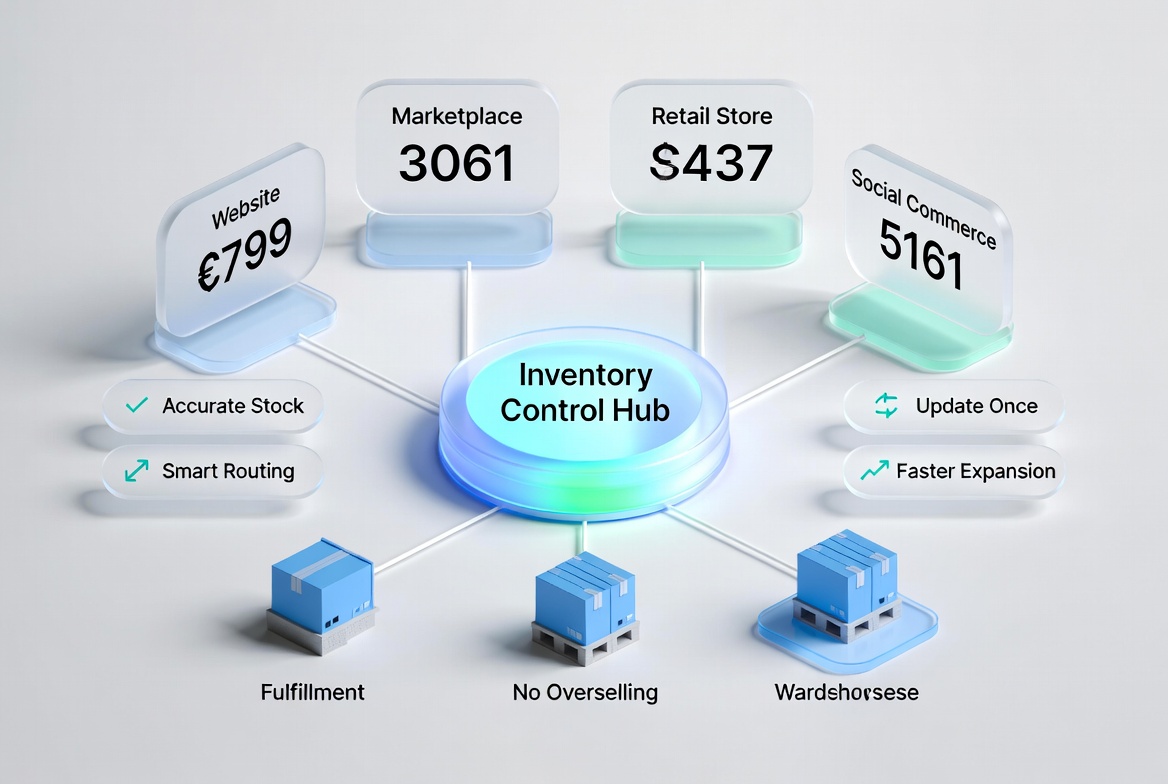
We’ve worked with many multi-channel sellers and seen how a real omnichannel inventory system changes the game. It’s not just about keeping stock in sync or cutting manual work. It’s about making more sales, keeping customers happy, and growing your business with confidence.
Here are the key benefits of an omnichannel inventory system:
Accurate Stock Count Across Every Channel:
Consolidating inventory across all channels, websites, Amazon, Etsy, and retail stores gives you a single, accurate view of what’s actually available. Businesses that implement centralized inventory see a 15–25% increase in conversion simply because “available” actually means available. Overselling and embarrassing “out-of-stock” emails become a thing of the past.
Orders Automatically Route to the Right Fulfillment Location:
Smart routing ensures inventory in your California warehouse doesn’t fulfill an East Coast order when stock exists in New York. Shipping from the nearer of two locations costs less and arrives sooner, without anyone assigning orders by hand.
Product Updates Happen Once, Not Five Times:
Change a price, update a description, or add images in your master store, and it flows across all channels instantly. What used to take hours of manual updates now happens in real-time, letting you focus on growth instead of repetitive admin.
Stop Losing Sales to Stockouts and Overselling:
With real-time inventory syncing, every channel shows accurate availability. Fewer listings advertising stock you do not have means fewer abandoned baskets, by 40%, and every customer gets what they ordered. No surprises, no lost revenue.
Add New Sales Channels Without Operational Chaos:
Whether it’s TikTok Shop, a pop-up store, or a new marketplace, proper systems integrate new channels in hours, not weeks. Businesses launch new channels 3x faster and scale confidently without disrupting existing operations.
Omnichannel inventory management isn’t just a back-office fix. It’s a growth engine. It protects your revenue, strengthens customer trust, and makes scaling your business predictable and stress-free.
The Common Omnichannel Inventory Management Challenges
The advantages of omnichannel inventory control are obvious. But working with dozens of multi-channel sellers, one thing is clear: an omnichannel inventory system is harder than most businesses realize. When inventory, fulfillment, and technology aren’t fully aligned, the results aren’t inconvenient.
Here are the most common omnichannel inventory management challenges, and how they actually impact businesses:
Lack of Inventory Visibility:
Without a single system to track all your stock, whether it’s in warehouses or fulfillment centers, accurate inventory is impossible. Products can appear available online but are actually sold out elsewhere, leading to overselling, angry customers, and lost revenue.
Example: A fashion brand synced inventory every 15 minutes. During a flash sale, 200 units were sold in 8 minutes. The lag caused 80 oversold items, platform penalties, and long-term trust erosion.
Segmented Supply Chains:
Many businesses treat each channel or location as its own silo: Amazon, Shopify, retail stores, or third-party vendors. Without centralized management, companies often overstock “just in case,” tying up capital and storage. Meanwhile, best-selling items can stock out because no one has enterprise-wide visibility.
Inaccurate Orders and Split Fulfillment:
When orders come from multiple warehouses or vendors, errors multiply. Wrong items, incomplete shipments, or delayed deliveries destroy customer trust. Modern shoppers expect real-time tracking from warehouse to doorstep. Anything less leads to abandoned carts and lost lifetime value.
Poor Demand Forecasting & Safety Stock Management:
Without accurate historical data and integrated systems, businesses struggle to forecast demand and optimize inventory levels.
Too little stock = missed sales.
Too much stock = higher storage costs and dead inventory.
Merchants who rely on spreadsheets often spend 25+ hours per week manually updating stock, costing $50,000 annually in labor and reputational damage.
Technology Gaps:
Manual processes, disconnected systems, and inadequate software make omni-channel inventory management nearly impossible. Without real-time inventory visibility and automation errors compounded, new channel integrations become slow, and scaling gets risky and expensive.
The “We’ll Fix It Later” Trap:
Delaying investment in the right syncing solution is costly. Technical debt accumulates, manual habits solidify, and migration becomes more difficult and expensive. One viral moment, weak infrastructure, and unprepared processes can create brand damage that takes years to repair.
Omnichannel inventory control is challenging, but the cost of ignoring it is far higher. The key barriers, like inventory visibility, segmented supply chains, inaccurate orders, poor forecasting, and inadequate technology, are all solvable with the right systems, processes, and planning.
Omnichannel Inventory Management Best Practices for Scaling Stores
After hundreds of implementations, it’s clear what separates businesses that scale smoothly from those that drown in operational chaos. These practices are proven to work before hitting the next growth phase.
Start with a Single Source of Truth:
The biggest mistake we see: businesses waiting until they’re “big enough” to centralize inventory. By then, you’re untangling years of fragmented data while orders pile up.
Every multi-channel seller should establish a master inventory database from day one. Whether you’re on two channels or ten, every stock movement flows through this central system first.
This prevents the data drift that kills accuracy. We’ve seen merchants lose 30% of operational efficiency simply because their “source of truth” was actually five conflicting spreadsheets.
Automate Real-Time Synchronization:
Batch updates are a liability. When we implement omnichannel systems, sync should be triggered by individual transactions, not by hourly dumps or nightly reconciliations.
Inventory must update across all channels before the customer receives their order confirmation. Anything slower creates windows where overselling occurs. During peak periods, even a 5-minute lag can generate dozens of conflicting orders.
Build Intelligent Routing Rules:
Fulfilling from the nearest location is not always optimal. Routing logic should consider:
- Speed: Distance vs. processing time
- Cost: Shipping, labor, packaging
- Capacity: Queue depth per location
- Inventory health: Aging stock, seasonality
Example: One apparel client reduced shipping costs 18% and sped up delivery by routing oversized orders to a dedicated facility rather than using geographic proximity.
Standardize Product Data:
New channel integrations fail when product data is inconsistent. A “golden record” structure for SKUs, variants, descriptions, images, and pricing ensures smooth channel adoption.
Plan for Returns From the Start:
Returns can damage inventory accuracy. Reverse logistics workflows should update stock only after inspection, not when the return is initiated or in transit.
This prevents “phantom inventory”, where damaged or missing items appear available for sale.
Forecast Demand by Channel:
Aggregate forecasting fails in omnichannel environments. Channel-specific demand models capture unique patterns: Amazon spikes, Shopify marketing surges, retail seasonality, TikTok virality.
Test Disaster Scenarios Early:
Systems should be stress-tested for warehouse outages, API failures, or sudden 10x demand spikes. Failure to do so risks major revenue loss during peak periods.
For example, an electronics merchant discovered their backup sync took 4 hours. After upgrading, recovery occurred in 90 seconds, preventing losses on Cyber Monday.
Track Metrics That Matter:
Focus on metrics that predict omnichannel health:
- Inventory accuracy: Physical vs. system count (target 99%+)
- Fulfillment cycle time: Order → ship (channel-specific targets)
- Split shipment rate: Keep multi-package orders under 5%
- Stockout-to-sales ratio: Revenue lost to unavailable items
Reviewing these weekly, rather than monthly, prevents issues from compounding.
These nine practices are essential for scaling multi-channel businesses. Proper implementation protects revenue, improves customer trust, and turns a daily reconciliation job into something nobody has to think about.
How QuickSync Solves Omnichannel Inventory Sync & Management
QuickSync is inventory syncing tool that covers the stock half of omnichannel: one count kept in step across your website, your marketplaces and your tills. It is not a POS and it does not run click-and-collect. It keeps data synchronized across every connected sales channel, preventing overselling, stockouts, and operational chaos.
Inventory sync:
When a sale happens on any connected channel (Shopify, Etsy, TikTok, Square, Clover, etc.), we write the new count to every other connected channel. Eight of our 11 channels report their own sales instantly; eBay, Etsy and Squarespace stock is checked every 2 minutes, and Etsy orders every 5, so hold a buffer on those.
Centralized Order Management:
All incoming orders automatically push to one designated fulfillment store. When orders ship, the tracking number goes back to Shopify, WooCommerce, Etsy, eBay, TikTok Shop and Squarespace. It does not go back to Amazon, Square, Clover or QuickBooks, and Lightspeed is marked shipped without the number.
Master Store Product Control:
Choose one store as your master—update price, description, images, or variants there, and changes propagate to every connected channel automatically. What used to take hours now happens in real time.
Multi-Location Support:
Map and sync inventory across multiple warehouses or retail locations individually. Sell from a California warehouse and a New York retail store without double-selling or duplicate safety stock.
Fast Setup, No Coding Required:
Pre-built connectors for major channels get you operational in hours, not weeks. Connect stores, map locations, toggle syncing options—all through a straightforward dashboard. Dedicated support guides onboarding via chat, phone, or Zoom.
QuickSync handles the infrastructure so you can focus on growth, not spreadsheet juggling.
What we don’t cover
Omnichannel is usually sold as two things at once, and we only do one of them. We keep the numbers in agreement across your shops and tills. We do not give a shopper a single view of your business, run click-and-collect, hold a loyalty scheme or act as your till.
If the counts are what hurt, that is the cheaper problem and this is the cheaper tool. If a customer buying online and collecting in store is what you need, you want a retail platform built around a POS, and we would rather say so here than after you have paid.
Related: multichannel inventory management for the per-channel timings, and multichannel order management for which channels can receive an order.
Final Words
Omnichannel inventory management is the difference between smooth growth and chaos. Every new channel without control adds risk of overselling, stockouts, and lost customer trust.
This is no longer optional. Customers expect accurate stock and fast delivery. Marketplaces penalize mistakes. A strong inventory system is now a basic requirement, and your competitors already have one in place.
QuickSync keeps one stock count in step across your shops and tills. Orders land in one place. Setup takes hours, not weeks.