Multichannel syncing isn’t just a backend task—it’s a strategic choice that impacts inventory management, profitability, customer experience, and scalability. Even minor sync issues can lead to overselling, delays, fees, and manual work—turning inventory control into a time consuming task.
When comparing QuickSync vs Sellbrite, the key question isn’t about similar features—it’s about which inventory management tool delivers greater reliability, smarter automation, real time accuracy, and stronger margin protection.
So to give you a clear, we’ve assessed both platforms across 10 critical operational criteria that matter most to fast-growing ecommerce businesses selling across online marketplaces, ecommerce platforms, and POS systems.
How Reliable Is This QuickSync vs Sellbrite Comparison?
You can rely on this comparison 100%. Choosing the right inventory management system directly affects the way you manage inventory, maintain stock levels accurate, track sales figures, and scale across all your sales channels.
Here’s how we made sure it’s reliable:
Real analysis, not guesses:
We’ve compared both tools across the crucial factors that genuinely matter like pricing, features, automation, reliability, and support.
Based on real seller experiences:
Insights come from real ecommerce brands (anonymous examples only, like a Shopify + Etsy jewelry brand or a multi-category online store).
Hands-on testing:
Our team has used both QuickSync and Sellbrite to understand how they perform in real day-to-day selling.
Balanced & Honest:
We highlight both strengths and weaknesses so you can make an informed choice without surprises.
Key Factors We Used to Compare QuickSync and Sellbrite
To give you the most useful comparison, we’ve focused on how QuickSync and Sellbrite perform in real ecommerce workflows. Whether you’re syncing inventory across Shopify pos and Amazon, managing listings, or avoiding overselling, we’ve looked at 10 essential factors that directly affect your bottom line:
Pricing & Overall Value
Features & Core Functionality
Performance & Reliability
Ease of Setup & Integrations
User Interface & Usability
Security & Compliance
Customer Support Quality
Customization & Flexibility
Scalability for Growth
User Feedback & Real Seller Insights
Taken together, these factors give you a transparent, no-nonsense view, helping you choose the tool that safeguards your margins and scales with your business.
Brief Overview of QuickSync and Sellbrite
QuickSync: A Unified Multichannel Inventory Syncing Solution
QuickSync is built for sellers who are done with slow updates and manual fixes. It brings all your channels like Shopify, WooCommerce, eBay, Etsy, Square POS, TikTok Shop, and more into one fast, reliable syncing engine.
It centralizes product data, inventory quantities, product details, and stock levels—automatically updated across channels like Shopify, WooCommerce, eBay, Etsy, TikTok Shop, Square POS, and more.
Sellbrite: Simple Listing & Inventory Tool
Sellbrite is a straightforward listing and inventory tool built mainly for sellers on Amazon, eBay, Etsy, and Walmart. It handles the basics well, such as publishing products, syncing stock, and routing orders.

But it’s lighter on real-time automation and advanced workflows, making it better for smaller or single-channel marketplace sellers rather than brands scaling across multiple storefronts, POS systems, or high SKU volumes.
Let’s Start QuickSync vs 3DSellers Detailed Comparison
1. Pricing Plans and Value for Money
Pricing isn’t just about what you pay — it’s about how easily you can grow. The wrong plan can squeeze margins and slow you down, while the right one lets you scale without stress. The right one keeps your operations smooth, predictable, and stress-free.
QuickSync Pricing Plans:
QuickSync keeps pricing simple, transparent, and budget-friendly — perfect for small to mid-sized brands and fast-growing multichannel sellers.
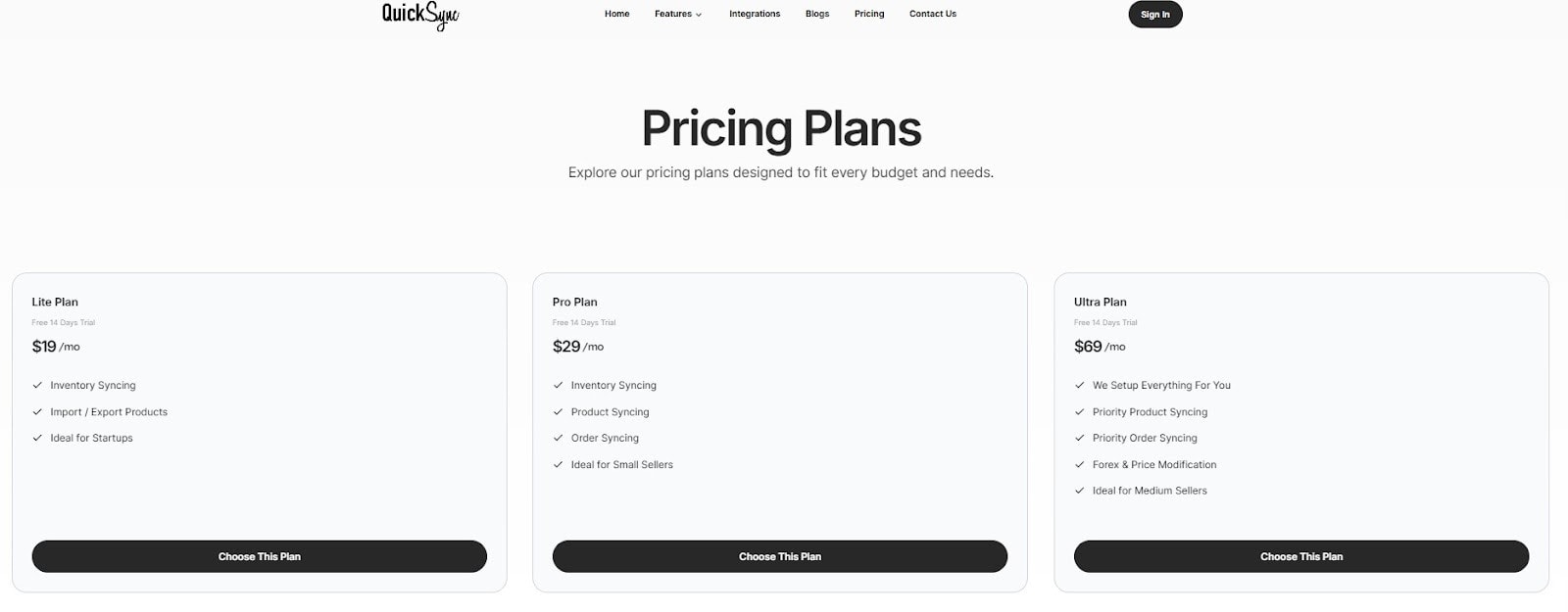
With basic plans ranging from $19/month (Lite) to $99/month (Ultra+), the pricing model supports steady growth without charging extra as your SKUs or sales channels expand.
What makes QuickSync’s pricing plans seller-friendly:
Predictable monthly costs
High feature value at every tier
14-day free trial on all plans
Supports large SKU counts
No sudden price spikes when you scale
QuickSync is built for sellers who want affordable entry and stress-free scaling.
Sellbrite Pricing Plans:
Sellbrite uses a more traditional marketplace-focused pricing model. Sellbrite’s Pricing is tied to order volume, which can work well in the beginning — but costs rise quickly as sales increase.
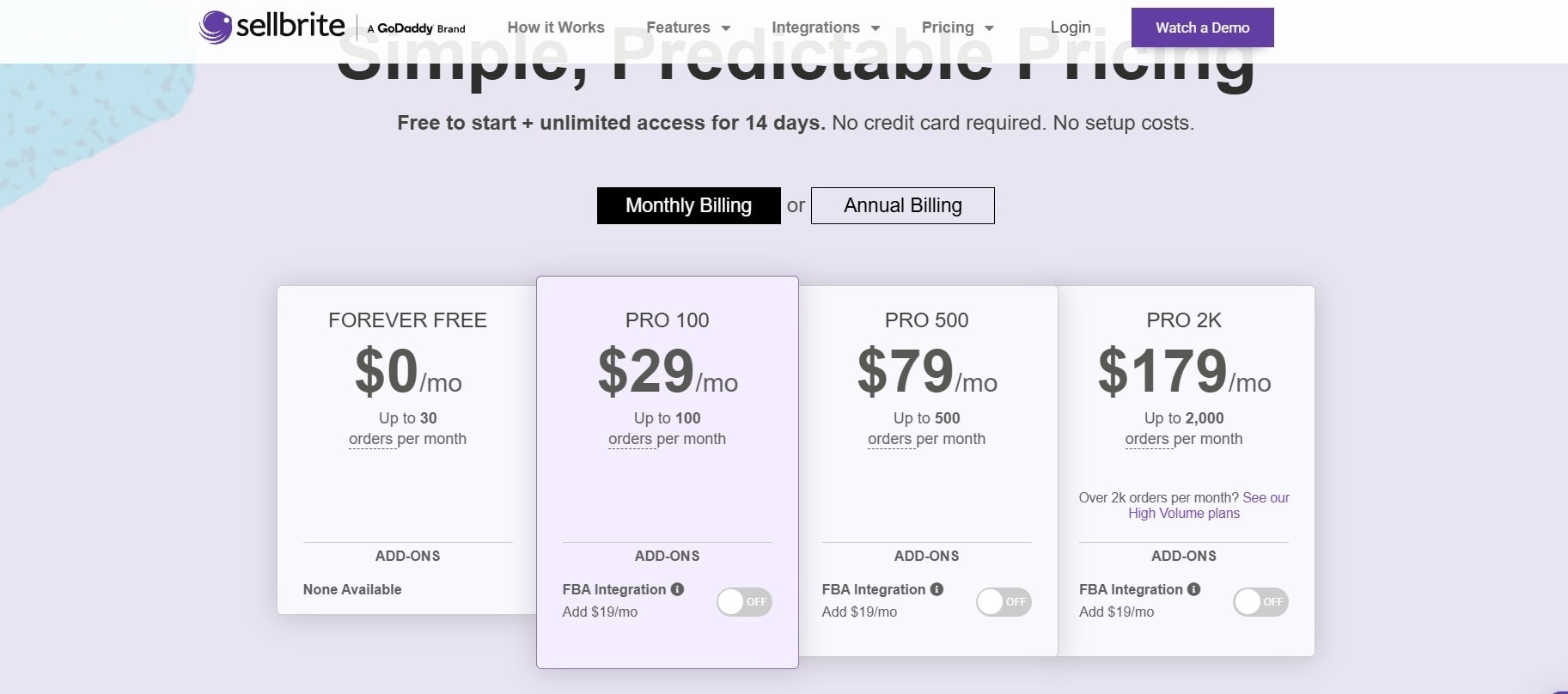
It’s suitable for sellers with steady marketplace activity, but high-growth brands may face increasing monthly bills as order volumes expand.
Sellbrite’s pricing plans strengths:
Volume-based pricing for predictable marketplace workflows
Good for smaller marketplace-only sellers
Custom plans available through Sellbrite by GoDaddy Commerce (for specialized cases)
But for fast-growing or multichannel brands, costs can stack up fast as orders scale.
Price Comparison Table: QuickSync vs Sellbrite
|
Plan Tier |
QuickSync |
Sellbrite |
|
Lite/ Basic |
Lite – $19/mo |
$29/mo (if billed annually) |
|
Mid-Tier |
Pro – $29/mo |
$79/mo |
|
Advanced |
Ultra – $69/mo |
$179/mo |
|
Premium |
Ultra+ – $99/mo |
– |
Verdict
QuickSync is the more cost-efficient choice for most sellers, offering stronger automation and syncing power without rising costs. Sellbrite works for moderate volumes, but its volume-based pricing gets expensive as you scale. For predictable, long-term affordability, QuickSync clearly wins.
2. Features, Functionality & Capabilities
Features aren’t just checkboxes they determine how smoothly your business runs every single day. The right tool removes guesswork, automates repetitive tasks, and keeps your entire operation in sync. The wrong one leads to manual corrections, delays, overselling, and a whole lot of unnecessary frustration.
What QuickSync Offers
QuickSync offers real-time, high-accuracy, multichannel syncing — not just basic listings or occasional updates. Its feature set focuses on automation, stability, and multi-platform flexibility.
Standout QuickSync features:
Real-time inventory syncing across all channels
Smart order syncing (prevents overselling across marketplaces)
Bulk product creation + bulk updates
Multi-location & multi-warehouse support
Full catalog syncing between storefronts + marketplaces
POS integrations (Square, Clover, etc.)
Faster syncing engine designed for high-volume sellers
QuickSync is built for brands that need precision, automation, and scalability — not just basic listing tools.
What Sellbrite Offers
Sellbrite focuses more on product listing and marketplace management than deep automation. It handles the essentials well, especially for sellers working mainly on Amazon, eBay, Etsy, or Walmart.
Sellbrite’s core features include:
Simplified multi-marketplace listing
Basic inventory sync across supported channels
Order routing and fulfillment workflows
A useful product catalog system for marketplace sellers
Standard templates for listing creation
Multi-channel order view
While Sellbrite is strong for listing-focused marketplace workflows, it offers less automation and fewer advanced syncing features for large catalogs, custom attributes, POS setups, or multi-store environments.
Feature Comparison Table: QuickSync vs Sellbrite
|
Feature Category |
QuickSync |
Sellbrite |
|
Real-Time Inventory Sync |
Fast & Accurate |
Basic, slower on high volumes |
|
Multichannel Catalog Sync |
Strong (Storefront + Marketplaces + POS) |
Limited beyond marketplaces |
|
Bulk Edits & Updates |
Advanced |
Basic |
|
Multi-Location / Warehouses |
Yes |
Limited |
|
Listing Tools |
Good |
Strong |
|
POS Integrations |
Square, Clover, + more |
Not a core focus |
|
High SKU Performance |
Optimized |
Slower with large catalogs |
|
Custom Attributes / Variations |
Advanced mapping |
Basic mapping |
|
Scalability |
Highly scalable |
Good for smaller setups |
Verdict
QuickSync dominates in automation, accuracy, and true multichannel support. Sellbrite is solid for marketplace-only sellers, but it can’t handle complex, scalable workflows the way QuickSync can. This round goes to QuickSync.
3. Performance & Speed
Performance isn’t just a technical detail it directly affects your orders, your customer experience, and your ability to scale. Slow syncing speed can cause overselling, delayed order updates, mismatched listings, and hours of manual correction. That’s why it matters most choosing the right tool that keeps your business sharp, reactive, and stress-free.
QuickSync Performance:
QuickSync is engineered for speed and stability, especially during peak traffic moments when delays hurt the most. Its syncing engine is built to handle large catalogs, multiple channels, and fast-moving inventory without slowing down.
QuickSync’s performance strengths:
Real-time update inventory across all channels
High-speed order syncing (ideal for flash sales or viral spikes)
Optimized for big catalogs (tens of thousands of SKUs)
Faster API communication with Shopify store, Amazon, Etsy, Square POS, and more
Designed for consistent performance even under heavy load
QuickSync ensures your data stays accurate at the speed your business demands.
Sellbrite Performance:
Sellbrite delivers stable but oftenly slower syncing performance, especially for brands working exclusively on marketplaces. It’s reliable for basic inventory updates and listing operations but struggles when SKU counts or order volumes increase.
Sellbrite’s performance strengths:
Decent syncing speed for small catalogs
Dependable for marketplace-only workflows
Works well for moderate order counts
Good listing-performance consistency
However, Syncing delays can occur when managing large catalogs, selling across multiple storefronts, running high-volume sales, or adding POS and multi-location workflows.
While Sellbrite works well for simple setups, it struggles to keep up with fast-paced, high-volume, multi-channel operations.
Performance Comparison Table: QuickSync vs Sellbrite
|
Performance Factor |
QuickSync |
Sellbrite |
|
Sync Speed |
Real-time, high-speed |
Reliable but slower |
|
Peak Load Handling |
Strong (high-volume optimized) |
Slows under heavy load |
|
Large Catalog Performance |
Designed for 50k SKUs |
Performance decreases with size |
|
Multi-Channel Syncing |
Fast across all channels |
Slower beyond marketplaces |
|
Order Sync Accuracy |
Highly accurate |
Good, but slower updates |
|
Flash Sale / High-Traffic Stability |
Excellent |
Mixed performance |
Verdict
For multi-channel sellers, QuickSync delivers the speed and reliability Sellbrite can’t match. Sellbrite is fine for small operations, but it’s not built for high-volume growth.
4. Ease of Integration & Supported Channels
Seamless integration is critical for scaling. The right platform connects channels effortlessly and avoids complex setups that slow teams down. A poor integration process creates early friction and long-term syncing issues.
What QuickSync Offers
QuickSync offers plug-and-play simplicity. You can connect your channels, map your products, and start syncing without tech headaches or complicated onboarding.
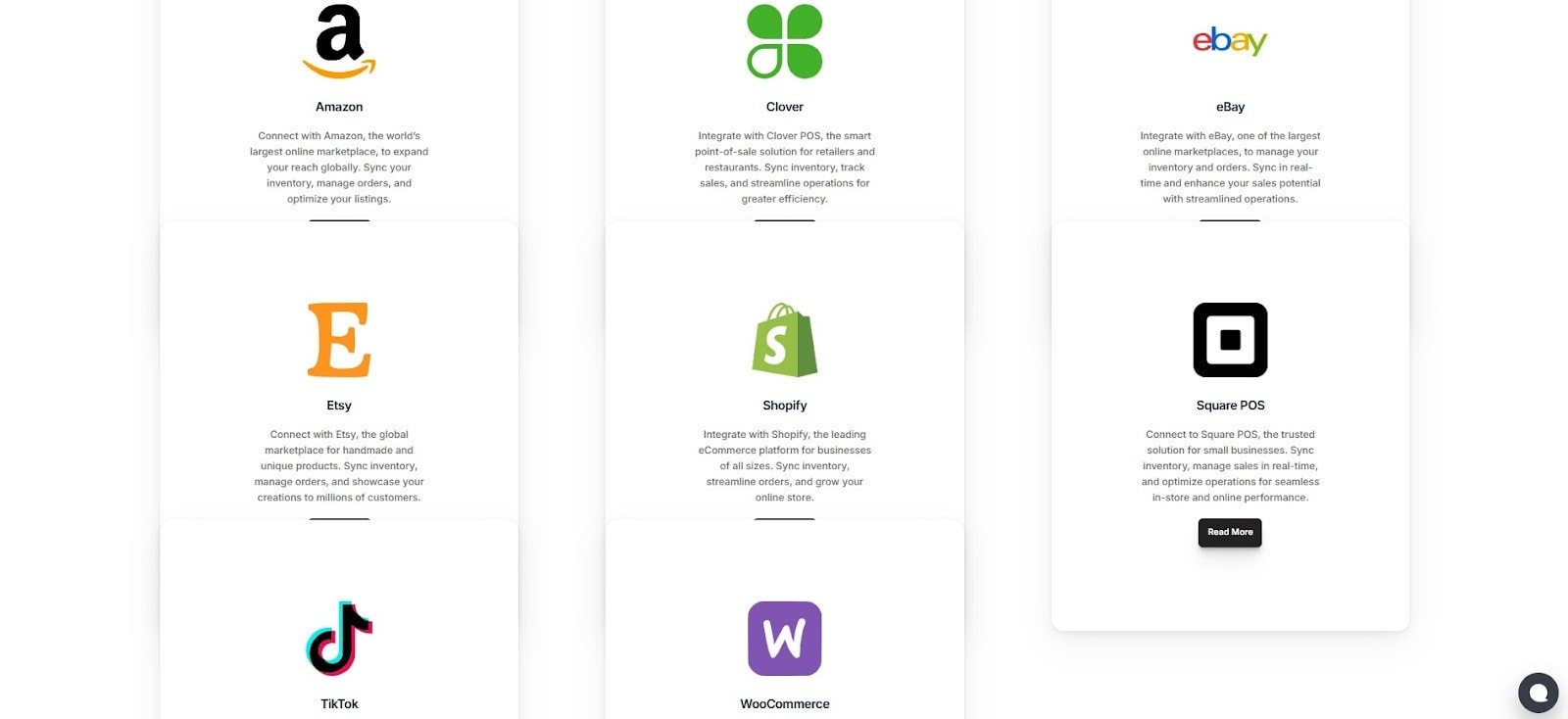
QuickSync’s setup strengths:
Easy channel connections (Shopify, Amazon, Etsy, Square POS, WooCommerce, TikTok Shop, and more)
Intuitive product and attribute mapping
Automatic catalog syncing for quick onboarding
Easy bulk import for existing listings
Guided setup for faster configuration
Minimal learning curve even for non-technical sellers
Most sellers are fully set up and syncing within minutes, not hours.
What Sellbrite Offers
Sellbrite offers a straightforward setup for marketplace sellers, especially those working with Amazon, eBay, Etsy, and Walmart. The onboarding is beginner-friendly but becomes more complex when multiple storefronts or advanced workflows are added.
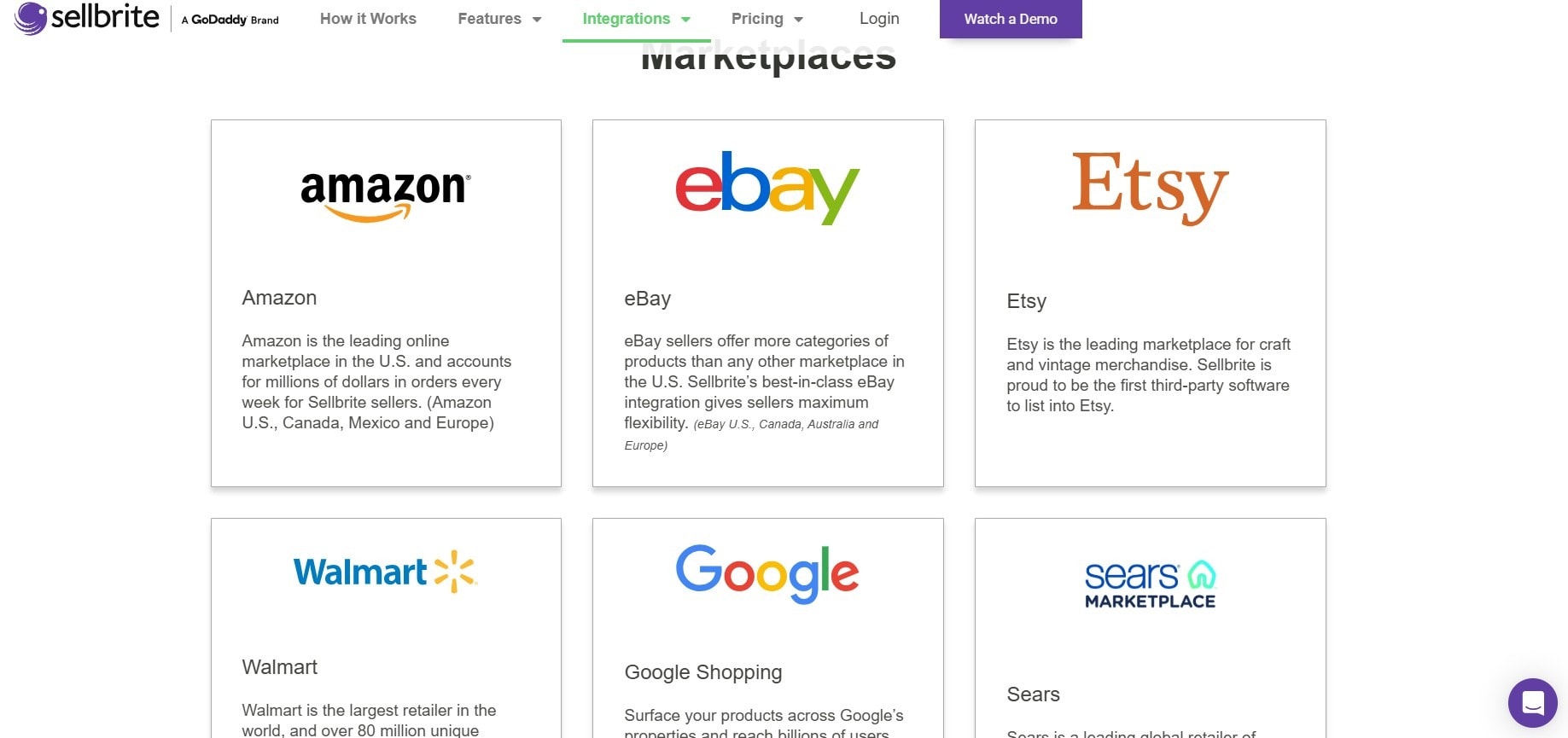
Sellbrite’s setup strengths:
Simple onboarding for marketplace-only sellers
Easy product publishing tools
Good documentation for beginners
Basic listing import tools
However, Setup can get more manual when managing multiple storefronts, adding POS systems, syncing complex catalogs, or handling multi-location inventory.
Quick Integration & Setup Comparison Table
|
Setup Factor |
QuickSync |
Sellbrite |
|
Initial Setup Time |
Very fast |
Fast for marketplaces |
|
Multi-Channel Setup |
Simple, smooth |
More manual steps |
|
Storefront + Marketplace Sync |
Fully supported |
Limited support |
|
POS Integration |
Yes (Square, Clover, etc.) |
Not supported |
|
Product Mapping |
Automated + advanced |
Basic |
|
Learning Curve |
Easy |
Easy for small setups |
|
Setup Support |
Strong guidance |
Good documentation |
Verdict
QuickSync makes setup quick and easy, even for multi-channel, high-volume stores. Sellbrite is fine for simple setups, but it gets tricky as you add more channels. When speed and reliability matter, QuickSync comes out on top.
5. User Interface & Experience
Your syncing tool shouldn’t feel like a maze. A clean, easy to use interface saves time, reduces mistakes, and makes your day-to-day workflow smoother. A complicated or outdated UI, on the other hand, increases confusion and slows down even simple tasks.
What QuickSync Offers
QuickSync’s interface offers you more clarity and speed. Everything like products, inventory, orders, channels is exactly where you expect it to be. No clutter, no unnecessary steps, no “where is this setting?” moments.
QuickSync’s UX strengths:
Modern, clean, easy-to-navigate single dashboard
Clear channel indicators for quick insights
Simple workflows for syncing, mapping, and publishing
Fast access to bulk actions and automations
Designed for beginners, powerful for advanced users
Minimal clicks to accomplish key tasks
Whether you’re adding multiple products or monitoring sync status, QuickSync keeps everything smooth and efficient with its easy to use interface.
What Sellbrite Offers
Sellbrite offers a simple, familiar layout that works well for sellers who primarily list and manage products on marketplaces. It’s straightforward and functional, but not as modern or automation-focused.
Sellbrite’s UX strengths:
Clean layout for listing-focused workflows
Easy marketplace listing navigation
user friendly product and inventory screens
Great for marketplace-only sellers
Sellbrite’s UX is solid for basic operations but less flexible for modern multi-channel needs.
UI & Experience Comparison Table: QuickSync vs Sellbrite
|
UI/UX Factor |
QuickSync |
Sellbrite |
|
Dashboard Design |
Modern & clean |
Simple but less modern |
|
Ease of Navigation |
Very easy |
Easy |
|
Bulk Editing UX |
Streamlined |
Basic |
|
Automation Visibility |
Clear & intuitive |
Limited |
|
Advanced Attribute Handling |
Strong |
Basic |
|
Learning Curve |
Very low |
Higher |
Verdict:
QuickSync has a modern, intuitive, and scalable interface, perfect for multi-channel sellers with large inventories. Sellbrite works for simple setups but slows down as complexity grows. For a smooth, future-ready experience, QuickSync wins.
6. Security Features & Compliance
Security is something that can not be compromised. When your tool manages products, inventory levels, orders, and API access across multiple platforms, even a small vulnerability can lead to listing errors, account flags, or data exposure. Hence it is crucial factor to choose the right and secure platform
What QuickSync Offers
QuickSync is built for sellers who want security without the hassle. Its lightweight, focused architecture handles only essential data, keeping your store safe and operations simple.
Key advantages:
End-to-end encryption for products, inventory, and orders
Safe authentication across all connected channels
Minimal data handling to reduce risk
Controlled access with real-time monitoring
Regular system checks to ensure stability
QuickSync prioritizes stability and protection so sellers can operate confidently at any scale.
What Sellbrite Offers
Sellbrite provides essential security protections suitable for small and mid-sized sellers. It covers the basics well, ensuring safe API connections and standard compliance for marketplace workflows.
Sellbrite’s security strengths:
Secure marketplace API integrations
Standard encryption for inventory and order data
Reliable authentication controls
Good for marketplace-focused operations
However, it offers fewer advanced security controls for multiple location operations and POS integrations. Sellbrite covers the fundamentals but lacks the deeper security layers needed for more complex, multi-channel workflows.
Security Comparison Table: QuickSync vs Sellbrite
|
Security Factor |
QuickSync |
Sellbrite |
|
API Security |
Strong, enterprise-grade |
Standard security |
|
Data Encryption |
End-to-end |
Standard encryption |
|
Compliance with Major Platforms |
Full compliance |
Compliant |
|
Access Controls |
Advanced |
Basic |
|
Multi-Channel Security Handling |
Robust |
Limited |
|
Automation Safety Nets |
Strong |
Fewer safeguards |
|
Enterprise-Grade Protection |
Yes |
Not designed for enterprise scale |
Verdict:
QuickSync ensures advanced, enterprise-level security across channels and automation, while Sellbrite covers basic marketplace protection. For long-term safety and compliance, QuickSync stands out.
7. Customer Support & Assistance
Customer support team can make or break your experience with any syncing platform. Quick responses, knowledgeable agents, and accessible channels help you fix issues fast so your sales and operations don’t suffer. Let’s look at the customer support service of both solutions and who provides it better.
What QuickSync Offers:
QuickSync offers fast, intuitive, and customer-focused support tailored specifically for multichannel sellers. Its straightforward system ensures most issues are resolved quickly, with minimal back-and-forth, so you can stay focused on growing your business.
Key features of QuickSync’s customer support include:
Fast responses during business hours
In-app live chat
Priority email
Guided onboarding & setup
Clear, simple assistance
Quick issue resolution
What Sellbrite Offers:
Sellbrite on the other end offers support via email and live chat during business hours, along with help center articles, guides, and onboarding resources for higher-tier plans. However, lower-tier users may experience slower response times, and smaller merchants have fewer personal touchpoints.
Quick Comparison Table of Customer Support
|
Criteria |
QuickSync |
Sellbrite |
|
Response Speed |
Very fast |
Moderate |
|
Dedicated Support |
Yes, all tiers |
Higher-tier only |
|
Help Documentation |
Good |
Extensive |
|
Onboarding Assistance |
Included |
Tier-based |
Verdict:
QuickSync offers quicker, more personal support across all plans, making it easier for small to mid-sized sellers to resolve issues fast. Sellbrite’s support is reliable but can feel slower or limited for smaller merchants.
8. Customization Options & Flexibility
No two businesses are the same so why settle for a rigid syncing tool? Inflexible systems slow you down, create mistakes, and leave you stuck. The right platform molds itself to your workflow, letting you grow smoothly while others struggle to keep up.
What QuickSync Offers:
QuickSync focuses on practical, easy-to-use customization options:
Sync settings
Selective syncing of products and channels
Price adjustments across marketplaces
Currency flexibility for multi-region selling
QuickSync prioritizes simplicity and ensures that even non-technical users can make adjustments quickly without getting overwhelmed.
What Sellbrite Offers:
Sellbrite provides deeper customization options for larger or more complex operations:
Automation rules for workflows
Custom product and inventory mapping
Developer tools for API integrations
Multi-location and channel-specific settings
While powerful, Sellbrite’s customization can feel more technical and may require a learning curve for smaller sellers.
Quick Comparison Table of Customization & Flexibility
|
Feature / Focus |
QuickSync |
Sellbrite |
|
Sync Settings |
Simple, easy-to-use |
Available but more technical |
|
Selective Syncing |
Products and channels can be selectively synced |
Custom product and inventory mapping |
|
Price Adjustments |
Across marketplaces |
More complex setup, may require technical knowledge |
|
Currency Flexibility |
Supports multi-region selling |
Limited focus, more advanced setup required |
|
Automation / Rules |
Basic automation |
Workflow automation rules for complex operations |
|
Multi-location & Channel Settings |
Basic |
Channel- and location-specific settings |
|
Ease of Use |
Prioritizes simplicity; non-technical users can adjust quickly |
More powerful but technical; learning curve for smaller sellers |
Verdict:
QuickSync keeps customization simple and accessible, perfect for small to mid-sized sellers who need quick adjustments without technical hassle. Sellbrite offers more advanced flexibility, but it’s better suited for larger operations with technical resources.
9. Scalability & Growth Potential
Your business growth shouldn’t be limited by your syncing platform. A scalable solution ensures you can handle more products, orders, and channels without slowdowns, glitches, or unexpected costs.
What QuickSync Offers:
QuickSync is designed for small-to-mid-sized and high-volume marketplace sellers looking for predictable, scalable performance:
Handles up to 50,000 items
Smooth multi-channel syncing as your business grows
Affordable upgrade paths without sudden cost jumps
Maintains performance even during peak sales
What Sellbrite Offers:
Sellbrite is built to support larger operations and enterprise-level workflows:
Multi-channel and multi-location support
Enterprise-grade sync for high-volume retailers
Custom plans for very large catalogs and complex operations
Can scale effectively but may come with higher pricing tiers
Quick Comparison Table of Scalability & Growth Potential
|
Criteria |
QuickSync |
Sellbrite |
|
Ideal User Type |
SMBs & growing brands |
Large retailers & enterprises |
|
Handles Large Catalogs |
Excellent |
Excellent |
|
Multi-Store Sync |
Yes |
Yes |
|
Enterprise Features |
Limited |
Strong |
Verdict:
QuickSync scales seamlessly for small-to-high-volume sellers, offering predictable costs and smooth performance. Sellbrite supports larger operations and enterprise features, but the pricing and setup can be more complex. For sellers seeking hassle-free scaling, QuickSync provides a simpler, cost-efficient path forward.
10. User Reviews, Feedback, and Testimonials
We checked out reviews from the Shopify App Store and ecommerce forums to see how QuickSync and Sellbrite actually perform. Reliability, syncing accuracy, and support—these are the things that really matter once you start using the tools.
What QuickSync Users Say
QuickSync consistently earns high praise, with an impressive 4.9-star rating. Here’s why users love it:
Customer Support: Fast, clear, and highly praised.
Setup & Onboarding: Quick and easy, even for multi-channel sellers.
Reliable Syncing: Runs smoothly with support on hand.
Long-Term Satisfaction: Users stay happy for years.
While feedback is overwhelmingly positive, a few users reported minor issues like rare inventory levels inconsistencies but these are isolated incidents.
What Sellbrite Users Say
Sellbrite’s reviews are more mixed, averaging around 3.9 stars. Here’s the breakdown:
Syncing Challenges: Occasional delays, missing multiple orders, or duplicate listings.
Support Limitations: Slower response times, especially on lower-tier plans.
Positive Reviews: Multi-channel capabilities and centralized dashboard appreciated by some users.
Long-Term Concerns: Technical issues with large catalogs or complex operations.
Comparison Table of User Reviews & Testimonials
|
Review Criteria |
QuickSync (4.9 ★) |
Sellbrite (3.6 ★) |
|
Overall Rating |
⭐ 4.9/5 |
⭐ 3.9/5 |
|
Support Quality |
Exceptional, fast, personal |
Moderate — mixed experiences |
|
Sync Reliability |
Stable & accurate |
Occasional delays & errors |
|
Ease of Setup |
Quick and smooth |
Moderate — some complexity |
|
Long-Term Satisfaction |
High |
Mixed |
|
Common User Complaints |
Rare syncing issues |
Sync delays, duplicate listings, slow support |
Verdict:
QuickSync clearly outshines Sellbrite in user satisfaction. With faster setup, reliable syncing, and top-notch support, QuickSync keeps users happy and operations smooth. Sellbrite works, but occasional syncing issues and slower support can frustrate growing sellers.
QuickSync vs Sellbrite: Who Actually Wins?
After breaking down pricing, basic and advanced features, performance, scalability, security, and real user feedback, one thing becomes very clear: this isn’t just a feature-by-feature comparison — it’s a question of which platform grows with you instead of holding you back.
Sellbrite is a capable tool for marketplace-focused sellers with simple needs. But as soon as complexity enters the picture — multiple channels, POS systems, large catalogs, high order velocity, or cost predictability — QuickSync consistently pulls ahead.
Below is the complete verdict across all 10 critical factors that truly define long-term ecommerce success.
|
Comparison Factor |
QuickSync |
Sellbrite |
|
1. Pricing Plans & Value |
Predictable, budget-friendly, scales without spikes |
Volume-based, cost rises quickly |
|
2. Features & Capabilities |
Deep automation, real-time sync, POS + marketplaces |
Strong listing tools, limited automation |
|
3. Performance & Speed |
Real-time, high-volume optimized |
Reliable but slower at scale |
|
4. Ease of Integration & Channels |
Plug-and-play, storefronts + POS + marketplaces |
Best for marketplace-only setups |
|
5. User Interface & Experience |
Modern, clean, scalable UI |
Simple but less flexible |
|
6. Security & Compliance |
Enterprise-grade, multi-channel safe |
Basic marketplace-level security |
|
7. Customer Support |
Fast, personal, strong across all plans |
Slower on lower tiers |
|
8. Customization & Flexibility |
Simple, non-technical adjustments |
More advanced but technical |
|
9. Scalability & Growth |
Smooth scaling with predictable costs |
Scales well but gets expensive |
|
10. User Reviews & Satisfaction |
⭐ 4.9★ — consistently praised |
⭐ ~3.9★ — mixed feedback |
Final Outcome: Which Platform Should Multi Channel Sellers Choose?
After comparing QuickSync and Sellbrite across all 10 key factors, the winner is clear.
QuickSync is the stronger choice for growing ecommerce brands.
It offers better automation, faster and more reliable syncing, predictable pricing, and higher user satisfaction — all designed to scale without stress.
Sellbrite works for simple, marketplace-only setups, but as complexity and volume increase, its limitations become clear.
Frequently Asked Questions (FAQs)
1. QuickSync vs Sellbrite: which platform is easier to migrate to from another inventory system?
QuickSync is generally easier to migrate to because it offers guided setup and automated catalog mapping. Sellbrite migrations may require additional manual validation depending on catalog size and marketplace complexity.
2. How does an inventory management tool help reduce errors for growing ecommerce businesses?
An inventory management tool reduces errors by centralizing stock data, automating updates, and eliminating manual adjustments, which helps prevent overselling and inconsistent inventory records.
3. Why is multi channel selling harder to manage than single-channel selling?
Multi channel selling is harder because each platform has different update rules, order flows, and listing requirements, making manual inventory coordination inefficient and error-prone.
4. What should ecommerce businesses look for beyond basic inventory sync features?
Ecommerce medium sized businesses should look for automation depth, error handling, data consistency checks, scalability, and visibility into syncing activity rather than relying only on basic inventory sync.
5. Why is real time sync important during high-volume sales periods?
Real time sync is important because delayed updates during high-volume sales can cause inventory mismatches, canceled orders, and poor customer experiences.
6. Does Etsy integration require different inventory handling compared to other marketplaces?
Yes, Etsy integration often requires more detailed variation handling and listing-specific logic, which makes flexible inventory rules more important than standard marketplace syncing.
7. Why do sellers prefer tools with predictable pricing as they scale?
Sellers prefer predictable pricing because it allows accurate cost forecasting and margin protection, especially as order volume and sales channels increase.
8. How does order sync affect fulfillment speed and customer satisfaction?
Order sync ensures fulfillment teams receive accurate and timely order data, which reduces shipping delays, prevents duplicate fulfillment, and improves delivery reliability.
Bottom line:
If you want long-term growth, control over costs, and smooth multi-channel operations, and centralized inventory management system then QuickSync is the best investment.
Start your 14-day free trial and protect your margins before overselling hurts your brand.