Managing accurate inventory levels across multiple e-commerce stores can be one of the biggest challenges for e-commerce sellers. Whether you sell on your Shopify store alone or use platforms like Etsy, TikTok Shop, or Amazon alongside it, keeping inventory data aligned in real time is critical to maintaining accurate stock levels and preventing costly overselling.
That’s where Shopify inventory sync comes in. It ensures your product data, stock counts, and orders remain consistent across all connected stores automatically and accurately.
Why Shopify Inventory Sync Is Essential for Multi-eCommerce Sellers
In the modern e-commerce landscape, most sellers don’t rely on just one platform. They list products on multiple channels to reach broader audiences — Shopify for brand control, Etsy for handmade items, or TikTok Shop for social selling.
However, managing inventory manually across these platforms often leads to:
- Overselling or underselling when inventory levels aren’t updated fast enough
- Inconsistent product details, such as mismatched pricing or images
- Time wasted on repetitive manual edits across multiple stores
A Shopify inventory sync app helps avoid all of this. It connects your sales channels and updates inventory in real time. When an order is placed or stock changes on one channel, every connected store reflects the same update instantly.
The result? Error-free selling, better inventory management, and happier customers — all from one unified system.
How Shopify Inventory Sync Works Across Multiple Stores
A Shopify inventory sync uses two-way data exchange to keep stock levels, pricing, and product details identical across platforms. When a product sells on one channel, the synced system automatically updates Shopify and all other sales channels.
For Example:
Let’s say you sell handmade candles on Shopify, Amazon, and eBay.
- You have 100 candles in stock, synced across all three stores.
- A customer buys 5 candles on Amazon.
- Instantly, your inventory sync app updates the same inventory count (95) across Shopify and eBay.
So like this, you don’t have to manually log in anywhere — it’s all automatically synced in real time.
Common methods sellers use to sync Shopify Inventory with Other e-commerce platforms
Here’s a quick comparison of the most common methods sellers can use to sync Shopify inventory:
|
Method |
Best For |
Pros |
Cons |
| Manual Updates | Small sellers | Free and simple | Time-consuming, prone to errors, and no real-time updates |
| CSV Import/Export | Occasional sellers | Bulk updates possible | Not automated, delays in stock accuracy |
| Integration Tools (like QuickSync) | Growing and multi-channel sellers | Real-time updates, automatic syncing, scalable | Requires a subscription plan |
Manual and CSV-based methods work for small catalogs, but as your business and sales channels expand, automation becomes essential. For most merchants, an inventory sync app is the best long-term solution for consistent inventory data across multiple locations.
Best Tool for Syncing Shopify Inventory Across Multiple Platforms
Among the available third-party apps, QuickSync stands out as one of the most efficient and best tools for Shopify inventory sync.
It’s designed for multi-store sync, giving you the ability to automatically sync inventory, sync products, and track inventory across multiple Shopify stores, physical stores, and online sales channels.
Key features include:
- Real-time inventory sync and order synchronization
- Automatic product import, descriptions, and images update
- Seamless integration with multiple platforms (Shopify, Etsy, TikTok Shop, WooCommerce, Square POS)
- Unified dashboard for better performance and efficiency
- SKU-based mapping for error-free product variants and bundles
By centralizing operations, QuickSync eliminates repetitive work and ensures that your Shopify store always displays correct stock data — no matter where you sell.
Setting Up Automatic Shopify Inventory Sync with Other E-commerce Platforms via QuickSync
Here’s how to connect and sync your Shopify inventory with other E-commerce Platforms using QuickSync:
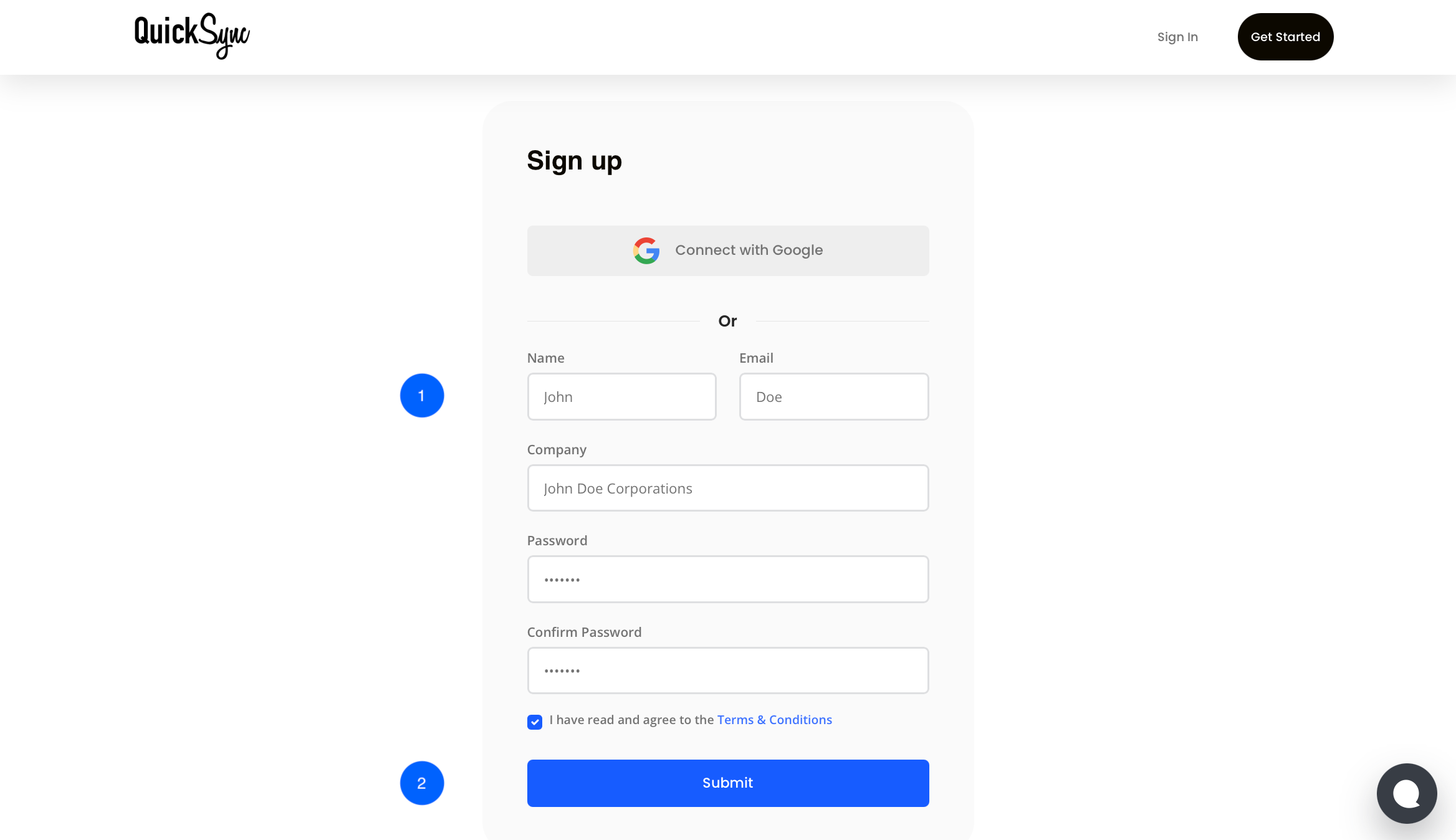
Step 1: Create a QuickSync Account
- Visit QuickSync.pro and sign up using your business email.
- Once registered, log in to your dashboard.
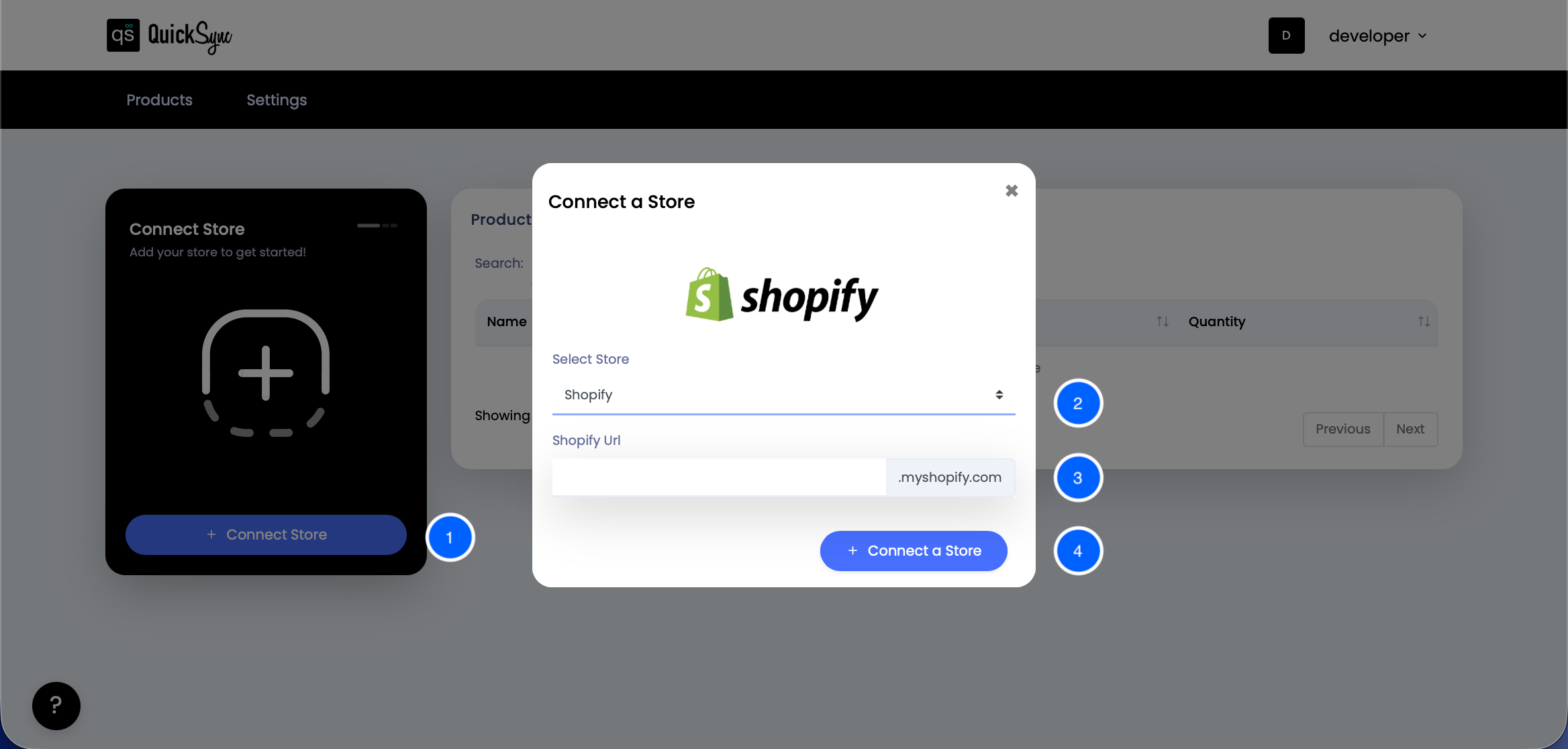
Step 2: Connect Your Shopify Store
- From the QuickSync dashboard, click “+ Connect Store” and select Shopify.
- Log in to your Shopify admin account and grant permissions for syncing products, inventory, and orders.
- Authorize QuickSync to access your store’s product catalog, inventory, and orders.
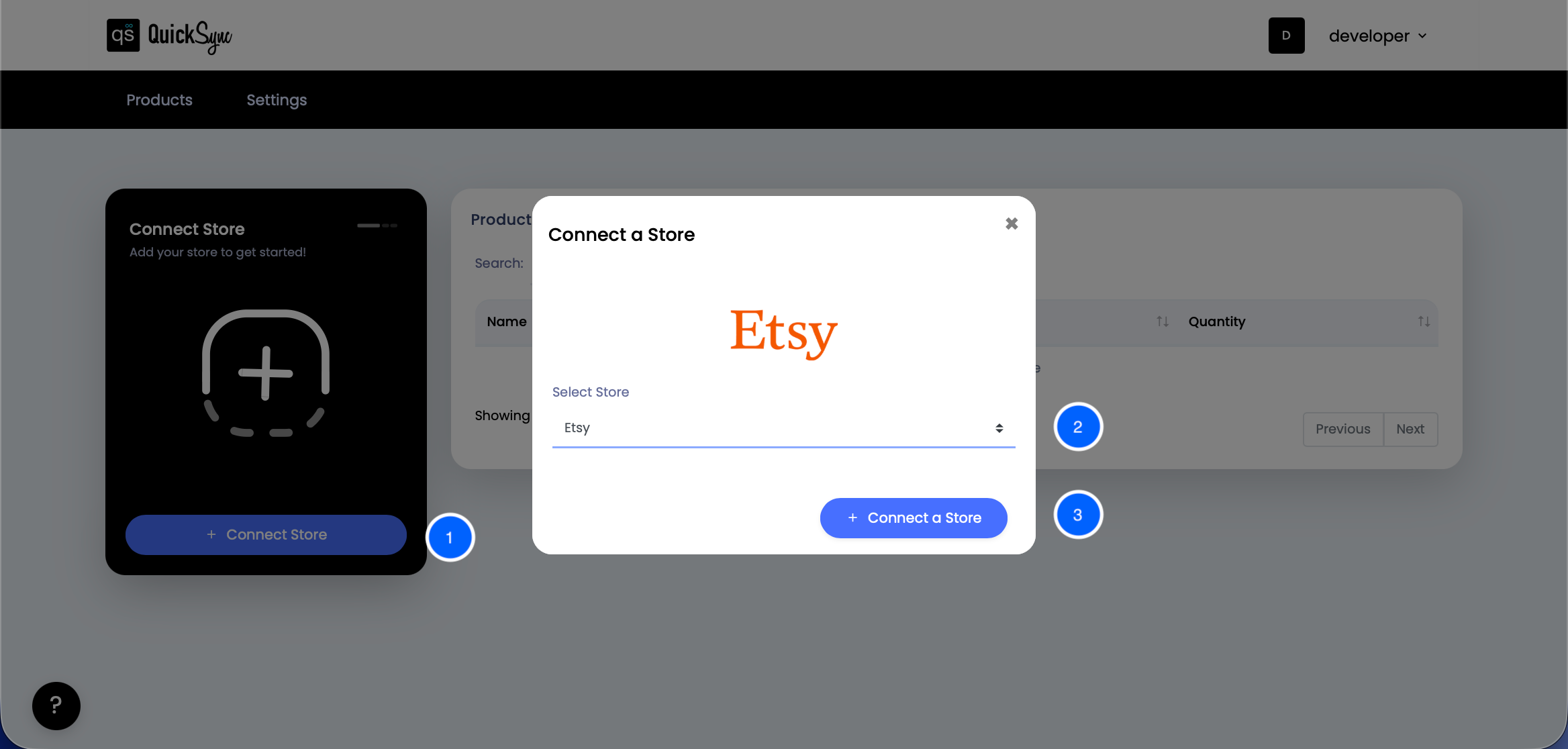
Step 3: Connect Other Sales Channels
Repeat the same process to connect your secondary platforms (such as TikTok Shop or Etsy). We have taken Etsy as an example.
- So come to the QuickSync dashboard, click “+ Connect Store” and select Etsy. and click on “+ Connect a Store“. That’s all.
- QuickSync now securely fetches product details and categories automatically.
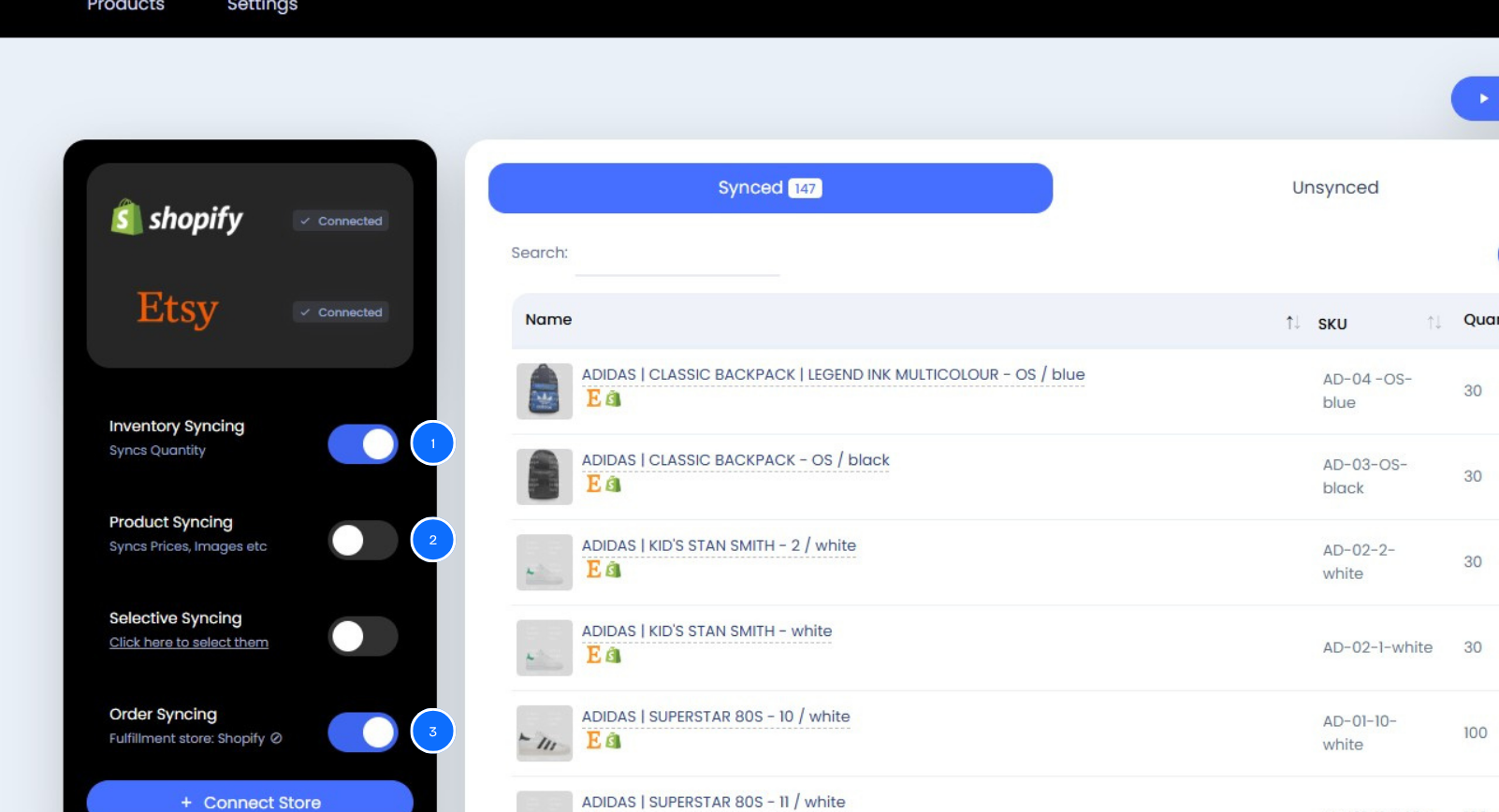
Step 4: Choose What to Sync
Now, decide whether to sync inventory, products, or orders.
- Sync Inventory: Sync inventory between Shopify and other connected sales channels, with automatic updates.
- Sync Products: Auto-sync product details (product images, description, price) across both platforms.
- Sync Orders: Orders from one store will be routed to the chosen Fulfillment Store.
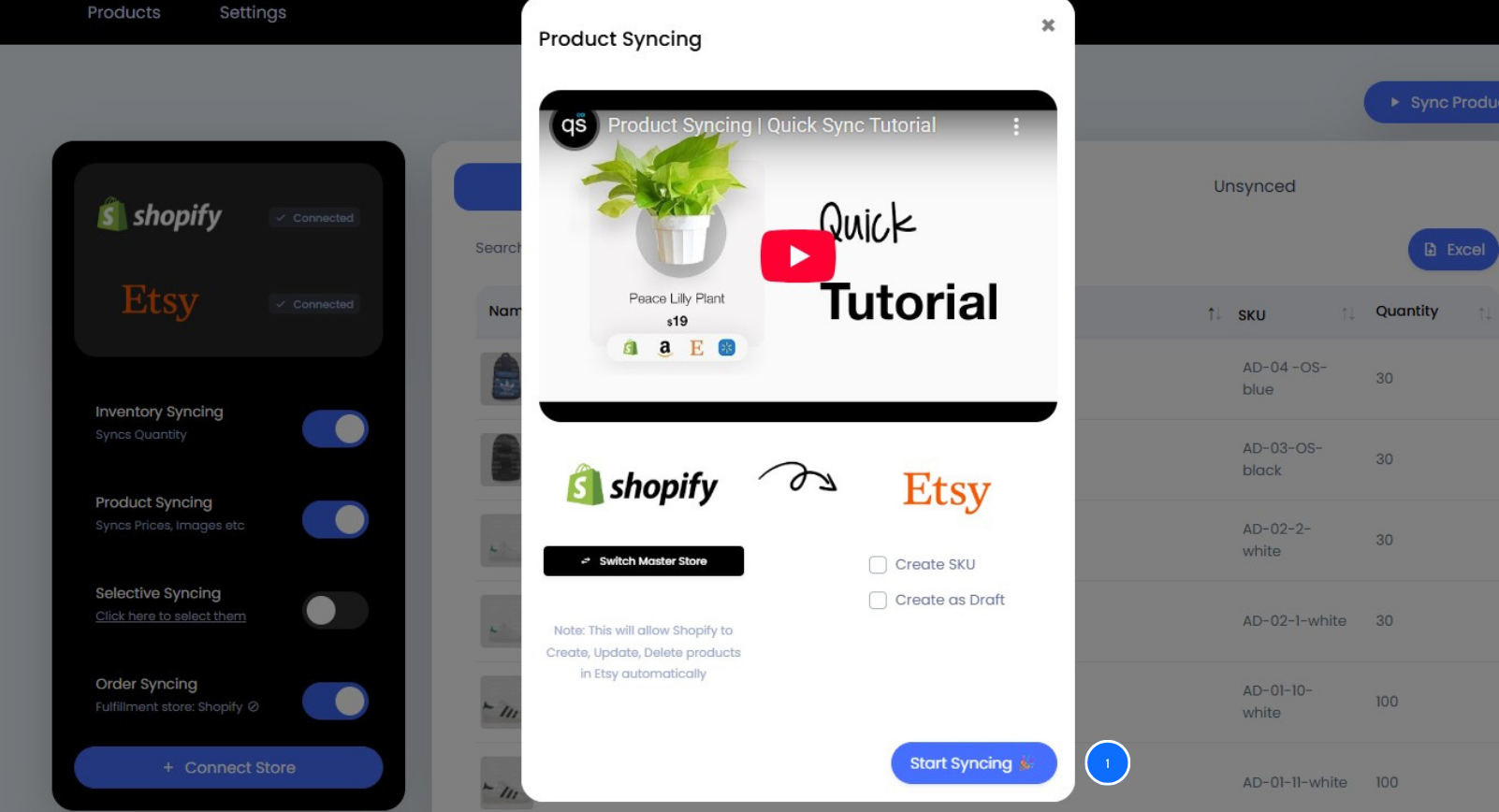
Step 5: Start Syncing
- Click Start Sync. QuickSync will begin syncing your Shopify inventory to all connected channels instantly. You can monitor all updates directly from your unified dashboard.
Common Shopify Inventory Sync Issues and How to Resolve Them
Even with automation, sellers can run into challenges. Here are a few common sync issues and how to handle them:
- Inconsistent SKUs: Ensure each product uses the same SKU across platforms. Inconsistent SKUs cause mismatched updates or duplicate listings.
- Delay in Non-Real-Time Tools: Some apps sync data periodically rather than instantly, leading to temporary stock inaccuracies. Always use tools with real-time syncing capabilities.
- Improper Product Mapping: If product data isn’t matched correctly between platforms, updates may fail. Always double-check product mapping settings during setup.
- Untracked Returns or Refunds: Returns can affect stock accuracy if not synced. Make sure your sync tool automatically adjusts inventory after each return or refund.
Best Practices to Sync Shopify Inventory Smoothly with Other Platforms
To maintain accurate and smooth synchronization, follow these best practices:
- Use Consistent SKUs: This ensures correct matching between Shopify and connected stores.
- Regularly Audit Your Inventory: Check product data periodically to confirm everything syncs correctly.
- Optimize Product Data: Keep names, images, and pricing consistent across platforms.
- Leverage Automation: Allow your sync tool to handle updates, orders, and pricing in real time.
- Track Analytics: Use performance reports to identify slow-moving or overstocked items and adjust accordingly.
These practices not only maintain accuracy but also help improve operational efficiency and customer satisfaction.
FAQs
Q1. What does Shopify inventory sync mean?
It refers to automatically updating stock levels, product details, and orders between Shopify and other connected sales channels in real time.
Q2. Can Shopify sync inventory with multiple platforms?
Yes. With automation tools like QuickSync, you can sync inventory between Shopify, TikTok Shop, Etsy, and other channels simultaneously.
Q3. Does Shopify have a built-in inventory sync?
Shopify offers limited integrations, but for complete automation and real-time accuracy, using a third-party integration tool is more effective.
Q4. How do I prevent overselling on Shopify?
By enabling real-time inventory sync, any order made on one channel instantly updates your stock levels everywhere else.
Q5. How often does QuickSync update inventory?
QuickSync updates inventory and orders near real time, ensuring accurate, real-time data across platforms.
The Bottom Line
Managing inventory across multiple Shopify stores and platforms doesn’t have to be a tough task. With real-time Shopify inventory sync, you can easily synchronize inventory, sync products, and keep inventory levels accurate across every connected store.
QuickSync offers a seamless integration experience that helps merchants automatically sync inventory, link suppliers, and manage inventory data effortlessly.
Try QuickSync today with a 14-day free trial and experience the effortless, automated inventory syncing process.