A backorder can either give you a sale or quietly cost you a customer. It all comes down to whether you chose it.
A backorder is an order you accept for a product that’s out of stock right now. The buyer pays today, and you ship when new stock arrives. When you plan it, with a real restock date and a clear note at checkout, it keeps sales you’d otherwise lose. When you don’t plan it, it usually means the same unit sold on two channels at once, and now someone’s waiting for stock you don’t have.
That second kind is the expensive one. On eBay, cancelling an order because an item is out of stock counts as a transaction defect. Go over 2% of transactions with defects, and you can drop below standard.
This guide covers what backorders are and how they differ from out-of-stock and pre-orders. It covers when to allow them and how to handle one without breaking US shipping rules. It also shows how to stop the accidental ones before they reach a customer.
What is a backorder?
A backorder is a customer order for an item that’s temporarily out of stock, which you’ll fill once you restock. The sale is made, but the item ships later. When a product page or order says “backordered,” it means the seller has accepted the order and is waiting on new stock to ship it.
Here’s an example. You sell a blue hoodie and run out on Monday. Your supplier will send more in 12 days. You don’t take the hoodie off your store. You keep selling it with a note: “Backordered. Ships in 12 days.” Anyone who buys it before the new hoodies arrive has placed a backorder.
A backorder only makes sense when more stock is actually coming, and you know roughly when. Suppose you don’t know when, or whether, you’ll get more; it isn’t a backorder. It’s an out-of-stock product that’s still taking money. In inventory terms, a stockout is the moment stock runs out, and a backorder is an order placed during one that’s waiting to be filled.
Backorder vs out of stock vs pre-order
All three start with zero units on the shelf. What changes is whether the buyer can still order and when the item ships.
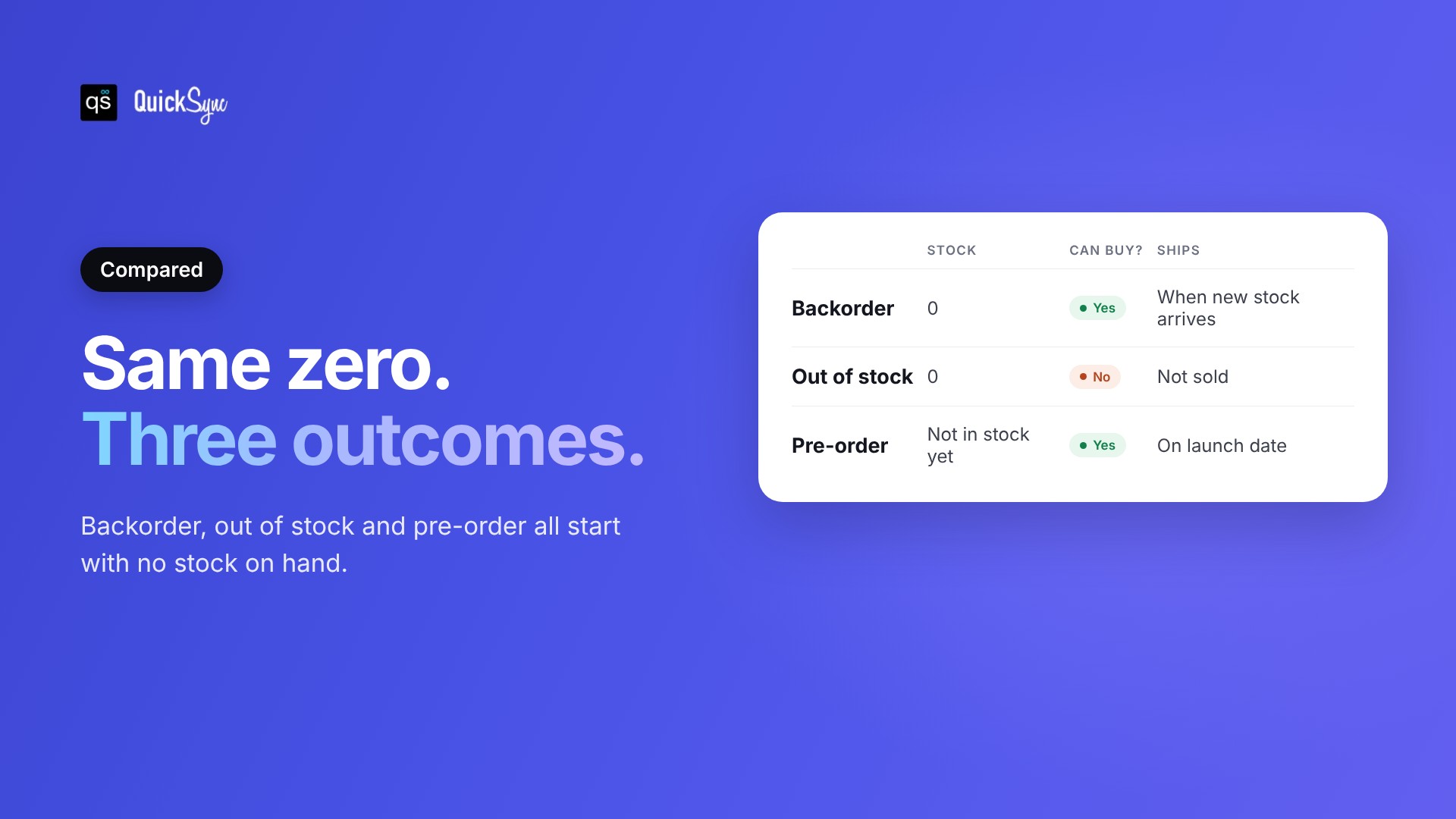
| Backorder | Out of stock | Pre-order | |
|---|---|---|---|
| Stock on hand | 0, more coming | 0 | 0, product not released yet |
| Can buyers order? | Yes | No | Yes |
| When it ships | When the restock arrives | Not sold | On or after launch |
| Typical use | Popular item between deliveries | No restock planned or date unknown | New product or new season |
| Main risk | Restock arrives late | Lost sale | Launch slips |
The difference between a backorder and a pre-order is the product’s history. A backorder is for something you’ve sold before and ran out of. A pre-order is for something you haven’t stocked yet. Buyers treat them the same way, though: in both cases they’ve paid, and they’re waiting.
Why do backorders happen?
Backorders happen when demand gets ahead of supply. Sometimes that’s a good problem, like a product going viral. Often it’s a planning or counting problem that’s easy to fix once you can see it.
The four most common causes:
- A demand spike. A gift guide, a TikTok video, or a holiday rush sells a month of stock in a week.
- Supplier delays. The restock you planned around arrives two weeks late, so your normal buffer runs out.
- Made-to-order lead times. Some products, like custom furniture or printed goods, are always technically on backorder because you make them after the order.
- Accidental overselling. Your count says you have stock, but you don’t. This is the most common cause for shops that sell on more than one channel, and that’s a lot of shops: online sales made up 17.1% of US retail sales in Q2 2026.
The first three are planning problems. You fix them with better reorder points and safety stock, which our inventory control guide works through with real numbers. The fourth is a counting problem, and we’ll come back to it. If it already sounds familiar, QuickSync keeps one stock count across all your channels, and you can try it free for 14 days.
Should you allow backorders?
You should allow backorders when you know when the stock is coming, the wait is short, and buyers are willing to wait for this particular product. Avoid them when restock dates are uncertain, when the product is easy to buy elsewhere, or when you sell on marketplaces that penalize late or cancelled orders.
| Allow backorders when | Avoid backorders when |
|---|---|
| You have a confirmed delivery date | Your supplier’s dates often slip |
| The wait is days or a couple of weeks | The wait is unknown or longer than a month |
| The product is unique or made by you | Buyers can get the same item elsewhere today |
| You sell mainly on your own store | Most sales come through marketplaces |
| You can email every waiting buyer | Nobody owns order updates |
Backorders also affect trust. If a buyer waits 10 days and gets their order on time, they’re happy. If they wait 10 days and then hear it’s delayed, they’re not.
How to handle a backorder, step by step
Handling a backorder well comes down to three things: tell the buyer before they pay, ship by the date you promised, and if you can’t, ask before you make them wait longer. In the US, the last part isn’t optional. It’s the law.
1. Say it before checkout
Show “Backordered” and an expected ship date on the product page, in the cart and at checkout. Don’t let a backorder look like an in-stock item. The buyer should know they’re waiting before they pay, not after.
2. Promise a date you can keep
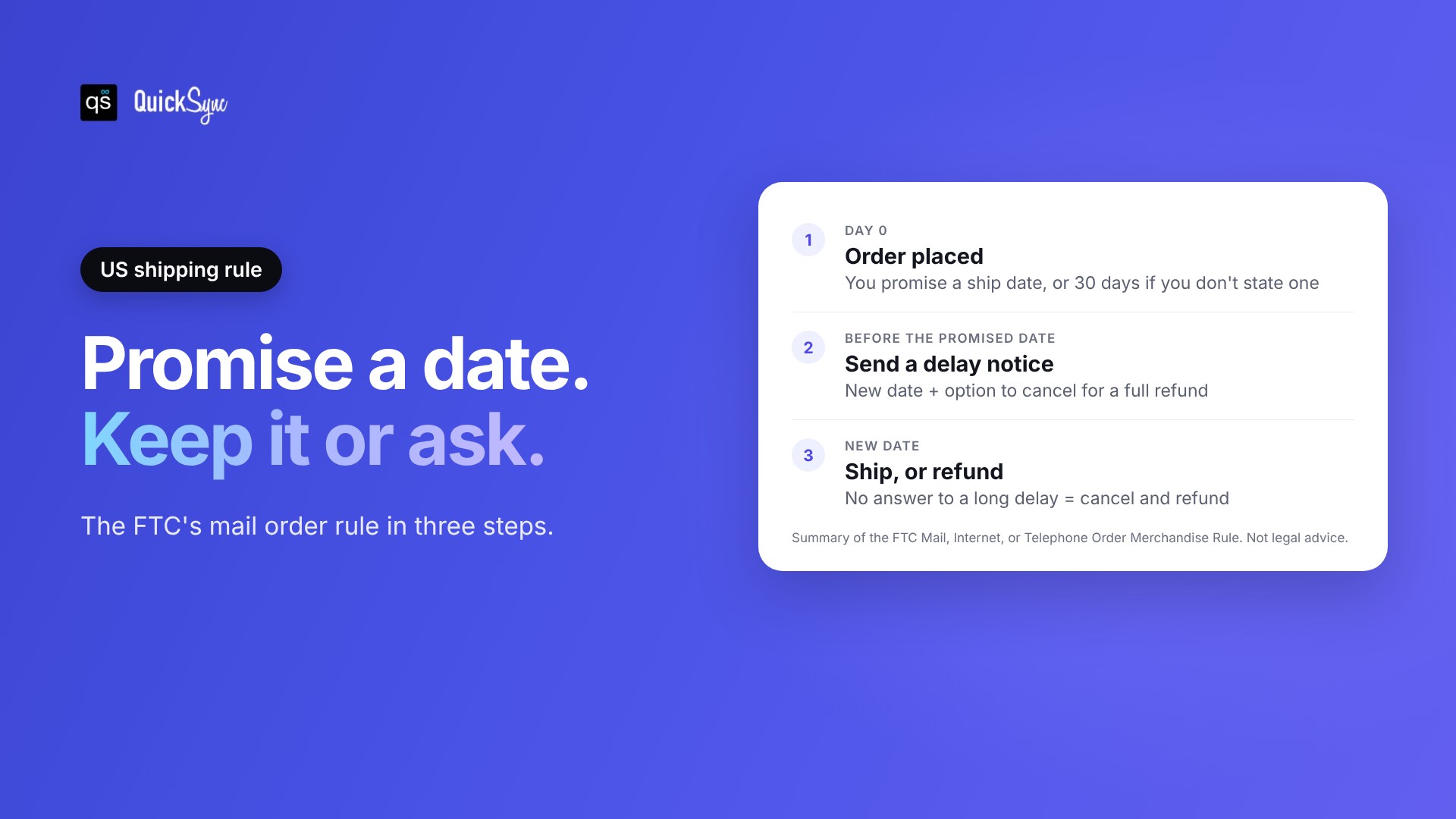
The FTC’s Mail, Internet, or Telephone Order Merchandise Rule says you must have a reasonable basis for the shipping time you state. If you don’t state one, you must ship within 30 days of the order. So use the date your supplier confirmed, plus a few days of margin.
3. Confirm it in writing
Send an order confirmation that repeats the expected ship date. If one order mixes in-stock and backordered items, say which item ships later and whether you’ll split the shipment.
4. If you’ll be late, send a delay notice in time
Under the same FTC rule, you have to send the delay notice before the promised ship date runs out. It must give a new date and let the buyer cancel for a full refund. If the new date is more than 30 days past the original, or you don’t know it, you need the buyer’s clear yes to wait. Silence doesn’t count. Without that yes, the order counts as cancelled if you haven’t shipped within 30 days of the original date, and you refund it. Buyers who agree to an open-ended wait can still cancel any time before you ship. This is a summary, not legal advice, so check the full rule for your situation.
5. Give the buyer options
Buyers handle a wait better when they get a choice. Offer to ship what’s ready now, swap to a similar item, keep waiting, or cancel for a refund. Refund to the original payment method. The FTC rule doesn’t allow store credit as a substitute for a required refund.
6. Ship in the order you received them
When the restock lands, fill backorders before new orders, oldest first. Send tracking the same day. Buyers who waited longest should get their items first.
7. Find out why it happened
Every backorder has a cause. Look at whether demand jumped, the supplier ran late, or your count was wrong. That answer tells you whether to raise your reorder point, add safety stock, or fix how your channels share stock.
How backorders work on Shopify, WooCommerce and marketplaces
Each platform handles backorders differently. Your own store usually lets you sell past zero on purpose. Marketplaces mostly don’t, so a sale with no stock behind it becomes a cancellation or a late shipment on your account.
Shopify. Shopify doesn’t use the word backorder, but the “Continue selling when out of stock” setting does the same job. It lets customers buy after inventory reaches zero, and Shopify suggests it for items you can restock quickly, pre-orders, and made-to-order products. You turn it on for each product or variant. It doesn’t apply to Shopify POS, which warns staff instead.
WooCommerce. WooCommerce has a setting called “Allow backorders?” with three options: Do not allow, Allow but notify customer, and Allow. Pick “Allow, but notify customer.” It shows a backorder notice on the product page, in the cart and checkout, on the order and in customer emails. Plain “Allow” makes a backordered item look exactly like an in-stock one, which sets buyers up for a surprise.
Etsy, eBay, Amazon and TikTok Shop. Most marketplaces don’t give you a “sell at zero” switch. When a listing hits zero, it stops selling. For made-to-order items, the usual approach is a longer processing or handling time, set up front. The risk on marketplaces is the accidental backorder: the listing showed stock you didn’t have. Then you either ship late or cancel. Marketplaces track both, and eBay, for example, counts an out-of-stock cancellation as a defect.
How to prevent accidental backorders
You prevent accidental backorders by making sure every channel shows the stock you really have, at the moment it sells. Planned backorders are a choice. Accidental ones come from a count that’s out of date somewhere, usually on the second or third channel you sell on.
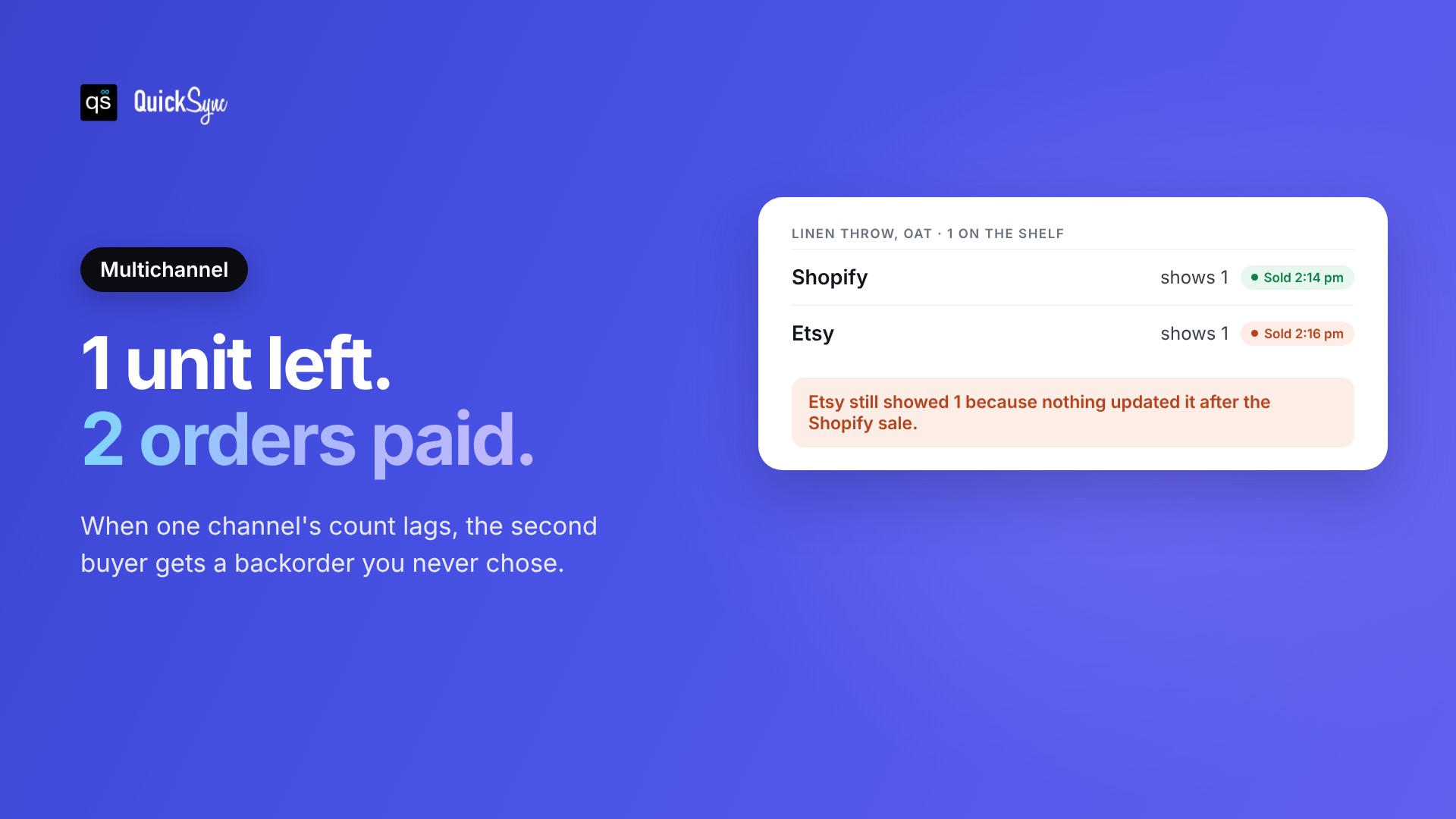
Here’s how it happens. The linen throw is down to its last unit. It sells on Shopify at 2:14 pm. Etsy still shows 1, because nothing updated it. Two minutes later, it sells on Etsy too. Now you have two paid orders for one throw. One buyer gets a backorder you never chose, or you have to cancel their order.
Three things stop it:
- Set reorder points and safety stock. Reorder before you hit zero, so the last unit is rarely in play. A free inventory spreadsheet is enough to start.
- Keep one stock count for every channel. Don’t split stock between channels or update them by hand. Our guide to multichannel inventory management explains why. One shared number, updated after every sale, removes the gap where the same unit sells twice.
- Count your best sellers often. A quick cycle count every couple of weeks catches errors in your system before they turn into oversold orders.
The second one is what QuickSync does. It connects Shopify, Etsy, eBay, Amazon, TikTok Shop, WooCommerce, Square and Clover, and keeps one stock count across all of them. When a unit sells on one channel, QuickSync updates the others, usually within a couple of minutes, so the last unit shows as sold out everywhere. Our guide on how to prevent overselling covers the other ways to close that gap, and you can see how real-time inventory syncing works in detail.
Backorders aren’t bad on their own. A planned backorder with a clear date can save a sale you’d otherwise lose. The ones to get rid of are the ones you didn’t choose. Start with an honest ship date on every backordered product, and one stock count across every channel you sell on. If you sell in more than one place, start a 14-day trial and connect your first two shops today.