A customer buys your black T-shirt in medium. Your records take one off the large instead, because both sizes share the same code. Now the medium shows stock you no longer have, and the large hides stock you do.
Mistakes like this cost real money at scale. IHL Group estimates that out-of-stocks and overstocks cost retailers $1.73 trillion a year, about 6.5% of global retail sales. You can’t fix a count you can’t identify, and identifying each product starts with its code.
That code is a SKU. This guide covers the SKU meaning, real SKU number examples, and how to create SKUs that keep working on Shopify, Etsy, eBay, Amazon and your accounting software. QuickSync matches products by SKU across 13 sales channels every day. So the rules below come from our own sync, not just from help pages.
What is a SKU?
A SKU (stock keeping unit, pronounced “skew”) is a code a business creates to identify each product it sells, down to the size and colour. A black T-shirt in medium might be TEE-BLK-M, and the same shirt in large TEE-BLK-L. You create your own SKUs, and each product has a unique one.
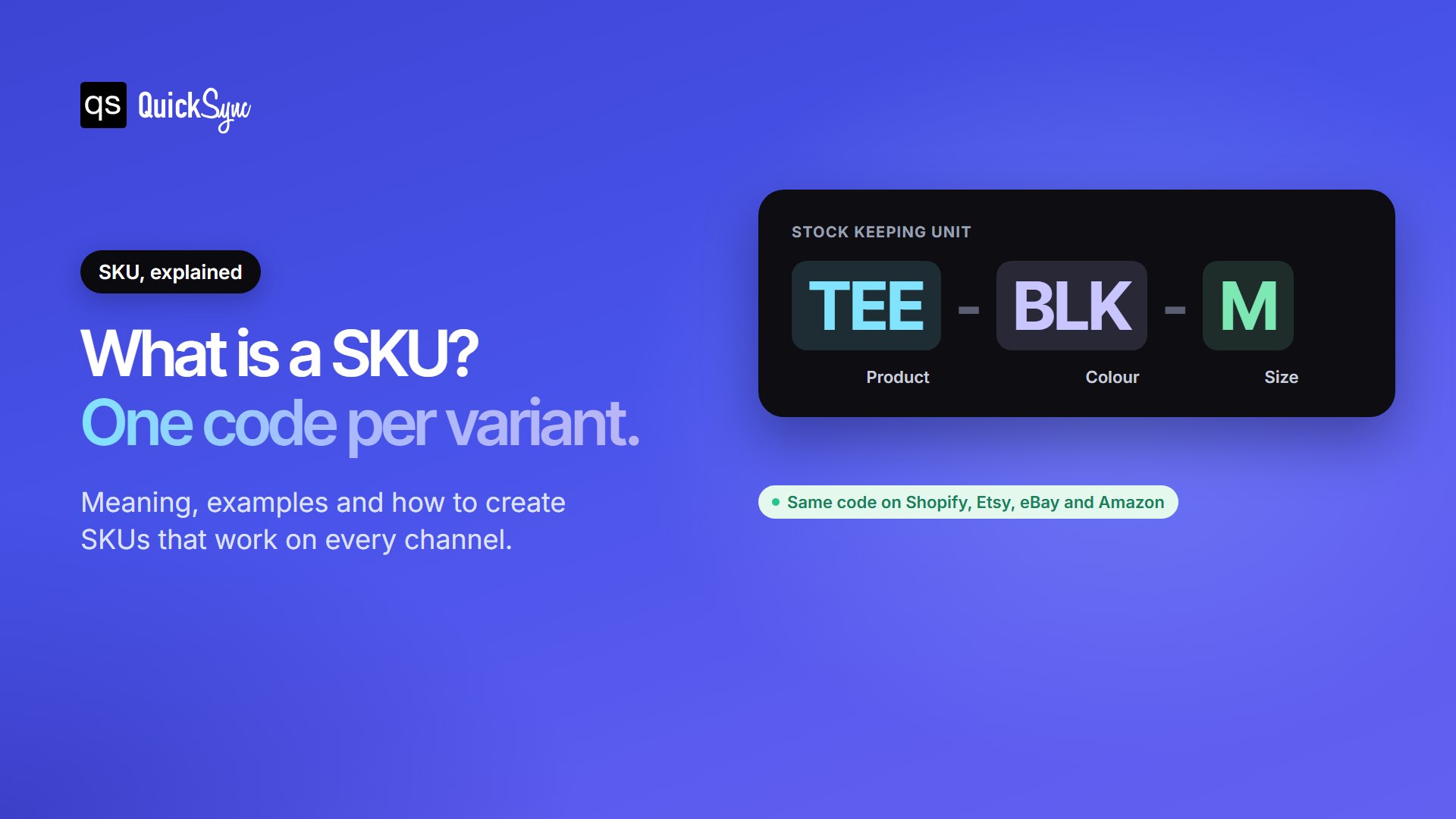
Each SKU stands for one thing a buyer can pick, so each one gets its own stock count. When you sell a TEE-BLK-M, only that count drops. Your reports, reorders, and listings all use that same code.
What Does SKU Stand for?
SKU stands for stock keeping unit. Most people say “skew”, though some spell it out as S-K-U. You’ll also see it under other names, depending on where you sell:
- Item code or product code in accounting software like Xero.
- Seller SKU on Amazon.
- Custom label (SKU) on eBay.
- SKU number in most stores and POS systems, even when it contains letters.
The SKU meaning shifts slightly in sales and business reports, where “SKU” also works as a unit of count. When a retailer says it stocks 5,000 SKUs, it means 5,000 distinct product variants, not 5,000 units on the shelf.
How SKUs Work
The key idea is simple: every variant a buyer can choose needs its own SKU. Take one T-shirt in 4 sizes and 3 colours. That’s one product on your website, but 12 SKUs in your inventory.
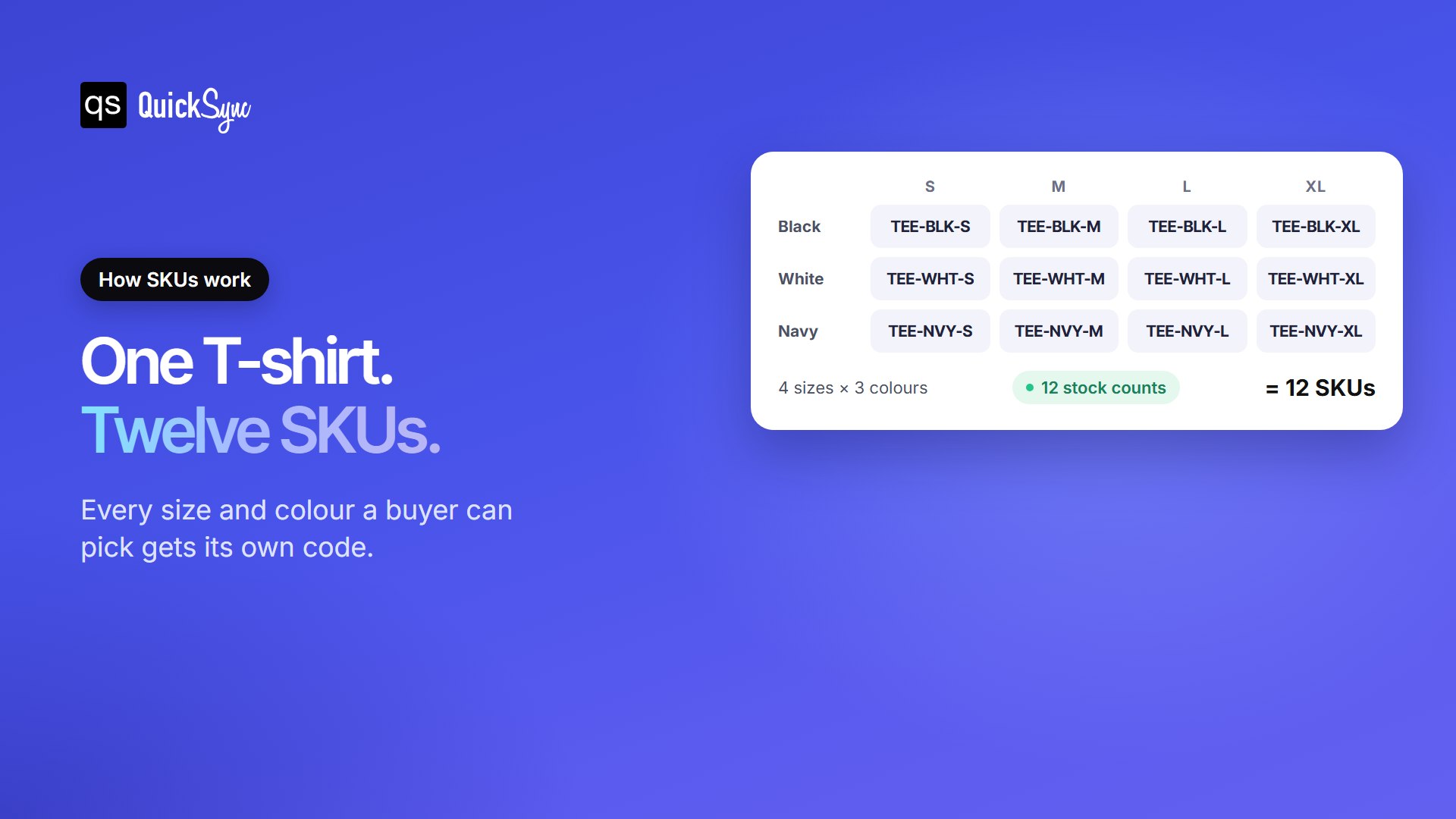
Each of those 12 codes carries its own stock count, sales history and reorder point. That’s what lets you see that navy in small sells out every month while white in extra large barely moves. Without separate SKUs, those two would blur into one total.
SKU Number Examples
Good SKUs read from general to specific, so you can understand them at a glance. Here’s how that looks across different product types:
| Product | Variant | Example SKU |
|---|---|---|
| T-shirt | Black, medium | TEE-BLK-M |
| Running shoe | Blue, size 10 | RUN-BLU-10 |
| Candle | Vanilla, 8 oz | CND-VAN-08 |
| Phone case | iPhone 16, clear | CASE-IP16-CLR |
| Coffee beans | Dark roast, 1 kg | COF-DRK-1KG |
| Gold ring | 14k, size 7 | RNG-14K-07 |
Bad SKUs look like 0001, new-tee or BLACK SHIRT MEDIUM COTTON 2026. The first tells you nothing. The second won’t scale past one product. The third is too long for several sales channels and has spaces that cause matching errors. We’ll come back to both problems below.
SKU vs UPC, Barcode, ASIN and Serial Number
SKUs often get confused with other product codes. The difference comes down to who creates the code and what it identifies. A SKU is yours. A UPC belongs to the product everywhere it’s sold.
| Code | Who creates it | Format | What it identifies |
|---|---|---|---|
| SKU | You, the seller | Letters and numbers, any length your channels allow | A product variant in your own inventory |
| UPC | The brand, through GS1 | 12 digits | A product in every store that sells it, mainly in North America |
| EAN | The brand, through GS1 | 13 digits | The same as a UPC, used mainly outside North America |
| GTIN | GS1 | 8, 12, 13 or 14 digits | The family name for UPC, EAN and similar numbers |
| Barcode | Printed from any code above | Lines or squares | Nothing by itself; it lets a scanner read a code |
| ASIN | Amazon | 10 characters | A product page in Amazon’s catalogue |
| MPN | The manufacturer | Varies | A part or model from that maker |
| Serial number | The manufacturer | Varies | One single unit, such as one laptop |
Two points clear up most confusion. First, a barcode is just a way to scan a number. You can print your SKU as a barcode for your own shelves, but only a UPC or EAN works in other people’s stores. Second, the same product can have one UPC and a different SKU at every shop that sells it. That’s why a Walmart SKU means nothing at Target.
How to Create SKU Numbers
You don’t need special software or permission to create SKUs. You need a simple pattern that you apply the same way to every product. These six steps get you there.
- List what changes. Write down the attributes buyers choose between, such as colour, size, material or scent. Each one becomes part of the code.
- Go from general to specific. Put the product first, then each attribute in the same order every time: TEE-BLK-M, never M-TEE-BLK. Sorted lists then group themselves.
- Use short, fixed abbreviations. Pick one code per value and stick to it: BLK for black, NVY for navy. Keep the list in a shared sheet so everyone uses the same codes.
- Join parts with hyphens. Avoid spaces, slashes and special characters. Hyphens work on every major sales channel.
- Skip lookalike characters. Capital O looks like zero, and capital I looks like one. Don’t start a SKU with zero either, because spreadsheets often drop leading zeros.
- Fit your shortest channel. Check the SKU limit of every place you sell, and keep every code within the smallest one. The next section shows why this matters.
Two more rules keep your SKUs useful for years. Never reuse an old SKU for a new product, or your sales history will mix two items. And leave out details that might change, like price or supplier. Your SKU should stay the same even when they do.
SKU Rules When You Sell on More Than One Channel
A SKU that works in one shop can break the moment you add a second. That’s because the SKU stops being just a label. It becomes the link that tells your systems two listings are the same product, so a sale on Etsy can take a unit off Shopify.
Three rules decide whether that link holds.
1. Use the exact same SKU everywhere
The black medium T-shirt needs the code TEE-BLK-M on every channel. Close isn’t enough. Sync tools compare SKUs character by character, so tee-blk-m, TEE-BLK-M with a trailing space, and TEE_BLK_M are three different products. In QuickSync, for example, capitals, spaces, dashes and underscores all count.
2. Keep every SKU unique inside each store
If three sizes of a shirt share one code in the same store, no system can tell which one sold. QuickSync, for one, stops syncing those items rather than guess. This happens most often on Etsy, where sellers reuse one SKU across several listings. It also happens in WooCommerce, which fills a blank variation SKU with its parent product’s SKU.
3. Fit the shortest SKU limit you sell on
Every channel caps how long a SKU can be, and the caps differ a lot. The chart shows the longest SKU each channel keeps when QuickSync syncs to it. eBay’s own developer docs set the same 50-character limit.
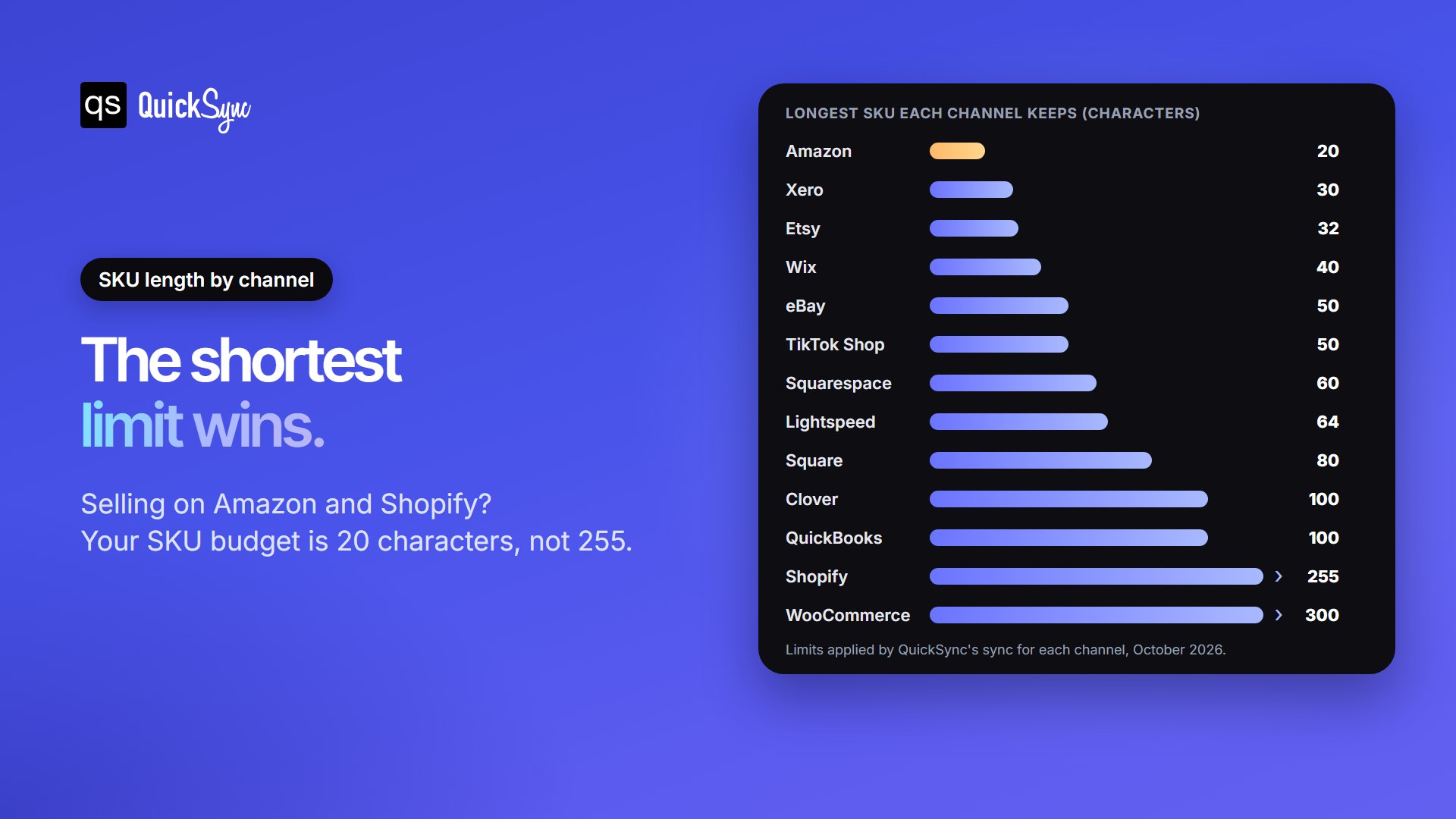
Here’s the catch. A SKU that’s too long is usually cut to fit, not rejected. The listing goes live and looks fine, but its code no longer matches yours, so its stock stops updating. You often find out from an oversell. If you sell on Amazon and Shopify, your Amazon SKU limit is 20 characters, however generous Shopify’s 255 looks.
Accounting software counts too. Xero keeps 30 characters for an item code, so a long Shopify SKU won’t match its Xero item. We cover that pairing in our guide to the best Shopify Xero integration apps.
Where to add a SKU on each platform
Once your codes are ready, add each one in the right field. Here’s where each platform keeps it:
- Shopify: open the product, then the variant. The SKU field sits in the Inventory section.
- Etsy: in Shop Manager, edit the listing and fill in SKU. With variations, turn on SKUs for them and give each its own.
- eBay: in Seller Hub, edit the listing and fill in Custom label (SKU), one for each variation.
- Amazon: enter the Seller SKU when you create the listing. Amazon won’t let you edit it later. Changing it means deleting the offer and listing it again.
- Square: open the item in your item library. Each variation has its own SKU field.
- WooCommerce: open the Inventory tab under Product data, and fill in each variation’s SKU under Variations.
For the full list, including Clover and what to do about missing or duplicate codes, see our SKU setup guide.
Common SKU Mistakes to Avoid
Most SKU problems don’t show up on day one. They surface weeks later as wrong counts or a sync that quietly stops. These are the ones we see most:
- Leaving SKUs blank. A product with no SKU can’t be matched. An eBay listing without one only has its item number, which won’t match anything else.
- Sharing one SKU across variants. Every size and colour needs its own code, or none of them can sync.
- Mixing capitals and spaces. ABC-1 and abc-1 look the same to you, but not to software.
- Writing codes longer than your shortest channel. The code gets cut and stops matching, usually without an error.
- Renaming SKUs carelessly. If you change a code, change it on every channel the same day, and check it doesn’t clash with an existing one.
- Building meaning into codes that change. A price or supplier inside the SKU forces a new code every time either changes.
Fixing these takes an afternoon for a small catalogue. If the same products also sell in several places, our guide to Shopify inventory sync shows how matching SKUs keep stock in step.
How to Find a SKU on a Product
Where you look depends on which side of the counter you’re on.
As a seller, your SKUs live in your store admin or POS, in the fields listed above. Most platforms also let you export every SKU to a spreadsheet, which is the quickest way to check for blanks and duplicates.
As a shopper, check the shelf label, your receipt, or the product page on the store’s website. Remember that SKUs are store-specific. A SKU from one retailer only works on that retailer’s own site or in its own stores.
FAQs
Want to go further? See how Etsy handles variations and SKUs, or compare ecommerce inventory management software that tracks every SKU for you.