You sold the last ceramic mug on Etsy this morning. An hour later, eBay sells it again, because the listing there still said 1 in stock. Now a buyer has paid for something you can’t send, and you need to cancel the order.
Cancelling takes a minute. Picking the right reason is what matters, because one reason gives you a transaction defect and keeps part of your fees, and the others don’t. This guide covers how to cancel order on ebay as seller, what each reason costs, when you can’t cancel at all, and how to stop out-of-stock cancellations from happening. The eBay rules here come from eBay’s own help pages, checked in November 2026.
How to Cancel Order on eBay as Seller
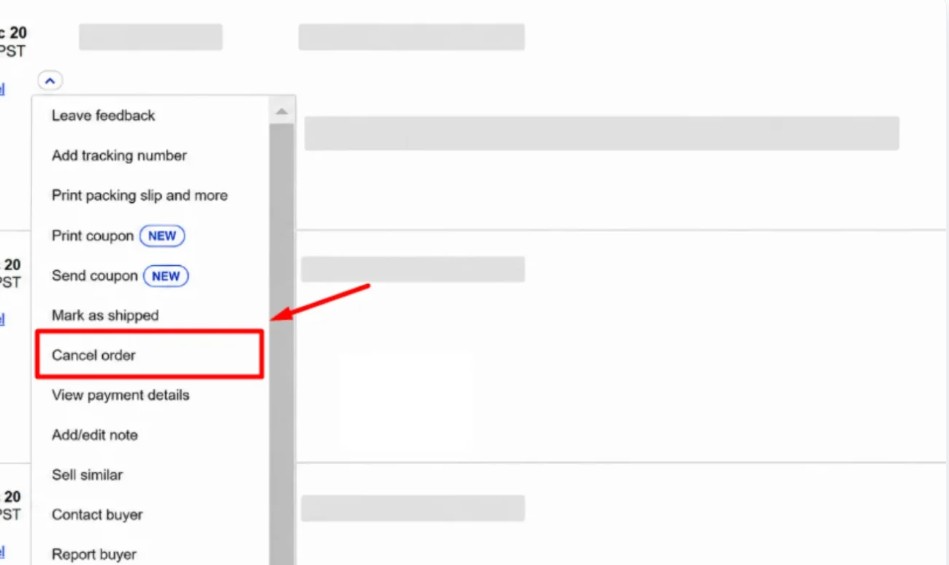
To cancel an eBay order as a seller, go to Orders in Seller Hub (or Sold in My eBay), find the order, open More actions and select Cancel order. Choose a reason and select Submit. You can cancel up to 30 days after the sale, and eBay refunds the buyer automatically. Cancelling because the item is out of stock gives you a transaction defect.
Step by step, this is how to cancel a sale on eBay, according to eBay’s seller cancellation guide:
Step 1: Go to Orders in Seller Hub, or Sold in My eBay.
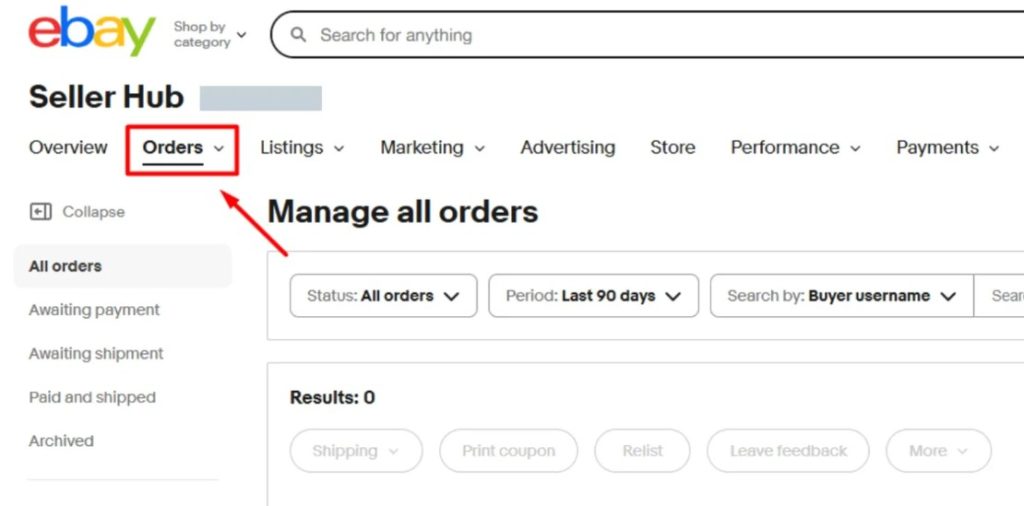
Step 2: Find the order you want to cancel.
Step 3: Open More actions and select Cancel order.
Step 4: Choose the reason for the cancellation.
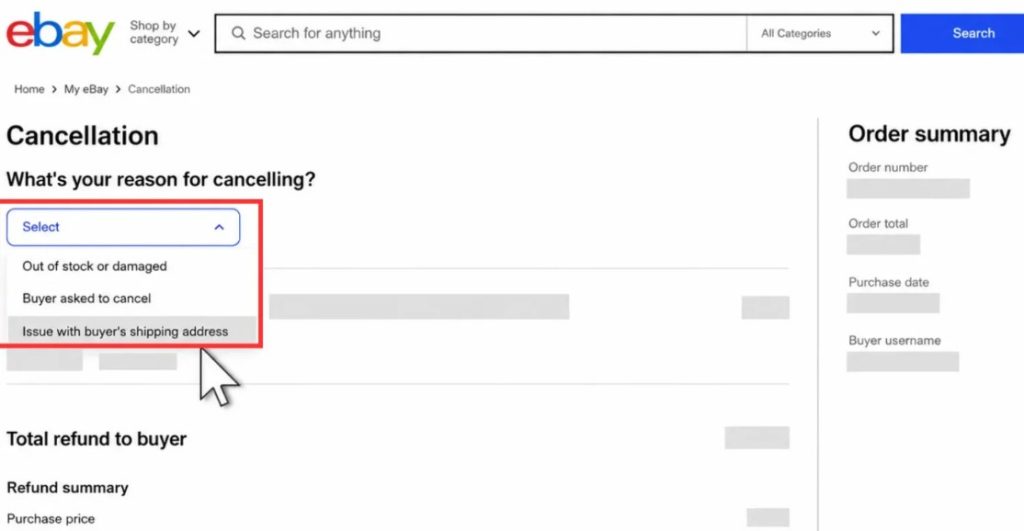
Step 5: If it was a single-quantity Buy It Now listing, decide whether to relist it. eBay relists it automatically unless you select No next to “Relist item?”. Finally, select Submit.
Once you submit, it’s final. eBay’s order cancellation policy says a cancellation can’t be undone, so check you’ve picked the right order. If the order had more than one item, the whole order is cancelled. You can’t cancel one item and keep the rest.
The refund goes back to the buyer’s original payment method. If it fails, eBay notifies you and asks you to select Retry refund, and you can fund it with a different payment method. If the buyer still isn’t refunded within 10 days, they can ask for it through the eBay Money Back Guarantee.
Which Cancellation Reason to Choose
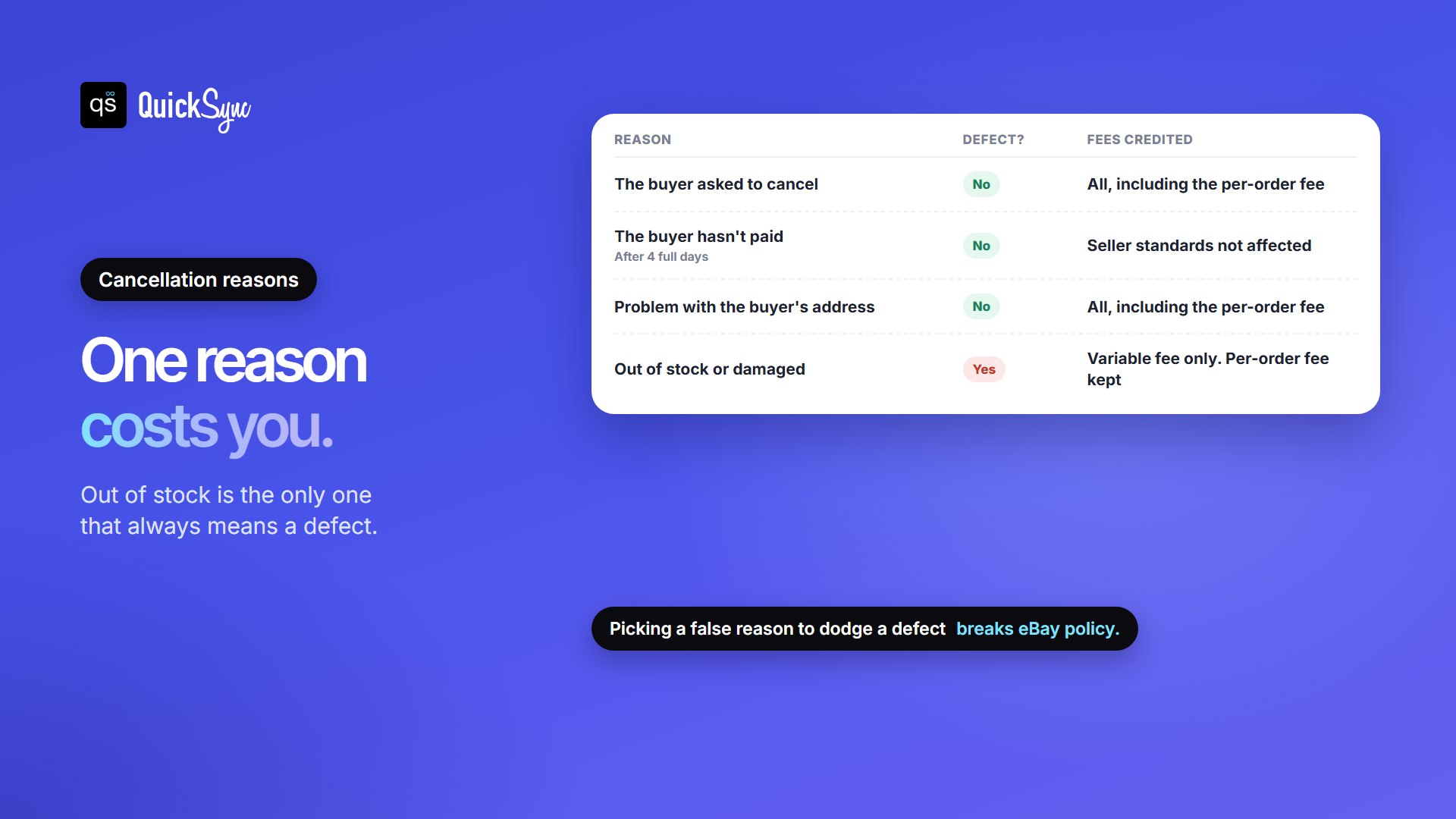
The reason you pick decides three things: whether you get a defect, how much of your fees come back, and what happens to feedback. Here’s how they compare, using eBay’s policy, its seller standards and its fee credits page:
| Reason | When it applies | Defect? | Fees credited | Feedback |
|---|---|---|---|---|
| Buyer asked to cancel | The buyer requested it, on eBay or by message | Not counted as a defect by eBay | All of them, including the per-order fee | Negative or neutral feedback about the cancellation is removed |
| Buyer hasn’t paid | 4 full calendar days after the sale | No. eBay says your seller standards won’t be affected | Not listed on eBay’s fee credits page | Any feedback from that buyer is removed |
| Issue with buyer’s shipping address | The buyer used the wrong shipping address. Not available for Authenticity Guarantee or eBay International Shipping orders | Not counted as a defect by eBay | All of them, including the per-order fee | The buyer can still leave feedback |
| Out of stock or damaged | You can’t send the item | Yes, always | Only the variable final value fee. The per-order fee is kept | The buyer can still leave feedback |
Don’t pick a reason that isn’t true
It’s tempting to choose “buyer asked to cancel” when the real reason is that you’ve run out, and sellers debate it on Reddit. eBay’s policy settles it: “Using an incorrect reason to avoid a defect or to bypass eBay policies is not allowed.”
If you’re out of stock, message the buyer straight away, apologise, and cancel with the out-of-stock reason. One defect is recoverable. A pattern of wrong reasons is a policy problem. Then fix whatever let the item sell twice, using the steps further down.
If the buyer hasn’t paid
eBay sends the buyer payment reminders 24 and 48 hours after the sale, so you don’t need to chase them. After 4 calendar days you can cancel with the “buyer hasn’t paid” reason, or let eBay do it: Preferences for items awaiting payment in your selling preferences cancels unpaid orders automatically after 4 or more days. It only works on orders paid through eBay checkout. If it was an auction, you can then send a Second Chance Offer to the next highest bidder.
When You Can’t Cancel an eBay Order
eBay’s policy lists four situations where an order can’t be cancelled:
- You’ve shipped the item, or the buyer has collected it in person.
- The buyer has reported that the item hasn’t arrived.
- The buyer has opened a return request.
- More than 30 days have passed since the order.
Once an item has shipped, the way out is a return, not a cancellation. If the buyer changes their mind after delivery, your returns policy applies. Our guide to eBay seller protection covers what eBay protects you from in returns and item-not-received cases.
When the Buyer Asks You to Cancel
Buyers can’t cancel an order themselves. They can only send a request, up until you mark the order as shipped. When one arrives:
- You have 3 calendar days to accept or decline it.
- If you don’t answer and the buyer hasn’t paid, eBay cancels the order automatically. If they’ve paid, eBay closes the request and you need to send the item.
- Feedback is protected either way. eBay removes negative or neutral feedback related to the cancellation request, whether you accept or decline.
- You don’t have to accept a cancellation asked for only by message, or one for an order that isn’t eligible.
Buyers can’t request a cancellation for items bought in an auction or at an eBay Live event. If a buyer keeps causing problems, you can block them from your listings.
What an Out-of-stock Cancellation Really Costs
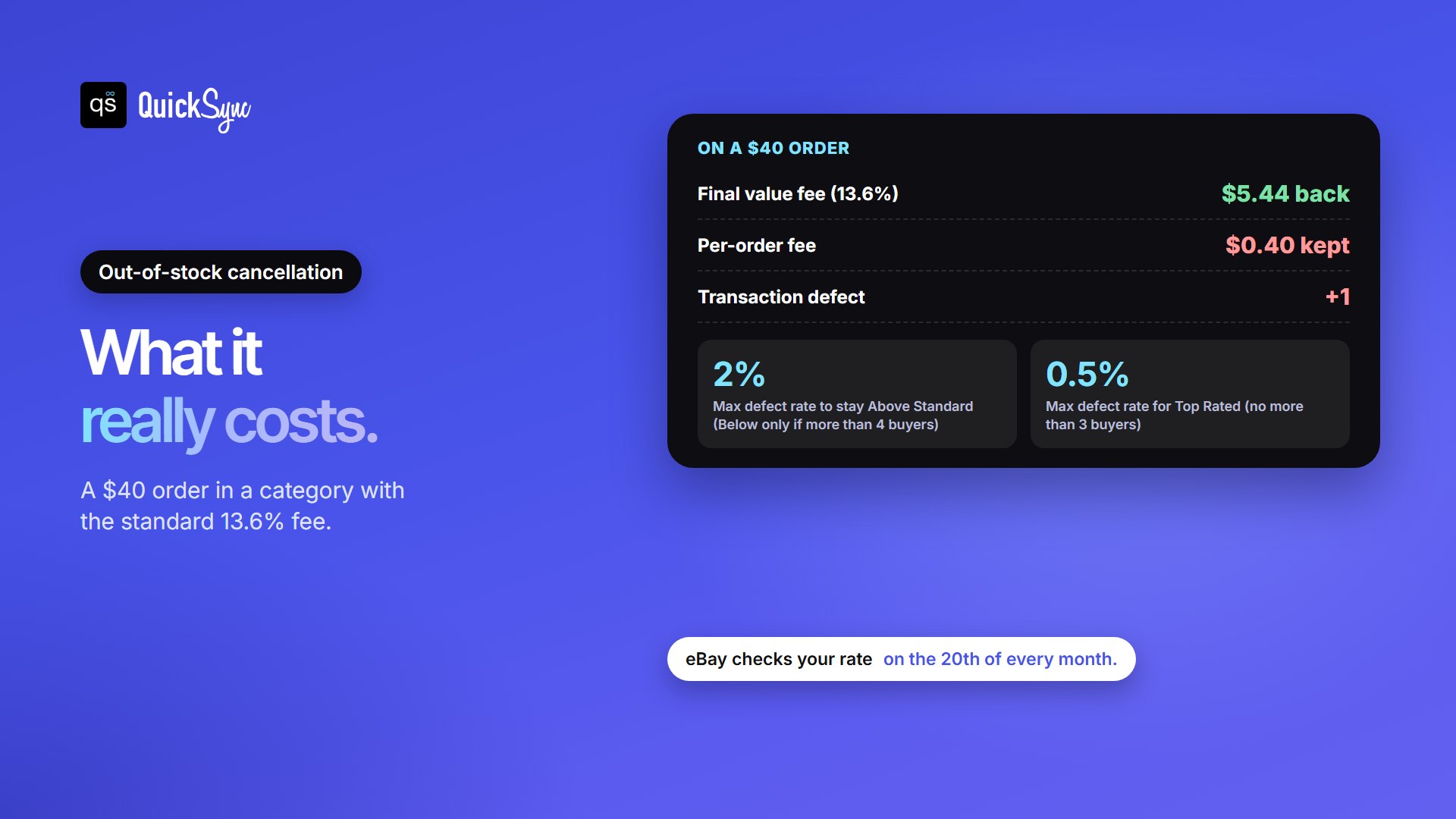
Say that mug was a $40 order in a category with the standard 13.6% final value fee. eBay charged you $5.44 plus the $0.40 per-order fee (the per-order fee is $0.30 for orders of $10 or less). When you cancel because it’s out of stock:
- You get the $5.44 back.
- You keep paying the $0.40, because eBay treats out of stock as a reason within your control.
- You get one transaction defect.
The money is small. The defect is what hurts. Under eBay’s seller standards:
- The minimum standard is a defect rate of no more than 2%. You’re only rated Below Standard if your defects involve more than 4 different buyers.
- Top Rated needs a defect rate of no more than 0.5%, associated with no more than 3 different buyers. See our guide to eBay Top Rated Seller requirements.
- eBay evaluates you on the 20th of each month. If you had more than 400 transactions in the past 3 months, it looks at those 3 months. Otherwise it looks at the past 12 months.
Falling to Below Standard has real costs. eBay may place your items lower in search, reduce your selling limits, block you from Promoted Listings, hold your funds until tracking shows the item is on its way, and charge higher final value fees from the 1st of the next month. You can watch your rate in the eBay seller dashboard. A lower limit means fewer items you can list each month; here’s how eBay selling limits work.
Can You Remove a Cancellation Defect?
Rarely. eBay’s defect appeals page lists only two cases where a cancellation defect will be removed:
- A buyer retracted their bid and it disrupted the auction.
- A buyer asked for something that wasn’t offered in the original listing.
If one applies, go to Seller Help, select Request assistance, then Appeal a defect, within 90 days of the transaction. eBay also removes some defects automatically, for example after an eBay site problem, usually within 72 hours. An out-of-stock cancellation isn’t on either list, so the only real fix is not to oversell in the first place.
How to Stop Out-of-stock Cancellations
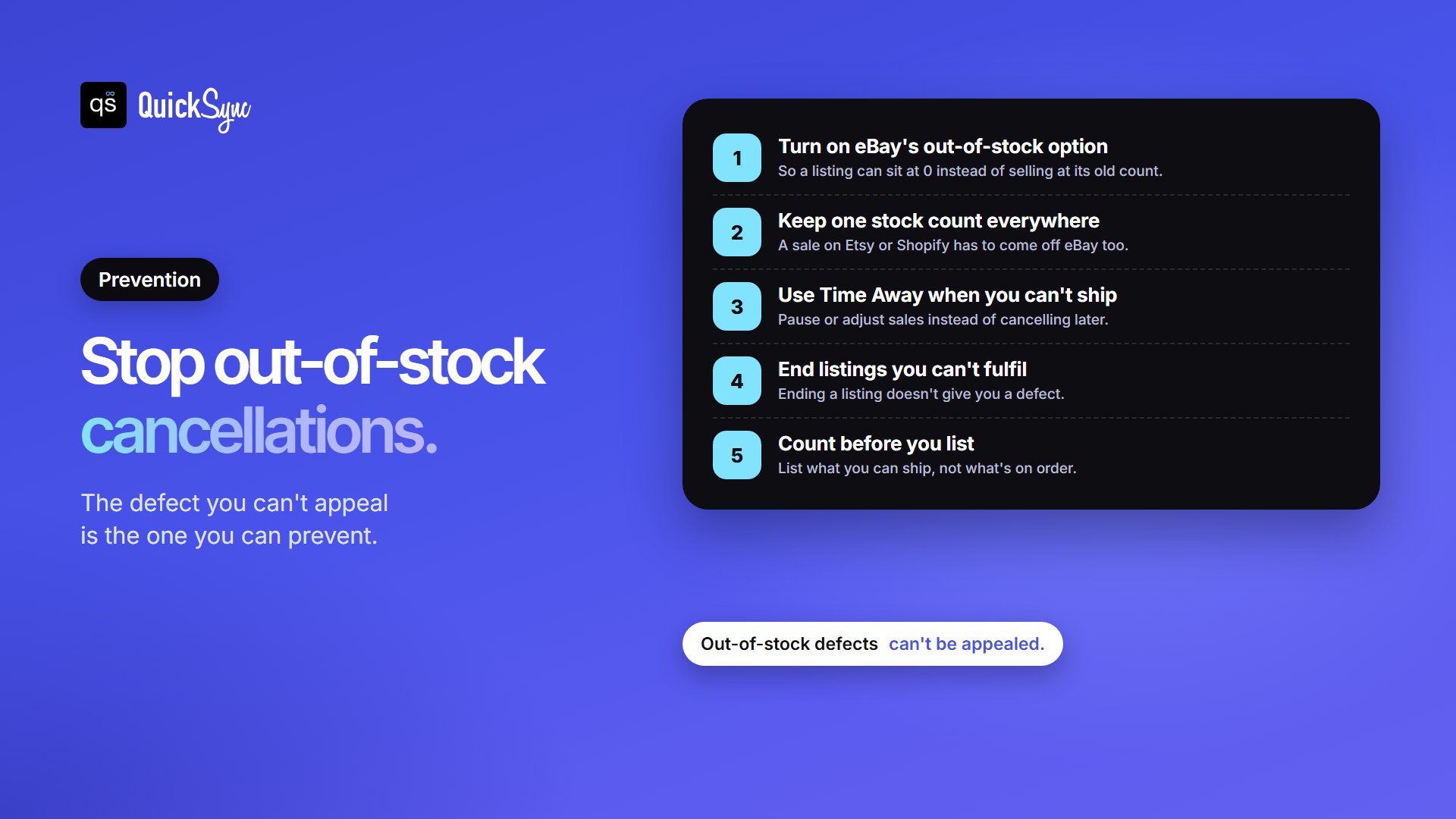
- Turn on eBay’s out-of-stock option. In eBay’s Selling preferences, under Multi-quantity listings, switch on “Listings stay active when you’re out of stock.” Without it, eBay won’t accept a count of 0 on a listing you created in eBay, so the listing stays live at its old count and can sell an item you don’t have.
- Keep one stock count across every channel. If the same items sell on Etsy, Shopify or in a shop, a sale anywhere has to come off eBay too. Doing that by hand is how the mug sold twice.
- Use Time Away when you can’t ship. Going on holiday? Pause or adjust sales instead of cancelling orders later. See eBay vacation mode.
- End listings you can’t fulfil. Ending a listing before it sells costs nothing in defects. Our guide to cancelling an eBay listing shows how.
- Count before you list. List the quantity you can actually ship, not what’s on order.
QuickSync handles step 2. It checks eBay for sales and stock changes every 2 minutes, and a change it sends to eBay goes out as soon as it has it, so a sale on Etsy or Shopify brings your eBay count down too. When a count reaches 0, it sets 0 on eBay. For listings you created in eBay, that 0 only goes through when the out-of-stock option is on (see when stock hits zero). One honest limit: if two stores sell the last item at almost the same moment, both sales can go through before either update arrives. Syncing makes that rare. It can’t make it impossible.
If You Sell on More Than eBay
Cancelling on eBay doesn’t tidy up everything else. Two things to check if you run several stores:
- The order copy in your other store. If eBay orders also go to another store for packing, cancel the copy there too, before anyone packs it. With QuickSync (order syncing is on Pro and above), a cancelled eBay order is marked cancelled in QuickSync, but its copy in your packing store isn’t cancelled automatically. Only Shopify cancellations do that. See cancellations and refunds.
- Your stock count. A cancellation doesn’t put stock back by itself. If the item is genuinely gone, that’s right. If you’ve found it after all, update the count in one of your connected stores, and QuickSync passes the new number to the others.
If eBay and Etsy are your two channels, the Etsy and eBay integration shows how the stock link works between them.
FAQs
More for eBay sellers: how to prevent overselling and eBay star colors explained.