Managing Shopify and Square separately often requires juggling two systems, repeating updates, and handling inventory errors. For growing online sellers, this slows operations and reduces efficiency.
A proper Shopify Square integration ensures that products, inventory, and orders are kept in sync across both platforms.
What is Shopify and Square Integration?
A Shopify and Square integration connects Shopify’s eCommerce platform with Square’s POS and payment system. It allows products, stock levels, and orders to flow between both tools without manual updates.
This integration ensures every sale, whether made online through Shopify or in-store using Square, gets updated instantly across both systems. For sellers managing digital and physical storefronts, it keeps operations smooth and data consistent.
Why Shopify Square Integration is Crucial for Businesses
Integrating Shopify with Square helps unify both in-person and online store operations under one platform. Instead of tracking separate stores, sellers can view everything together — orders, inventory, and customer information.
Key advantages include:
- Accurate inventory Levels: Product stock updates automatically across both channels.
- Simplified Order Management: Orders from Shopify and Square sync together for faster fulfillment.
- Time-Saving Automation: Real-time syncing reduces manual work, freeing time for other essential business tasks.
- Error Reduction: Automated updates minimize mistakes that occur with manual data entry.
For online sellers, integrating Square and Shopify turns complex workflows into an automated system that saves time and reduces costly mistakes.
Things to Prepare Before Connecting Shopify and Square
Before linking Shopify with Square, ensure that everything is ready for a seamless connection.
Here’s what’s needed:
- An active Shopify account with full admin access.
- A verified Square account (POS or payment setup).
- A QuickSync account to bridge both platforms automatically.
That’s it — no developers, no plugins, no coding required.
Meet QuickSync: The Best Tool for Shopify Square integration
QuickSync is designed to make Shopify and Square integration effortless for sellers of all sizes. Instead of switching between platforms or handling manual uploads, QuickSync automatically syncs inventory, product details, and order data between both platforms.
Here’s what makes it stand out:
- Simple onboarding: Quick setup without technical steps.
- Real-time sync: Instant updates for inventory, product listings, and orders.
- Dependable performance: Secure, stable, and accurate syncing.
- Multi-channel support – Support Multi-channel Platform Integration.
- Responsive support: A proactive team ready to assist whenever needed.
Whether managing a single store or multiple outlets, QuickSync is the best tool to keep both platforms synced seamlessly.
Steps to integrate Shopify & Square Via Quicksync
Integrating Square with Shopify is a breeze thanks to QuickSync. With just a few clicks, even non-tech sellers can sync products, inventory, and orders effortlessly. Here’s a step-by-step process to get started:
Step 1: Sign Up For QuickSync
- Firstly, visit the Quicksync.pro website.
- Click Sign Up to create a new account using details such as name, email, and business name (or Log In if already registered).
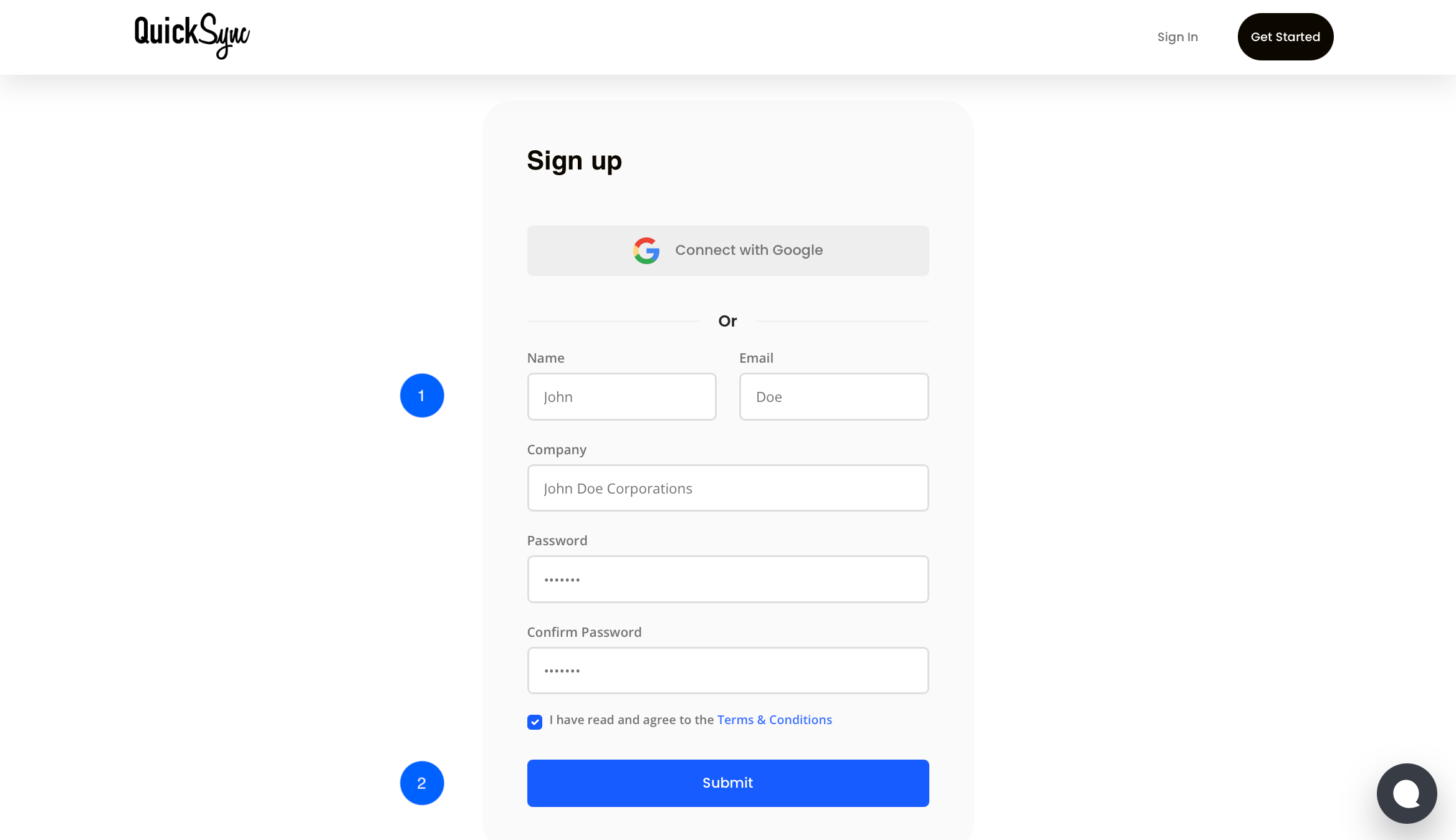
Step 2: Connect Shopify Store
- Go to Quicksync Dashboard → Connect Store and Choose Shopify from the available options.
- Follow the prompts and authorize QuickSync to access Shopify data.
- Once connected, QuickSync begins fetching product and inventory data automatically.

Step 3: Connect Square
- Go back to the Dashboard → Connect Store option again and select Square from the dropdown list.
- Log in to your Square admin account when prompted.
- Approve access permissions so QuickSync can sync products, stock, and orders.
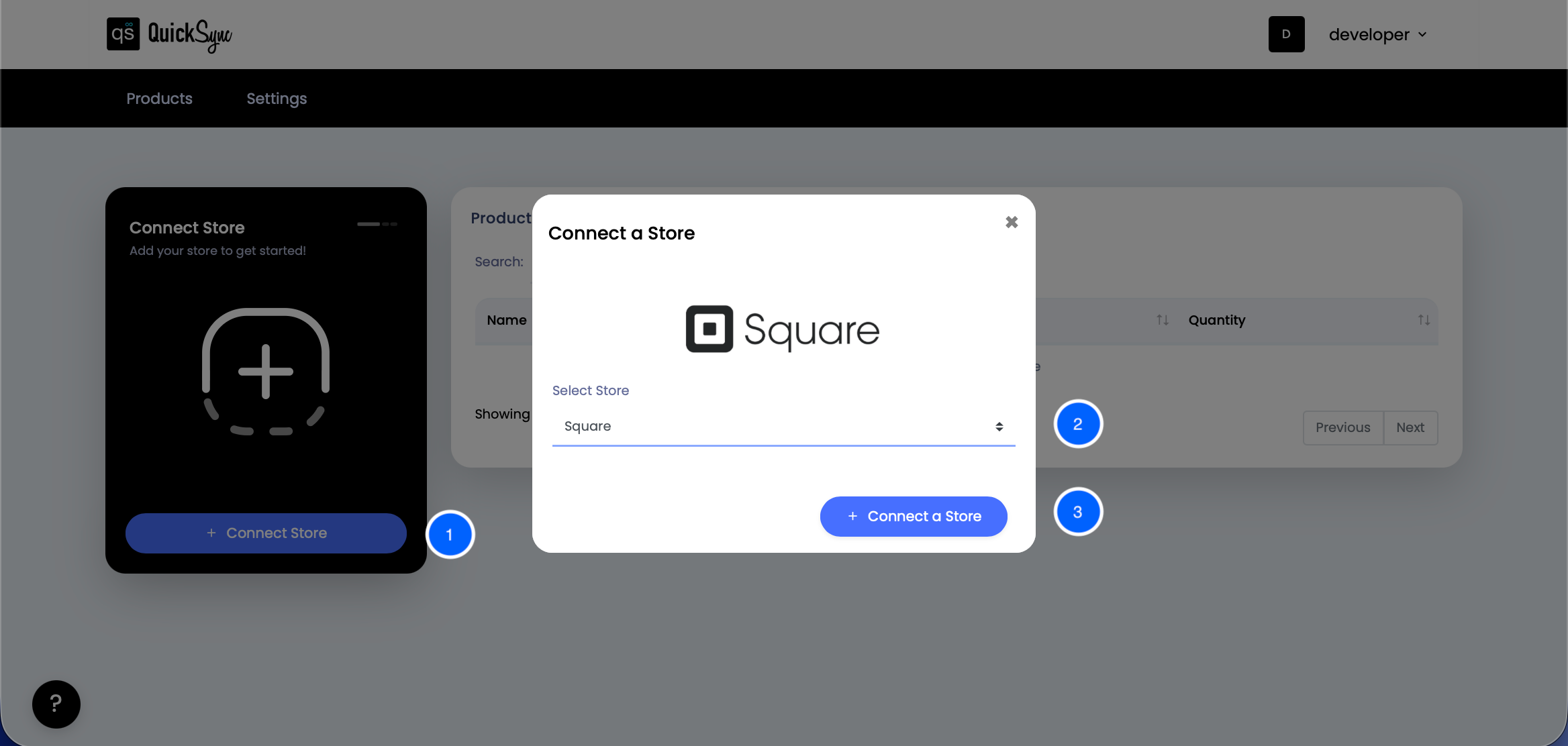
Once done, QuickSync will begin importing store data. Progress can be tracked directly within the dashboard.
Step 4: Start Syncing
After both accounts are connected, select what to sync:
- Inventory Syncing: Sync inventory levels in real time between Shopify & Square, with automatic updates on both platforms.
- Products Syncing: Auto-sync product details (price, description, images) across both platforms.
- Order Syncing: Orders from both stores will be routed to the chosen Fulfillment Store.
- Click Start Sync, and QuickSync will begin real-time synchronization across both systems.

Once syncing starts, every change from price edits to inventory updates is instantly reflected on both platforms.
Best Practices to Avoid Common Syncing Pitfalls
Once your Shopify & Square integration is active, following best practices ensures seamless syncing across both platforms and minimizes syncing issues.
- Standardize SKUs: Use matching SKUs across your Shopify store and Square POS for accurate syncing and consistent inventory levels.
- Automate inventory syncs: Automate inventory syncing and order details between both platforms. This helps maintain real-time accuracy for both in-store and online store sales.
- Keep titles & categories clear: Consistent product titles and categories across two platforms make it easier to manage and track sales.
- Use activity logs effectively: Check activity logs in the automation platform regularly to quickly identify and fix syncing errors.
Following these steps will ensure accurate inventory management, consistent updates between Shopify and Square, and a reliable experience.
Final Words
Running both the Shopify store and the Square POS separately often leads to confusion and wasted time. But with Shopify Square Integration through QuickSync, managing everything from one place becomes effortless.
Every product, order, and stock level stays consistent across both platforms without coding or manual uploads. So don’t waste hours switching between dashboards.
Sign up for QuickSync today and get a 14-day free trial!