Inventory control is how you make sure the stock in your system matches the stock on your shelf, and that you reorder before you run out. When it’s missing, the errors are small at first: a sale logged late, a breakage never recorded, a return that went back on the shelf but not into the system. Over a few weeks, those small errors become oversold orders, missed sales, and cash stuck in products that don’t move.
That risk grows with every place you sell. Online sales made up 17.1% of US retail sales in Q2 2026, and many small brands now sell the same stock online and in person. Each extra channel is one more count that can drift.
This guide covers what inventory control is, the two main systems, and seven inventory control methods you can start using this week. Each method comes with a worked example for one small shop that sells on Shopify, Etsy, and Square POS. The last section covers what most guides leave out: how to keep control when the same units are listed on several channels at once.
What is inventory control?
Inventory control is how you keep the right amount of stock on hand and keep your records accurate. It answers practical questions: what to reorder, when, how much, and whether the count in your system matches the shelf. Good inventory control means fewer stockouts, less cash tied up in slow products, and no orders you can’t fill.
People often confuse inventory control with inventory management as if they mean the same thing. They overlap, but the scope is different.
| Inventory control | Inventory management | |
|---|---|---|
| Focus | Stock you already have | The whole flow of stock |
| Main questions | How many do we have? When do we reorder? | What should we buy, from whom, and where should it sell? |
| Typical work | Counting, reorder points, safety stock, valuation | Forecasting, purchasing, supplier terms, channel planning |
| Time frame | Day to day | Month to month and longer |
In short, inventory control is the part of inventory management that happens on the shelf and in your records. If you want the wider view, our guide to inventory management techniques covers the planning side, and store inventory control covers the physical shop floor.
Why it matters more now: online sales made up 17.1% of US retail sales in Q2 2026, and many small brands now sell the same stock online and in person. Every extra place you sell is another place your count can be wrong.
Perpetual vs periodic inventory control
There are two main inventory control systems. A perpetual system updates your stock count every time something sells, arrives, or comes back. A periodic system counts stock at set intervals, such as monthly or yearly, and works out sales from the difference.
| Perpetual | Periodic | |
|---|---|---|
| How it updates | After every sale, delivery or return | At each scheduled count |
| Accuracy between counts | High, if every movement is recorded | Unknown until you count |
| Effort | Needs software | Needs a full count each period |
| Best for | Anyone selling online | Very small shops with one sales point |
If you sell online, you’re already on a perpetual system, whether you planned it or not. Shopify’s inventory tracking lowers your count with every order and can stop selling a product at zero. Etsy, eBay, and Square POS do the same for their own sales.
Here’s the catch. Each of those platforms runs its own perpetual count. Shopify knows nothing about the mug that sold at your market stall. So a shop on three channels really has three perpetual systems that don’t talk to each other. We’ll come back to this, because it’s where most counting errors in multichannel shops start.
7 inventory control methods (with examples)
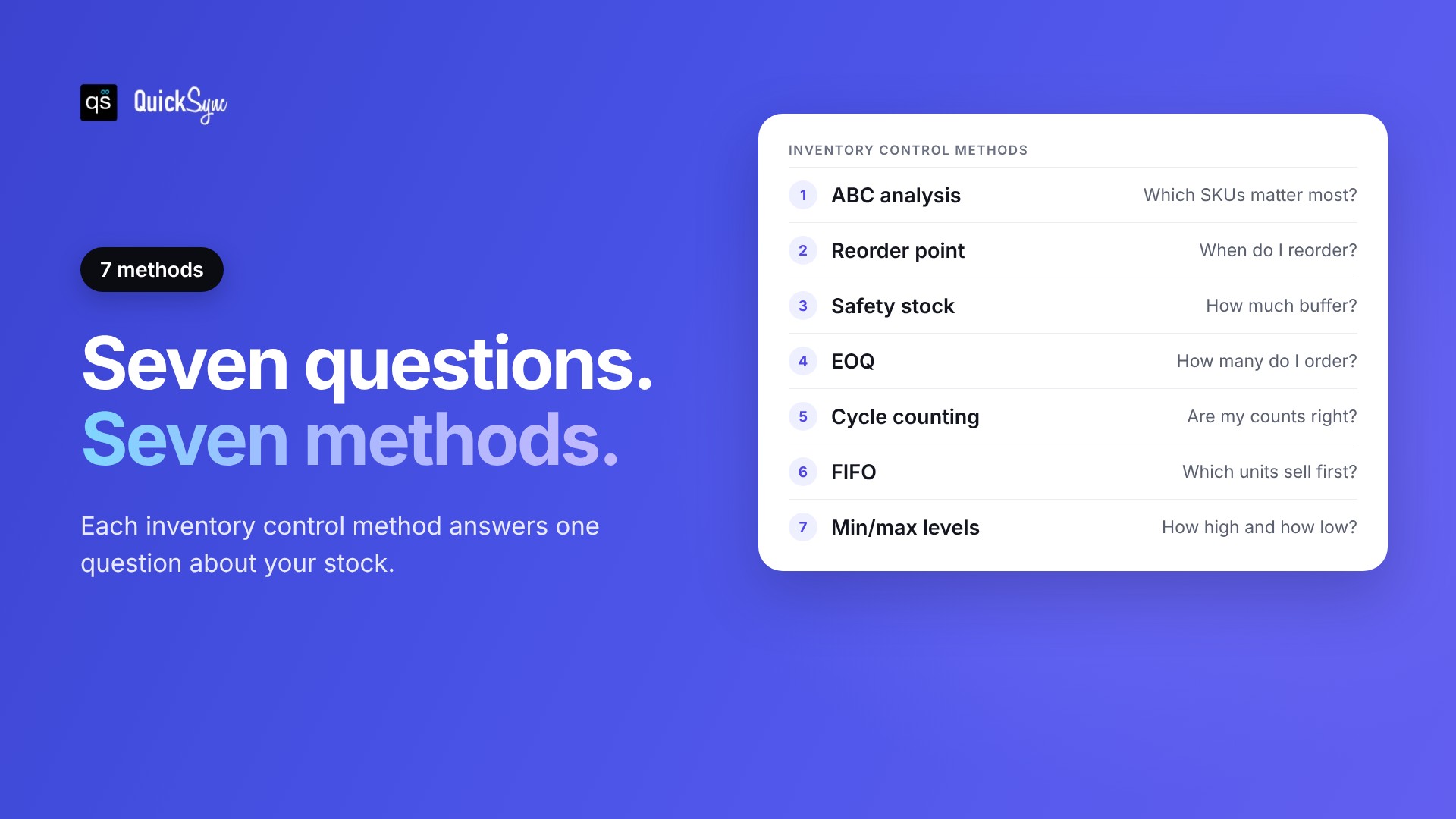
Each inventory control method below answers one question about your stock. You don’t need all seven on day one. Most small shops start with ABC analysis, reorder points and cycle counting, then add the rest as they grow.
All the examples use the same sample shop. Its bestseller is a 12 oz speckled mug that costs $9 to make, sells about 5 a day across all channels, and takes 14 days to restock from the pottery (18 days when they’re busy).
1. ABC analysis
ABC analysis sorts your products by how much of your stock value they move in a year. A products are the few that matter most, B products are in the middle, and C products are the long tail. The usual pattern is that 10 to 20% of items make up 60 to 70% of value.
To run it, multiply each SKU’s yearly units sold by its unit cost, sort from highest to lowest, and add up the running share.
| SKU | Units a year | Unit cost | Yearly value | Running share | Class |
|---|---|---|---|---|---|
| Speckled mug, 12 oz | 1,800 | $9 | $16,200 | 41% | A |
| Matte black mug, 12 oz | 1,200 | $9 | $10,800 | 68% | A |
| Pour-over set | 300 | $28 | $8,400 | 89% | B |
| Bud vase | 400 | $6 | $2,400 | 95% | C |
| Gift box | 150 | $14 | $2,100 | 100% | C |
Two mugs out of five products carry 68% of the value. They get the tightest control: frequent counts, careful reorder points and no stockouts. You can check the gift box and vase far less often. Our full guide to ABC analysis covers how to set the class cut-offs.
2. Reorder point
A reorder point is the stock level that tells you to place a new order. You set it so the new stock arrives just before you’d run out. Without one, most shops reorder when they notice the shelf looks thin, which is usually too late.
Reorder point formula
Reorder point = (average daily sales × lead time in days) + safety stock
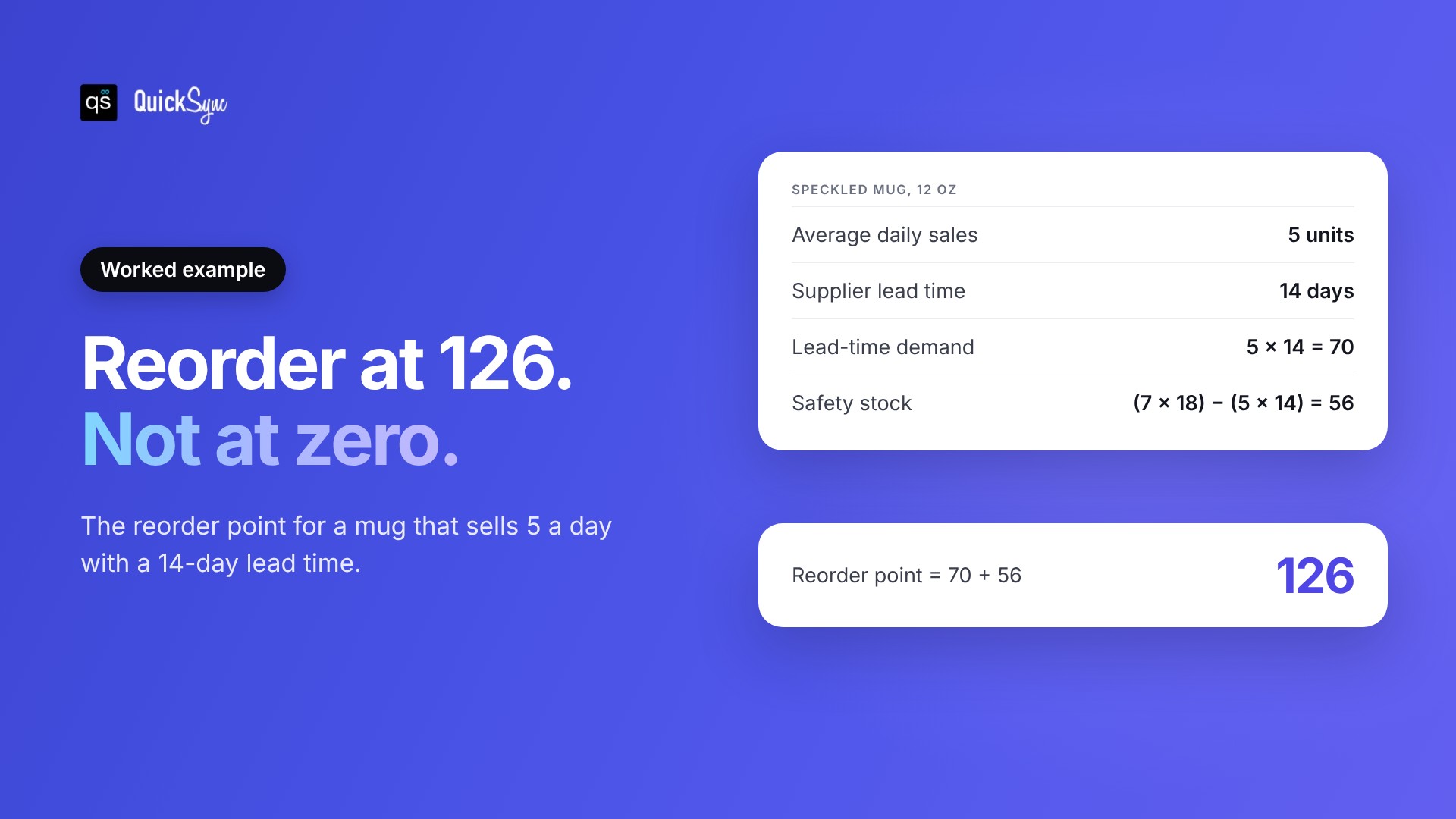
For the speckled mug, the shop sells 5 a day and waits 14 days for stock. That’s 70 mugs sold while the order is on its way. Add a safety stock of 56 (worked out in the next method) and the reorder point is 126. When the count drops to 126, the shop orders.
3. Safety stock
Safety stock is the extra stock you keep for days when sales jump or the supplier runs late. It’s the buffer between a busy week and a stockout. The simplest formula compares your worst case with your normal case.
Safety stock formula
Safety stock = (maximum daily sales × maximum lead time) − (average daily sales × average lead time)
The mug’s busiest days hit 7 sales, and the pottery’s slowest restock took 18 days. So safety stock is (7 × 18) minus (5 × 14), which is 126 minus 70, or 56 mugs. This is the most common version of the formula, and Shopify lists it alongside more advanced ones that use standard deviation.
One honest warning: this formula assumes your worst sales day and your worst delay happen together. For slow sellers, it can give a buffer bigger than a month of sales. For C products, a smaller fixed buffer, such as one week of sales, is often enough.
4. Economic order quantity (EOQ)
Economic order quantity is the order size that keeps your total cost of ordering and holding stock as low as possible. Ordering often costs you in shipping and admin. Ordering a lot at once ties up cash and shelf space. EOQ finds the balance.
Economic order quantity formula
EOQ = √(2 × yearly demand × cost per order ÷ yearly holding cost per unit)
The formula dates back to Ford W. Harris in 1913. For the mug, yearly demand is 1,800 units. Each order costs about $60 in freight and handling. Holding one mug for a year costs about $2.25 (25% of its $9 cost, covering storage, breakage and tied-up cash).
EOQ = √(2 × 1,800 × 60 ÷ 2.25) = √96,000 ≈ 310 mugs. That’s just under 6 orders a year. If your supplier has a minimum order, use whichever number is higher.
5. Cycle counting
Cycle counting means counting a small group of products on a rolling schedule instead of shutting down for one big stocktake. You count your A products often and your C products rarely. Over a few months, you count every SKU and catch errors while they’re still small.
Errors add up faster than most sellers expect. US retailers lost 1.6% of sales to shrink in 2022, which covers theft, damage and admin mistakes. A cycle count is how you find your share of it.
The sample shop uses its ABC classes to set the schedule:
- A products (two mugs): count every two weeks.
- B products (pour-over set): count monthly.
- C products (vase, gift box): count every quarter.
Each count takes about ten minutes. When the shelf and the system disagree, fix the number and note why. If the same SKU keeps drifting, the cause is usually a process gap, such as market sales or returns not getting logged.
6. FIFO (first in, first out)
FIFO means you sell your oldest stock first. On the shelf, it keeps products from going stale, fading, or falling out of date. In your books, it’s also one of the ways to value inventory and work out your cost of goods sold.
Here’s how it changes the numbers. Say the shop bought 100 mugs at $8 in March and 100 more at $9.50 in July, then sold 120. Under FIFO, the cost of those 120 mugs is (100 × $8) + (20 × $9.50), which is $990.
LIFO (last in, first out) does the opposite and would give $1,110. The IRS allows FIFO, LIFO, and specific identification for US businesses. The international standard, IAS 2, allows FIFO and weighted average cost but not LIFO. Ask your accountant which fits your business, then stick with it.
7. Min/max levels
Min/max is the simplest way to turn the methods above into a daily routine. The min is your reorder point. The max is the level you order up to. When stock hits the min, you order enough to get back to the max.
Min/max formula
Min = reorder point.
Max = reorder point + order quantity.
Order amount = max − stock on hand
For the mug, min is 126 and the order quantity from EOQ is 310, so max is 436. When the count hits 126, the shop orders 310. Most inventory tools and even a spreadsheet template can flag SKUs that drop below their min.
Inventory control example: one shop, five SKUs
Here’s how the methods fit together for the whole sample shop. Mugs and gift boxes come from the local pottery (14 days, 18 at worst). The pour-over sets and vases come from an overseas supplier (21 days, 28 at worst). We rounded all numbers up to whole units.
| SKU | Class | Sales a day | Lead time | Safety stock | Reorder point | Count |
|---|---|---|---|---|---|---|
| Speckled mug, 12 oz | A | 5 | 14 days | 56 | 126 | Every 2 weeks |
| Matte black mug, 12 oz | A | 3.3 | 14 days | 44 | 90 | Every 2 weeks |
| Pour-over set | B | 0.8 | 21 days | 25 | 42 | Monthly |
| Bud vase | C | 1.1 | 21 days | 19 | 42 | Quarterly |
| Gift box | C | 0.4 | 14 days | 12 | 18 | Quarterly |
That’s the whole inventory control setup on one page. Each week, the owner checks which SKUs are below their reorder point, places orders, and does the cycle counts that are due. It takes under an hour.
There’s one assumption hiding in this table, though. “Sales a day” is the total across Shopify, Etsy and the market stall. The reorder points only work if every channel draws from, and reports to, the same count.
Inventory control when you sell on more than one channel
Inventory control breaks down on multiple channels when each channel keeps its own count. The usual fixes, splitting stock between channels or updating counts by hand, either leave sales on the table or let the same unit sell twice. The reliable fix is one shared stock count that every channel reads from and updates.
There are two common ways sellers handle this without a shared count. Both cause problems.
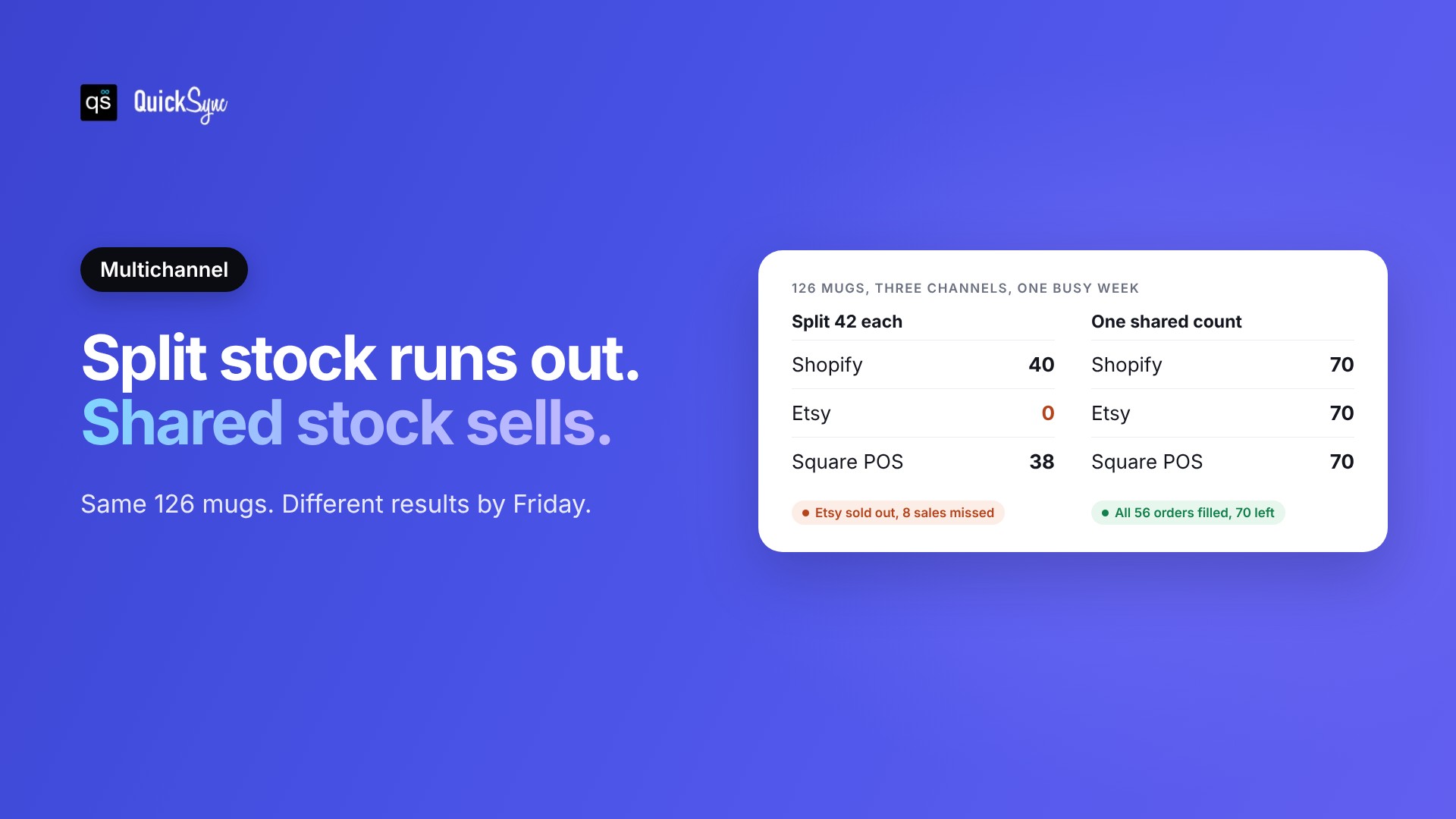
Splitting stock. The shop gives each channel its own share of the 126 mugs: 42 on Shopify, 42 on Etsy, 42 for the market. Then a gift guide features the mug on Etsy, and 50 people want it that week. Etsy sells out after 42, and 8 buyers leave. Meanwhile, 78 mugs sit unsold on the other two channels. The reorder point also stops working, because no single number shows that the shop really has 78 left.
Updating manually. The shop lists all 126 everywhere and adjusts each channel after a sale. That works on a quiet day. On a busy one, the last mug sells on Etsy and on Shopify before anyone updates either. Now you have to cancel one order. On marketplaces, that costs more than one sale. eBay counts a seller cancellation because an item is out of stock as a transaction defect, and sellers who go over 2% of transactions with defects can fall below standard. Top Rated sellers need to stay under 0.5%.
The fix is a single shared count. When a mug sells anywhere, every other channel drops by one. Your reorder point, safety stock, and cycle counts all work on one real number again, and you can list each unit everywhere without selling it twice. Our guide on how to prevent overselling covers the other ways to cut that risk.
This is what QuickSync does. It connects Shopify, Etsy, eBay, Amazon, TikTok Shop, WooCommerce, Square, and Clover, and keeps one stock count across all of them. When a unit sells on one channel, QuickSync updates the count on the others, usually within a couple of minutes. Real-time inventory syncing won’t set your reorder points for you, but it makes sure the number they’re checked against is right.
Set up inventory control in a week
You don’t need new software to start. You need one accurate count, a few formulas, and a routine. Here’s a one-week plan that works for most small shops.
- Day 1: Count everything once. Do a full count and fix every channel to match the shelf. This is your clean starting point.
- Day 2: Run ABC analysis. Pull 12 months of sales from each channel, add them together per SKU, and sort by yearly value.
- Day 3: Find your lead times. Check your last few orders from each supplier. Note the usual delay and the worst one.
- Day 4: Set safety stock and reorder points. Use the formulas above for A and B products. Give C products a fixed buffer.
- Day 5: Set min and max levels. Use EOQ or your supplier’s minimum order to set the max.
- Day 6: Schedule cycle counts. A products every two weeks, B monthly, C quarterly. Put them in your calendar.
- Day 7: Connect your channels to one count. If you sell in more than one place, make sure every channel reads from the same stock number. Otherwise, the work from days 1 to 6 starts drifting the next busy weekend again. QuickSync can do this for you: start a 14-day trial and connect your first two shops in a few minutes.
Once it’s running, inventory control takes about an hour a week. Check what’s below its reorder point, place orders, do the counts that are due, and look at slow movers once a month. If you want to see which products tie up the most cash, track your inventory turnover ratio per SKU alongside it.