You need an eBay listing gone, and fast. Maybe the item sold at a market this morning. Maybe you listed it at the wrong price, or it arrived damaged. Either way, you want to know how to cancel an eBay listing before someone clicks Buy It Now.
On eBay, canceling a listing is called ending it. For a fixed-price listing, it takes about a minute. Auctions with bids are different. eBay limits when you can end them, and in the last 12 hours you sometimes can’t end them at all.
Timing matters. If a buyer purchases an item you no longer have, you’ll have to cancel their order, and eBay can count that as a transaction defect. Its seller standards policy allows defects on no more than 2% of your transactions. Go over that, and you risk selling limits and higher fees.
This guide covers the exact steps on how to cancel eBay listing in Seller Hub, My eBay, and the app. It also explains the auction rules, what ending costs, and when revising or pausing a listing is the better move.
How do you cancel an eBay listing?
You cancel an eBay listing by ending it. In Seller Hub, open Listings, then Active. Tick the checkbox next to the item, select End item from the dropdown, choose a reason, and confirm. In My eBay, go to Selling, then Active, and select End listing. The listing will appear in search results right away.
These steps come from eBay’s help page on ending a listing.
In Seller Hub
Step 1: Open Seller Hub and go to Listings, then Active.
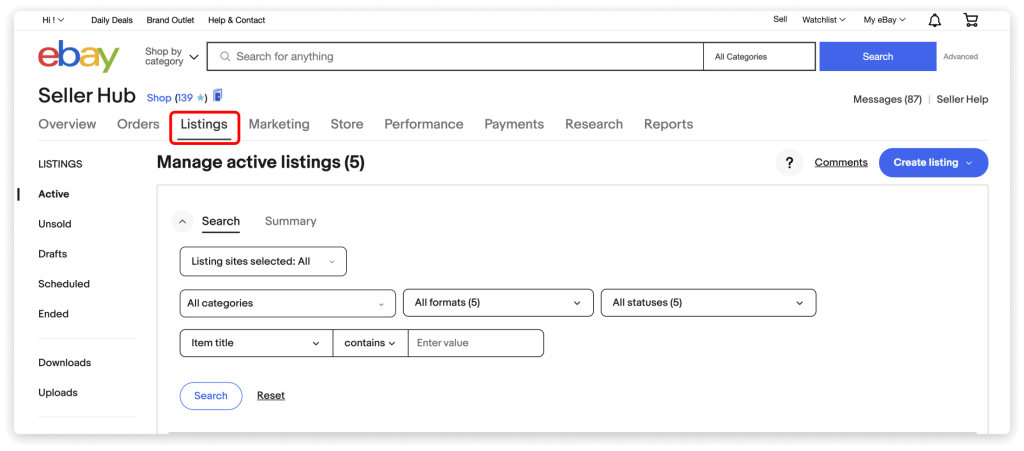
Step 2: Find the listing. Use the search box if you have a lot of them.
Step 3: Tick the checkbox next to the item.
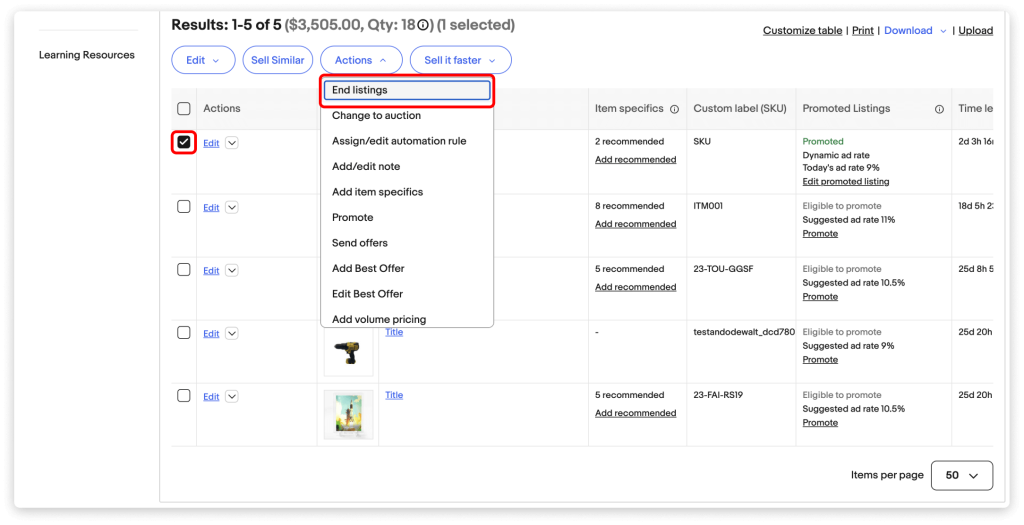
Step 4: From the dropdown menu, select End item.
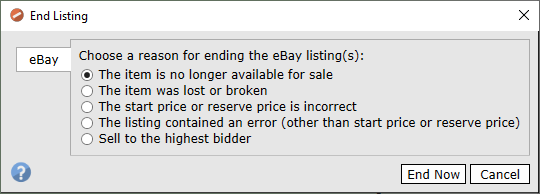
Step 5: Choose a reason, such as the item being no longer available, and confirm.
In My eBay
If you don’t use Seller Hub, go to My eBay, then Selling, then Active. Find the item and select End listing from the dropdown menu next to it.
In the eBay app
On iPhone or Android, open the eBay app and go to Selling, then Active. Tap the listing, tap End listing, pick a reason, and confirm. The menu labels can shift a little between app versions, but the option sits on the listing itself.
End several listings at once
In Seller Hub’s Active listings, tick the box next to each listing you want to end. Then open Actions and select End. This works for fixed price listings and auctions without bids. Auctions with bids have to be ended one at a time, with a valid reason for each.
Can you end an eBay auction early if it has bids?
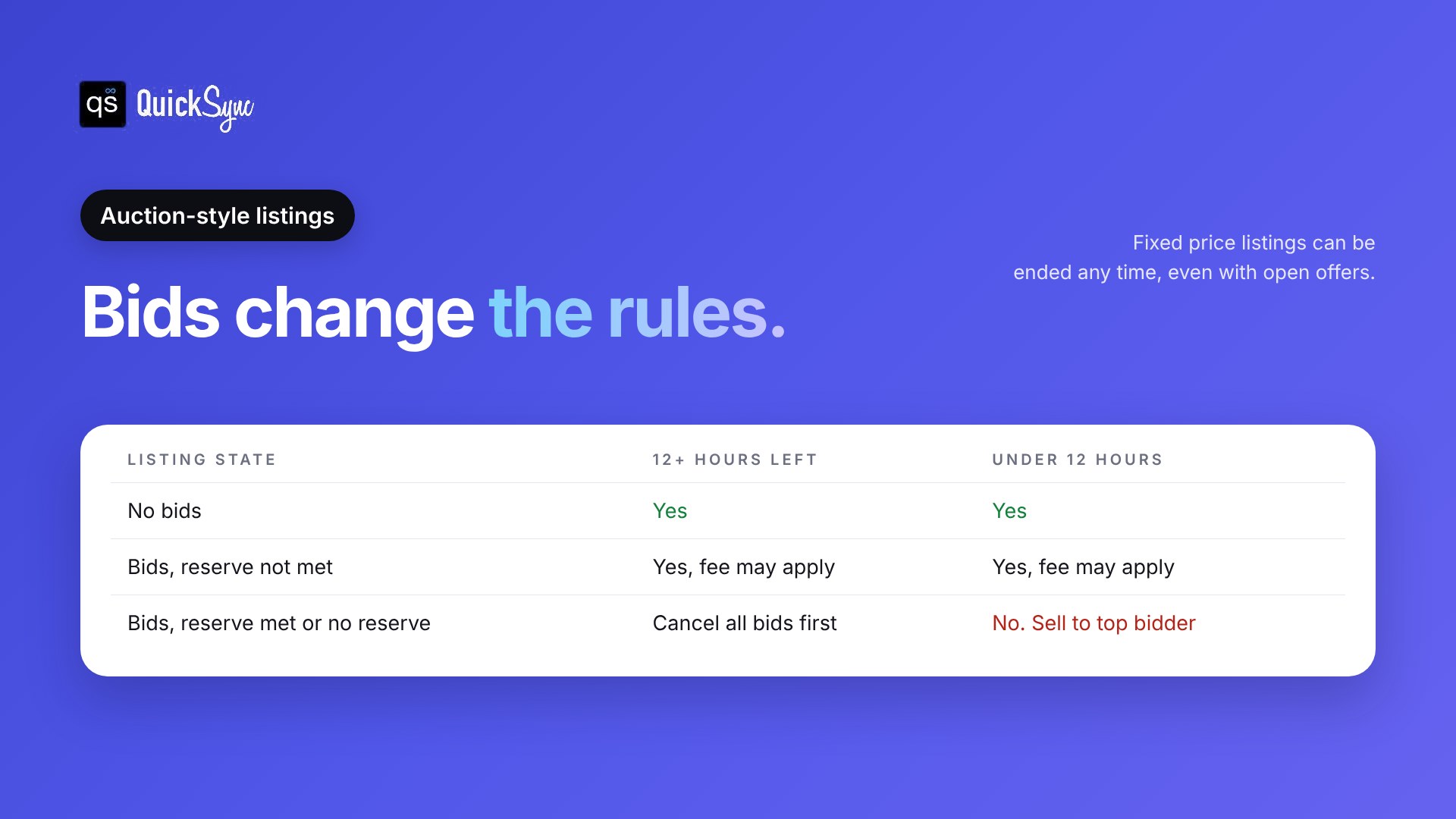
Sometimes. It depends on how many hours are left, whether there are bids, and whether the reserve price has been met. With 12 or more hours left, you can cancel all bids and end it. With under 12 hours left and the reserve met, you can’t end it. You can only sell to the highest bidder.
Here’s the full set of rules from eBay’s ending a listing page.
| Listing state | 12 or more hours left | Under 12 hours left |
|---|---|---|
| No bids | Yes | Yes |
| Bids, reserve not met | Yes. A final value fee may apply to the highest bid | Yes. A final value fee may apply on the highest bid |
| Bids, reserve met or no reserve | Yes, by canceling all bids, or sell to the highest bidder | No. You can only sell to the highest bidder |
Fixed price listings are simpler. You can end them at any time, even with open offers.
How to cancel bids before ending an auction
If you need to clear bids first, use eBay’s canceling bids form. Enter the item number, the bidder’s username and your reason, then select Submit. eBay accepts a few reasons, such as the item no longer being available or an error in the listing. A canceled bid can’t be reinstated, so be sure before you submit.
When the auction can’t be ended
If you’re inside the last 12 hours and the reserve is met (or there’s no reserve), you have two options. Message the bidders, explain what happened, and ask them to retract their bids. Or let the auction finish and ask the winner to agree to cancel the sale.
Neither is ideal. And eBay says it may place limits on accounts that end listings early regularly, so treat this as a last resort.
Does it cost anything to end an eBay listing?
Ending a fixed-price listing or an auction with no bids costs nothing extra. But fees you’ve already paid, like the insertion fee, aren’t refunded. If you end an auction that has bids, eBay may charge a final value fee based on the highest bid.
Let me break the fees down.
- Insertion fees. eBay’s selling fees page says insertion fees are non-refundable if your item doesn’t sell. Ending early counts. If the listing used one of your free monthly listings, there’s nothing to lose here.
- Upgrade fees. Extras like a bold title or subtitle are charged up front when you list, so ending early doesn’t undo them.
- Final value fees on auctions. If bids are in place, eBay may charge a final value fee on the highest bid, even though nothing sold.
- Good ‘Til Cancelled renewals. Fixed price listings renew every calendar month, and each renewal can carry an insertion fee. Ending a listing you don’t need stops the next one.
For the full picture, see our breakdown of eBay seller fees.
Ending a listing vs canceling an eBay order
These two get mixed up a lot, and they work very differently. Ending a listing takes an item off eBay before anyone buys it. Canceling an order undoes a sale that’s already happened.
| End a listing | Cancel an order | |
|---|---|---|
| When | Before the item sells | After a buyer has bought it |
| Where | Listings, then Active | Orders, then More actions, then Cancel order |
| Buyer impact | None, or bids canceled | Buyer gets a full refund |
| Seller impact | None for fixed price listings | Out-of-stock cancellations can count as a transaction defect |
| Time limit | Any time for fixed price | Up to 30 days after the sale |
eBay’s guide to canceling an order says sellers can cancel up to 30 days after a sale, and the buyer gets a full refund automatically. You may also get a fee credit. But if you cancel because the item is out of stock, that can be counted as a transaction defect.
That’s the reason to end a listing early. A listing you end costs you an insertion fee at most. An order you cancel can cost you your seller level. Defects also count against Top Rated Seller requirements, where the limit is just 0.5%.
One more thing to watch. When you cancel a single-quantity Buy It Now order, eBay relists the item automatically unless you select “No” for “Relist item?” If the item’s gone, untick it. Otherwise, you’ll be back here ending the same listing again.
Before you end it: three better options
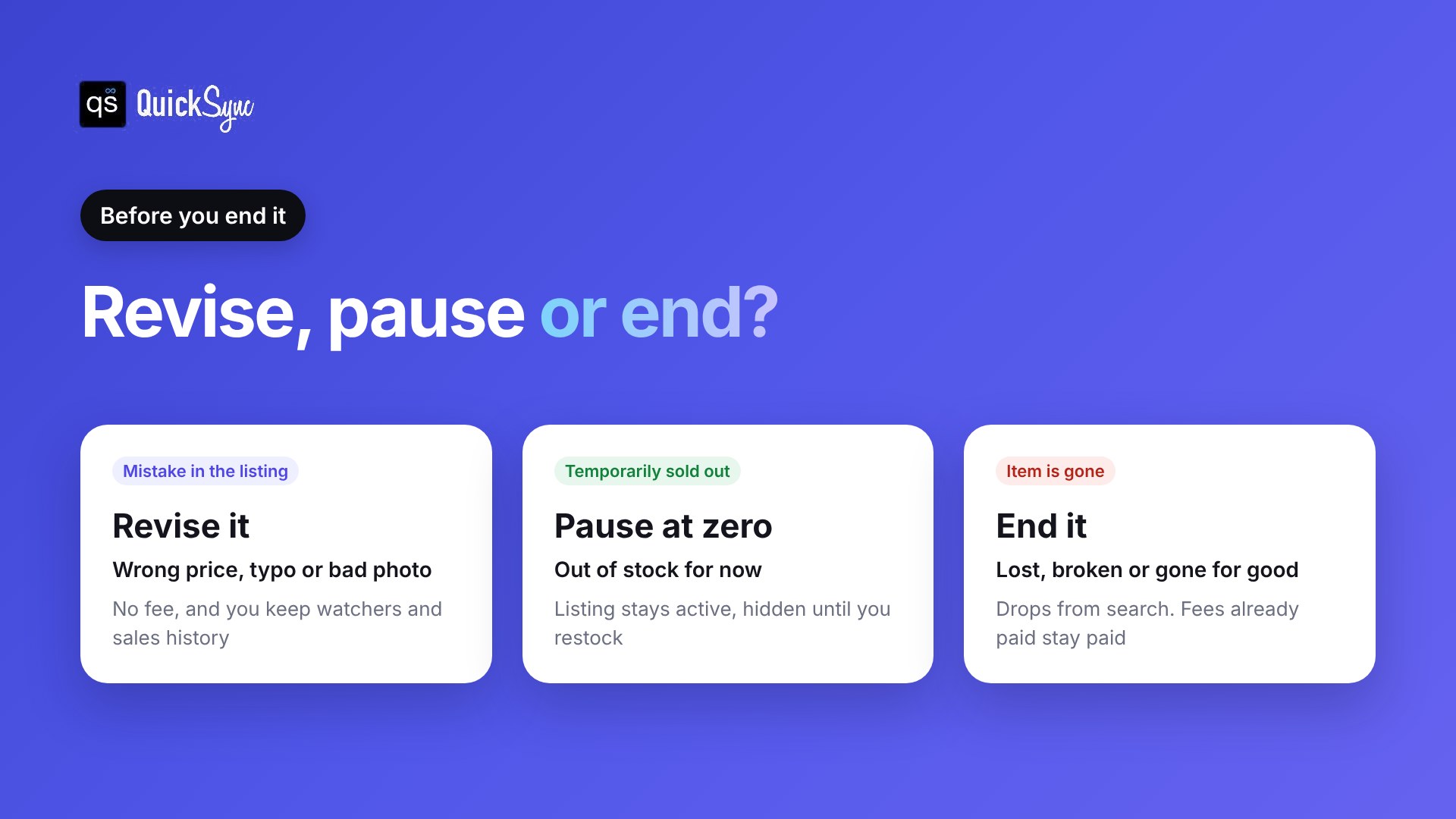
Ending a listing isn’t always the right call. eBay itself says it strongly discourages ending listings early and suggests revising instead where you can. Here’s how to choose.
Revise the listing
If the problem is a mistake, such as a wrong price, a typo in the title or a missing photo, revise the listing instead. There’s no fee to revise, and because it’s the same listing, you keep its watchers and sales history. Auctions are stricter: once there are bids, or under 12 hours are left, you can change much less.
Pause it at zero stock
If you’ve only run out for now, don’t end a fixed price listing. eBay has an out-of-stock option that keeps Good ‘Til Cancelled listings alive at zero quantity. While it’s at zero, the listing is hidden from eBay search. Add stock and it shows up again, with its sales history intact.
To turn it on, go to your eBay selling preferences and switch on Listings stay active when you’re out of stock under Multi-quantity listings.
Here’s the thing though: without this setting, a listing that hits zero can end on its own, and you lose the history you built.
End it and relist later
If the item really is gone, or you want to switch an auction to fixed price, end it. You can bring it back later from your Unsold listings. Just know that a manual relist charges a new insertion fee or uses one of your free listings. If the relisted item sells, you may get that fee back as a credit.
What happens after you end an eBay listing?
Once you end a listing, it drops out of eBay search right away and buyers can’t purchase it. It moves to your Unsold listings, where you can relist it or use it as a template. Fees already paid stay paid. If you ended an auction by selling to the highest bidder, that sale goes ahead as normal.
A few practical notes:
- Unsold listings. In Seller Hub, check the listing’s box on the Unsold page and select Relist when you’re ready.
- Clearing them out. You can delete ended listings from your Unsold view to tidy up. That only removes them from your list. It doesn’t change your sales history or feedback.
- Automatic relisting. If you sell auctions as a new or occasional seller, you may have auto-relist turned on. Remove it from the More actions menu if you don’t want the item back.
Why listings get ended early (and how to stop it)
Plenty of early endings have nothing to do with mistakes. The item simply sold somewhere else, at a market, in your shop or on your website, and eBay still shows it as available.
Here’s what this looks like in practice.
You sell vintage cameras on eBay and on your Shopify store. You have one Canon AE-1. At 10:05 a.m., it sells on Shopify. You’re packing orders, so you don’t get to eBay. At 10:40 a.m., someone buys it there too. Now you’re canceling an eBay order for a camera you don’t have, and that cancellation can count as a defect.
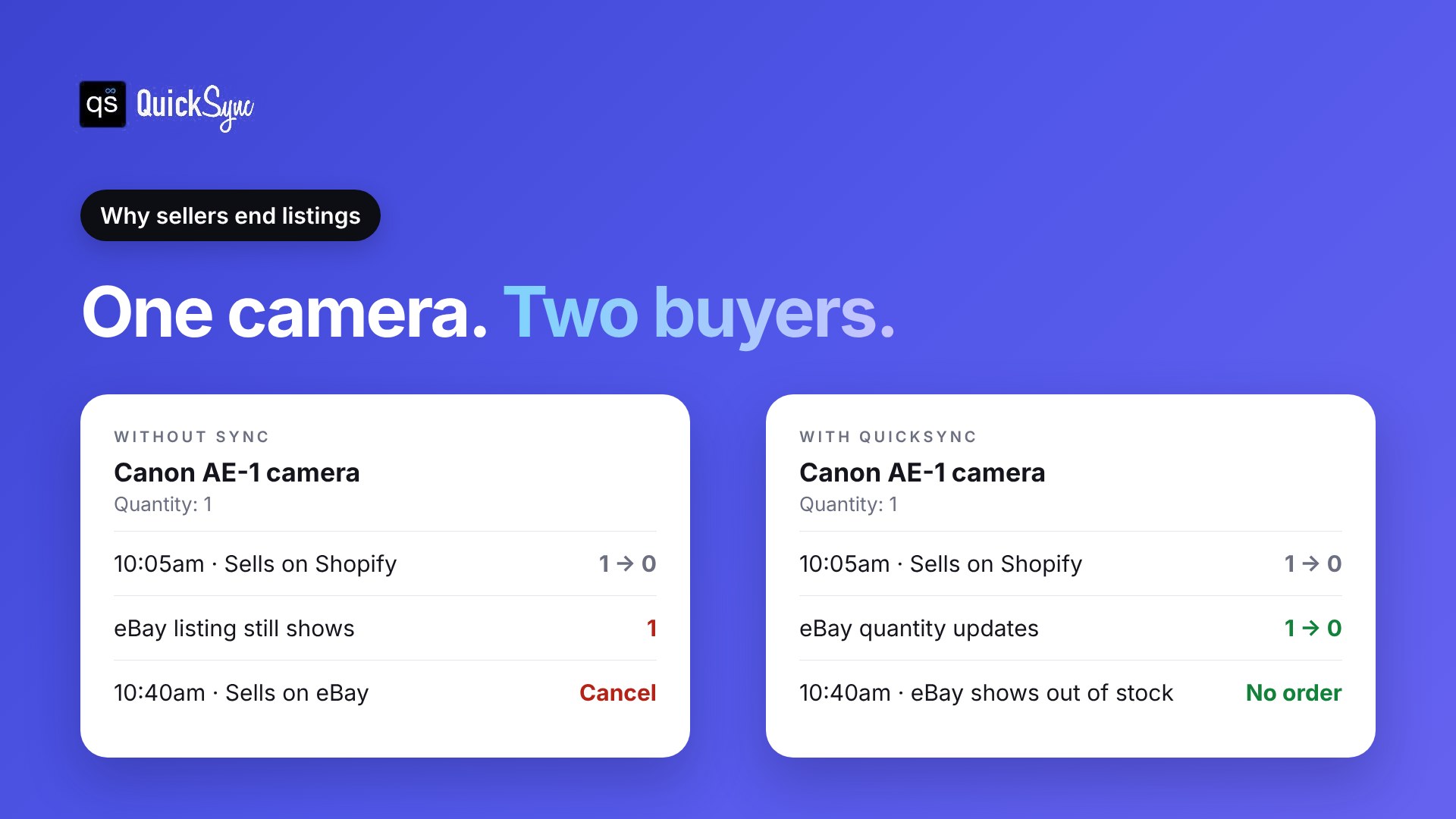
That’s overselling, and it gets harder to avoid the more channels and listings you have.
You have three ways to handle it:
- End listings by hand after each sale. It works for a few items. It breaks once you have dozens of listings or sell in person.
- Keep a buffer. List one fewer unit on eBay than you have. Fewer oversells, but your last units sit unsold.
- Sync your stock automatically. QuickSync watches every channel you connect. When something sells on Shopify, Etsy, Square, or WooCommerce, it lowers the quantity on your eBay listing to match.
With eBay’s out-of-stock option turned on, QuickSync sets the listing to zero instead of ending it. The listing stays active but hidden from search, and comes back when you restock. You keep your sales history and never touch it by hand. Our eBay integration checks your channels for changes every couple of minutes.
Final thoughts
To cancel an eBay listing, end it from Seller Hub: Listings, Active, tick the box, End item, confirm. Fixed price listings can go any time. Auctions with bids follow the 12-hour rules, and fees you’ve paid don’t come back.
Before you end anything, ask why. A mistake is a revision. A temporary stockout is a pause at zero. Only end listings for items that are truly gone.
If you sell the same stock on eBay and anywhere else, the bigger win is not having to end listings at all. Start a 14-day QuickSync trial and connect eBay to your other channels. It’s free for 14 days, and you don’t need a card. Your eBay quantities update on their own, so a sale elsewhere is far less likely to turn into a canceled eBay order.