How many units of your best seller do you have right now?
If you can answer that in a second, you’re running a perpetual inventory system. If you’d need to walk to the shelf and count, you’re running a periodic one. That one difference decides how often you oversell, how late you reorder, and how much missing stock you never notice.
This guide breaks down both systems in plain terms:
- How each system works, and where the numbers come from
- The key differences, side by side in one table
- How cost of goods sold (COGS) is calculated in each one
- Which system fits your business, and how to switch
- What perpetual inventory means when you sell on Shopify, Etsy, eBay, and a POS at the same time
What is a perpetual inventory system?
A perpetual inventory system updates your inventory records every time stock comes in or goes out. Each sale lowers the count, and each purchase raises it, so you always have a current number. Most ecommerce platforms and POS systems work this way. You still count stock now and then to check the records.
OpenStax’s Principles of Financial Accounting puts it simply: a perpetual system “automatically updates and records the inventory account every time a sale, or purchase of inventory, occurs.”
Here’s what that looks like in practice:
- You receive 50 jars from a supplier. Your stock goes up by 50.
- A customer buys 2 jars online. Your stock goes down by 2.
- A customer returns 1 jar. Your stock goes up by 1.
Every change happens when the sale or purchase happens, not at the end of the month. Your COGS builds up as you go, too.
Perpetual doesn’t mean you never count. Breakage, theft, and mistakes still happen, so you count from time to time and fix any gaps. For tax purposes, the IRS says in Publication 538 that you must take a physical inventory at reasonable intervals. Then you adjust your records to match what’s actually there.
What is a periodic inventory system?
A periodic inventory system updates your inventory only at set times, such as the end of each month, quarter, or year. Between counts, you record purchases but don’t track stock item by item. At the end of the period, you count everything and use that count to work out your ending inventory and cost of goods sold.
In a periodic system, purchases go into a separate purchases account. The inventory balance stays the same until you count and confirm it.
Plenty of small shops run this way without calling it anything. You buy stock, sell it, and do a full count when it’s time to do the books. It works when you sell from one place, carry few products, and can see your shelves.
Perpetual vs periodic inventory: the key differences
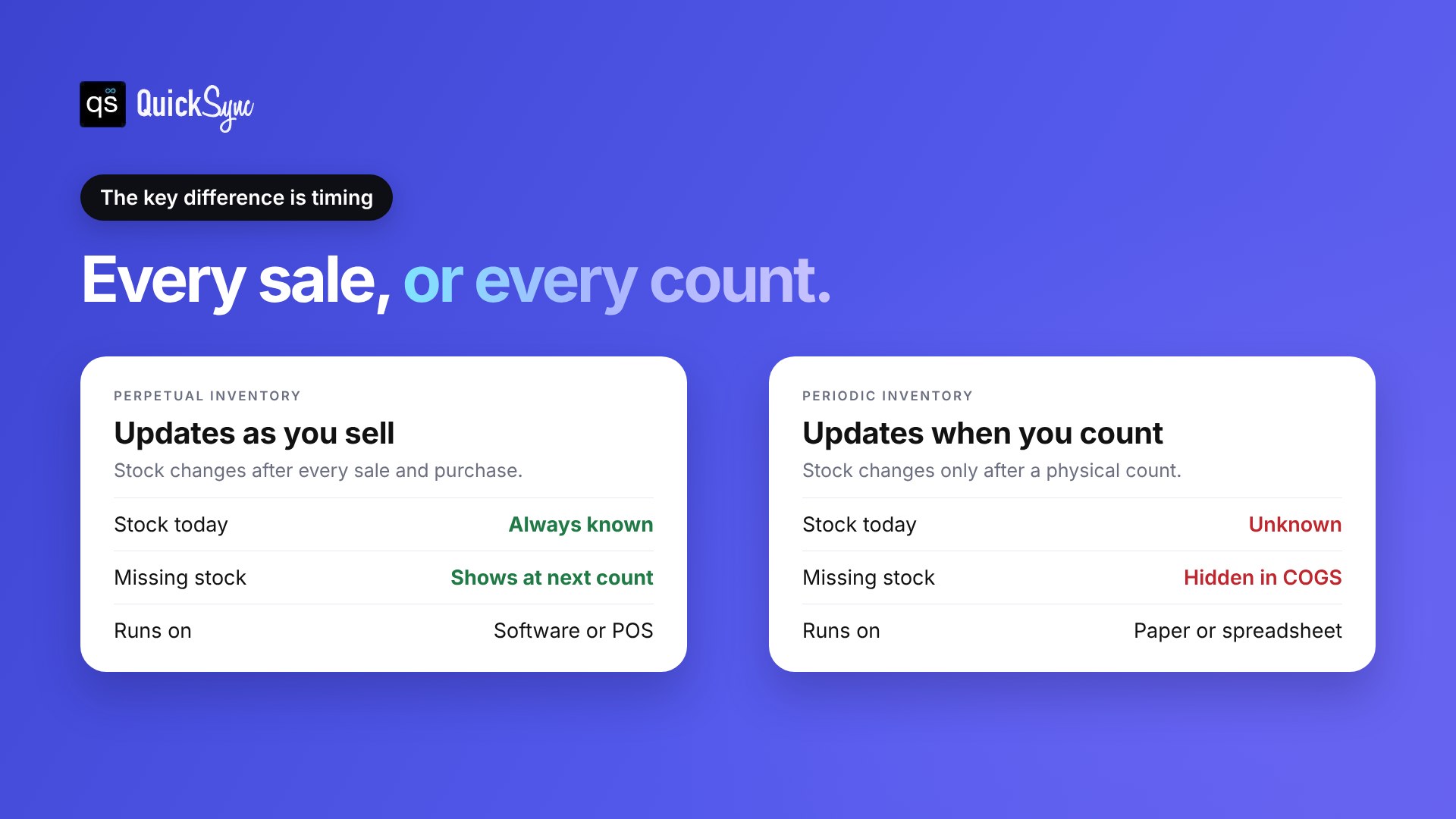
The main difference is timing. A perpetual system updates stock after every sale and purchase. A periodic system updates stock only after a physical count. That one difference changes how you calculate COGS, how fast you spot missing stock and whether you can trust your numbers between counts.
| Perpetual inventory | Periodic inventory | |
|---|---|---|
| When stock updates | After every sale and purchase | Only after a physical count |
| Stock level between counts | Known at any time | Unknown until the next count |
| How COGS is worked out | Recorded with each sale | Calculated at the end of the period |
| Where purchases go | Straight into inventory | Into a separate purchases account |
| Physical counts | Still needed, but less often | Needed every period |
| Spotting missing stock | Shows up as a gap at the next count | Hidden inside COGS |
| Setup | Needs software or a POS | Can run on paper or a spreadsheet |
| Best for | Online sellers and anyone selling in more than one place | Very small, single-location shops |
Selling on more than one channel? Jump to perpetual inventory across sales channels.
Perpetual vs periodic inventory example: one month, two systems
Here’s one month at a small candle shop, tracked both ways.
The month
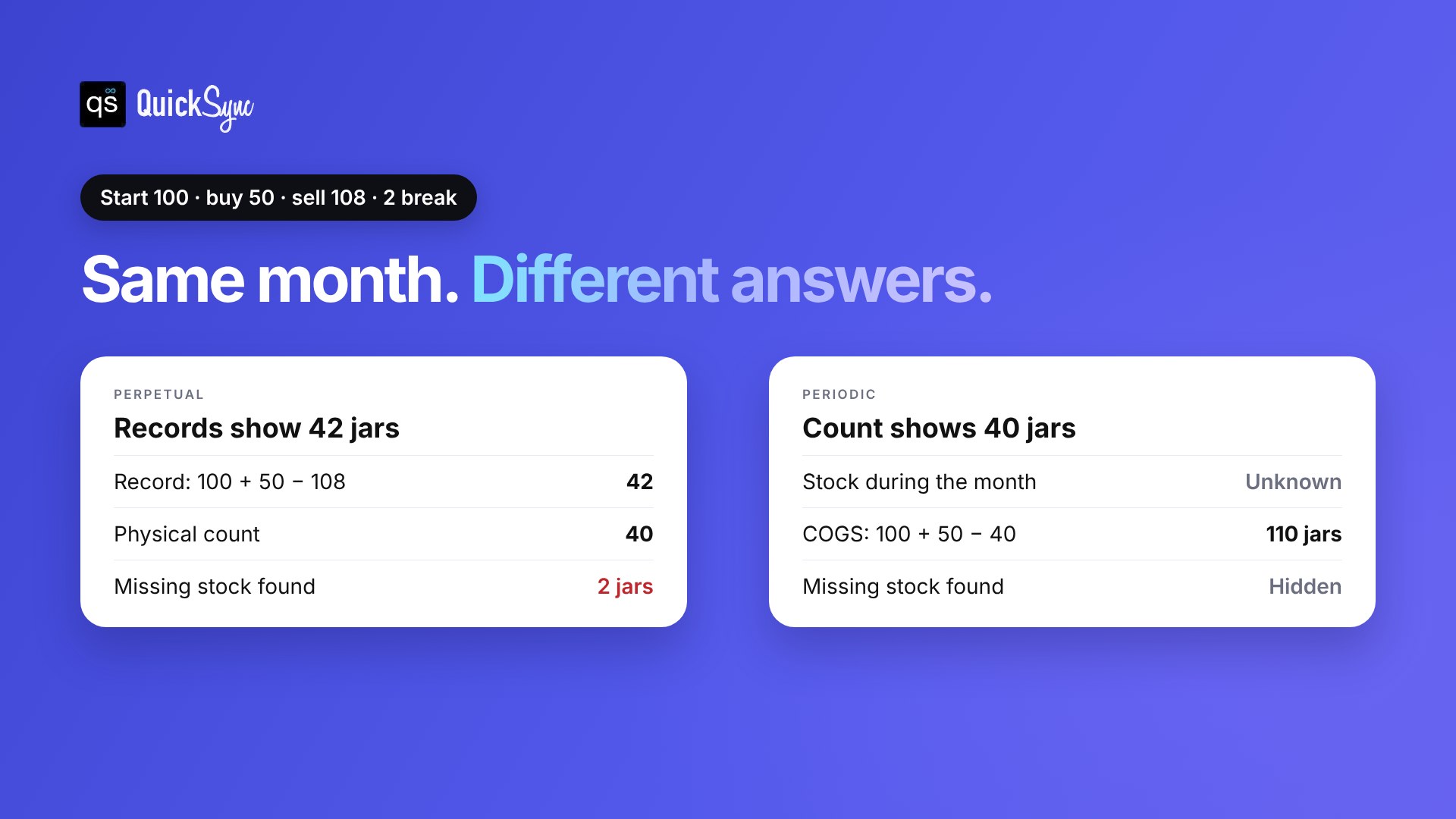
Starts with 100 jars · buys 50 · sells 108 · 2 break and nobody records it · $5 a jar
| Perpetual | Periodic | |
|---|---|---|
| Stock during the month | Known every day | Unknown |
| Records at month end | 100 + 50 − 108 = 42 jars | No running record |
| Physical count | 40 jars | 40 jars |
| COGS | 108 jars sold = $540, plus 2 jars shrinkage = $10 | 100 + 50 − 40 = 110 jars = $550 |
| The 2 broken jars | Found as a 2-jar gap | Hidden inside COGS |
The takeaway: both systems end the month at 40 jars. Only perpetual tells you 2 went missing, and only perpetual tells you your stock on any day before the count.
Missing stock adds up. The National Retail Federation’s 2023 National Retail Security Survey puts average retail shrink at 1.6% in fiscal 2022, about $112.1 billion in losses.
How do you calculate COGS in each system?
In a periodic system, you calculate cost of goods sold at the end of the period: beginning inventory plus net purchases, minus ending inventory. In a perpetual system, you record the cost of each item as it is sold, so COGS builds up through the period.
Periodic inventory formula for COGS
Cost of goods sold = Beginning inventory + Net purchases − Ending inventory
Net purchases are your purchases minus any purchase discounts, returns, and allowances. Ending inventory comes from your physical count.
Perpetual COGS: there’s no end-of-period formula to run. Each sale records the cost of the item sold. Your COGS for the month is the total of those costs, adjusted for any shrinkage you find when you count.
Both systems work with the common costing methods, like FIFO (first in, first out). Our guide to the inventory turnover ratio shows how COGS feeds into other numbers you’ll want to track.
Perpetual vs periodic inventory: pros and cons
Neither system is perfect. Here’s how they compare in practice.
Perpetual inventory
| Pros | Cons |
|---|---|
| You know your stock level at any time | Needs software or a POS to run |
| Missing stock shows up when you count | Records can drift if sales aren’t entered correctly |
| You can reorder before you run out | Software usually has a monthly cost |
| Fewer full counts needed | Each sales channel needs to share the same count |
Periodic inventory
| Pros | Cons |
|---|---|
| Simple to run on paper or a spreadsheet | You don’t know your stock between counts |
| No software needed | Shrinkage and damage hide inside COGS |
| Low cost for very small shops | Full counts take time and can pause selling |
| Fine for a handful of products in one place | Hard to use once you sell online |
OpenStax sums it up well. Periodic systems are “often less expensive and time consuming.” But there are “more chances for shrinkage, damaged, or obsolete merchandise because inventory is not constantly monitored.”
Which inventory system should you use?
Use a perpetual inventory system if you sell online, carry more than a few products, or sell in more than one place. Use a periodic system only if you run a very small shop from one location and don’t mind a full count every period. Most growing sellers move to perpetual sooner rather than later.
Choosing between perpetual vs. periodic inventory comes down to three questions:
- Do you sell online? Customers buy at any hour. Your store needs a live stock count to stop them buying what you don’t have.
- Do you sell in more than one place? Shopify, Etsy, eBay, and a market stall all draw from the same shelf. Periodic counts can’t keep them in line.
- Do you need to know when to reorder? Reorder points only work if you know your current stock.
If you answered yes to any of these, perpetual is the right choice.
Perpetual inventory across sales channels
Shopify, Etsy, eBay, and most POS systems already track stock perpetually. The catch: each one only tracks its own sales.
What happens without sync:
- A customer buys 2 candles on Shopify. Shopify drops from 20 to 18.
- Etsy, eBay, and your Square POS still show 20.
- Two buyers grab the last candle on two channels, and you cancel one order.
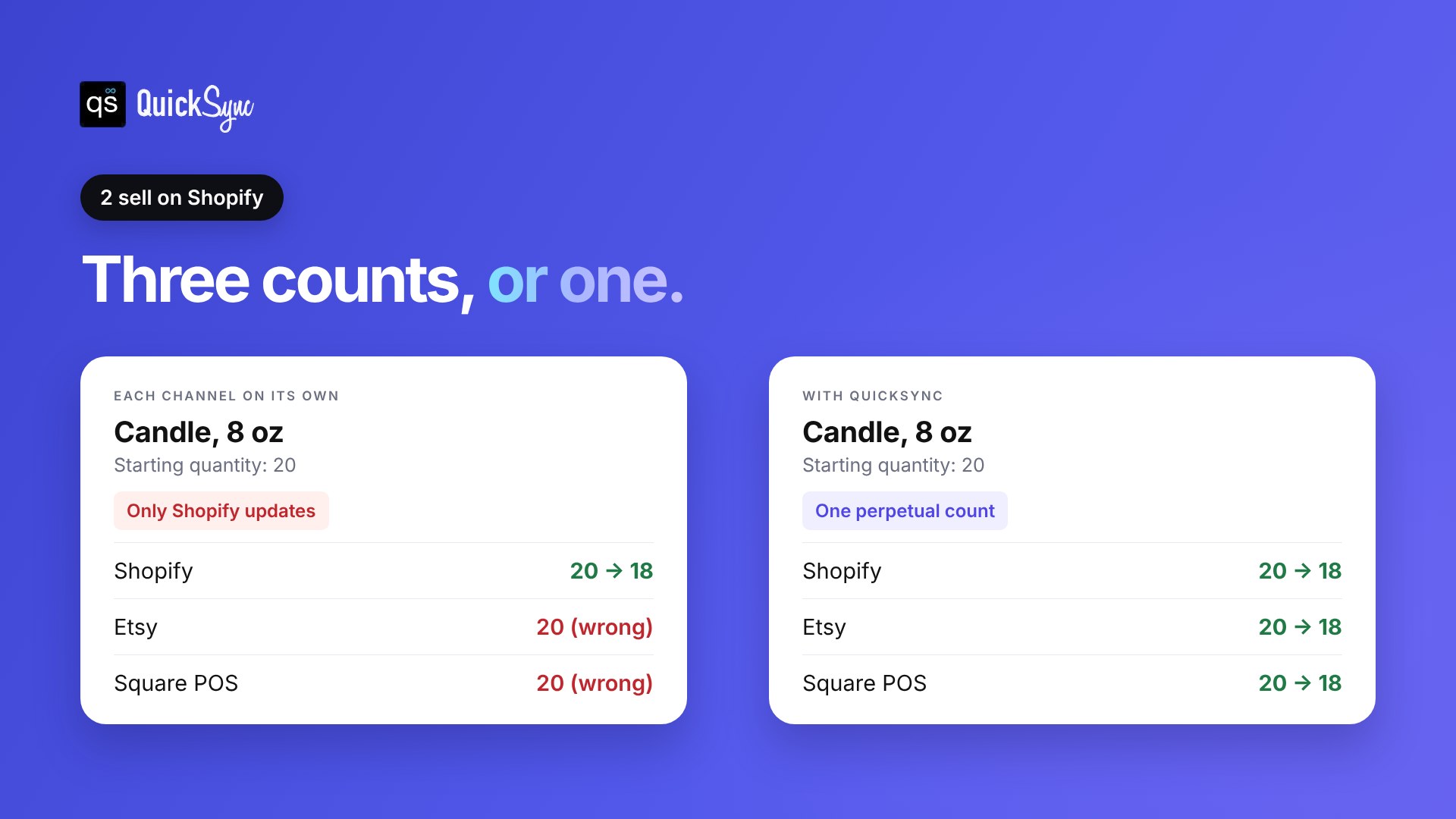
Each channel is perpetual on its own, but your business isn’t. On eBay, canceling because an item was out of stock counts as a transaction defect under the seller standards policy. Our guide on how to prevent overselling has more on this.
How QuickSync makes it one perpetual count:
- One baseline. You choose a Source Store, and every connected channel matches it.
- Every sale reaches every channel. Sell on one channel and your other shops update.
- Stock syncs both ways on Shopify, Etsy, eBay, TikTok Shop, and the POS systems. A market-stall sale on Square lowers your Shopify and Etsy stock too.
- Listings and orders too. QuickSync also syncs product details and sends orders to one place.
- Works with Shopify, Amazon, Etsy, eBay, TikTok Shop, WooCommerce, Squarespace, Wix, Square, Clover and Lightspeed. See the integrations page.
How to move from periodic to perpetual inventory
You don’t need to rebuild your business to switch. Run the move in this order.
- Do one full physical count. This is your starting point. Count every product and write down the quantity.
- Give every product a SKU. A SKU is a short code for each product and variant. Our guide on what a SKU is shows how to set them up.
- Enter your counts into your main store. Turn on inventory tracking in Shopify, Square, or wherever most of your sales happen.
- Connect your other channels. Use an inventory sync tool so every channel shares the same count.
- Set a counting schedule. Count a few products each week instead of everything once a year. Fix any gaps as you find them.
After the first month, compare your records with a count. If the numbers are close, your perpetual system is working. If they’re not, check how returns and damaged stock are being recorded.
Final thoughts
Perpetual and periodic inventory both end up at the same place: the stock you actually have. The difference is how long you wait to find out.
A periodic system can work for a small shop with one counter and a few products. Once you sell online, add products or open a second channel, waiting for the count gets expensive. You oversell, you reorder late, and missing stock stays hidden.
A perpetual system fixes that, as long as every channel shares the same count. That’s the job QuickSync is built for. Sync Shopify and Etsy, connect Square or see how inventory syncing works. The trial is 14 days, and you don’t need a card.