On this page
- What WooCommerce eBay Sync Actually Means
- Common WooCommerce and eBay Sync Problems Costing You Sales
- What are the Methods to sync WooCommerce and eBay accounts?
- Features to Look for When Choosing the WooCommerce eBay Sync Solution
- How To Connect & Sync WooCommerce & eBay (Using QuickSync)
- Best Practices for WooCommerce and eBay Integration
- Key Benefits of Connecting eBay to WooCommerce
- The Bottom Line: What Next:
- FAQs
Last month, we saw a home goods seller running a successful WooCommerce store with 400+ SKUs, steady traffic, and loyal customers. Two weeks after launching on eBay, they had oversold 89 units, triggered account warnings, and spent hours fixing inventory errors.
The problem wasn’t eBay but a poor synchronization.
With over 135 million active buyers, eBay moves fast. A single promotion or search boost can increase the demand overnight. Without a proper WooCommerce eBay Sync system in place, inventory gaps, pricing mismatches, and delayed updates quickly turn into costly mistakes.
Connecting the two platforms is simple. Syncing them perfectly is what protects your revenue.
In this guide, you’ll learn how to sync WooCommerce with eBay the right way, build a system that scales, prevent overselling, and keep your store stable when sales surge.
So get your cup of coffee and read on…
What WooCommerce eBay Sync Actually Means
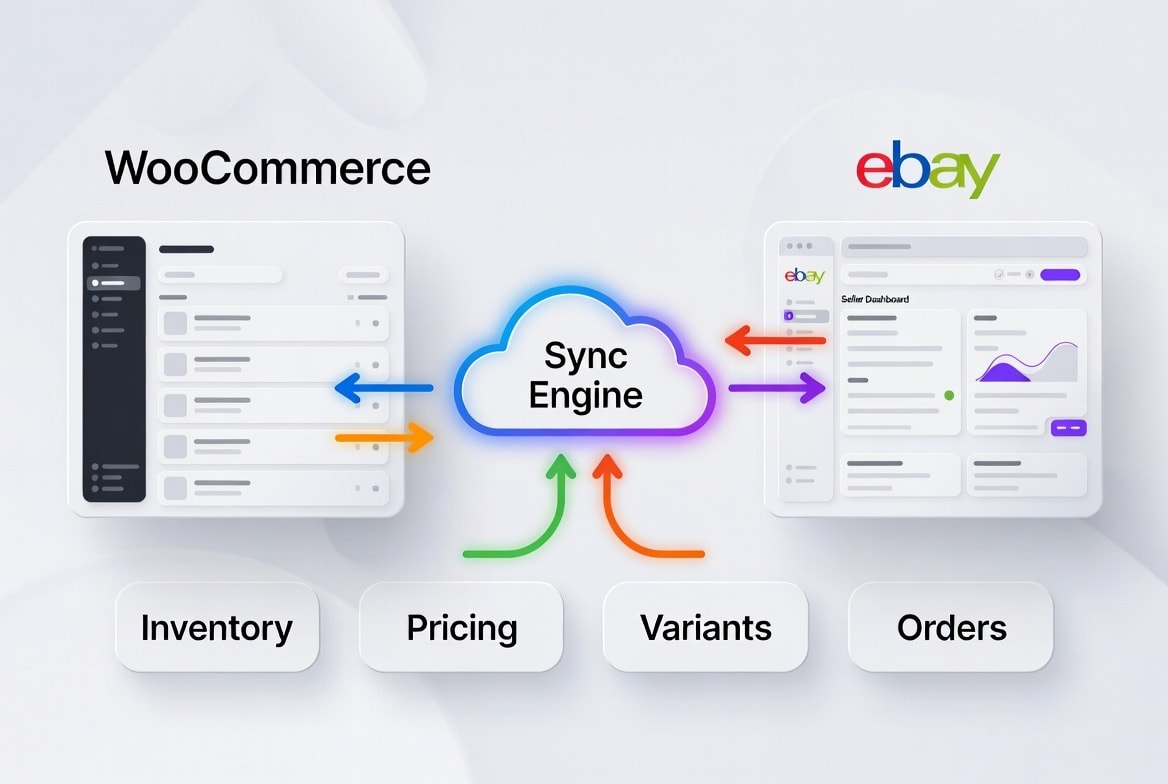
Most sellers misunderstand “sync.” They think it means connecting accounts and importing listings once.
That’s not synchronization. That’s setup.
Real WooCommerce and eBay sync is a continuous, automated data alignment between both platforms. Your catalog, inventory, pricing, and listing data update automatically without spreadsheets, CSV uploads, or manual corrections. WooCommerce changes reach eBay within seconds; eBay sales are picked up within about two minutes.
If you are copying titles, adjusting stock manually, or updating prices twice, you are not synced. You are exposing your multichannel business to risk.
Real synchronization means:
- A stock change in WooCommerce immediately adjusts the available quantity on eBay
- A price update reflects across all active listings
- Variant options remain structured and accurate
- Item specifics stay compliant with marketplace requirements
An effective syncing process includes the following 5 core elements:
Data Layer | What Moves Automatically | Why It Protects Your Business |
Products | Titles, descriptions, categories | Marketplace visibility and listing accuracy |
Variants | Size, color, style attributes | Prevents fulfillment errors and returns |
Pricing | Base price, discounts, currency | Safeguards margins and promotions |
Inventory | Real-time stock counts and buffers | Eliminates overselling |
Images | Primary and variant media | Maintains conversion performance |
When even one of these layers breaks, the damage compounds. Listings get flagged. Inventory drifts. Margins shrink. Customer trust erodes.
Sync is not about getting products onto eBay. It is about maintaining operational control when sales velocity increases.
Common WooCommerce and eBay Sync Problems Costing You Sales
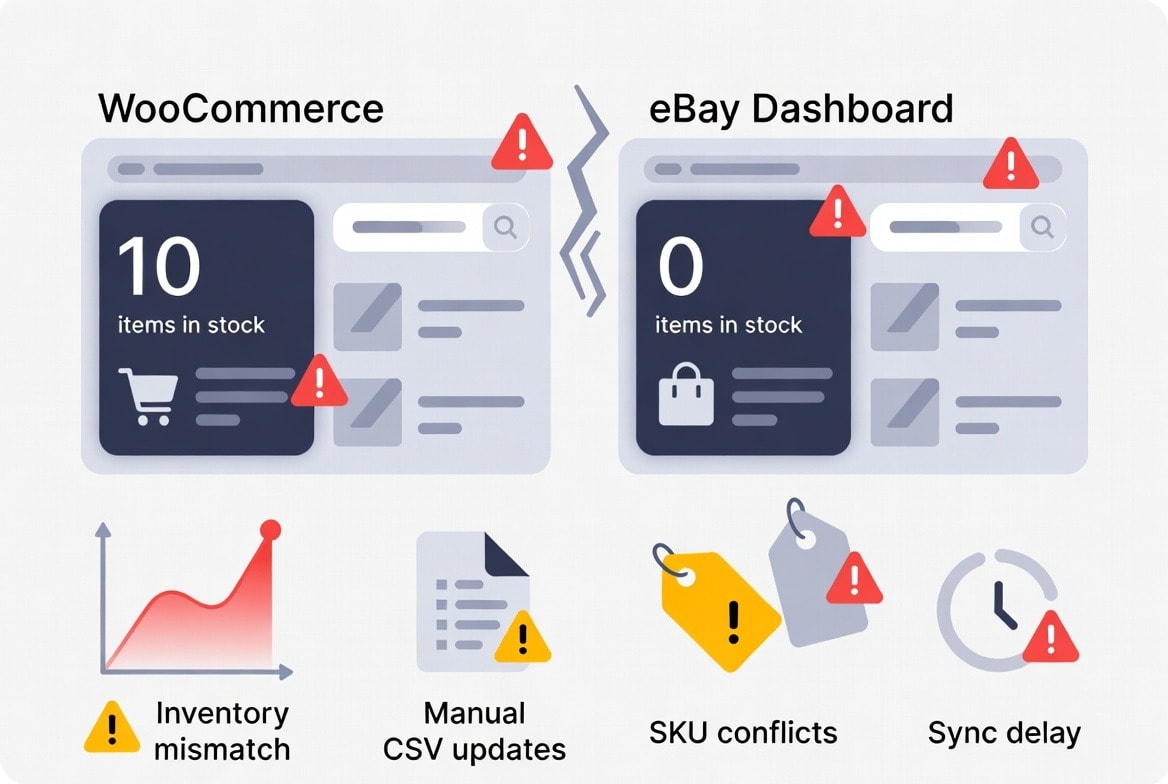
After auditing hundreds of multichannel stores, we’ve noticed a pattern. Most multi-channel sellers say they are “connected” to eBay.
But in reality, very few are truly synchronized.
Connection just pushes data, but synchronization protects operations.
Here are the six most common problems and how they quietly drain revenue.
Inventory Mismatches Across Sales Channels:
Your platforms show different stock counts because they don’t update instantly after each sale or return. Without real-time stock accuracy, the numbers your systems show are outdated or conflicting.
Inventory Mismatches Cause:
- Overselling or stockouts happen frequently
- Refunds, cancellations, negative reviews
- Damaged account health on marketplaces
Inventory conflicts are estimated to account for upto 95% of stock mismatches without automated sync tools.
Overselling During Promotional Spikes:
eBay traffic doesn’t rise in a straight line. Demand can surge suddenly due to promotions, algorithm boosts, or featured deals. If sync isn’t instant, orders continue to be accepted on one platform even when stock has already sold out.
Overselling Causes:
- Automatic order confirmations for stock you don’t have
- Customer complaints and negative feedback
- Marketplace penalties and seller performance issues
Overselling contributes significantly to cart abandonment and lost revenue, which globally costs sellers up to $1 trillion annually.
Manual Uploads and Constant Hand Updates:
Listing products, assigning the right categories, adding item details, and updating inventory are mostly done manually or with limited automation. While this approach may work for a small catalog, it becomes time-consuming, error-prone, and difficult to manage as the number of products increases.
Manual Updates Causes:
- Human errors increase exponentially with SKU count
- Wrong categories or item specifics cause listing rejections
- Repeated manual edits waste hours and cost productivity
Even partial automation reduces errors and saves hours weekly compared to manual stock handling.
SKU and Item-Specific Inconsistencies:
Different platforms often require different formatting for SKUs and item specifics. If WooCommerce and eBay don’t interpret the same SKU the same way, the platforms treat them as separate products.
These causes:
- Inventory pools drift apart across channels
- Reported availability becomes inaccurate
- Sync gaps grow over time
This isn’t just a minor technical issue. Inventory inaccuracies are common, with up to 35% of large retailers regularly experiencing stock mismatches across different sales channels.
Price Differences Across Platforms:
Pricing on eBay often needs to account for marketplace fees, promotions, and competitive dynamics that differ from WooCommerce pricing strategies. If pricing isn’t properly synced or automated, several problems can occur:
- Margins shrink due to unplanned discount mismatches
- Customers see inconsistent prices across channels
- Pricing confusion can lead to compliance issues or reduced traffic
Inconsistent pricing also weakens demand forecasting and profitability planning.
Order and Stock Update Delays:
Basic sync setups work in a batch or event‑triggered way (e.g., after a sale, export data, then import it), rather than continuously. That delay allows orders to be accepted on platforms using stale inventory data.
Impact:
- Both channels can accept orders for the same stock
- Customer orders exceed actual inventory on hand
- Manual reconciliation becomes daily firefighting
Delays become critical at higher order volumes and peak shopping periods, leading to overselling and customer dissatisfaction.
Note: In multichannel commerce, even small delays or inconsistencies compound quickly into serious operational issues, lost sales, and declining customer trust.
What are the Methods to sync WooCommerce and eBay accounts?
When brands ask how to sync WooCommerce and eBay, we tell them there are three main methods. However, choosing the wrong one might cause big problems when demand spikes. So, you too ensure to choose the right one for you from the following.
Let’s break them down.
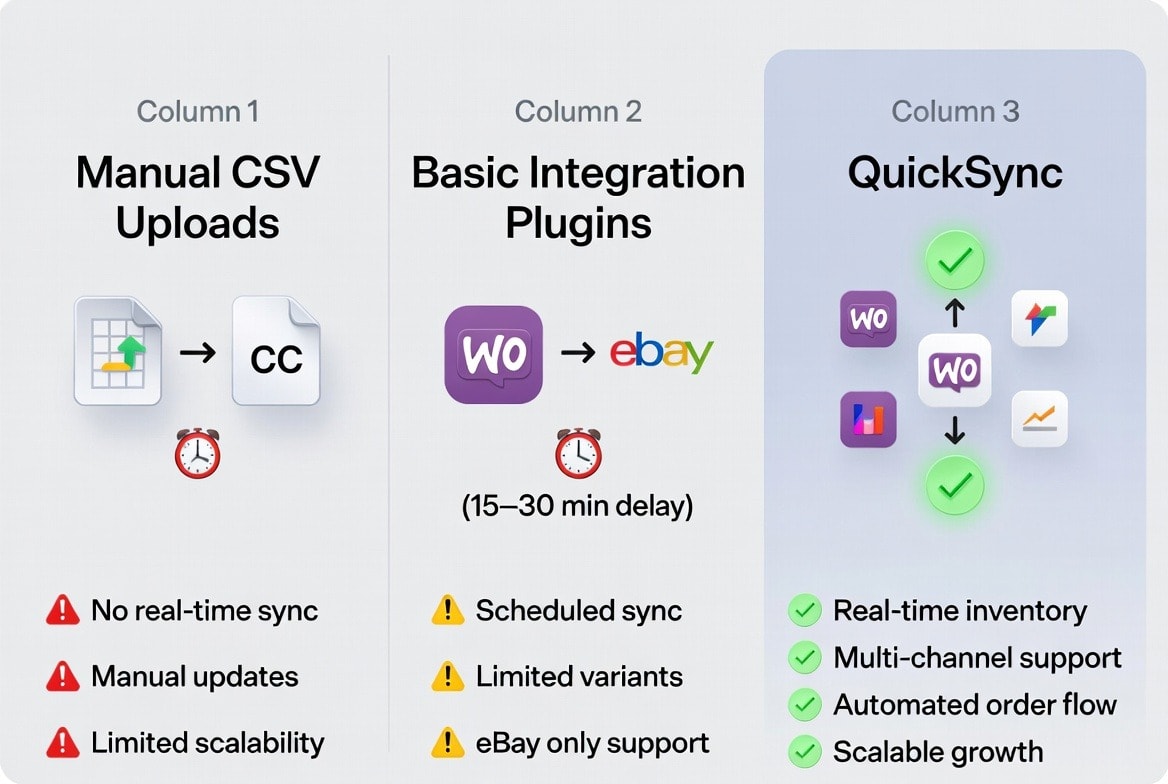
Method 1: Manual CSV Uploads:
If you’re just starting, eBay’s File Exchange or basic CSV uploads can work. We’ve used this method with early-stage sellers to test product-market fit.
How it works:
- Export products from WooCommerce as a CSV
- Format the data to meet eBay’s requirements
- Upload via eBay Seller Hub or File
- Update inventory levels
- Manage eBay orders separately from
Who it’s for: Sellers with fewer than 50 SKUs and under 20 orders per month. It can be good for testing, not scaling or growing.
It also has several critical Limitations:
- No real-time inventory sync
- Manual category and item-specific mapping
- No automated order fulfilment
- Fails under higher order volume
Method 2: Basic Integration Plugins:
Once eBay is more than a test, basic WooCommerce plugins offer more automation. They are faster than CSVs but still have limitations.
Typical features:
- Scheduled inventory updates every 15–30
- Basic product listing
- Simple order sync
- Limited category mapping
Who it’s for: Sellers with 50 to 100 SKUs and moderate order volume.
The Limitations:
- Update delays can cause overselling
- Limited handling of complex variants
- No intelligent error recovery
- Usually supports only eBay
Method 3: QuickSync – A Unified Syncing Engine:
QuickSync is an all-in-one syncing engine trusted by 10k+ multi-channel sellers. They choose QuickSync because it’s more than a syncing solution. It’s a multi-channel syncing engine built for high-velocity multichannel commerce sellers.
Why QuickSync is different:
- One setup connects you to multiple marketplaces instantly
- Inventory updates propagate across all channels simultaneously
- Orders from every marketplace flow into your WooCommerce dashboard
- Pricing rules are customizable per channel while keeping central control
- Adding a new product in WooCommerce launches it across all connected platforms instantly
Most multichannel sellers don’t realize they’re future-proofing their business. Today it’s eBay. Tomorrow, it could be Etsy or Amazon. QuickSync offers more than 10+ marketplace and sales channel integrations.
Features to Look for When Choosing the WooCommerce eBay Sync Solution
Not all WooCommerce-eBay integrations are created equal. When choosing how to connect your store to eBay, look for these essential features that separate professional-grade tools from basic connectors.
Real-Time or Near Real-Time Inventory Updates:
Your sync should update inventory within minutes of any change. Delays longer than 15 minutes create risk windows where overselling becomes possible. Look for solutions that use webhooks or frequent API polling to keep stock levels continuously accurate.
Real-time syncing protects your inventory, prevents refunds, and maintains account health.
Bidirectional Order Flow:
A proper sync imports eBay orders directly into WooCommerce, letting you manage fulfillment from a single dashboard. Tracking information and shipment updates should automatically flow back to eBay, keeping buyers informed and protecting your seller metrics.
Bidirectional Order Flow reduces manual work, improves customer experience, and ensures accurate performance metrics.
Variant and Bundle Support:
When you sell products with options like size, color, or style, or offer bundled kits, your system needs to manage them correctly without creating duplicate listings or stock conflicts. Clear SKU mapping keeps all variations organized and maintains the correct link between the main product and its options, supporting efficient inventory management.
It helps to achieve accurate inventory tracking and seamless fulfillment for complex product types.
Pricing Rule Engines:
Pricing rule engines let you apply dynamic pricing strategies such as percentage markups, fixed price adjustments, or currency conversions. These rules automatically adjust your eBay prices so you can stay profitable despite different fee structures, without constantly updating prices by hand.
This maintains profitability and reduces the risk of underpricing or margin erosion.
Safety Stock Buffers:
Advanced tools let you reserve a portion of inventory to avoid listing your full stock. This buffer protects against sudden demand surges and gives you time to restock before selling out completely.
Keeping safety stock buffers prevents overselling during high-demand periods and stabilizes operations.
Error Handling and Recovery:
No system works all the time perfectly. Your syncing solution needs to show clear error reports, retry failed updates automatically, and notify you when someone needs to step in and fix an issue.
You catch small problems early and stop them from turning into expensive operational issues.
These features are not optional if you want a stable WooCommerce eBay integration.
QuickSync brings all these capabilities into one system, keeping WooCommerce as your single source of truth while ensuring eBay stays accurately synchronized. Stock is written to eBay within seconds, and an eBay sale reaches WooCommerce within about two minutes.
Why continue risking revenue loss, overselling, and negative reviews?
How To Connect & Sync WooCommerce & eBay (Using QuickSync)
Now let’s talk about how to connect WooCommerce to eBay via QuickSync. The process is easy and just requires a few clicks. Even if you are not a technical person, you can still connect and sync both platforms effortlessly.
Here’s how to set it up properly using QuickSync.
Step 1: Create Your QuickSync Account
- Sign up for QuickSync
- Access your central dashboard
Step 2: Connect Your WooCommerce Store
Next, connect your WooCommerce store to QuickSync.
- Authorize your WooCommerce store
- Allow access to products, SKUs, and inventory
- Set WooCommerce as your source of truth
QuickSync now reads your catalog structure.
Step 3: Connect Your eBay Store
After WooCommerce is connected, link your eBay Account.
- Log into eBay via QuickSync
- Grant listing and inventory permissions
- Confirm store connection
This securely links both systems.
Step 4: Define Sync Preferences for Products and Inventory
This is where you tell QuickSync exactly how syncing should work.
You can choose:
- Whether to sync products, inventory, or both
- How inventory updates should behave across WooCommerce and eBay
- Which products or categories should be included in the sync
- How SKUs and product variations are matched and mapped
Once configured, QuickSync keeps your WooCommerce and eBay stores fully synchronized. Product updates in WooCommerce are written to eBay within seconds; an eBay sale reaches WooCommerce within about two minutes. Manual uploads or edits are no longer needed.
Best Practices for WooCommerce and eBay Integration
Connecting WooCommerce and eBay is just the first step. Even with the right tools, your success depends on how you manage the sync and your operations. Brands that scale smoothly follow consistent processes, while those that don’t often run into overselling, listing errors, and account issues.
Here are the key practices that separate high-performing sellers from those struggling to keep up:
Use WooCommerce as Your Single Source of Truth:
All product details like titles, descriptions, pricing, inventory, variants, and images should originate in WooCommerce. Editing listings directly on eBay creates conflicts and split versions.
QuickSync acts as the messenger. Update once in WooCommerce, and changes automatically propagate to eBay. One update, everywhere updated.
Enable Real-Time Syncing:
Hourly or daily scheduled syncing leaves gaps where inventory and product info can fall out of sync. In fast-moving marketplaces, those gaps quickly lead to overselling and negative feedback.
Real-time sync under five minutes drastically reduces risk, protects your account, and ensures inventory accuracy without high additional cost.
Sync Only eBay-Approved Products:
eBay enforces strict category and compliance rules. Syncing prohibited or restricted products can damage your account health.
- Exclude non-approved categories
- Only publish compliant products
- Prevent listing rejections before they happen
It will save hours of troubleshooting and safeguard your seller reputation.
Test Syncing Before Running Promotions:
Never launch a promoted listing or sale without first testing your sync. So ensure to check the following things:
- Place test orders on eBay
- Confirm real-time inventory updates
- Verify order flow from eBay to WooCommerce
- Confirm fulfillment workflows
Overselling during a high-traffic day can be a big loss. Thus, testing ensures your systems handle the load before scaling.
Use Automation Before Launching Campaigns:
Manual syncing may work for small catalogs or testing, but automation is essential for scale.
Automation isn’t a luxury. It’s a risk-management strategy. It protects your business from overselling, errors, and lost revenue during viral campaigns or peak periods.
Key Benefits of Connecting eBay to WooCommerce
Despite the challenges of multichannel selling, a properly executed WooCommerce eBay sync can be transformative for your business. When done right, these platforms create a multiplier effect, delivering efficiency and growth that manual management simply cannot match.
Expand Your Reach Without Doubling Your Work:
eBay gives you access to 135 million active buyers who might never discover your WooCommerce store. Managing separate inventories, pricing structures, and order workflows manually is operational chaos waiting to happen.
Proper syncing lets you capture this expanded audience without hiring additional staff or working weekends catching up on data entry, keeping your operations smooth and scalable.
Eliminate Costly Overselling Scenarios:
The financial impact of overselling goes far beyond the immediate refund. You also face payment processing fees, extra customer service time, negative feedback, and potential account restrictions.
Real-time inventory synchronization acts as a safety net, protecting your seller reputation, preserving customer trust, and safeguarding your bottom line.
Maintain Pricing Consistency and Margin Control:
When you sync WooCommerce to eBay with intelligent pricing rules, marketplace fees, discounts, and promotions are automatically factored in.
This eliminates manual spreadsheet updates, reduces errors, and prevents accidental margin erosion, ensuring your pricing stays competitive and profitable across every channel.
Centralize Your Operations:
Instead of toggling between multiple dashboards to process orders, update inventory, and handle customer service, a proper integration brings everything into your familiar WooCommerce environment.
This reduces training time, minimizes errors, and frees you to focus on growth rather than tedious maintenance.
Scale Confidently During Peak Periods:
High-demand moments like holiday seasons, viral promotions, and special campaigns are when manual systems fail. Automated WooCommerce and eBay sync ensures that when orders spike, your infrastructure handles the load seamlessly, without requiring you to babysit inventory counts or rush to delist out-of-stock items.
The Bottom Line: What Next:
For WooCommerce merchants, eBay is one of the most powerful expansion channels available. But without dependable synchronization, that opportunity can quickly turn into operational risk. If you want your WooCommerce eBay sync to handle real sales velocity, basic or manual setups simply are not enough.
QuickSync delivers a scalable system that keeps both platforms aligned and protected during sales spikes.