Your packing store is the one store we copy every order into. Your team packs from one list. Pick the store you ship from: Shopify, WooCommerce, Square, Clover or Lightspeed. If you’d rather keep orders in your books, QuickBooks or Xero can take them instead.
The Orders page and older guides call it the fulfillment store. You’ll pick it in setup, and you can change it any time. Below: which stores can do it, how to pick and change it, and what happens when you ship.
One store for every order
With order syncing on, we copy each new order from your other stores into the packing store, with its items, customer, shipping, taxes and discounts. We leave orders placed in the packing store itself where they are. Order syncing needs Pro or above.
There’s one packing store per account. Saving a new one replaces the old. Each order goes to one place. Nobody packs it twice.
It’s a separate choice from your main store, which decides where product details come from. One store can do both jobs.
Which stores qualify
Seven of the 13 apps can take orders in. Here’s what your order becomes in each:
| Store | Can be the packing store | Your order arrives as |
|---|---|---|
| Shopify | Yes | An order marked paid |
| Clover | Yes, except Clover EU | An order under the order type you set up for QuickSync |
| Lightspeed | Yes | A parked sale, with no customer or address |
| WooCommerce | Website sign-ups | An order marked paid, without the order’s tax |
| Square | Website sign-ups | An open order with the payment recorded |
| QuickBooks | Website sign-ups | A sales receipt, or an invoice if unpaid |
| Xero | Website sign-ups | A draft invoice |
| Etsy, eBay, Amazon, TikTok Shop, Squarespace, Wix | No | Their orders go out to your packing store |
Website sign-ups means you created your QuickSync account on our website. We count accounts billed through the Clover App Market too. If your account started in the Shopify App Store or another app store, WooCommerce, Square, QuickBooks and Xero aren’t available. That includes accounts from the QuickSync-QuickBooks Connector app. They’re greyed out in the store menu. Each one says Not supported.
Two tills need a step first:
- Clover needs an order type for these orders. We use the one with “quick” in its name, or your only one. Without it, orders fail with No Order Type Found. See Clover order type.
- Lightspeed needs an active register, a primary user and a default tax. Without them, orders fail with Lightspeed Order Setup Incomplete.
Pick it in setup
Setup’s last question is Bring every order into one packing queue? Answer Yes, then pick a store under Which store packs and ships your orders? We list only the stores that can receive orders on your account. A marketplace won’t show up there.
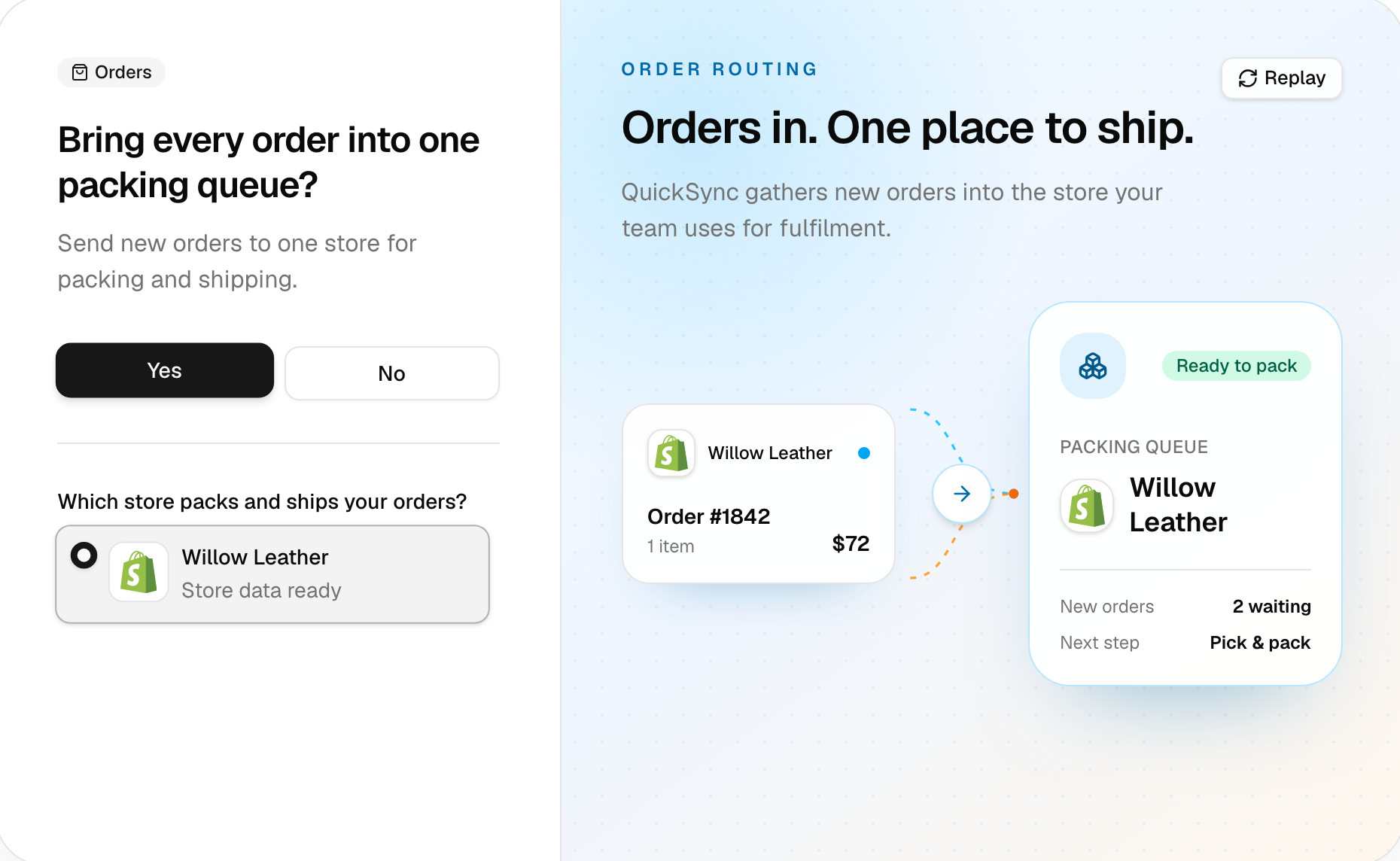
Answer No if you’d rather ship from each store separately. We still sync stock. You can turn order syncing on later from the Orders page.
Change it later
- Open Orders and click the Order route card. Actions, then Order route, opens the same window.
- In Order routing, open the menu under Fulfillment store and pick the new store.
- Click Save route.
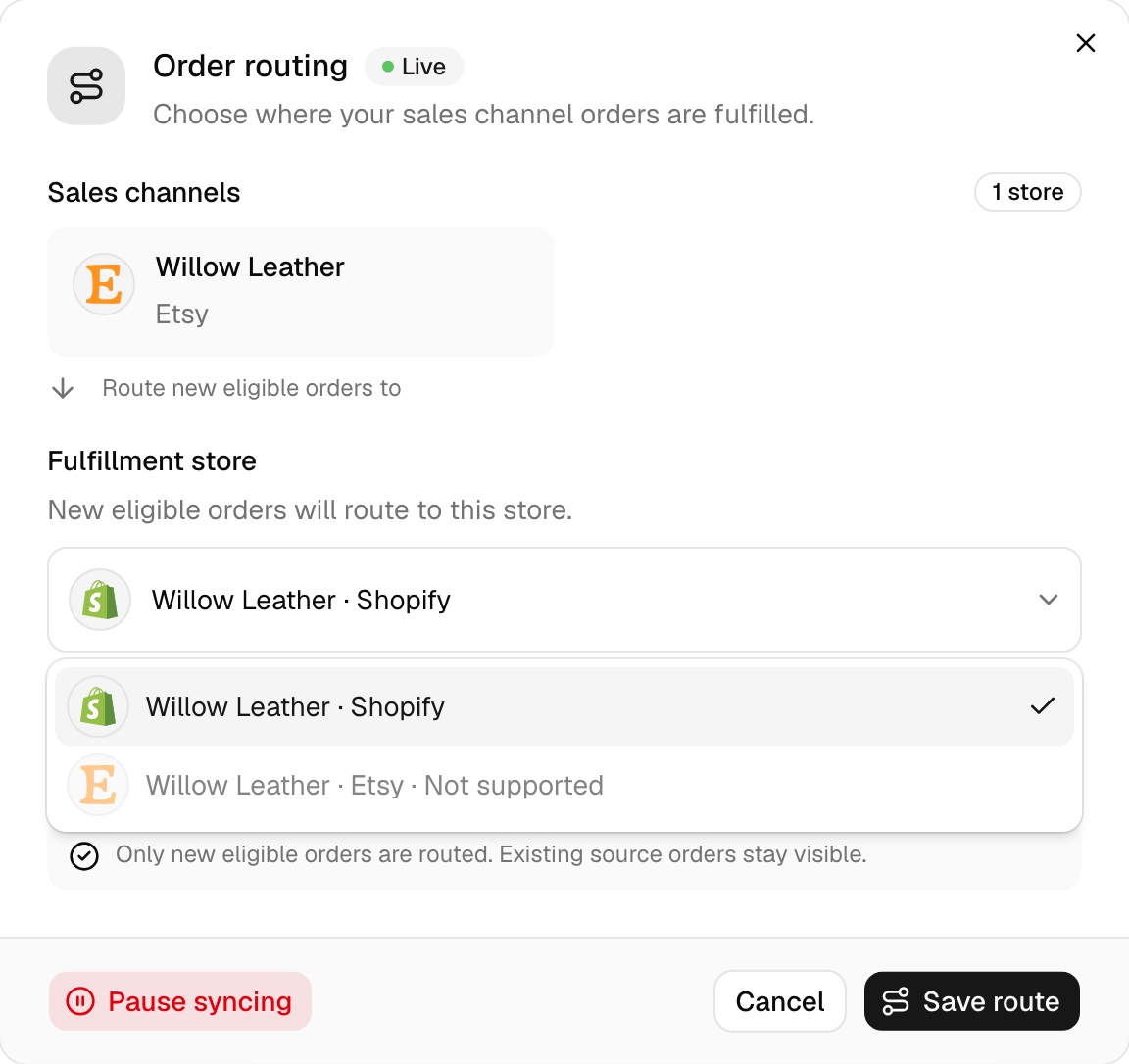
Only orders placed after you’ve saved go to the new store. Orders already copied stay in the old one. Ship those from there. We skip any order placed before the switch that hadn’t copied yet. Fetch those with Actions, Sync past orders, with Backdated orders on. That also copies again any order the old store has that isn’t yet marked shipped where it was sold.
If the old store was Shopify, WooCommerce or Square, clear its queue before you switch. Once it’s no longer the packing store, shipping there doesn’t send tracking back to the store the order came from.
With Shopify picked, the window also has a Mark orders as completed in the fulfillment store switch. While it’s on, we archive the Shopify copy once the original order’s complete. Turn it off to keep copies open.
When you ship
Ship the order in your packing store as you normally would, with a carrier and a tracking number. We send tracking back to the store the customer bought from only when the packing store is Shopify, WooCommerce or Square:
- Shopify sends it once the shipment has both a carrier and a tracking number.
- WooCommerce sends what you enter in the Shipment Tracking extension. Without the extension, nothing goes back.
- Square sends it only when the shipment has both a tracking number and a carrier.
Clover, Lightspeed, QuickBooks and Xero don’t send anything back. Mark those orders shipped in the store they came from.
The selling store sets limits too. Square and Clover orders don’t take shipping updates from us. Lightspeed takes the shipped status without the tracking number. Etsy won’t accept tracking for US sellers who first connected on or after 21 October 2024. Tracking and shipping status has every store’s rules.
Common questions
Can Etsy or eBay be my packing store?
No. Etsy, eBay, Amazon, TikTok Shop, Squarespace and Wix send their orders to your packing store, but none of them can be one. Pick the store you ship from instead, such as Shopify, WooCommerce, Square, Clover or Lightspeed. If you ship every order from Etsy itself, leave order syncing off. We’ll keep your stock in sync, and each store keeps its own orders.
Why does a store say Not supported?
That store can’t take orders on your account. Etsy, eBay, Amazon, TikTok Shop, Squarespace, Wix and Clover EU never can. WooCommerce, Square, QuickBooks and Xero can only on accounts created on our website or billed through the Clover App Market, so accounts that started in the Shopify App Store see them greyed out. Shopify, Clover and Lightspeed never show it.
Can I have two packing stores?
No. There’s one per account, so each order goes to exactly one place. When you save a new packing store, it replaces the old one, and we send it only orders placed after that. Orders already copied stay in the old store. If you pack in two places, one store still takes every order, and your team splits the work from there.
Can my packing store be my main store?
Yes. They’re separate choices, and one store can do both jobs. The main store controls product details, and the packing store decides where orders go. When you turn on order syncing from the Orders page, we suggest your main store first, as long as it can receive them.
Next step
For what each copy holds and which orders qualify, read How order syncing works. If an order didn’t arrive, work through Orders aren’t syncing.