Order syncing copies every new order from the stores you sell on into the one store you pack from, your packing store. An Etsy order turns up in your Shopify with its items, the customer’s name and address, the shipping charge, taxes and discounts, so your team ships from one list.
It’s off until you turn it on. It needs Pro or above. Below: what each copy carries, which of the 13 apps send and receive orders, which orders qualify, how order lines find their products, QuickBooks and Xero, and how to switch it on and off.
What a copy holds
When a new order comes in, we create its copy in your packing store with:
- Items. We match each line, with its quantity and price, to the packing store’s product by SKU.
- Customer. The name, email and shipping address we get from the selling store.
- Shipping. What the customer paid for shipping.
- Taxes and discounts. The order’s tax and discount, with tips, fees and duties as lines of their own. We don’t send the tax to WooCommerce.
- Payment. A paid order arrives marked paid. We record the payment the customer already made, and we don’t charge anyone.
Two packing stores take less. Lightspeed’s copy is a parked sale with the items and totals, but no customer, address or payment. Xero’s is a draft invoice with the customer’s name and email, but no shipping address or payment.
In Shopify, we tag each copy with the store it came from and its order number. On Ultra and above, we add the order’s notes too, such as an Etsy gift message.
Who sends, who receives
Every app except QuickBooks and Xero sends us its orders. Seven can be the packing store. Only one does the job at a time.
| App | Sends its orders | Can be the packing store |
|---|---|---|
| Shopify | Yes | Yes |
| Clover | Yes | Yes, except Clover EU |
| Lightspeed | Yes | Yes |
| WooCommerce | Yes | Website sign-ups |
| Square | Yes | Website sign-ups |
| QuickBooks | No | Website sign-ups |
| Xero | No | Website sign-ups |
| Etsy | Yes | No |
| eBay | Yes | No |
| Amazon | Yes | No |
| TikTok Shop | Yes | No |
| Squarespace | Yes | No |
| Wix | Yes | No |
Website sign-ups means you created your account on our website. Accounts billed through the Clover App Market count too. If you installed QuickSync from the Shopify App Store or another app store, WooCommerce, Square, QuickBooks and Xero don’t qualify. They show as Not supported when you pick a packing store on the Orders page. Choose your packing store has the details.
The plan you need
Order syncing needs Pro or above. The 14-day trial includes it.
On Lite, setup won’t let you answer Yes on the orders screen. The Orders page shows Order syncing needs a plan, with a View plans button. If your account drops below Pro, or a trial ends without a plan, we turn order syncing off.
Which orders copy
We copy an order when it’s new, it’s ready to ship, and it came from a store other than your packing store. In detail:
- Placed after you turned order syncing on. Older orders stay behind. So do orders placed before you last changed the packing store. To fetch them, open Actions on the Orders page, choose Sync past orders and turn on Backdated orders. We’ll reach back up to 14 days. After a packing store change, that also copies again any order the old store has that isn’t yet marked shipped where it was sold.
- Ready in the store it came from. Each store’s rule is in the table below. An order that isn’t ready yet waits. We copy it once it’s ready.
- Not cancelled first. An order cancelled before we copy it never copies. We also skip an order we first see already completed or cancelled. Square, Clover and Lightspeed sales are the exception, since they reach us completed.
- Not from the packing store. Orders placed in your packing store stay there.
| Selling store | An order copies once it’s |
|---|---|
| Shopify | Paid |
| WooCommerce | Processing |
| Etsy | Paid |
| eBay | Paid |
| Amazon | Unshipped. Orders Amazon ships from its own stock (FBA) never copy |
| TikTok Shop | Awaiting shipment. Orders TikTok ships itself follow other rules |
| Squarespace | Placed |
| Wix | Placed |
| Square | Completed |
| Clover | Closed, no longer open |
| Lightspeed | Paid in full |
We don’t filter out test orders. A test order that meets these rules copies like a real one.
How lines find products
We match each line in an order to a product in the packing store by SKU, the same way stock matches. When there’s no match, the packing store decides what happens:
| Packing store | A line with no match |
|---|---|
| Shopify, Square, Clover | Added by name and price, with no link to a product |
| WooCommerce | The whole order fails until every line matches |
| Lightspeed | Left off the sale. If no line matches, we try copying those products to Lightspeed, then retry the order |
| QuickBooks | Recorded with no item attached |
Two products with the same SKU in the packing store don’t count as a match either. Shopify, Square and Clover add that line unlinked, and WooCommerce and QuickBooks stop the order. For TikTok Shop orders, Shopify stops the order too. Give the product one SKU, the same in both stores. Fix missing and duplicate SKUs shows how.
QuickBooks and Xero
QuickBooks or Xero can be your packing store when you’d rather have orders in your books than in a shop. QuickBooks records a paid order as a sales receipt, and an unpaid one as an invoice. Xero gets each order as a draft invoice. It stays a draft until you approve it.
Neither one ships. Nothing goes back to the selling store, so mark those orders shipped there yourself. There’s one packing store per account, so if QuickBooks or Xero takes your orders, no shop does. The QuickBooks and Xero guides cover their settings.
Turn it on or off
Setup asks Bring every order into one packing queue? as its last question. Answer Yes and pick the store that packs and ships your orders. Set up your first sync covers that screen.
If you said no in setup, open Orders and click Turn on order syncing. Pick your packing store, then click Start syncing.
Once it’s on, the Order route card at the top of the Orders page says Live. Click the card to open Order routing. Pick a different packing store and click Save route. Or click Pause syncing and confirm.
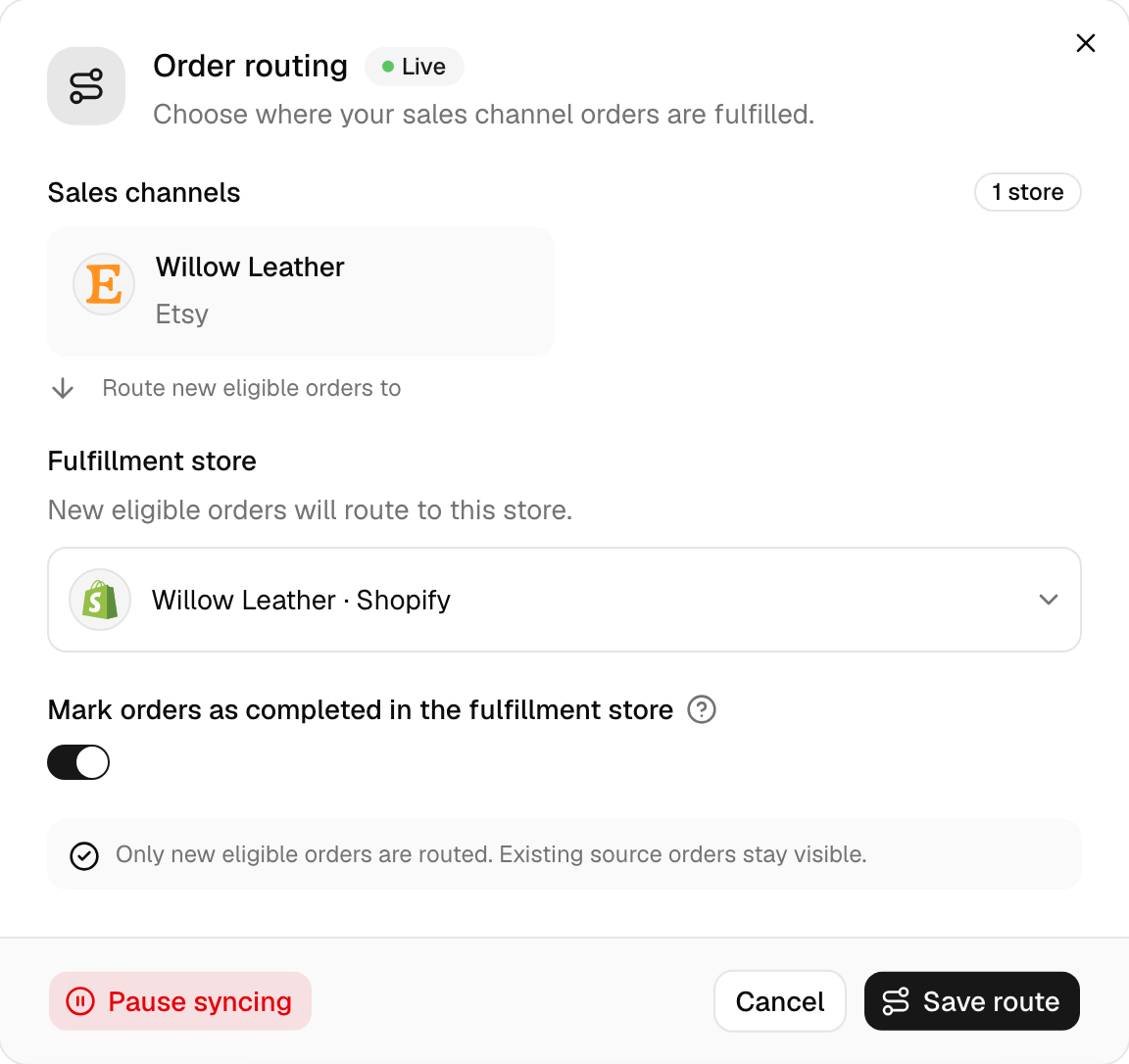
Pausing stops new orders copying. Orders already in your packing store stay there. Stock keeps syncing, since that’s a separate switch. When you turn order syncing back on, we skip orders placed while it was off, until you fetch them with Sync past orders and Backdated orders on.
If your packing store is Shopify, WooCommerce or Square, ship its open orders before you pause. Shipments you make there while order syncing is off don’t send tracking back to the store the order came from.
Common questions
Does QuickSync sync orders both ways?
No. Orders travel one way: from your selling stores into your packing store. We don’t copy an order placed in the packing store anywhere else. What travels back is the shipping update. Only a Shopify, WooCommerce or Square packing store sends it: when you ship there, we mark the original order shipped and pass on the tracking number, if the selling store accepts it.
Does pausing order syncing stop stock syncing?
No. They’re separate switches. Pausing order syncing stops new orders copying into your packing store, and stops tracking going back. We keep syncing stock, which has its own switch on the Inventory Syncing card on the Products page. Orders you’ve already copied don’t move. To restart orders, click the Order route card on the Orders page and pick your packing store again.
Why do Etsy orders arrive without a shipping address?
Etsy holds the street address back from apps for US sellers who first connected on or after 21 October 2024, and it refuses their tracking too. We pass on exactly what Etsy sends, so those orders reach your packing store with the buyer’s name and email but no street. Copy the address from the order in Etsy when you buy the label.
Do in-store sales sync as orders too?
Yes. We copy completed sales from a Square, Clover or Lightspeed till to your packing store like online orders, unless that till is your packing store. There’s no filter to leave some out. If you sell in person and only want stock to match, leave order syncing off: we’ll still sync stock, and each store keeps its own orders.
Next step
To choose where orders go, read Choose your packing store. If an order didn’t arrive, Orders aren’t syncing has the checks in order.