On this page
- 📌 Key Takeaways
- Why Inventory Management Matters for Every Small Business
- What Is Inventory Management for Small Business?
- The Biggest Inventory Challenges Small Businesses Face
- How Inventory Management Software Simplifies Daily Operations
- Inventory Management Methods Every Small Business Should Know
- How to Choose the Best Inventory Management Software for Small Business
- How to Sync Inventory with QuickSync in Minutes
- Inventory KPIs Every Small Business Should Track
- Common Inventory Management Mistakes That Cost Small Businesses Money
- FAQs
If you’re running a small business, you’ve probably asked yourself at least once, “Why doesn’t my inventory ever match what’s actually in stock?” You’re not alone. As your product catalog grows, orders increase, and you start selling across multiple channels, keeping inventory accurate becomes much harder.
Before you know it, you’re dealing with stockouts, excess inventory, delayed orders, unhappy customers, and money tied up in products that aren’t selling.
Inventory management for small businesses isn’t just about counting products or updating stock numbers. It’s about knowing exactly what you have, where it’s located, when to reorder it, and how to keep every sales channel updated in real time.
When your inventory is under control, you make better purchasing decisions, improve cash flow, reduce manual work, and deliver a better customer experience.
So, where do you start? Let me walk you through it.
In this guide, you’ll learn how small business inventory management works, the biggest inventory challenges merchants face, and the different ways to manage inventory.
📌 Key Takeaways
- Better inventory management helps reduce errors, control costs, and keep customers happy.
- Manual tracking becomes harder as your products and sales channels grow.
- Inventory software can automate stock updates and reduce repetitive work.
- Real-time syncing helps prevent overselling across multiple stores and marketplaces.
- Choosing the right inventory method depends on your products, sales channels, and business size.
- Inventory KPIs help you spot problems and make better stocking decisions.
- Demand forecasting helps you prepare for busy seasons without overstocking.
- A scalable inventory system gives you better control as your business grows.
Why Inventory Management Matters for Every Small Business
Many small business owners think inventory management is simply counting products. In reality, it affects almost every part of your business. From purchasing and sales to customer experience and cash flow, every inventory decision influences your bottom line.
As your business grows, keeping inventory accurate becomes more challenging. That’s why investing time in effective inventory management today can save thousands of dollars later.
Here’s what poor inventory management actually costs you, beyond the obvious:
- Tied-up cash. Small and mid-sized businesses now carry roughly 38% more inventory than they need, according to Netstock’s retail data, which means a third of your working capital might be sitting in boxes instead of in your bank account.
- Rush shipping and emergency orders. When you run out of a bestseller, you either lose the sale or pay a premium to restock fast. Around 43% of retailers report extra supply chain costs tied directly to stockouts.
- Storage and carrying costs. Overstock doesn’t just tie up cash; it inflates warehouse and storage costs by 20 to 30%, according to inventory research from Opensend.
- Staff hours you can’t get back. Someone is manually counting, re-entering, or hunting for a SKU number instead of serving a customer or packing an order.
What Is Inventory Management for Small Business?
Before we dive into software and strategies, let’s answer the most important question. What exactly is inventory management for a small business?
Many store owners think inventory management means counting products. That’s only part of the job. It also covers purchasing, storing, tracking, and selling inventory. The goal is simple. Keep the right products in stock. Avoid stockouts and excess inventory at the same time.
Now that you know the basics, let’s break it down.
- Inventory Management: It tracks inventory from purchasing to selling. It also keeps stock records accurate at every stage.
- Why It Matters: Good inventory management reduces stock errors. It improves cash flow. It prevents overstocking and keeps customers happy.
- Who Needs It? Every business that sells products needs inventory management. This includes retail stores, ecommerce businesses, wholesalers, manufacturers, and merchants using Shopify, Square, Clover, or multiple sales channels.
As ecommerce expert Jane Mitchell says, “Effective inventory management software is the backbone of any successful online retail business. It not only streamlines operations but also empowers merchants to anticipate demand, manage stock levels efficiently, and build stronger supplier relationships.”
The Biggest Inventory Challenges Small Businesses Face
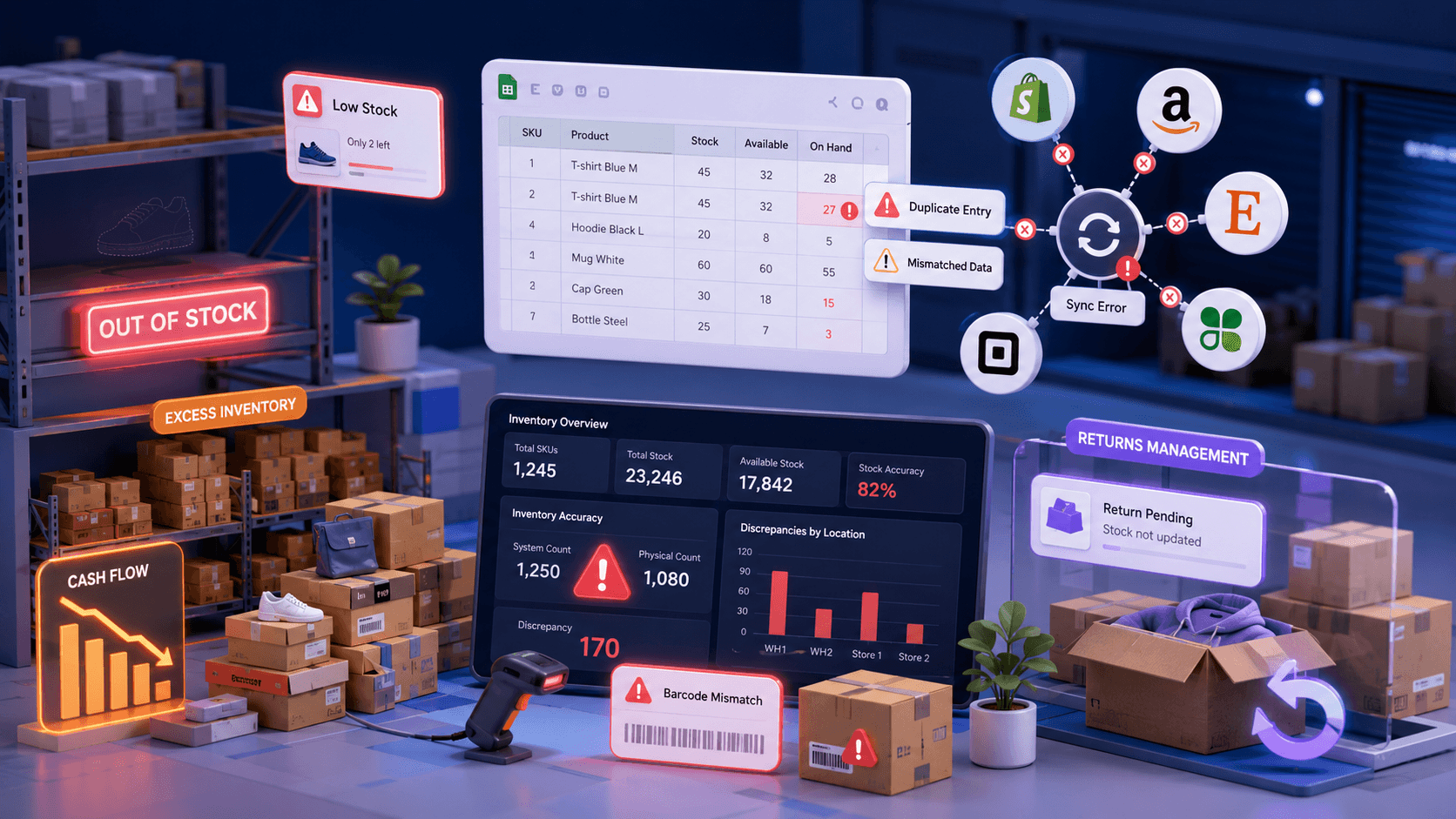
Managing inventory sounds simple until your business starts growing. More products, more orders, and more sales channels mean more opportunities for mistakes. Let’s look at the biggest challenges small businesses face every day.
Running Out of Best-Selling Products
Nothing is more frustrating than discovering your best-selling product is out of stock. Every stockout means missed revenue and disappointed customers. And sometimes losing prestigious buyers to competitors.
Without accurate inventory tracking and timely low-stock alerts, it’s difficult to know exactly when it’s time to reorder. Over time, frequent stockouts can damage customer trust. It reduces repeat purchases.
Carrying Too Much Inventory
Buying extra stock may seem like the safer option. But it often creates a different problem. Excess inventory ties up your cash, increases storage costs, and leaves products sitting on shelves longer than expected.
Slow-moving inventory also makes it harder to invest in products that customers actually want. This affects both cash flow and overall profitability.
Relying on Manual Spreadsheets
Still managing inventory through spreadsheets? You’re definitely not the only one doing this. However, manual stock updates take time and become harder to maintain as your business grows. What starts as a simple tracking system often turns into hours of manual work.
A single typing mistake, forgotten update, or duplicate entry can throw off your entire inventory record. Before long, your spreadsheet no longer reflects what’s actually available.
Selling Across Multiple Channels
Selling on Shopify, Amazon, Etsy, Square, Clover, or other platforms helps you reach more customers. The challenge of multichannel selling is keeping inventory updated everywhere at the same time. As you add more sales channels, even a slight delay in stock updates can create inventory mismatches.
If one channel doesn’t receive inventory updates immediately after a sale, you risk overselling products that are no longer available.
Managing Product Returns
Returns are part of every retail and ecommerce business. But many merchants overlook one important step: updating inventory after a return is processed. Without an automated process, returned items can easily be forgotten or recorded incorrectly, leading to inaccurate stock levels.
If returned products aren’t added back into available stock automatically, your inventory records quickly become inaccurate, making future purchasing decisions much harder.
Dealing with Inaccurate Inventory Records
When inventory numbers don’t match physical stock, every business decision becomes harder. You may reorder products you already have or delay purchasing items that are running low. Over time, these small inventory mistakes add up, making it harder to plan future purchases with confidence.
Inaccurate inventory data also affects reporting, forecasting, customer service, and overall business planning. The longer these errors continue, the more expensive they become.
How Inventory Management Software Simplifies Daily Operations
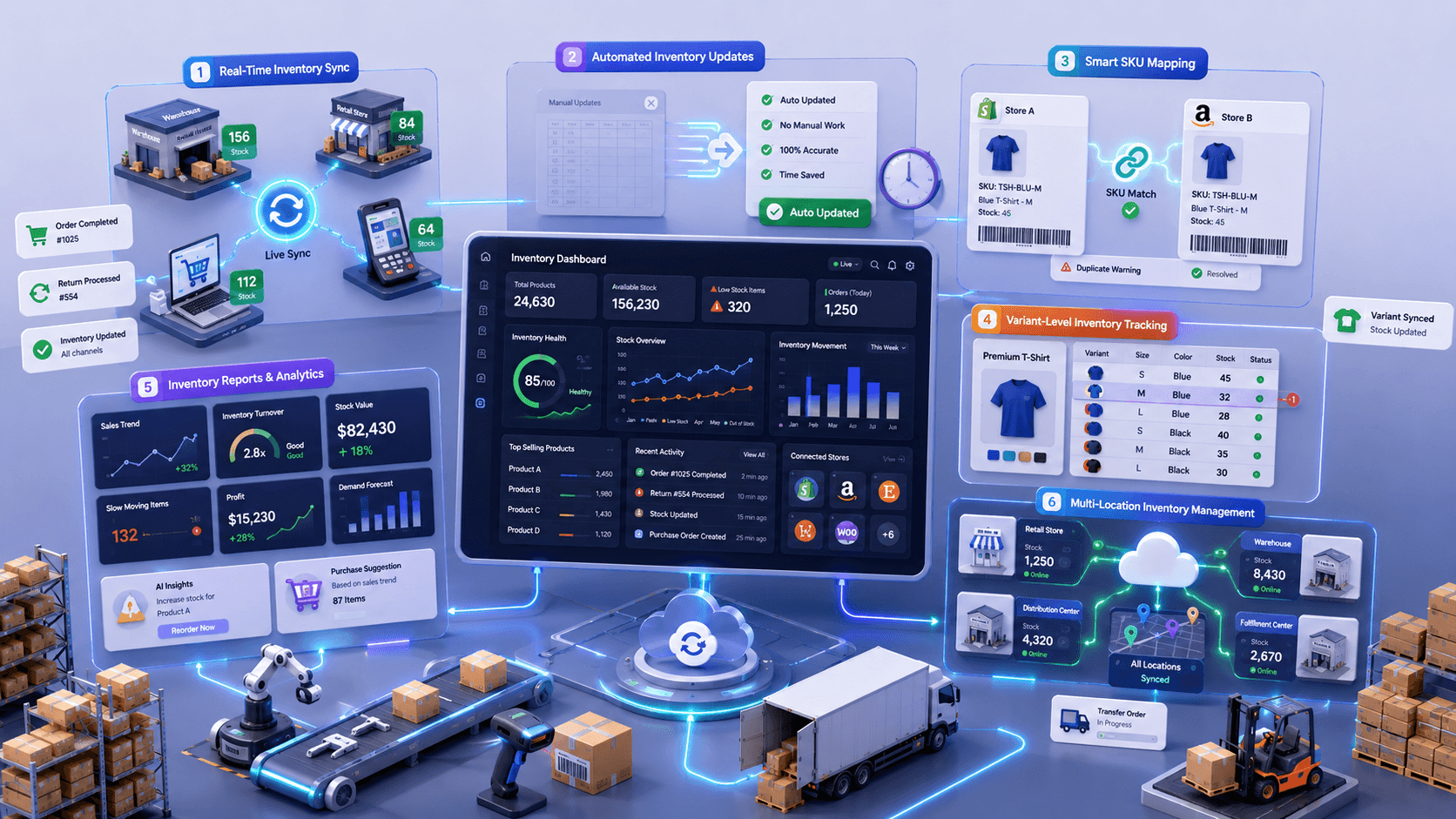
Now that you understand the biggest inventory challenges, here’s the good news: you don’t have to solve them manually. A modern inventory management software for small businesses automates many daily tasks that normally consume hours of your time.
Let’s look at the benefits of using the best inventory management system for small businesses.
Keep Inventory Updated in Real Time
Stock levels change every minute as customers place orders, cancel purchases, or return products. Keeping up with these changes manually is almost impossible once your business starts growing. Real-time inventory syncing automatically updates stock levels whenever a product is sold.
This gives you complete visibility into your inventory across every connected sales channel. Real-time inventory sync also helps prevent overselling products.
Eliminate Manual Inventory Updates
Updating inventory after every sale might seem manageable at first. But as your order volume increases, those small tasks become time-consuming and repetitive. Imagine never having to edit inventory spreadsheets after every order.
Inventory software automatically updates stock records, reducing manual work and minimizing human errors. This saves valuable time while improving inventory accuracy across your business.
Match Products with Smart SKU Mapping
Managing products across different platforms can get confusing when SKUs don’t match. A single mismatch can cause inventory updates to apply to the wrong product. Smart SKU mapping automatically links matching products between connected platforms.
It ensures inventory updates apply to the correct items every time, reducing manual errors and improving inventory control.
Sync Every Product Variant Automatically
Tracking products with multiple sizes, colors, or styles can become difficult without the right system. Even a small mistake can lead to incorrect stock levels and unhappy customers. Products often come in different sizes, colors, or styles.
Good inventory software tracks every product variant separately. Selling a blue medium shirt won’t reduce the stock of a black large shirt. This improves inventory accuracy. It gives customers confidence that every variant is available.
Turn Inventory Data Into Better Decisions
Your inventory data tells a story about what’s selling and what isn’t. The right software turns that information into insights you can actually use. Good software doesn’t just store inventory data. It helps you understand it.
Your inventory data tells you more than what’s in stock. It shows what’s selling, what’s slowing down, and what needs attention next. Clear reports help you spot trends early and make smarter buying decisions.
Manage Multiple Locations Without Confusion
Growing your business often means adding more stores or warehouses. That’s great for sales, but it also makes inventory harder to manage. Without one system, it’s easy to lose track of where your products are.
A centralized inventory management system lets you view stock across every location from one dashboard. You can transfer inventory, replenish stock, and manage every location with confidence.
Inventory Management Methods Every Small Business Should Know
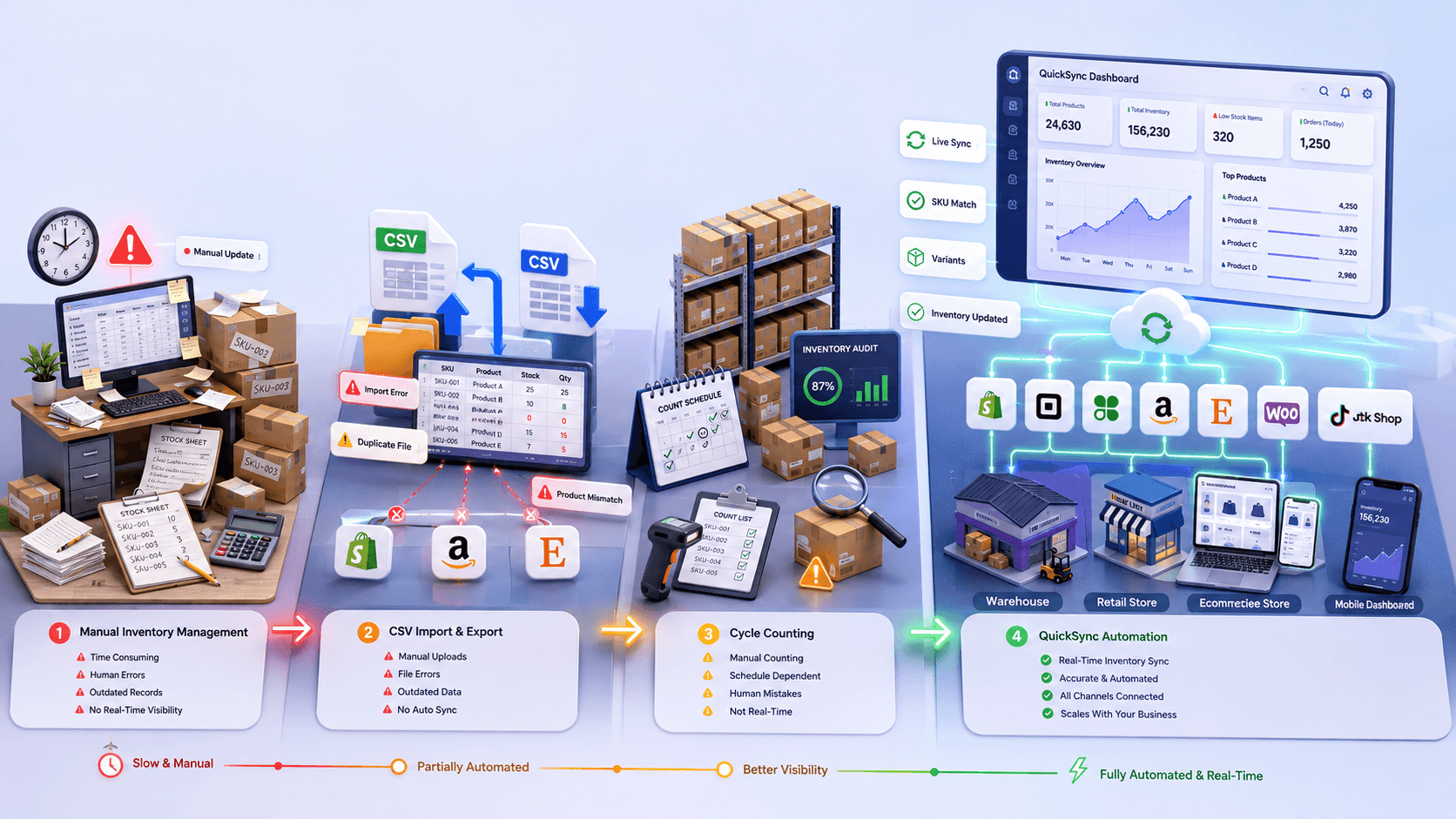
There’s no single inventory management method that works for every business. The right choice depends on how many products you sell, where you sell them, and how quickly your inventory changes.
Some methods work well for businesses with a small product catalog. Others are built for retailers managing thousands of SKUs across multiple sales channels.
So, which method is right for you? Let’s look at the most common inventory management methods and techniques.
Method 1: Manual Inventory Management
Many businesses begin with manual inventory management because it’s simple. It doesn’t require any special software. Products are tracked using notebooks, printed stock sheets, or basic spreadsheets. In the manual inventory method, every inventory change is updated manually. This method can work when you’re just starting. But it quickly becomes difficult as your business grows and order volumes increase.
However, as your business grows, this method becomes much harder to manage.
- Every inventory update must be entered manually.
- Human errors become more common as order volume increases.
- Inventory records quickly become outdated.
- Tracking inventory across multiple locations becomes difficult.
- Real-time inventory visibility isn’t possible.
- Stockouts and excess inventory happen more often.
- Manual reporting takes valuable time every week.
Method 2: CSV Import and Export
Many small businesses move from spreadsheets to CSV files as their inventory grows. CSV import and export allow you to upload or download inventory data between different platforms. It’s faster than updating products one by one. But it still depends on manual uploads whenever inventory changes.
If your inventory changes several times a day, relying on CSV files can quickly become frustrating. The downside is that it still depends on manual file uploads.
- Inventory updates don’t happen automatically.
- CSV files can quickly become outdated.
- Import mistakes can overwrite existing inventory.
- Managing large product catalogs takes longer.
- Product variants may become mismatched.
- Every inventory change requires another upload.
- Multiple sales channels require separate updates.
Method 3: Cycle Counting
Another method for inventory management is cycle counting. Instead of counting your entire inventory at once, cycle counting focuses on checking smaller groups of products throughout the month. This helps businesses maintain more accurate inventory records without shutting down operations for a full inventory audit.
It’s a useful inventory management practice, but it’s important to remember that cycle counting only identifies inventory issues. It doesn’t prevent them from happening in the first place.
While it’s a good inventory practice, it doesn’t solve inventory problems on its own.
- Inventory still needs to be counted manually.
- Counting schedules must be followed consistently.
- Human counting mistakes can still happen.
- Inventory mismatches aren’t fixed automatically.
- Sales channels don’t sync inventory in real time.
- It works best when combined with inventory software.
- Growing businesses usually need more automation.
Method 4: Inventory Management Software like QuickSync
QuickSync is an all-in-one inventory management software designed for modern retailers and ecommerce businesses. Instead of updating inventory manually across different stores, QuickSync automatically keeps your stock levels synchronized in real time. Whether you sell from one location or across multiple platforms, it gives you complete visibility into your inventory from one easy-to-use dashboard.
The platform is simple to set up, requires no coding, and works quietly in the background while your inventory stays accurate. As your business grows, QuickSync grows with you, making inventory management easier instead of more complicated.
- Real-Time Inventory Sync: Automatically sync inventory across connected stores after every sale, return, exchange, or restock.
- Variant-Level Inventory Sync: QuickSync tracks every product size, color, and style separately for accurate inventory management.
- Smart SKU Mapping: QuickSync matches products with identical SKUs across platforms to prevent inventory mismatches.
- Multi-Location Inventory Sync: It monitors and synchronizes inventory across multiple warehouses, stores, or fulfillment locations.
- Multi-Channel Inventory Sync: Keep inventory updated across Shopify, Square, Clover, Amazon, Etsy, WooCommerce, and more.
- Centralized Inventory Dashboard: Manage your entire inventory from one dashboard without switching between multiple systems.
How to Choose the Best Inventory Management Software for Small Business
By now, you’ve seen the different ways to manage inventory. So, how do you decide which solution is right for your business?
Don’t just compare prices. Think about where your business will be a year from now. The best inventory management system for small businesses should save you time today. Before making your decision, compare these essential features. This table will help you choose the right inventory sync tool for your business.
| Feature | Manual Inventory | CSV Import & Export | Cycle Counting | QuickSync Inventory Management |
|---|---|---|---|---|
| Ease of Use | Easy to start, but becomes difficult as inventory grows and requires constant manual updates. | Fairly simple for bulk uploads, but every inventory change requires another import or export. | Easy to follow with a schedule, but depends on regular manual counting. | Easy to set up with an intuitive dashboard. Most inventory tasks are automated after setup. |
| Inventory Automation | Every inventory update must be entered manually after each sale, return, or restock. | Inventory updates happen only after uploading a new CSV file. | Inventory is counted manually and updates aren’t automatic. | Automatically syncs inventory in real time across all connected stores and sales channels. |
| Platform Integrations | Doesn’t connect with ecommerce platforms or POS systems. | Works with supported platforms through file imports and exports only. | Doesn’t integrate with other systems. | Connects with Shopify, Square, Clover, WooCommerce, Etsy, Amazon, TikTok Shop, and many more. |
| Scalability | Suitable only for businesses with a small inventory. | Can handle more products, but becomes difficult to manage as sales grow. | Useful for regular inventory checks, but doesn’t scale as a complete inventory solution. | Built for growing businesses, large product catalogs, and businesses selling across multiple channels. |
| Reporting & Insights | Reports must be created manually, which takes time. | Limited reporting based on exported data. | Shows inventory count results only. | Provides inventory reports, stock trends, inventory value, and product performance from one dashboard. |
| Pricing | No software cost, but requires significant time and manual effort. | Low software cost, but higher operational effort. | Low direct cost, but ongoing labor expenses. | Affordable monthly plans with premium inventory automation and a 14-day free trial. |
| Customer Support | No dedicated support available. | Support depends on the platform being used. | Relies on internal staff and processes. | Dedicated customer support to help with setup, inventory syncing, and troubleshooting. |
| Multi-Location Support | Managing inventory across locations is completely manual. | Requires separate inventory files for each location. | Counts inventory separately at every location. | Syncs inventory across multiple stores, warehouses, and fulfillment locations from one dashboard. |
Looking at the comparison, one thing becomes clear. Manual methods may help when you’re just starting, but they become difficult to manage as your business grows. CSV files reduce some manual work, while cycle counting helps improve inventory accuracy. However, none of these methods provide real-time inventory visibility or automatic inventory updates.
If you want to spend less time managing inventory, automation is the way forward. That’s where QuickSync makes a real difference. It replaces spreadsheets and repeated CSV uploads with automatic inventory syncing. Every inventory update happens in real time across your connected stores. Whether you sell on Shopify, Square, Clover, Amazon, Etsy, or other sales channels, QuickSync helps you stay in control while spending less time managing inventory.
How to Sync Inventory with QuickSync in Minutes
Getting started with QuickSync is much easier than most merchants expect. There’s no complicated setup or technical knowledge required. Simply connect your stores, choose your inventory settings, and QuickSync begins keeping your inventory synchronized automatically.
Let’s walk through the process.
Step 1: Create Your QuickSync Account
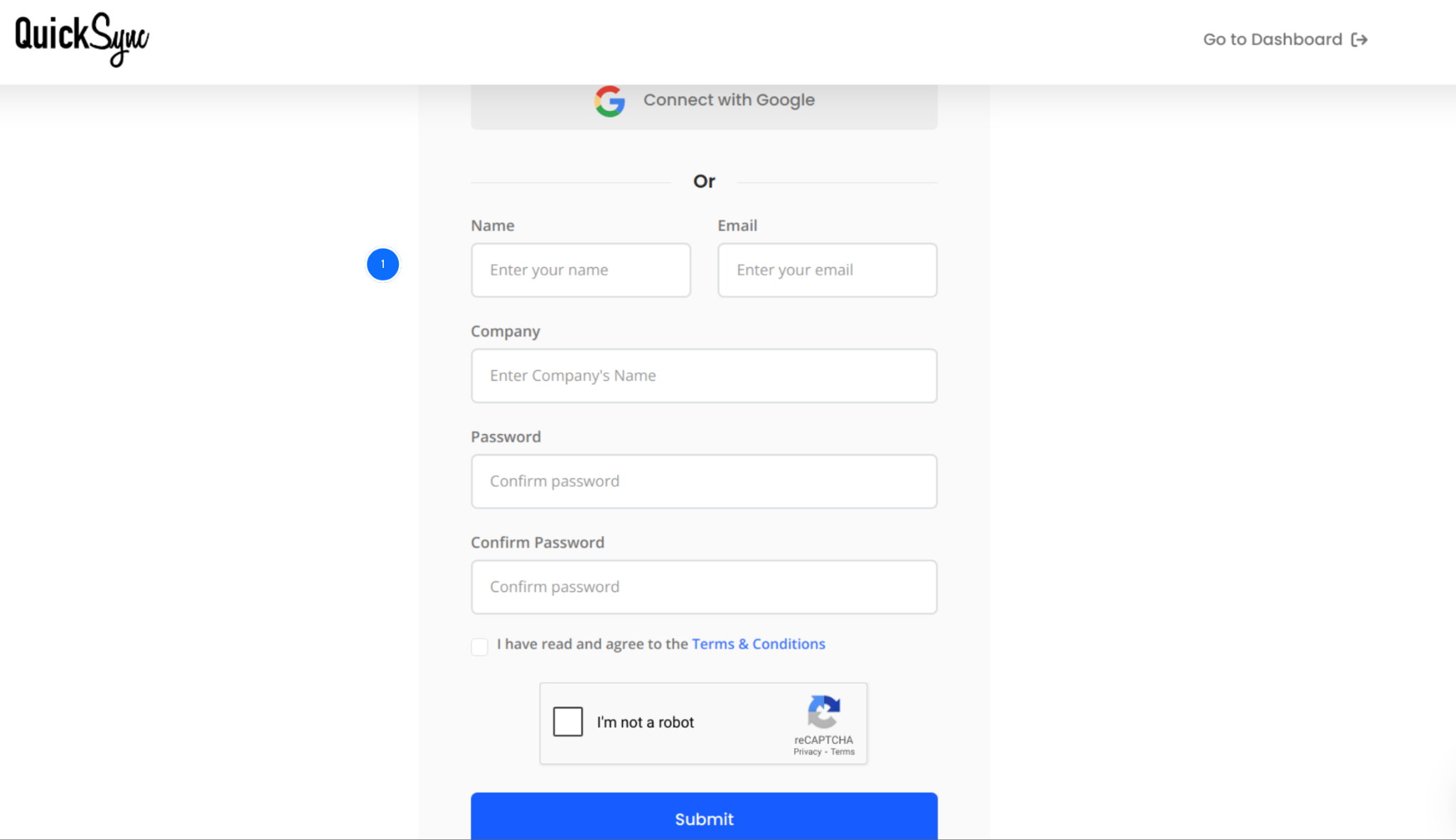
- Visit QuickSync.pro and create your account using your business email. If you already have an account, simply sign in to your dashboard.
- From one dashboard, you’ll be able to manage inventory sync, product sync, order sync, pricing rules, store connections, and fulfillment settings.
Step 2: Connect Your First Store
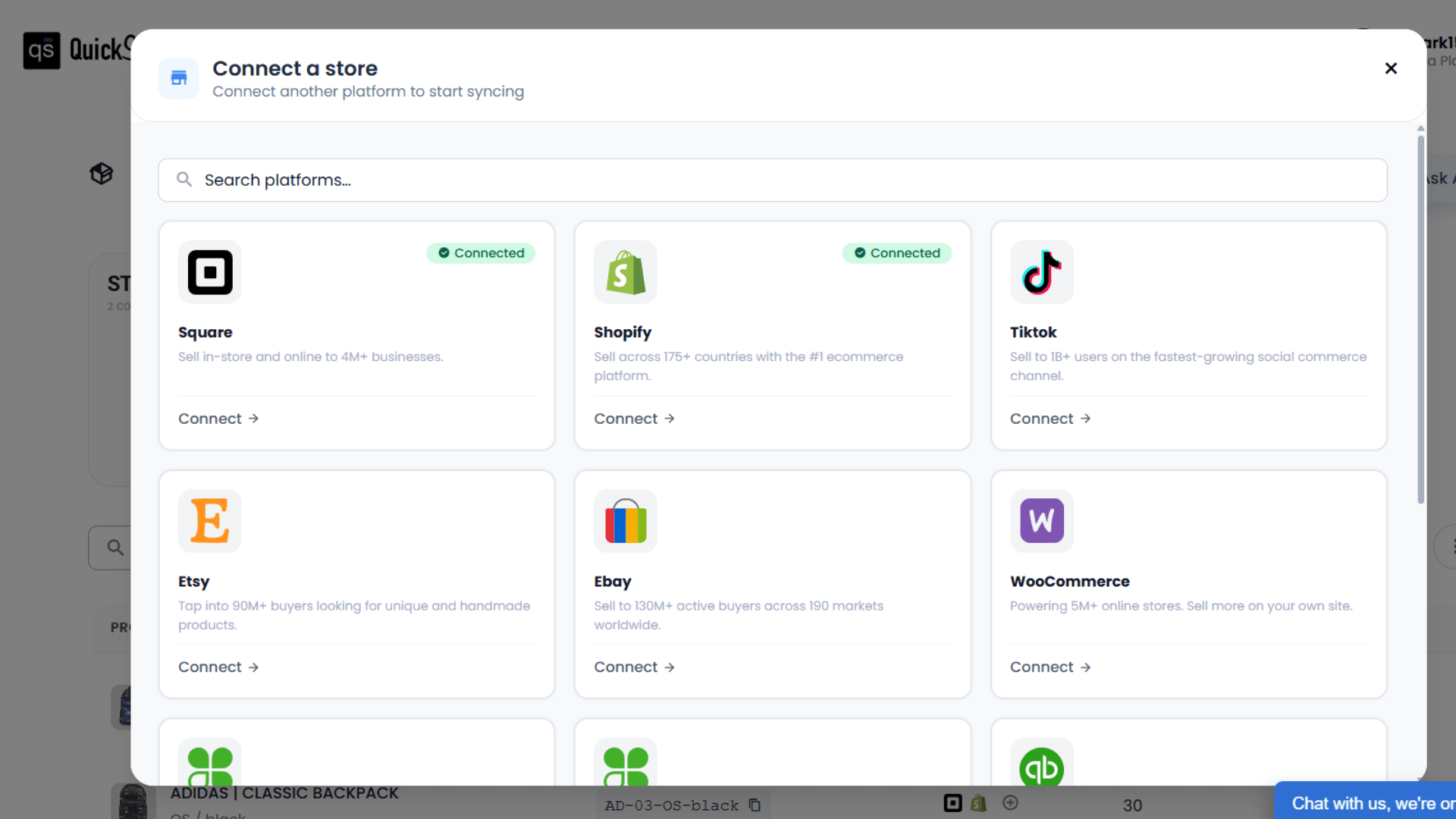
- Click Add Store from your QuickSync dashboard.
- Choose the ecommerce platform or POS system you want to connect, such as Shopify, Square, Clover, WooCommerce, Etsy, or Amazon.
- Log in to your store and approve the required permissions. QuickSync will securely import your products, inventory, locations, and other required data.
Step 3: Connect Your Second Sales Channel
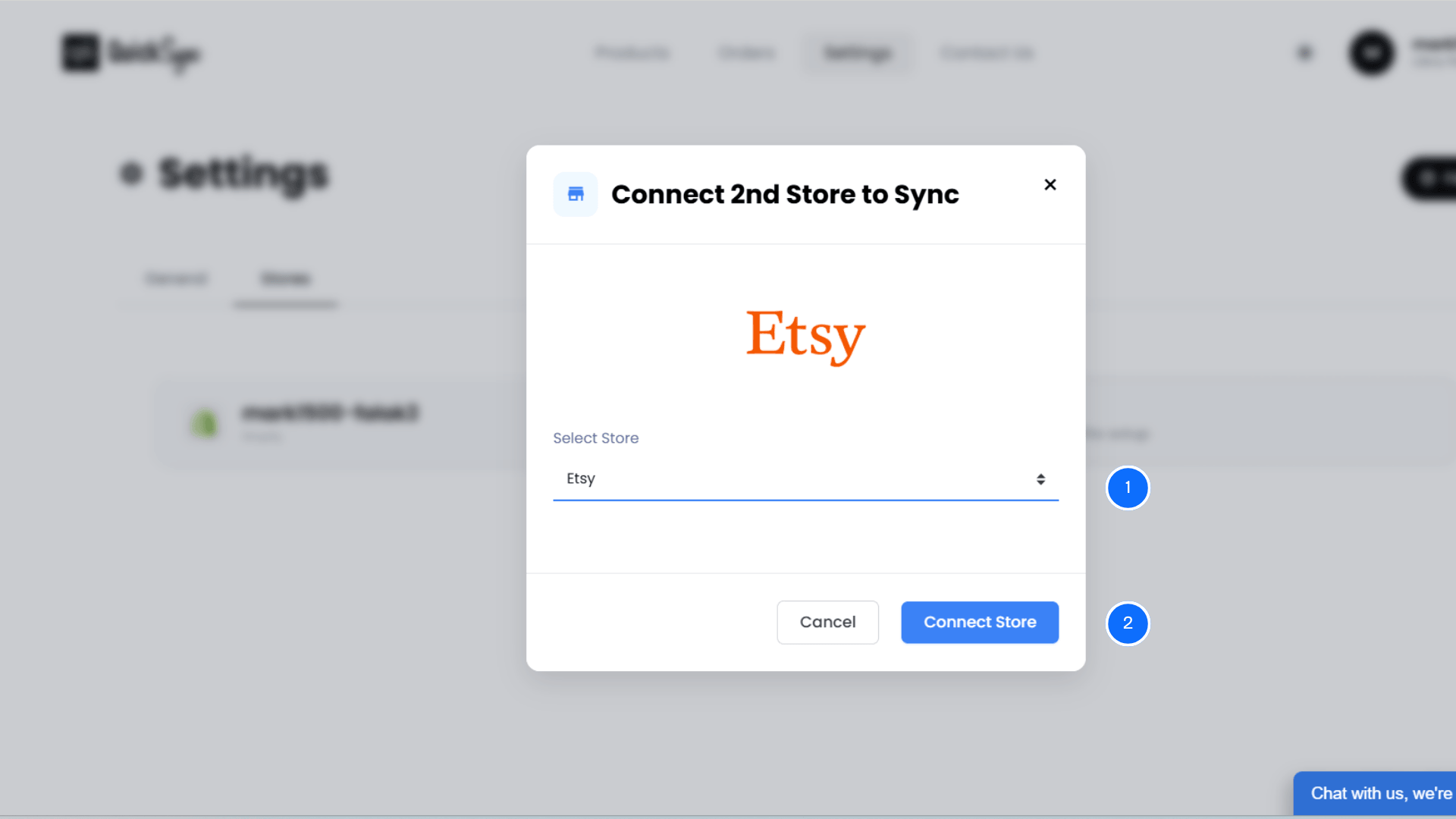
- Next, connect the second platform where you want inventory to stay synchronized.
- Whether you’re connecting Shopify with Clover, Shopify with Etsy, Square with WooCommerce, or another supported integration, QuickSync guides you through the setup in just a few clicks.
- Once connected, both stores are ready for inventory synchronization.
Step 4: Configure Your Inventory Sync Settings
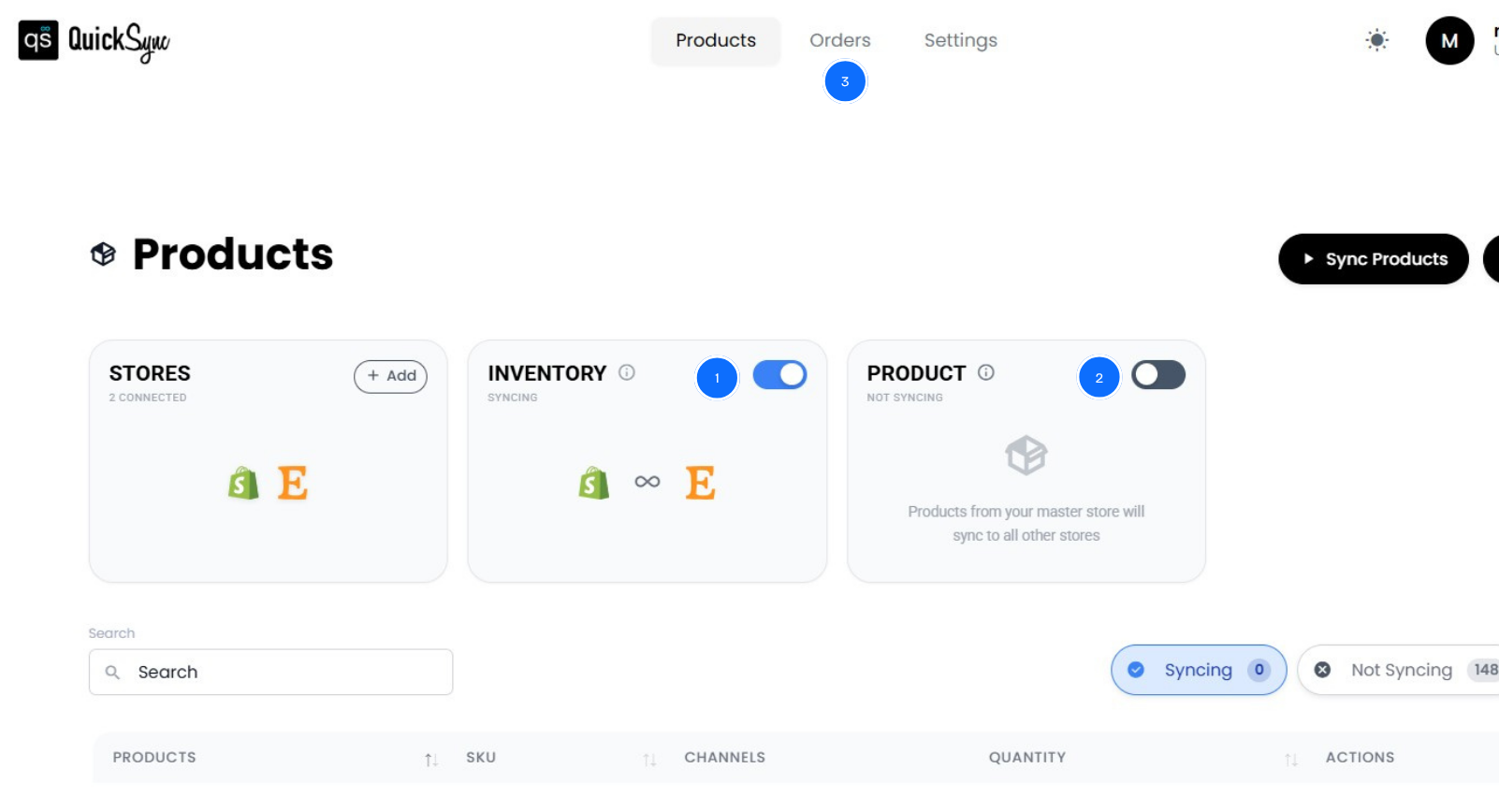
Open the Inventory Sync settings inside your QuickSync dashboard.
Select which store should act as your Source Store. This is the store whose inventory will be used as the primary inventory source. You can also configure additional options, including:
- Export products between connected stores.
- Automatically generate missing SKUs.
- Export products as drafts if required.
- Match existing products using identical SKUs.
- Review your connected stores before starting the sync.
These settings help ensure every connected channel starts with accurate inventory data. Once everything looks good, click Start Syncing.
Inventory KPIs Every Small Business Should Track
Managing inventory isn’t just about keeping products in stock. How do you know if your inventory process is actually working? That’s where Key Performance Indicators (KPIs) come in.
Think of KPIs as the health check for your inventory. They show what’s working, where money is getting tied up, and what needs attention before it becomes a bigger problem. Instead of making decisions based on guesswork, you can use real inventory data to improve purchasing, reduce costs, and increase profitability.
Here are the most important inventory KPIs every small business should monitor.
| KPI | Why It Matters |
|---|---|
| Inventory Turnover | Shows how quickly your inventory is sold and replaced. A healthy turnover means products are moving instead of sitting on shelves. |
| Sell-Through Rate | Measures how much inventory you sell compared to how much you receive. It helps identify high-performing and slow-moving products. |
| Stockout Rate | Tracks how often products become unavailable. A high stockout rate usually leads to lost sales and unhappy customers. |
| Carrying Cost | Measures the cost of storing inventory, including warehousing, insurance, and storage expenses. Lower carrying costs improve cash flow. |
| Fill Rate | Shows the percentage of customer orders fulfilled without delays. A higher fill rate leads to better customer satisfaction. |
| Inventory Accuracy | Compares your recorded inventory with your actual physical stock. High inventory accuracy helps prevent purchasing mistakes and stock discrepancies. |
| Inventory Value | Calculates the total value of your inventory. Monitoring this regularly helps you avoid carrying excess inventory. |
| Gross Margin Return on Inventory (GMROI) | Measures how much profit your inventory generates. It helps you understand whether your inventory investment is delivering a strong return. |
You don’t have to track dozens of reports every day. Start with these KPIs, review them regularly, and you’ll quickly spot trends before they become expensive problems.
Common Inventory Management Mistakes That Cost Small Businesses Money
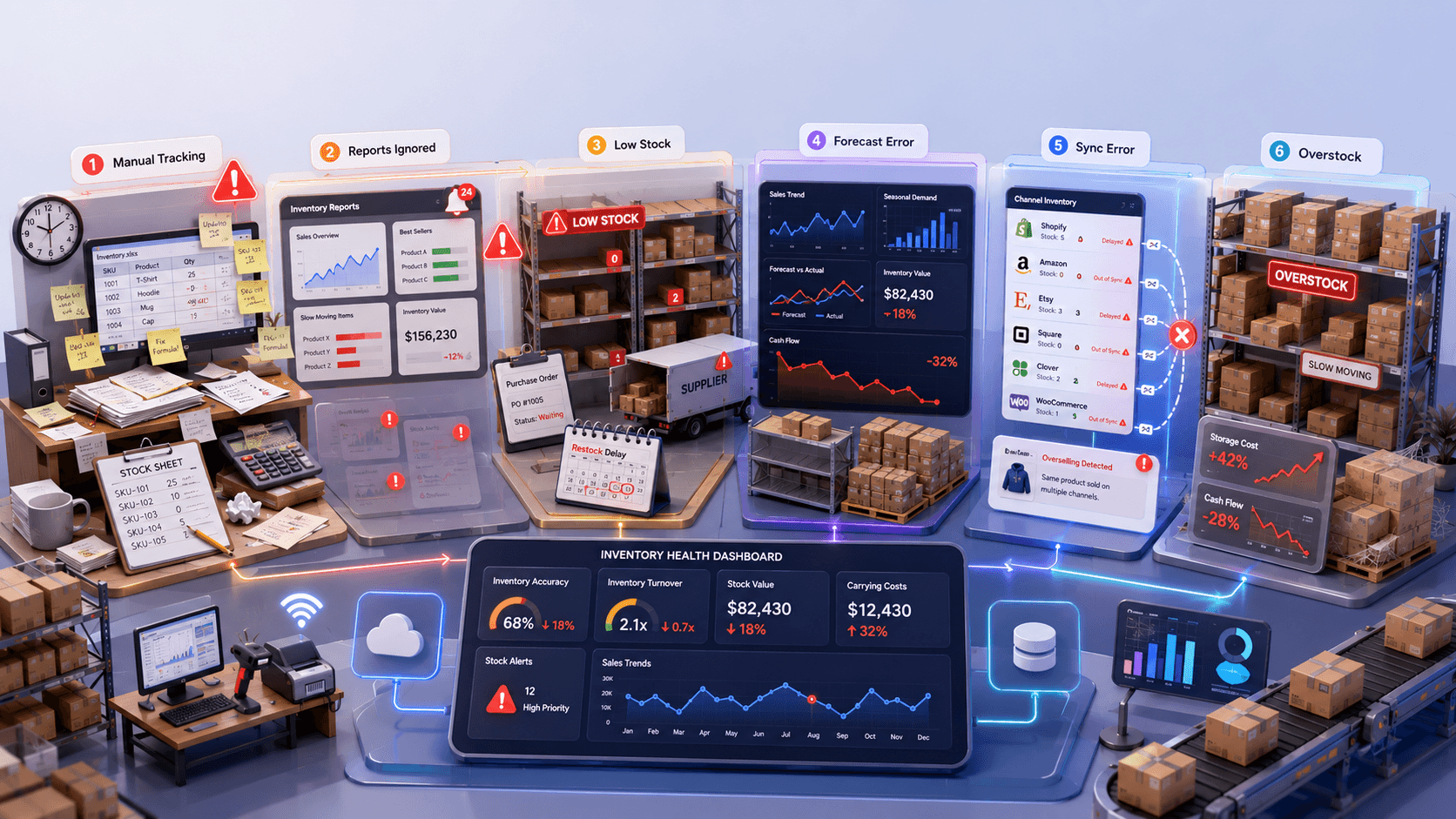
Every business makes inventory mistakes. The difference is that successful businesses identify them early. And fix them before they affect profits.
Let’s look at the most common mistakes merchants make.
Depending on Manual Tracking
Manual inventory tracking works when your business is small. But as orders grow, it becomes much harder to manage. Updating spreadsheets after every sale takes time and leaves room for mistakes. Before long, your inventory records no longer match what’s actually in stock.
Ignoring Inventory Reports
Your inventory reports tell you what’s selling and what’s not. They also show products that need your attention. If you ignore these reports, you’ll likely order the wrong products or carry excess inventory. Checking them regularly helps you make smarter business decisions.
Not Setting Reorder Points
Running out of stock before placing a new order is an expensive mistake. Reorder points tell you exactly when it’s time to buy more inventory. This helps you avoid stockouts, reduce last-minute purchases, and keep your best-selling products available.
Poor Demand Forecasting
Customer demand doesn’t stay the same all year. Sales change with seasons, holidays, and buying trends. If you don’t review past sales, it’s easy to overbuy or underbuy inventory. Better forecasting helps you maintain healthy stock levels and improve cash flow.
Not Syncing Inventory Across Sales Channels
Selling on multiple platforms without inventory syncing can quickly create stock problems. A product sold on one channel may still appear available on another. Real-time inventory syncing updates every connected store automatically. This helps prevent overselling and keeps inventory accurate everywhere.
Buying More Inventory Than You Need
Buying extra inventory may feel like the safer option. In reality, it often creates more problems than it solves. Slow-moving products take up storage space and tie up your cash. Buying based on real sales trends helps reduce inventory costs and improve profitability.
Conclusion
Managing inventory doesn’t have to be stressful. With the right system, you can reduce stock errors, improve cash flow, and keep customers happy. Better inventory management also gives you more time to focus on growing your business instead of fixing inventory mistakes.
If you’re still using spreadsheets or manual updates, now is a great time to switch. An automated inventory management system keeps your inventory accurate. It saves hours of manual work and helps you make better business decisions every day.
That’s exactly what QuickSync is built for. It automatically syncs inventory across Shopify, Square, Clover, Amazon, Etsy, and other sales channels. Most updates land within seconds; Etsy doesn’t announce a sale, so we check it every five minutes. No more manual updates. No more inventory mismatches. Just accurate inventory, smoother operations, and complete peace of mind as your business grows.