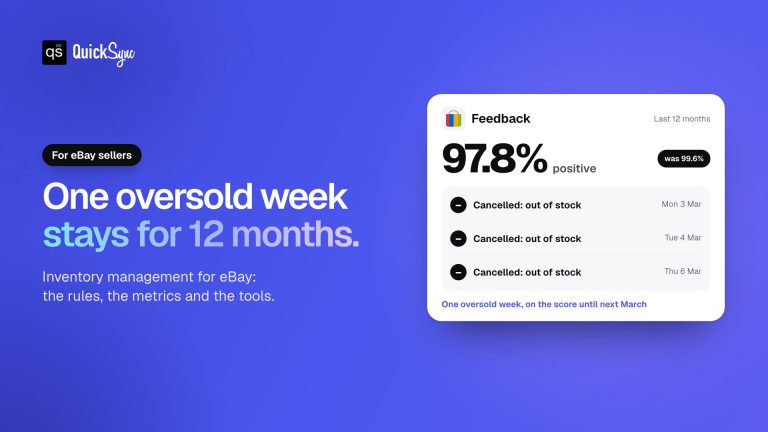
You’re selling on eBay. Then Amazon. Then Etsy. An item sells on eBay at 2 PM. You’re busy packing orders, so you forget to update Amazon. A buyer buys the same item on Amazon.
Now you’re oversold. The buyer gets a cancellation. You get negative feedback. Your eBay seller rating takes a hit.
Sound familiar?
Most eBay sellers don’t realize their inventory problems aren’t caused by too many products. They’re caused by inventory living in too many places. You’re juggling three dashboards, three inventory counts, and three manual update processes. One delayed sync, one forgotten update, and overselling happens. Canceled orders pile up. Buyer reviews tank.
The good news? It’s completely fixable. With proper eBay inventory management software, you can keep inventory synced across all the sales channels you sell on. A reliable tool and approach keep your inventory updated without constant manual work. You get accurate inventory numbers. No more overselling. No more overstocking.
In this guide, you’ll learn how eBay inventory management works. You’ll discover why multi-channel inventory management matters. You’ll also learn the best ways to manage inventory across multiple sales channels. Also know about the best ways to manage inventory across multiple marketplaces.
📌 Key Takeaways
- eBay inventory management becomes more challenging as you add new sales channels.
- Manual inventory updates often lead to overselling, stock errors, and canceled orders.
- Real-time inventory synchronization keeps stock levels accurate across every marketplace.
- Multi-channel inventory management improves inventory accuracy and customer satisfaction.
- The best eBay inventory management software automates inventory, products, and orders.
- Features like SKU mapping, variant sync, and multi-location inventory save hours of manual work.
- QuickSync helps sellers manage inventory across eBay and other channels automatically.
What Is eBay Inventory Management?
Let’s start with the basics
If you only sell on eBay, managing inventory is fairly easy and can be done with built-in functions. Once you start selling on eBay with Shopify, or eBay with Amazon, or Clover, everything changes. Every order must reduce inventory across every channel immediately. Otherwise, inventory quickly becomes inaccurate.
eBay inventory management is the process of tracking, updating, and synchronizing inventory across eBay and every connected sales channel. The goal is simple. Every marketplace should always show the correct stock, no matter where a customer buys.
Let me explain this. eBay inventory management isn’t just about tracking stock. It ensures every marketplace always shows the correct inventory.
Why eBay Inventory Management Matters More Than Ever
A few years ago, many businesses sold through one marketplace. Today, that’s no longer enough. Most growing sellers list products on eBay, Amazon, Shopify, TikTok Shop, etc. Sometimes even sell through Square or Clover along with eBay.
Every new sales channel creates another place where inventory can go wrong. Good eBay inventory management keeps everything connected.
It helps you:
- Sell confidently across multiple marketplaces.
- Update stock after every order.
- Prevent overselling before it happens.
- Deliver orders faster.
Why eBay Sellers Struggle to Manage Inventory Across Multiple Sales Channels
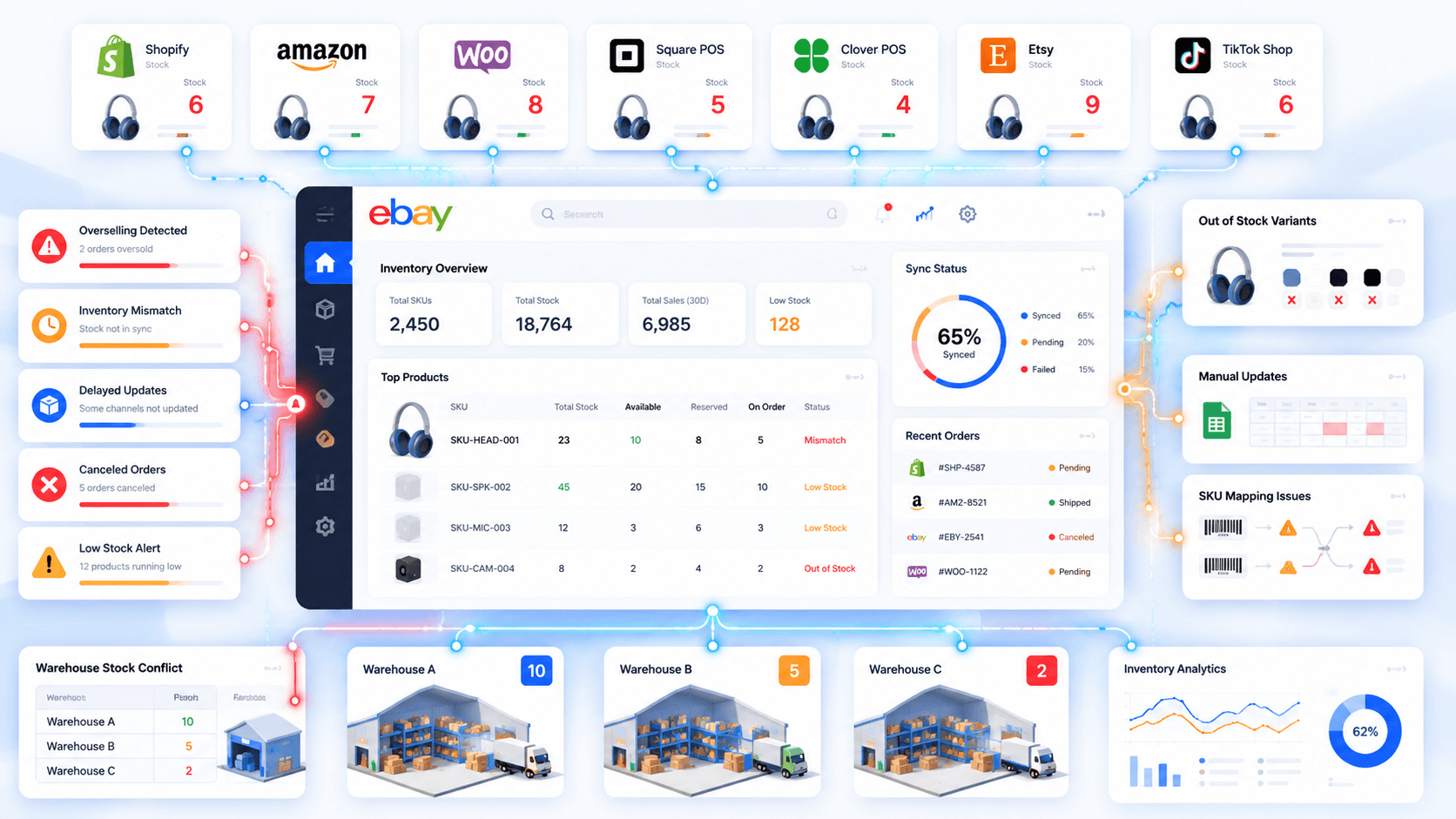
Selling on multiple marketplaces is great for revenue. But it creates a completely different inventory challenge. Let’s look at the biggest eBay inventory management challenges multi-channel sellers face.
Overselling Starts Costing You Sales
One of the fastest ways to lose buyer trust is selling inventory you don’t actually have. A product sells on Shopify, but the same listing remains active on eBay. Before inventory updates, another customer places an order for that last unit.
Overselling doesn’t just create canceled orders. It leads to refunds, negative feedback, and lower seller ratings. As you add more sales channels, preventing overselling becomes even more important. It damages your reputation and reduces customer trust.
Manual Inventory Updates Take Over Your Entire Day
Another challenge of managing eBay inventory across multiple channels is the constant manual updating. You or your team have to keep checking different dashboards and updating stock numbers throughout the day.
You may end up showing stock you do not have. You may be ordering more than you need, or running out of products that are still selling. What starts as a simple stock update can quickly become a daily cycle of checking, updating, and correcting inventory
eBay Inventory Never Matches Other Sales Channels
Have you ever checked eBay and seen ten units available, while Amazon shows seven? Then your warehouse reports only five? You’re no longer sure which inventory count is actually correct.
Inventory mismatches happen because every marketplace updates inventory differently. Without centralized inventory syncing, stock quantities become unreliable. Your inventory planning becomes much more difficult.
Warehouse Inventory Becomes Difficult to Control
As your business grows, inventory often moves into multiple warehouses or fulfillment locations. While that’s great for faster shipping, it also creates another inventory challenge. You need accurate inventory visibility across every location.
If warehouse inventory doesn’t sync, unavailable products may still appear in stock. That leads to shipping delays and unnecessary fulfillment costs.
eBay Product Variants Stop Staying Accurate
Managing eBay variations is often more complicated than sellers expect. Every size, color, material, and style has its own inventory. Without proper inventory data, you never know which variation is selling, which one is running low, and which one is already out of stock.
When those stock levels are not updated correctly, eBay can continue showing a variation as available after its actual stock is gone. Customers can then order a size or color you cannot fulfill, creating another inventory issue to resolve.
Poor Inventory Forecasting Creates eBay Stock Problems
Inventory management isn’t only about current stock. It’s also about knowing when to reorder products before your eBay inventory runs out. That becomes difficult when inventory is spread across multiple marketplaces.
Without accurate inventory forecasting, you may order too much slow-moving inventory. At the same time, your best-selling eBay products can run out of stock. Better forecasting helps you maintain healthy stock levels and avoid stockouts.
How eBay Inventory Software Simplifies Multi-Channel Selling
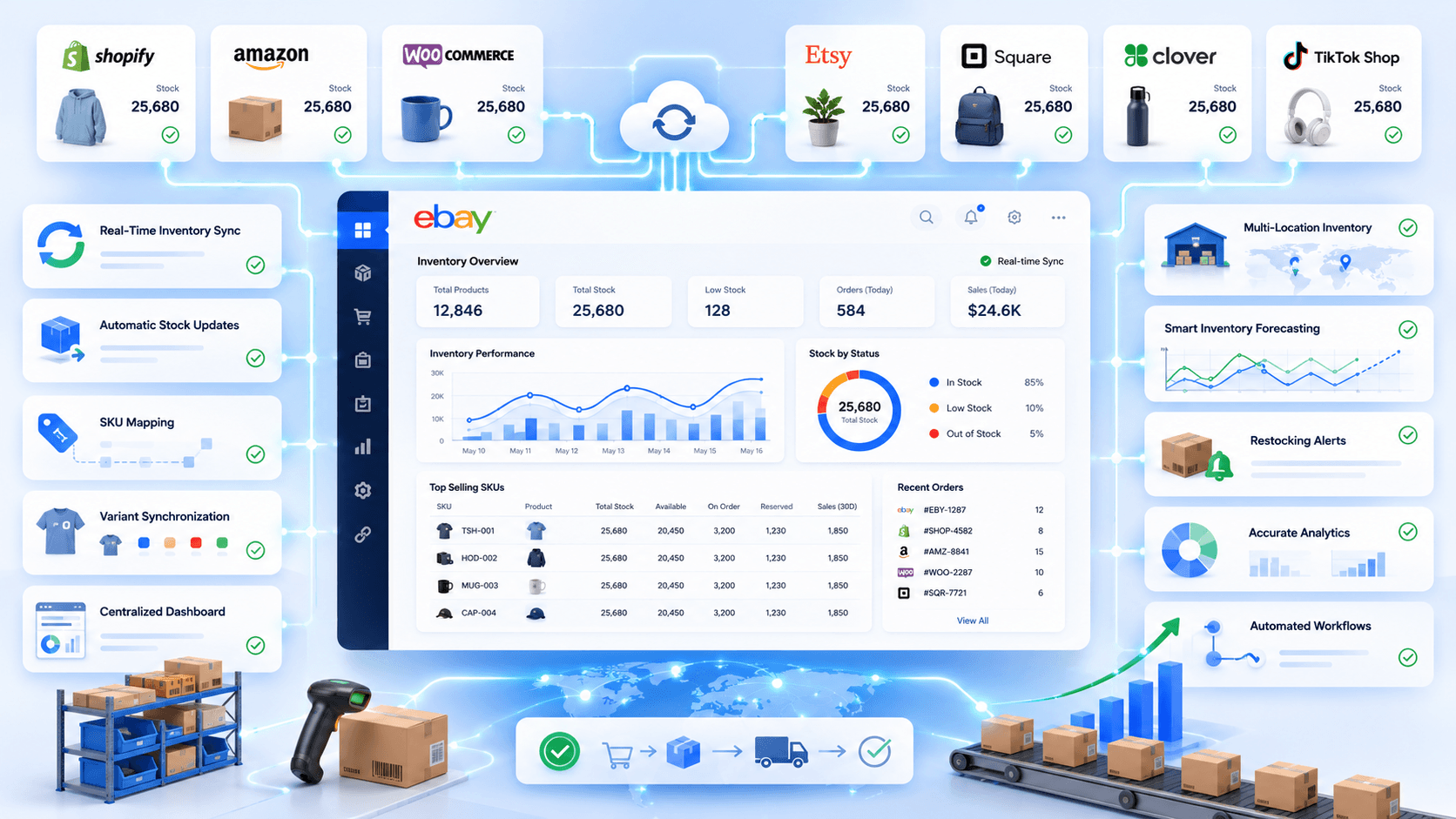
Managing eBay inventory across multiple sales channels can be challenging. The right tool makes inventory management for eBay faster and easier. Instead of updating stock manually, you can automate the process. Your inventory stays accurate across every connected marketplace.
Let’s explore the key benefits it brings to your business.
Prevent Overselling Across Every Sales Channel
One major benefit of eBay inventory management software is that it helps tackle overselling. When your inventory is synced in real time, you have a more accurate view of the stock available to sell.
You can sell products based on the inventory you actually have, rather than relying on outdated stock numbers. When a product sells, the available quantity is updated across your connected channels. This helps prevent overselling and canceled orders.
Keep eBay Product Variants Perfectly Synced
One of the biggest benefits of eBay inventory management software is accurate variant-level stock across every channel. Each size, color, or style stays synced to its corresponding SKU. So inventory changes are applied to the right variant.
When stock changes, the software automatically updates that specific variant across your connected marketplaces. Your team does not have to open individual listings and adjust every size or color manually.
Make Smarter Restocking Decisions
Accurate inventory data helps you make smarter restocking decisions. You can track stock levels across eBay and connected marketplaces. This helps you identify when products need replenishment before they run out.
You can restock popular products before they go out of stock. You can also avoid overstocking items that sell slowly. This keeps your cash flow healthier and inventory more balanced. It also keeps your best-selling eBay listings active for customers.
Reduce Costly Inventory Errors
Every inventory mistake costs time, money, and customer trust. Duplicate inventory records and manual updates often lead to expensive order issues. Proper eBay inventory management software minimizes these errors.
That means fewer corrections, smoother operations, and a more reliable inventory. It also helps your team work more efficiently by reducing repetitive inventory checks.
Spend More Time Growing Your Business
Let’s be honest. Logging into eBay and every other marketplace just to update stock isn’t a good use of your time. As your catalog grows, manual inventory updates become even harder to manage.
Automating inventory removes repetitive work. Focus on marketing instead. Improve customer service. Source new products. Grow sales.
As Jeff Bezos once said, “In the world of eCommerce, inventory management is not just about stock; it’s about customer trust and operational excellence.” This highlights how crucial effective inventory management is for growing businesses in the online marketplace.
Which eBay Inventory Management Method Is Right for You?
By now, you’ve probably realized that managing eBay inventory becomes harder as your business grows. Fortunately, there are several ways to manage eBay inventory. Some sellers still update inventory manually. Others rely on eBay’s built-in tools.
Let’s look at each option and see which one actually fits a multi-channel business.
Method 1: Manual Inventory Updates
When you’re just getting started on eBay, manual inventory management doesn’t seem like a bad idea. You make a sale, reduce the stock quantity, and move on. If you’re selling only a few products on one marketplace, it usually gets the job done.
Everything changes once you expand beyond eBay. The same product is now listed on Shopify, Amazon, WooCommerce, or even TikTok Shop. Suddenly, every order means opening multiple dashboards just to adjust one stock quantity.
Here’s where manual inventory management starts slowing your business down:
- Every sale needs a manual inventory update across all your marketplaces.
- You’re constantly switching between eBay, Shopify, Amazon, and other channels.
- Product variants like sizes and colors become difficult to keep accurate.
- Stock differences appear because updates don’t happen at the same time.
- Managing inventory across multiple warehouses becomes confusing.
- Inventory forecasting is harder because stock data isn’t always reliable.
- Your team spends more time fixing inventory than growing the business.
- As orders increase, manual inventory simply doesn’t scale.
Method 2: eBay’s Built-In Inventory Management
If you only sell on eBay, the eBay seller dashboard already gives you everything you need to manage your inventory. You can create listings, update stock quantities, and track inventory directly from Seller Hub. For many small eBay sellers, that’s enough to keep daily operations running smoothly.
The challenge starts when eBay is no longer your only sales channel. Your inventory may update correctly inside eBay. But Shopify, Amazon, WooCommerce, or other marketplaces won’t know those changes happened. Instead of managing one inventory, you’re now managing several separate inventories that don’t communicate with each other.
Here’s where eBay’s built-in inventory tools start reaching their limits:
- Inventory updates stay inside eBay and don’t sync with other marketplaces.
- Every external sales channel still needs separate inventory updates.
- There’s no centralized inventory dashboard for all your marketplaces.
- Multi-warehouse inventory support is limited for growing businesses.
- Product variants stay organized on eBay but not across other channels.
- Inventory forecasting becomes harder because stock data is scattered.
- It’s a great solution for eBay sellers, but not for multi-channel businesses.
Method 3: CSV Import and Export
As your eBay catalog grows, updating every listing manually becomes frustrating. That’s why many sellers switch to CSV files. Instead of editing products one by one, you export your inventory, make changes in a spreadsheet, and upload the updated file back to eBay. It feels much faster, especially when you’re managing hundreds of listings.
The downside is that CSV files only update inventory when you upload them. If a product sells on Shopify, Amazon, or another marketplace after your last import. Your eBay inventory won’t know about it. You still have to export, edit. And import files repeatedly to keep every sales channel aligned.
Here’s where CSV inventory management starts falling short:
- Bulk updates make managing large eBay catalogs much faster.
- It’s useful for occasional inventory changes across many listings.
- Every inventory update still depends on manual exports and imports.
- Inventory doesn’t stay synchronized across eBay and other marketplaces.
- Spreadsheet mistakes can create incorrect stock quantities or failed imports.
- Product variants become harder to manage as your catalog grows.
- Frequent inventory changes make CSV management difficult to maintain.
Method 4: Multi-Channel eBay Inventory Management Software Like QuickSync
If you want to grow beyond eBay, basic inventory tools are not enough. You need software that keeps inventory accurate automatically. QuickSync syncs products, inventory, orders, and variants across every connected sales channel.
QuickSync creates one centralized inventory system for your business. Supported stock changes are processed through webhooks or scheduled checks. eBay stock and orders are checked every two minutes. Whether orders come from eBay, Shopify, Amazon, WooCommerce, or TikTok Shop, your inventory stays accurate. Your team spends less time fixing inventory. They spend more time growing the business.
Here’s how QuickSync simplifies eBay inventory management:
- Real-Time Inventory Sync: eBay stock and orders are checked every two minutes; processing and retries can add time. A refund alone does not restore stock: the source platform must report an actual restock or quantity increase.
- Product Sync: Sync titles, descriptions, prices, images, and other product details automatically. Keep every marketplace consistent without manual edits.
- Smart SKU Mapping: Match products across marketplaces using SKUs. Missing SKUs are created automatically during syncing.
- Create Products Faster: Export new products to eBay without creating listings manually. Build your catalog in less time.
- Centralized Dashboard: View products, inventory, and updates from one dashboard. Stop switching between multiple platforms.
- Multi-Location Inventory Sync: Manage inventory across warehouses with accurate stock visibility. Always display the correct inventory location.
- Multi-Channel Inventory Sync: Connect eBay with Shopify, Amazon, WooCommerce, and other marketplaces. Every inventory update stays synchronized.
- eBay and POS Sync: Connect eBay with QuickBooks, Square, and Clover. Keep online and in-store inventory perfectly aligned.
- Order Sync: Sync orders automatically across connected platforms. Speed up fulfillment and reduce manual work.
How to Sync eBay Inventory With Other Channels Using QuickSync
After comparing different inventory management methods, one thing becomes clear. Growing eBay sellers need more than basic inventory tracking tools. They need a tool that automatically keeps inventory synced across every sales channel.
This is where QuickSync stands out. It is a complete eBay inventory management software built for multi-channel sellers. QuickSync connects eBay with Etsy, Shopify, Amazon, WooCommerce, Clover, and other platforms through one centralized dashboard.
Instead of switching between different platforms and updating stock manually. Sellers can manage their entire inventory workflow from one place. That means fewer inventory errors, less manual work, and more time to grow the business.
Now, let’s see how you can connect eBay inventory with other channels using QuickSync
Step 1: Create Your QuickSync Account
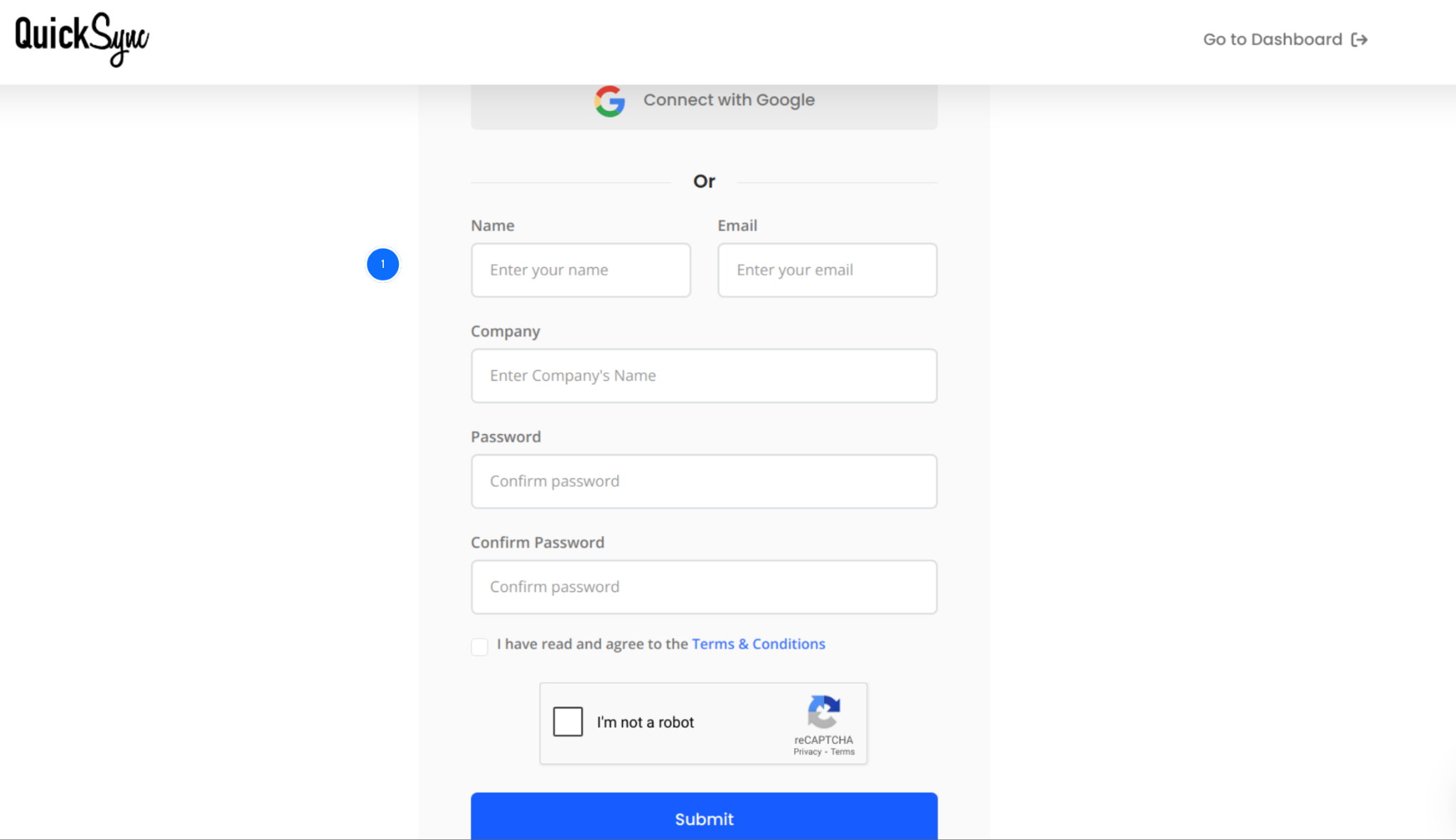
- Go to QuickSync and create your account using your email and business details.
- The sign-up process takes only a few minutes.
- After creating your account, log in to your QuickSync dashboard. This is where you will manage connected stores, inventory sync settings, product sync, and order flows.
Step 2: Connect Your eBay Store
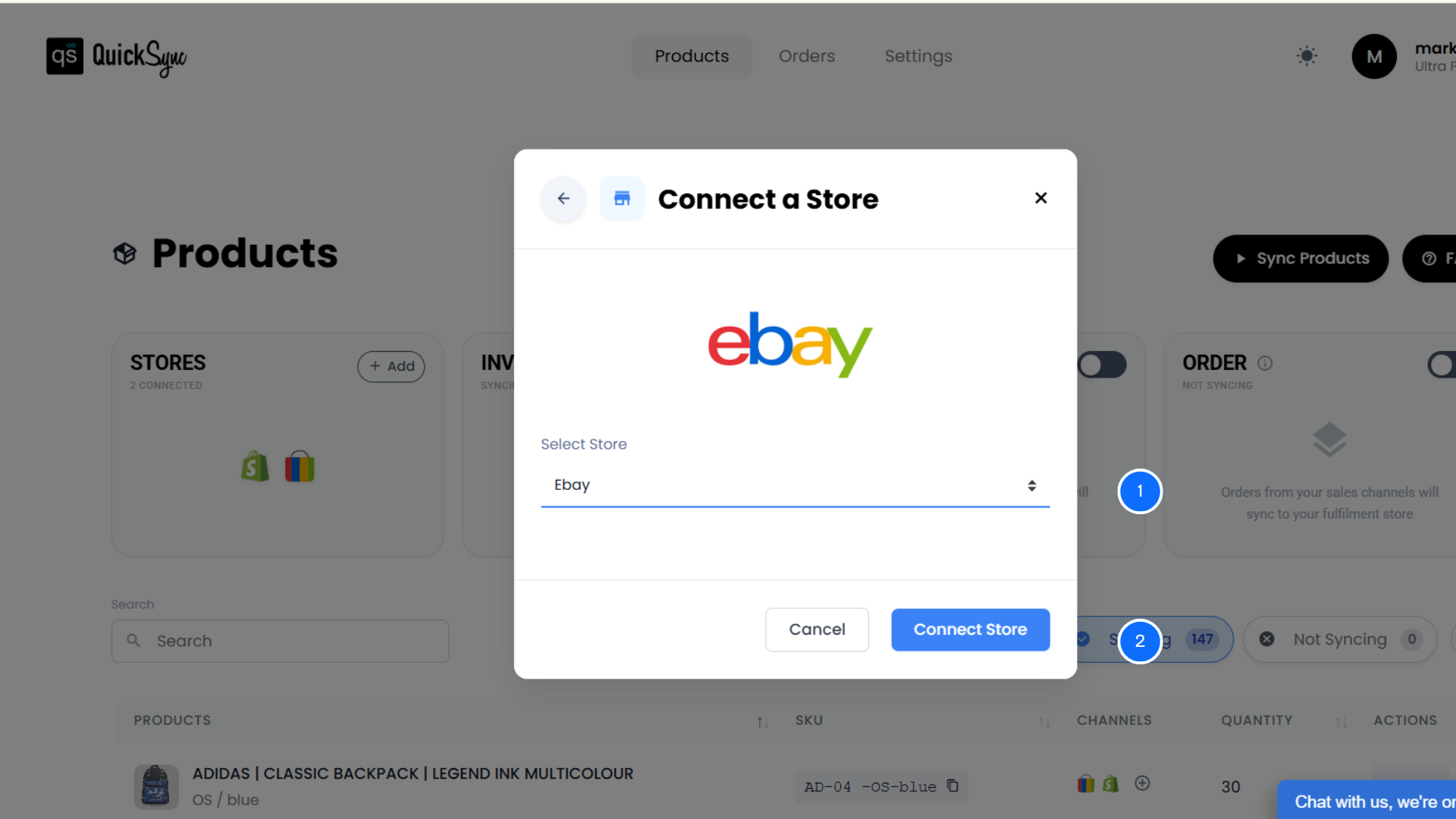
- Open your QuickSync dashboard and go to Sync Products → Add Store.
- Select eBay from the list of supported channels.
- Click Add a Store and log in to your eBay account.
- Approve the required permissions so QuickSync can access your store information.
Step 3: Connect Your Other Sales Channels
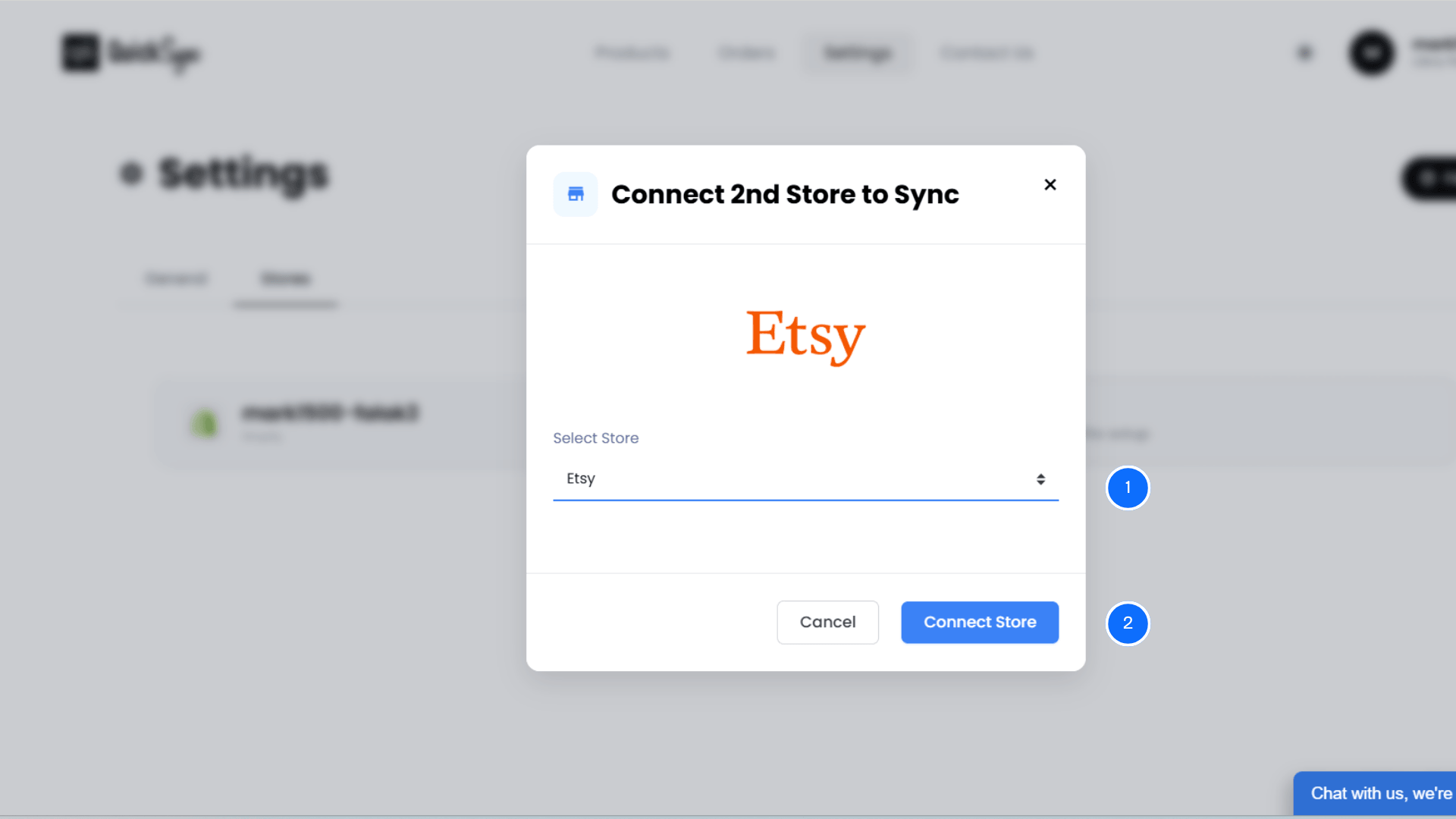
- From the dashboard, go to Sync Products → Add Store again.
- Select the channels you want to connect, such as Shopify, Amazon, WooCommerce, Etsy, Square, or Clover.
- Complete the authorization process for each platform.
- Once connected, QuickSync will link your stores. Then prepare them for inventory, product, and order syncing.
Step 4: Configure Sync Settings
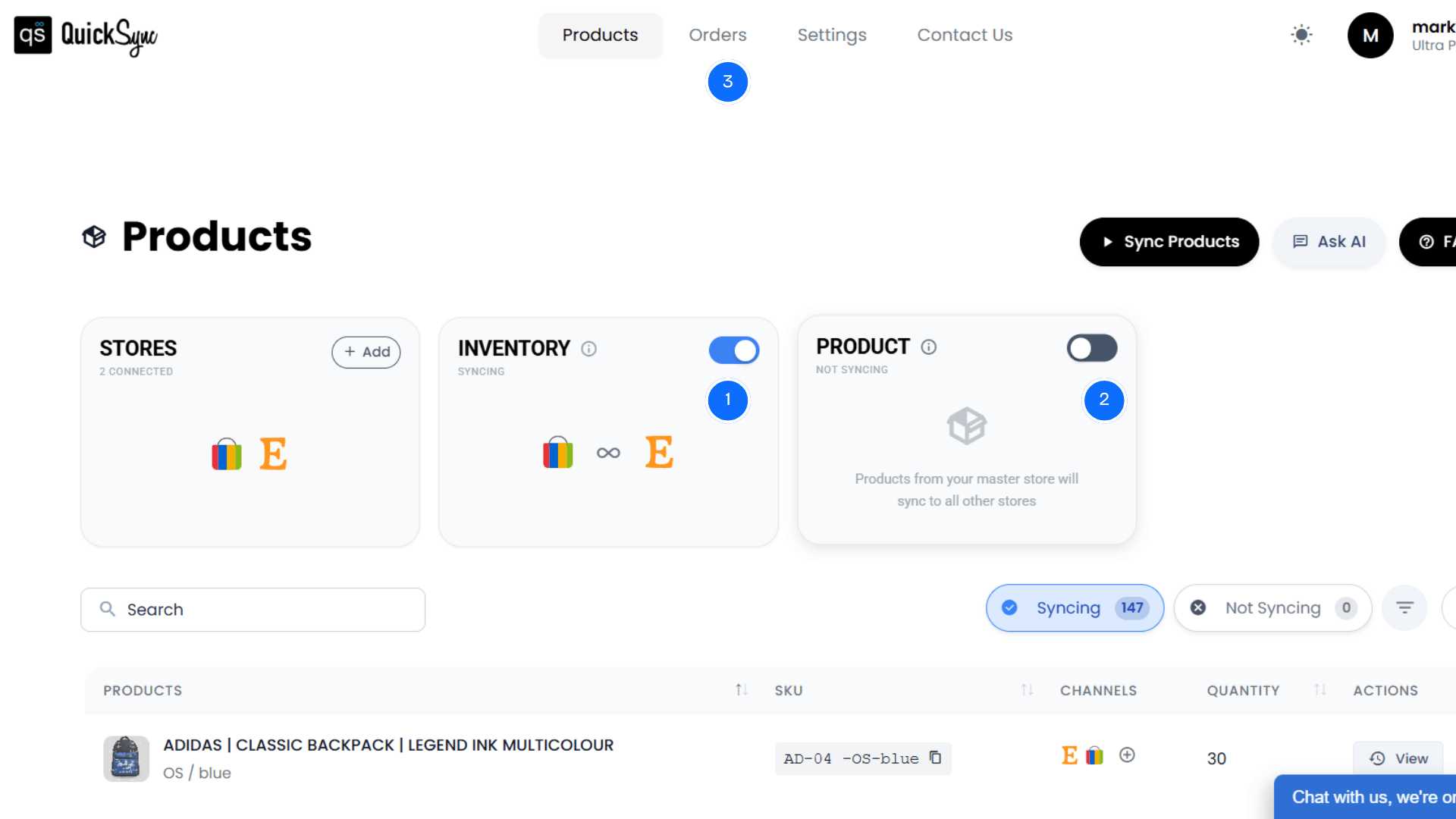
After connecting your stores, open the sync settings from your QuickSync dashboard. In the pop-up window, you will see your connected channels. The store on the left side acts as the Source Store.
- Click Switch Store if you need to change the source store.
- Export Products (Optional) – Export selected products to your connected store.
- Create SKU – If a product has no SKU, QuickSync creates one automatically.
- Create as Draft – Export products as drafts before publishing them.
- Match Existing Products – If the product already exists, QuickSync matches it automatically using the SKU.
Click Start Syncing. QuickSync will begin syncing your products, inventory, and connected store data.
eBay Inventory Management Tips for Better Control
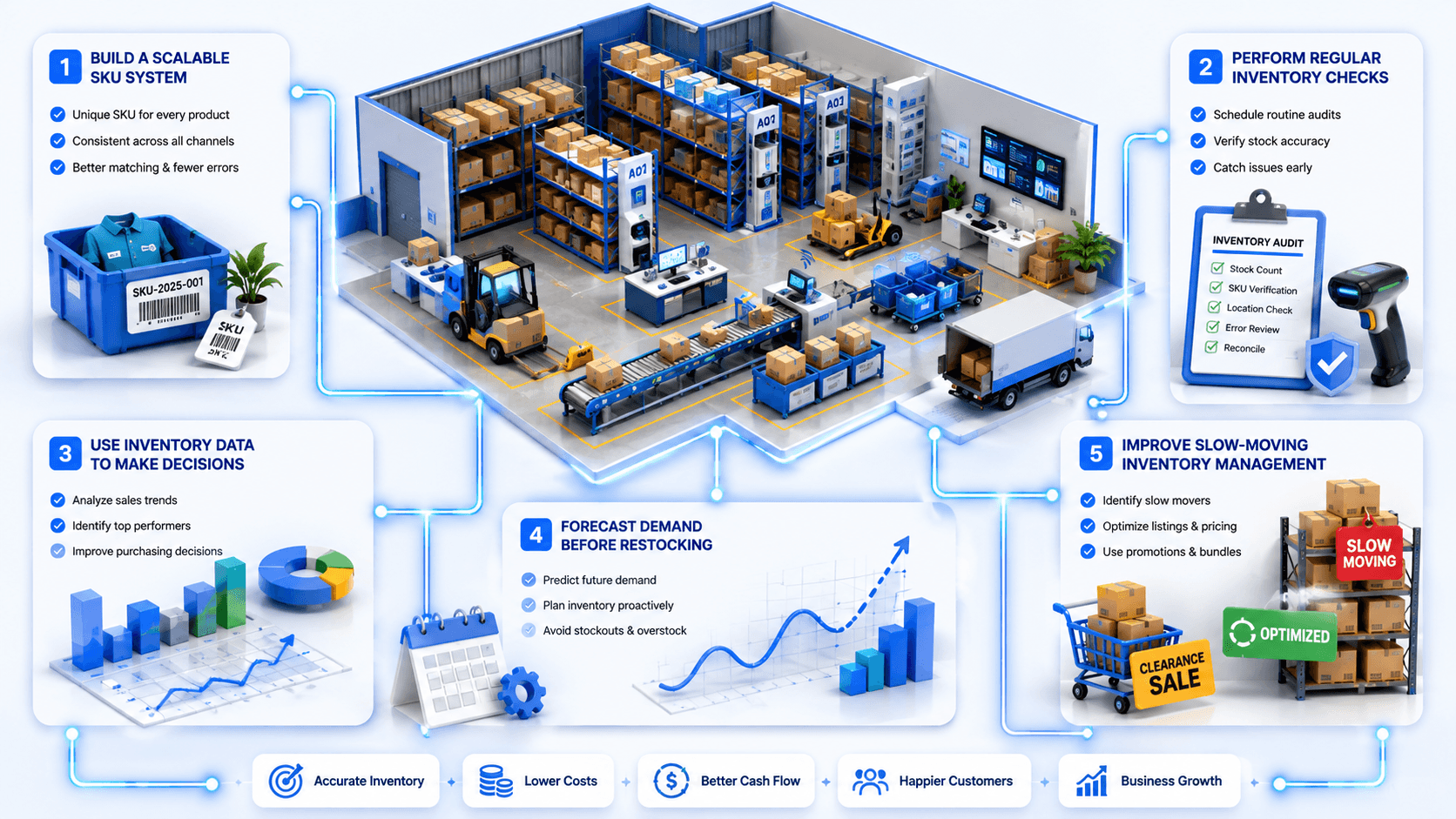
Managing inventory successfully is not about reacting to stock problems after they happen. Experienced eBay sellers build a system that keeps their inventory accurate.
Here are the inventory practices that help successful sellers reduce errors.
Build a Scalable SKU Management System
A strong SKU structure makes inventory easier to manage as your catalog grows. Each product should have a unique SKU that works across eBay and other platforms. This improves product matching and prevents duplicate records.
Perform Inventory Checks Before Problems Appear
Inventory audits should not only happen when something goes wrong. Regular checks help identify missing stock and incorrect quantities. By reviewing inventory data consistently, sellers can maintain accurate stock levels. They can avoid unexpected order fulfillment issues.
Use Inventory Data to Make Decisions
Inventory management is not only about knowing current stock. Your inventory data can reveal which products perform well and which items move slowly. Analyzing sales patterns helps sellers improve purchasing decisions and maintain healthier inventory levels.
Forecast Demand Before Restocking
Running out of popular products can hurt sales momentum. At the same time, ordering too much stock ties up cash and warehouse space. Demand forecasting helps sellers understand buying patterns and prepare inventory before demand increases.
Improve Slow-Moving Inventory Management
Not every product will sell at the same speed. Slow-moving inventory can increase storage costs. It can reduce available capital for new products. Successful sellers regularly review product performance and optimize listings. They create promotions to move aging inventory faster.
Conclusion: Simplify eBay Inventory Management Across Channels
Managing eBay inventory across multiple channels should not create extra work. As your business grows, keeping products, quantities, orders, and listings accurate becomes harder. Manual updates can lead to stock errors, overselling, and wasted time.
QuickSync helps eBay sellers manage multichannel inventory easily. It connects eBay with Amazon, Shopify, WooCommerce, Square, and Clover. Sellers can sync products, inventory, and orders from one centralized dashboard.
With features like real-time inventory sync, SKU mapping, and multi-location support, QuickSync keeps inventory accurate. It reduces errors, saves time, and helps sellers manage ecommerce operations smoothly. Multi-location support makes inventory management easier as your business grows.
Start managing your eBay inventory smarter with QuickSync today.