The fastest way to price something on eBay is to check what the same item actually sold for. eBay shows you this for free. Search for the item and switch on the Sold items filter. eBay’s sold listings then show every matching sale from the last 90 days, with the price and date.
One thing changed in 2026: you now have to be signed in. If the sold filter seems to have disappeared, that’s almost always why. This guide covers the steps on desktop and in the app, the Advanced Search route, how to see sold Items on eBay and read the results, and how to see up to three years of sales when 90 days isn’t enough.
The short version
- Sign in to eBay.
- Search for the item.
- Turn on the Sold items filter.
- Sort by End Date: Recent First, so the newest sales come first.
Sold prices show in green with the date of sale. Results go back 90 days. For older sales, use Product research in Seller Hub, which covers three years.
Pricing items to sell on eBay and on Etsy, Shopify or TikTok Shop too? Skip to how to sell in more than one place without overselling.
First: sold listings now need a sign-in
Since mid-2026, eBay only shows sold and completed listings to signed-in users. A normal search still works without an account. Add the sold filter while signed out, and eBay sends you to its sign-in page instead of the results. We checked this on 12 October 2026: the same search loaded fine, but its sold version went straight to sign-in.
eBay hasn’t said why. The fix is simple: sign in with any eBay account, buyer or seller, and the filter is back where it was.
How to see sold items on eBay (desktop)
- Sign in at ebay.com.
- Search for the item. Be specific: brand, model, size and condition all narrow the results to real comparisons.
- In the filters on the left, find Show only and tick Sold items. On a smaller window, the filters may sit under All filters.
- Change the sort order to End Date: Recent First.
How to see sold items in the eBay app
- Open the app and make sure you’re signed in.
- Search for the item.
- Tap Filter.
- Switch on Sold items. You may need to scroll down the filter list to find it.
- Tap Show results, then sort by End Date: Recent First.
If you can’t find the toggle, update the app. eBay has moved this filter between versions.
How to use eBay Advanced Search for sold listings
Advanced Search is useful when a plain search returns too much noise. It lets you combine the sold filter with exact words, exclusions, condition, price range and a specific seller in one go.
- Click Advanced next to the search button, or go to ebay.com/sch/ebayadvsearch.
- Enter your keywords. Use the exclude box to drop words like “broken”, “parts” or “box only”.
- Tick Sold listings. eBay ticks Completed listings with it, since every sold listing is also a completed one.
- Set condition, price range and location if they matter.
- To see one seller’s sales, choose specific sellers in the seller options and enter their user ID.
- Click Search.
A shortcut worth bookmarking: on any eBay search page, add &LH_Sold=1&LH_Complete=1 to the end of the web address. That turns the sold filter on without clicking through menus. You still need to be signed in.
Sold listings vs completed listings
eBay has two filters that sound alike. Sold items shows listings that ended with a sale. Completed items shows every listing that ended in the last 90 days, whether it sold or not. Use sold items to find the price. Add completed items when you also want to see what didn’t sell, and at what price.
How to read sold results
Not every result tells you what you think it does. Before you use a price, check which of these three it is:
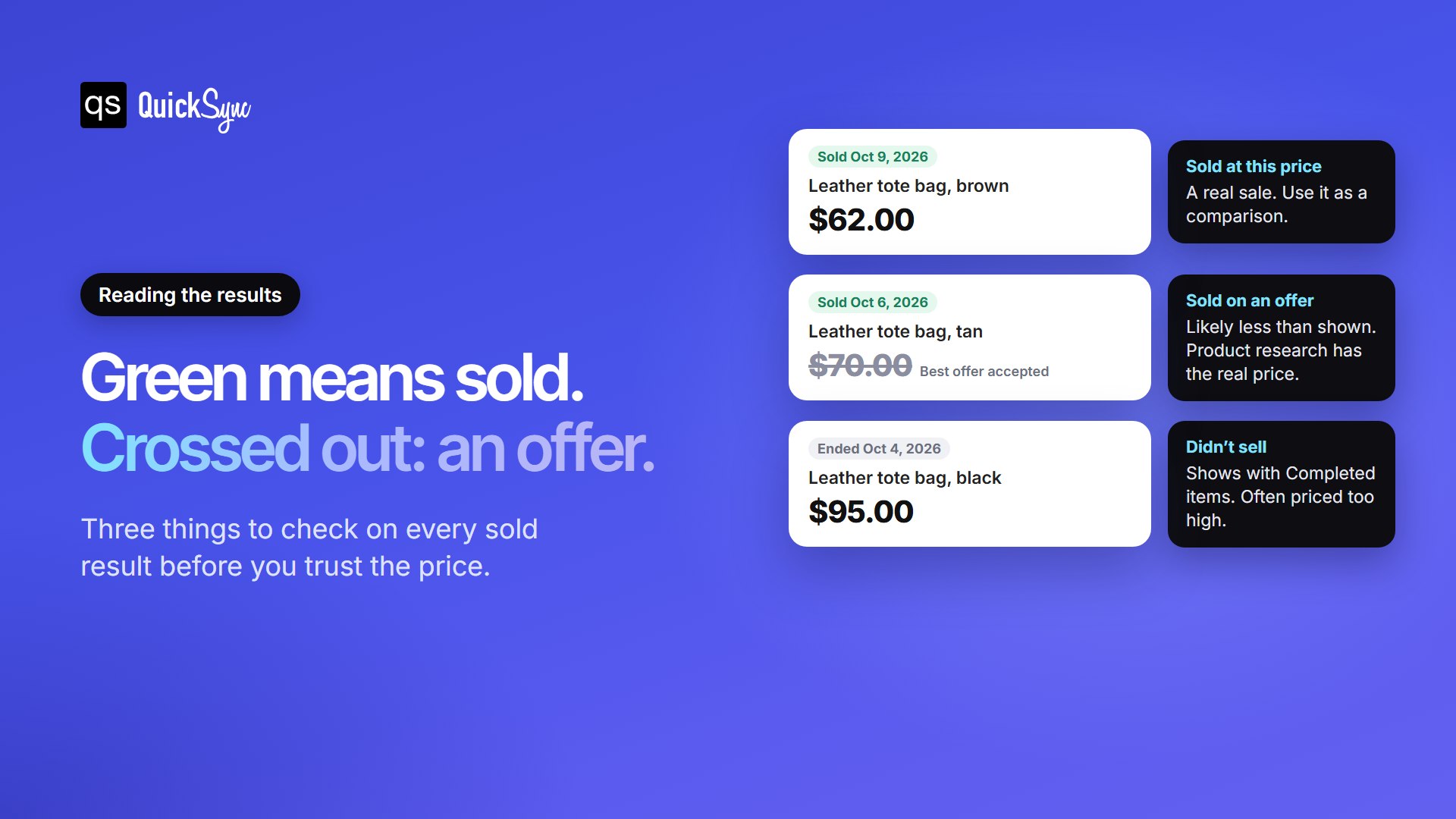
- Green price with a sold date. The item sold at that price. This is your comparison.
- Price crossed out. The item sold through Best Offer, so the buyer likely paid less than the price shown. Search results don’t always show the accepted amount. Product research does.
- No sold label. If you also tick Completed items, you’ll see listings that ended without selling. These are useful too, as a sign of where the price was too high.
Two more things to check: whether the price included free shipping, and whether the condition matches yours. A new item with tags and a used one can be listed under the same name and sell for very different prices.
See up to 3 years of sales with Product research
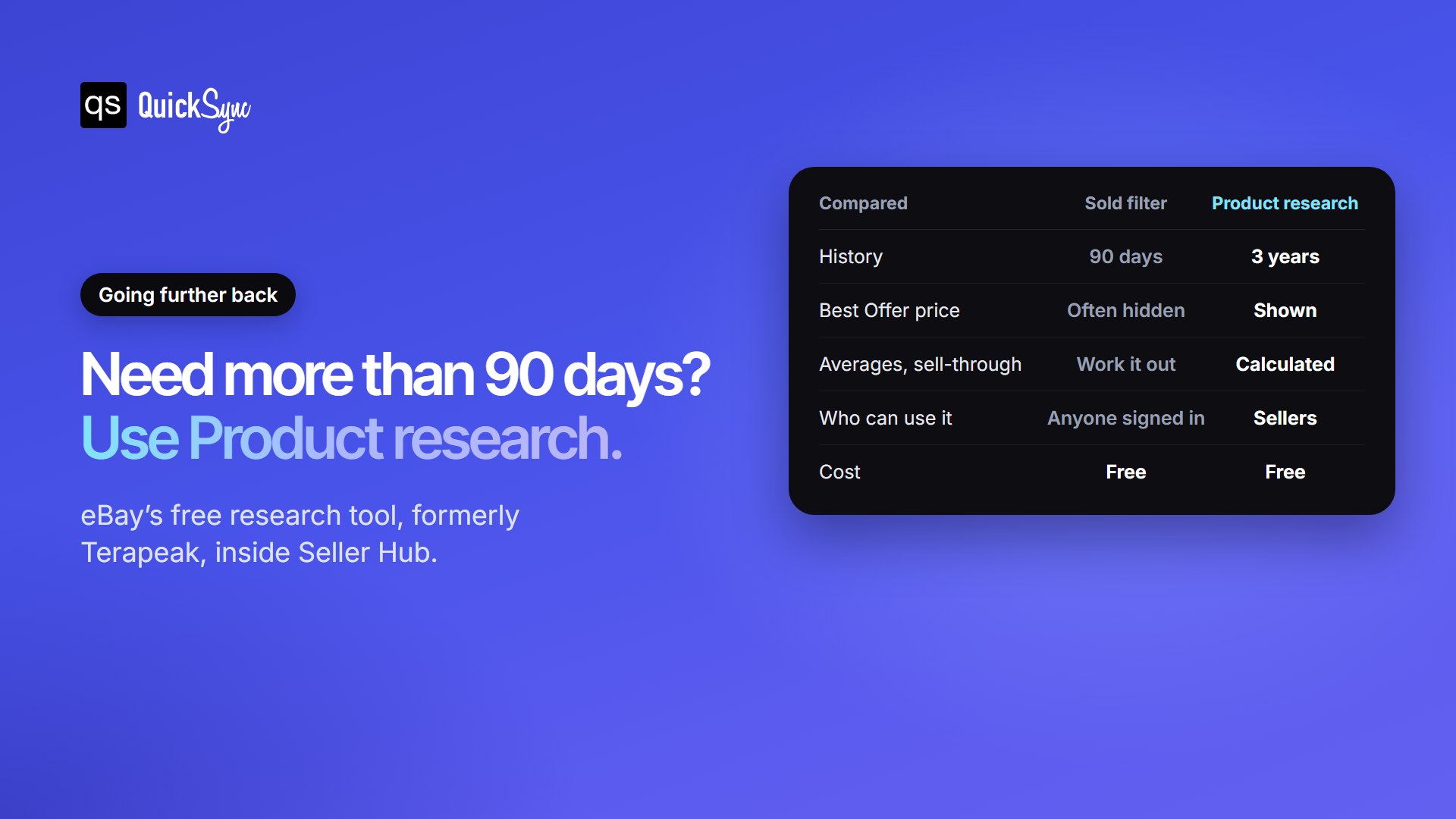
The sold filter stops at 90 days. eBay’s Product research tool, which used to be called Terapeak, goes back three years. It’s free for sellers and lives in Seller Hub.
- Open Seller Hub and go to the Research tab. It’s also in the eBay app.
- Choose Product research and search for the item.
- Set the date range, up to the last three years.
- Filter by condition and format, such as auction or Buy It Now.
You get the average sold price, the price range, average shipping cost, how many sellers sold it and a sell-through rate for sales in the last 90 days. It also shows the real price when a Best Offer was accepted, which search results don’t always show.
How to see your own sold items
Your own sales are in a different place. Go to My eBay, then Selling, then Sold. If you use Seller Hub, open Orders, then All orders. For a full record, Seller Hub can download your orders as a report.
Turn sold prices into your listing price
Here’s a simple way to go from comparisons to a price you can list at:
- Pick 5 to 10 close matches. Same item, same condition, sold in the last few weeks.
- Drop the outliers. Ignore the one that sold far below or above the rest.
- Use the middle price. If close matches sold for $55, $58, $60, $62 and $65, start around $60.
- Adjust for shipping. If most sold with free shipping, build the postage into your price.
- Check your margin. Take off eBay’s fees before deciding. Our eBay seller fees guide works one through on a $50 sale.
Check how busy the market is as well. Run the same search for active listings. If far more are for sale than sold in the last 90 days, buyers have plenty of choice, so price toward the lower end or expect to wait.
Selling it in more than one place?
Once you know the price, the next question is where to sell. Plenty of items that sell on eBay also sell on Etsy, Shopify or TikTok Shop, and listing in more places gets them in front of more buyers. The catch is stock. If you have one of something and it sells on eBay, it has to come off everywhere else straight away, or you’ll sell it twice.
QuickSync does that for you. Connect eBay to your other shops and a sale on any of them updates the stock on the rest. Plans start at $19 a month for two shops. From $29, it can also copy listings from one channel to another, so you don’t retype them.
FAQs
Try it yourself
- Sign in, search for something you own, and turn on Sold items.
- Open Seller Hub’s Research tab and compare the 90-day and three-year averages.
- Read our guide to inventory management for eBay before you list in more than one place.
Selling on eBay and somewhere else? Start 14-day trial and keep one stock count across every shop, or book a walkthrough.