On this page
- Can You Connect Etsy and QuickBooks?
- Why Sellers Sync Etsy to QuickBooks
- What Etsy and QuickBooks Sync Tool Actually Includes
- Different Methods to Sync Etsy to QuickBooks
- How to Sync Etsy With QuickBooks Using QuickSync
- Etsy QuickBooks Sync Problems Sellers Face and How QuickSync Fixes Them
- Why Sellers Choose QuickSync for Etsy QuickBooks Integration
- Conclusion
If you sell on Etsy and use QuickBooks for accounting, the real challenge is not just recording sales. The real challenge is making sure every Etsy order enters QuickBooks with the right details.
Etsy sales are more complex than simple ecommerce transactions.
One order can include product revenue, shipping, sales tax, VAT, gift wrap, Etsy fees, processing fees, refunds, and payout adjustments. If these details are not recorded properly, your QuickBooks reports can quickly become difficult to trust.
That is why many sellers look for different ways to sync Etsy with QuickBooks. Etsy charges a $0.20 listing fee and a 6.5% transaction fee on sales, which makes accurate fee tracking important when syncing Etsy with QuickBooks.
Some try manual bookkeeping. Some export CSV files. Some use basic connector apps. But these methods often still leave sellers fixing fees, correcting refunds, and separating taxes from revenue.
In this guide, I’ll explain how to sync Etsy with QuickBooks, which methods sellers use, what a proper sync tool should include, and how QuickSync helps automate Etsy accounting workflows.
For the direction-by-direction version rather than the setup, the Etsy and QuickBooks integration page covers what lands where, how long Etsy takes to tell us, and the point at which the sync deliberately stops.
Can You Connect Etsy and QuickBooks?
Yes, you can connect Etsy and QuickBooks. But you need a third-party sync tool to do it properly. Etsy does not have a built-in QuickBooks export. QuickBooks does not have a native Etsy connector either. The only thing the two share is the merchant typing data from one into the other.
Here’s the thing, though. QuickBooks Online has a basic “import sales receipts” feature, and Etsy has a CSV download. Some sellers use these together with spreadsheets, but it doesn’t work after the first month. Then refunds, fees, partial payments, gift wrap, and tax start breaking things.
That means Etsy and QuickBooks can work together, but you need the right integration tool.
A proper Etsy QuickBooks integration should help with:
- Etsy sales syncing into QuickBooks.
- Etsy orders becoming proper accounting records.
- Sales receipts, invoices, and refunds handled correctly.
- Etsy fees categorized clearly.
- Taxes recorded properly.
- Buyer and shop coupons tracked correctly.
- Product line items linked by SKU.
- Inventory sync when products sell.
- Refunds connected to the correct order.
- Personalization notes preserved for fulfillment.
- Gift wrap and buyer messages kept visible.
- Customer records kept cleaner.
- Manual bookkeeping reduced.
So yes, Etsy and QuickBooks can connect. But the quality of your accounting depends on the tool you choose.
Why Sellers Sync Etsy to QuickBooks
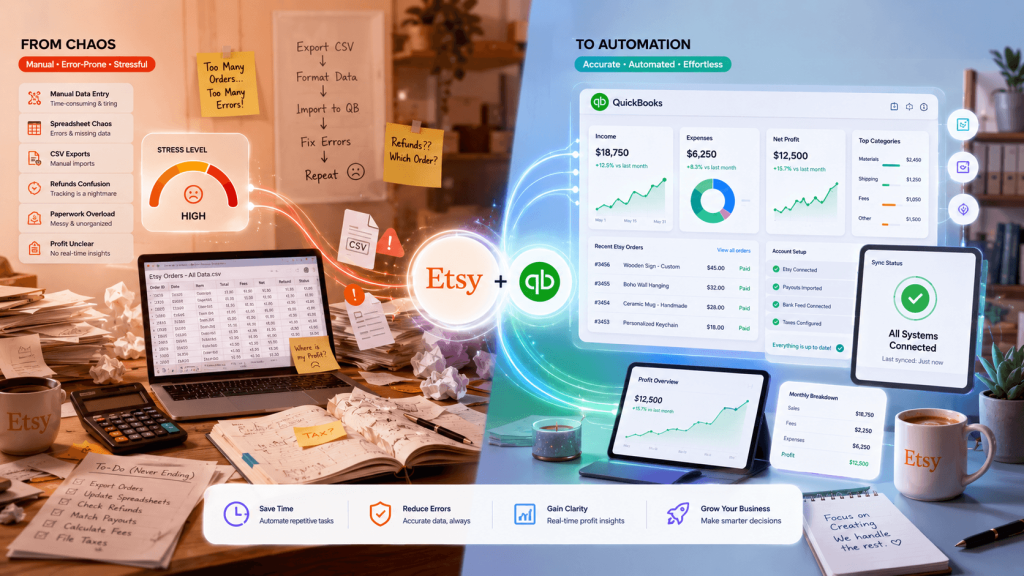
Syncing Etsy to QuickBooks is one of the best operational moves you can make as a craft seller. It frees up real hours. It cuts mistakes. And it makes your books match reality. Let me walk you through the biggest reasons sellers do it.
Manage Etsy Orders Without Dashboard Switching
Etsy orders become harder to manage when order details stay outside QuickBooks. You have buyer names, shipping charges, taxes, discounts, payment status, and product line items sitting in Etsy, while your accounting happens somewhere else. That creates double work.
When you sync Etsy with QuickBooks through QuickSync, orders sync into QuickBooks with the right details. Your sales records stay cleaner, and you don’t have to rebuild every order manually.
Save Hours Every Single Week
Manual bookkeeping kills your weekend. Most Etsy sellers spend two to five hours a week downloading CSVs, sorting deposits, and matching refunds. A QuickBooks small business survey found that small business owners spend over 120 hours a year on bookkeeping tasks.
Eliminate Costly Reconciliation Mistakes
Reconciling Etsy deposits to QuickBooks by hand is where most sellers make mistakes. Etsy lumps fees, taxes, and refunds into one payout. If you treat that as revenue, your numbers will be off by hundreds of dollars every month.
Manual bookkeeping is error-prone. Automated Etsy to QuickBooks sync removes that risk. Every line is mapped correctly the first time, every time.
Get Real Profit Numbers, Not Guesses
Without sync, your QuickBooks just shows lump deposits. You can’t see which Etsy listings are profitable. With proper SKU-linked sync, every sale ties back to your QuickBooks inventory items.
That means real Cost of Goods Sold tracking. You finally see which handmade items make money and which ones cost you to ship. Per-product profitability becomes a number, not a feeling.
Prevent Overselling and Inventory Drift
When your Etsy stock and QuickBooks inventory drift apart, you start overselling. A customer buys an item on Etsy that you sold last week at a craft fair. Now you’ve got an unhappy buyer and a 1-star review.
Syncing inventory between Etsy and QuickBooks keeps your quantity available accurate in both places. Sales reduce stock on both ends as soon as we see them — Etsy orders within about five minutes. That’s how you prevent overselling.
What Etsy and QuickBooks Sync Tool Actually Includes
A proper Etsy to QuickBooks sync pushes a lot more than just sales totals. It moves orders, fees, taxes, refunds, inventory, listings, and customer notes between both platforms. The trick is mapping each piece of Etsy data to the right QuickBooks field. That’s where most basic tools fall short.
Let me break down what a real-team inventory sync software like QuickSync.pro actually covers.
Order Sync
A good sync tool turns Etsy orders into the right QuickBooks transaction. Paid Etsy orders should become Sales Receipts. Unpaid or partially paid orders may need Invoices. Refunded orders should create Refund Receipts. This makes multichannel order management easier.
Inventory Sync
When an Etsy buyer purchases your candle, the quantity drops in your Etsy shop and in QuickBooks at the same time. Restocking in QuickBooks pushes new quantities back to Etsy. This is continuous sync rather than a nightly batch; an Etsy sale reaches QuickBooks within about five minutes, because Etsy has to be polled.
Product and Listing Sync
Product titles, descriptions, prices, images, and variants flow between Etsy listings and QuickBooks items. Update once in your Master Store, and the change pushes everywhere. QuickSync.pro preserves Etsy’s required handmade metadata like who_made and when_made fields. That’s something most sync tools simply lose.
Fees, Taxes, and Charges
A proper sync tool separates Etsy fees, taxes, VAT, shipping, gift wrap, and other charges inside QuickBooks. These details should not be grouped into one unclear deposit. Clean mapping helps sellers understand revenue, expenses, tax liability, and real profit.
Refund Sync
Refunds need proper accounting treatment. If refunds enter QuickBooks as vague negative adjustments, reconciliation becomes harder. A sync tool should creates the right refund record and connect it to the correct order, making refund reporting cleaner and easier to review.
Discount and Coupon Sync
Etsy supports buyer coupons and shop coupons. These discounts should be handled correctly inside QuickBooks. If discounts are ignored or mapped poorly, revenue can look higher than reality. A proper integration maps discounts to the correct QuickBooks discount account.
Different Methods to Sync Etsy to QuickBooks
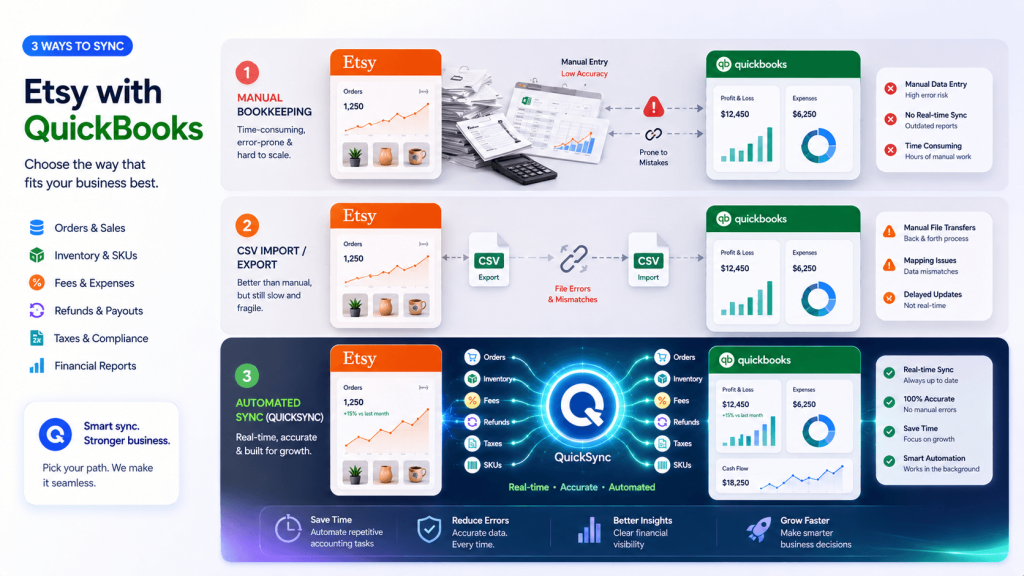
There’s more than one way to move data from Etsy to QuickBooks. Some methods are simple but limited. Some work for very small shops only. Others are built for stronger accounting automation.
Let me explain each option.
Method 1: Manual Data Entry
This is the way most Etsy sellers start. You open your Etsy shop manager, download a CSV, then type each order into QuickBooks line by line. It works for the first ten orders. After that, it breaks down fast.
Here’s why manual entry is a bad long-term plan:
- It takes 2 to 5 minutes per Etsy order to enter properly.
- Tax, fees, and shipping all need separate line items in QuickBooks.
- Refunds get missed or entered as negative invoices instead of Refund Receipts.
- Sales tax collected by Etsy often ends up booked as revenue.
- Inventory doesn’t update in QuickBooks automatically with each entry.
- Personalization notes and gift messages get dropped from records.
- One typo means hours of reconciliation work at month-end.
- It does not scale past 20 to 30 Etsy orders per month.
Manual entry is fine if you sell one or two items a week. Anything more, and you’ll burn out.
Method 2: CSV Import and Export
The next method is downloading Etsy CSVs and importing them into QuickBooks. Etsy gives you order, sales, and statement CSVs from the shop manager. QuickBooks Online lets you import sales receipts in bulk. Sounds clean, right? It isn’t.
Here’s what breaks with CSV imports:
- Etsy CSVs do not map directly to QuickBooks line items.
- Fees, VAT, and gift wrap come bundled into one column.
- You must manually split each row into multiple accounts.
- Refunds need a separate workflow that CSV imports don’t support.
- Inventory items in QuickBooks won’t auto-link to Etsy SKUs.
- You still need to reconcile Etsy payouts to deposits manually.
- CSV imports run on your schedule, not in real time.
- New orders sit unbooked between import sessions.
CSV imports cut some time but they’re still error-prone. And they’re slow.
Method 3: Native Built-In Tools
Some sellers ask if QuickBooks or Etsy has a built-in sync option. The short answer is no. QuickBooks Online does not have a native Etsy connector. Etsy does not have a built-in QuickBooks button. There’s no official direct connection between the two platforms.
Here’s why the “native” path doesn’t actually exist:
- Etsy’s API requires a developer or middleware to connect to QuickBooks.
- QuickBooks Online lists Etsy apps in its marketplace, but all are third-party.
- The free apps usually push only sales totals, not detailed line items.
- Tax handling in basic free connectors is often wrong.
- They rarely support refunds or partial payments correctly.
- They don’t preserve Etsy’s handmade metadata or personalization data.
- Most free apps batch sync once a day, not in real time.
- Support is limited to email, with slow response times.
The “native” option is really just choosing between weak third-party apps.
Method 4: QuickSync (Recommended Etsy QuickBooks Integration Tool)
This is what I would suggest any serious Etsy seller. QuickSync is built specifically for sellers running Etsy alongside QuickBooks Online. It’s a continuous sync platform that connects both accounts in minutes and keeps every piece of data flowing automatically.
No CSVs. No copy-paste. No guessing which document type a refund needs.
What makes QuickSync different is the depth of the Etsy-specific handling. Other tools push generic order totals into QuickBooks and call it a day. QuickSync handles Etsy’s quirks: the handmade metadata, the gift wrap line, the buyer versus shop coupons, the personalization fields, the auto-renewal of listings.
Here’s exactly what QuickSync brings to your Etsy QuickBooks setup:
- Smart Document Type: QuickSync checks every Etsy order’s payment status. Paid orders become Sales Receipts. Partial payments become Invoices. Refunds become Refund Receipts. No guesswork.
- Continuous Sync: Every Etsy sale, refund, or stock change pushes to QuickBooks within about five minutes — Etsy does not notify us, so we check it on a timer. Not batch updates. Not imports. Your books match Etsy continuously.
- SKU-Linked Line Items: Etsy sales sync to QuickBooks inventory items by SKU. That means real COGS tracking, real per-product profit reports, and accurate stock movements every time.
- Handmade Metadata Preserved: Etsy requires who_made and when_made fields on every listing. QuickSync preserves these as shop-level defaults so they survive every sync cycle. Compliance stays intact.
- Etsy Charges Mapped Correctly: VAT, gift wrap, shipping, and coupons each posted as separate QuickBooks line items. Each lands in the right income or liability account, not lumped together.
- Personalization Carried Through: Buyer personalization notes, gift wrap selections, and custom requests all flow into QuickBooks order notes. Your fulfillment team sees the full context.
- Auto-Renewal Handling: When stock runs out, your Etsy listing deactivates. When you restock in QuickBooks, the listing reactivates. The 20-cent renewal fee is managed automatically.
- Discount Account Integration: Etsy buyer coupons and shop coupons hit different QuickBooks discount accounts. That keeps your revenue clean and your tax filing accurate.
- Connect Multiple Channels: QuickSync also supports multichannel integration, helping you easily expand to additional channels. With QuickSync, you can connect eBay to QuickBooks and sync Shopify, eBay, and Amazon. You can also connect Shopify and QuickBooks and other channels.
This is what a proper Etsy QuickBooks sync should look like. Anything less leaves you cleaning up data at month-end.
How to Sync Etsy With QuickBooks Using QuickSync
QuickSync is one of the best methods to sync Etsy with QuickBooks because it is built around accounting accuracy. It does more than move orders. It helps sellers create cleaner QuickBooks records with proper document selection, SKU mapping, fee tracking, refund handling, and Etsy-specific data preservation.
Compared with manual entry, CSV files, and basic connectors, QuickSync gives Etsy sellers a more complete accounting workflow. It helps save time, reduce errors, improve reconciliation, preserve personalization details, and keep your Etsy sales useful inside QuickBooks.
Here’s how you can connect Etsy to QuickBooks.
Step 1: Create Your QuickSync Account
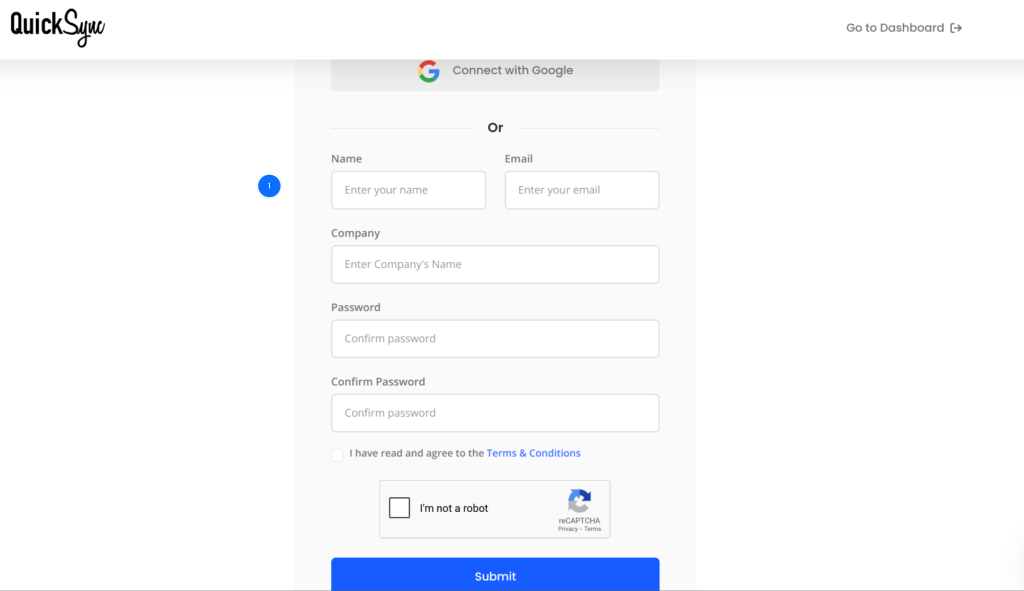
- Go to quicksync.pro and sign up with your email and business details.
- If you already have an account, log in and open the dashboard.
- This is where you manage connected platforms, sync settings, inventory rules, product sync, accounting workflows, customer records, and order flows.
Step 2: Connect Your Etsy Account
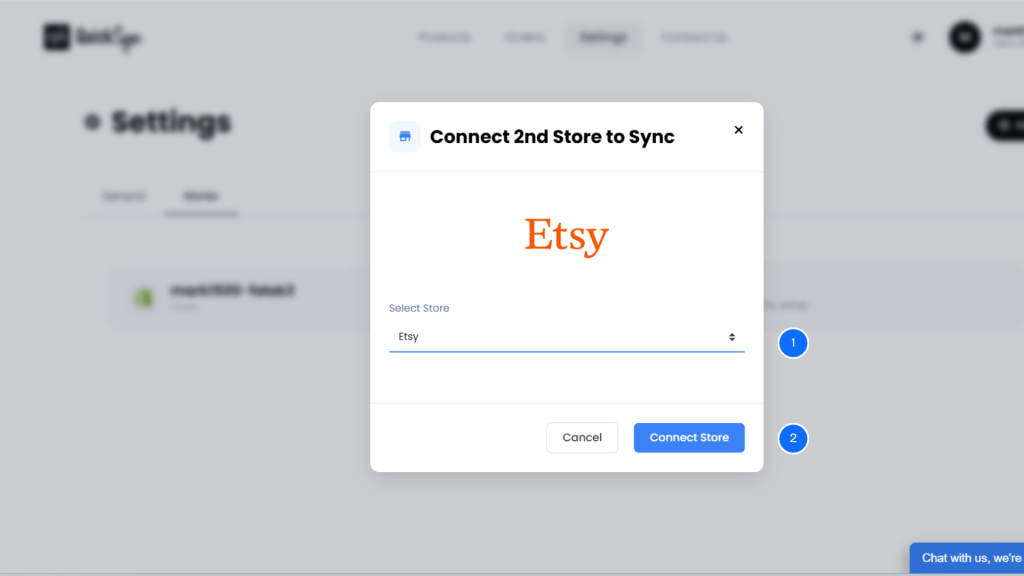
- Go to Dashboard → Sync Products → Add Store.
- Select Etsy from the list of available platforms.
- Log in to your Etsy account and authorize QuickSync to access your Etsy shop.
- This allows QuickSync to read Etsy listings, orders, inventory data, product details, customer information, fees, discounts, and refund-related data.
- QuickSync imports your existing Etsy data and prepares it for mapping.
Step 3: Connect Your QuickBooks Account
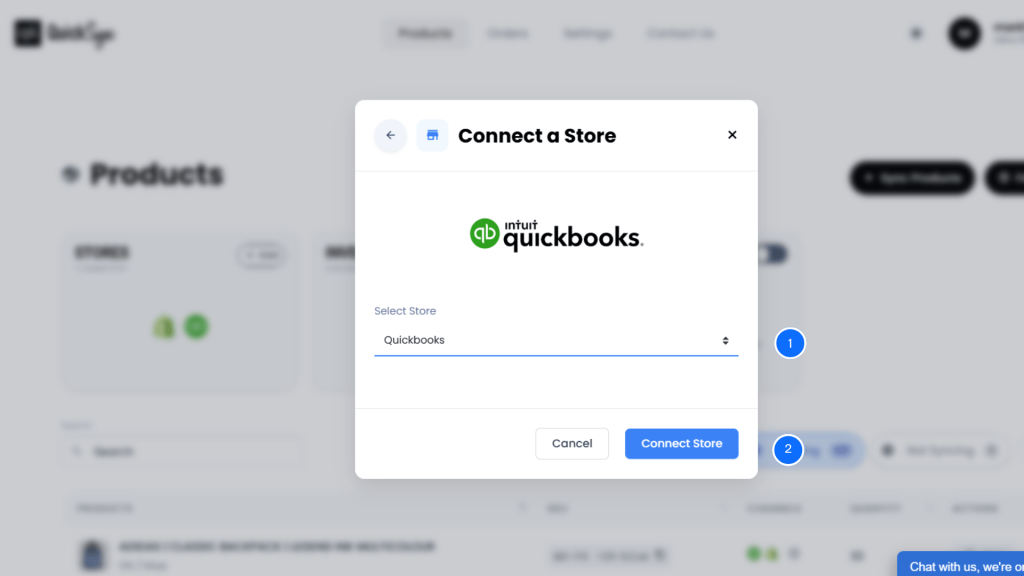
- From the QuickSync dashboard, select QuickBooks as your accounting platform.
- Log in to your QuickBooks Online account.
- Approve the permissions required for customers, products, orders, sales receipts, invoices, refunds, payments, and accounting data.
- Once connected, QuickSync can send Etsy sales and accounting details into QuickBooks in a structured format.
Step 4: Configure Product, Order, Inventory, and Accounting Sync
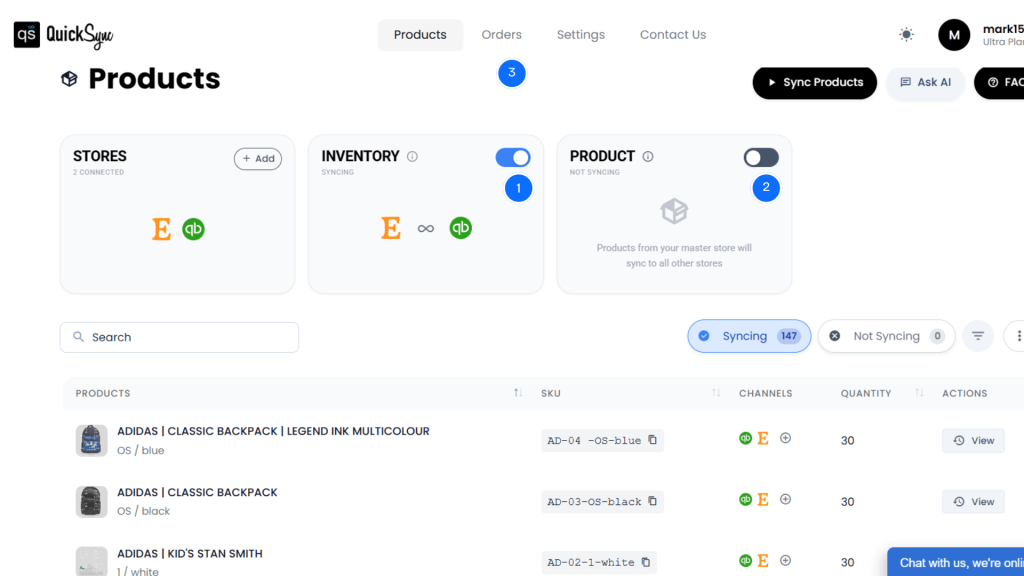
Once Etsy and QuickBooks are connected, configure how the sync should work.
- Inventory Sync: Etsy stock and QuickBooks inventory can stay aligned where inventory tracking is required. This helps reduce overselling and improves product-level visibility.
- Product Sync: Etsy products can map to QuickBooks items through SKUs. This keeps line items connected to real products instead of generic sales categories.
- Order Sync: Etsy orders can move into QuickBooks with customer details, line items, shipping, taxes, fees, discounts, payment status, and order totals. This helps reduce manual order entry.
After setup, QuickSync keeps Etsy and QuickBooks connected automatically.
Etsy QuickBooks Sync Problems Sellers Face and How QuickSync Fixes Them
Even with a sync tool, Etsy sellers run into the same handful of issues over and over. Most of them come down to how Etsy structures its data versus how QuickBooks expects to receive it.
Let me walk you through the six most common problems and how QuickSync fixes each one without you having to think about it.
Problem 1: Wrong Document Type for Etsy Orders
Most sync tools dump every Etsy order into QuickBooks as the same document type, usually a generic invoice. That breaks your books fast. A paid Etsy order should be a Sales Receipt. A refunded order needs a Refund Receipt. A partial payment needs an Invoice plus a Payment.
Fix: QuickSync reads each Etsy order’s payment status and picks the right QuickBooks document automatically. Paid means Sales Receipt. Partial means Invoice. Refund means Refund Receipt. You never guess again.
Problem 2: Fees and Taxes Bundled Into Revenue
Etsy lumps fees, VAT, shipping, and tax into payouts. Basic sync tools just push the gross total to QuickBooks. Now your revenue is inflated. Your tax liability is missing. Your accountant is upset.
Fix: QuickSync splits every Etsy charge into a separate QuickBooks line item. VAT goes to the tax liability account. Etsy fees post to your expense account. Shipping and gift wrap each get their own income lines. Your books stay clean.
Problem 3: Refunds Booked Incorrectly
Refunds are where most Etsy QuickBooks integrations fall apart. They show up as negative invoices, credit memos, or worse, they don’t show up at all. That kills your tax reports and creates ghost revenue.
Fix: QuickSync creates a proper QuickBooks Refund Receipt for every refunded Etsy order. Partial refunds split into their own line items. Inventory reverses automatically.
Problem 4: Inventory Drift Between Platforms
Without real-time sync, your Etsy quantity available and your QuickBooks stock drift apart. You sell a candle at a craft fair, forget to update Etsy, and a buyer orders it online. Now you’re refunding and apologizing.
Fix: QuickSync runs inventory sync across Etsy and QuickBooks. Every sale, refund, or stock adjustment updates both platforms automatically, within about five minutes when the trigger is an Etsy sale. Safety stock covers that window on fast movers.
Problem 5: Lost Handmade Metadata and Personalization
Etsy requires who_made, when_made, and other handmade metadata on every listing. Other sync tools either don’t store this data or overwrite it when QuickBooks pushes back. Suddenly your listings fail Etsy compliance and get suppressed.
Fix: QuickSync preserves Etsy’s required handmade metadata as shop-level defaults that survive every bidirectional sync. Personalization notes and gift wrap data also carry through to QuickBooks order notes. Nothing gets lost.
Problem 6: Coupons Hitting the Wrong Account
Etsy uses two kinds of coupons: buyer coupons and shop coupons. They behave differently for tax purposes. Most sync tools lump them into one discount line, which throws off your revenue and tax filing.
Fix: QuickSync maps Etsy buyer coupons and shop coupons to separate QuickBooks discount accounts. That keeps your revenue numbers honest and your tax filing accurate at year-end.
These are the small details most sellers don’t notice until something breaks. QuickSync handles them all before they become your problem.
Why Sellers Choose QuickSync for Etsy QuickBooks Integration
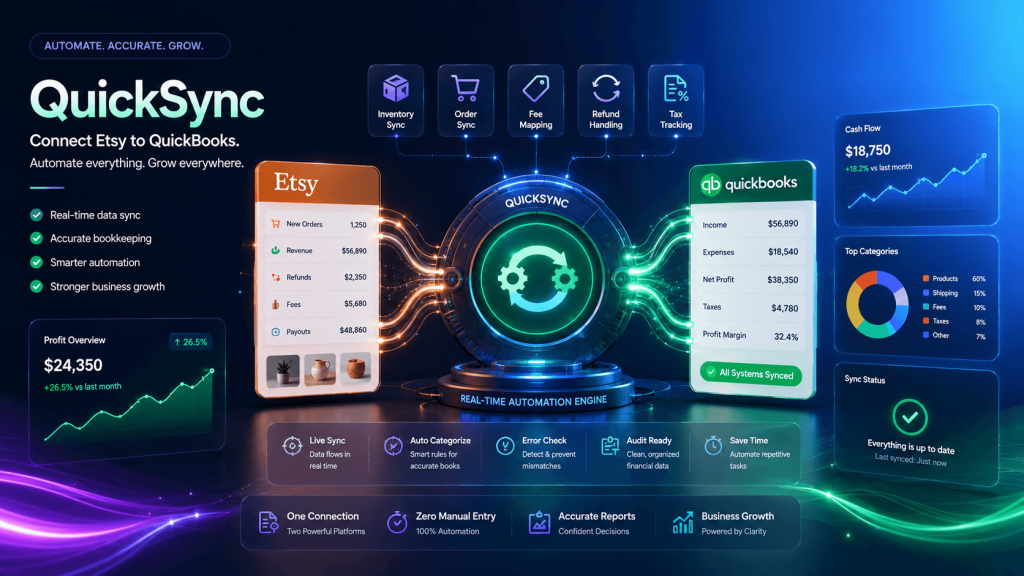
There are a few Etsy QuickBooks tools on the market, but most are built for either Shopify or Amazon and treat Etsy like an side store. QuickSync is different. It’s built with Etsy’s quirks in mind, and it’s priced for craft sellers who care about their margins. Here’s what makes sellers stick with it.
Here’s why sellers choose QuickSync.
Easy to Use
QuickSync is designed for sellers, not developers. You can connect Etsy and QuickBooks and start automating accounting. This helps shop owners move faster without building a technical workflow from scratch.
Smart Document Logic
QuickSync can choose the right QuickBooks document based on Etsy order status. This helps sellers avoid guessing between Sales Receipts, Invoices, and Refund Receipts. Better document logic creates cleaner books and fewer accountant headaches.
SKU-Based Accuracy
QuickSync links Etsy orders to QuickBooks products using SKUs. This helps sellers track inventory, product-level revenue, COGS, and profitability more accurately. It also prevents Etsy sales from becoming vague, unhelpful revenue totals.
Etsy-Specific Details
Etsy is not just another marketplace. QuickSync helps preserve handmade metadata, gift data, personalization notes, buyer messages, VAT, coupons, and order-specific details. This matters for sellers who handle custom, handmade, or personalized products.
Selective Product Sync
Not every Etsy product needs to sync into QuickBooks immediately. Some listings may be seasonal, inactive, low-margin, experimental, or not ready for accounting sync yet. QuickSync gives sellers selective product sync, so they can choose exactly which Etsy products should connect with QuickBooks.
Built for Large Etsy Catalogs
Whether you’ve got 50 listings or 10,000, QuickSync scales with your shop. The Lite plan handles up to 1,000 items at $19 a month. The Pro plan goes up to 2,500 items. The Ultra plan supports up to 10,000 items with complete setup and priority sync. You won’t outgrow it as your catalog expands.
Free Trial Option
QuickSync offers a 14-day free trial, so sellers can test the workflow before committing. You can review how Etsy data moves into QuickBooks and decide whether the integration fits your accounting process.
Conclusion
Syncing Etsy with QuickBooks is not just about moving orders. It is about creating cleaner books, faster reconciliation, better product tracking, and less manual accounting work.
Etsy sellers deal with sales, fees, taxes, refunds, coupons, gift wrap, personalization, and payouts. If those details are recorded poorly, QuickBooks becomes harder to trust.
QuickSync gives sellers a better way to connect Etsy to QuickBooks. It syncs Etsy orders, products, inventory, fees, taxes, refunds, discounts, and customer details with accounting accuracy in mind.
If you want fewer bookkeeping errors, cleaner reports, and less manual entry, QuickSync is built for that.