



Connect Shopify and WooCommerce. Sync Everything, Automatically

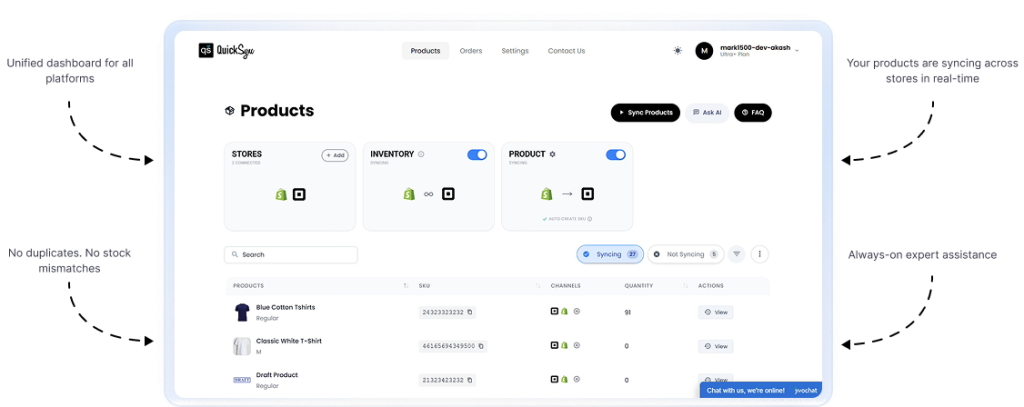
Connect your Shopify store and WooCommerce with QuickSync and manage everything from one place. Product catalogs stay consistent, inventory syncs in real time, and orders flow in both directions automatically across all the platforms.

No manual imports. No stock mismatches. No double the work.

4.9/5 Merchant Rating | 10,000+ Stores Synced | Real-Time Webhook Sync | 50,000 SKU Capacity

24K+
Active Stores Using QuickSync
Avg. Increase in Sales After Integration

Your TikTok best-seller is out of stock on Shopify. Auto-sync inventory now to avoid missed sales.

Cost savings

Cost savings

Cost savings

Cost savings

Running Shopify and WooCommerce Shouldn’t Mean Managing Everything Twice

Without a proper Shopify WooCommerce integration, two platforms mean two catalogs, two inventory counts, and two order dashboards. As your store grows, the manual work grows with it, and growth stalls because your team is maintaining data instead of driving sales.

Running Shopify and WooCommerce Shouldn’t Mean Managing Everything Twice

Without a proper Shopify WooCommerce integration, two platforms mean two catalogs, two inventory counts, and two order dashboards. As your store grows, the manual work grows with it, and growth stalls because your team is maintaining data instead of driving sales.

Shopify products not mapping to WooCommerce’s native product types

Inventory changes on one platform not reflecting on the other

Product variable breaking because variations don’t sync correctly

WooCommerce orders never appearing in Shopify for centralized management

HTML content removed, breaking WooCommerce product descriptions

Compare-at prices not converting to WooCommerce sale prices

Global attributes missing, breaking layered navigation and filtering

Self-hosted installs with custom domains breaking most integration tools

What Gets Synced Between Shopify and WooCommerce Stores

Managing two platforms should not feel like managing two businesses. QuickSync’s WooCommerce Shopify integration connects both stores, so product data, orders, and inventory sync automatically without manual intervention. QuickSync removes the operational complexity of integrating Shopify and WooCommerce.

Real-Time Inventory Sync

With QuickSync, your inventory levels stay accurate across every product and every variant on both platforms automatically. No manual checks, no numbers falling out of sync. Per-variation quantities stay right across your entire catalog without extra effort. Want to control what buyers see? Inventory spoofing lets you show custom stock levels on WooCommerce without revealing real Shopify numbers.

Product Data Sync Rightly

With QuickSync, your full Shopify catalog syncs to WooCommerce exactly the way WooCommerce expects it. Simple products as Simple, Variable as Variable, with proper variations intact. With QuickSync, rich HTML product descriptions sync to WooCommerce without losing formatting. Shopify compare-at prices are automatically converted into WooCommerce sale prices with QuickSync.

Centralized Order Management

QuickSync brings every order from both platforms into one centralized workflow automatically. WooCommerce orders sync in the Shopify dashboard in real time via webhooks, and POS orders are auto-detected and tagged instantly without any setup. Shopify orders export to WooCommerce as completed paid transactions with full line items, customer data, and payment mapping included.

Fulfillment on Your Terms

QuickSync adapts to the fulfillment workflow you already use. So there’s no need to change how your team processes orders. When an order ships, QuickSync automatically syncs the carrier and tracking number to the WooCommerce Shipment Tracking plugin. You can choose Shopify or WooCommerce as your fulfillment hub and keep orders, shipment details, and fulfillment updates synced.

Built for Self-Hosted Stores

Self-hosted WooCommerce comes with challenges that most integration tools weren’t built for. QuickSync handles custom domains, follows domain migrations, and keeps syncing when security plugins block API requests, retrying with alternative user agents without any whitelist setup. Plugins injecting junk before REST responses? Stripped and parsed cleanly. Your sync runs through all of it.

Advanced QuickSync Features That Power the Integration

QuickSync’s Shopify WooCommerce integration handles the technical complexity of keeping two full ecommerce platforms perfectly aligned. These are the capabilities running behind every sync.

Native Product Mapping

Simple and Variable products sync on WooCommerce correctly.

Full HTML Descriptions

Rich content and formatting transfer perfectly between both platforms.

Sale Price Mapping

Compare-at becomes regular price. Strikethrough works automatically.

Global Attributes

Color, Size, Material sync as reusable, filterable WooCommerce attributes.

Bi-Directional Orders

WooCommerce orders in Shopify. Shopify orders in WooCommerce.

Plugin-Aware Fulfillment

Works with Shipment Tracking. Degrades gracefully without it.

Per-Variation Inventory

Individual stock counts per variant. Always managed. Always accurate.

Self-Hosted Ready

Custom domains, domain migrations, security blocks, all handled.

Batch Processing

100 variations per call. Creates, updates, and deletes in one request.

Data Mapping

Ensures all product fields and customer data sync correctly between platforms.

Real-Time Sales Sync:

QuickSync moves TikTok sales into QuickBooks with order, buyer, payment, and product details included.

Order Sync With Details:

TikTok Shop orders sync with shipping, discounts, taxes, refunds, and customer information. 

Smart Document Logic:

QuickSync sends sales, invoices, and refunds through the right accounting flow. 

Customer Sync:

TikTok customer details can move into QuickBooks with cleaner profiles and fewer duplicates.

Payout Reconciliation:

Sales, fees, refunds, taxes, and deposits stay easier to match inside QuickBooks.

Fee Mapping:

Platform fees, commissions, and selling costs stay visible as separate accounting details.

Tax Line Sync:

QuickSync moves Sales tax details into QuickBooks without being mixed into revenue totals.

Refund Sync:

QuickSync keeps TikTok refunds connected to revenue, payouts, and original orders. 

Product Mapping:

TikTok products link to QuickBooks online items using product details and SKU matching.

Inventory Sync:

QuickBooks inventory and TikTok Shop sales data stay easier to keep accurate with QuickSync

Customer Sync:

TikTok customer details can move into QuickBooks with cleaner profiles and fewer duplicates.

Payout Reconciliation:

Sales, fees, refunds, taxes, and deposits stay easier to match inside QuickBooks.

How to Get Started With QuickSync Shopify WooCommerce Integration

Integrating WooCommerce and Shopify with QuickSync takes just a few simple steps:

Step 01

Sign up on QuickSync

Step 02

Connect your Shopify store

Step 03

Connect your WooCommerce store

Step 04

Choose what to sync – inventory, products, and orders syncing

Why QuickSync Is the Best Shopify WooCommerce Integration Tool

Most Shopify WooCommerce integration tools treat WooCommerce like a basic REST endpoint. They push product data in and ignore how WooCommerce actually works, its product types, attribute taxonomy, pricing logic, and the self-hosted realities no generic SaaS tool handles. QuickSync is engineered for all of it.

Inventory Sync: Stock levels sync automatically, keeping inventory accurate and preventing overselling.

Product Sync: Titles, images, and descriptions sync automatically, ensuring WooCommerce listings match Shopify structure.

Order Sync: Orders flow between Shopify and WooCommerce with line items, customer details, and status updates kept aligned.

Native Type Mapping: Products land as Simple or Variable, proper WooCommerce, not generic post types.

Global Attribute Taxonomy: Attributes sync as reusable WooCommerce globals that power filtered navigation.

Correct Sale Price Logic: Compare-at becomes regular price. Strikethrough works without any configuration.

Resilient Response Parsing: Plugin output injected before REST responses? Stripped and parsed cleanly.

Security Plugin Fallback: API blocked? QuickSync retries with an alternative user agent automatically.

Duplicate SKU Recovery: Errors detected, corrected, and retried automatically. No manual fix needed.

Auth Failure Alerts: Authentication breaks send an immediate re-authorization email, never fails silently.

Expand Beyond One Channel Without Adding More Work

Your customers shop across multiple platforms. Managing each one separately only adds complexity. QuickSync integrates Shopify store with multiple channels, so you can control products, inventory, and orders from one centralized dashboard. You can have the following integration with Shopify using QuickSync:

Shopify to Clover

Shopify to QuickBooks

Shopify to Etsy

Shopify to Amazon

Shopify to eBay

Shopify to Square

Shopify to TikTok Shop

WooCommerce to Amazon

WooCommerce to eBay

WooCommerce to Square

WoocCommerce to Etsy

WooCommerce to QuickBooks

WooCommerce to Clover

Real Experiences of Shopify WooCommerce Sellers

“We have a pretty large catalog and sell across multiple eBay regions, so things can get complicated. Most tools struggled with that, but QuickSync handled it better than we expected.”

Michael T., Multi-Channel Retailer
rating

“Keeping up with eBay’s rules was always a bit overwhelming. There’s always something changing. QuickSync seems to handle all of that in the background, which has been a big relief for our team.”

Olivia P., Home & Garden Brand Owner
rating

“Inventory used to be all over the place for us. We’d sell something on eBay that was already out of stock on Shopify. Since switching, everything updates instantly, and we haven’t had those issues again.”

Sarah L., Fashion Retail Brand
rating

“We have a pretty large catalog and sell across multiple eBay regions, so things can get complicated. Most tools struggled with that, but QuickSync handled it better than we expected.”

Michael T., Multi-Channel Retailer
rating

“Keeping up with eBay’s rules was always a bit overwhelming. There’s always something changing. QuickSync seems to handle all of that in the background, which has been a big relief for our team.”

Olivia P., Home & Garden Brand Owner
rating

“Inventory used to be all over the place for us. We’d sell something on eBay that was already out of stock on Shopify. Since switching, everything updates instantly, and we haven’t had those issues again.”

Sarah L., Fashion Retail Brand
rating

“Before QuickSync, getting listings live on eBay was frustrating. Something would always get rejected, usually because of missing details or wrong categories. Now it just goes through on the first try. We don’t really think about it anymore.”

Jason M., D2C Brand Owner
rating

“Managing eBay separately was honestly eating up a lot of our time. Updating products, fixing listings, and checking orders added up fast. QuickSync took all of that off our plate.”

Daniel R., Electronics Seller
rating

“Now all our eBay orders just show up in Shopify like everything else. Tracking gets updated automatically, too. It’s made our workflow and order management a lot cleaner and easier to manage.”

Emma J., E-commerce Manager
rating

“Before QuickSync, getting listings live on eBay was frustrating. Something would always get rejected, usually because of missing details or wrong categories. Now it just goes through on the first try. We don’t really think about it anymore.”

Jason M., D2C Brand Owner
rating

“Managing eBay separately was honestly eating up a lot of our time. Updating products, fixing listings, and checking orders added up fast. QuickSync took all of that off our plate.”

Daniel R., Electronics Seller
rating

“Now all our eBay orders just show up in Shopify like everything else. Tracking gets updated automatically, too. It’s made our workflow and order management a lot cleaner and easier to manage.”

Emma J., E-commerce Manager
rating

FAQ

Have questions? We have answers. Can’t find what you’re looking for?

Can Shopify integrate with WooCommerce?

Yes, but you need a dedicated tool like QuickSync to integrate Shopify with WooCommerce. There is no built-in feature that connects Shopify with WooCommerce. That’s why merchants trust QuickSync for integration. QuickSync automatically syncs products, inventory, and orders across both platforms without any manual entry required.

To connect a Shopify store to WooCommerce, you need a third-party app like QuickSync. You can visit quicksync.pro and sign up to connect your Shopify account and WooCommerce store, and enable sync. QuickSync maps your products and keeps both stores updated in real time automatically from day one of setup.

Yes, but you need a tool like QuickSync to make it happen. There is no built-in sync between Shopify and WooCommerce. QuickSync imports your full Shopify catalog to WooCommerce natively. Simple and Variable products map correctly, with proper variations, global attributes, and sale prices configured automatically.

Yes, but only with a dedicated integration like QuickSync. Shopify and WooCommerce have no native inventory sync. QuickSync updates stock levels across both platforms instantly after every sale. Per-variation quantities stay accurate, and stock tracking is automatically active on every synced WooCommerce product.

Yes, with the QuickSync order sync feature, your WooCommerce order lands in the Shopify admin. Choose Shopify as the fulfillment store while configuring. QuickSync syncs every WooCommerce order into Shopify in real time via webhooks. Customer details, shipping costs, order status, and POS order tags all transfer automatically the moment an order is placed.

Yes, QuickSync is built specifically to handle self-hosted complexity. QuickSync connects to any WooCommerce store on any custom domain. It follows domain migrations automatically. QuickSync can handles security plugin blocks without whitelist setup. It keeps syncing without requiring any manual re-setup at any point.

QuickSync maps everything automatically, so nothing needs to be set up manually. Shopify product types become WooCommerce categories automatically. Global attributes like Color, Size, and Material sync as reusable, filterable WooCommerce attributes, powering your store’s layered navigation and filtering system from the first sync.

Yes. QuickSync integrates natively with the WooCommerce Shipment Tracking plugin. Tracking provider and number push the moment an order ships automatically. And the order marks are completed instantly. No plugin installed? Fulfillment still syncs correctly; you are never locked into a specific setup.

QuickSync handles it automatically without any action needed from your side. If a security plugin blocks the API request, QuickSync detects it and retries using an alternative user agent. No whitelist configuration is required. Your Shopify WooCommerce sync keeps running without interruption or manual intervention.

Yes, QuickSync enables you to easily import products from your Shopify store to WooCommerce with full support for Shopify collection mapping, importing products, and creating products automatically. The integration handles individual products as well as variable products, preserving all essential details like descriptions, pricing, and shipping details.

Stop losing sales to inventory conflicts

Join thousands of merchants who’ve automated their multichannel operations with QuickSync.

Get started now

Enter your email and we’ll set up your account in minutes.

Free for 14 days. No credit card needed.