Free Google Sheets inventory templates: six sheets with the formulas already in
Six templates, no sign-up and no email. Each one keeps stock the way a sync tool does: one row per SKU, every movement on its own line, and a status that turns amber at the reorder point. The multichannel sheet goes one further and flags the moment two sales channels disagree.
No sign-up · no email · a copy in your Drive or the .xlsx, August 2026
Six files, one per job
Each is built the same way: grey cells are formulas, everything else is yours to type over, and the rows are pre-formatted 200 deep.
| Template | Best for | Sheets inside | Get it |
|---|---|---|---|
| Multichannel stock sheet | Selling the same items on two or more of Shopify, Etsy, eBay, Amazon and Square | Dashboard, Inventory, Movements, Reorder, Lists | Sheets copy → · .xlsx ↓ |
| Simple inventory list | A first count, a market stall, or anything under 100 items | Inventory, Lists | Sheets copy → · .xlsx ↓ |
| Inventory control with reorder points | One shop that reorders from suppliers and wants the purchase list written for it | Dashboard, Inventory, Movements, Reorder, Lists | Sheets copy → · .xlsx ↓ |
| Stock in / out log | Anyone who has been burned by overwriting a count and wants an audit trail | Inventory, Movements, Lists | Sheets copy → · .xlsx ↓ |
| Multi-location inventory | A shop floor, a back room and a warehouse that share one catalogue | Inventory, Transfers, Lists | Sheets copy → · .xlsx ↓ |
| Inventory value and COGS | Month-end: what the stock is worth, what it cost to sell, and the margin by SKU | Summary, Inventory, Sales, Purchases, Lists | Sheets copy → · .xlsx ↓ |
Multichannel stock sheet
Selling the same items on two or more of Shopify, Etsy, eBay, Amazon and Square.
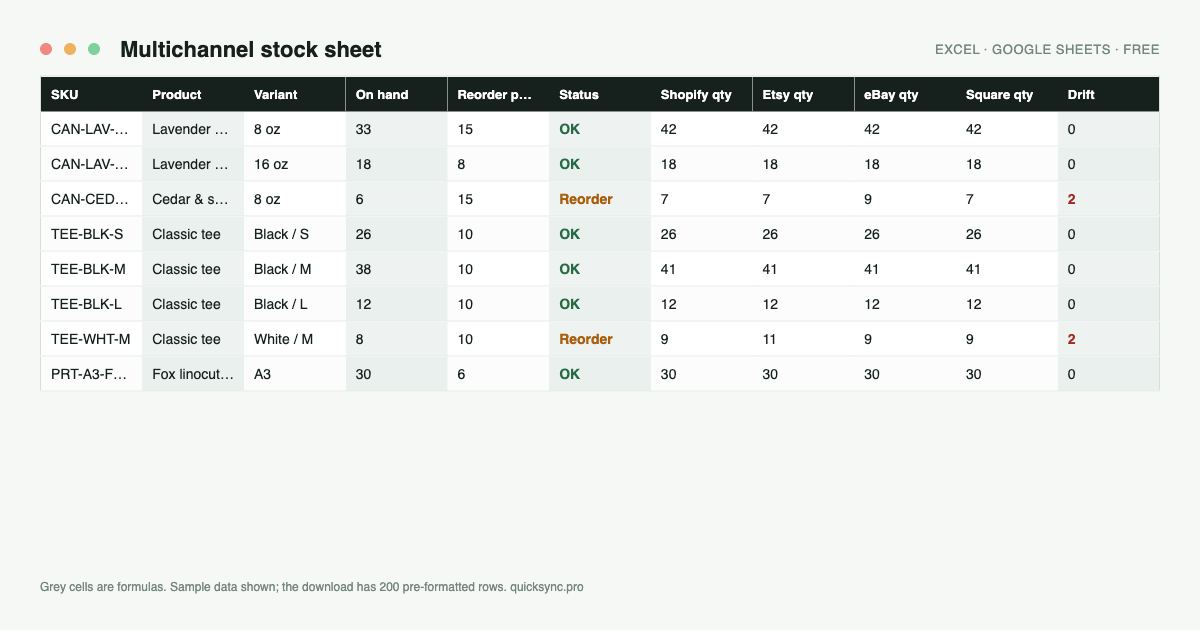
One row per SKU with a column for what each channel currently shows. On hand is the opening count plus every movement you log, so you never overwrite a number. Drift is the gap between the highest and lowest channel count, and it turns red the moment that gap is not zero.
Sheets inside
Dashboard, Inventory, Movements, Reorder, Lists
Columns
SKU, product, variant, cost, price, opening count, on hand, reserved, available, reorder point, status, stock value, days of cover, a quantity per channel, drift
The formulas doing the work
SUMIFS for on hand, a nested IF for status, MAX−MIN for drift, SUMIFS over a 30-day window for days of cover, COUNTIF for the dashboard
Simple inventory list
A first count, a market stall, or anything under 100 items.
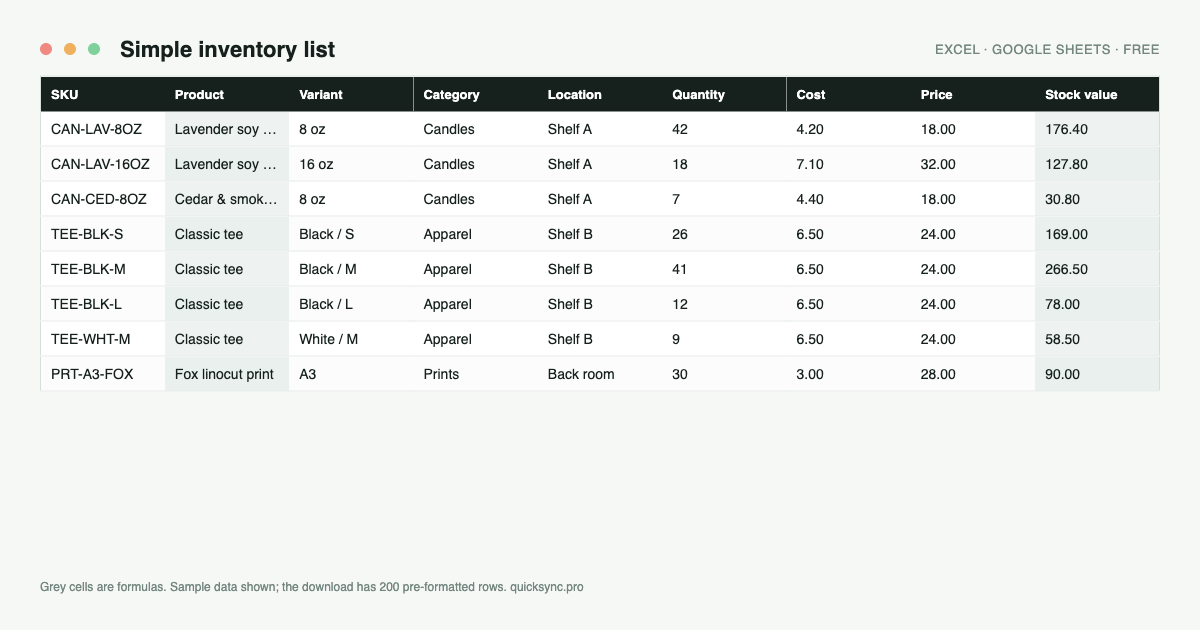
Thirteen columns and a totals row. Type what you counted and the value columns and totals follow. Category, supplier and location are dropdowns, so the filter arrows on the header row give you a count by any of them.
Sheets inside
Inventory, Lists
Columns
SKU, product, variant, category, supplier, location, quantity, cost, price, stock value, retail value, last counted, notes
The formulas doing the work
Quantity × cost, quantity × price, SUM for the totals row
Inventory control with reorder points
One shop that reorders from suppliers and wants the purchase list written for it.
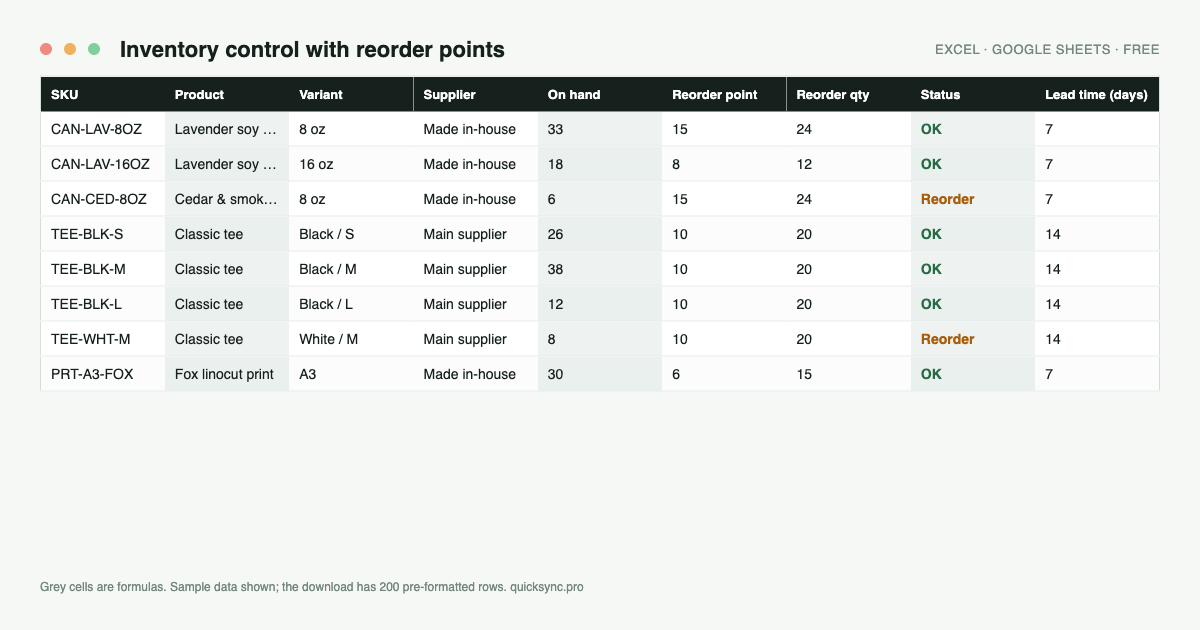
Each SKU carries a reorder point, a reorder quantity and a lead time. Status turns amber at the reorder point and red at zero. The Reorder sheet lists only the SKUs that need ordering, grouped by supplier, with the order value totalled at the top.
Sheets inside
Dashboard, Inventory, Movements, Reorder, Lists
Columns
SKU, product, variant, category, supplier, cost, price, opening count, on hand, reorder point, reorder qty, status, stock value, lead time
The formulas doing the work
SUMIFS for on hand, nested IF for status, COUNTIF and SUM for the purchase list
Stock in / out log
Anyone who has been burned by overwriting a count and wants an audit trail.
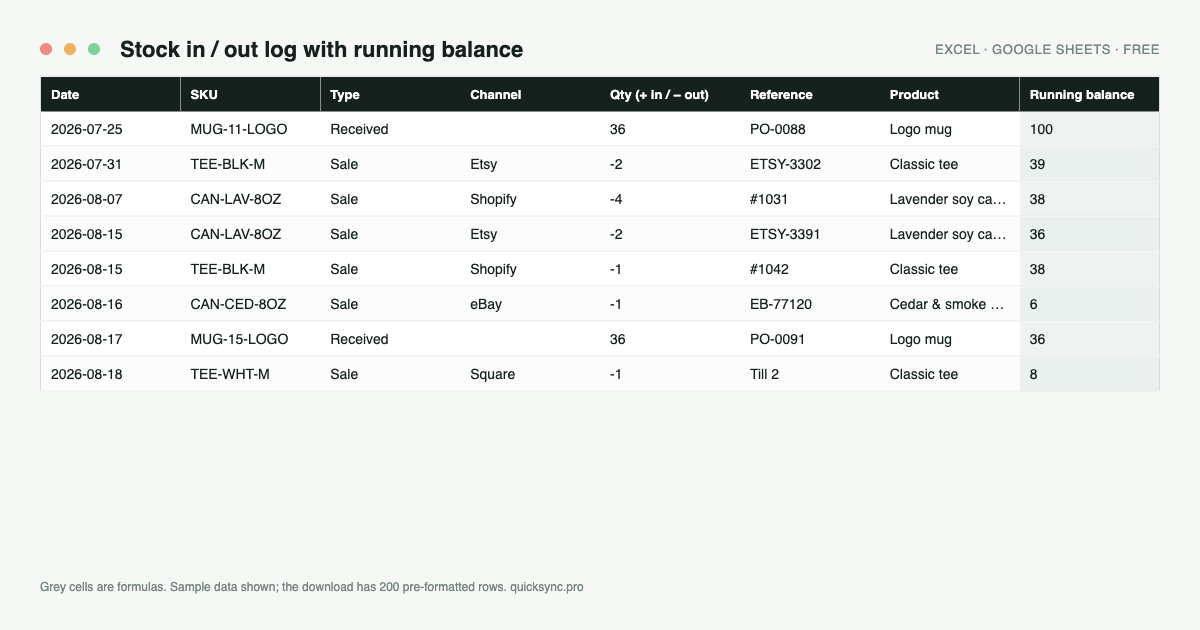
Every receipt, sale, return and write-off is one line with a date, a type and a reference. A running balance shows the stock after each line, and the Inventory sheet’s on hand is the opening count plus all of them. A recount becomes an Adjustment line rather than an overwrite, so you can always see what changed and when.
Sheets inside
Inventory, Movements, Lists
Columns
Date, SKU, type, channel, quantity in or out, reference, note, product, running balance
The formulas doing the work
INDEX/MATCH to name the product, a growing SUMIFS for the running balance, SUMPRODUCT(MAX()) for the last movement date
Multi-location inventory
A shop floor, a back room and a warehouse that share one catalogue.
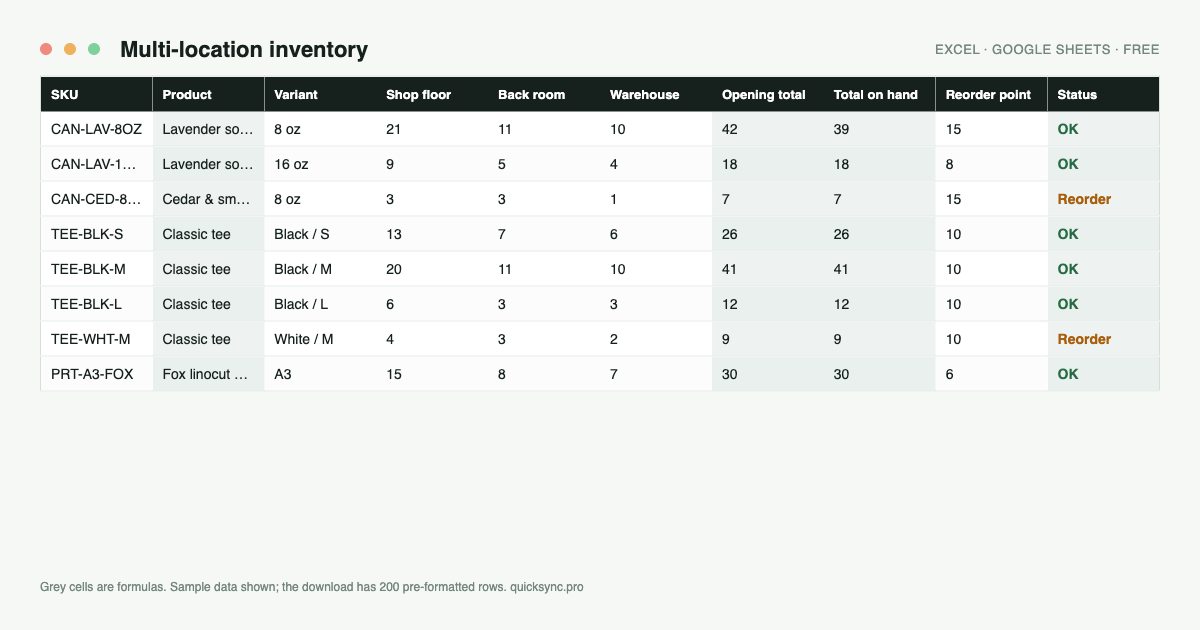
A column per location and a computed total. Transfers between locations are logged on their own sheet and leave the total alone; receipts add to it and sales take from it. Add a location by inserting a column between the existing ones and the total’s range grows with it.
Sheets inside
Inventory, Transfers, Lists
Columns
SKU, product, variant, cost, price, opening total, a quantity per location, transfers in/out, total on hand, reorder point, status, stock value
The formulas doing the work
SUM across the location columns, SUMIFS by transfer type, nested IF for status
Inventory value and COGS
Month-end: what the stock is worth, what it cost to sell, and the margin by SKU.
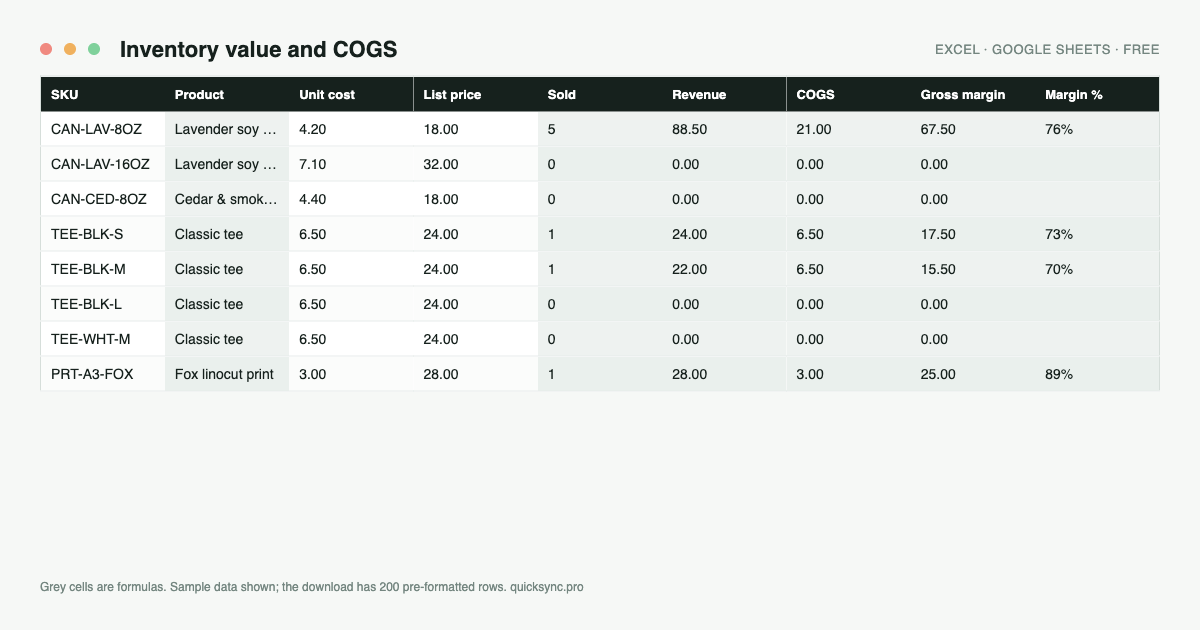
Opening count and unit cost per SKU; sales and purchases on their own sheets. Closing count, closing value, revenue, cost of goods sold and margin percentage are worked out per SKU, and the Summary sheet rolls them up for the period with margin by month and an inventory turnover figure.
Sheets inside
Summary, Inventory, Sales, Purchases, Lists
Columns
SKU, product, unit cost, list price, opening count, purchased, sold, closing count, opening value, closing value, revenue, COGS, gross margin, margin %
The formulas doing the work
SUMIFS over the sales and purchase logs, INDEX/MATCH for unit cost, SUMIFS by month for the summary
Setting up Google Sheets for inventory from scratch
The six files follow these steps. If you would rather build than download, this is the order that avoids the rebuild later.
One row per variation
A t-shirt in three sizes is three rows, not one, because a buyer picks a size. Give each row a SKU that is unique across every place you sell; the SKU generator checks length limits per channel.
Log movements, never overwrite
Put sales, receipts and returns on a second sheet, one line each with a date and a signed quantity. On hand becomes =opening + SUMIFS(qty, sku, this row), and a recount is an Adjustment line you can see later.
Compute status, don’t type it
=IF(on_hand<=0,"Out",IF(on_hand<=reorder_point,"Reorder","OK")). Then Format › Conditional formatting colours the cell so you stop reading the column.
Dropdowns for anything you filter by
Data › Data validation on category, supplier and location, pointing at a Lists sheet. A typo in a category is a row that vanishes from every filter.
Freeze the header and the SKU
View › Freeze › 1 row and 2 columns. Twenty columns in, you still need to know which SKU you are on.
A channel column per place you sell
Type what Shopify shows, what Etsy shows, what the till shows. =MAX(channels)-MIN(channels) is your drift, and a drift that is rarely zero is the signal that the sheet has reached its limit.
When a spreadsheet stops being enough
Three things a sheet cannot do, whichever of the six you pick.
It can’t hear a sale
An Etsy order at 2 a.m. is a row nobody has typed yet. Until someone does, every other channel still shows the unit for sale. QuickSync is told the moment most channels change, and checks eBay, Etsy and Squarespace stock every two minutes.
Two channels means drift
The Drift column exists because the counts diverge by exactly the number of sales you have not logged yet. A sync tool writes the new count to every connected shop itself, in under a second on the channels that push to it.
One editor at a time
A sheet has one on-hand cell per SKU and no record of who changed it. Past a few hundred SKUs, or the first part-time helper, the movements log becomes the only thing you trust.
What replaces the sheet, and how to choose one: multichannel inventory management software, compared → · inventory techniques that still apply → · how overselling happens →
Questions people ask before downloading
How do I set up Google Sheets for inventory?
Download one of the six files above, then in Sheets use File › Import › Upload and choose “Replace spreadsheet”. The formulas, dropdowns and conditional formatting all survive the import. Building from scratch instead: follow the six steps on this page; they take about 40 minutes.
Is Google Sheets good for inventory tracking?
For one place you sell and a few hundred items, it’s fine, and it’s free. It can’t hear about a sale: every Etsy order, every till transaction has to be typed in by someone. Once the same item sells in two places, the sheet is wrong by the time you read it, and that is when sellers move to a sync tool.
Does Google have an inventory app?
No. Google offers Sheets, AppSheet for building your own app on top of a sheet, and Marketplace add-ons from third parties. None of them connects to Shopify, Etsy or a till on its own, which is the job a dedicated sync tool does.
Is there a free inventory template I can download?
Yes, six of them on this page, as .xlsx files with no sign-up and no email. The multichannel stock sheet, the simple list, reorder points, a stock in/out log, multi-location and value/COGS. Every formula is in the file; you type counts, not calculations.
Which template should I start with?
Under 100 items and one place you sell: the simple list. Reordering from suppliers: inventory control. Two or more sales channels: the multichannel sheet, because it is the only one that tells you when the channels disagree. Month-end numbers for your accountant: value and COGS.
How do I stop the spreadsheet going wrong?
Never type over a computed cell, and never type over a count. Log a movement instead, even for a recount. Most broken inventory sheets got there through one overwritten cell nobody can trace.
When the Drift column stops being zero
Connect two of your shops and QuickSync keeps one count across them, so the sheet goes back to being a report. Your first two weeks are on us.
★★★★★ 4.9 out of 5 from 3,200+ reviews across our Shopify apps
No credit card required · all free tools