On this page
- Can You Connect QuickBooks to Squarespace?
- Benefits of Connecting Squarespace and QuickBooks
- What Should a Squarespace QuickBooks Integration Tool Sync?
- Ways to Connect QuickBooks to Squarespace
- How to Connect Squarespace With QuickBooks Using QuickSync
- Common Squarespace QuickBooks Integration Problems QuickSync Solves
- Why Businesses Choose QuickSync for Squarespace QuickBooks Integration
- Squarespace QuickBooks Integration: What To Check Before Choosing a Tool
- Conclusion
Are you using Squarespace and QuickBooks together, but still struggling to keep your sales data accurate? You are not alone.
Orders need to be recorded properly. Refund receipts need to be created in the right format. Payments should reconcile with deposits. And if you sell products, your QuickBooks inventory should update after every Squarespace sale.
Many merchants who sell on the Squarespace website and use QuickBooks for accounting have the same question: Can both platforms work together without manual bookkeeping?
Yes, Squarespace can integrate with QuickBooks.
The real answer is not just “connecting” both platforms. The solution is syncing the right data in the right format.
Your sales, payments, taxes, discounts, refunds, products, and customers should move into QuickBooks without daily manual entry. Otherwise, you still end up fixing numbers, matching payouts, and cleaning reports.
Without a proper integration, you still end up fixing QuickBooks manually. And that manual work adds up fast. According to an Intuit QuickBooks Business Solutions report, businesses spend an average of 25 hours per week on manual data entry or reconciling data across apps.
Let me explain how Squarespace and QuickBooks integration works, what it should include, and how QuickSync helps automate the workflow.
Can You Connect QuickBooks to Squarespace?
Yes, you can connect QuickBooks to Squarespace. Squarespace helps you run your online store, manage products, accept payments, and process orders. QuickBooks helps you manage accounting, invoices, sales receipts, refunds, taxes, customer records, bank reconciliation, and financial reports.
But both systems do different jobs.
Squarespace is built for selling online. QuickBooks is built for accounting. To make them work together, you need an integration tool that moves store data into QuickBooks in a clean and useful way.
A proper Squarespace QuickBooks integration should help you sync:
- Squarespace orders into QuickBooks
- Sales as the correct QuickBooks document
- Payments into the right account
- Taxes with accurate amounts
- Refunds with clear refund records
- Products through SKU matching
- Inventory where needed
- Discounts with proper mapping
- Customer records without duplicates
- Sales data without daily manual entry
So yes, QuickBooks can integrate with Squarespace. But the quality of that integration depends on the tool and workflow you choose.
Benefits of Connecting Squarespace and QuickBooks

Integrating Squarespace with QuickBooks offers various benefits to merchants. It reduces manual data entry and improves financial visibility.
Here are the biggest benefits of Squarespace QuickBooks integration.
Save Hours on Bookkeeping
Manual bookkeeping takes time, especially when every order, refund, discount, tax, and payment needs to be entered separately. Syncing Squarespace with QuickBooks reduces repeated admin work and helps merchants save 5–10 hours every week on manual entries and reconciliation.
This gives your team more time to focus on selling, fulfillment, product planning, and customer support instead of fixing accounting data.
Reduce Accounting Errors
Manual data entry increases the chance of mistakes. A wrong tax amount, missed refund, duplicate customer, or incorrect payment record can make QuickBooks reports harder to trust.
When Squarespace and QuickBooks are synced, sales data moves more consistently. Even a 1% manual entry error rate can create several incorrect records. Automated sync reduces those risks and keeps your accounting records cleaner.
Make Reconciliation Easier
Reconciliation becomes difficult when payments, refunds, discounts, and fees are not recorded properly. Sellers often spend extra time matching Squarespace sales with QuickBooks deposits and bank activity.
If a store processes 200 orders a month, even a small mismatch can create hours of cleanup. Syncing stores helps payments, refunds, and order data stay easier to review. This can save 5–8 hours monthly by reducing manual matching, missing entries, and repeated corrections.
Keep Inventory Data Cleaner
When Squarespace sales affect stock, QuickBooks should reflect that product movement. If both systems show different inventory data, merchants may overbuy, understock, or make poor purchasing decisions.
Syncing QuickBooks and Squarespace helps keep product movement easier to track. This gives store owners better visibility into stock, product performance, and purchasing needs.
Understand Business Performance Better
Clean financial data helps merchants make better decisions. For example, if one product drives 30% of monthly revenue, synced data helps you identify it faster.
Instead of checking separate dashboards, you can review product sales, refunds, taxes, and cash flow inside QuickBooks with more confidence. This helps with pricing, promotions, cash flow, tax planning, and product decisions.
What Should a Squarespace QuickBooks Integration Tool Sync?
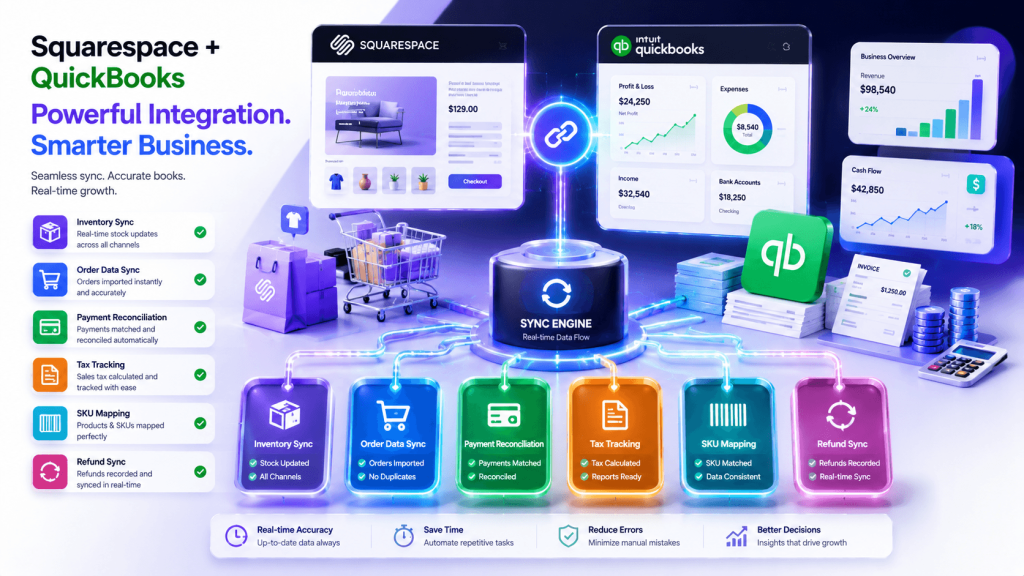
Before choosing a Squarespace QuickBooks integration tool, you need to understand what it should actually sync. A weak connection may only move basic sales totals. That may look fine at first, but it usually creates cleanup work later.
A stronger integration app should sync accounting, product, inventory, customer, tax, discount, payment, and refund data in a way that makes QuickBooks easier to trust.
Here are the key features to look for.
Inventory Sync
Inventory sync is one of the most important features to check if you manage product stock. When products sell on Squarespace, your QuickBooks stock records should update properly. A proper integration should help keep product availability and inventory reconciliation aligned.
Order Data Sync
Your integration app should send every Squarespace order into QuickBooks with complete transaction details. This includes customer information, line items, payment status, taxes, discounts, shipping, and order totals.
Payment and Deposit Sync
Payments should sync in a way that supports bank reconciliation. A good integration tool should send payment methods, deposits, fees, and transaction details into QuickBooks with clear records. This is important for reconciliation.
Tax Amount Sync
Sales tax should not be guessed, rounded incorrectly, or entered manually. The syncing tool should transfer tax amounts from Squarespace orders into QuickBooks accurately. Clean tax sync helps bookkeepers review taxable sales with more confidence.
Product and SKU Sync
Your integration should connect Squarespace sales to the correct QuickBooks products through SKUs. This keeps line items tied to real products, not just general sales totals. SKU-based product sync improves inventory tracking, COGS visibility, and product-level reporting.
Refund Record Sync
If Squarespace refunds enter QuickBooks as vague adjustments, reconciliation becomes messy and difficult to trust. A reliable integration app should create clear refund records, connect them to the right order, and route them to the correct bank account. This keeps refund reporting cleaner.
Ways to Connect QuickBooks to Squarespace
There are several ways to connect QuickBooks to Squarespace. Some methods are simple but limited. Others work better for accounting automation.
Here is a quick comparison of different methods to connect QuickBooks to Squarespace.
| Method | Best For | Main Limitation | Automation Level |
| Manual data entry | Very small stores with few orders | Slow, repetitive, and easy to get wrong | Low |
| CSV export and import | Occasional bulk updates | Data becomes outdated quickly | Low to medium |
| Basic connector apps | Simple order and sales syncing | May need cleanup for refunds, SKUs, inventory, and accounting logic | Medium |
| QuickSync | Sellers who want cleaner accounting automation | Needs proper setup once | High |
Now let’s look at each method in more detail.
Method 1: Manual Data Entry
Manual data entry means copying Squarespace orders, sales, taxes, refunds, products, and customer details into QuickBooks by hand. This gives you full control, but it is slow and difficult to scale.
Manual entry may work for a very small store with only a few orders. But once your sales volume grows, it becomes unreliable.
Why manual entry is not reliable:
- It takes too much time every week.
- Order details can be missed.
- Taxes may be entered incorrectly.
- Refunds may be recorded in the wrong place.
- Customer records can be duplicated.
- Discounts may not be tracked properly.
- Reconciliation becomes harder as sales grow.
Manual entry may work for a very small store. But it becomes difficult once orders, refunds, discounts, and product sales increase.
Method 2: CSV Export and Import
Another method to integrate Squarespace with QuickBooks is through CSV import and export. In this method, merchants download sales or order data from Squarespace and upload it into QuickBooks. This can help move data in bulk, but it is not true automation.
Why CSV imports fall short:
- CSV files only capture one time period.
- Data becomes outdated quickly.
- Formatting errors can break imports.
- Product SKUs may not map cleanly.
- Refunds may need separate handling.
- Payment fees may not match deposits.
- Manual cleanup is still required.
CSV workflows are better than typing everything manually. But they still create delays and reconciliation issues.
Method 3: Basic Connector Apps
Basic connector apps help connect Squarespace and QuickBooks. Some can sync orders, customers, products, and payment data. QuickBooks Connector, for example, can sync most order details from Squarespace into QuickBooks, including net amount, fees, taxes, discounts, products or services, and customers.
Why basic connector apps may still feel limited:
- Setup may not fit every accounting workflow.
- Product matching can require cleanup.
- Refund handling may need review.
- Document type selection may be limited.
- Sales receipts and invoices may need checks.
- Inventory logic may not match your store setup.
- Advanced pricing rules may not work cleanly.
Basic connectors can help. But design-first Squarespace sellers often need deeper accounting control.
Method 4: QuickSync Squarespace QuickBooks Integration
QuickSync is the stronger option when you want Squarespace and QuickBooks to work together without daily manual fixes.
Instead of sending rough totals into QuickBooks, QuickSync focuses on structured syncing. It helps your orders, payments, taxes, refunds, products, discounts, inventory, and customer records move into QuickBooks with cleaner accounting logic.
That means your Squarespace store can stay polished on the front end while QuickBooks stays organized in the back office.
Here is what QuickSync can handle for Squarespace and QuickBooks integration:
- Order Sync: Squarespace orders sync with customer, product, tax, discount, and payment details included.
- Product Sync: QuickSync syncs Squarespace products into QuickBooks with SKUs, pricing, and item details.
- Inventory Sync: Stock quantities stay aligned between Squarespace and QuickBooks to reduce overselling issues.
- Smart Documents: QuickSync chooses Sales Receipt, Invoice, or Refund Receipt based on payment status.
- SKU Matching: Squarespace sales link to QuickBooks items by SKU for cleaner reporting and tracking.
- Sale Pricing: QuickSync preserves Squarespace sale prices correctly inside QuickBooks revenue records during promotions.
- Refund Routing: Refunds reach the correct QuickBooks bank account, not messy generic adjustment records.
- Discount Mapping: Squarespace coupons map to the right QuickBooks discount account with clear details.
- Digital Products: QuickSync gives physical and digital products the correct accounting treatment automatically.
- Customer Matching: Repeat buyers match to existing QuickBooks customers, helping reduce duplicate customer records.
How to Connect Squarespace With QuickBooks Using QuickSync
QuickSync is one of the best ways to connect Squarespace with QuickBooks because it is built around accounting accuracy, not just basic data transfer. It helps Squarespace sellers turn online store activity into cleaner QuickBooks records.
With QuickSync, you can reduce manual bookkeeping, improve reconciliation, and link product sales by SKU.
This is especially helpful for ecommerce businesses, creators, service stores, and brand-led Squarespace sellers who want clean books without daily data entry.
Here’s how to get started.
Step 1: Create Your QuickSync Account
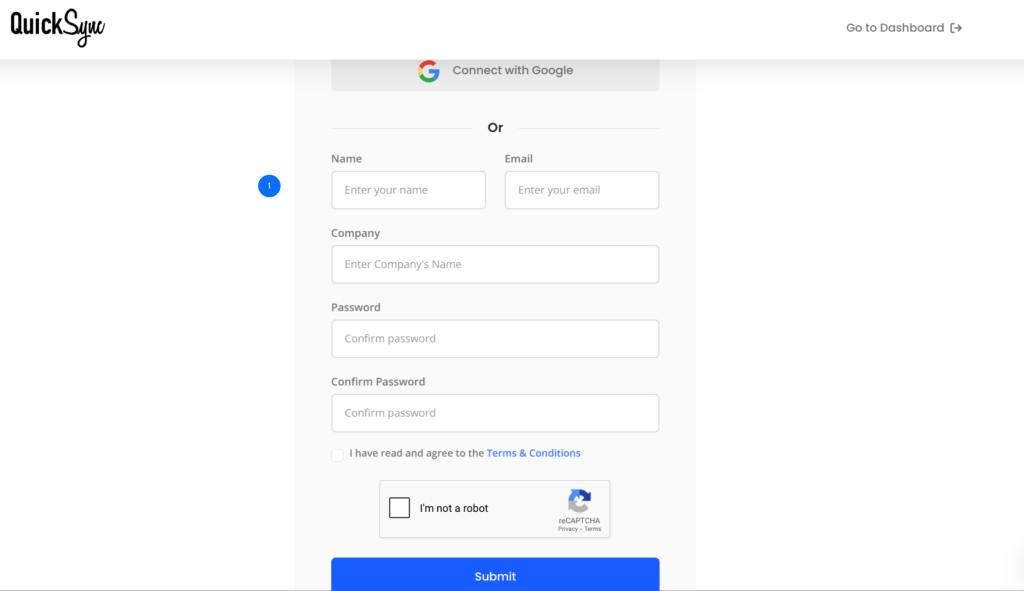
- Go to quicksync.pro and sign up with your email and business details.
- If you already have an account, log in and open your dashboard.
- This is where you manage connected platforms, product sync settings, order sync, payment data, and accounting workflows.
Step 2: Connect Your Squarespace Store
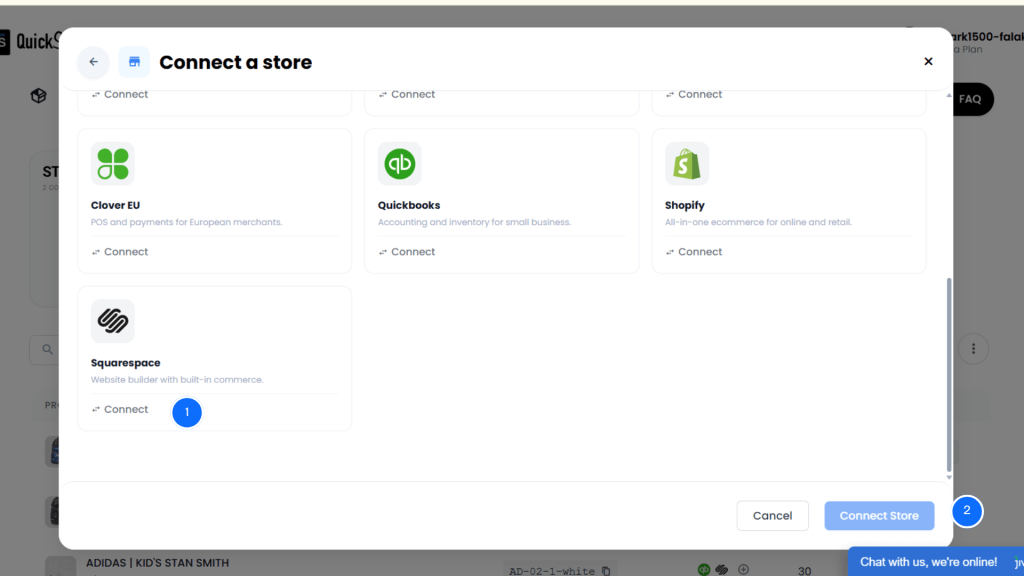
- From the QuickSync dashboard, go to Add Store or Connect Store.
- Select Squarespace from the platform list.
- Authorise QuickSync to access your Squarespace store data.
- This allows QuickSync to read orders, products, customer details, prices, refunds, taxes, discounts, and inventory-related data.
Step 3: Connect Your QuickBooks Account
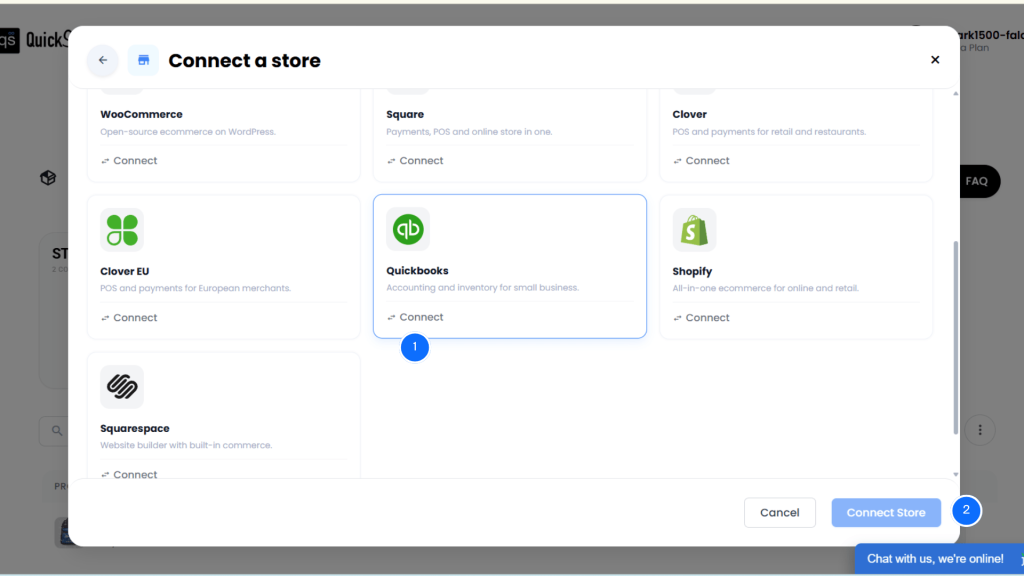
- Next, choose QuickBooks from the available accounting platforms.
- Log in to your QuickBooks Online account.
- Approve permissions so QuickSync can create or update sales records, customers, products, refunds, payments, and accounting data.
Step 4: Configure Order, Product, and Accounting Sync
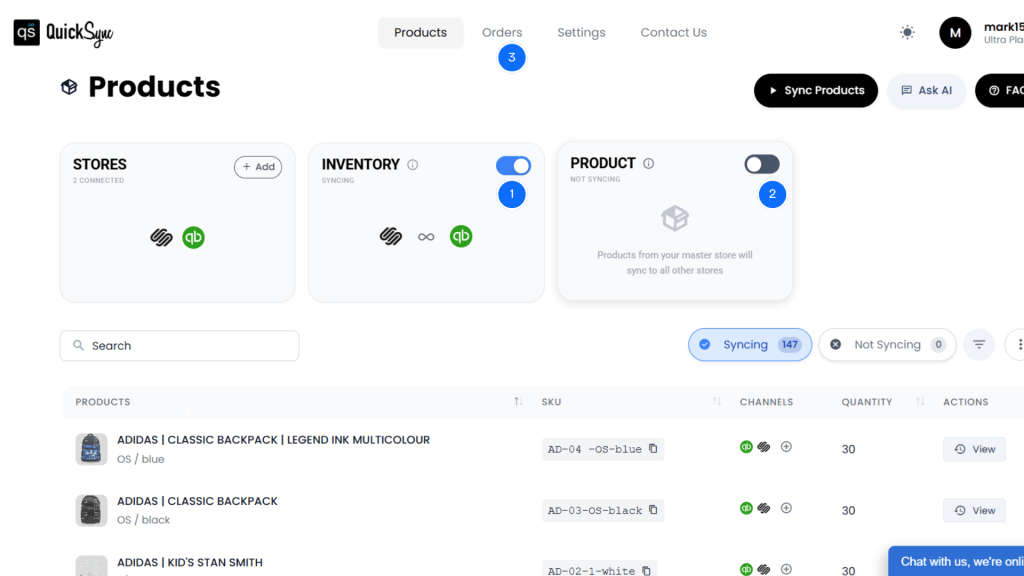
Once Squarespace and QuickBooks are connected, open your QuickSync dashboard and configure your sync settings.
- Product Sync can be enabled from the dashboard. Choose one store as the master store. Any product changes made on the master store will be reflected in other connected stores.
- Inventory Sync is automatically on once you have connected both stores. It helps keep Squarespace stock and QuickBooks quantities aligned without manual updates.
- Order Sync can be enabled from the dashboard. Choose a fulfillment store where all the orders will be sent with customer, product, tax, discount, and payment details.
Once your settings are saved, QuickSync starts syncing Squarespace and QuickBooks automatically, helping your accounting records stay cleaner after every sale.
Common Squarespace QuickBooks Integration Problems QuickSync Solves
Squarespace and QuickBooks handle data differently. That is why basic syncing often creates accounting issues.
Here are common problems sellers face and how QuickSync helps solve them.
Issue 1: Wrong Document Types
Squarespace orders can have different payment statuses. Some orders are paid. Some may be pending. Some may involve refunds.
If every order becomes the wrong QuickBooks document, your records become messy.
QuickSync fix: QuickSync uses smart document type selection. It can turn Squarespace activity into the right QuickBooks document, such as Sales Receipt, Invoice, or Refund Receipt.
Issue 2: Refunds Break Reconciliation
Refunds are one of the biggest accounting pain points.
If a Squarespace refund becomes a generic adjustment, it may not match the correct bank account in QuickBooks. That makes reconciliation harder.
QuickSync fix: QuickSync creates cleaner refund records and supports refund routing. This helps avoid confusing adjustment entries and keeps refund reporting easier to review.
Issue 3: Sale Prices Sync Incorrectly
Squarespace uses base price and sale price logic. QuickBooks needs clean unit price values.
If sale prices sync incorrectly, revenue can look wrong during promotions.
QuickSync fix: QuickSync checks the active sale price and syncs the correct selling price into QuickBooks. This helps keep promotional revenue more accurate.
Issue 4: Product Sales Lose SKU Links
If Squarespace orders enter QuickBooks without product-linked line items, reporting becomes weak.
You may see sales totals, but not useful product-level performance.
QuickSync fix: QuickSync links Squarespace line items to QuickBooks items through SKUs. This supports better product reporting, inventory tracking, and COGS visibility where applicable.
Issue 5: Discounts Overstate Revenue
Coupons and discounts can create reporting issues if they are not mapped correctly.
If discounts are ignored or recorded poorly, revenue may look higher than it actually is.
QuickSync fix: QuickSync maps Squarespace coupons to the correct QuickBooks discount account and preserves useful discount details for cleaner records.
Issue 6: Duplicate Customer Records Create Confusion
Customer records can become messy when every order creates a new customer profile in QuickBooks.
This makes customer history harder to understand.
QuickSync fix: QuickSync can match repeat buyers to existing QuickBooks customers, helping reduce duplicate records and keep customer history cleaner.
Why Businesses Choose QuickSync for Squarespace QuickBooks Integration
QuickSync is trusted by thousands of ecommerce merchants for integrating Squarespace with QuickBooks. It not only connects both platforms, but it also offers clean accounting with premium features.
This matters because Squarespace sellers often care deeply about brand presentation, but still need strong back-office accuracy.
Here’s why businesses choose QuickSync.
Real-Time Sync
QuickSync helps sync orders, products, inventory, payments, and accounting data automatically. This keeps your QuickBooks records closer to what is happening in your Squarespace store.
Built for Merchants
You do not need a developer to connect your store and accounting system. QuickSync gives merchants a simple dashboard to manage connected platforms, sync settings, and daily operations.
Supports Growing Catalogs
As your Squarespace store grows, your sync tool should not slow you down. QuickSync is built to support larger product catalogs, higher order volume, and multichannel operations.
Easier Reconciliation
QuickSync helps payments, refunds, discounts, taxes, and order details land in QuickBooks with a clearer structure. That means fewer manual corrections and less month-end confusion.
Better Pricing Control
QuickSync handles Squarespace sale pricing carefully. It checks the active selling price and maps it into QuickBooks correctly, so promotional revenue is easier to track.
Cleaner Refund Handling
QuickSync helps create cleaner refund records inside QuickBooks. Refunds can route to the right account instead of becoming unclear adjustment entries.
Customer Deduplication
QuickSync can match repeat Squarespace buyers to existing QuickBooks customers. This helps reduce duplicate records and keeps customer history cleaner.
Squarespace QuickBooks Integration: What To Check Before Choosing a Tool
Before choosing a Squarespace QuickBooks integration tool, check whether it can handle your real accounting workflow.
Do not choose a tool only because it says it “connects” both platforms. Look at what happens after the connection.
Ask these questions:
- Does it sync complete order details or only sales totals?
- Can it map products by SKU?
- Does it handle refunds clearly?
- Can it sync taxes correctly?
- Does it preserve discounts and coupon details?
- Can it support inventory tracking where needed?
- Does it reduce duplicate customer records?
- Can it support your accounting document logic?
- Does it help with reconciliation?
- Does it reduce manual cleanup?
The best tool is not just the one that connects Squarespace and QuickBooks. It is the one that reduces the work your team has to fix later.
Conclusion
So, does Squarespace integrate with QuickBooks?
Yes, it can. But the quality of the integration depends on the method you choose.
Manual entry and CSV files may work for a short time. Basic connector apps can help with simple syncing. But growing Squarespace sellers usually need cleaner accounting automation.
QuickSync gives sellers a stronger way to connect Squarespace and QuickBooks. It helps sync orders, payments, taxes, refunds, products, discounts, customers, and inventory with accounting accuracy in mind.
If you want fewer bookkeeping errors, cleaner reconciliation, and less manual work, QuickSync helps your Squarespace store and QuickBooks work together more reliably.