If you’re selling only through your Shopify store in 2026, you’re missing customers who prefer shopping on Amazon, Etsy, eBay, TikTok Shop, and other marketplaces. Expanding to more sales channels can significantly increase your reach. But managing them all without overselling products, creating duplicate orders, or spending hours updating inventory manually is where most businesses start to struggle.
This is where multichannel selling with Shopify makes the difference. With the right setup, Shopify becomes the central hub for managing products, inventory, and orders across every connected sales channel.
In this guide, you’ll learn how Shopify multichannel selling works, which marketplaces are worth connecting, how to sync inventory in real time, and the best practices for growing across multiple channels without creating operational headaches.
TL;DR: Multichannel Selling With Shopify at a Glance
- Shopify multichannel selling lets you sell across multiple platforms like Amazon, Etsy, eBay, TikTok Shop, and social channels while managing everything from one place.
- Real-time inventory sync is essential to keep stock accurate across all channels and prevent overselling.
- The right sales channels depend on your products and customers. Choose platforms where your target buyers already shop.
- There are three ways to start multichannel selling: Shopify’s built-in integrations, manual management, or third-party sync tools like QuickSync.
- A successful multichannel strategy starts with the right setup: keep product data accurate, use consistent SKUs, and manage updates from one central store.
What Is Multichannel Selling With Shopify?
Multichannel selling with Shopify means selling your products on multiple marketplaces and sales channels while managing everything from a single Shopify store. Instead of handling Amazon, eBay, Etsy, TikTok Shop, and your online store separately, Shopify acts as the central hub for your products, inventory, and orders.
As every new sales channel is connected, your business can reach more customers without creating separate workflows for each platform. Inventory, product information, and orders stay synchronized, making day-to-day operations much easier to manage as you grow.
The Practical Difference between Multichannel vs Omnichannel Selling
These two terms are often used interchangeably but they describe different things. Multichannel selling means your products are available across multiple platforms. Each channel may have its own customer experience and listing presentation. Omnichannel means creating a genuinely seamless experience across all platforms where every customer interaction connects regardless of which channel it started on.
For most growing Shopify merchants, multichannel selling is the practical starting point. Getting products onto the right platforms and keeping inventory accurate across all of them is the immediate priority. The seamless omnichannel selling experience is typically built on top of a functioning multichannel operation rather than built simultaneously from the beginning.
Benefits of Selling on Multiple Channels For Shopify Merchants
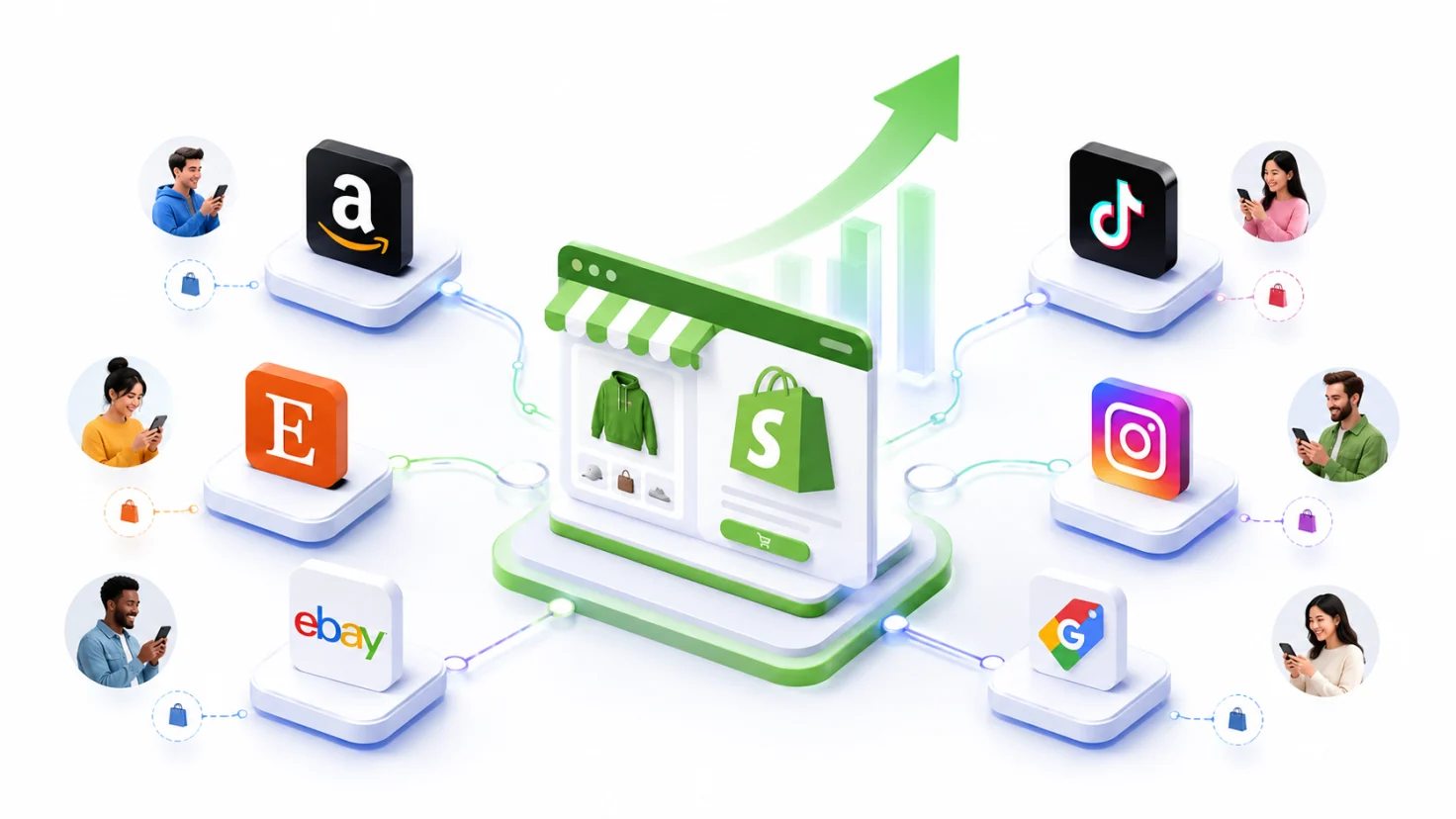
The way people shop has changed. Some customers search for products on Amazon, others browse Etsy for unique items, while many discover brands on TikTok Shop or Instagram before making a purchase.
If you only sell through your Shopify store, you could be missing customers who are already looking for products like yours on other platforms. But multichannel selling helps you meet customers where they already shop, giving your business more selling opportunities and more ways to grow.
Let’s look at the key benefits of multichannel selling with Shopify and why more businesses are adopting this approach.
Wider Customer Reach and Market Presence:
Selling on multiple platforms increases market presence and sales by putting products in front of customers who would never find them only through a Shopify store. Multichannel selling allows businesses to reach customers at various purchasing stages, from customers actively searching on Amazon to those who discover your product while scrolling through TikTok.
Each channel brings a distinct customer segment. The buyers on Etsy are looking for something different from the buyers on eBay or Amazon. That’s why multichannel selling reaches different audiences across different shopping platforms.
Higher Average Transaction Value:
Customers who encounter a brand across multiple channels spend more per purchase. According to research from Harvard Business Review, multichannel customers have 15% to 35% higher average transactions than single-channel customers.
This happens because repeated brand presence across different platforms builds brand familiarity and trust, which directly influences purchase decisions and basket size.
Social Commerce Marketing Opportunities:
Social media is no longer just a place to discover new brands. It has become a place where people shop. Platforms like Instagram and TikTok Shop help customers find products while they’re scrolling, making it easy to purchase without actively searching for them. This allows businesses to reach shoppers who may never have visited their online store.
The opportunity is significant. According to Shopify’s Commerce Trends Report, Instagram users spend an average of $69 during a single interaction, while Pinterest users spend an average of $154 per order.
Reduced Business Risk Through Channel Diversification:
Depending entirely on one platform creates vulnerability. A policy change, an algorithm update, or a platform outage can significantly affect revenue when all sales flow through a single channel.
A well-executed multichannel strategy provides higher sales opportunities and reduced business risk by spreading revenue across channels. So no single commerce platform disruption affects the entire operation.
Better Brand Visibility and Customer Engagement:
Multiple sales channels increase brand visibility and customer engagement. When customers see the same brand on Amazon, Etsy, and social channels, brand recognition builds faster than through a single-channel presence.
The reinforcement effect of appearing across multiple touchpoints in a customer’s shopping journey creates the kind of familiarity that converts browsing into buying.
Key Sales Channels You Should Integrate with Shopify Store
Not every channel suits every product or every customer base. The most successful multichannel Shopify merchants choose channels where their target customers already shop rather than simply connecting to all popular marketplaces. Understanding what each channel offers and what it demands is what makes channel selection a strategic decision rather than a default one.
Amazon
Amazon gives Shopify merchants access to a massive customer base with over 300 million active buyers worldwide. It works best for sellers with competitive pricing and products that already have strong demand.
Success on Amazon depends on factors like pricing, fast fulfillment, and seller ratings. With Fulfillment by Amazon (FBA), merchants can store products in Amazon’s warehouses while Amazon handles packing, shipping, and delivery. However, sellers should consider FBA fees when calculating product margins.
eBay
eBay’s 135 million active buyers include a significant proportion looking for unique items, collectibles, used products, and spare parts that are harder to find on more standardized marketplaces. eBay Shopify integration keeps product listings and inventory connected without managing two separate systems.
For merchants with inventory that has unique or hard-to-find characteristics, eBay often reaches buyers who specifically seek out that kind of stock.
Etsy
Etsy’s 96 million active buyers are specifically looking for handmade, vintage, and customized products. Connecting an Etsy shop to Shopify suits merchants whose products fit those categories and who want to reach a buyer audience that values craftsmanship, personalization, and uniqueness over price competitiveness.
Merchants who can authentically communicate the handmade or unique nature of their products typically see strong performance on Etsy that complements their Shopify store audience without cannibalizing it.
TikTok Shop
TikTok Shop connects products directly to discovery-driven purchases from a fast-growing and mostly younger audience. TikTok Shop Shopify integration allows customers to complete checkouts within their preferred apps rather than being redirected to an external store.
Products that have strong visual appeal, that can be demonstrated or used in short video content, and that benefit from trend-driven discovery tend to perform best on TikTok Shop. The channel rewards content over catalog size, which makes it different from a traditional marketplace.
Google Shopping
Google Shopping puts your products in front of customers at the moment they are actively searching for them. This makes it different from social commerce, where customers often discover products while browsing.
Shopify integration allows your products to appear in Google search results with images, pricing, and store information, helping shoppers make faster purchase decisions. Merchants should monitor advertising costs to maintain profitable campaigns.
Facebook and Instagram:
Facebook and Instagram help Shopify merchants reach customers while they are browsing social media. These channels work especially well for products that are visually appealing and easy to showcase through images, videos, and social content.
With social selling features, customers can discover products and complete purchases with fewer steps, creating a smoother buying experience.
Quick Comparison of Marketplace and Social Commerce Channel
With multiple marketplace and social commerce platforms available, Shopify merchants need to understand how each channel compares before expanding their multichannel strategy. The table below compares popular selling channels based on customer reach, product types, fees, competition, and the types of sellers they are best suited for.
| Channel | Customer Reach | Best Product Types | Avg Fees | Competition | Best For |
| Amazon | 300M+ active buyers globally | Consumer goods, electronics, household items | 8 to 15% referral fee plus FBA fees if used | Very High | Sellers with competitive pricing and high-volume products |
| eBay | 135M+ active buyers globally | Used items, collectibles, unique goods, spare parts | 10 to 12% final value fee | Medium to High | Sellers with unique, niche, or used inventory |
| Etsy | 96M+ active buyers globally | Handmade, vintage, craft supplies, personalized items | 6.5% transaction fee plus listing fees | Medium | Artisans, creators, and niche product sellers |
| TikTok Shop | Fast-growing, younger demographics | Trending, visual, lifestyle, and impulse products | 2 to 8% commission depending on category | Low to Medium | Sellers with strong visual content and trend-driven products |
| Google Shopping | Billions of searches daily | Any product category with active search demand | Cost-per-click advertising model | Medium to High | Sellers targeting active purchase intent searchers |
| Facebook and Instagram | 3.27B+ monthly active users across Meta | Fashion, beauty, home goods, lifestyle products | 5% selling fee or flat rate per order | Medium | Sellers whose customers spend significant time on social media |
This comparison is a starting point rather than a definitive ranking. Research helps identify the best sales channels for your specific audience. The right channels for a handmade jewelry seller look different from the right channels for a consumer electronics merchant.
Common Challenges Every Multichannel Shopify Seller Should Know
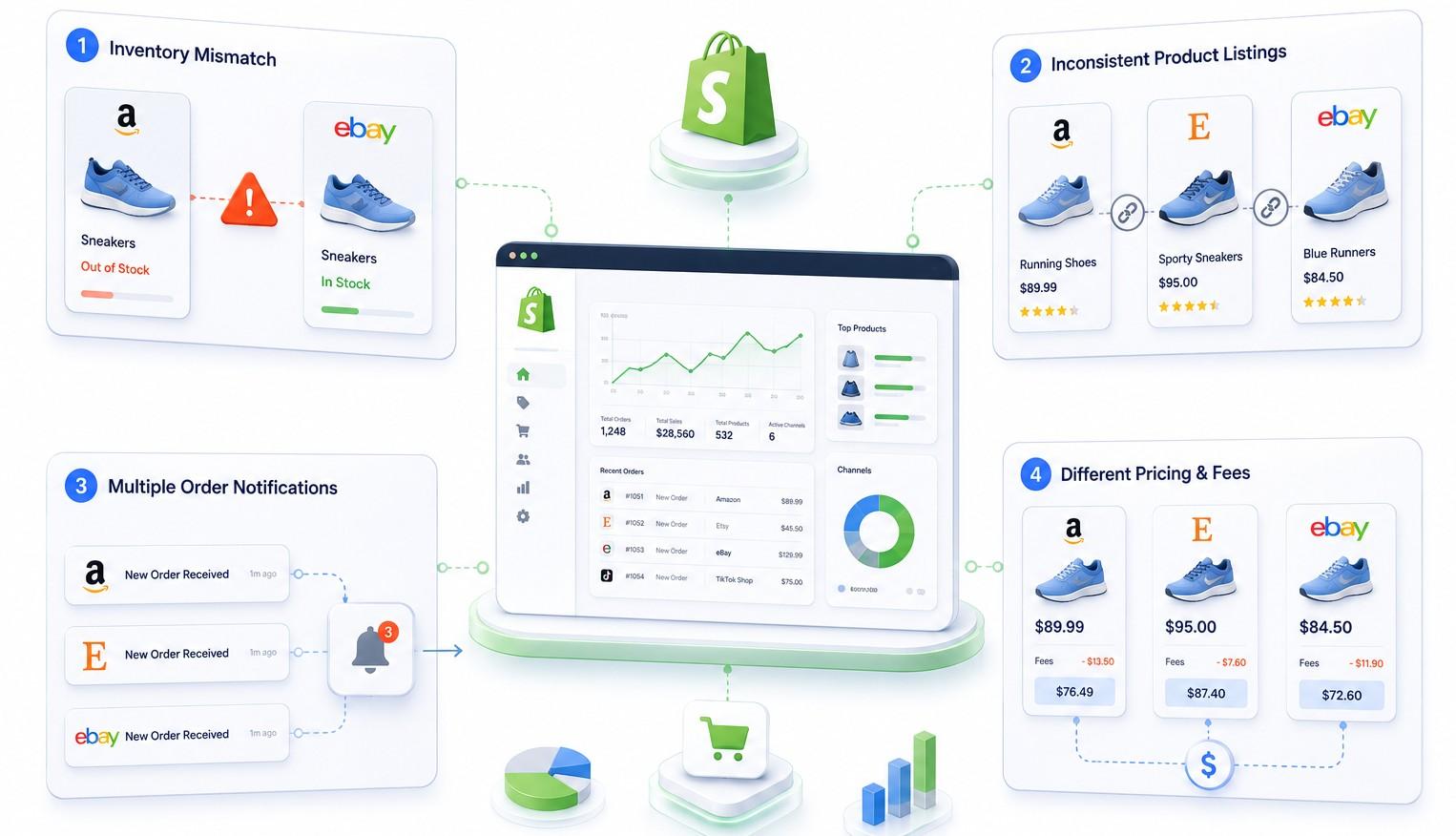
Selling on Amazon, Etsy, eBay, and other platforms can increase your reach, but managing them all manually is not easy. If inventory is not updated across every channel at the right time, the same product can be sold more than once. As your business grows, these small issues can become daily operational challenges.
Understanding the most common multichannel selling challenges is the first step toward avoiding them.
Keeping Inventory Accurate Across Every Channel:
As you add more sales channels, keeping inventory accurate becomes one of the biggest operational challenges. Without real-time inventory sync, a product sold on one platform may still appear available on another, increasing the risk of overselling.
While manually updating inventory may work for a small number of orders, it quickly becomes difficult as sales grow across multiple platforms. According to McKinsey, better inventory management can improve stock availability by up to 5%, helping businesses reduce stock errors and capture more sales.
Maintaining Consistent Product Information Everywhere:
Each marketplace has its own listing fields, category structures, image requirements, and attribute specifications. A price change updated on Shopify but forgotten on eBay creates inconsistency that either costs margin or confuses buyers.
A description updated on Amazon but not on Etsy means the same product tells two different stories to two different buyer audiences. Product sync in real time ensures consistent product data across sales channels.
Managing Orders From Multiple Sources:
Selling on multiple platforms means orders start coming from multiple places. While this creates more sales opportunities, it also makes order management more challenging.
Every marketplace has its own fulfillment requirements and customer expectations. Without a centralized system, tracking and processing orders manually can quickly become overwhelming as your business grows.
Setting Prices That Work Across Every Channel:
The right price for your Shopify store may not be the right price for every sales channel. Marketplaces like Amazon, eBay, and Etsy charge different fees, which can affect your profit on every sale.
Before selling on a new channel, calculate all the costs involved, including marketplace fees, fulfillment, and advertising. This helps you set prices that protect your profit across every platform.
These challenges are solvable. The solution depends significantly on which method you use to connect your channels. That is what the next section covers.
What Are Different Ways to Start Multichannel Selling With Shopify
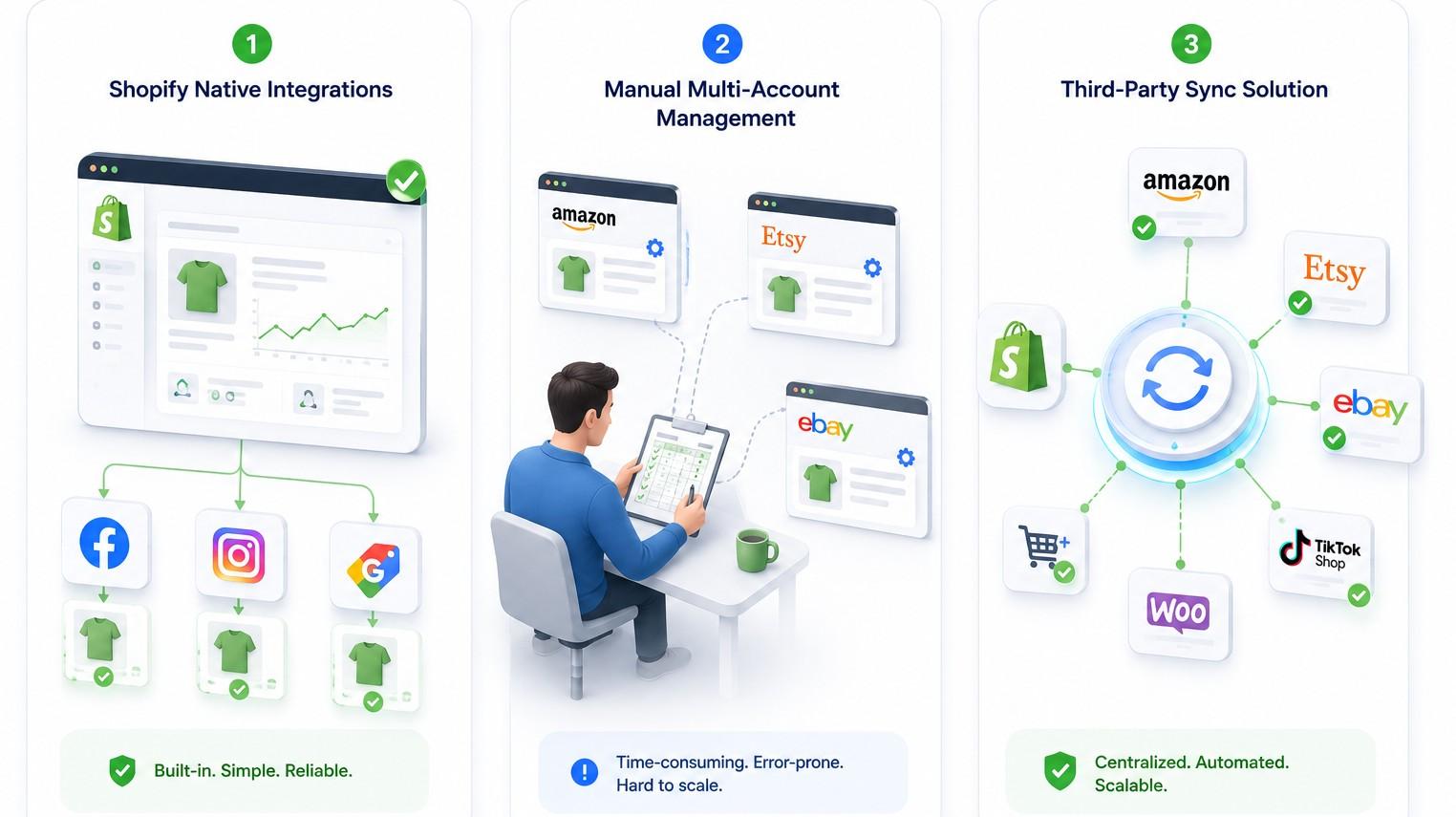
There are three main approaches Shopify sellers use to start their multichannel selling journey. Each works differently, serves a different type of seller, and creates different operational outcomes as order volume grows.
Understanding all three helps you make the right choice for where your business is now and where it is going.
Method 1: Shopify’s Native Sales Channel Integrations
Shopify includes built-in integrations for selected sales channels through the Sales Channels section in the Shopify admin. Platforms like Facebook, Instagram, and Google Shopping can be connected directly, making it easy to start selling on supported channels without installing additional apps.
What it does well:
- This is pretty easy to set up and manage within Shopify.
- This does not require an extra app for supported channels.
- This can be a good option for merchants getting started with multichannel selling.
Limitations:
- This supports only a limited number of sales channels.
- The inventory sync speed and features vary between channels.
- Several platforms require separate apps or manual management.
Best for:
This method may be a good option for merchants selling on one or two supported channels with relatively low order volumes.
Method 2: Manual Multi-Account Management
With this approach, merchants manage each marketplace separately without connecting them to Shopify or another inventory management tool. Every product update, inventory change, price adjustment, and order is handled manually on each platform.
What it does well:
- This does not need any additional software or subscription costs.
- This method gives full control over listings and pricing on each platform.
- This might work for sellers with a small product catalog and low order volume.
Limitations:
- Inventory does not update automatically across channels, increasing the risk of overselling.
- Product, pricing, and stock updates must be repeated on every platform.
- Becomes difficult and time-consuming as sales channels and order volume grow.
Best for:
This method may be a good option for hobby sellers or small businesses with low order volumes that do not plan to expand to multiple channels.
Method 3: Third-Party Sync Solution (QuickSync)
A third-party multichannel sync solution like QuickSync connects your Shopify store with all your sales channels, automatically syncing inventory, product information, and orders. When a sale happens on one platform, stock levels are updated across every connected channel in real time, reducing the need for manual updates.
What it does well:
- This method gives you real-time inventory sync across connected channels.
- This has automatic product sync and inventory updates from one place.
- This method lets sellers have centralized order management.
- This method supports more marketplaces than Shopify’s native integrations.
Limitation:
- The only limitation of this method is that it requires a monthly subscription, unlike manual management or Shopify’s built-in integrations.
Best for:
This option is best for those ecommerce sellers who sell across various channels and want to automate multichannel inventory management, reduce manual work, and keep stock accurate.
Now that you understand what each method involves, the next question is which one is actually right for your business. A side-by-side comparison makes that decision significantly clearer.
Which Method Should You Choose? An Honest Comparison
Here is the complete side-by-side view of all three methods across the criteria that matter most when running real multichannel commerce operations.
| Criteria | Shopify Native Channels | Manual Multi-Account Management | Third-Party Solution (QuickSync) |
| Setup time | Minutes per channel | Ongoing manual work | Under 20 minutes for all channels |
| Real-time inventory sync | Limited, varies by channel | No, manual updates only | Yes, fully automatic across all channels |
| Channels supported | Selected native channels only | Any channel managed separately | Shopify, Amazon, eBay, Etsy, TikTok Shop, WooCommerce, Square, Clover, Lightspeed, QuickBooks and More |
| Order management | Partial, Shopify orders only | Separate per channel | Centralized dashboard for all channels |
| Product sync | Basic | Manual per channel | Full automatic sync from master store |
| Overselling risk | Moderate | High | Eliminated through real-time sync |
| Technical skill needed | Basic | None but time-intensive | None, no coding required |
| Monthly cost | Included in Shopify plan | Free but labor-intensive | From $19 per month for QuickSync, and this can be different for other sync tools |
| Best for | Sellers just starting on 1 to 2 channels | Very low volume hobby sellers | Any serious multichannel ecommerce business |
Our Verdict: The comparison makes one thing clear. Each method has its place, but the right choice depends on your business. Shopify’s native integrations are a good starting point, while manual management works only for sellers with low order volumes. As your business grows, a third-party sync tool becomes the most practical way to keep inventory accurate, manage orders efficiently, and reduce manual work across multiple channels.
| “Many merchants wait until they face inventory problems before setting up a sync solution. But by then, manual management has already become difficult. Building the right system early helps businesses grow across multiple channels without adding unnecessary complexity.” – Jelena C., Product Sync & Order Management Expert |
QuickSync is the third-party sync tool built specifically for Shopify multichannel sellers. Here is exactly what it does and why it stands out from the alternatives.
Things to Keep Handy for Effortless Shopify Integration Via QuickSync
Taking some minutes to prepare before connecting your channels makes the setup process significantly faster and prevents the most common issues from appearing during or after configuration. The merchants who run into problems during setup almost always skipped one of these preparation steps.
- Accurate product data in Shopify: Make sure your product titles, descriptions, images, variants, and SKUs are complete and correct. This information will be shared with all connected channels.
- Matching SKUs across platforms: Use the same SKU for the same product on every channel. QuickSync uses SKUs to match products correctly across Shopify and other platforms.
- Updated inventory counts: Check your stock levels before connecting QuickSync. Starting with accurate inventory ensures every channel shows the right availability.
- Choose your master store: Decide where your product updates should come from. For most Shopify sellers, Shopify works as the main store that sends updates to other channels.
- Admin access to connected platforms: Make sure you have admin access to every channel you want to connect so QuickSync can complete the setup successfully.
- A QuickSync account: Sign up at QuickSync.pro with 14-day free trial, no credit card required
No developer involvement is required. No coding knowledge is needed. The entire setup is managed through a visual dashboard in under 20 minutes.
How to Do Shopify Marketplace Integration via QuickSync: Step By Step
Integrating your Shopify store with all other major commerce platforms with QuickSync is straightforward. You do not need any technical knowledge. Just follow the steps shown on the dashboard, and your Shopify store will be connected to every channel within 20 minutes.
Sign up or log in to QuickSync
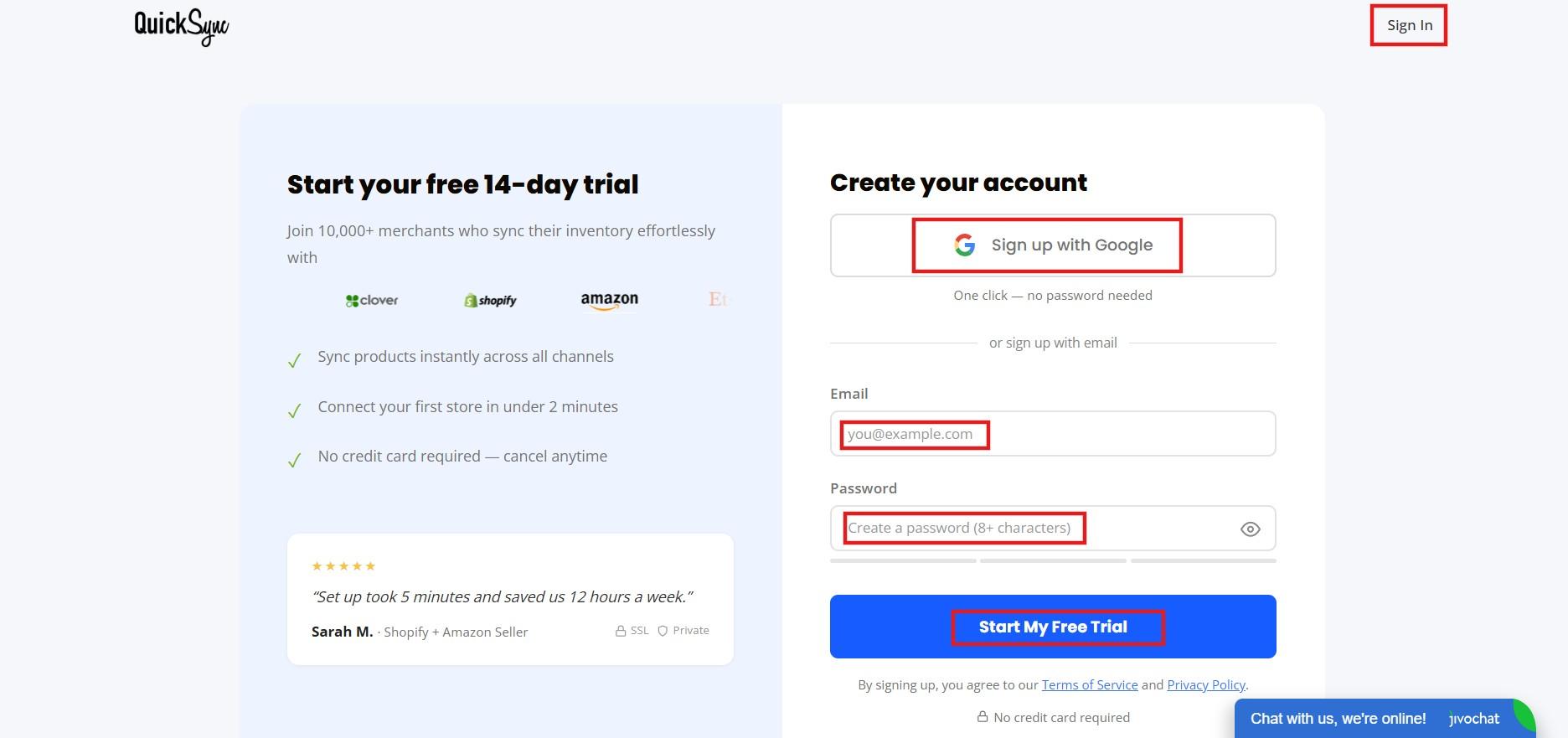
Visit QuickSync.pro and click on “Create an account” or log in if you already have one. The setup process will guide you through the initial configuration and connection steps.
Connect Your Shopify Store
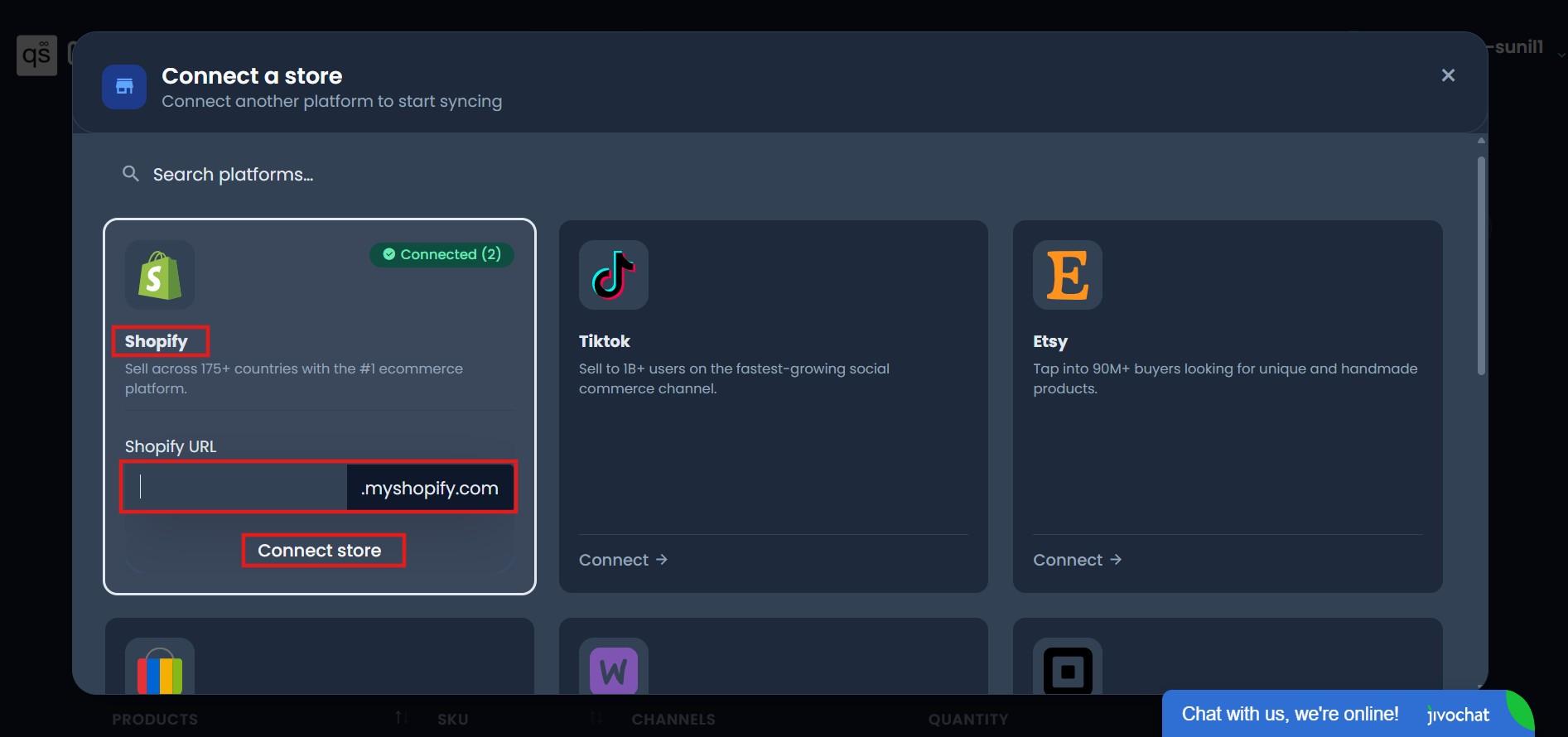
After logging in to QuickSync, you will be taken to the platform selection page.
Select Shopify and click “Connect Store.” Enter your Shopify store URL, log in to your Shopify admin, and approve QuickSync’s access.
Once completed, your Shopify store will be successfully connected to QuickSync.
Connect Your Additional Sales Channels
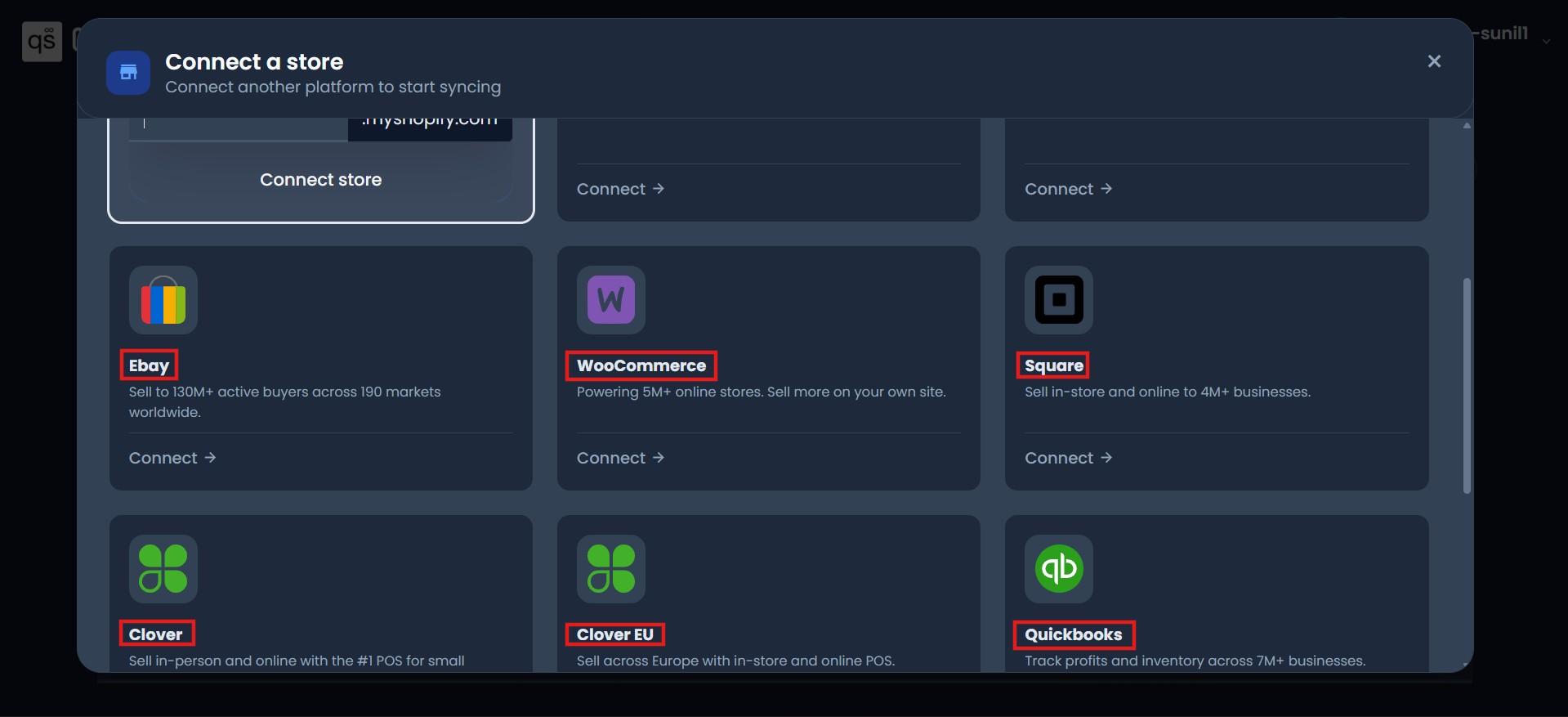
After connecting Shopify, you can add your other ecommerce store POS platforms and online marketplaces like Amazon, eBay, Etsy, WooCommerce, Square, QuickBooks, and more.
Choose the platform you want to connect, click “Connect,” enter the required information, and authorize QuickSync’s access. Once connected, your store will be ready to sync data with Shopify.
Step 4: Select What You Want to Sync
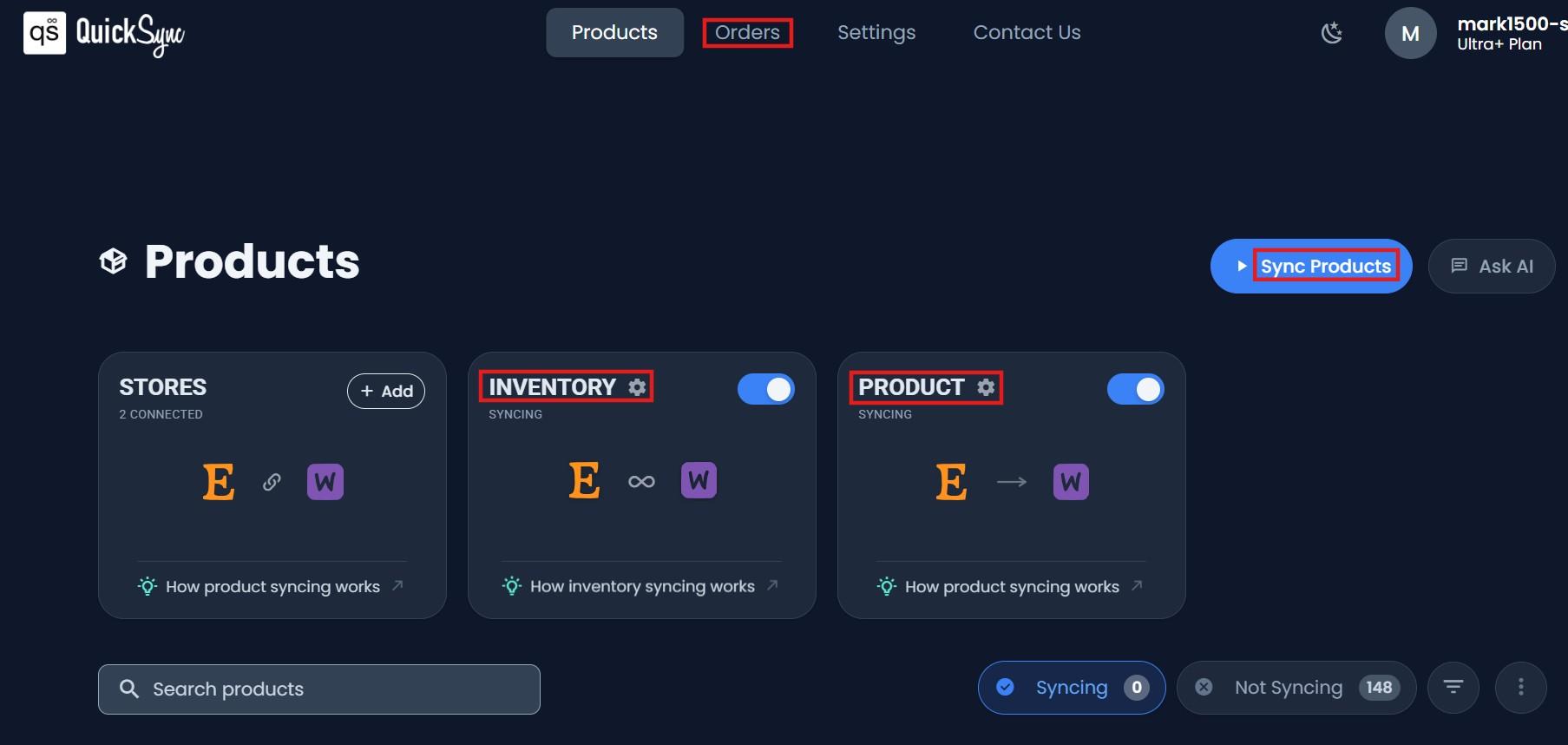
After connecting your Shopify account with your other sales channels, select the information you want to keep synchronized across locations:
- Inventory Sync: Keeps Inventory levels updated across Shopify and connected platforms.
- Product Sync: Keeps product details consistent across locations.
- Order Sync: Keeps order information connected between accounts.
You can choose one or enable multiple sync options based on your business needs. Once setup is complete, QuickSync will begin syncing your selected data between your connected Clover accounts.
Important: Only orders placed after the sync is activated will appear in QuickSync. Historical orders from before the connection was established do not transfer.
Best Practices For Smooth Multichannel Selling With Shopify
Connecting your Shopify store with multiple channels is easy. The real challenge is keeping everything synchronized as your business grows. These best practices help you manage inventory, products, and orders efficiently across every connected platform.
Always Make Product Changes in Your Master Store:
Once syncing is active, make all product changes from your Shopify store. Updates made directly on connected channels may be replaced when QuickSync syncs data from Shopify. Keeping Shopify as your single source of truth helps prevent conflicts and keeps every channel consistent.
Test With a Small Product Batch Before Syncing Your Full Catalog:
Select ten products and run the sync on those alone before expanding to your full catalog. Verify that each product appears correctly on all connected channels and that an inventory change on one platform updates the others within seconds. Only after confirming everything works correctly should you expand the sync to your complete product range.
Keep SKUs Consistent and Do Not Change Them After Connecting:
QuickSync uses SKUs to match the same product across platforms. If a SKU changes on one channel after connecting without being updated on all others, the sync loses the ability to match that product and may create duplicate or orphaned listings. If SKU updates are genuinely needed, pause the sync, update across all channels simultaneously, and reconnect.
Monitor the Sync Dashboard in the First Week After Setup:
The first seven days after connecting channels are when configuration issues that were not apparent during setup tend to surface. Check your QuickSync dashboard daily during this period. Look for sync errors, inventory discrepancies, or products not appearing correctly on any channel. A small issue caught on day two is always faster to resolve than one discovered weeks later.
Final Words
In short, Multichannel selling with Shopify allows merchants to sell across Amazon, eBay, Etsy, TikTok Shop, and other platforms while managing inventory and orders from one place.
The biggest challenge is keeping every channel updated accurately. Real-time inventory sync helps prevent overselling, reduces manual work, and makes scaling easier. Tools like QuickSync help merchants manage multiple channels without the added complexity.
The best approach is simple: start with the right channels, keep your inventory synced, and expand at a steady pace. With the right system in place, you can grow across multiple platforms without making daily operations harder to manage.