Sign up on our website and you get 14 days of Pro features. The trial covers 2,500 items and two stores. You don’t need a card. If you haven’t picked a plan by day 14, syncing stops, stock included, until you pick one.
Installed QuickSync from Shopify, Clover, Wix or WooCommerce.com instead? The trial works a little differently there. See App store trials below.
What the trial includes
- 14 days, starting when you verify your email address.
- Pro features: stock syncing, product syncing and order syncing. Price rules and currency conversion need Ultra, so they aren’t part of the trial.
- Up to 2,500 items, the same cap as Pro. An item is one variant, such as a tote in black. See what counts as an item.
- Two connected stores. To try a third, you need a paid plan with room for it.
- No card. We only ask for one when you pick a paid plan.
During the trial, your plan shows as Free Plan, with a Trial badge on the Billing page. That’s what you should see. Your cap stays at 2,500 items until the trial ends. Plan usage on the Products page shows it.

When the trial ends
If you haven’t picked a paid plan by the end of day 14, we turn syncing off within the hour. We don’t charge you. There’s nothing to cancel.
- Stock stops syncing, so a sale no longer updates your other stores.
- Product and order syncing turn off, and we clear your main store and packing store choices.
- Your stores stay connected. So does your sync list, and we don’t delete anything in your stores.
The Billing page then says Your subscription has ended. Pick a paid plan any time after that to turn syncing back on. Then check product and order syncing, and your main store and packing store.
Pick a plan
You can pick a plan before the trial ends or after it.
- Open Settings and click Manage next to Your plan.
- Under Compare plans, choose Monthly or Yearly · save 10%, and the number of stores.
- Click Choose plan on the plan you want, check the Estimated price, and click Continue.
- Pay on Stripe’s checkout page.
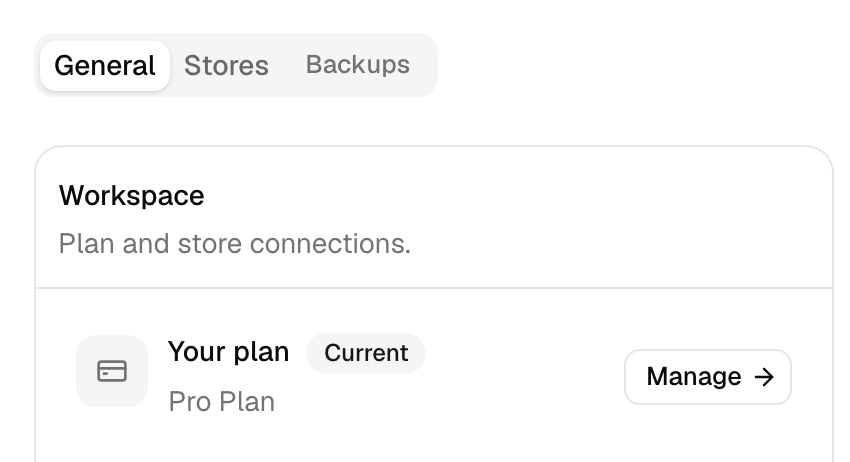
On card billing, picking a paid plan during the trial starts billing that day. The trial days you had left don’t carry over. Picking Pro or above by day 14 keeps product and order syncing running without a gap.
Through Shopify, it’s the other way round. The days you have left carry onto Shopify’s charge, so Shopify starts billing when the trial ends.
App store trials
- Shopify App Store: the 14 days belong to your Shopify store. Days that store already used count against them, and the count resets 60 days after you uninstall. Some Shopify listings ask you to choose a plan first and approve it in Shopify. Then your 14 days run on that plan, and Shopify’s charge starts when they end.
- Wix App Market and Clover’s Latin America app market: the same 14 days with Pro features and 2,500 items, then Free.
- Clover’s US and EU app markets: there’s no QuickSync trial. You pick a plan in Clover before you sync. In Germany, Austria and the Netherlands, Clover’s free tier gets the website trial and card billing instead.
- WooCommerce.com: the subscription you approve there starts with 14 free days.
Need more time?
Ask support before your trial ends. We can extend a trial by 7 days. Signing up again with the same email address doesn’t start a new trial. Neither does reinstalling on the same Shopify store within 60 days.
Common questions
Do I need a credit card for the QuickSync free trial?
No. Sign up on our website and the trial starts when you verify your email. We don’t ask for a card. You add one only when you pick a paid plan on the Billing page. If you installed from the Shopify App Store, Shopify bills you instead, and only once you approve a paid plan there.
What happens when my QuickSync trial ends?
If you signed up on our website and haven’t picked a paid plan, we turn syncing off within the hour, and we don’t charge you. Stock, product and order syncing all stop, and we clear your main and packing store choices. Your stores stay connected, and you can pick a paid plan any time to turn syncing back on. Wix, Clover Latin America and some Shopify installs move to Free instead, which keeps stock syncing for up to 100 items.
How many items can I sync on the free trial?
Up to 2,500 items, the same as Pro. An item is one variant, such as a shirt in size M. During the trial your plan shows as Free Plan, but your cap stays at 2,500 until day 14. Plan usage on the Products page shows your count. If the trial ends without a paid plan, syncing stops until you pick one.
How do I cancel my QuickSync free trial?
If you signed up on our website, there’s nothing to cancel. We don’t hold a card, so we can’t charge you. Syncing stops when the 14 days end. If you approved a paid plan in Shopify during the trial, Shopify charges when it ends. Uninstalling stops that charge, but it also deletes your QuickSync account. Some accounts can pick Switch to Free on the Billing page instead.
Can I extend my QuickSync trial?
Yes. Ask support before your trial ends. We can extend it by 7 days. You can’t extend it yourself in the app. Signing up again with the same email address doesn’t start a new trial either. On Shopify, the 14 days belong to the store, so reinstalling within 60 days carries on the same trial rather than starting a fresh one.
Next step
Ready to try it? Start 14-day trial, then follow Set up your first sync to connect your stores. Prices for after the trial are in Plans and item limits.