You’re listing a pair of headphones on eBay. The title’s done, the photos are up, and then the form asks for an “MPN”. The box is small, but what you put in it decides whether eBay can match your item to its catalog, whether buyers find it, and whether the listing goes through at all.
This guide explains what MPN means on eBay, how it differs from a UPC or a SKU, where to find one, and what to enter when your item doesn’t have one. The rules come from eBay’s own Seller Center and developer documentation, checked in November 2026.
What is MPN on eBay?
MPN on eBay stands for Manufacturer Part Number. It’s a code the manufacturer gives a specific product or part, and you enter it with the brand in your listing’s item specifics. eBay uses Brand and MPN together, like a barcode, to identify the exact product and match it to its catalog. If an item genuinely has no MPN, such as a handmade or vintage piece, you can enter “Does not apply”.
MPNs are usually a mix of letters and numbers. The examples in eBay’s developer guide include DSC-RX100/B, ILCZVE10L/B and fcb-ex980sp. Because the manufacturer sets it, the MPN stays the same whoever is selling the product.
MPN vs UPC vs EAN vs ISBN vs SKU
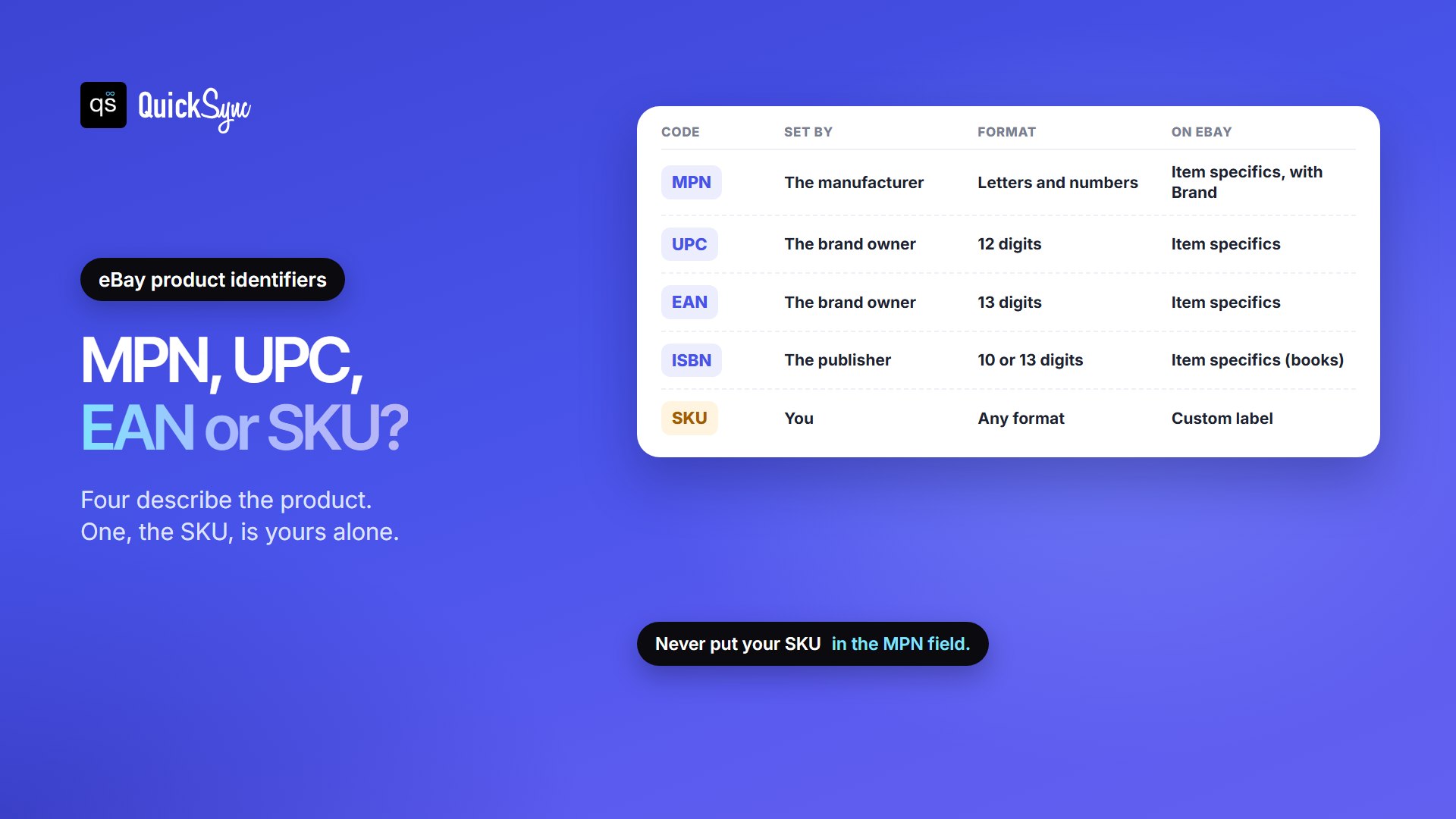
eBay calls these codes product identifiers. Four of them identify the product itself, and one, the SKU, is yours alone. Here’s how they differ:
| Code | What it is | Who sets it | Format on eBay | Where it goes on eBay |
|---|---|---|---|---|
| MPN | Manufacturer Part Number | The manufacturer | Letters and numbers; can’t be only special characters | Item specifics, always with Brand |
| UPC | Universal Product Code, the barcode common in North America | The brand, through GS1 | 12 digits (GTIN-12 or UPC-A) | Item specifics |
| EAN | European Article Number, the barcode common outside North America | The brand, through GS1 | 13 digits (GTIN-13) | Item specifics |
| ISBN | International Standard Book Number | The publisher | 10 or 13 digits | Item specifics (books) |
| SKU | Stock Keeping Unit, your own stock code | You | Any format you choose | The Custom label field |
The common mix-up is MPN and SKU. An MPN describes the product, and every seller of that product uses the same one. A SKU describes your stock, and you make it up yourself. Never put your SKU in the MPN field. Our guide to what a SKU is shows how to build a simple scheme.
MPN and UPC aren’t the same thing either. A UPC is the number under the barcode on the box. An MPN is the manufacturer’s own part or model code. Many products have both, so add every identifier your product has.
You’ll also see the term GTIN (Global Trade Item Number). It’s the umbrella name for barcode numbers: UPC, EAN and ISBN are all GTINs (plus JAN, used only on eBay Japan). So when eBay asks for “a GTIN or MPN”, it means a barcode number, or the brand and MPN together.
Where to Find an MPN Number
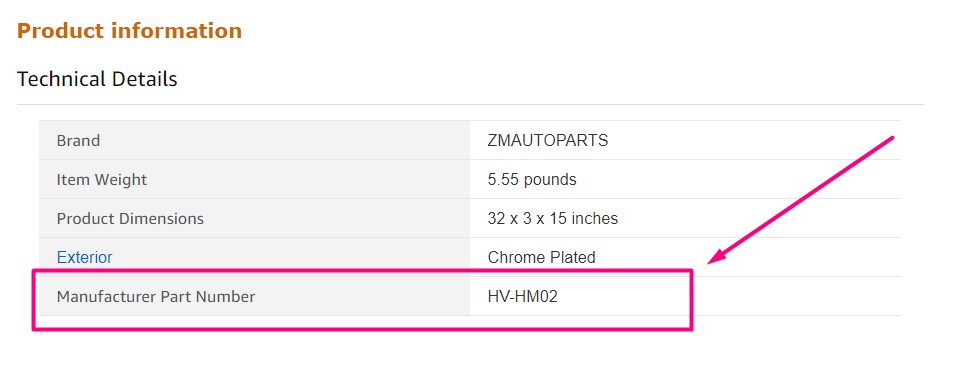
- On the product. Look for a label or plate marked P/N, Part No., MPN or Model. Electronics often have it on the back or underside, and car parts are often stamped.
- On the packaging. It’s usually near the barcode or on a side panel.
- In the manual or warranty card.
- On the manufacturer’s website. Search the product name and check the specifications or support page.
- In eBay’s catalog. Start a listing with the brand and model. If eBay finds a matching product, its details, including identifiers, can fill in for you.
Watch out for near-matches. A model name like “Pro 2” can cover several colors or regional versions, each with its own MPN. Copy the code exactly as printed, including dashes and slashes.
How to Add an MPN to An eBay Listing
- Start your listing and search for the product. If eBay suggests an exact catalog match, check it carefully and select it. eBay says many fields, such as the photo and title, will then be pre-filled.
- In the Item specifics section, enter the Brand exactly as the manufacturer writes it.
- Enter the MPN next to it.
- Add a UPC or EAN too, if the product has one.
- If the item truly has no identifier, choose Does not apply (more on that below).
Only use a catalog match that’s exactly your product. eBay warns that a model from a different year or with different specs risks misleading buyers. The right match, by contrast, “could help reduce the number of return requests”.
eBay’s Rules for Brand and MPN
Most guides stop at “enter the MPN”. eBay’s developer documentation spells out what it accepts, and these rules explain most rejected listings:
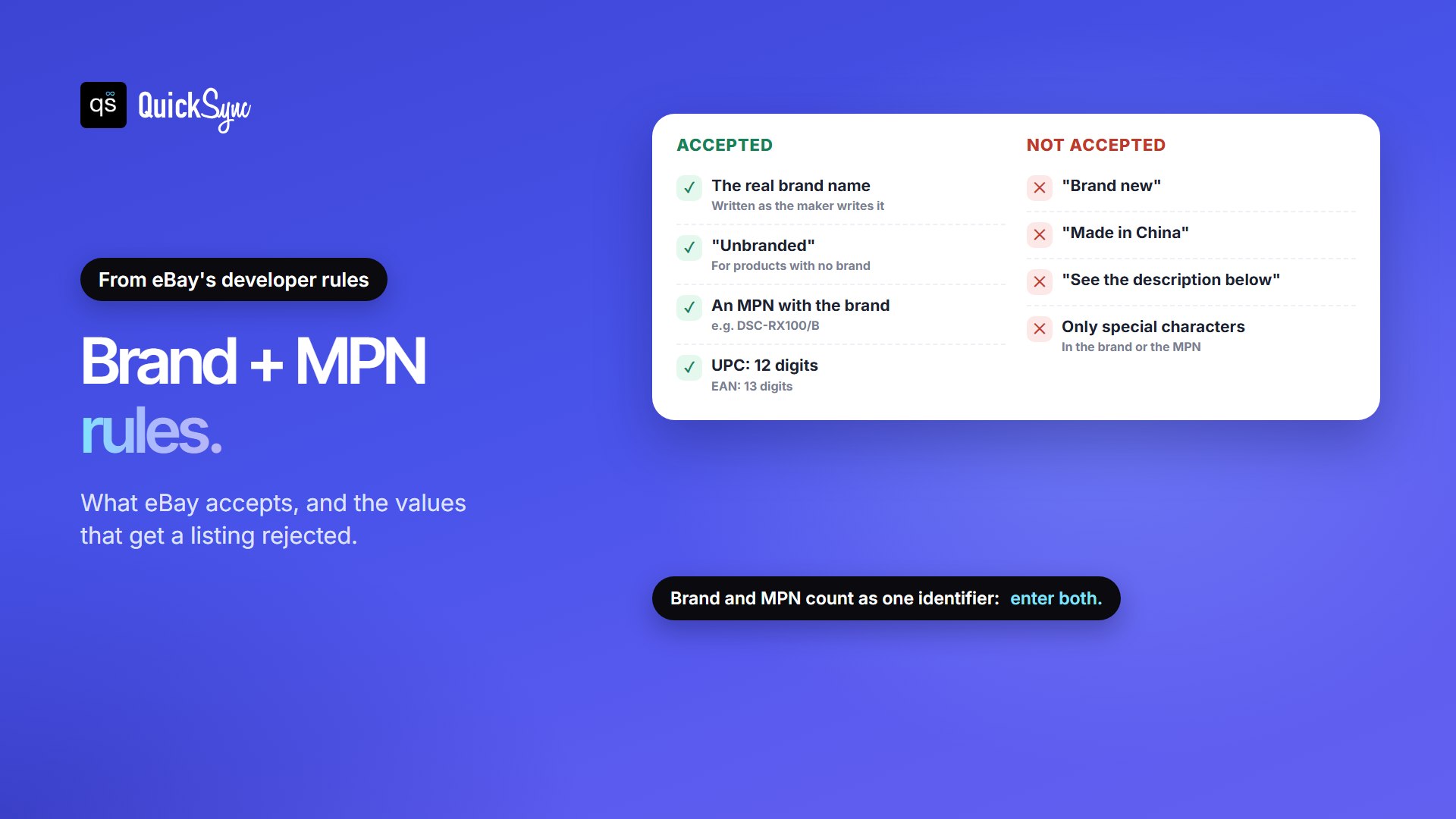
- Brand and MPN go together. eBay treats them as one identifier, called BrandMPN. An MPN without a brand doesn’t identify anything.
- The brand must be the real brand name. eBay rejects values such as “Brand new”, “Made in China”, “See the description below”, “100% compatible with listed model” or strings of only special characters.
- Unbranded is allowed. If the product genuinely has no brand, eBay accepts “Unbranded” as the brand.
- The MPN can’t be only special characters.
- Barcodes must be the right length. A UPC is 12 digits, an EAN is 13, and an ISBN is 10 or 13.
No MPN? When to Use “Does not apply” Option
Not every product has an identifier. eBay’s Seller Center says that if a product has no identifier, such as an antique, or you aren’t sure what it is, you can select “Does not apply”. Items that genuinely have none include:
- handmade or custom-made items
- vintage and antique pieces made before part numbers were common
- unbranded or generic goods with no manufacturer code
Treat it as a stopgap when the product does have a code. If you skip a real MPN or UPC, you lose the catalog match and the benefits below. eBay’s advice is that if you chose “Does not apply” or didn’t have the identifier handy, it’s well worth going back to fill it in.
If you sell on eBay sites in other countries, the wording changes. According to eBay’s product identifier text list:
| eBay site | “Does not apply” text |
|---|---|
| US, UK, Canada (English), Australia, Ireland, Malaysia, Philippines, Singapore, eBay Motors | Does not apply |
| Germany, Austria, Switzerland | Nicht zutreffend |
| France, Belgium (French), Canada (French) | Non applicable |
| Italy | Non applicabile |
| Spain | No aplicable |
| Netherlands, Belgium (Dutch) | Niet van toepassing |
| Poland | Nie dotyczy |
MPNs on Listings with Variations
If one listing has several variations, such as colors or sizes, each variation usually has its own MPN. eBay’s rules reflect that: the brand is set once for the whole listing, and each variation carries its own MPN, UPC or EAN. A camera sold in black and white, for example, would have one brand and two MPNs, one per color.
Why the MPN Matters
- It’s required in most categories. eBay says product identifiers are required when listing in most categories.
- It saves time. With a catalog match, eBay pre-fills fields such as the photo and title.
- It helps buyers find you. eBay says the biggest benefit is that identifiers increase the chances of a buyer finding your item. Our eBay SEO guide covers the other listing details eBay’s search looks at.
- It can cut returns. The right catalog match tells buyers exactly what they’re getting, and eBay says that could reduce return requests.
- It helps your research. Terapeak, eBay’s product research tool, can search by UPC, MPN, EAN or ISBN, as our Terapeak guide explains.
Selling the Same Product on Several Channels
If the same products also sell on Shopify, WooCommerce or Etsy, keep the brand, MPN and barcode in your product data, not just in eBay’s form. Then every new eBay listing starts with the right facts, and you’re not retyping codes product by product.
QuickSync builds eBay item specifics the same way. According to our eBay listing docs, item specifics come only from facts already in your product, never guesses:
- Your Shopify vendor, or your WooCommerce brand, fills eBay’s Brand.
- Options such as Size or Colour fill the matching item specifics.
- A labelled line in the title or description, such as “Material: Leather”, fills a required specific that nothing else did.
- If eBay requires a specific that your product doesn’t have, QuickSync stops before creating the listing. The product waits under Needs attention and names the field, so you can add it with Edit eBay item specifics and sync again.
Your SKU still does its own job. It goes in eBay’s Custom label field and matches the same product across your channels, so a sale on one channel updates the stock on the others.
FAQs
More for eBay sellers: how to sell on eBay, how to see sold items on eBay and eBay seller protection.