A lot of bad buys on eBay start with a guess. You see a price on a live listing, assume that’s what it sells for, and pay too much for the stock.
Terapeak fixes that with real numbers. eBay’s free research tool shows up to 3 years of eBay sales data for millions of items, including the price a buyer actually paid when a Best Offer was accepted. The catch is that Terapeak isn’t called Terapeak any more, and most sellers never open it.
This guide shows you where to find it, what each number means, how to search it properly, and how to turn the data into the most you should pay for an item. Everything was checked against eBay’s help and Seller Center pages on 28 October 2026.
What is Terapeak?
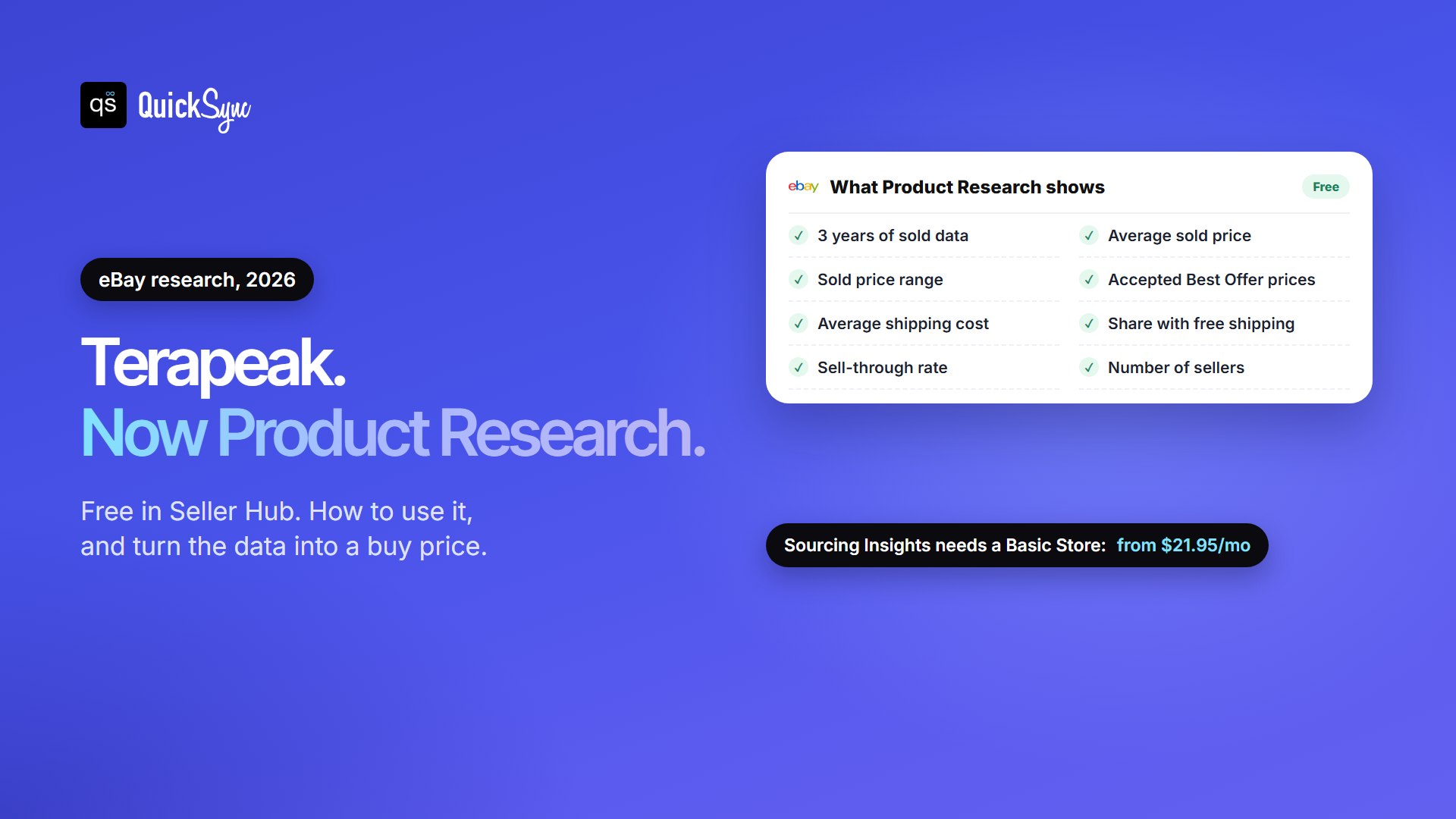
Terapeak is eBay’s market research tool, now called Product Research. It’s free for sellers in the Research tab of Seller Hub and in the eBay app. It shows up to 3 years of eBay sales data: average sold prices, price ranges, shipping, sell-through rates and how many sellers sold an item.
Terapeak started as a Toronto company that analysed marketplace sales data. eBay completed its purchase of Terapeak in December 2017 and built the tool into Seller Hub. Today it comes in two parts:
- Product Research: search sold data for any item or keyword. This is the part most people mean by “Terapeak”.
- Sourcing Insights: find categories with high demand and not enough listings, so you know what stock to look for.
Is Terapeak free?
Product Research is free. Sourcing Insights comes with an eBay Store subscription:
| Tool | Who gets it | Cost |
|---|---|---|
| Product Research | Sellers with access to Seller Hub | Free |
| Sourcing Insights | Business sellers with a Basic Store or above | Included in the Store. Basic costs $27.95 a month, or $21.95 a month on a yearly plan |
You don’t need to pay for a separate Terapeak subscription. That was the old model, before eBay bought the company.
How to open Terapeak on eBay
On a computer:
- Sign in to eBay and open Seller Hub.
- Select the Research tab.
- Choose Product research, or Sourcing insights if you have a Store.
In the eBay app (iOS and Android): update the app, open the Selling tab, scroll to the Product Research banner and tap Get started. eBay added it to the app in May 2024. The app also has a handy Sell one like this button, which starts a new listing pre-filled from a similar sold item (for items sold in the last 90 days).
If you use Team access on your account, the people you give access to can use Product Research too.
What data Terapeak shows
For any search, Product Research works out these numbers for you:
| Metric | What it tells you |
|---|---|
| Average sold price | What the item typically sells for. Your starting point for pricing. |
| Sold price range | The lowest and highest sale. A wide range means condition, completeness or listing quality matter a lot. |
| Average shipping cost | What buyers paid for shipping, and how many listings offered free shipping. |
| Sell-through rate | How many listings sold compared with how many were listed. Only shown for searches of items sold in the last 90 days or less. |
| Total sellers | How many sellers sold the item. Many sellers means a crowded market. |
| Selling format | Whether it sold by auction or fixed price. |
| Sales trends | How sales and prices moved over time, which shows seasonality. |
One detail matters more than it looks. When a buyer’s Best Offer is accepted, Product Research shows the price they actually paid. A normal eBay search only shows the listed price, which can be well above what the item really sold for.
How to use Terapeak, step by step
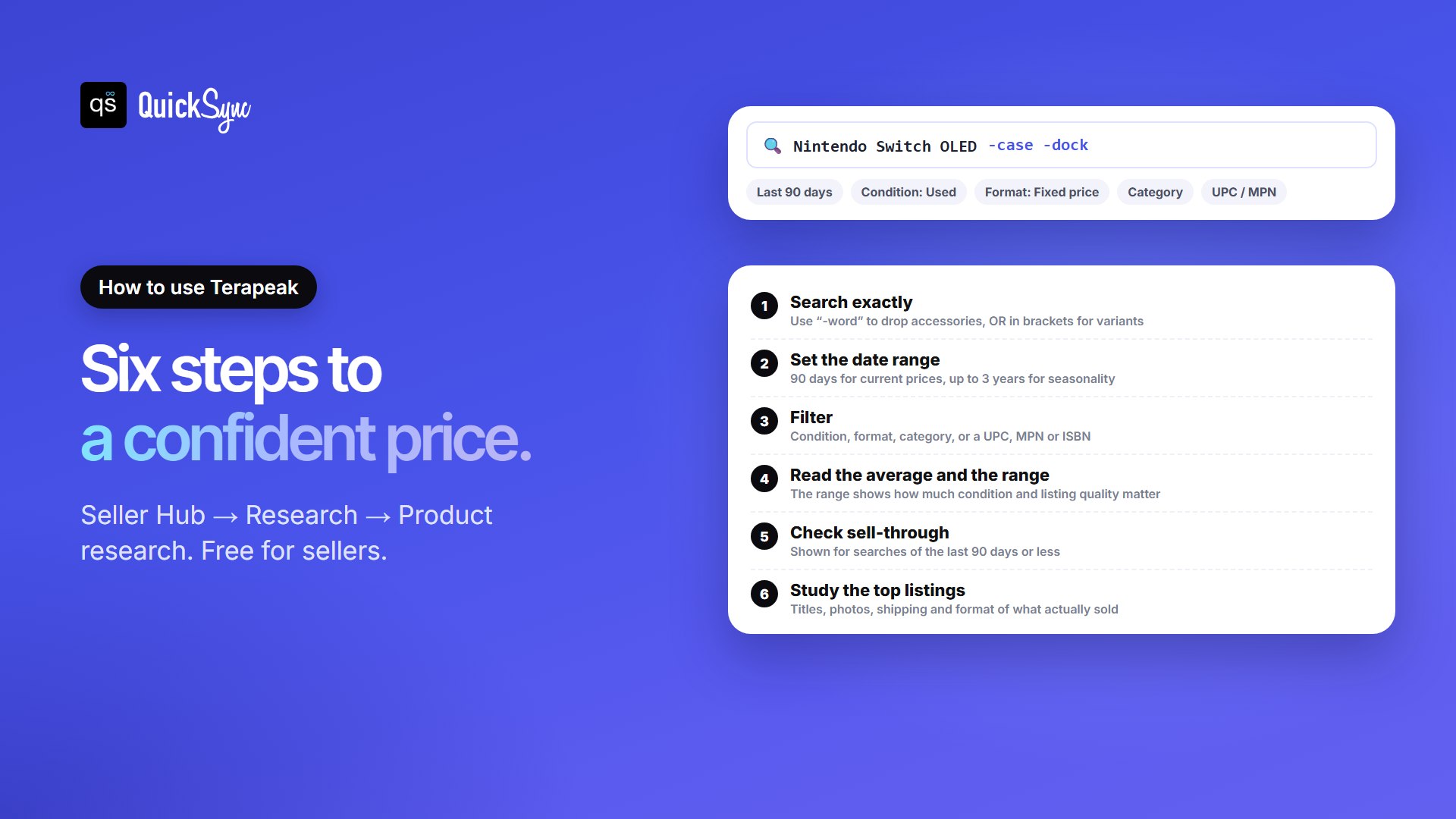
1. Search exactly
Product Research only returns sales that match your search, so the words you type decide the answer. Use eBay’s search logic to keep the results clean:
- All words must match.
Nintendo Switch OLEDreturns sales with all three words in the title. - Exclude with a minus or AND NOT.
Nintendo Switch OLED -case -dockdrops accessory listings that would drag the average down. - Group variants with OR.
iPhone XS Max AND (64GB OR 256GB)covers both storage sizes in one search.
2. Set the date range
You can pick anything from one day to 3 years. Use the last 90 days for today’s prices and to see sell-through. Use a year or more to spot seasonal peaks, such as toys before December.
3. Filter
Narrow by condition, listing format, sale price range, buyer or seller location, or eBay marketplace. Pick a category to unlock filters such as model and colour. For exact products, search by UPC, MPN, EAN, ISBN or eBay product ID instead of keywords.
4. Read the average and the range
Start with the average sold price, then look at the range. If most sales cluster near the average, pricing is predictable. If they’re spread wide, sort the results and see what the expensive ones did differently, such as better photos, original boxes or free shipping.
5. Check sell-through
Sell-through shows how many listings sold compared with how many were listed, for searches of the last 90 days or less. eBay doesn’t publish a “good” number, so use it to compare. If one variant or condition sells through far better than another, that’s the one to stock.
6. Study the top listings
Open the best-selling listings and look at their titles, photos, item specifics, shipping and format. Copy what works into your own listing. Listings sold in the last 90 days, and active ones, open when you click them. Older ones may no longer be viewable.
Turn Terapeak data into a buy price
The point of research is to know what you can afford to pay. Work backwards from the average sold price:
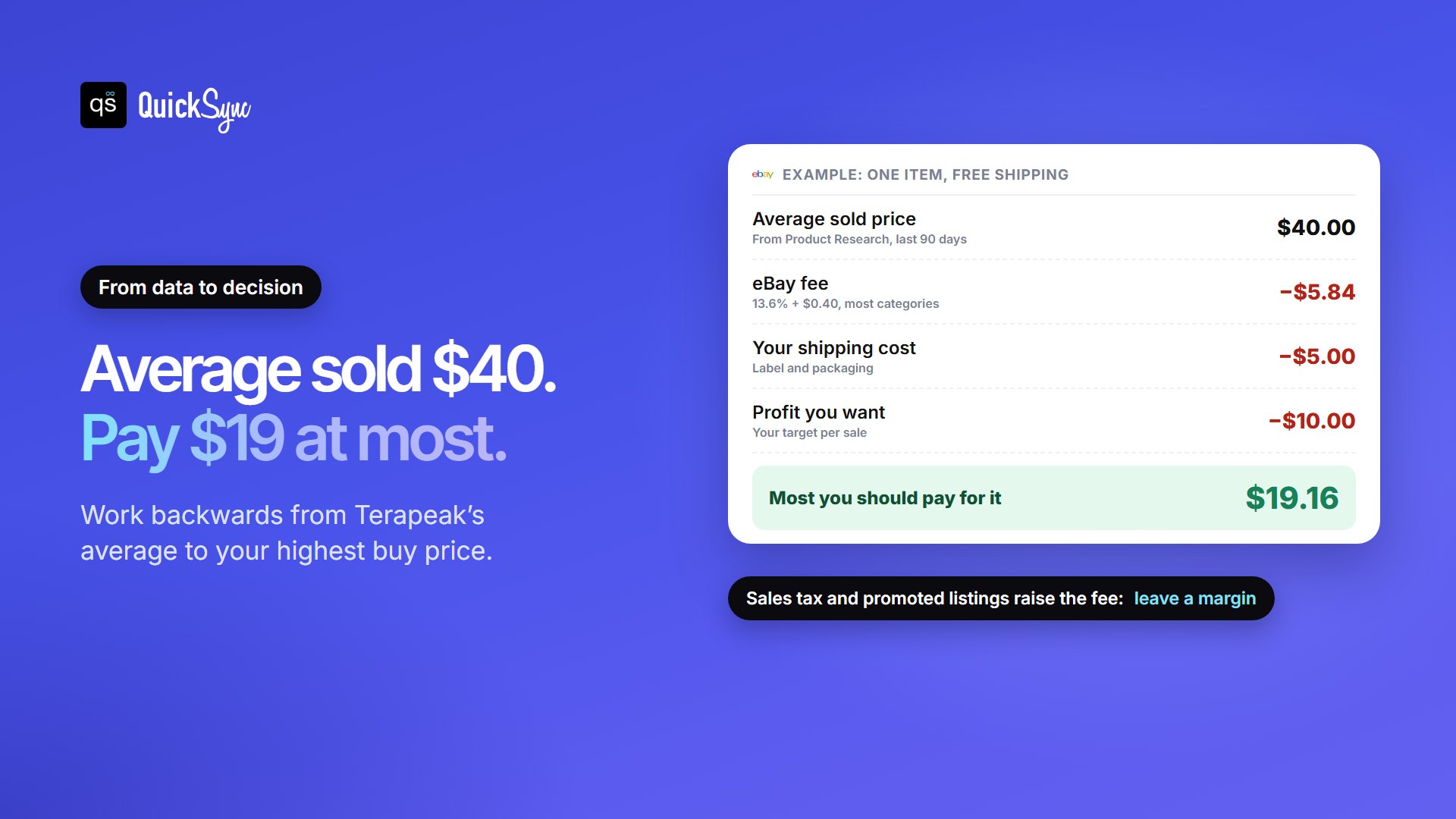
| Average sold price, free shipping | $40.00 |
| eBay fee: 13.6% of $40 + $0.40 | −$5.84 |
| Your shipping cost | −$5.00 |
| The profit you want | −$10.00 |
| The most you should pay | $19.16 |
Leave yourself a margin for promoted listings, returns and slow sales. To run your own numbers, use our free eBay fee calculator.
Terapeak vs eBay sold listings
Both are free. The sold listings filter on a normal eBay search is quick for a rough check. Product Research is better when the decision matters:
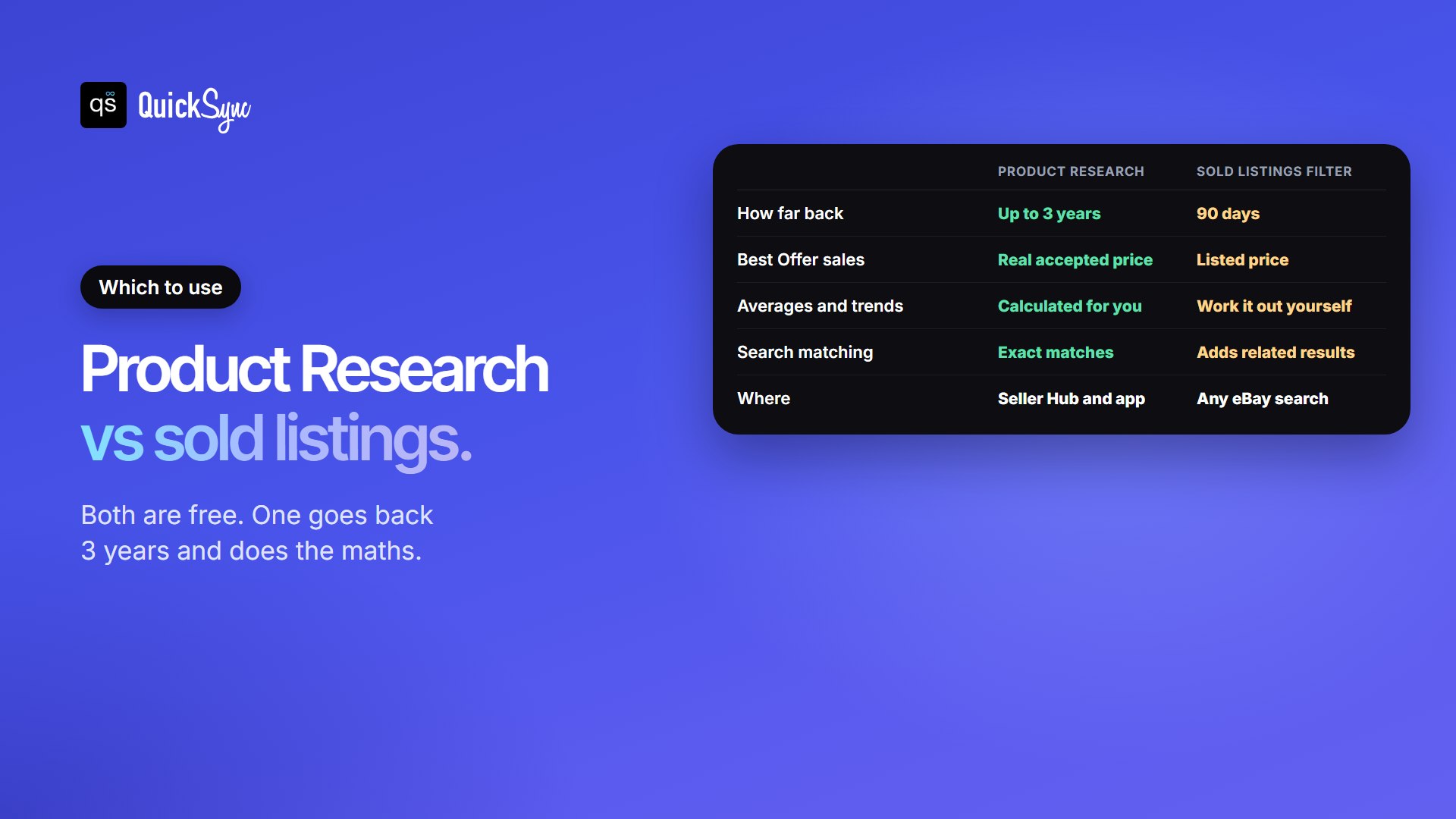
| Product Research (Terapeak) | Sold listings filter | |
|---|---|---|
| How far back | Up to 3 years | 90 days |
| Best Offer sales | The real accepted price | The listed price |
| Averages, ranges and trends | Calculated for you | You work them out |
| Matching | Exact matches to your search | Often adds related results |
| Where | Seller Hub and the eBay app | Any eBay search |
For the quick method, see our guide on how to see sold items on eBay.
Sourcing Insights: is a Basic Store worth it?
Sourcing Insights looks at categories instead of single products. eBay says it helps you:
- Find categories with high demand and low supply, which eBay marks as “Great Opportunity”.
- See trends over time and get ahead of seasonal demand.
- Find the top item specifics in a category.
- Source from sold single-stock listings to see what’s in or out of stock.
It’s worth it if you already want a Store for its other perks, such as more free listings each month, or if you buy stock in volume and need ideas for what to source next. If you research one item at a time, free Product Research is enough.
Terapeak tips and limits
- Small samples mislead. If a search returns a handful of sales, widen the date range before trusting the average.
- Exact matching cuts both ways. A spelling variant or missing model number can hide sales. Try a second search with different wording.
- Sell-through needs a short range. It only shows for searches of 90 days or less.
- It’s eBay data only. It tells you what sold on eBay, not on Amazon, Etsy or TikTok Shop.
- The past isn’t a promise. Trends, new releases and more sellers piling in can move prices fast. Check again before you restock.
Found a winner? Sell it on more than eBay
Terapeak shows you what sells on eBay. The same product often sells on TikTok Shop, Shopify, Etsy or at a counter too. Listing it in more places reaches more buyers, but it creates a new problem: one stock pool and several shops. Sell your last unit on eBay, and the listing on another channel stays live. If it sells there too, you cancel an order and your seller rating takes the hit.
That risk is highest for resellers. A thrift find, a vintage piece or a trading card is one of a kind, so any double sale ends in a cancellation.
QuickSync links eBay with TikTok Shop, Shopify, Etsy, Square, WooCommerce and Amazon. It matches each product by SKU and updates stock on every channel when something sells. Our guide to what a SKU is explains how to set them up.
FAQs
More guides for eBay sellers: how to sell on eBay, the eBay Seller Hub dashboard, eBay Top Rated Seller requirements and how to combine shipping on eBay.