eBay Promoted Listings are eBay’s ads for your own listings. You pay to show an item higher in search results and other sponsored spots, either as a percentage of the sale or per click. Sellers argue about them constantly, and the reason is simple: the fee is easy to set, but hard to judge. You can see what you paid, but not which of those sales you’d have made anyway.
This guide covers how each campaign type charges you, the 30-day rule most sellers misunderstand, what promoting costs on a real $50 sale, and how to tell whether it’s paying off. Every rule below comes from eBay’s own help pages, checked in November 2026.
eBay Promoted Listings: The Quick Answer
With a General campaign, you pay a percentage of the total sale (2% to 100%, your choice) only if the item sells within 30 days of a click on your ad, by any shopper. With a Priority campaign, you pay per click from a daily budget. Promoted listings are worth it when they bring sales you wouldn’t get otherwise and your margin covers the fee. Start low, around 2% to 5%, and measure.
What are eBay Promoted Listings?
Promoted Listings are part of eBay Advertising. They put your items in sponsored placements across eBay, including search results and product pages, marked as ads. eBay now offers two campaign strategies for them, plus an offsite option. (eBay Advertising also includes Promoted Stores, which advertises your whole eBay Store rather than single listings.) If you’ve seen older guides talk about “Standard” and “Advanced” campaigns, those are today’s General and Priority.
| Key Points | General | Priority | Promoted Offsite |
|---|---|---|---|
| You pay | A % of the total sale, only when the item sells | Per click | Per click |
| You control | Ad rate, 2% to 100%, fixed or dynamic | Target daily budget ($3 minimum), keywords and bids | Target daily budget |
| Ads appear | eBay placements, and by default sponsored spots off eBay too | Priority access to eBay placements | External sites such as Google |
| A sale counts if | The item sells within 30 days of a click on the ad by any buyer | The clicking buyer buys within 30 days | The clicking buyer buys anything from you within 30 days |
| Listings | Mainly fixed price, most categories | Fixed price only; no auctions, out-of-stock or some categories | Eligible fixed price listings |
To use either strategy, eBay says you need to be an Above Standard or Top Rated seller with enough account activity. If you’re not sure where you stand, our guide to the eBay seller dashboard shows where to check.
How General Campaigns Charge You: The 30-day “any buyer” Rule
Most sellers start with General because it looks risk-free: no sale, no fee. Two details make it more expensive than it first appears.
- A “click” is any interaction with the ad. eBay counts adding to a watchlist, adding to cart or a quick view, not just opening the listing.
- The buyer who pays doesn’t have to be the one who clicked. In eBay’s words, the fee is charged “when a buyer purchases the promoted item from a general ad that any buyer clicked on in the most recent 30 days.” The item has to be promoted both when the click happens and when it sells.
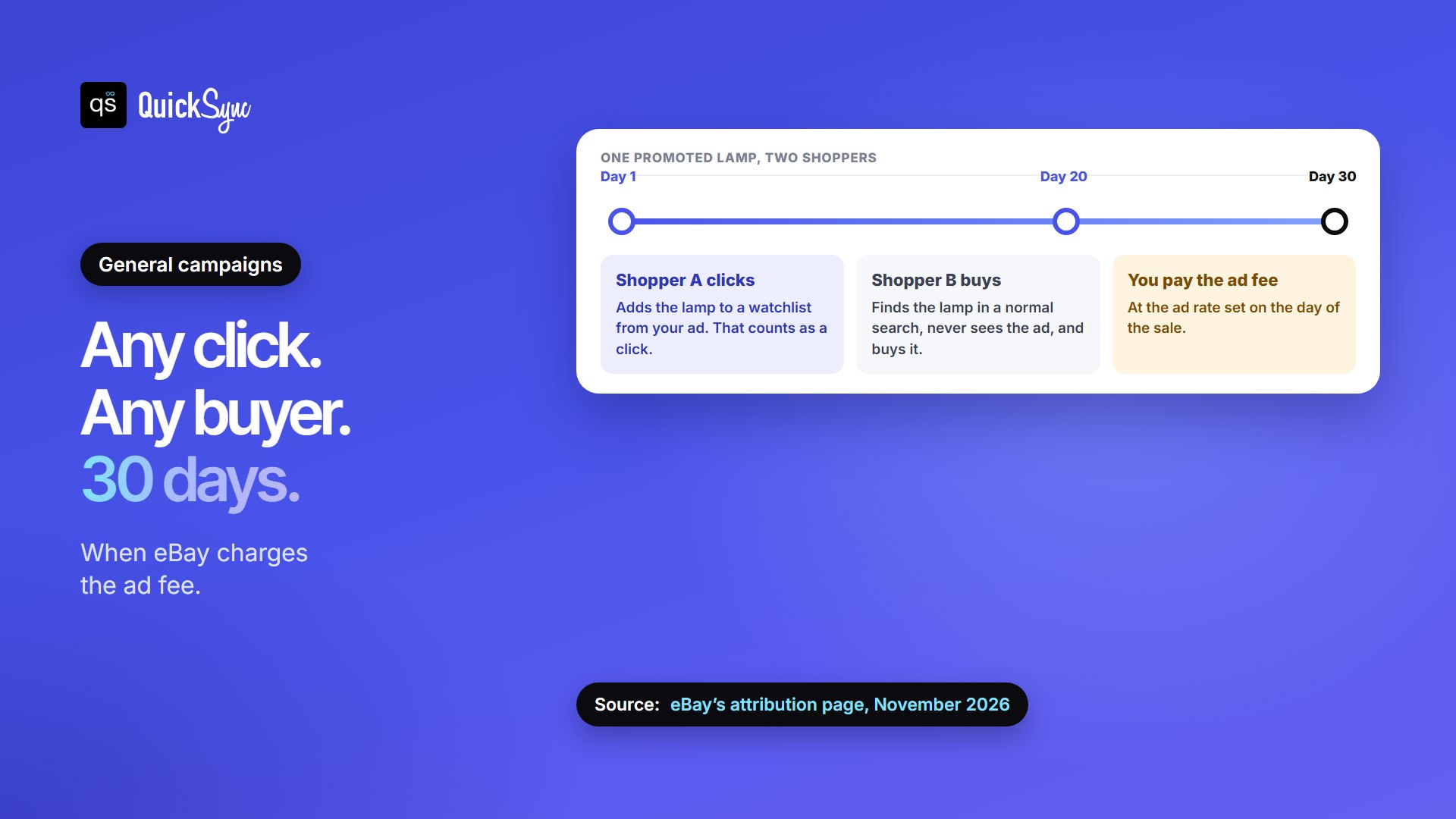
Here’s how that plays out. On day 1, a shopper sees your promoted lamp and adds it to their watchlist. On day 20, a different shopper finds the same lamp through a normal search and buys it. You pay the ad fee on that sale, at whatever ad rate is set on the day it sells. This is the change sellers have been venting about on Reddit and YouTube in 2026, and eBay’s attribution page confirms it.
A few more rules from eBay’s FAQs:
- Several clicks on one listing don’t mean several fees. You pay once, when it sells.
- On a multi-quantity listing, each purchase is charged at the rate from that buyer’s last click.
- If you accept a Best Offer or change the ad rate, the fee uses the rate in effect at the time of the sale.
- Relisting carries the promotion over to the new listing, including auctions that relist automatically. Turn it off in the relist flow if you don’t want that.
How Priority Campaigns Charge You
Priority is cost per click. You set a target daily budget, from $3 up, and eBay charges for clicks up to that amount. Some days can run over, but a full month won’t exceed 30.4 times your daily budget. So $10 a day caps out at $304 a month.
You choose Smart targeting, where eBay picks buyers and bids, or Manual targeting, where you set keywords, negative keywords and a maximum cost per click. Priority also reports “Halo” sales: a buyer clicks one promoted item and buys a different item from you within 30 days. You don’t pay extra for those, because Priority only ever charges for clicks.
Priority suits sellers who want control and will check the numbers weekly. If you’d rather set one rate and leave it, General is simpler.
What Promoted Listings Cost on a $50 Sale
The ad rate is charged on the total sale amount, which eBay defines as the item price plus shipping, handling and sales tax. eBay’s final value fee is calculated on that same total. Say you sell a $50 item with free shipping in most categories, and the buyer pays $4 in sales tax, so the total sale is $54:
| Ad rate | Final value fee (13.6% + $0.40) | Ad fee | eBay’s total take | Left from your $50 |
|---|---|---|---|---|
| Not promoted | $7.74 | $0 | $7.74 | $42.26 |
| 2% | $7.74 | $1.08 | $8.82 | $41.18 |
| 5% | $7.74 | $2.70 | $10.44 | $39.56 |
| 10% | $7.74 | $5.40 | $13.14 | $36.86 |
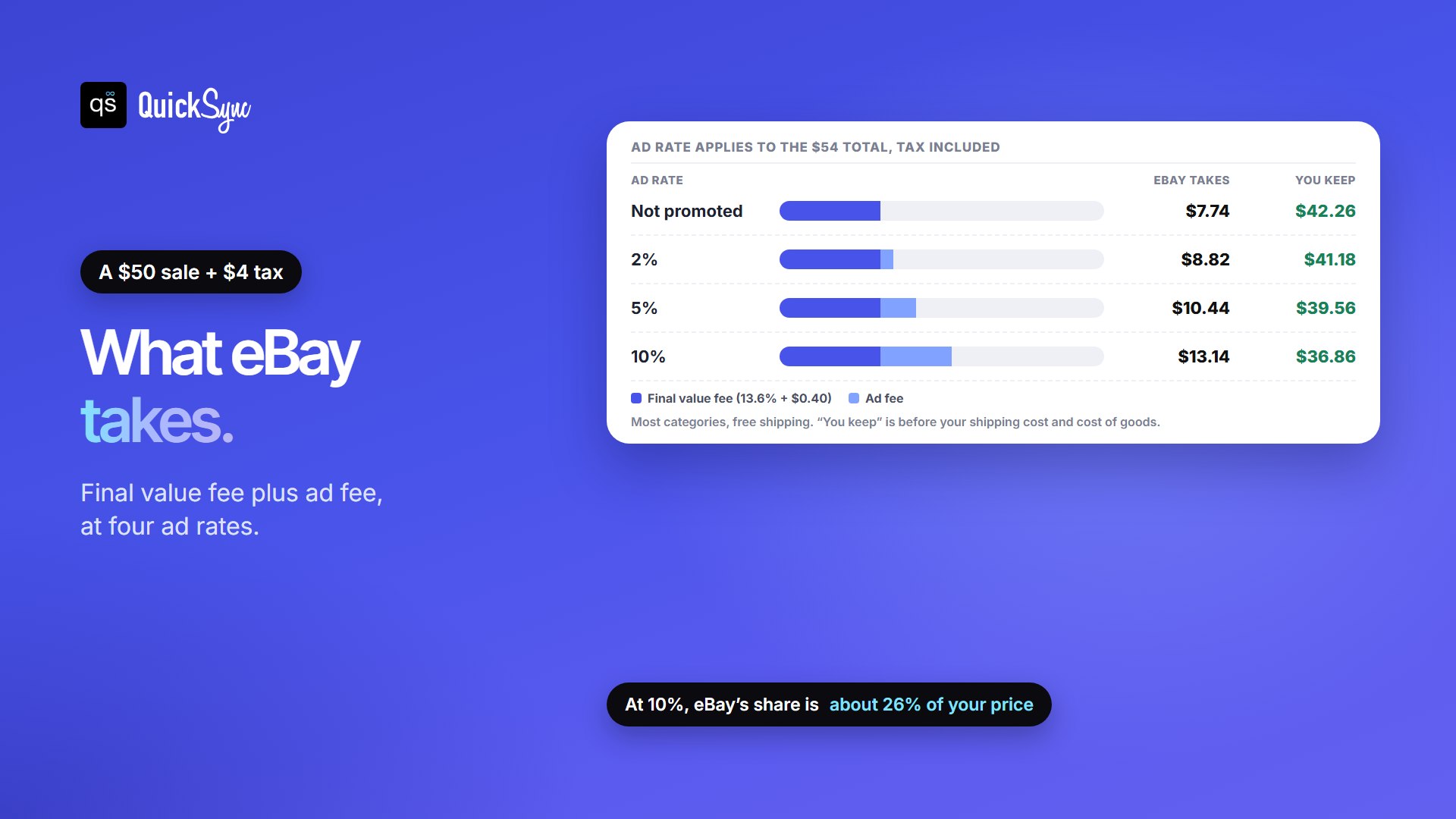
Because the rate applies to the tax-inclusive total, a 10% ad rate costs you more than 10% of your price. At 10%, eBay’s share of this sale rises from about 15% to about 26% of the item price. Our breakdown of eBay seller fees covers the other charges, and an eBay Store subscription can lower the final value fee in some categories.
Are eBay Promoted Listings Worth it?
They’re worth it when the extra sales they bring are worth more than the fees on every sale eBay attributes to them. That second part matters, because with General, eBay attributes sales you might have made without the ad.
Here’s an illustration with made-up numbers. You sell 10 of that $50 item a month without ads, and each one leaves you $15 after fees, shipping and cost of goods. You promote at 5% and sell 14, and eBay attributes 12 of them to the ad.
- Ad fees: 12 sales × $2.70 = $32.40.
- Extra profit: 4 extra sales × $15 = $60.
- Result: about $27.60 better off. But if promotion had brought only 2 extra sales, you’d be about $2.40 worse off, even though the dashboard shows 12 “ad sales.”
As a rule of thumb, promotion tends to pay on generic, competitive items where your listing would otherwise sit deep in search. It’s weaker on one-of-a-kind items that already sell steadily, listings with lots of watchers who’d likely buy anyway, and anything where the ad rate eats most of your margin.
Even eBay is careful: its help page says that setting the suggested rate “generally delivers significantly better performance” but is “not always a guarantee,” and that higher rates can raise visibility while “conversion may lag.”
To find out for your own shop, compare a month of sales before and after promoting the same items, not just the “sales” figure in the Advertising dashboard. Before you pay for visibility, make sure the listing itself is strong. Our guide to eBay SEO covers the free ranking factors, and sold listings or Terapeak show whether the price is right.
How to Promote Listings on eBay (General Campaign)
- In Seller Hub, open the Advertising menu, go to Campaigns and select Create new campaign.
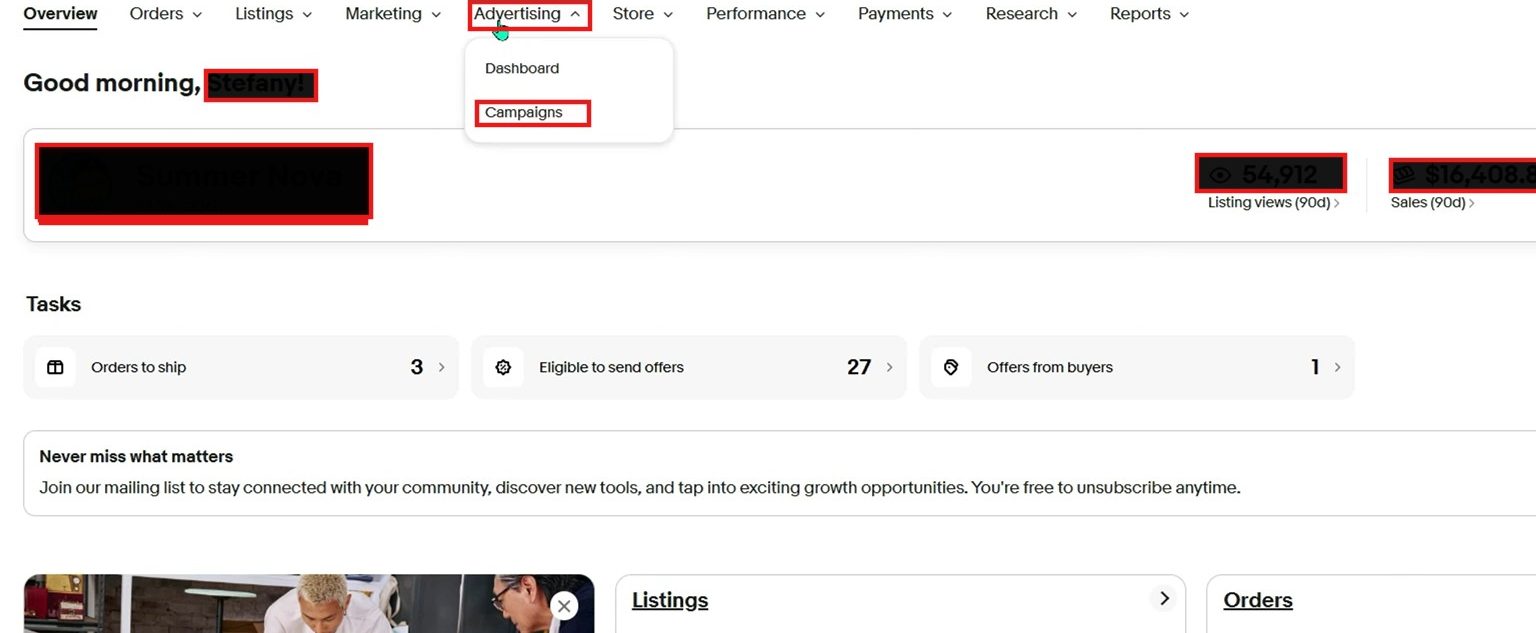
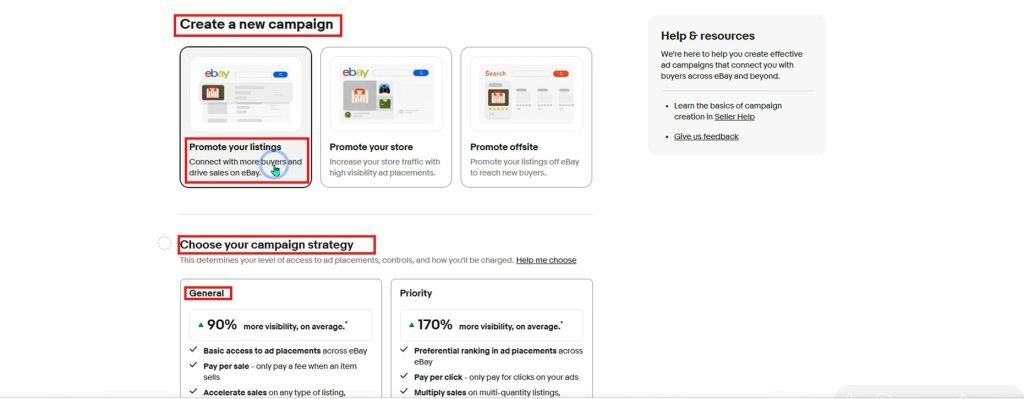
- Choose Promote your listings, then the General campaign strategy.
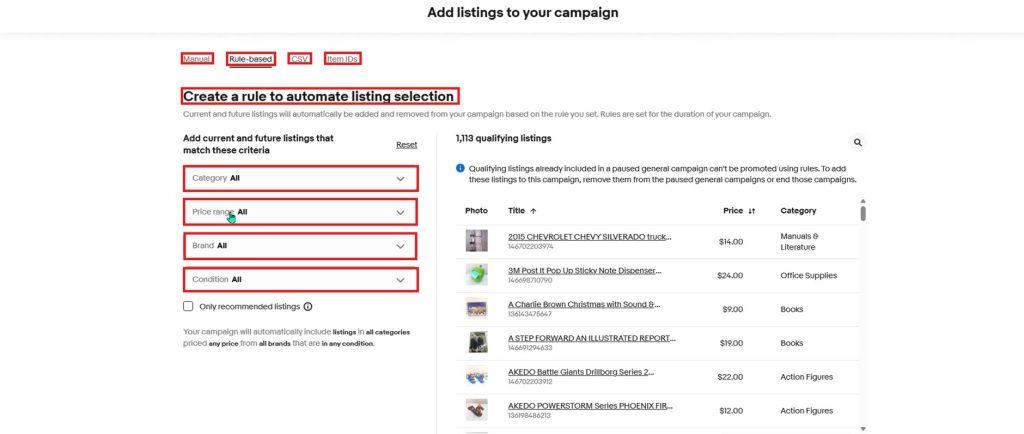
- Add listings: pick them by hand, enter item IDs, upload a CSV, or create a rule by category, price range, brand, condition, days on site or quantity. Rules add new listings that match, every day.
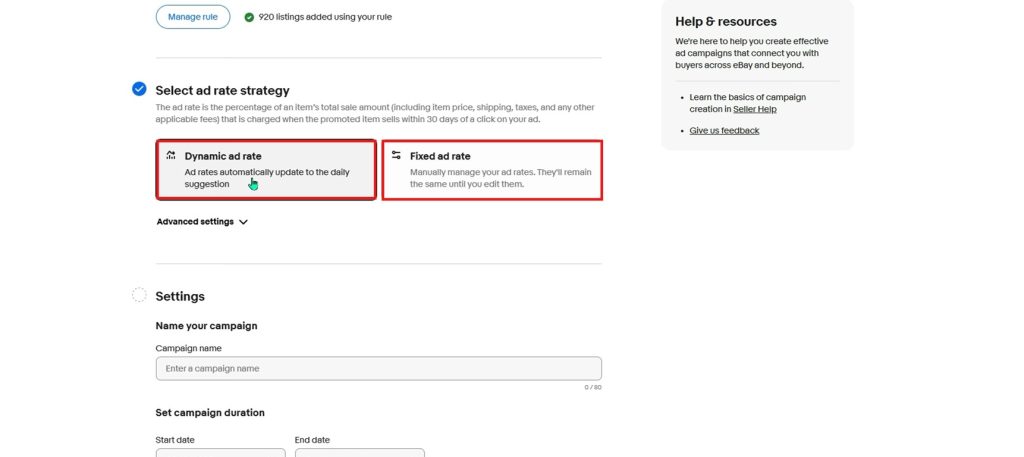
- Choose an ad rate strategy: Dynamic follows eBay’s daily suggested rate; Fixed stays where you set it.
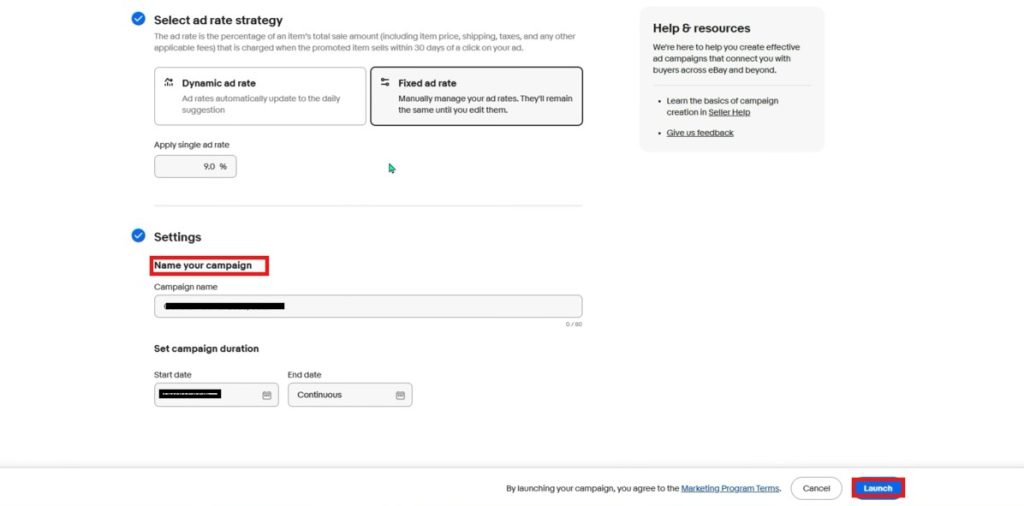
- Name the campaign, set start and end dates, and launch.
You can also promote from My eBay Active or Seller Hub Active listings, or straight from the listing tool. In the eBay app, Easy boost promotes every eligible listing at one rate: go to Selling, Advertising, Easy boost, set the rate with the slider and tap Promote all listings. It also applies to listings you add later, so check it before a big upload.
Choosing an ad rate
- Start low on a fixed rate, around 2% to 5%, on a group of similar items. Many sellers find the suggested rate higher than their margins allow.
- Give it 30 days. eBay’s attribution window is 30 days, and dashboard figures can take up to 72 hours to settle.
- Watch ROAS and sales conversion, not impressions. ROAS is sales divided by ad fees, and eBay shows it in the Advertising dashboard.
- Raise rates only where the extra sales show up, and cut them where sales look the same as before.
You may have seen posts claiming eBay raised the minimum ad rate to 5%. eBay’s General campaign page still lists a range of 2% to 100% as of November 2026. Check your own campaign screen, since eBay can change it.
Off-eBay placements
By default, listings in General campaigns can also show in sponsored placements off eBay, including search engines. If you want General ads on eBay only, eBay has an opt-out request form, and it takes about 7 days to apply. Promoted Offsite is the separate, per-click product built for Google and other external sites. A Promoted Offsite sale counts if the clicking buyer buys anything from you within 30 days.
Promoting on eBay while You Sell Elsewhere
If the same stock also sells on Shopify, Etsy, Amazon, or at a till, promotion adds two problems that are easy to miss.
- eBay becomes your most expensive channel. A 5% ad rate on top of eBay’s fees can make the same item earn noticeably less there. Some sellers price eBay slightly higher to cover it.
- Promoted items sell faster. That’s the point, but a quick run of eBay sales is exactly when a separate stock count on your other channels oversells the last units.
QuickSync handles both. On the Ultra plan and above, its eBay price adjustment adds a percentage or fixed amount to your main store’s price, so eBay can carry the cost of the ad. It checks eBay every 2 minutes for new sales and sends changes to eBay as soon as another shop reports one, so every channel works from one stock count. QuickSync doesn’t set or manage your eBay ad rates; that stays in Seller Hub.
If you’re still setting up, our guides to selling on eBay and eBay business policies cover the basics, and eBay listing software helps if you list in bulk.
FAQs
More eBay guides: eBay seller fees, eBay Store subscriptions, eBay SEO, and our eBay integration page.