eBay’s normal search bar is fine for browsing, but it’s a blunt tool when you need something specific: an auction ending in the next hour, a listing from one seller, or every result that doesn’t say “parts only”. That’s what eBay Advanced Search is for. It packs more than 20 options onto one page, yet eBay’s own help article on it takes about a minute to read.
To open eBay Advanced Search, select Advanced next to the search bar on most eBay pages on a computer, or go straight to ebay.com/sch/ebayadvsearch. It isn’t available in the eBay app.
This guide explains every filter on the page, the five ways to search, and ready-made searches for buyers and sellers. Everything here comes from eBay’s live Advanced Search page and its help pages, checked in November 2026.
How to Open eBay Advanced Search
On a computer, select Advanced next to the search bar, which appears on most eBay pages. Or open ebay.com/sch/ebayadvsearch directly.
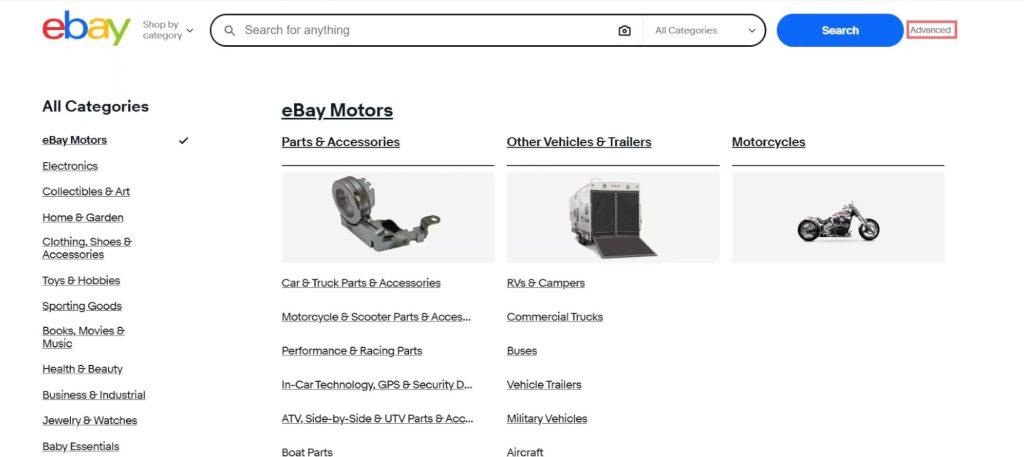
Then choose what to search for: items or stores, and enter your keywords and tick the filters you want.
Select Search.
Those steps come from eBay’s Advanced search help page. You can narrow things further with the filters on the results page. Bookmark the direct link if you use Advanced Search often, because it saves a click every time.
The Five Ways to Search
The menu on the Advanced Search page offers five search types. Most guides only cover the first.
| Search type | What it does | Use it to |
|---|---|---|
| Find items | The full filter form, covered below | Search everything with exact filters |
| By seller | Shows items from one or more sellers’ user IDs | Browse a favorite seller or check a competitor |
| By item number | Opens one listing from its item number | Find a listing you saved the number of |
| Items in stores | Searches only items sold through eBay Stores | Shop from established sellers |
| Find stores | Searches for eBay Stores themselves | Find a shop by name or specialty |
Every eBay Advanced Search Filter, Explained
Here’s everything on the Find items form, top to bottom:
| Filter | Options | Use it to |
|---|---|---|
| Keywords or item number | Free text | Say what you’re looking for |
| Keyword options | All words, any order; Any words, any order; Exact words, exact order; Exact words, any order | Control how strictly your words must match |
| Exclude words | Free text | Hide listings that mention “broken”, “parts” or “box only” |
| In this category | All Categories, or one top-level category, including eBay Motors | Stop a search for “mouse” returning pet toys |
| Search including | Title and description; Completed items; Sold items | Search deeper than titles, or see past sales |
| Price | From $ to $ | Set a budget or a price band |
| Buying format | Accepts offers; Auction; Buy It Now; Classified ads | Choose how you want to buy |
| Condition | New; Used; Not specified | Filter by condition |
| Show results | Free returns; Returns accepted; Authorized seller; Deals and savings; Sale items; Listed as lots; Benefits charity; Authenticity Guarantee | Find safer buys, discounts or bulk lots |
| Items | Ending within, Ending in more than, or Started within 1 hour to 7 days | Catch auctions about to end, or see new listings |
| Number of bids | From and to | Find auctions with little competition |
| Multiple items | Quantity from and to | Buy several of the same item |
| Shipping options | Free shipping; Local pickup | Avoid shipping costs or collect in person |
| Item location | US Only; North America; Worldwide; Located in a country; Available to a country | Get faster delivery or avoid import fees |
| Sellers | Specific sellers’ user IDs, set to Include or Exclude | Shop one seller or hide sellers you avoid |
| Sort by | Ending soonest; Newly listed; Price + Shipping lowest or highest first; Distance nearest first; Best match | Put the most useful results first |
| View and results per page | List or gallery; 60, 120 or 240 results | See more listings at once |
Keyword options and excluded words
These four settings decide how eBay reads your search words. Say you search for leather tote bag:
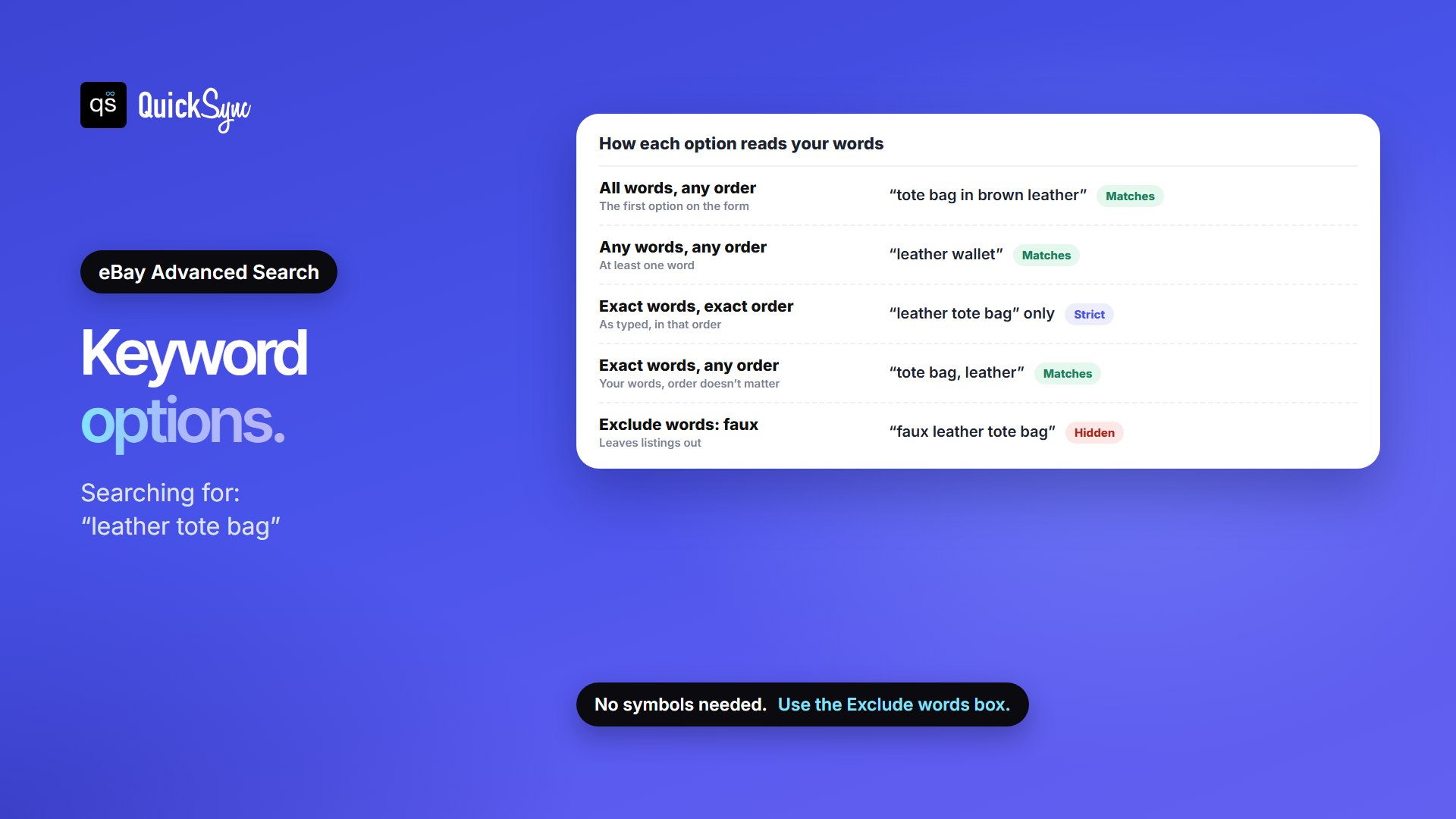
- All words, any order: every word must appear, in any order, so “tote bag in brown leather” counts. It’s the first option on the form.
- Any words, any order: at least one word must appear. That brings in any leather item, any tote and any bag, so expect a lot of results.
- Exact words, exact order: the words must appear exactly as you typed them, in that order. Use it for a model name or a set phrase.
- Exact words, any order: your exact words must appear, but the order doesn’t matter.
- Exclude words: hides any listing containing the words you add, such as faux or replica.
eBay’s current help pages don’t document search symbols such as the minus sign, so use the Exclude words box instead. It does the same job and you can see exactly what you’ve excluded.
Category and “search including”
Picking a category removes results from unrelated corners of eBay. Ticking Title and description searches the full listing text, which helps with model numbers or details sellers mention only in the description. The Completed items and Sold items boxes show listings that have already ended, which is how you research prices.
Price, format and condition
Set a price range, then choose a buying format. Accepts offers shows listings where you can make a Best Offer, which is often the quickest route to a lower price. Condition is a simple New, Used or Not specified, so open each listing to check details such as “new without tags”.
“Show results” filters
These tick boxes narrow results to listings with particular benefits. Free returns and Returns accepted lower your risk. Authenticity Guarantee shows items in eligible categories that eBay checks before they reach you. Listed as lots finds bundles, which resellers use to buy in bulk. Deals and savings and Sale items find discounted listings.
Timing, bids and quantity
Ending within 1 hour, combined with Auction and sorted by ending soonest, shows auctions you can still win. Started within 24 hours shows only fresh listings. Setting Number of bids to 0–2 finds auctions with little competition.
Shipping, location and sellers
Free shipping and Local pickup cut delivery costs. For US buyers, Item location set to US Only usually means faster delivery and no import fees. In Sellers, enter one or more user IDs, separated by commas or spaces, and choose Include to see only their items or Exclude to hide them.
Sold and Completed Listings in Advanced Search
Ticking Sold items shows listings that ended with a sale. Completed items shows every listing that ended, whether it sold or not. Results go back 90 days, and you need to be signed in. For the full steps, the app route, and how to see three years of sales, read our guide on how to see sold items on eBay.
Ready-made eBay Advanced Searches
Copy these filter combinations for common jobs.
For buyers
| Goal | Filters to set |
|---|---|
| Grab an auction about to end | Buying format: Auction. Items: Ending within 1 hour. Sort by: Time: ending soonest. |
| Shop near home | Shipping options: Local pickup. Sort by: Distance: nearest first. |
| Skip broken or empty-box listings | Exclude words: parts, broken, box only. Condition: New or Used. |
| Buy with less risk | Show results: Free returns, or Authenticity Guarantee for eligible items. |
| Find auctions few people have spotted | Buying format: Auction. Number of bids: 0 to 2. |
| Get it delivered fast | Item location: US Only. Shipping options: Free shipping. |
For sellers
| Goal | Filters to set |
|---|---|
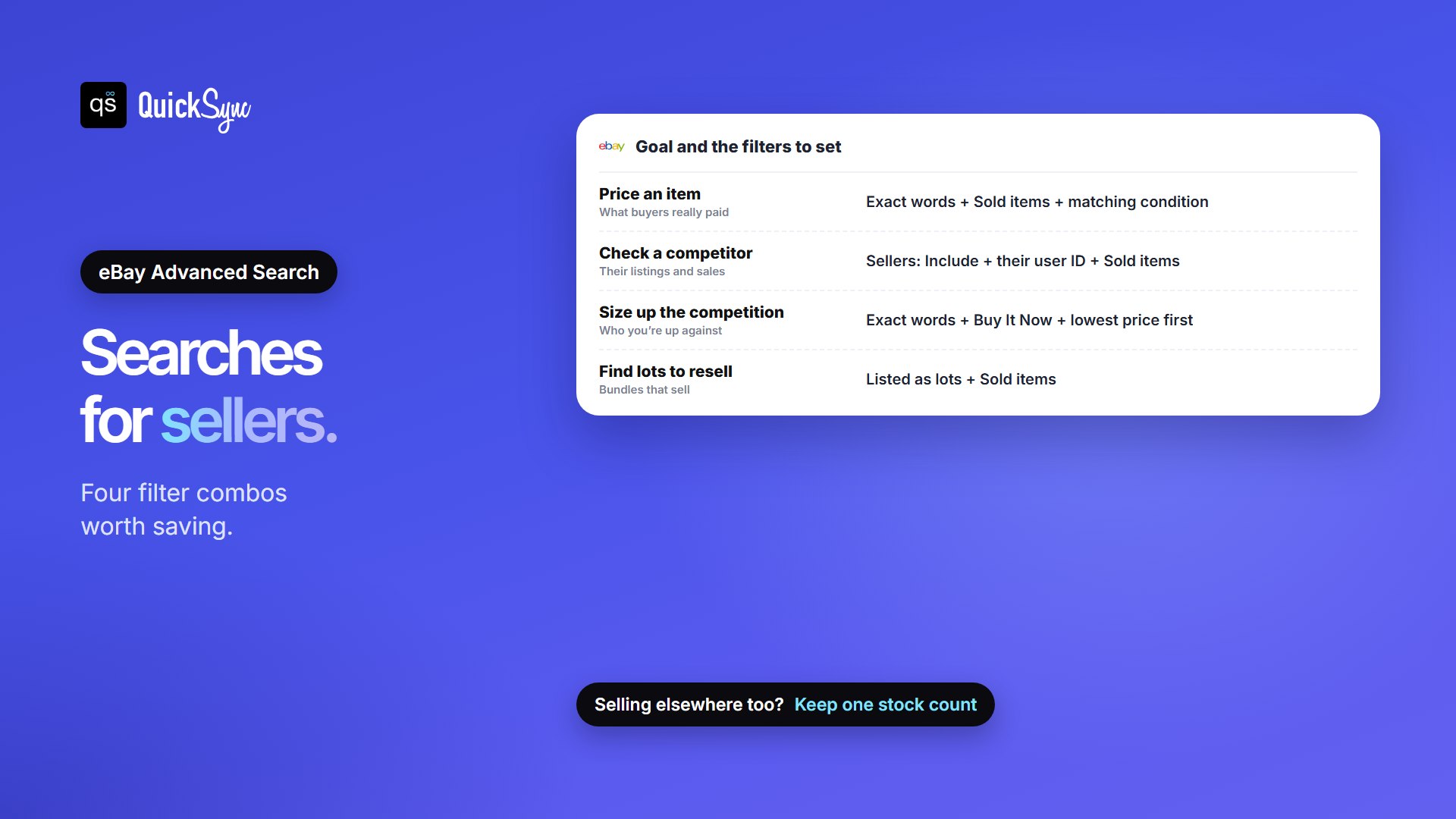
| Price an item | Exact words, exact order. Search including: Sold items. Condition to match yours. |
| Check a competitor’s listings | Sellers: Include, plus their user ID. Add Sold items to see what they sold. |
| Size up the competition | Exact words. Buying format: Buy It Now. Sort by: Price + Shipping: lowest first. |
| See what sells as a bundle | Show results: Listed as lots. Search including: Sold items. |
| Spot new competition | Items: Started within 24 hours. Sort by: Time: newly listed. |
Once you know the price, the next step is listing well. Our guides to eBay SEO and Terapeak (now Product research) go deeper on research and titles.
Advanced Search on the eBay App
eBay says Advanced Search isn’t available on mobile. In the app, search as normal, then use Filter and Sort on the results page. You can still narrow results by things like condition, price and buying format, and our sold items guide shows the app steps for sold listings. When you need the full form, for example to include or exclude specific sellers, use a computer.
Save an Advanced Search and Get Alerts
If you run the same search often, you should save it. These steps come from eBay’s saved searches help page:
- Save it: after searching, select Save this search at the top of the results page.
- Get alerts: eBay emails you when new items match. Saved searches also appear in your feed and under Saved on the homepage.
- Edit it: open the saved search, change the filters and save again. eBay creates a new saved search rather than changing the old one.
- Turn off emails: select the envelope icon on that saved search. Select the blue heart to delete it.
How eBay Ranks Search Results (for Sellers)
Buyers who don’t change the sort order see results by Best Match. According to eBay’s search help page, Best Match weighs:
- how closely a listing matches the search terms
- how popular the item is
- its price
- the buyer’s browsing history and the item’s location
- the seller’s track record and how complete the listing is
eBay also says promoted listings that match a search appear higher. For sellers, that means clear titles, complete item specifics and competitive prices all help. Our guide to eBay promoted listings explains when paying for visibility is worth it. eBay is also testing an AI-powered search, eBay.ai, with a limited number of buyers in the app.
There’s one more thing sellers can do: keep listings in stock. A listing that has sold out can’t sell to the next buyer, and if you sell the same item on several sites, one sale should update the count everywhere. Our guide to inventory management for eBay covers how.
FAQs
More for eBay sellers: how to sell on eBay, eBay Store subscriptions, how to block buyers on eBay and eBay alternatives.