Something sold and another store still shows the old count. Work down this list in order. The first two causes explain most cases, and each check takes under a minute.
1. Give it a few minutes
Most stores tell us about a sale as it happens. Etsy, eBay, Squarespace, TikTok Shop and Xero don’t, so we check them on a timer: an Etsy sale can take up to 5 minutes to reach your other stores, and eBay up to 2. Clover tells us about the order, but we only read its new stock about 30 minutes later. If the sale was on one of those, wait, then look again. The timing for every app is in How QuickSync works.
2. Open the product in QuickSync
Go to Products, find the product by name or SKU, and click it. The panel shows the stock we hold for each store and location. Its badge says Matched when the counts agree across your stores, Different when they don’t, and Review locations when it can’t compare them.
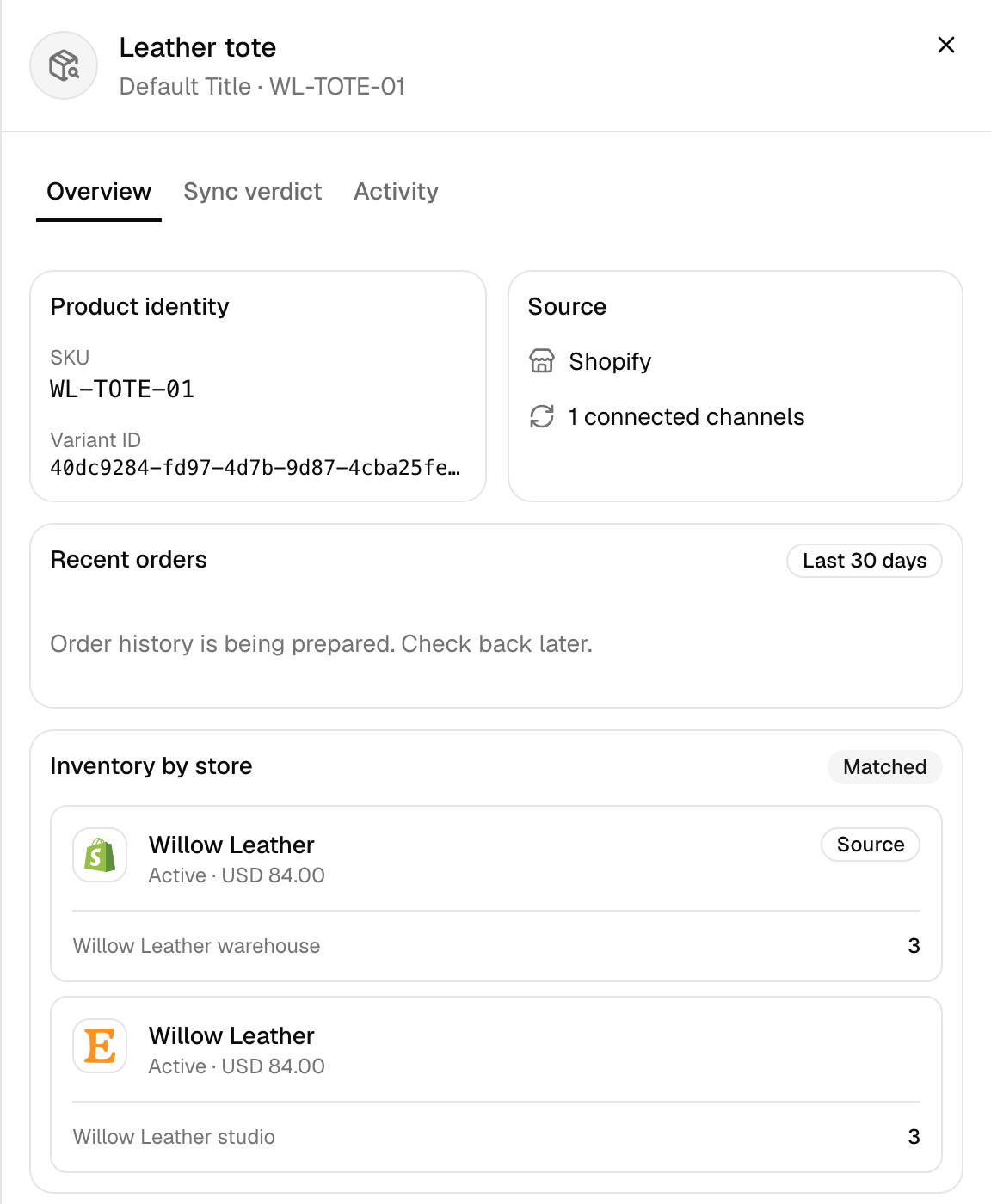
- The counts match the sale, but the store doesn’t. We have the new number and the store hasn’t taken it yet. With product syncing on, click Sync product to send it again, along with the product’s details from your main store.
- The product isn’t linked across your stores, or it’s under Needs attention. It isn’t syncing at all, and its status names the reason. What each product status means has the fix for each.
- The counts are wrong in QuickSync too. On Overview, the sync activity table lists the stock changes we sent and received, marked Synced or Failed. Search it for the SKU, then carry on down this list.
3. Check stock syncing is on
On the Products page, the Inventory Syncing card has a switch. If it’s off, no stock moves for any product. Stock syncing also stops if your plan ends, so check Settings, then Your plan, if the switch turned itself off.
4. Check where the sale came from
If a store has more than one location, we only sync the locations you’ve connected. A sale at a warehouse you haven’t connected doesn’t change anything in your other stores. Check under Settings, Connect locations. More in Locations.
5. Check a sync wasn’t running
While a first sync or a Sync products run is matching your catalogue, we hold stock updates until it finishes, so the matching isn’t fighting live changes. They go through once it’s done. The Products page shows when a sync is in progress.
6. Check the store is still connected
If a store’s login expired or someone removed our access, we can’t read its sales or write its stock. Products you try to sync while it’s down can show Store disconnected. Reconnect the store under Settings, Stores. See A store disconnected.
7. Rule out the special cases
- A refund or cancellation. Stock goes back only when the store you refunded in puts the item back in stock. Refunding without restocking leaves every count where it was.
- Stock tracking is off. If a store isn’t tracking stock for a product, there’s no number to sync. In Shopify, turn on Track quantity.
- Fulfillment by Amazon. We send stock to the Amazon listings you ship yourself, and we don’t read the stock Amazon holds for you. Keep FBA listings out of your sync with a sync list or their own SKUs.
- Reserved stock. We sync the quantity you can sell. If 10 are on the shelf and pending orders hold 2, your other stores show 8, not 10.
Still wrong?
Contact support with the product’s SKU, the store where it sold, and roughly when. With those three, we can trace the exact update in a few minutes.
Common questions
Why didn’t my inventory sync after a sale?
Usually one of two things. The sale was on a store we check on a timer, such as Etsy or eBay, and the update hadn’t arrived yet. Or the product isn’t matched, so it isn’t syncing at all. Open the product on the Products page: it shows the stock we hold per store and, if it isn’t syncing, the reason.
How long does QuickSync take to update stock?
For Shopify, WooCommerce, Square, Clover, Lightspeed, Wix and QuickBooks, we hear about a change as it happens and send it on straight away. Two exceptions: we read stock sold in Clover about 30 minutes after the sale, and while another store packs your orders, we don’t pass Lightspeed stock changes on. We check Etsy, eBay, TikTok Shop and Xero every 2 minutes, and Etsy orders every 5. We check Squarespace stock every 2 minutes.
Why does a refund not put stock back?
We copy the stock the store reports, and a refund on its own doesn’t change it. If you refund in Shopify and tick restock, Shopify raises its count and we pass the new number to your other stores. If you refund without restocking, every count stays as it was, which is right when the item didn’t come back.
Next step
To understand where the numbers come from, read How stock syncs.