QuickSync keeps one stock count across all the shops you sell on. Sell a leather tote on Shopify, and QuickSync takes it off Etsy and everywhere else too, so every shop shows 2 left instead of 3.
It works in three steps. You connect your stores. We find the same product in each one by its SKU. From then on we pass changes along: stock between your stores and, if you turn them on, product details out of one main store and orders into the one store you pack from.
The SKU is the part people miss. We match on it and nothing else, so a product without one doesn’t sync anywhere, however clearly its name matches.
Below: the three steps, what syncs which way, the stores you pick in setup, how quickly each of the 13 apps reports a change, and what QuickSync won’t do.
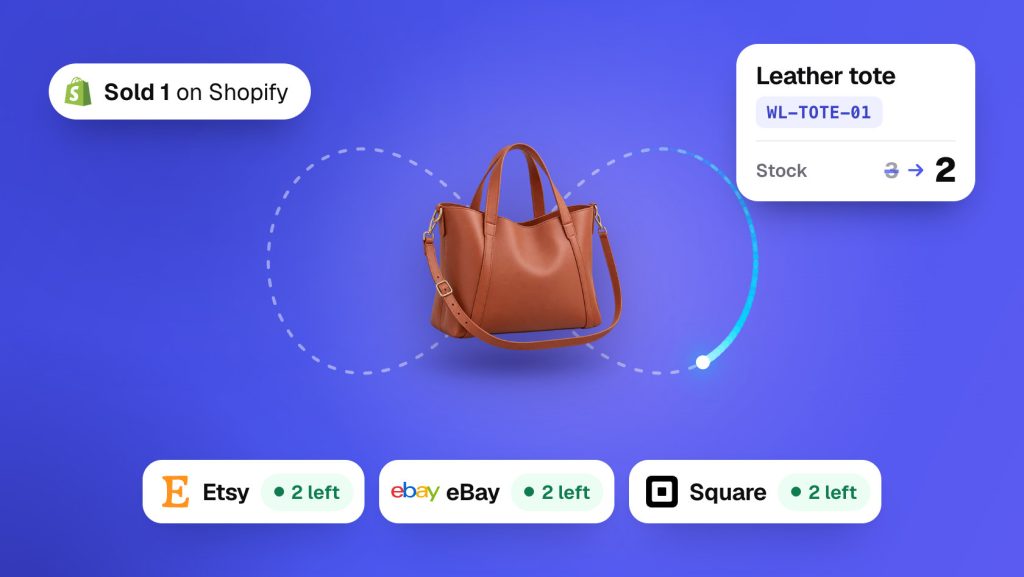
Connect, match, sync
Connect. Add each store from the QuickSync app, or install QuickSync from that platform’s app store, and approve access. We read the store’s products, stock and locations. Connecting doesn’t change your listings, though Square items with no stock count at a location get a count of 0.
Match. We pair every product with its twin in your other stores by SKU. If a product has no twin, we leave it alone unless you ask us to create it. The first match also evens out stock. You tell us which store has the right counts, and every other store takes its numbers from that one, so some counts change here.
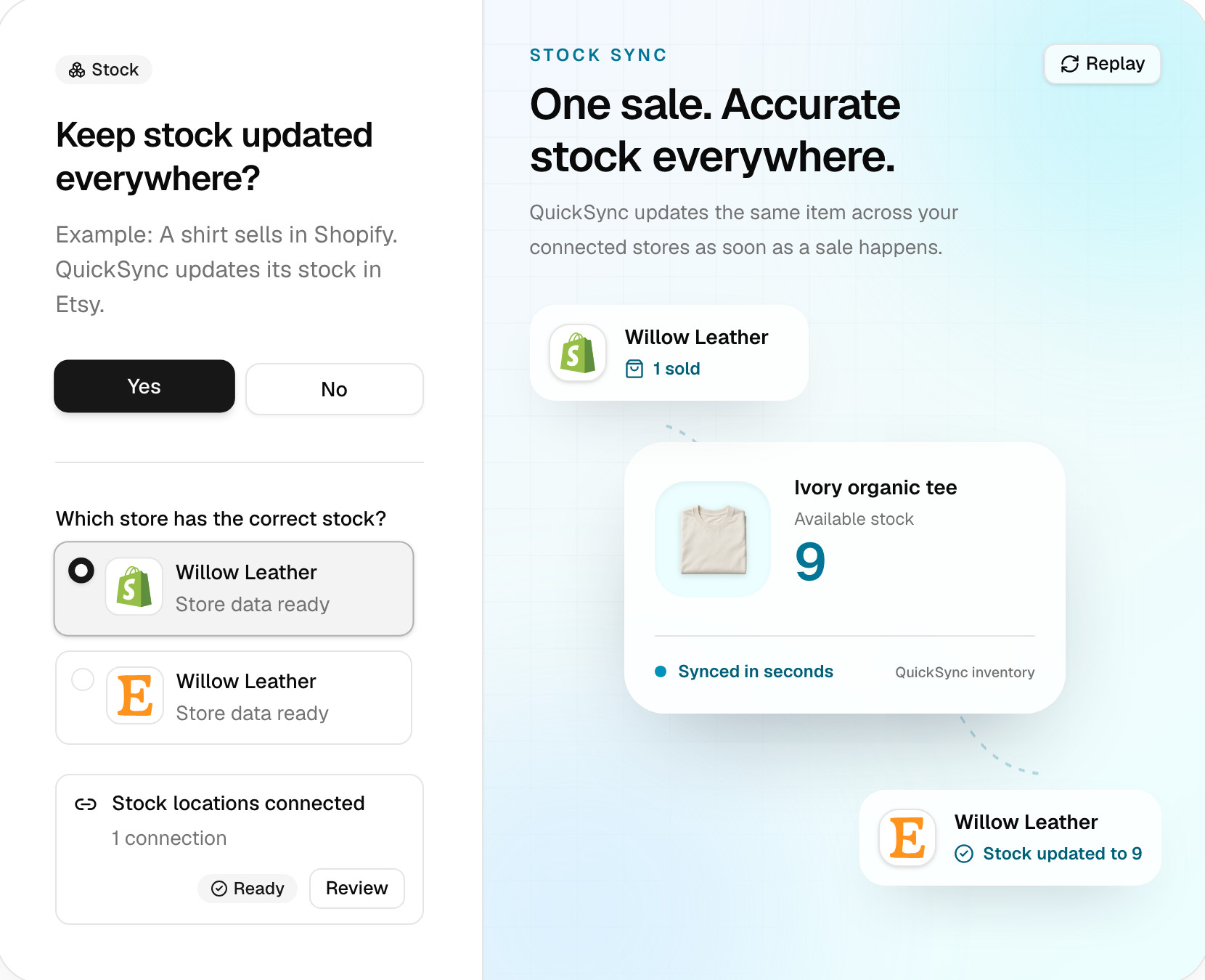
Sync. From then on, a change in one store goes to the others. Stock syncing starts on its own as soon as products match. Connecting another store later pauses it until you run Sync products. Product and order syncing are choices you make in setup, and you can turn either on later.
A basic setup takes 10 to 15 minutes. We’ll email you when the first sync finishes.
Matching by SKU
A SKU (stock keeping unit) is the product code you give each item. It’s the link between your stores. If Shopify and Etsy both have a listing with the SKU WL-TOTE-01, that’s one product to us, whatever the titles, photos or prices say.
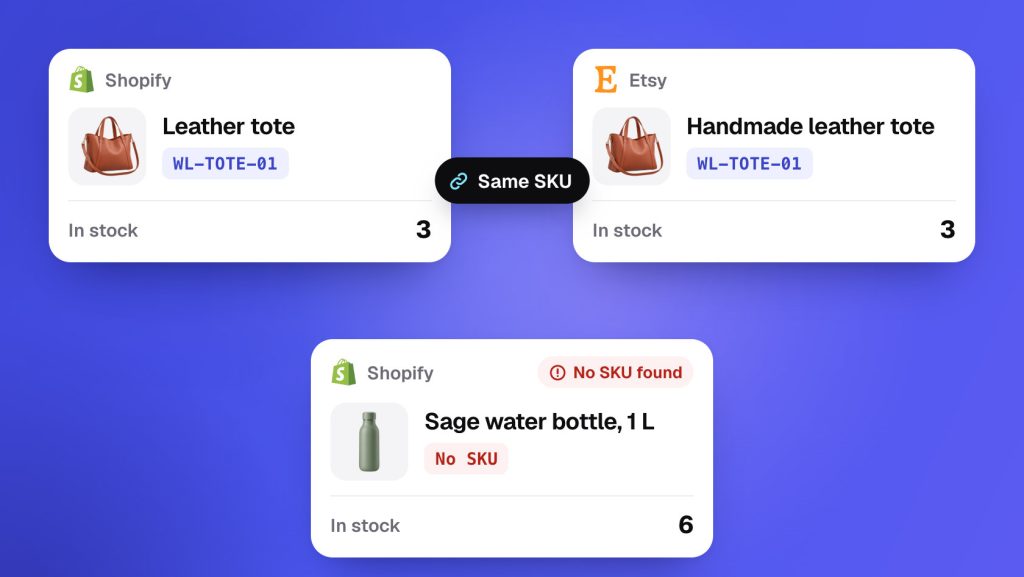
Three rules follow from that.
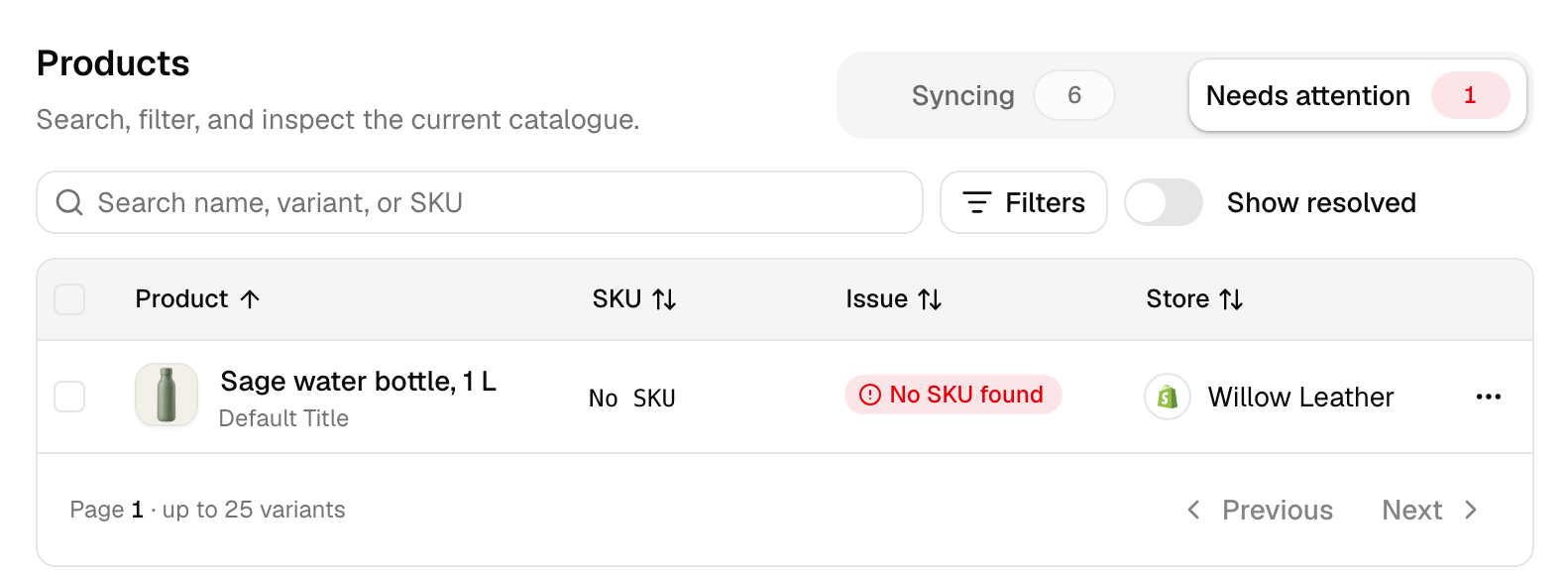
- Every product needs a SKU. A product without one shows up under Needs attention as No SKU found, and it doesn’t sync. Setup can create the missing codes for products it copies to your other stores.
- One product per SKU in each store. If two Etsy listings share
WL-TEE-01, we can’t tell which one sold, so neither syncs. Both show Multiple same SKU found until each has its own code. - The codes must be identical.
WL-TOTE-01on Shopify andTOTE-01on Etsy are two different products. Change one to match the other, then click Sync products on the Products page.
Matching never creates listings on its own. If Shopify has the sand tote and Etsy doesn’t, matching leaves it there. We create the Etsy listing when you ask: Create missing products in setup, a QuickFix, or turning product syncing on later from the Products page. If you chose drafts, new listings on Shopify, WooCommerce, Etsy and TikTok Shop start as drafts. Every status, and what to do about it, is in product syncing statuses.
What syncs, and which way
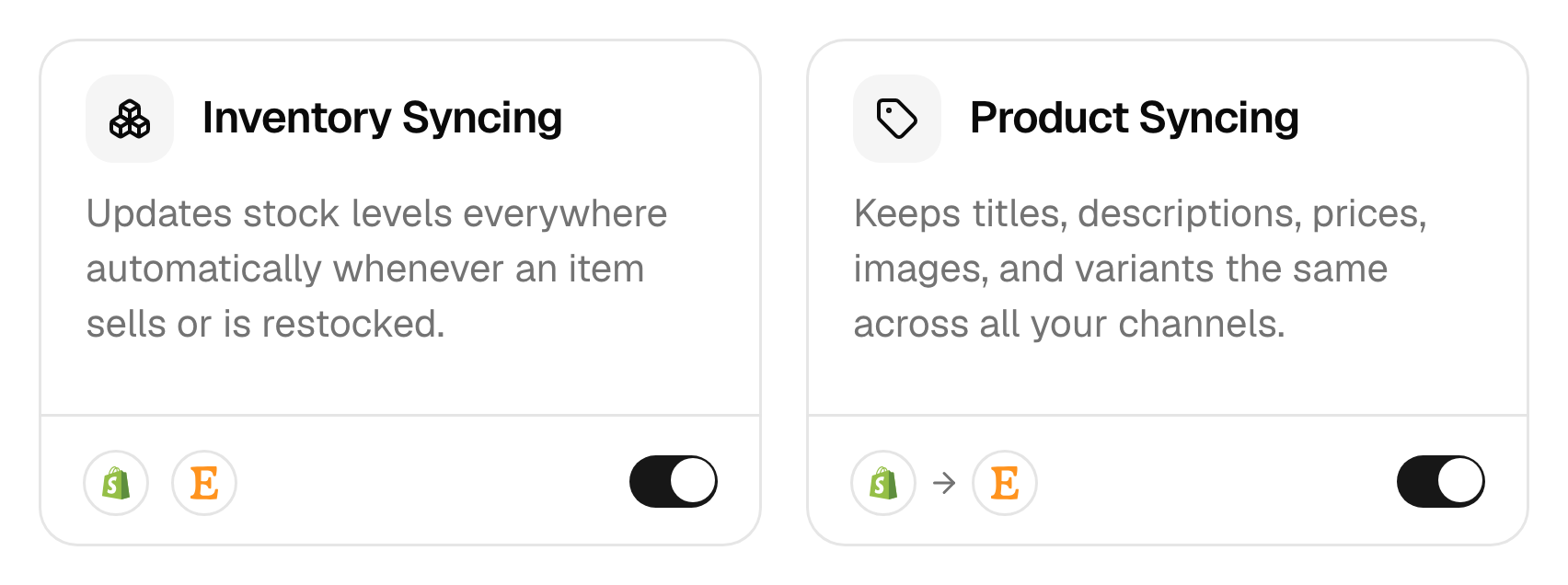
QuickSync runs three syncs. They move in different directions, and that’s the thing to know before you switch them on.
| Sync | What moves | Which way |
|---|---|---|
| Stock | The quantity available to sell | Between every connected store, both ways (two exceptions below) |
| Products | Titles, descriptions, prices, images and variants | From your main store to the others |
| Orders | New orders, then their shipping status | From every store into your packing store |
Stock has no main store. A sale or a restock in any store updates all the others, including the one you edit products in. Amazon only receives stock, and so does Lightspeed while another store packs your orders. We sync the quantity you can sell. If 10 are on the shelf and pending orders hold 2, your other stores show 8.
Products flow one way. Change a price in your main store and we copy it to the others. Change it on Etsy instead, and the next edit to that product in your main store puts its price back. Want a higher price on one store? Use a price rule (Ultra and above) instead of editing that store. Amazon is the one exception: we send it stock and copy its orders, but we don’t send product details to it. The syncing reference table lists what each app takes.
Orders flow into one store. An Etsy order shows up in your Shopify with the customer’s address and the items, so your team packs from one list. Ship it there, and we mark the Etsy order shipped and send the tracking number back. For US Etsy shops first connected on or after 21 October 2024, Etsy leaves off the street address and refuses the tracking. Etsy, eBay, Amazon, TikTok Shop, Squarespace and Wix send orders out but can’t take them in, so none of them can be the packing store.
The stores you pick
Setup asks you to name up to three stores, one for each job. One store can do all three, and on your first setup the starting store and the main store have to be the same one.
- Starting store: the store whose stock is right today. The first match copies its counts to the others. Older guides call it the source store.
- Main store: the store you edit products in. Product changes go out from it and never come back. Older guides call it the master store. You only need one if product syncing is on.
- Packing store: the store every order goes to for packing and shipping. Older guides call it the fulfillment store. You only need one if order syncing is on.
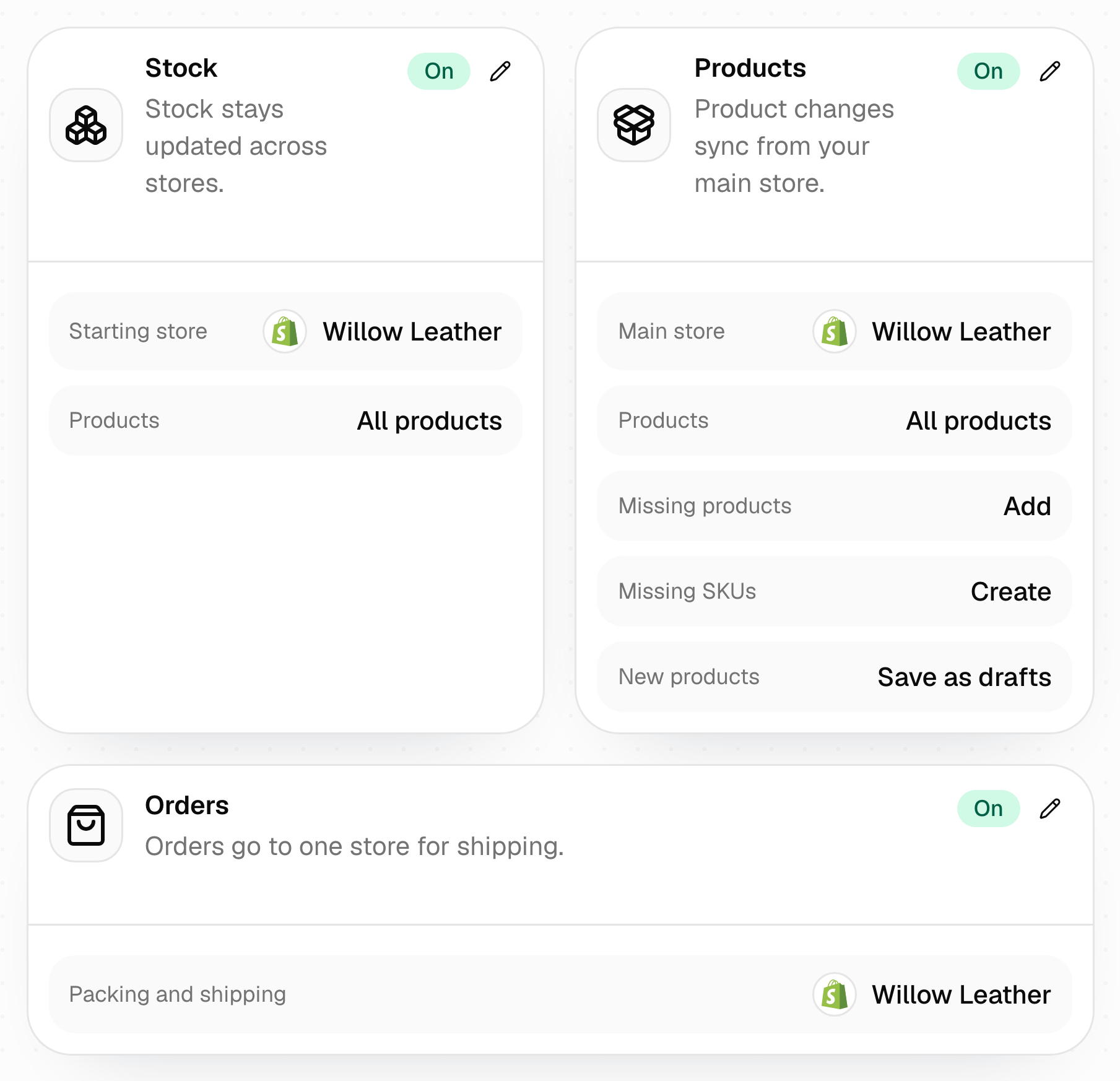
You can change any of them later. After switching your main store, run Sync products so we match your products from it. Switching doesn’t delete anything in your other stores.
How fast changes arrive
We send a change to a store as soon as we have it. The wait, when there is one, is in hearing about it. Most apps tell us the moment something changes. The rest we ask on a timer.
| When we hear about a change | Apps |
|---|---|
| As it happens | Shopify, WooCommerce, Square, Lightspeed, Wix, QuickBooks |
| As it happens, except stock from a sale: 30 minutes after the order | Clover |
| Orders as they happen, stock every 2 minutes | Squarespace, TikTok Shop |
| Every 2 minutes | eBay (stock and orders), Xero, Amazon orders |
| Stock every 2 minutes, orders every 5 | Etsy |
So a sale takes longest to reach your other stores from Clover, TikTok Shop and the apps we check on a timer. If you keep one of something and it’s listed on one of those, that gap is when it can sell twice. With order syncing on, stock from a TikTok Shop sale can wait until the order ships. We don’t read stock changes from Amazon, sales included, so change stock in your other store rather than in Seller Central, and we’ll send the new count to Amazon.
What QuickSync won’t do
- Create listings you didn’t ask for. Connecting creates no listings. We create a listing in another store when you choose Create missing products or a QuickFix, when you turn product syncing on, or when product syncing is on and you add or edit a product in your main store.
- Guess a match. A product with no SKU, or with the same SKU as another product in its store, waits under Needs attention until you fix it.
- Add up your locations. If Shopify has two warehouses and Etsy has one stock count, Etsy gets the count of the Shopify location you connect to it, not the total.
- Restock a refund by itself. Stock goes back only when the store you refunded in puts the item back.
- Send edits back to your main store. An edit made in another store stays there until your main store’s next change replaces it.
- Send tracking back from every store. An order’s original store gets the tracking number only when you ship from Shopify, WooCommerce or Square, and Square, Clover and Lightspeed orders never get it. Tracking and shipping status has the rules for each store.
- Read the stock Amazon holds for you. We update the Amazon stock you ship yourself, not stock in Fulfillment by Amazon. Keep FBA listings out of your sync with a sync list or their own SKUs.
Which plan you need
Stock syncing and sync lists work on every plan. Product syncing and order syncing need Pro or above. Price rules and currency conversion need Ultra or above.
Each plan caps the number of variants syncing: Lite holds 1,000, Pro 2,500, Ultra 10,000 and Ultra+ 20,000. A plan covers two connected stores, and each extra store adds the plan price again, up to 8 stores, or 2 if you’re billed through the Clover or Wix App Market. Prices are on the pricing page.
Common questions
What is QuickSync?
QuickSync is an app that keeps stock, product details and orders in step across the places you sell. It connects Shopify, Etsy, eBay, Amazon, TikTok Shop, WooCommerce, Square, Clover, Lightspeed, Squarespace and Wix, plus QuickBooks and Xero for your accounts. It matches the same product in each store by SKU, then passes sales and restocks to the others, except Amazon’s, and product edits out of your main store.
Will QuickSync change my products when I connect a store?
No, apart from one thing in Square: items with no stock count at a location get a count of 0. Otherwise connecting reads a store’s products, stock and locations, and doesn’t change your listings. Changes start when you finish setup: the first match sets every store’s stock to your starting store’s counts, and we create new listings only if you turned on Create missing products or product syncing. Product details change only once product syncing is on.
Does QuickSync need SKUs?
Yes. QuickSync matches products by SKU and nothing else, so a product without one doesn’t sync, and neither do two products that share a SKU in the same store. If a product is already in two stores, give it the same SKU in both. Create missing SKUs in setup adds codes only to the products we copy from your main store.
How fast does QuickSync sync?
Shopify, WooCommerce, Square, Clover, Lightspeed, Wix and QuickBooks tell us about a change as it happens. Stock sold in Clover follows 30 minutes after the order, and while another store packs your orders, we don’t pass Lightspeed stock changes on. We check Etsy, eBay and Xero every 2 minutes, Etsy orders every 5 and Amazon orders every 2. Squarespace and TikTok Shop report orders at once, and we check their stock every 2 minutes. With order syncing on, a TikTok Shop sale’s stock can wait until the order ships.
Which store should be my main store?
The store you edit products in, usually the one with the fullest listings: titles, photos, variants and a SKU on every product. For most sellers that’s Shopify, WooCommerce or Wix. You can switch later, then run Sync products so we match your products from the new main store. We don’t delete anything in your other stores.
How many stores can I connect?
Up to 8 per account, including two stores on the same platform, or 2 if you’re billed through the Clover or Wix App Market. Your plan price covers two stores, and each extra store adds the plan price again. So three stores on Pro cost $58 a month instead of $29.
Next step
Setting up now? Set up your first sync goes through each setup screen in order.
New to QuickSync? Start 14-day trial. You get 14 days with Pro features, and you don’t need a card.